Voice Agent Span Attributes: The Fields Every Turn Needs
On this page
A trace without good voice agent span attributes is a set of bars on a timeline. You can see that a turn was slow. You cannot see which model, prompt version, provider or tool was involved. The fields decide whether a root-cause review ends in an answer or in "could not reproduce."
This post is the field list: voice agent span attributes for each span type in a call, and why each field earns its place. It also covers what to leave out. The span names follow the model in our post on the OpenTelemetry trace and span model for voice agents. The standard gen_ai.* names follow the pattern in our guide to the OpenTelemetry GenAI semantic conventions for voice agents. We do not repeat either one here.
For the log-record view, read what to log on every voice agent call. This post covers voice agent trace attributes only: what to record per turn voice agent teams need, span by span.
Evalgent Observe, which is launching, ingests OpenTelemetry data from any stack. It never sits in the media path. The names below are recommendations for your own instrumentation, so you do not need to match them to use Observe.
What the OpenTelemetry attribute limits mean for your field list
Span attributes are key-value metadata on a span. Before deciding what to record per turn in a voice agent, know the limits the SDK enforces. The OpenTelemetry common specification sets them.
- Count. The default
AttributeCountLimitis 128 per record. When a span passes it, the SDK must discard the extra attributes. - Value length. The default
AttributeValueLengthLimitis Infinity. Nothing truncates a long string unless you set a limit. A transcript pasted into an attribute is exported whole. - Events. The trace SDK specification sets the default event limit to 128 per span.
- Configuration. The SDK environment variables include
OTEL_SPAN_ATTRIBUTE_COUNT_LIMITandOTEL_SPAN_ATTRIBUTE_VALUE_LENGTH_LIMIT.
The trace API specification adds two rules. Attributes passed at span creation are preferred, because samplers can only use information present then. And setting a key twice overwrites the first value.
A typical span here needs ten to fifteen attributes. If you reach 128, something is wrong, such as a payload stored as attributes.
Naming rules for your own fields
The semantic conventions naming guide asks for lowercase snake_case names. It recommends a prefix from your reverse domain name or application name, and says not to reuse an OpenTelemetry namespace as a prefix.
The voice.* names here match our two earlier posts. They are suggestions, not standard. Swap the prefix if you like, but keep one across every service.
Which names are standard and which are suggestions
As of November 19, 2026, the GenAI conventions live in the semantic-conventions-genai repository. The registry page on opentelemetry.io shows each gen_ai.* attribute as deprecated, with a note that it moved there. Read the repository for current definitions.
The client inference page and the execute tool page both say Status: Development, so names can still change. Pin the version you target, as the GenAI conventions post explains.
The otel span attributes voice stacks can borrow from the standard are the conversation ID, the agent name and version, the model and provider names, token counts, finish reasons, the tool name and call ID, and error.type. Each is marked Required, Conditionally Required or Recommended on those pages. The tables below say which.
The attribute requirement levels matter for privacy. An Opt-In attribute is populated only if the user configures it, and the spec recommends that level for attributes that might pose a security or privacy risk. The GenAI pages mark message content and tool arguments as Opt-In.
error.type is the one stable name in the list. Its registry entry says it should be predictable and low cardinality. The recording errors guidance says to set span status to Error on failure, and to leave it unset on success.
We found no voice-specific attributes for turns, endpointing or playback in the GenAI pages. Every voice.* name below is our suggestion.
Voice agent turn fields and other fields every span should carry
Some fields belong on all spans, not one type. They let you join, filter and group without walking the tree.
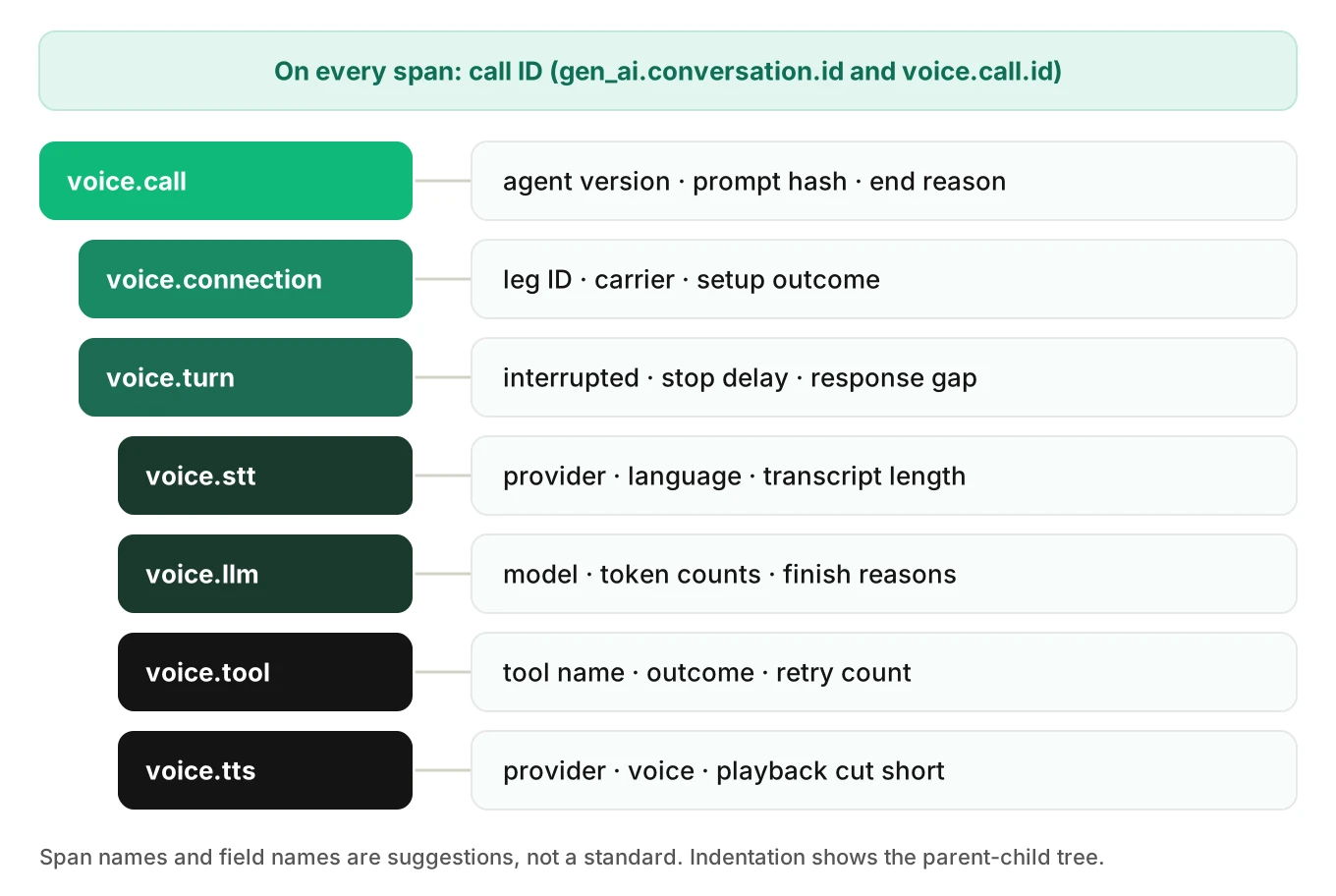
| Field | Example | Question it answers |
|---|---|---|
gen_ai.conversation.id | the call ID | Which call is this span from, in any tool that reads GenAI names? |
voice.call.id | the same call ID | Which call is this, in your own queries? |
voice.turn.index | 4 | Which exchange within the call? Not on call or connection spans. |
Why two call ID fields? The standard name helps tools that read GenAI conventions. Your own name keeps your queries independent of a Development-status standard. Set both to one value, generated at call start.
Put the call ID on every span, not just the root. A span shown alone in an alert needs the ID without a parent lookup.
Call span fields
The voice.call span is the root. It holds facts that are true for the whole call and cannot change after start.
| Field | Example | Question it answers |
|---|---|---|
gen_ai.agent.name | scheduling-agent | Which of our agents handled this call? |
gen_ai.agent.version | 2026-11-12.3 | Which release was live? Did the failure start with a deploy? |
voice.prompt.hash | a short hash | Did the prompt text change inside one version label? |
voice.call.end_reason | caller_hangup, agent_hangup, transfer, error, timeout | How did the call end, from a short fixed list? |
The version fields earn their place first. Most "it worked yesterday" reports reduce to a release, a prompt edit or a model swap. With the version on the call span, one query compares failure rates before and after. The agent spans page marks gen_ai.agent.version Conditionally Required when available.
Keep voice.call.end_reason a short closed list.
Telephony fields
A telephony leg is the stretch between the phone network and your agent. In our span model, setup lives on voice.connection. These fields fit that span, and the leg ID also helps on the call span.
| Field | Example | Question it answers |
|---|---|---|
voice.leg.id | provider call identifier | Which record at the carrier or telephony provider matches this call? |
voice.carrier.name | provider name | Do failures cluster on one provider? |
voice.transport | sip, webrtc, pstn | Which transport carried the media? |
voice.setup.outcome | connected, no_answer, rejected, failed | Did setup succeed, and if not, how? |
error.type | a short code | If setup failed, which class of error? |
The provider's own call identifier is the join key. Store it in its own field, because one call can have several legs. When a caller disputes a call, the provider's records are an independent source, and this field links them to your trace.
Turn span fields
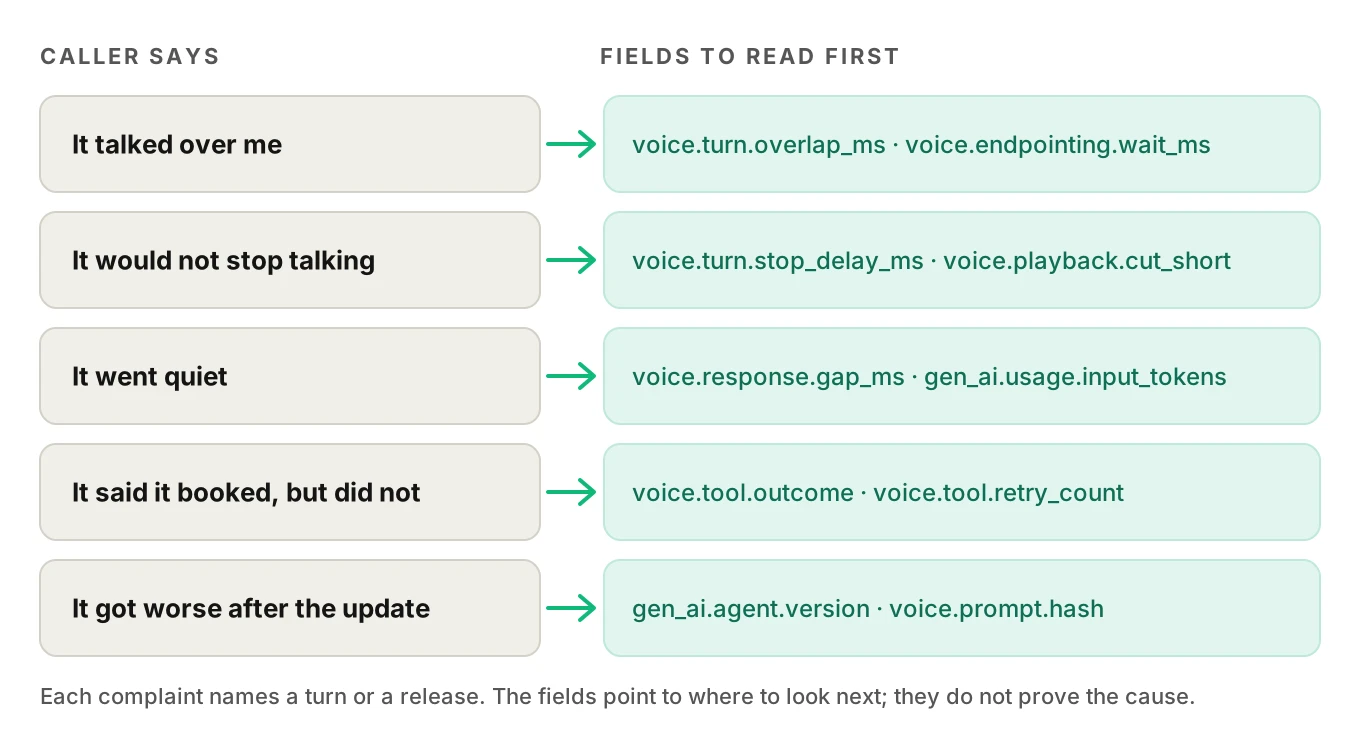
A turn is the unit people complain about, so these voice agent turn fields matter most. "It cut me off on the second question" names a turn. The turn span carries the facts that classify what happened in that exchange.
| Field | Example | Question it answers |
|---|---|---|
voice.turn.index | 4 | Which exchange? |
voice.turn.interrupted | true | Did the caller cut the agent off? |
voice.turn.stop_delay_ms | 1840 | After the caller started speaking over the agent, how long until playback stopped? |
voice.turn.overlap_ms | 620 | How long were both sides active at once? Record it only if your pipeline sees caller activity during playback. |
voice.endpointing.wait_ms | 300 | How long did the agent wait in silence before deciding the caller had finished? |
voice.response.gap_ms | 1900 | How long between the end of caller speech and the first agent audio? |
voice.audio.input.duration_ms, voice.audio.output.duration_ms | 4200, 7100 | How much speech went in and came out? |
Three of these cross span boundaries, so no single child span holds them. The response gap runs from caller speech end to first agent audio. The stop delay runs from caller onset to the end of playback. Compute them once, in your own code, from raw timestamps.
These turn fields map to what callers actually say: it talked over me, it would not stop, it waited too long. They come from trace and call data, so a review can find them without anyone listening to the recording. For one cause of false interruptions, see self-interruption and echo. To measure interruptions across calls, see interruption rate. For what makes up the gap, see time to first audio.
Do not set Error status for an interruption. A barge-in is normal conversation, and the boolean carries it.
Speech-to-text span fields
The voice.stt span runs from the first audio of an utterance to the final transcript. The GenAI pages define no transcription operation, so these are all suggested names.
| Field | Example | Question it answers |
|---|---|---|
voice.provider.name | provider name | Which recognizer produced this? |
voice.model.name | model identifier | Which recognizer model or tier? |
voice.language | en-US | Which language setting was in force? |
voice.stt.transcript_chars | 38 | Did the recognizer return almost nothing for a long utterance? |
voice.stt.confidence | 0.62 | How sure was the recognizer, if your provider returns a score? |
Record the length of the transcript, not the text. A 38-character transcript against 12 seconds of caller audio is a visible mismatch, and it needs no personal data.
Confidence scores differ by provider, so keep the provider and model name next to them. Record the first partial result as an event, because its timestamp is the point.
LLM span fields
The LLM span is where the standard helps most. Use the GenAI names so any compatible tool can read the span.
| Field | Example | Question it answers |
|---|---|---|
gen_ai.operation.name | chat | What kind of operation? Required. |
gen_ai.provider.name | provider name | Which provider? Required. |
gen_ai.request.model | model identifier | Which model did we ask for? |
gen_ai.usage.input_tokens | 3120 | Is context growing across turns? |
gen_ai.usage.output_tokens | 64 | Was the answer long for speech? |
gen_ai.response.finish_reasons | ["stop"] | Why did generation end? |
gen_ai.response.time_to_first_chunk | 0.41 | How long until the first streamed output? In seconds. |
voice.llm.cancelled | true | Did we cancel it, for example on a barge-in? |
error.type | a short code | Which class of failure, if any? |
Input tokens are the cheapest way to see context bloat. The inference page defines them as the total, cached ones included. Plot them by turn index, and a drifting long call shows up as a climbing line.
The finish reasons answer "why did the model stop." For interrupted generations, the page says to report the provider's reason when available, and interrupted otherwise. That records an early end. It does not say the caller spoke. Use voice.turn.interrupted for that.
For first token, pick one representation. The inference page defines gen_ai.response.time_to_first_chunk as an attribute in seconds. Our span model post suggests an event. Set whichever your backend reads, and never emit two numbers that disagree.
Prompt and response text are Opt-In and flagged as likely sensitive. Leave them off.
Tool span fields
A tool call is where a voice agent touches the outside world: a booking, a lookup, a transfer. The execute tool page names the span execute_tool {gen_ai.tool.name} with kind INTERNAL. Our span model calls it voice.tool. If you keep that name, still set the standard attributes so tools that read them can find it, and test how your backend treats the span.
| Field | Example | Question it answers |
|---|---|---|
gen_ai.operation.name | execute_tool | Which kind of operation? Required. |
gen_ai.tool.name | book_appointment | Which tool? Required. |
voice.tool.outcome | success, error, timeout, cancelled | Did it work, from a short fixed list? |
voice.tool.retry_count | 1 | How many attempts? |
voice.tool.cancelled_by_interruption | true | Did a barge-in cancel it mid-flight? |
error.type | a short code | Which class of failure? |
The outcome and retry fields find silent failures. A tool can return an empty result while the model carries on, and no exception is raised. An outcome set from the result, not only the exception, catches it. See detecting silent tool failures, and interrupted tool calls for why a cancelled tool may still complete.
Tool arguments and results are Opt-In and flagged as possibly sensitive. Voice tools take names, phone numbers and birth dates. Keep arguments out of spans.
Text-to-speech span fields
The voice.tts span runs from the synthesis request to the end of playback. Again, the standard has no operation for it, so these are suggested.
| Field | Example | Question it answers |
|---|---|---|
voice.provider.name | provider name | Which synthesis provider? |
voice.tts.voice | voice identifier | Which voice? Did a voice change coincide with complaints? |
voice.playback.cut_short | true | Did playback stop before the end? |
voice.tts.end_basis | playback_end, last_chunk | What did the span end on? |
The last field guards against mixed definitions. Synthesis can finish well before the caller hears the last word, because audio is buffered and played in real time. If services end the span on different events, durations are not comparable. The first audio chunk is an event, not an attribute.
What not to record
The most common mistake is recording too much. Four rules keep spans safe and cheap.
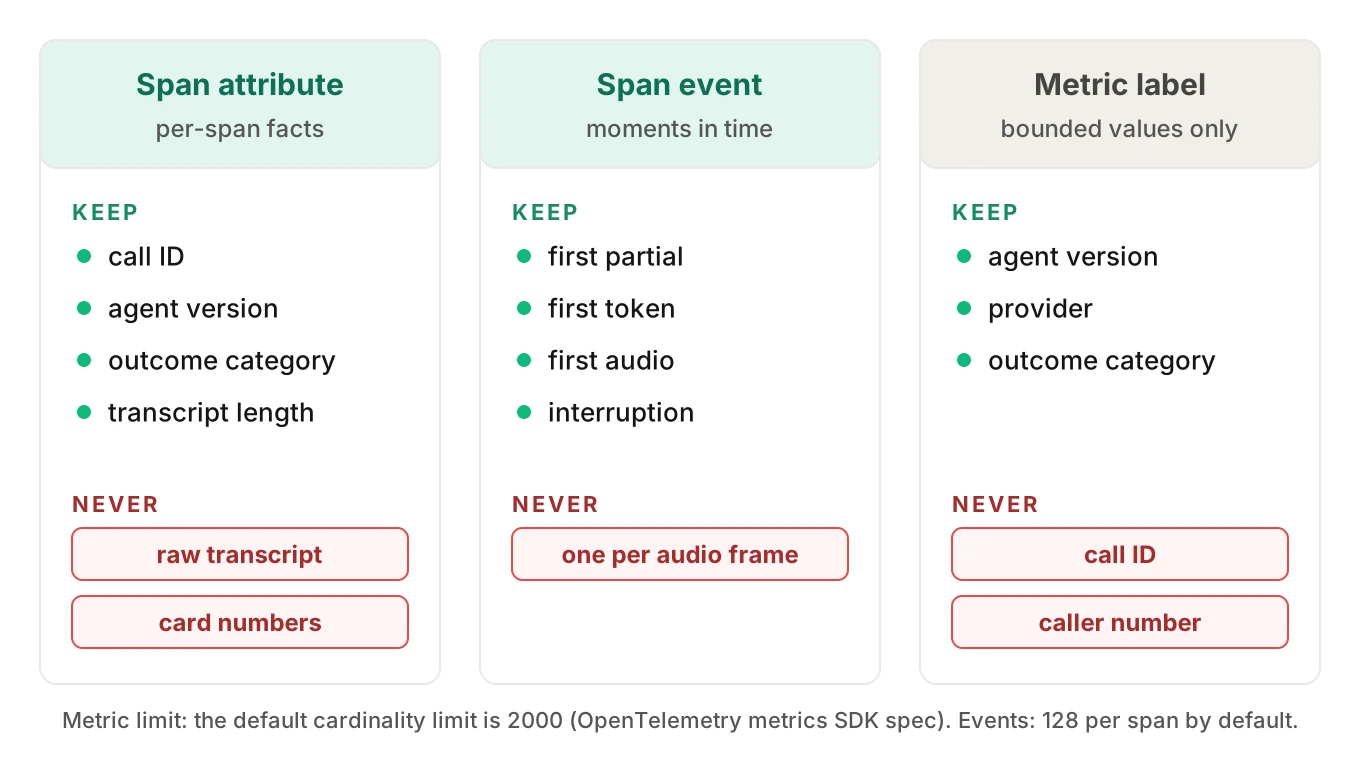
Raw personal data
Callers say names, addresses, card numbers and health details. Transcripts and tool arguments carry them, and spans are exported to whichever backend you use. Record lengths, categories and outcomes. Where content is needed, redact before export and store it separately with access controls. See PII leakage detection.
Whole transcripts as attributes
Even a clean transcript is a bad attribute. The default value length limit is unlimited, so the full text goes out with the span and inflates storage. Keep the transcript as a separate artifact keyed by call ID and turn index, and put its length on the span.
Derived values that spans already give you
A span has a start and an end time. Do not also record an STT duration field. Your copy can drift from the real timestamps. Record a derived number only when it crosses spans, like the response gap, and define it once.
High-cardinality values in metric labels
A call ID on a span is fine. A call ID as a metric label is not. Cardinality is the number of distinct label combinations a metric tracks. The metrics SDK specification says the default cardinality limit is 2000, and calls it a hard limit on metric points per collection cycle. Past it, measurements go into an overflow set marked otel.metric.overflow=true.
A worked example, with illustrative numbers. Label a latency metric with agent version (10 values), end reason (5) and tool name (12). That is 600 combinations, under the limit. Add the call ID as a label. Every new call adds combinations, so the metric hits 2000 after about 2000 calls and collapses into the overflow set. Keep metric labels to bounded fields such as version, provider and outcome. Read per-call values from spans.
The same logic applies to the error type. The registry says error.type should be low cardinality. Put a short class there and keep long messages elsewhere.
One event per audio frame
Events are for moments. The default limit is 128 per span. An event per audio frame fills that in seconds. Use a handful of named events: first partial, first token, first audio, interruption.
Worked example: reading one bad turn from its fields
This example is illustrative, not from a real call. A caller reports that the agent kept talking after they tried to interrupt. A reviewer opens the trace and reads the turn span.
voice.turn   index=4
  voice.turn.interrupted        true
  voice.turn.stop_delay_ms      1840
  voice.turn.overlap_ms         1840
  voice.endpointing.wait_ms     300
  voice.response.gap_ms         1100
voice.tts
  voice.playback.cut_short      true
  voice.tts.end_basis           playback_end
voice.llm
  voice.llm.cancelled           true
  gen_ai.response.finish_reasons ["interrupted"]
The fields answer three questions. The caller did interrupt, since the turn is marked interrupted. The agent was slow to stop, since the stop delay is 1840 ms. The model was cancelled, so the LLM was not the holdup.
They do not say why playback took so long to stop. The stop signal may have been late, or the playback buffer may have held queued audio. From these fields alone, the cause is undetermined. That is a valid finding. It tells the reviewer where to add instrumentation, instead of guessing. For the next step, see voice agent root cause analysis.
How to add span attributes to an existing voice agent in 5 steps
You do not need to re-instrument everything. Add fields where the spans already exist.
1. Pick the prefix and write the field list down — Choose one prefix for your own names. List every field with its type, allowed values and the question it answers, and mark which names are standard. Keep the list in the repository.
2. Set identity fields at span creation — Generate the call ID once at call start. Pass it, the agent version and the prompt hash as attributes when you create each span. The trace API prefers creation-time attributes because samplers only see those.
3. Add the cross-span fields in one place — Compute the response gap, stop delay and audio durations in the code that sees all the timestamps, usually the turn handler. Set them when the turn ends, with a comment defining each.
4. Bound every category and cap every length — Replace free text with short fixed lists for end reason, tool outcome and setup outcome. Set OTEL_SPAN_ATTRIBUTE_VALUE_LENGTH_LIMIT as a safety net. Check that no transcript or tool argument reaches an attribute.
5. Send a staged call and read it back — Place one test call with an interruption and a failed tool call. Open the trace. Check that every field is present, every value is bounded and your backend shows the standard names.
A simplified sketch of steps 2 and 3, using the OpenTelemetry Python API:
from opentelemetry import trace
from opentelemetry.trace import Status, StatusCode

tracer = trace.get_tracer("voice-agent")

END_REASONS = {"caller_hangup", "agent_hangup", "transfer", "error", "timeout"}

def start_call(call_id, agent_version, prompt_hash):
    ids = {"gen_ai.conversation.id": call_id, "voice.call.id": call_id}
    return tracer.start_span("voice.call", attributes={
        **ids,
        "gen_ai.agent.version": agent_version,
        "voice.prompt.hash": prompt_hash,
    })

def end_turn(turn, caller_end_ns, first_audio_ns, stop_delay_ms, interrupted):
    # Cross-span values are computed once, here.
    turn.set_attribute("voice.response.gap_ms",
                       (first_audio_ns - caller_end_ns) // 1_000_000)
    turn.set_attribute("voice.turn.interrupted", interrupted)
    if stop_delay_ms is not None:
        turn.set_attribute("voice.turn.stop_delay_ms", stop_delay_ms)

def end_call(call, reason):
    call.set_attribute("voice.call.end_reason",
                       reason if reason in END_REASONS else "error")
    if reason == "error":
        call.set_status(Status(StatusCode.ERROR))
    call.end()
The start_span call with attributes, and set_attribute, are in the Python API reference. Timestamps are nanoseconds you capture yourself. Check the unit for your SDK version.
Where Evalgent fits
A field list is only useful if something reads it. Evalgent Observe, which is launching, ingests OpenTelemetry-format data from any stack. It traces each failure to the step or handoff that caused it, and groups failures into root causes. It gives no verdict without evidence in the data you send. Where fields are missing, it says "undetermined" and shows the coverage gap, as in the worked example above. Evalgent Monitor, which is live, flags problems in production calls with fix recommendations.
For tracing beside testing and monitoring, see testing vs monitoring vs observability and voice agent alerting. For the wider picture, see what is voice agent observability, the observability buyer checklist and monitoring voice agents in production.
Frequently asked questions
What are voice agent span attributes?
Voice agent span attributes are key-value facts attached to a span in a trace, such as the call ID, model name, tool outcome or whether a turn was interrupted. They let a reviewer filter, group and explain failed calls. Standard gen_ai.* names cover model and tool calls. Turn, telephony and playback fields have no standard names yet.
Which attributes should every span carry?
Every span should carry the call ID, set at creation. We suggest gen_ai.conversation.id and your own voice.call.id with the same value. Turn-level spans should also carry the turn index. Version fields belong on the call span, and you can join to them by call ID.
Are the voice.* attribute names an OpenTelemetry standard?
No. They are our suggestions. As of November 19, 2026, the GenAI conventions have Development status, and we found no voice-specific attributes for turns, endpointing or playback. Use one consistent prefix of your own, keep it out of the gen_ai. namespace, and document each field.
How many attributes can a span have?
The OpenTelemetry default attribute count limit is 128 per record, and the SDK discards attributes past it. The default value length limit is unlimited. You can set both with environment variables such as OTEL_SPAN_ATTRIBUTE_COUNT_LIMIT. A voice span usually needs only ten to fifteen fields.
Should I record transcripts in span attributes?
No. Transcripts often contain personal data, and the default attribute value length is unlimited, so the full text is exported on every span. Record the transcript length on the span. Keep content in a separate, access-controlled store keyed by call ID and turn index, or redact it first.
What causes high cardinality in voice agent metrics?
Labels with many distinct values, such as call ID, caller number or free-text errors. The metrics SDK specification sets a default cardinality limit of 2000, after which data goes to an overflow set. Use bounded labels such as agent version, provider and outcome, and look up per-call values on spans.
Should first token and first audio be attributes or events?
Use events when the timestamp matters, which it does for first audio. For first token, the GenAI inference page defines an attribute in seconds, gen_ai.response.time_to_first_chunk. Set whichever your backend reads. Do not record two values that can disagree.
Which fields help find a call where the agent talked over the caller?
Look at the turn span. The interrupted flag, the stop delay and the overlap duration show whether the caller cut in, how long the agent kept talking and how long both were active. The endpointing wait shows whether the agent jumped in too early. All come from trace data, not audio.
The bottom line
Voice agent span attributes work when every span carries the call ID, each span type adds a short bounded field list, and every field answers a question a reviewer will ask. Keep personal data, whole transcripts and per-call values out of attributes and metric labels, and mark every voice.* name as your own convention.
Related Articles
How to automate voice agent testing: synthetic callers vs manual QA
Learn how ai test automation replaces manual QA for voice agents. Compare synthetic callers vs human testers, with a 5-step framework to scale without hiring.
Read more
AI Agent Testing vs Voice Agent Testing: What General Tools Miss for Voice
AI agent testing measures text outputs. Voice agent testing measures behaviour through an acoustic pipeline. Five failure categories general tools miss.
Read more