Release Attribution for Voice Agents: Tie Failures to a Prompt or Model Version
On this page
Failures rose on Wednesday. The team shipped a prompt edit that morning, so the prompt gets blamed. Days later someone notices the speech-to-text setting also moved on Wednesday, and nobody shipped that. Without a record of what ran on each call, you cannot tell which change did the harm.
This post covers attribution after the fact: tying a rise in failures to one release component. It does not repeat release mechanics. For per-call pinning and gates, see shipping voice agent prompt changes safely. For the live comparison, see canary releases. For changes you do not control, see regression testing for model updates. Sources were checked on November 23, 2026. Every worked number is illustrative.
What counts as a release in a voice agent
A release is anything that changes what the caller experiences. Teams count the prompt and forget the rest. Here are eight kinds.
| Component | Example change | Can it change without your deploy? |
|---|---|---|
| Prompt text | New refund wording | No, unless prompts load from a store |
| Model and model version | Alias resolves to a new snapshot | Yes, if you call an alias |
| Tool or API contract | A field renamed upstream | Yes, if a partner ships it |
| Knowledge base content | An article edited by support | Yes, often by non-engineers |
| STT or TTS provider and voice | A new default model or voice | Yes, if the setting floats |
| Flow or state logic | A new branch or transition | No |
| Telephony config | Carrier, codec or region change | Sometimes |
| Feature flags | A flag flipped for a segment | Yes, by anyone with access |
Several rows change silently. The prompt engineering guide covers what belongs in the first row.
Stamp a release manifest on every call
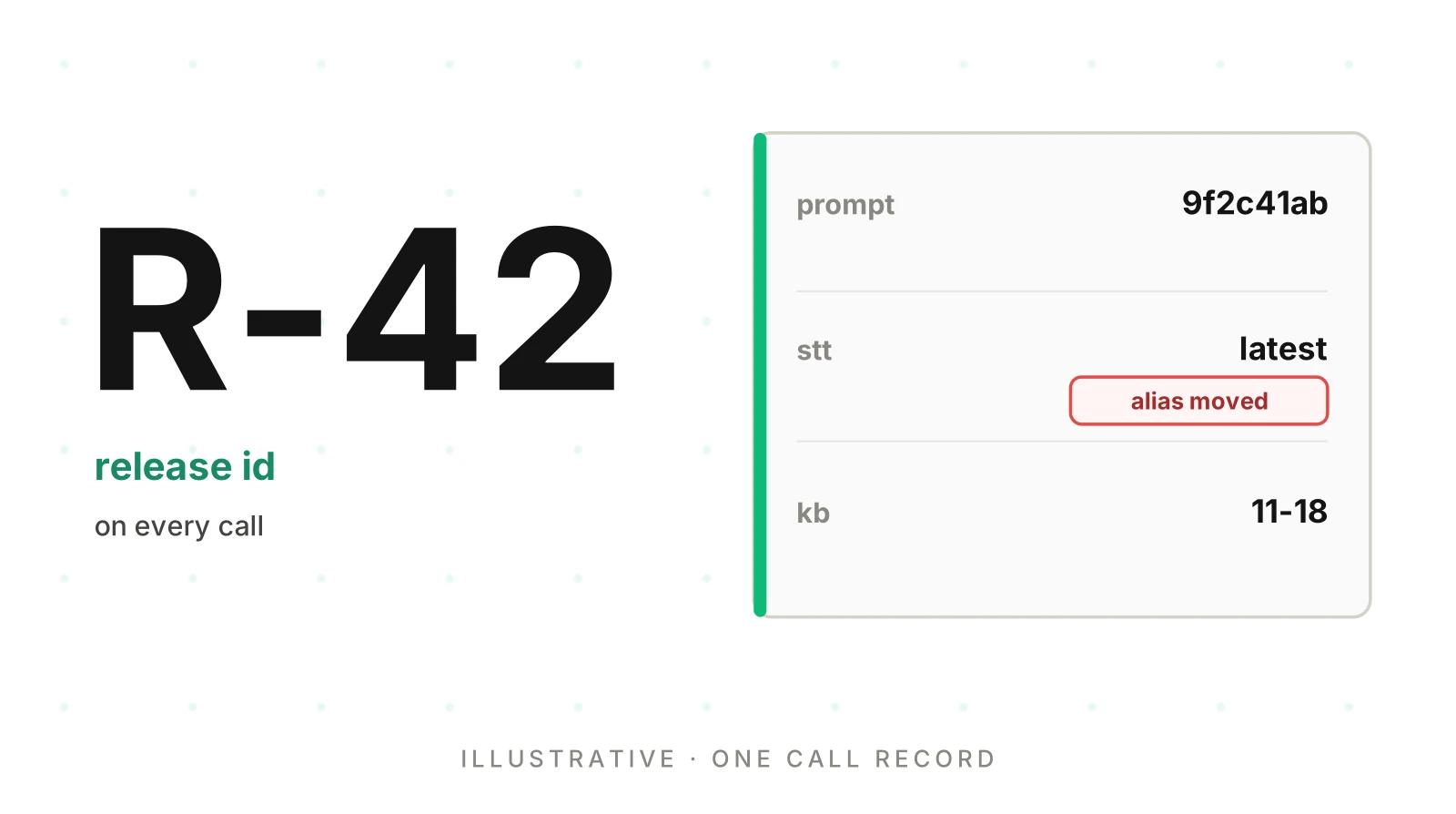
Attribution needs one fact per call: what ran. Mint one release id and list the component versions under it. Store the prompt as a hash, not raw text.
{
  "release_id": "R-42",
  "parent": "R-41",
  "prompt_sha256": "9f2c41ab07d3",
  "model": { "requested": "<id as configured>", "resolved": "<id the provider reports, if any>", "pinned": false },
  "stt": { "provider": "<vendor>", "requested": "latest", "resolved": "<version reported>" },
  "tts": { "provider": "<vendor>", "voice_id": "<pinned id>" },
  "tools_contract": "tools-v4",
  "kb_version": "kb-2026-11-18",
  "flow_version": "flow-v7",
  "telephony": "trunk-cfg-3",
  "flags": { "new_greeting": true }
}
Three habits make the manifest useful.
- Resolved beside requested. Log the version you asked for and the one the provider reports, where the response includes it. A floating setting then shows up as a diff.
- Stamp at call start. The call keeps one manifest to the end.
- Version the knowledge base. Give every KB edit an id. Track the share of untagged calls, because they cannot be attributed.
OpenTelemetry's attribute registry defines service.version as "The version string of the service component" and marks it stable. It adds that "The format is not defined by these conventions," so the release id format is yours. The span attributes post, the call event schema and the call logging guide show where the fields sit.
Model version pinning: pinned id or moving alias
A pinned model id points at one version. An alias points at whatever is newest. That decides whether a release can change under you. A pinned model version is the safer default, and a model alias is a release waiting to happen.
Anthropic's model IDs and versioning page says each model ID "identifies a pinned version of the model." That guarantee, it says, "covers model IDs, not the convenience aliases." For earlier models, an alias such as claude-sonnet-4-5 "is a convenience pointer that resolves to the most recent dated snapshot." The page adds that infrastructure updates can cause minor behaviour differences even on a pinned id.
Google's Gemini model page describes the same split. A latest alias "will get hot-swapped with every new release," with "A 2-week notice" by email. Most production apps, it says, should use a specific stable model. OpenAI's deprecations page sets retirement notice at 6 months for generally available models and as little as 2 weeks for previews.
Two lessons follow. An alias is an unannounced release, and your call records show nothing unless you log the resolved version. Pinning also does not reduce suspects to zero, so keep a fixed test set. The regression testing post has a per-layer pinning plan.
Four methods of voice agent release attribution, strongest first
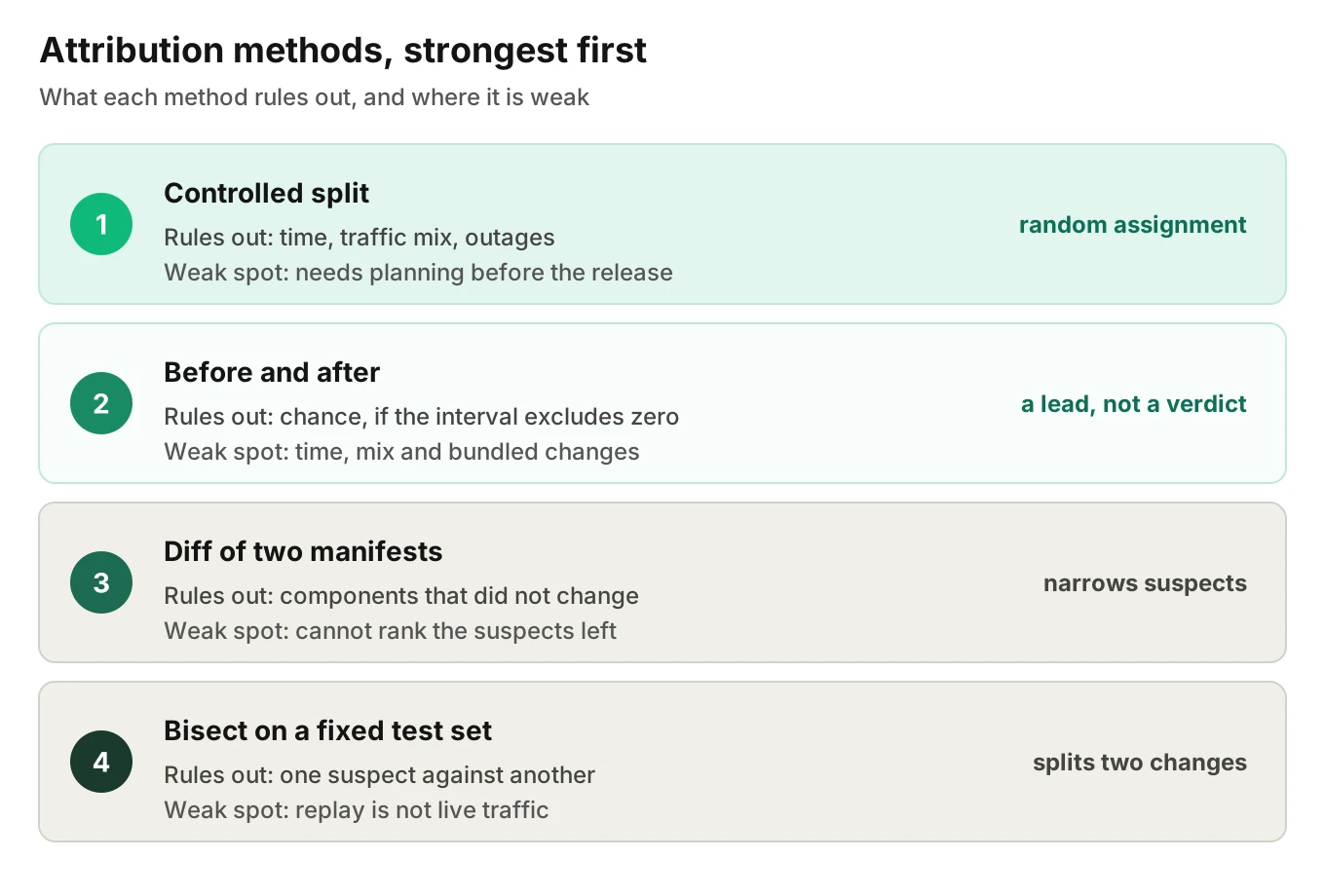
Rank methods by how much they rule out. Stronger methods need more planning.
1. A controlled split with random assignment
Send a random slice of calls to the change and keep the rest on the current release. Both groups run at the same time, so time of day, traffic mix and outages hit both.
Google's SRE Workbook on canarying calls the changed part "the canary" and the rest "the control." It wants changes in the metrics "clearly attributable to the change we are canarying." Assign by caller when callers phone back. The A/B testing guide covers test design.
2. Before and after
Run a before and after comparison: the window before the release against the window after. This is cheap and needs no planning. It is also the weakest causal claim, because everything else that changed at the same moment sits in the "after" group. Compare the same hours and weekdays, check the call-reason mix, and treat the result as a lead.
3. Diff the component lists
Compare the manifests of the last good release and the first bad one, field by field. The diff is your suspect list. It cannot say which suspect did the harm, but it often cuts eight components to two. It needs resolved versions logged, or a moved alias is invisible.
4. Bisect by replaying a fixed test set
When the diff leaves two or more suspects, build every combination and run the same fixed scenarios on each, as in side-by-side prompt comparison. Replays remove traffic mix and time of day, but not every live condition, so the result is strong evidence, not proof.
Worked example: 18 of 400 against 36 of 420
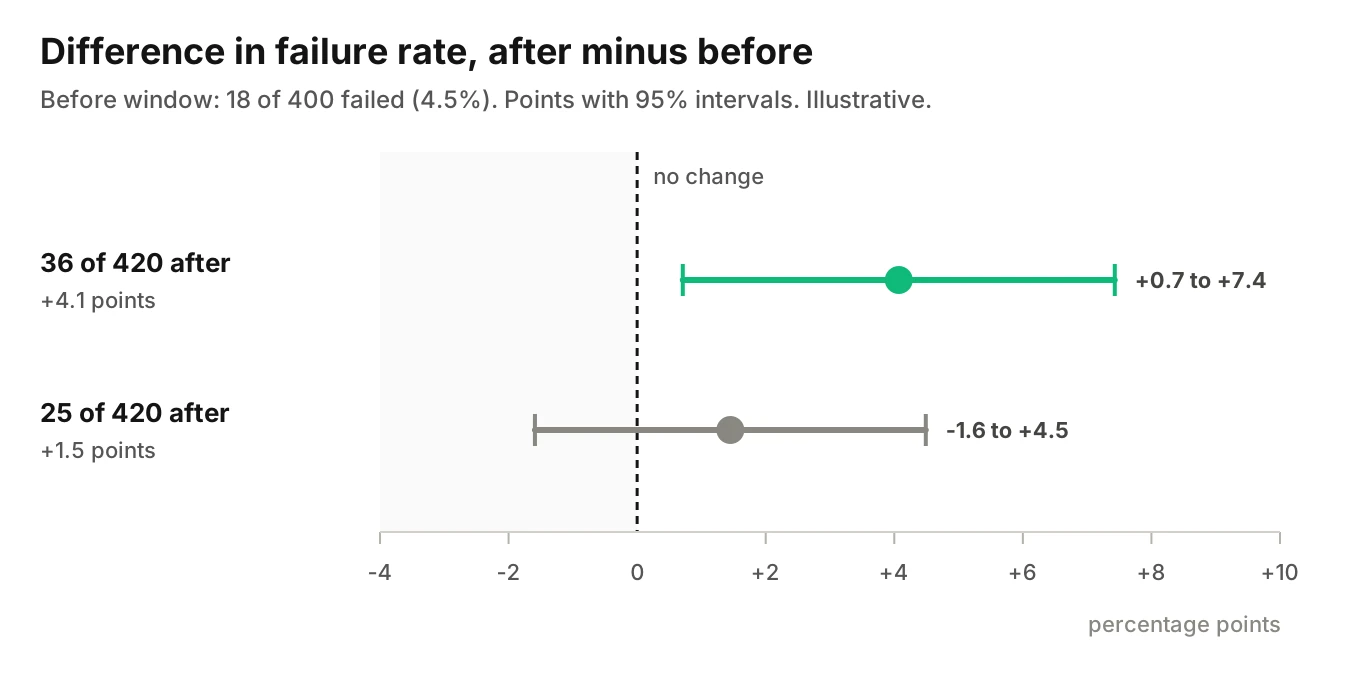
The window before had 18 failed calls out of 400 (4.5%). The window after had 36 out of 420 (8.57%). Is that gap more than noise?
The NIST handbook gives the two-proportion test: pool the counts, p̂ = (x₁ + x₂) / (n₁ + n₂), then z = (p̂₁ − p̂₂) / √[p̂(1 − p̂)(1/n₁ + 1/n₂)].
1. Pooled rate. (18 + 36) / (400 + 420) = 54 / 820 = 6.59%.
2. Standard error. √[0.0659 × 0.9341 × (1/400 + 1/420)] = 0.01733.
3. Difference. 8.57% − 4.50% = 4.07 points.
4. z. 4.07 / 1.733 = 2.35. The two-sided p-value is 0.019.
5. 95% interval for the difference. Using unpooled standard errors, 4.07 ± 1.96 × 1.715 = +0.7 to +7.4 points.
The confidence interval excludes zero. Newcombe's method, offered in statsmodels as confint_proportions_2indep, gives about +0.7 to +7.5. The proportions_ztest page documents the matching two-proportion test.
Conclusion. The rise is distinguishable from noise. That does not say the release caused it. This was a before-and-after comparison, so time, mix and bundled changes are still open.
Now suppose the after window had 25 failures out of 420 (5.95%). The gap is 1.45 points, z = 0.93, p = 0.35, interval about −1.6 to +4.5. That fits no change at all. You would claim neither a regression nor safety.
How many calls you need
Four hundred calls per arm is thin here. At two-sided 5% significance and 80% power, detecting a move from 4.5% to 8.5% needs about 600 calls per arm. Detecting 4.5% to 6.5% needs about 2,000 per arm. For small counts, NIST recommends Fisher's exact test instead of the z approximation. Fix the sample size and checkpoint before the release, and do not peek. The metric drift post covers baselines and control limits.
A slice needs its own count. If the change touched a flow that is 15% of calls, 420 calls gives about 63 in that flow. Say "undetermined" for a slice that small.
Confounders that fake a release effect
Check these before naming a cause.
- Traffic mix. A promotion or billing cycle shifts call reasons. Compare within the same intent.
- A provider outage in the window. An STT or LLM incident raises failures for every release. Check provider status history and your timeout rates.
- A knowledge base edit shipped alongside. Support edits articles without a deploy. A changed KB version is a suspect.
- Day of week and time of day. A Monday before window and a Saturday after window compare two populations.
- Missing stamps. If untagged calls cluster in one release, the sample is biased.
The root cause analysis post explains why a trace alone does not rule these out.
When two things changed at once
A prompt edit can ship on the day a moving alias resolves to a new snapshot. Do not guess. Work down this order.
1. Diff the manifests. List every component that differs. Drop any that cannot touch the failing step.
2. Check the failing step. If the failures sit in transcription, the STT setting outranks the prompt. Clustering failures helps here.
3. Bisect on a fixed set. Run all four old and new combinations, with identical scenarios, and repeat each several times.
4. Revert one at a time. Roll back one component and watch the live rate. It beats one before-and-after comparison, but it is not random.
5. Write "undetermined" if the data cannot separate them. An honest "cannot split" beats a confident wrong cause.
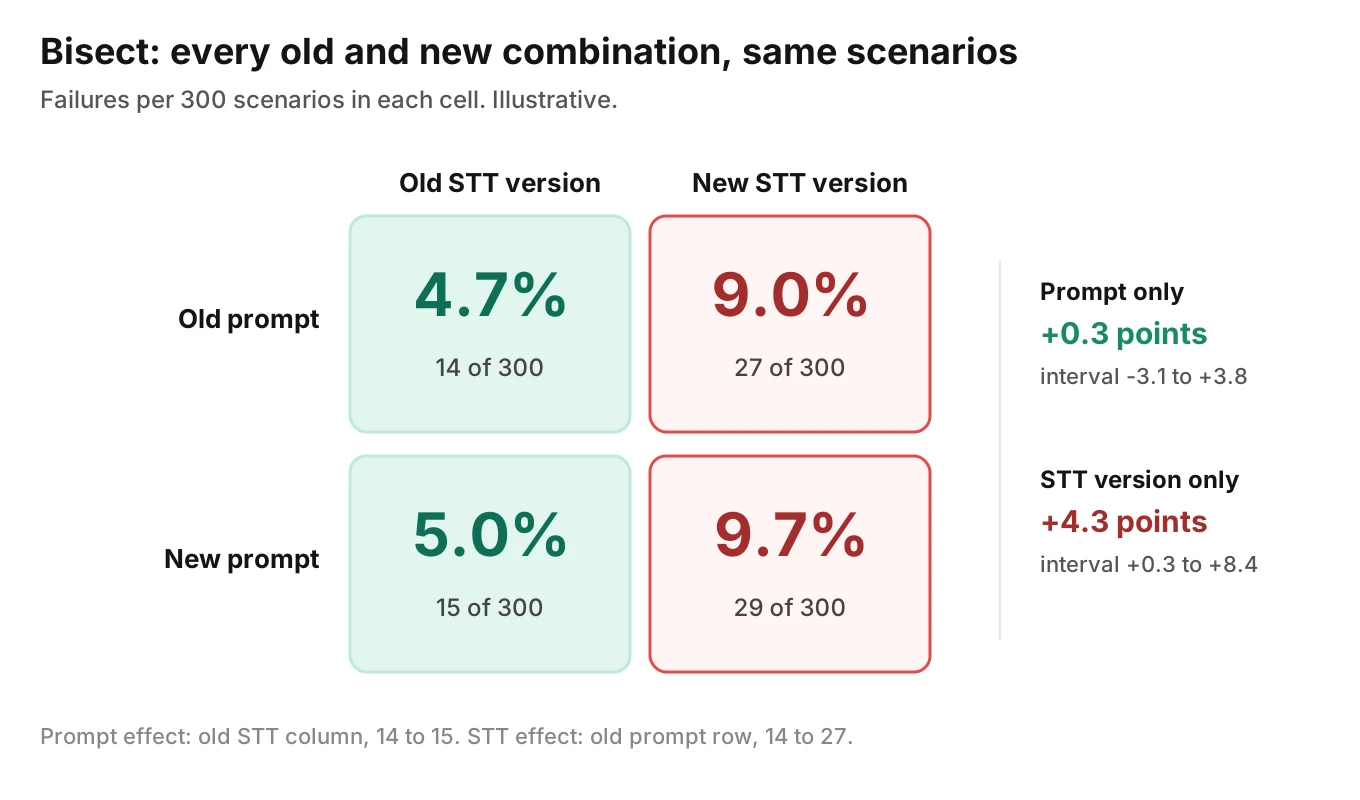
An illustrative bisect, on a fixed set of 300 scenarios per cell:
| Old STT version | New STT version | |
|---|---|---|
| Old prompt | 14 of 300 (4.7%) | 27 of 300 (9.0%) |
| New prompt | 15 of 300 (5.0%) | 29 of 300 (9.7%) |
Changing only the prompt moves the rate about 0.3 points (95% interval −3.1 to +3.8). Changing only the STT version moves it about 4.3 points (+0.3 to +8.4). STT is the main suspect, but the interval is wide, so rerun with repeats.
Write rollback criteria before the release
Decide the rule while nothing is on fire. Write each rule as a metric, a comparison group, a minimum count and an action. Illustrative examples:
- Hard stop. Any wrong-record write caused by the new release rolls it back at once.
- Soft stop. Tool-call failures exceed the control by 3 points at the checkpoint, with 400 calls per arm. Roll back.
- One change per release. Ship one component at a time when you can. It makes failure attribution simple.
The kill switch post covers how to cut exposure fast. The incident runbook covers the "check for a recent change" minutes.
One illustrative week, release by release
One agent, one week. Every number is invented. A failure means a failed booking.
| Release | Live window | What changed | Calls | Failed | Rate | Reading |
|---|---|---|---|---|---|---|
| R-41 | Mon 09:00 to Wed 10:00 | Baseline | 400 | 18 | 4.5% | Reference |
| R-42 | Wed 10:00 to Fri 10:00 | Prompt wording, plus an STT alias that resolved to a new version | 420 | 36 | 8.6% | Two changes. Before and after only |
| R-43 | Fri 10:00 to Sun 00:00 | Prompt reverted to R-41 text. STT unchanged | 300 | 25 | 8.3% | Prompt revert did not help |
| R-44 | Sun 00:00 to Sun 24:00 | STT pinned back to the R-41 version | 130 | 6 | 4.6% | Supports STT. Weekend mix |
R-42 changed two components, so the data says only "something." R-43 reverts the prompt and the rate stays high, which points away from the prompt. R-44 pins STT and the rate drops. But R-44 is a Sunday with 130 calls, so the mix differs. It is an inference, not proof. The bisect above makes it defensible.
Record the attribution in the postmortem
Say how strong the evidence is. Add these lines to the postmortem template:
- Suspect components, from the manifest diff, with release ids.
- Method used: split, before and after, diff or bisect.
- Effect and interval, with counts, such as "+4.3 points, 95% interval +0.3 to +8.4."
- Confounders checked, and which stayed open.
- Verdict: attributed, likely or undetermined.
- Follow-up, such as pinning STT or logging resolved versions.
How to run voice agent release attribution in seven steps
1. Define the failure - Pick one outcome, such as a failed booking, and fix the counting rule first.
2. Confirm the rise is not noise - Compute the difference and its interval. If it spans zero, wait.
3. Group calls by release id - Split failed calls by manifest and flag untagged ones.
4. Diff the manifests - Compare the last good release with the first bad one, resolved versions included.
5. Rule out confounders - Check mix, outages, KB edits and weekday.
6. Run the strongest method you can - A live split if you have one, otherwise a bisect on a fixed set.
7. Record the verdict - Write the method, interval and verdict in the postmortem, plus the rollback rule for next time.
Where Evalgent fits
Evalgent does not stamp releases and does not attribute failures automatically. You stamp the release. Evalgent Observe, which is launching, works from the traces and call data you send. It clusters failures into root causes and uses traces to explain why a call failed. Where the data cannot show the cause, it says undetermined, and it shows coverage gaps instead of hiding them. Release ids in your own data let you check each cluster against the releases yourself.
For the bisect, Evalgent generates test scenarios from your agent's prompt and flows. You can re-run that same scenario set on each candidate version. In Reviews, test calls replay with audio and transcript together, and show the exact tool payloads. If you want to set up an evaluation for your first agent, you can book a demo.
Frequently asked questions
What is voice agent release attribution?
Voice agent release attribution is the practice of tying a change in failures to the specific release component that caused it. You stamp each call with a release id and component versions, then compare groups of calls. The goal is a verdict with stated strength: attributed, likely or undetermined.
What counts as a release in a voice agent?
A release is any change a caller can experience: prompt text, model version, tool contracts, knowledge base content, STT and TTS provider and voice, flow logic, telephony configuration and feature flags. Several can change without a deploy, so each needs a version stamp.
How do I stamp a release on every call?
Mint one release id at call start and store it with the component versions. Hash the prompt instead of storing raw text. Log the model version you requested and, where the provider reports it, the version that served the call. The stamp stays fixed for that call.
Why does a moving alias break attribution?
An alias can point to a newer version without a deploy on your side. Anthropic calls its aliases convenience pointers to the most recent dated snapshot. Google says a latest alias gets hot-swapped. Log only the alias, and the change leaves no trace.
Is a before and after comparison enough to blame a release?
No. It shows that the rate differs, not why. Time of day, traffic mix, provider incidents and bundled changes all sit in the after window. Treat it as a lead, then confirm with a concurrent split or a replay bisect.
How many calls do I need to tell a change from noise?
It depends on the size of the shift. At a 4.5% baseline, detecting a move to 8.5% needs about 600 calls per arm at 5% significance and 80% power. Detecting 6.5% needs about 2,000 per arm. Fix the sample size and the checkpoint before the release.
What if a prompt change and a model change shipped together?
Diff the manifests, check which step failed, then bisect: run all four old and new combinations on a fixed scenario set. Repeat each scenario several times. If the intervals overlap, record the verdict as undetermined rather than naming one cause.
What should rollback criteria say?
Each rule names a metric, a comparison group, a minimum call count and an action. Include a hard stop for severe events that needs no sample size. Write the rules before release so the decision is not argued after a rise.
The bottom line
Voice agent release attribution works only if every call carries a release id and resolved component versions. Use the strongest method you can run, report an interval, and write "undetermined" when the data cannot separate two changes.
Related Articles
How to automate voice agent testing: synthetic callers vs manual QA
Learn how ai test automation replaces manual QA for voice agents. Compare synthetic callers vs human testers, with a 5-step framework to scale without hiring.
Read more
AI Agent Testing vs Voice Agent Testing: What General Tools Miss for Voice
AI agent testing measures text outputs. Voice agent testing measures behaviour through an acoustic pipeline. Five failure categories general tools miss.
Read more