Voice Agent Post-Incident Review Template
On this page
The pager is quiet. The agent is back on the old release. Callers can book again. Now comes the step most teams skip: the review.
This voice agent postmortem template covers that review. It starts after the incident is contained. For the first 15 minutes, use the incident runbook. This post covers what comes next: counting damage, building the timeline, tracing a causal chain and turning findings into tests.
The practices come from Google's SRE material, PagerDuty's post-incident documentation, Atlassian's incident postmortem templates page and John Allspaw's Etsy article, all read on November 21, 2026. Review timing is my suggested starting plan unless a source states it. The worked example is illustrative.
Why a voice agent needs its own post-incident review
A voice agent post-incident review differs from a web postmortem in four ways.
- The unit of harm is a call. A caller heard something. Request counts tell you little.
- The agent can be wrong and sound fine. A tool can fail while the agent says "you're booked." See silent tool failures.
- Some calls are regulated. A missing disclosure or consent step needs its own line.
- Outbound keeps dialing. Campaigns multiply impact until paused.
Root cause analysis covers how to find a cause. The bad-call runbook covers one call. This post is the document that records the whole incident and drives the fixes.
What blameless means and when to hold a review
Google's SRE book says a blameless postmortem "assumes that everyone involved in an incident had good intentions" (Postmortem Culture: Learning from Failure). It adds: "You can’t “fix” people, but you can fix systems and processes to better support people making the right choices."
John Allspaw's Etsy article makes the point from the engineer's side. Engineers "are, after all, the most expert in their own error." The review should "seek out Second Stories" from several perspectives (Blameless PostMortems and a Just Culture).
Google's SRE Workbook warns that "animated language and dramatic descriptions of events distract from the key message and erode psychological safety." So write roles, not names.
The SRE book says "Postmortems are expected after any significant undesirable event." Its triggers map onto voice:
- User-visible degradation: callers heard silence, wrong answers or a dead line.
- Data loss of any kind: lost bookings, missing call records, wrong write-backs.
- On-call intervention: a rollback, flag flip, campaign pause or reroute to humans.
- A long resolution time: your own limit, set before the incident.
- A monitoring failure: a customer or staff member found it before an alert did.
If a clinic told you first, that alone justifies the review.
A suggested review schedule
PagerDuty's guide says the post-mortem meeting should be "scheduled within 3 calendar days for a SEV-1 and 5 business days for a SEV-2" (PagerDuty post-mortem process). It says meetings "should generally last 15-30 minutes." The rest is my starting plan.
- Day the incident closes: name one review owner and freeze evidence.
- Within 2 business days: draft the timeline and impact numbers. The Workbook says a prompt postmortem "tends to be more accurate."
- Within PagerDuty's limits: hold the meeting and ticket the actions.
- About 30 days later: run the follow-up review.
The copyable voice agent postmortem template
Copy this into your wiki. Every line is plain text. Sections follow the SRE book's and Workbook's example postmortems and Atlassian's template, adapted for calls.
VOICE AGENT POST-INCIDENT REVIEW (BLAMELESS)
Rule: write roles, not names.

SECTION 1: HEADER
Incident ID:
Title (what callers experienced, not the failing component):
Severity by caller impact: Highest reached:   Final:
Agents and clients affected:
Caller impact started / ended (UTC):
Incident opened / closed (UTC):
Caller impact minutes:      Incident open minutes:
Review owner (one person):  Incident lead:
Review meeting date:        Follow-up review date:

SECTION 2: SUMMARY
Three to five sentences: what callers experienced, how long, how many,
containment, leading cause.

SECTION 3: IMPACT (write HOW COUNTED beside every number)
Calls affected:      HOW COUNTED:
Callers affected:    HOW COUNTED:
Outbound campaigns:  Calls in window, share affected, queue left undialed.
                     HOW COUNTED:
Regulated calls:     Count, and whether the required step ran on each.
                     HOW COUNTED:  (A count, not a legal finding.)
Cost:                Assumed rates and the arithmetic. HOW COUNTED:
Not measured:        What you could not count, and why.

SECTION 4: TIMELINE (UTC, from traces and call data)
Time | Event | Source (trace ID, call ID, deploy log, ticket)
Include: last change, first bad call, detection, acknowledgement,
containment actions, resolution.
Time to detect      = detection minus first bad call
Time to acknowledge = acknowledgement minus detection
Time to contain     = containment minus detection
Time to resolve     = resolution minus containment

SECTION 5: DETECTION ANALYSIS
How found: ALERT / CUSTOMER REPORT / STAFF / ROUTINE REVIEW / OTHER
First bad call at:     Detected at:     Time to detect:
Signal that should have alerted:
Why it did not: NO SIGNAL / WRONG THRESHOLD / NOISY / NOT ROUTED
Monitoring failure? YES / NO (manual discovery counts as yes)
Earliest alert that would have caught it, and when:

SECTION 6: ROOT CAUSE AND CONTRIBUTING FACTORS (causal chain)
Trigger:
Link 1: Because ...   Factor type:   Evidence ID:
Link 2: Because ...   Factor type:   Evidence ID:
Link 3: Because ...   Factor type:   Evidence ID:
Link 4: Because ...   Factor type:   Evidence ID:
Types: PROVIDER, PROMPT OR MODEL, TOOL, TELEPHONY, CONFIG OR DATA,
TRAFFIC, PROCESS, MONITORING.
Links that caused the harm:
Links that made it longer or larger:
Ruled out (with evidence):
Undetermined (what data was missing):

SECTION 7: LESSONS
What went well:
What went badly:
Where we got lucky:

SECTION 8: EVIDENCE INDEX
Item | ID or link | Stored where | Personal data? | Retention
Affected call IDs (list or saved query):
Healthy comparison call IDs:
Trace IDs:
Recordings and transcripts:
Prompt, model, tool versions, flags, campaign state at the time:
Provider and carrier evidence, responder action log:

SECTION 9: ACTION ITEMS
ID | Action | Type | Priority | Owner | Due | Test case to add | Ticket
Type: PREVENT, DETECT or MITIGATE. One owner per row.

SECTION 10: FOLLOW-UP REVIEW
Date:
Checks: actions closed; test cases passing; alert tested; recurrence?
Notes for filling in each section
Header: severity by caller impact
Rate severity by what callers experienced, not by which dashboard went red. Use the scale from the runbook. Record the highest and final levels. Write the duration twice: caller impact, and incident open time.
Impact: count it, and say how
A number without a counting rule cannot be checked. Here is how to count affected calls and the other figures.
- Calls affected: calls whose trace or call data shows the bad outcome, using a rule fixed before you count. Do not count every call in the window.
- Callers affected: distinct numbers among those calls. Repeat callers count once.
- Outbound campaigns: calls placed in the window and the share affected. Note the queue you did not dial.
- Regulated calls: calls that went through a required flow, such as a recording consent step, and whether the step ran. This is a count, not legal advice.
- Cost: wasted agent minutes times a stated rate, plus staff minutes. Leave lost revenue under "Not measured" unless finance owns it.
The blast radius post lists what widens damage.
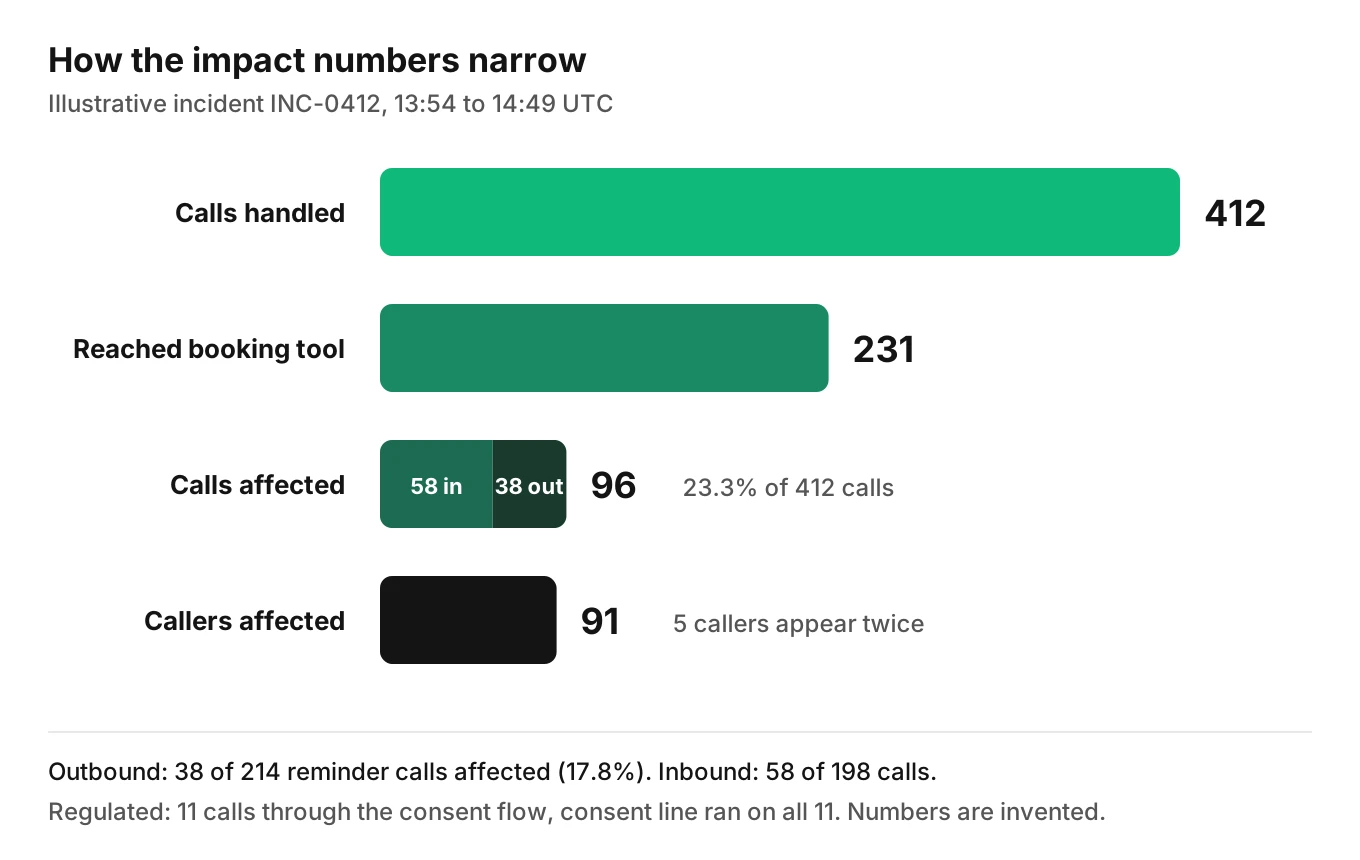
The example below uses these numbers, narrowed from all calls to distinct callers.
Timeline: voice agent incident timeline from traces, not memory
PagerDuty says "the timeline should be the main focus to begin with." Atlassian's template lists events chronologically, preferably in UTC, and Google's example postmortem states "all times UTC."
Pull each time from a record: deploy log, first bad trace, ticket, flag log. Memory drifts by minutes. For what to capture on every call, see what to log for voice agent calls. Voice agent time to detect is the derived number to watch.
Detection analysis: could it have been caught sooner?
PagerDuty's agenda includes "Discuss how the problem could've been caught." For voice, the gaps are usually one of three:
- Infra looked green. Latency and errors were normal while callers got wrong answers.
- The alert watched errors, not outcomes such as confirmed bookings.
- No outcome signal existed per call.
Name the earliest alert that would have caught it. For setup, see voice agent alerting and SLOs. For a failing provider, see provider outage detection.
Root cause and contributing factors
Write "Because" links from trigger to harm. The SRE book says a blameless review identifies "the contributing causes of the incident." Atlassian's template includes a Five Whys step. Use it to find links, not one final answer.
Tag each link with a factor type. Voice incidents usually mix two or three:
- Provider degradation: STT, LLM or TTS slowed or failed.
- Prompt change or model change: new wording, a model swap, a tool schema edit.
- Tool failure: an API timed out or returned success with empty data.
- Telephony: carrier errors, SIP failures, setup problems.
- Config, data or traffic: a flag, a campaign list, a spike.
- Process and monitoring: missing tests, alerts or pause hooks.
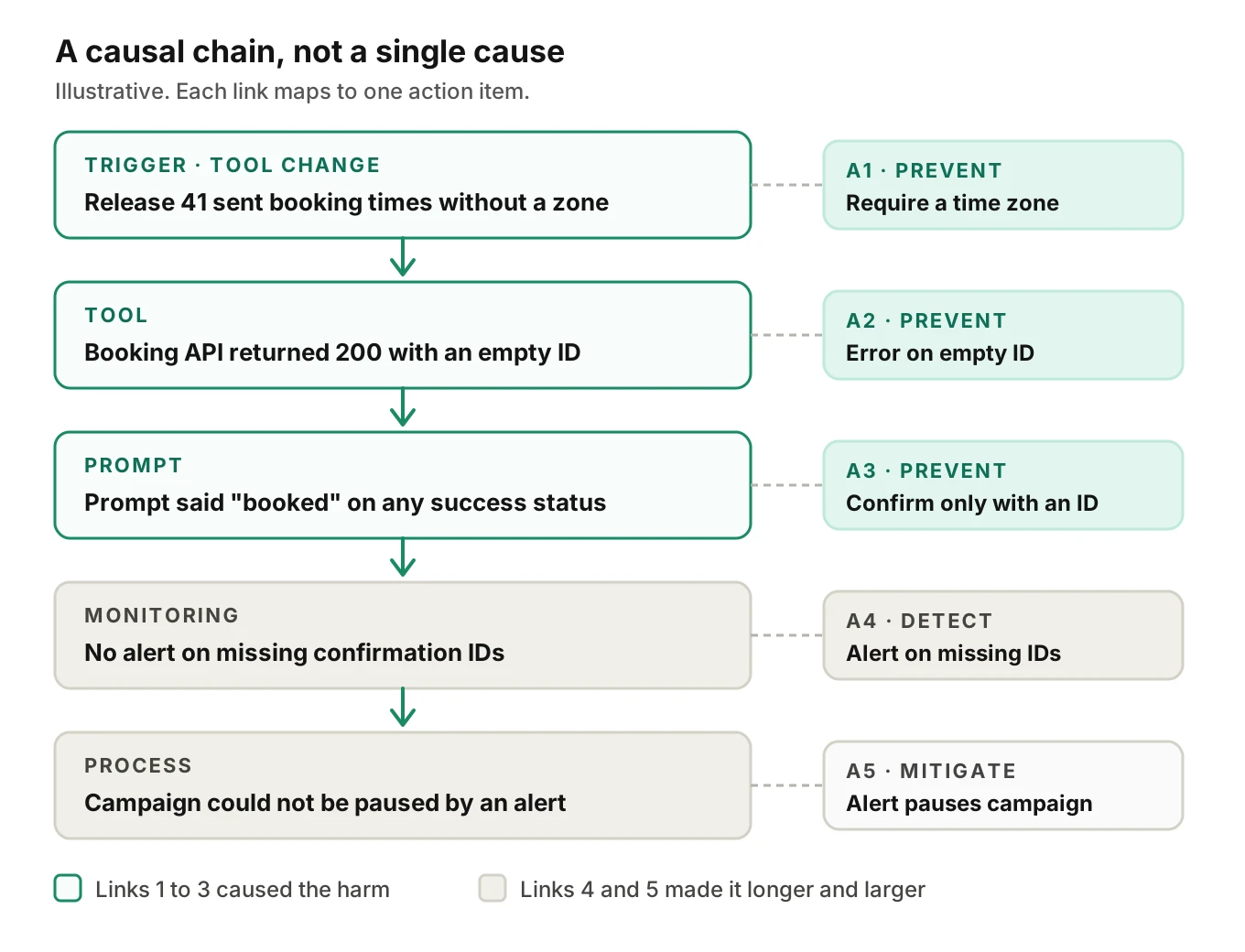
Attach an evidence ID to every link. If you cannot, write "undetermined." Record what you ruled out too. To group similar failures first, use failure clustering. The chain below comes from the example in the next section.
Lessons, evidence and where you got lucky
Google's examples use "What went well," "What went wrong" and "Where we got lucky." Luck marks a risk still open. Keep each item a system fact, such as "no pause hook existed."
In the evidence index, include healthy comparison calls, and keep recording access narrow.
Voice agent incident action items that become tests
Google's Workbook says "a postmortem without subsequent action is indistinguishable from no postmortem." Its table has action, type, priority, owner and tracking bug.
- One owner per row. The Workbook prefers "a single owner and multiple collaborators."
- A priority on every row. PagerDuty generally creates tickets only for P0 and P1 items and warns against creating "too many tickets."
- A test case on every prevent and detect row. It fails before the fix and passes after. See the production feedback loop and test cases versus assertions.
Schedule the follow-up too: the SRE book says "An unreviewed postmortem might as well never have existed." PREVENT stops the cause. DETECT shortens time to detect. MITIGATE shrinks damage when it happens anyway, through a kill switch or a rollback action.
A filled-in example (illustrative)
Every number here is invented to show the arithmetic. No real client or Evalgent result is described. Times are UTC.
Header. INC-0412, "Callers told they were booked, but no booking was made." Severity: Sev 2. Caller impact 13:54 to 14:49, which is 55 minutes. Incident open 14:31 to 15:32, which is 61 minutes. Incident date: Thursday, November 12, 2026. Review meeting: Monday, November 16.
Summary. After release 41, the booking tool returned success with an empty confirmation ID for clinics outside the server's time zone. The agent told 91 callers they were booked. Ops paused the campaign and rolled back by flag. Release 42 fixed it. No alert fired; a clinic reported it.
Example impact
| Number | Value | How counted |
|---|---|---|
| Calls handled | 412 | 198 inbound plus 214 outbound connected, from call data |
| Calls affected | 96 | Empty confirmation ID and the agent still said "booked." 96 of 412 is 23.3% |
| Callers affected | 91 | Distinct numbers among the 96 calls; 5 callers appear twice |
| Outbound campaign | 38 of 214 | 17.8% of reminder calls from 13:54 to 14:44; paused at 14:44 |
| Regulated calls | 11 | Calls through the consent flow; the trace shows the consent line ran on all 11 |
| Cost | $215.60 | 96 x 3.5 min x assumed $0.10 = $33.60, plus 91 x 4 staff min x assumed $0.50 = $182.00 |
Check: 58 inbound plus 38 outbound is 96. And 96 calls over 55 minutes is about 1.7 a minute. Lost revenue goes under "Not measured."
Example timeline and detection
| Time | Event | Source |
|---|---|---|
| 13:52 | Release 41 deployed (prompt and tool contract change) | Deploy log |
| 13:54 | First call with an empty confirmation ID | Trace T-A |
| 14:31 | Clinic ticket: patients booked, nothing on the calendar | Ticket |
| 14:38 | Error rate and latency normal; no alert | Dashboard |
| 14:44 | Outbound campaign paused | Campaign log |
| 14:49 | Release 41 rolled back by flag; contained | Flag log |
| 15:05 | Affected-call list final: 96 | Saved query |
| 15:32 | Release 42 live; test calls pass; resolved | Deploy log |
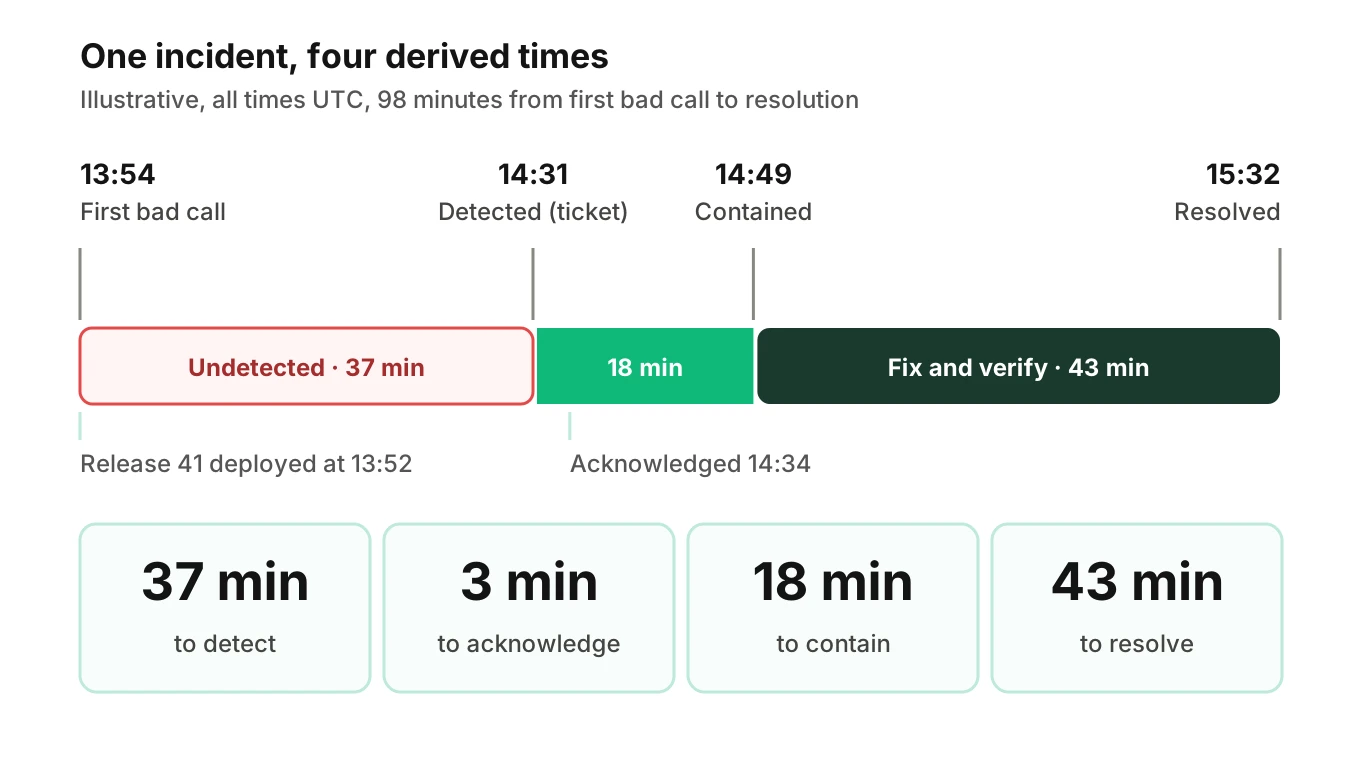
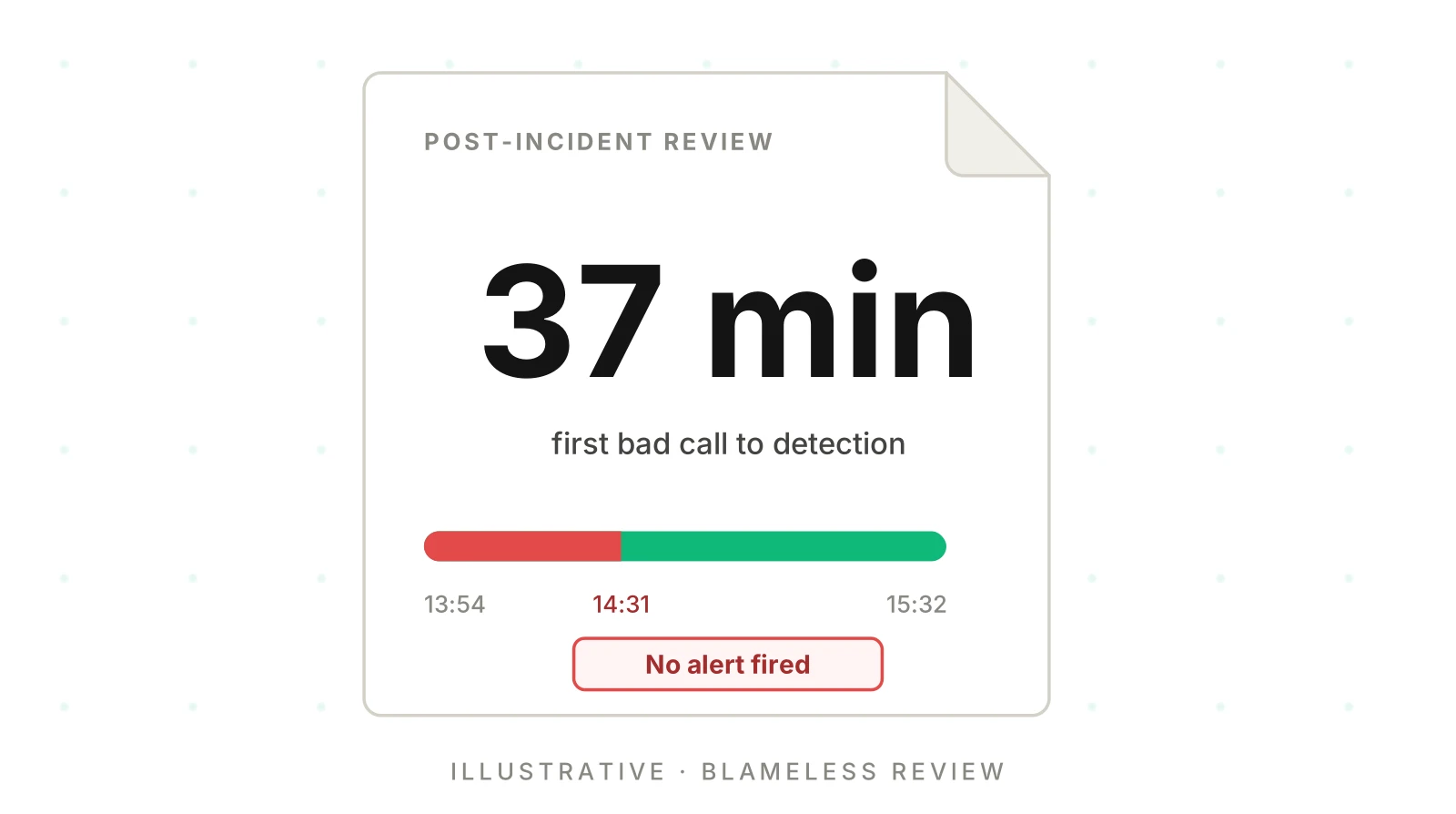
Time to detect is 14:31 minus 13:54, which is 37 minutes. On-call acknowledged at 14:34, so acknowledgement took 3 minutes. Time to contain is 18 and time to resolve is 43. The phases sum to 37 + 18 + 43 = 98 minutes.
Detection analysis: found by customer report. The signal that should have alerted was the share of booking calls with no confirmation ID. At about 1.7 affected calls a minute, 15 build up in about 9 minutes. An alert then would have fired near 14:03, cutting time to detect from 37 minutes to 9. Monitoring failure: yes.
Example causal chain
In the chain figure above, links 1 to 3 caused the harm. Links 4 and 5 made it longer and larger. Ruled out: carrier setup and the speech provider showed no fault.
Example lessons and actions
- Went well: traces let the team list all 96 calls in 16 minutes.
- Went badly: dashboards showed green. The campaign could not pause itself. Staging used one time zone.
- Got lucky: only some clinics were affected, and consent lines ran.
| ID | Action | Type | Priority | Owner | Due | Test case to add |
|---|---|---|---|---|---|---|
| A1 | Require a time zone on booking requests | Prevent | P0 | Tool owner | Nov 20 | Book from a non-server zone |
| A2 | Error when the confirmation ID is empty | Prevent | P0 | Tool owner | Nov 20 | Tool returns 200 with no ID |
| A3 | Say "booked" only after reading an ID | Prevent | P1 | Prompt owner | Nov 24 | Agent must not confirm without ID |
| A4 | Alert on booking calls with no ID | Detect | P1 | On-call lead | Nov 27 | Replay INC-0412 calls; alert fires |
| A5 | Let the alert pause the campaign | Mitigate | P2 | Campaign ops | Dec 4 | Drill on a test campaign |
Follow-up review: Monday, December 14, 2026. Check that A1 to A5 are closed and the tests pass.
How to run a voice agent post-incident review in seven steps
1. Close the incident and name one owner - the commander assigns a single review owner, who freezes evidence.
2. Pull the timeline from records - deploy logs, flag logs, traces and tickets, all in UTC.
3. Count the impact and write how - calls, callers, campaigns, regulated calls and cost, each with its rule.
4. Analyze detection - compute time to detect and name the alert that should have fired.
5. Build the causal chain - write "Because" links, tag factor types and attach evidence IDs.
6. Hold the review meeting - 15 to 30 minutes, facts first, no blame language, then agree actions.
7. Ticket the actions with tests - one owner, priority, due date and test case each, then set the follow-up date.
Where Evalgent fits
Evalgent is a testing, evaluation and monitoring platform for voice agents. Monitor is live. It works on production call data your team sends, through OpenTelemetry or an upload path, and flags problems such as tool-call failures, latency spikes, PII leakage and policy failures, with fix recommendations. In this template it helps fill the detection and timeline sections: a flagged failing tool points to calls and times. Treat a recommendation as a hypothesis. Findings come from traces and call data. For the wider setup, see monitoring voice agents in production.
The testing side closes the action items. Evalgent generates test scenarios from an agent's prompt and flows, and Reviews replay test calls with audio and transcript together and show exact tool payloads. That turns an incident call into a repeatable test before you re-enable a change. Evalgent works with teams to set up evals for a first agent. You can book a short call to map your review process.
Frequently asked questions
What is a voice agent postmortem template?
A voice agent postmortem template is a fixed outline for a blameless review after an incident. It records the header, impact in calls and callers, a timeline from traces, detection analysis, a causal chain, evidence and action items with owners, due dates and test cases.
What should a voice agent incident report template include?
A header with severity by caller impact, a summary, counted impact, a UTC timeline, detection analysis, a causal chain, lessons, an evidence index, action items and a follow-up date. Each number states how it was counted.
What does a blameless postmortem for voice agents mean?
The review assumes everyone acted in good faith and asks what the system allowed. Google's SRE book says you cannot fix people but can fix systems and processes. Write roles instead of names, and avoid dramatic language.
When should I hold the review?
PagerDuty's guide says to schedule the meeting within 3 calendar days for a SEV-1 and 5 business days for a SEV-2. My suggested plan: name an owner when the incident closes, draft within two business days, follow up at about 30 days.
How do I count affected calls and callers?
Fix a rule before counting, such as calls where the tool returned an empty confirmation ID and the agent still said "booked." Count those calls from traces and call data. Count callers as distinct numbers among them. Write the rule beside each number.
How do I write a root cause for a voice agent?
Write "Because" links from trigger to harm. Tag each link as provider, prompt or model, tool, telephony, config, traffic, process or monitoring, and attach evidence. Where evidence is missing, write "undetermined" and say what data was missing.
What action item types should I use?
Use prevent, detect and mitigate. Prevent stops the cause, detect shortens time to detect, and mitigate limits damage when it happens anyway. Give every row one owner, a due date, a priority and a test case.
How is this different from an incident runbook?
The runbook covers the first 15 minutes: lead, severity, containment and evidence. The review starts after containment. It builds the full timeline, counts impact, finds the causal chain and assigns fixes.
The bottom line
A voice agent postmortem template works when it counts impact in callers, takes its timeline from traces, explains the incident as a causal chain and ends in owned actions with tests. Review it again in about 30 days, because a postmortem without follow-through changes nothing.
Related Articles
How to automate voice agent testing: synthetic callers vs manual QA
Learn how ai test automation replaces manual QA for voice agents. Compare synthetic callers vs human testers, with a 5-step framework to scale without hiring.
Read more
AI Agent Testing vs Voice Agent Testing: What General Tools Miss for Voice
AI agent testing measures text outputs. Voice agent testing measures behaviour through an acoustic pipeline. Five failure categories general tools miss.
Read more