Voice Agent SLOs: Reliability Targets for Agents That Talk
On this page
Last verified November 5, 2026, against Google's SRE book and SRE workbook. All targets in this post are illustrative. Set yours from your own call data.
Your dashboard says the agent answered 99.9% of calls. Meanwhile one restaurant chain's tickets carry the wrong delivery address, and a lender's CRM shows a payment plan nobody agreed to. Uptime was fine. The calls still failed.
That gap is what a voice agent SLO is for. This post is for teams that built and run their own agent inside a larger product. It covers service level objectives for voice agents: SLIs that count wrong outcomes, error budgets, alerts that skip the noise, and per-tenant targets. For vendor contracts, read our vendor SLA checklist.
Why uptime SLOs miss what breaks a voice agent
A voice call is the front door to a workflow. The agent captures details, calls a tool, confirms to the caller and writes a record. Each step can fail where a health check never looks.
The agent can answer fast and still store the wrong house number. Our post on why voice agents fail in production lists the causes. Our guide to silent tool failures shows how a call can end happily while the write-back never happened.
So an SLO for a voice agent needs two kinds of indicators. Infrastructure SLIs ask whether the call was served. Quality SLIs ask whether it was served correctly. Most teams only have the first kind. The second is where customers churn.
SLI, SLO, SLA and error budget in plain terms
We use Google's definitions, because they are the common language of reliability work.
SLI (service level indicator): a carefully defined quantitative measure of some aspect of the level of service that is provided. In practice, a ratio of good events to total events.
SLO (service level objective): a target value or range for an SLI, such as "at least 99% of calls".
SLA (service level agreement): an explicit or implicit contract that attaches consequences, often financial, to meeting or missing the SLOs.
Error budget: the rate at which the SLO may be missed. For a 99% target the budget is 1% of events in the window.
The SRE book chapter on SLOs adds three rules worth copying. Start from what users care about, not what is easy to measure. Do not set the target from current performance, because that can lock in a system that needs heroics to hit it. Keep the number of SLOs small.
Keep any customer SLA looser than your internal SLO. The SLO is the tripwire. The SLA is the promise you pay for missing.
The SRE workbook's implementing SLOs chapter frames the SLI as "good events divided by total events". That form matters for voice, because it lets you define a good call precisely. It also gives alerting, budgets and reports one shared input.
Choose SLIs for a voice agent
Start from the call. List what a caller needs, then write one voice agent SLI per need. The workbook suggests five or fewer SLI types at first.
Here is a candidate list of voice agent reliability targets. The numbers are illustrative placeholders. Replace them after two weeks of baseline data.
| SLI | Good event | Valid events | Type | Illustrative target |
|---|---|---|---|---|
| Call answer success | Call picked up and greeting audible within 3 s of ring | Inbound calls, minus test and spam numbers | Infra | 99.5% |
| Time to first audio | Agent audio starts within 1.5 s of the caller finishing | Caller turns | Infra | 95% |
| Turn latency | Turn response under 2.5 s | Agent turns | Infra | 99% |
| Dead air | No silence over 4 s while the agent holds the floor | Calls | Infra | 99% |
| Tool-call success | Tool returns a valid result and the agent uses it | Tool calls | Infra and quality | 99% |
| Task completion | Caller's goal met per the scenario rubric | Calls with a gradable goal | Quality | 90% |
| Correct-record rate | Stored fields match what the caller said and confirmed | Calls that write a record | Quality | 99% |
| Escalation success | Handoff reached a human with context within 30 s | Calls that escalate | Quality | 98% |
Track abandonment as a leading signal, not an SLO. Callers hang up for many reasons. Our leading versus lagging metrics post covers that split.
Three notes on the table.
First, define "valid events" with care. The SRE workbook's example error budget policy says budget burned by out-of-scope users, such as load tests, should not count against you. Exclude test calls and obvious spam. Do not exclude hard callers. Accents, noise and interruptions are your traffic.
Second, the correct-record rate is the SLI most teams are missing. It compares the record to what was said, not to what the agent believed. Our post on post-call write-back testing shows how to build that comparison. For the entity-level causes, see STT entity accuracy and alphanumeric capture.
Third, a 200 response is not a good tool-call event if the agent sent wrong arguments or ignored it. Our guide to tool call accuracy defines the stricter version.
Quality SLIs versus infrastructure SLIs
Infrastructure SLIs come from telemetry your telephony layer, speech services and orchestrator already emit. They are cheap and nearly real time.
Quality SLIs come from judging each call. That needs a rubric, a judge and some human review. They lag by minutes or hours and cost more per call.
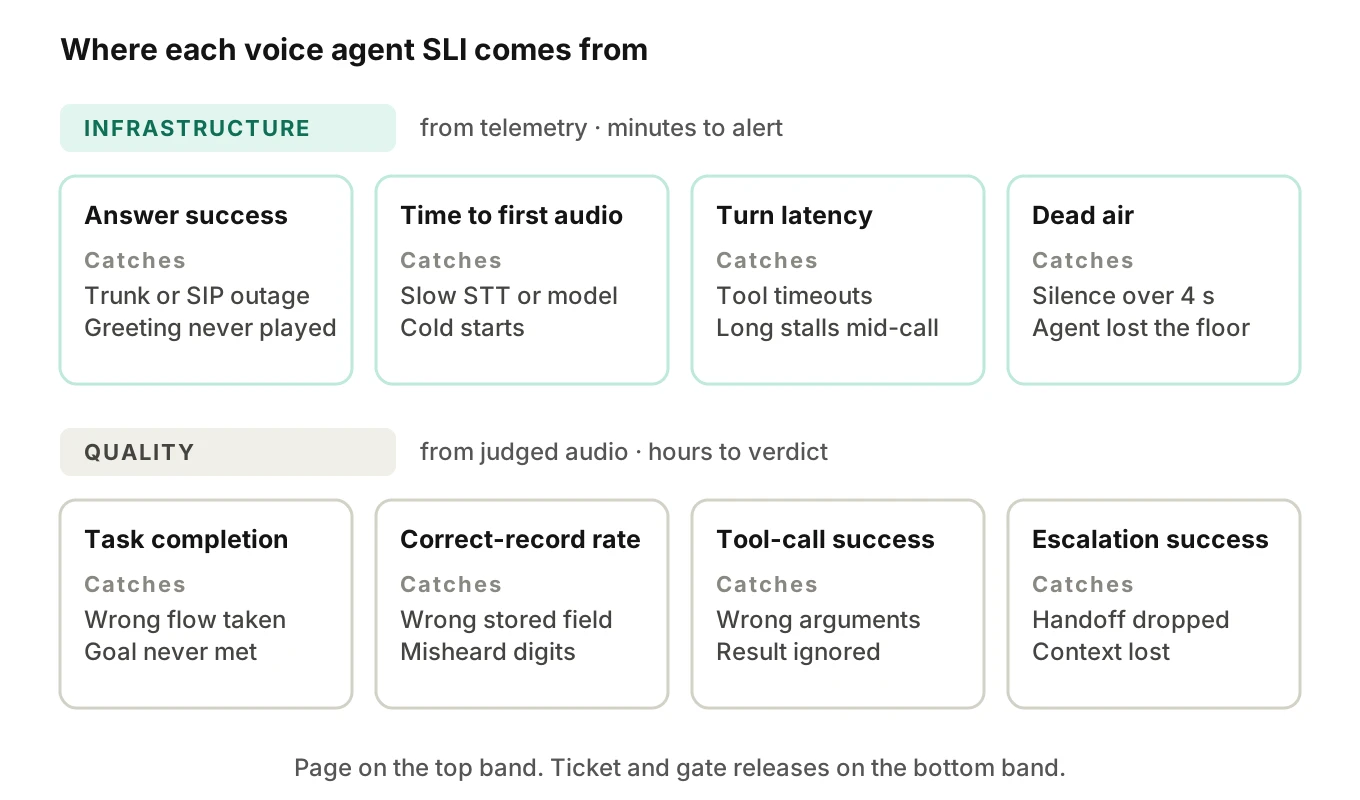
Do not pick one side. Infrastructure SLIs page you within minutes when an outage hits. Quality SLIs catch slow, silent failures. A prompt edit that makes the agent misconfirm a field leaves every infrastructure SLI green.
The judging has to hear the call. A judge that reads only the transcript can miss a clipped word or a long pause. Evalgent scores calls from the audio, with an LLM plus Jev as judge, and pairs each verdict with evidence a human can review. Those verdicts are the numerator and denominator you feed into your own SLO math.
Why average latency lies
Averages hide the calls that hurt. The SRE book describes a service where a typical request takes about 50 ms but 5% are 20 times slower. An alert on the average stays quiet. A p95 latency target would not.
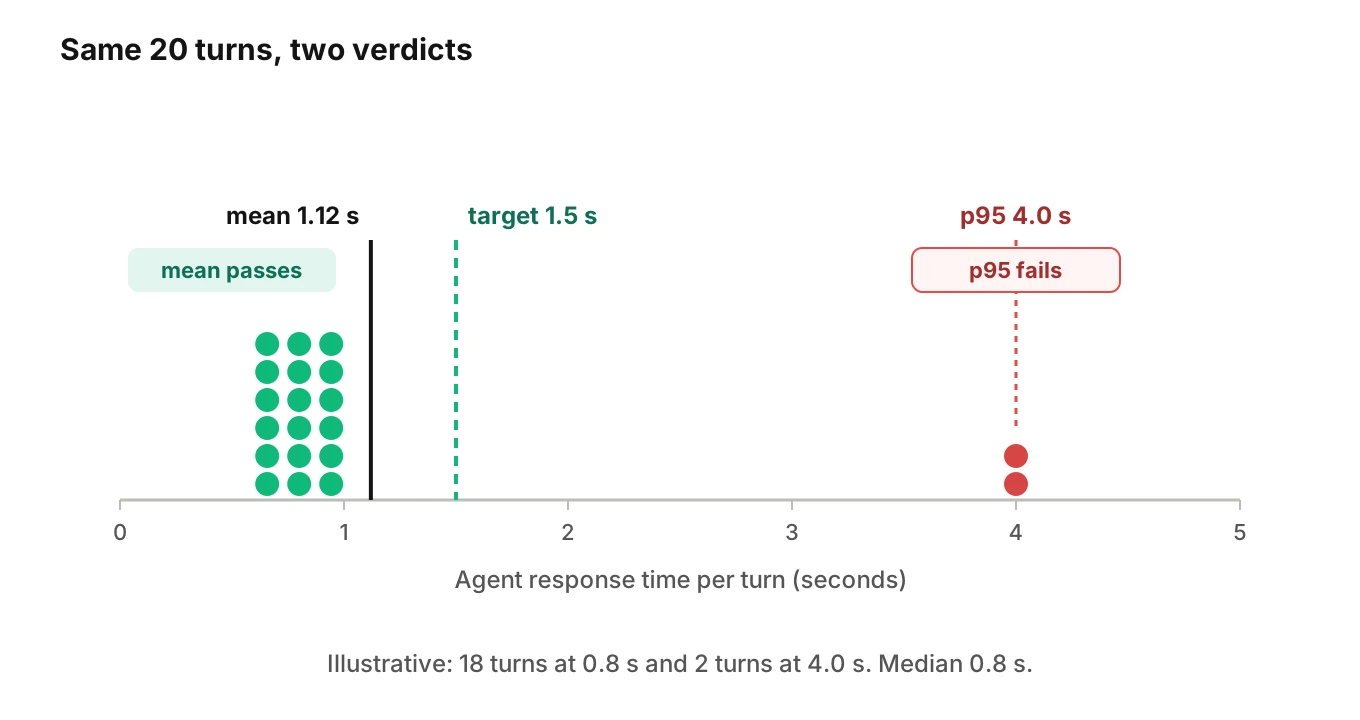
Voice shows the same shape. Here is a worked example with made-up numbers. A caller has 20 agent turns. Eighteen respond in 0.8 s. Two stall for 4 s while a tool call times out.
- Mean: (18 × 0.8 + 2 × 4.0) ÷ 20 = 1.12 s
- Median: 0.8 s
- 95th percentile: 4.0 s
A mean target of 1.5 s says this call is fine. The caller heard two awkward four-second gaps and probably said "hello?" into the phone. Our post on the cost of latency covers what gaps do to hang-ups.
Two fixes help.
Use a threshold SLI, not a percentile gauge. Define a good turn as one that responds within 2.5 s. The SLI is the share of good turns. That matches the good-over-total form, and it needs no percentile math at alert time.
Never average percentiles across instances. Prometheus's histogram guidance warns that aggregating precomputed quantiles "rarely makes sense". Store histogram buckets, sum the bucket rates, then compute the quantile. Put a bucket boundary at your SLO threshold so the share of good turns is a direct read. The same page notes that moving boundaries later is tedious with fixed buckets.
Track the per-call view too. One long stall makes a bad call for dead-air purposes. Per-turn SLIs tell you where to look. Per-call SLIs tell you what the caller felt. Our Pipecat latency guide shows per-stage numbers.
Windows, sample size and the dependency ceiling
The SRE workbook's error budget policy example uses a four-week rolling window. Rolling windows match how users feel outages. Calendar windows make mid-period forecasts shaky.
Start with 30 days rolling for the SLO, plus a weekly review. We use 30 days below so the workbook's alert numbers hold exactly.
Sample size limits what you can claim. Suppose you judge 200 calls in a window and 98% pass. The 95% margin is roughly 1.96 × √(0.98 × 0.02 ÷ 200), about 1.9 points. You cannot tell 98% from 96%. At 1,000 judged calls the margin drops to about 0.9 points. If you cannot judge every call, size the sample to the target gap you need to see.
Your ceiling is your dependencies. A call crosses telephony, speech-to-text, a model, text-to-speech and your tools. Take illustrative availabilities of 99.9%, 99.9% and 99.95% for three of them. Multiplied, they give 0.999 × 0.999 × 0.9995 = 99.75%. Your agent cannot promise more without fallbacks. A vendor SLA is an input, not your SLO.
Burn-rate alerts for call volume
An error budget is the allowed amount of unreliability. The SRE book's risk chapter says that while budget remains, teams can keep shipping. Once it is spent, releases slow or stop, and effort shifts to testing and resilience.
Burn rate is how fast the service consumes that budget relative to the SLO. A burn rate of 1 uses the whole budget exactly at the end of the window. The SRE workbook gives the formula:
budget consumed = burn rate × (alert window ÷ SLO period)For a 99% correct-record SLO over 30 days, the budget is 1% of calls. A burn rate of 14.4 means 14.4% of calls are bad. In one hour that spends 14.4 × (1 ÷ 720) = 2% of the budget. At that pace the budget is gone in about 2.1 days.
The workbook recommends multiwindow alerting with several burn rates. These burn rate alerts work like this. The long window shows real budget loss. The short window confirms it is still happening, which cuts false pages and speeds reset.
The workbook's tiers: a 1-hour window with a 5-minute confirmation at 14.4x pages, 6 hours with 30 minutes at 6x pages, and 3 days with 6 hours at 1x opens a ticket. At a 99% SLO those are bad-call rates of 14.4%, 6% and 1%. Full alert rules are in how to monitor voice agents in production.
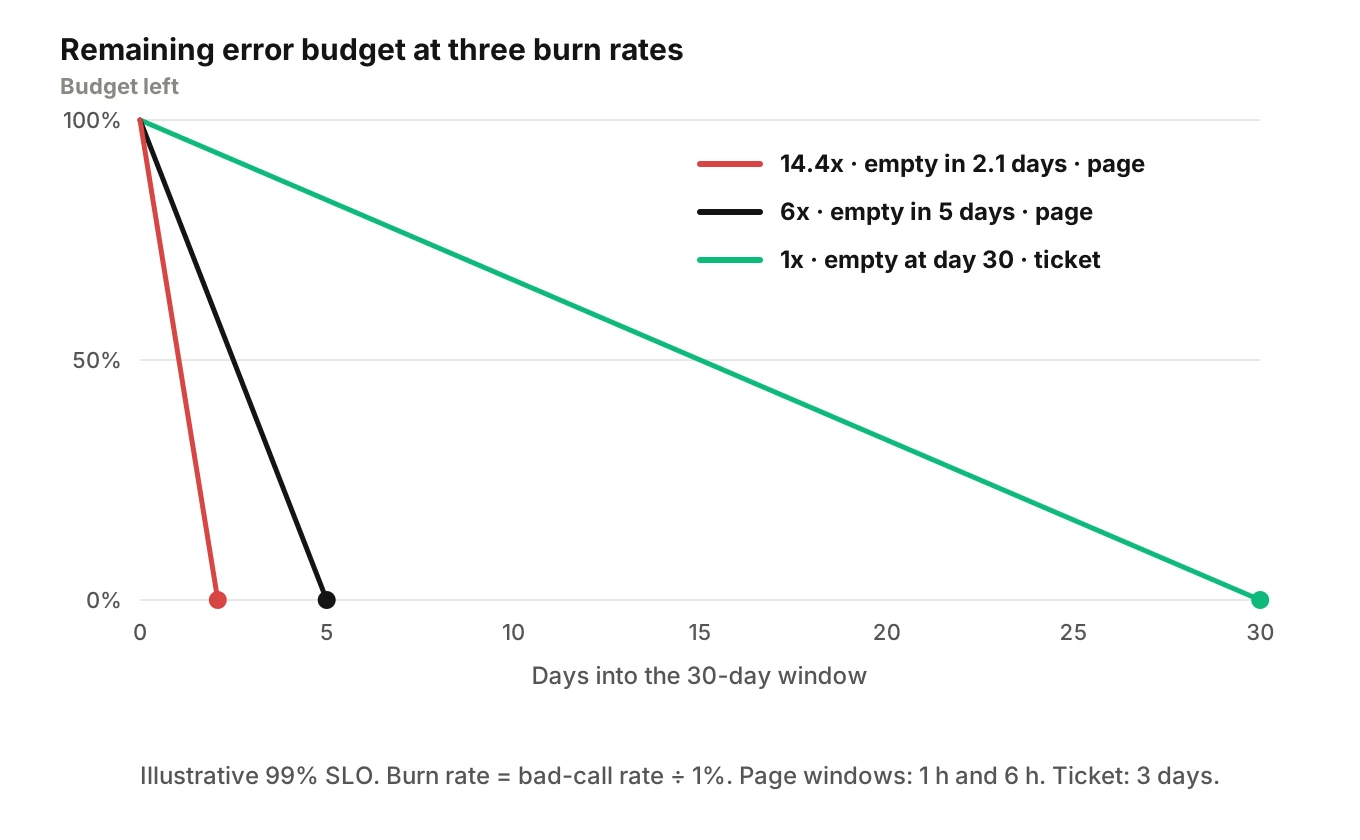
The burn rates and budget percentages come from the workbook's table for a 99.9% SLO. The bad-call rates are our translation to a 99% SLO. Burn rate scales with the SLO, so the thresholds stay the same.
Low volume breaks the math. Suppose a small tenant gets five calls an hour. One bad call is 20% of that hour, which clears the 14.4% page line. You would page on a single failure. For small tenants, alert on counts over longer windows or route to a ticket queue only. The workbook's low-traffic section also suggests combining small services for monitoring, adding artificial traffic, or lowering the SLO. Do not copy the tiers blindly.
Quality SLIs lag, so use the fast tiers for infrastructure SLIs and the slower tiers for judged quality. Evalgent's production monitoring takes pushed call recordings, transcribes them, maps them to scenarios and judges them, which supplies the quality numerator. Our post on production monitoring covers the live signals. For threshold values, see setting production thresholds.
Per-tenant SLOs for multi-tenant agents
If your agent runs across many of your customers, a fleet-wide SLO can be green while one tenant is on fire. The SRE workbook's SLO case studies show a similar trap: Evernote notes that a green provider-level SLO can differ from its own view, and that regional outages "may be lost in the overall rollup to a global level". A fleet-wide SLO hides a single tenant's outage the same way.
Here is an illustrative month, with a 99% correct-record SLO.
| Tenant | Calls | Bad calls | Correct-record rate | Budget used |
|---|---|---|---|---|
| Tenant A | 12,000 | 96 | 99.2% | 80% |
| Tenant B | 3,000 | 21 | 99.3% | 70% |
| Tenant C | 900 | 14 | 98.4% | 156% |
| Fleet | 15,900 | 131 | 99.18% | 82% |
The fleet looks healthy at 82% used. Tenant C blew its budget. You want to know before they tell you.
Set a per-tenant SLO in three steps.
1. Tag every call with a tenant ID at ingest, so any SLI can be sliced by tenant.
2. Keep a fleet SLO and a tenant floor. The fleet SLO drives release policy. The floor, say 97% for any tenant over a minimum call count, drives account alerts.
3. Slice by what else differs per tenant: menu, phone numbers, language, accent mix, integration. One tenant's POS connector can fail while the rest work.
Small tenants need a minimum volume before the floor applies. Our metric drift guide covers spotting slow shifts per segment.
What prompt and model changes cost in budget
Outages spend budget fast. Prompt and model changes spend it quietly.
Take an illustrative regression. A prompt edit breaks the reschedule flow. That flow is 20% of calls, and it now fails 15% of the time. Overall, 3% of calls go bad, a burn rate of 3 against a 99% SLO. That spends 10% of the 30-day budget per day. It will not trip the 6x page alert. It will trip the 3-day ticket after the damage is done.
SLOs and pre-release testing belong together. The budget says how much risk you can afford. Simulated calls show whether a change is about to spend it. Evalgent generates test scenarios from the agent's prompt and flows, then runs them with caller profiles that vary accent, pace, interruptions, delay, noise and language, over phone, SIP or WebRTC. Run it before every prompt or model change. Our voice agent testing guide explains the structure, and tool-calling test cases gives starters.
The SRE workbook example policy halts releases other than P0 or security fixes when the budget is exhausted. A voice team can adapt that into a release gate. This tiering is our suggestion, not a Google rule:
| Budget left | Release rule (illustrative) |
|---|---|
| Over 50% | Ship normally. Run the simulation suite. Canary on a small tenant set first. |
| 10% to 50% | Ship only changes with a passing suite and a one-tenant canary. |
| Under 10% or spent | Fixes only until the SLO is back inside budget. |
Get product and engineering to sign it. The same policy example lists the parts: author, reviewers and approvers, an approval and revisit date, actions at exhaustion and an escalation path to the CTO. A policy nobody agreed to will not hold when a launch is due.
A copyable SLO spec
Keep the spec in version control next to the agent's prompts, so a per-tenant SLO and release gate live with the code. This simplified YAML is a starting shape, not a standard. All targets are illustrative.
service: voice-agent
window: rolling_30d
policy: release_gate_v1
slis:
  - name: correct_record_rate
    good: stored fields match caller-confirmed values
    valid: calls that write a record, excluding test numbers
    objective: 0.99
    slice_by: [tenant_id, flow]
    tenant_floor: 0.97
    min_calls_for_floor: 300
  - name: good_turn_rate
    good: agent audio starts within 2.5s of caller finishing
    valid: caller turns
    objective: 0.99
  - name: tool_call_success
    good: valid result returned and used correctly
    valid: tool calls
    objective: 0.99
alerts:
  page:
    - {long: 1h, short: 5m, burn: 14.4}
    - {long: 6h, short: 30m, burn: 6}
  ticket:
    - {long: 3d, short: 6h, burn: 1}
How to set your first voice agent SLOs
1. Write down the callers' needs. List what a caller must get from the call, using real recordings, not the prompt.
2. Pick four or five SLIs. Include at least one quality SLI, ideally correct-record rate. Add answer success and one latency threshold SLI.
3. Write good and valid rules. Each SLI is good events over valid events. Say what is excluded and why.
4. Collect two weeks of baseline. Do not guess targets. Measure, then set a target you can meet without heroics that still protects callers.
5. Judge calls for the quality SLIs. Score every call, or sample enough to hit your margin. Spot-check the judge against human review.
6. Tag by tenant and flow. Compute each SLI per tenant and fleet-wide.
7. Set the burn-rate alerts. Use the multiwindow tiers, then adjust for low-volume tenants.
8. Agree the release policy. Tie budget remaining to what can ship. Review after a month.
Frequently asked questions
What is a voice agent SLO?
A voice agent SLO is a target for a measured share of good events, such as 99% of calls with the correct record written back. You pick the SLI, define what counts as good, and choose a window. The gap between 100% and the target is your error budget.
What SLIs should a voice agent have?
Start with four or five. Good picks are call answer success, time to first audio or a turn latency threshold, tool-call success, task completion and correct-record rate. Include at least one quality SLI judged from the call, not only infrastructure signals. Add escalation success if you hand calls to humans.
What is a good SLO for voice agent latency?
There is no universal number. Define a good turn as one that responds within a threshold, then target the share of good turns, for example 99% under 2.5 seconds. Pick the threshold from baseline data and caller behavior. Avoid average latency targets, because a few long stalls disappear inside the mean.
How do you set an error budget for a voice agent?
Subtract the SLO from 100%. A 99% SLO gives a 1% budget of bad events in the window. On 10,000 calls that is 100 bad calls. Then agree what happens as it drains, such as slowing releases or freezing all but fixes when it is spent.
How is a voice agent SLO different from an SLA?
An SLO is an internal target you manage to. An SLA is a contract with consequences, often financial, if you miss it. Keep the SLA looser than the SLO so you act before you owe anything. If you buy from vendors, their SLAs become inputs to your SLO.
How do you alert on voice agent error budget burn?
Use multiwindow burn-rate alerts. Google's workbook pages at 14.4x burn over 1 hour with a 5-minute confirmation window, and at 6x over 6 hours. It opens a ticket at 1x over 3 days. For small tenants with few calls, use counts over longer windows to avoid noise.
Should each customer have its own voice agent SLO?
Yes, if one agent serves many customers. Keep a fleet SLO for release decisions and a per-tenant floor for account alerts. A fleet average can stay green while one tenant is far over budget. Apply a minimum call count before the floor fires, so a single bad call does not page.
Do prompt changes use up the error budget?
Yes. A prompt or model change that makes one flow fail more often burns budget like an outage, just more slowly. A change that makes a flow carrying 20% of calls fail 15% of the time burns at 3x the allowed rate for a 99% SLO. Run a simulation suite before release and canary on a few tenants.
The bottom line
A voice agent SLO turns "is it working?" into a ratio of good calls over valid calls, with an error budget that tells you how much risk you can still take. Measure what callers and downstream records actually experienced, alert on burn rate by tenant, and let the remaining budget decide what ships.
Related Articles
How to automate voice agent testing: synthetic callers vs manual QA
Learn how ai test automation replaces manual QA for voice agents. Compare synthetic callers vs human testers, with a 5-step framework to scale without hiring.
Read more
AI Agent Testing vs Voice Agent Testing: What General Tools Miss for Voice
AI agent testing measures text outputs. Voice agent testing measures behaviour through an acoustic pipeline. Five failure categories general tools miss.
Read more