Voice Agent Go-Live Monitoring: What to Watch in the First 30 Days
On this page
You shipped the agent. The AI phone agent go-live checklist is signed off. Now real callers arrive, and they do not follow your scripts.
That checklist covers the first call. This post is the monitoring plan after it, phase by phase, for the first 30 days. Each phase has a goal, a few signals, a review depth and an exit rule.
The plan borrows from site reliability practice. Google's launch checklist asks for canaries under live traffic and staged rollouts, plus end-to-end monitoring. Facts are current as of November 23, 2026. Worked examples are labelled illustrative.
What must be measured before launch
Voice agent go live monitoring fails when the first week is spent deciding what to measure. Settle five things before the first live call.
Baselines from test calls. Run your scenario set against the exact build you will ship. Record end reasons, latency, tool failures, handoffs and hangup timing. They are not production truth. They give day 1 something to be compared against. See the staging environment.
Alert owners. Every alert needs a named person, not a channel. Google's SRE book says every page should be actionable. See voice agent alerting for what to page on and what to ticket.
A kill switch. Someone must be able to route callers away from the agent in minutes, without a deploy. Decide who may pull it. See the voice agent kill switch.
A rollback path. Know which prompt, model and flow version was live yesterday, and how to restore it. Stamp versions on every call. See release attribution.
A review rota. Name who reads calls each day for 30 days, with a backup.
The phase table
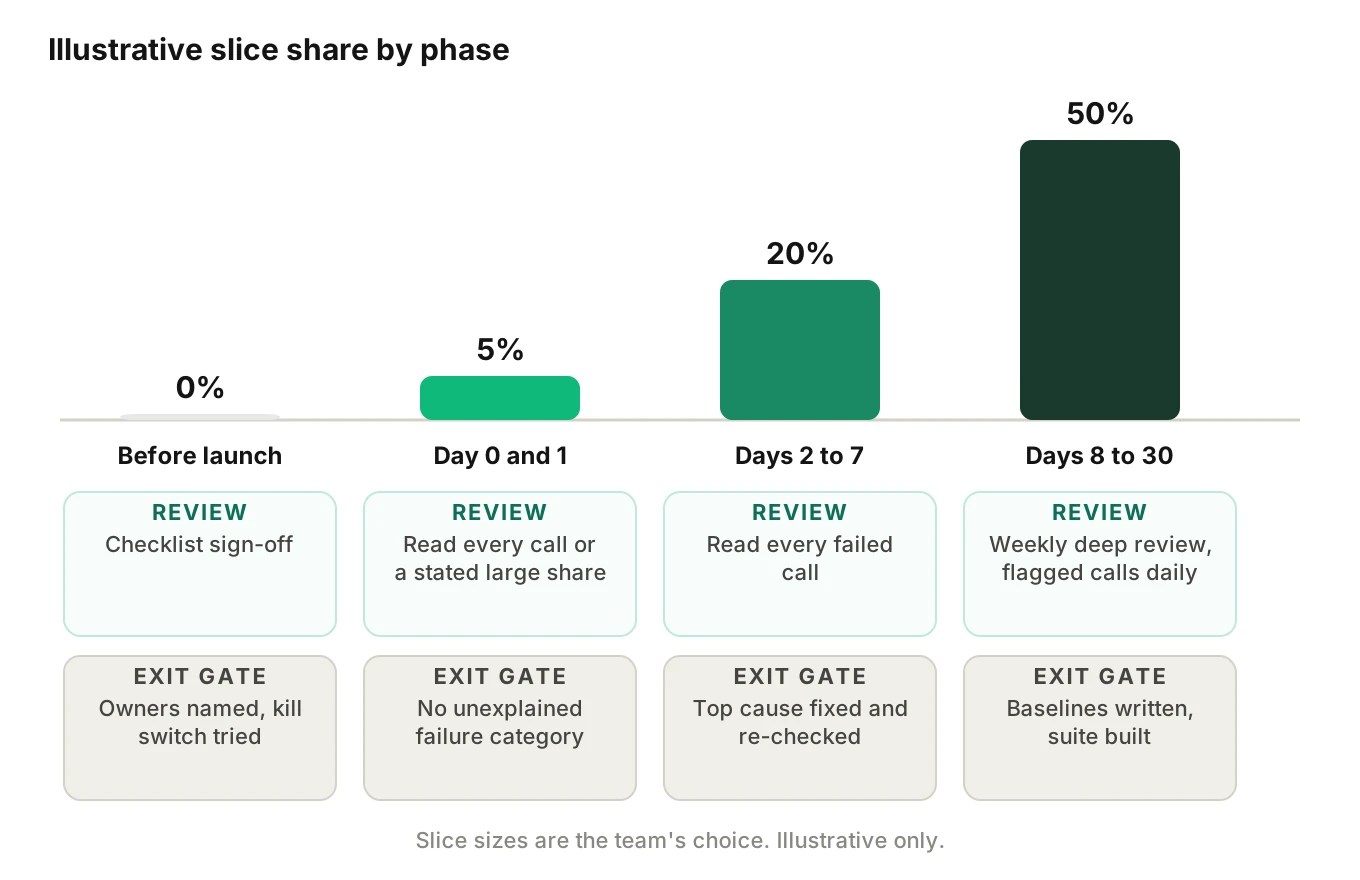
This voice agent go live monitoring plan fits on one screen. Slice sizes are the team's choice. The exit criteria are examples, labelled illustrative.
| Phase | Goal | What to watch | Review depth | Exit criterion (illustrative) |
|---|---|---|---|---|
| Before launch | Be able to see, stop and undo | Test-call baselines, owners, kill switch, rollback, rota | Checklist sign-off | Every item has a named owner and has been tried once |
| Day 0 and day 1 | Catch loud failures on a small slice | End reasons, unanswered callers, latency, tool failures, handoff, hangup timing | A person reviews every call, or a stated large share | No unexplained failure category left open, no safety or compliance miss |
| Week 1 | Find and fix the top cause | Every failed or abandoned call, first failure tags | Read every failed call; sample the rest | Top cause fixed and re-checked; failure tags cover most failed calls |
| Weeks 2 to 4 | Form baselines and catch drift | Rates by weekday, cost per call, long-call tail, drift checks | Weekly deep review, daily scan of flagged calls | Baselines written; regression suite built from real failures |
| Day 30 | Hand over to steady state | Alerts tuned to the new baselines | Normal sampling plus flagged calls | Owner signs the handover note |
Day 0 and day 1: ramp on a small slice
The goal is simple. Find the loud failures while few callers can be hurt. Route a small slice of traffic to the agent. The SRE workbook says you do not need a terribly large canary population to catch key critical conditions.
Start small, but do not judge on a handful of calls. Our post on voice agent canary release goes deeper on slice mechanics for prompt and model changes.
Review every call if volume allows. If it does not, state the share you will review and keep it large. Read each one end to end.
Watch these six signals:
- End reasons. Who hung up, and at which step?
- Unanswered callers. Calls where the caller spoke and got no reply.
- Latency. The long tail of response time, not the average.
- Tool failures. Failed, retried or repeated tool calls.
- Handoff. Did transfers to a person happen, and did they land?
- Hangup timing. An early leaver and a late leaver mean different things. See early hangups and abandonment.
Check that the downstream record was written correctly. A call that ended well can still leave a wrong one.
Evalgent Monitor is built for this stage. It flags problems from traces and call data, such as long latency, repeated tool calls, failed steps and unanswered callers, and gives fix recommendations. Where the data cannot support a verdict, it says undetermined and shows the coverage gap. It never sits in the media path, so it cannot slow a call.
Week 1: read every failed or abandoned call
Day 1 gives you a list of surprises. Week 1 turns it into causes. Read every failed or abandoned call. Do not sample them.
Build failure tags as you read. Start with free text, then merge. A first set might include no answer, wrong intent, tool failed, caller confused by script, agent talked over caller, and wrong handoff. Keep tags specific to your flow. The post on clustering voice agent failures shows how tags grow into root causes.
Count calls per tag, fix the top one, then re-check it on the next batch of calls. Fix one thing at a time. If three changes ship and the rate moves, you will not know which one worked.
Only widen the slice when the exit criteria, written before launch, are met. Do not widen because the week ended. The Google SRE workbook says a canary must be sizeable and last long enough to be representative.
Evalgent Observe, which is launching, works at the outcome level. It traces each failure to the step or handoff that caused it, then groups failures into root causes. That is the tag-and-count loop above, done from traces.
Why day-1 rates are unreliable: a worked example
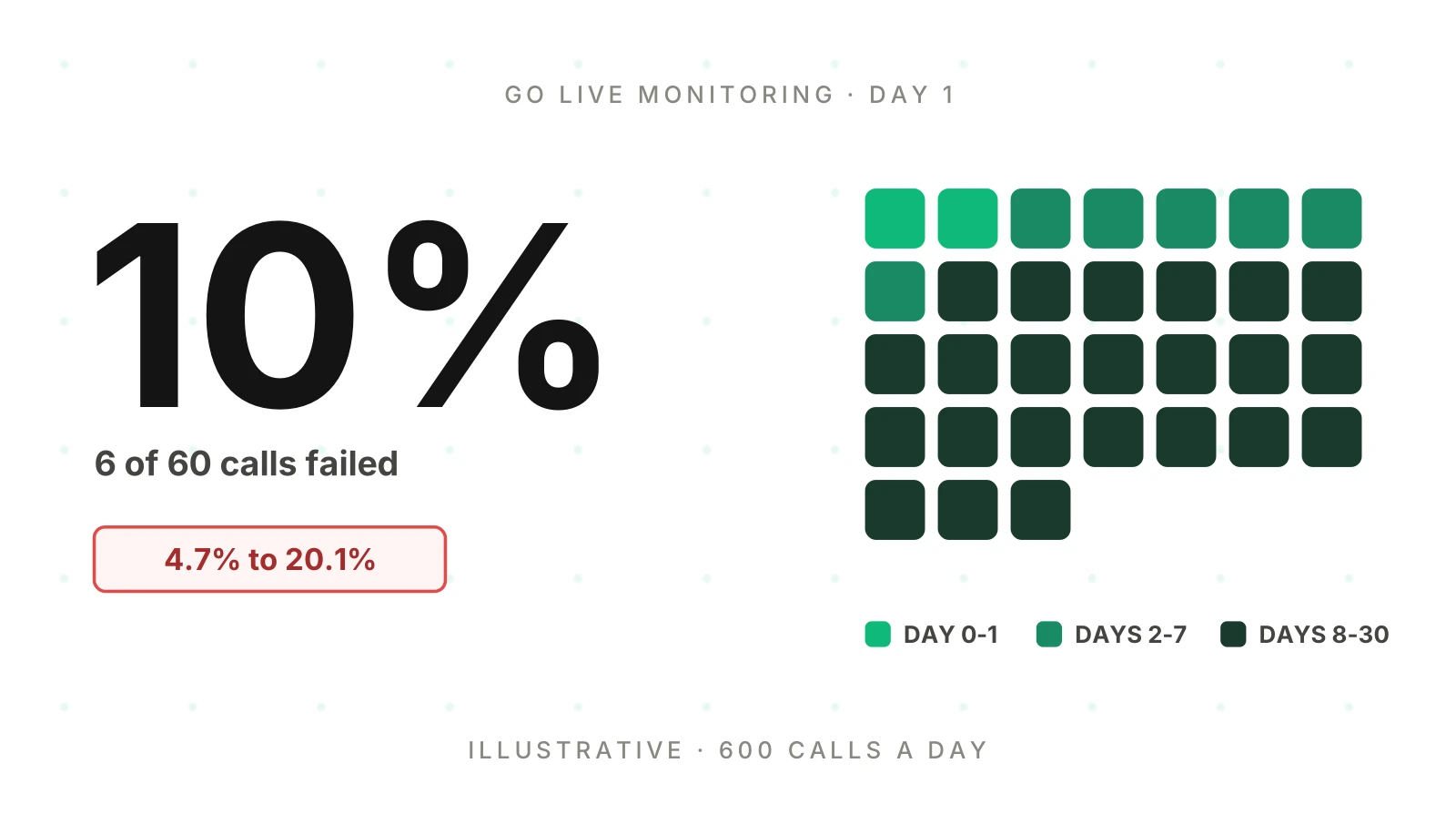
A rate from 60 calls is a guess with a wide margin. Here is the arithmetic. It is illustrative, and the call counts are invented to show the shape.
Assume about 600 inbound calls a day. The team routes 5% for two days, 20% for the next six days, then 50% for the rest of the 30 days. Suppose a failed-call rate of 10% shows up in each phase. The Wilson score interval gives a 95% range around that figure. We use Wilson because the NIST handbook cites it as recommended for virtually all combinations of sample size and proportion. It also warns that the simple normal formula can be inaccurate when samples are small or failures are few. statsmodels documents the same method as wilson.
| Phase | Calls so far (cumulative) | Failed (10%) | Wilson 95% interval | Width |
|---|---|---|---|---|
| Day 0 and day 1 | 60 | 6 | 4.7% to 20.1% | 15.5 points |
| Days 2 to 7 | 780 | 78 | 8.1% to 12.3% | 4.2 points |
| Days 8 to 30 | 7,680 | 768 | 9.3% to 10.7% | 1.3 points |
Computed in Python and cross-checked against statsmodels. On day 1, the true rate could sit anywhere from under 5% to over 20%.
The swing is easy to see. If 3 of 60 calls had failed, the observed rate would be 5.0%, with an interval of 1.7% to 13.7%. If 9 had failed, it would be 15.0%, with 8.1% to 26.1%. Those two intervals overlap heavily. Day 1 cannot tell them apart.
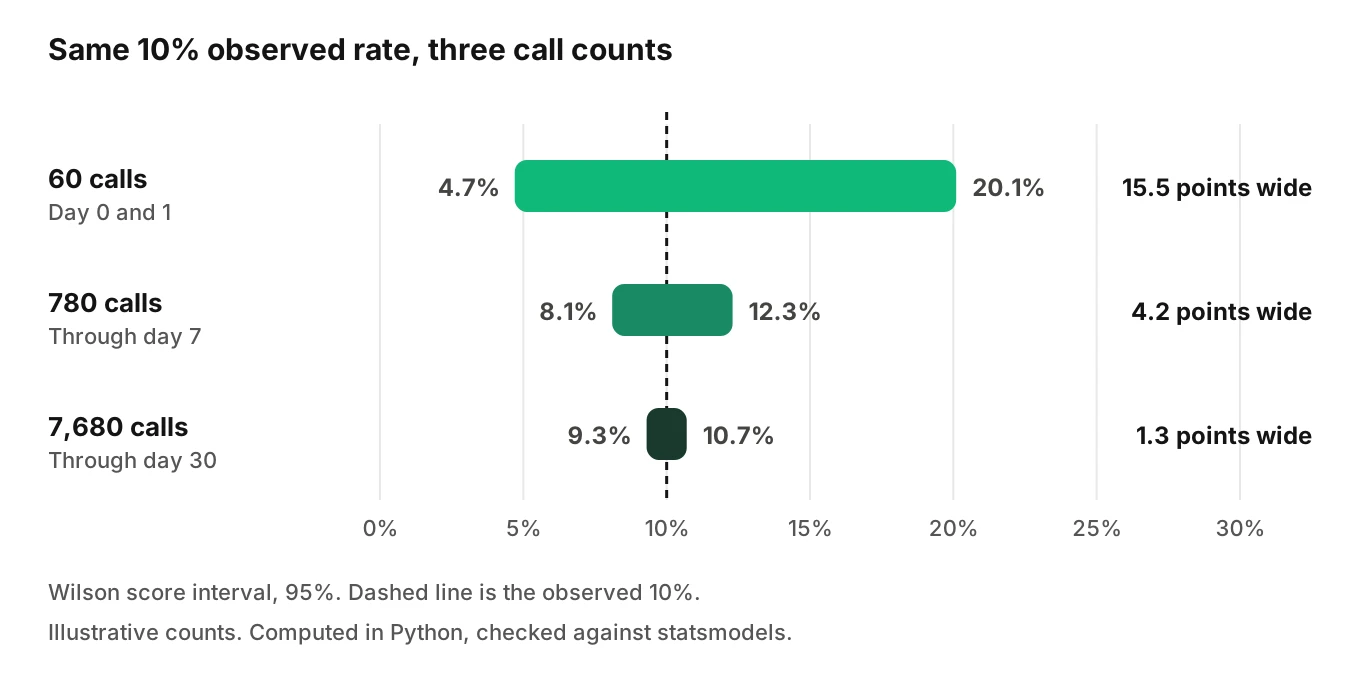
The practical rule: on day 1, read calls rather than trust rates. A rate is a headline only once the interval is narrow enough to act on. At a 10% rate, the interval is about 2 points wide at roughly 3,470 calls. Pick the width you can accept, and wait for it.
Small slices also hide rare failures. A 1-in-200 failure may not appear in 60 calls at all.
Weeks 2 to 4: baselines form
By week 2 you have enough calls to start trusting some numbers. Treat three habits as standard.
Wait for enough calls before trusting a rate. Use the interval, not a fixed number. A rate with a 15-point range is a prompt to read more calls.
Check seasonality by weekday. A Monday morning caller mix is rarely a Saturday one. Compare Tuesday to Tuesday. Four weeks gives four of each weekday, so call baselines provisional. See voice agent metric drift for drift checks.
Add cost per call and the long-call tail. A few runaway calls hide in an average. Look at the longest calls. See cost monitoring.
Grow a regression suite from real failures. Each failure fixed in week 1 becomes a test, run before every change. Evalgent can generate test scenarios from the agent's prompt and flows, a starting set beside the real failures you collect. See the production feedback loop.
What to look at and what to ignore
| Phase | Look at | Ignore for now |
|---|---|---|
| Day 0 and day 1 | Individual calls, end reasons, any unanswered caller | Averages, week-over-week trends, rates to one decimal |
| Week 1 | Failure counts by tag, the top cause | Rare one-off failures with no pattern |
| Weeks 2 to 4 | Rates with intervals, weekday patterns, cost tail | Single-day swings inside the interval |
| Day 30 | Alerts that fired, and which were useful | Metrics nobody acted on |
Ramping traffic with written exit criteria
Slice sizes are the team's choice. Write exit criteria before the first call, and widen one step at a time (for example 5%, 20%, 50%, 100%). Do not widen on time alone.
Illustrative exit criteria for moving from the first slice to the second:
- No unanswered-caller category left unexplained.
- No tool failure without a named cause and fix owner.
- No safety, privacy or compliance miss in any reviewed call.
- Review notes show the team understands every failed call.
None of these is a rate. At 60 calls, a rate cannot carry the decision.
First-month surprises
Expect some version of each.
- Callers ask things the script never expected. Tag them and decide whether to handle, deflect or hand off.
- Background noise and speakerphone. Tag them and add them to your test scenarios.
- Carrier differences. Tag each call with the carrier and path if you have it. Group by route to see patterns.
- Outbound answer-machine cases. For outbound agents, Twilio's documentation says answering machine detection will not always be right. It names false machine and false human errors, and notes that a very short voicemail greeting can read as a person. An
unknownresult is also possible if the timeout is reached. - A provider change mid-month. Stamp calls with versions so you can line a shift up with a change.
The daily and weekly review routine
Daily, 20 to 30 minutes, first 7 days: the review owner and one engineer. Read every failed or abandoned call. Check the six signals. Decide whether to hold, fix or widen. Write one line in the launch log.
Daily, weeks 2 to 4: the review owner scans flagged calls and any alert that fired. Ten minutes is usually enough.
Weekly, 45 minutes: product owner, engineer, whoever runs operations or support, and the on-call owner. Review failure tags by count, the interval on each headline rate, cost per call and the long-call tail. Pick one fix for the coming week. Update the regression suite. Keep a launch log of each decision.
When to pause or roll back
Write the triggers before launch. The incident runbook covers the first 15 minutes. Here is the ladder.
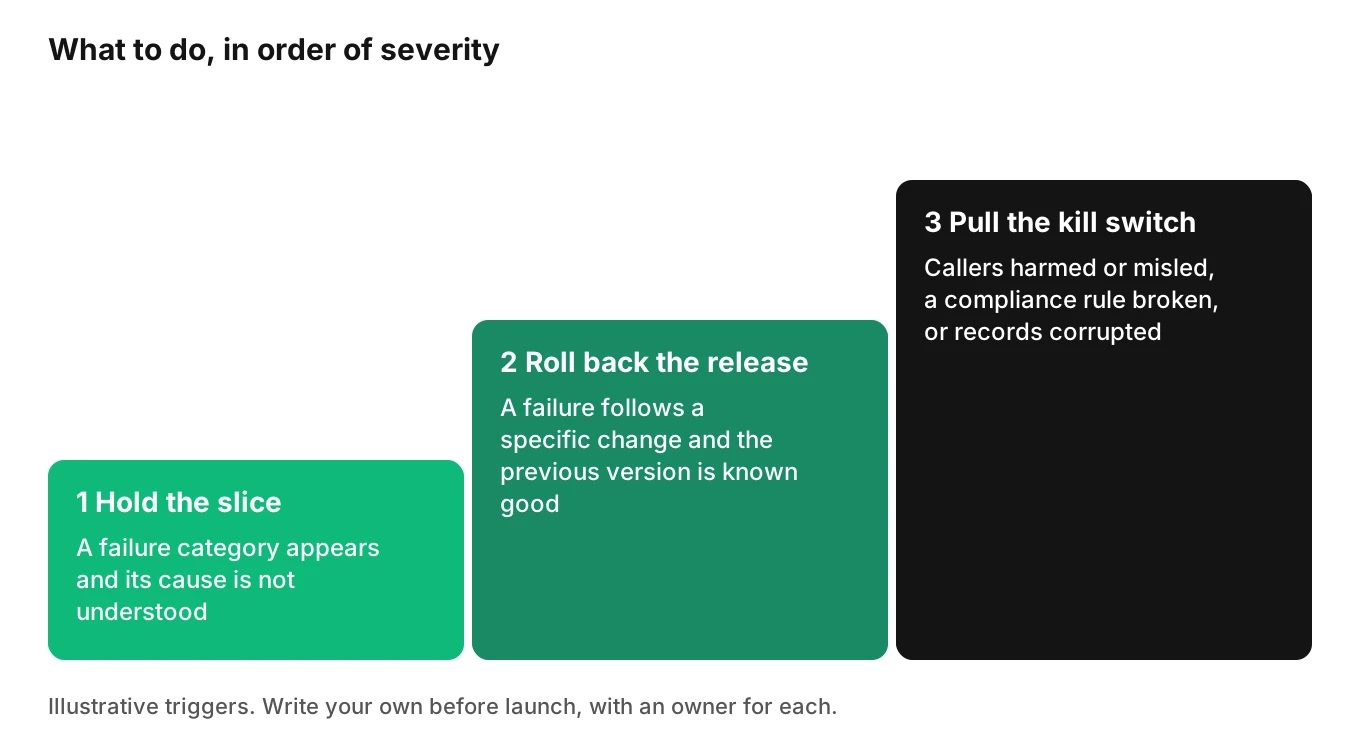
- Hold the slice. A new failure category appears and its cause is not understood. Do not widen. Keep reading.
- Roll back the release. A failure follows a specific change, and the previous version is known good.
- Pull the kill switch. Callers are harmed or misled, a compliance rule is broken, or records are being corrupted. Route callers away first, then investigate.
Examples are illustrative. Name the signal, owner and action in your own triggers.
What to tell the business
Send a short note at the end of day 1, week 1 and day 30. Say what you saw, what you fixed and what you will do next. Put rates in ranges, not as single numbers. Say how many calls the range rests on.
Say what you do not know. "We reviewed 60 calls and found two failure types" beats "the agent is at 90%." If you widened the slice, name the exit criteria you met.
Handover at day 30
At day 30, monitoring moves from a launch plan to a steady routine. Hand over:
- Baselines. Written down with intervals and the weekday pattern.
- Alerts. Tuned to the new baselines, each with an owner. Remove any that nobody acted on.
- Regression suite. Built from real failures, run before every change.
- Review cadence. Move from daily reading to sampling plus flagged calls. See scoring every call instead of a sample for the trade-off.
- Open risks. Failure tags still unresolved, with owners.
If you want to walk through this handover with the Evalgent team, you can book a demo. For the wider picture of what to monitor in production, see how to monitor AI voice agents in production.
How to run go-live monitoring for 30 days
1. Measure baselines before launch - run your scenario set on the build you will ship and record end reasons, latency, tool failures and handoffs.
2. Name owners and tools - assign each alert a person, and confirm the kill switch and rollback path work.
3. Launch on a small slice - route a share your team chooses, and review every call or a stated large share.
4. Read every failed call in week 1 - tag failures, count them and fix the top cause first.
5. Widen only on written exit criteria - move one step at a time and re-check after each step.
6. Let baselines form in weeks 2 to 4 - wait for enough calls, compare weekdays, and track cost per call and the long-call tail.
7. Hand over at day 30 - write the baselines, tune the alerts and move to steady sampling.
Frequently asked questions
What is voice agent go-live monitoring?
It is a time-boxed plan for watching a new voice agent after launch. Phases run from before launch through day 0 and 1, week 1 and weeks 2 to 4. Each has signals, a review depth and an exit rule, so traffic grows only when the team understands what it sees.
How long should go-live monitoring last?
Thirty days fits because it covers four of each weekday. Your length can differ. End it when baselines are written, alerts are tuned and a regression suite exists. Then move to steady-state monitoring.
Should a person review every call on day one?
If volume allows, yes. Early volume is small, and a reader finds failures that no rate shows. If you cannot read every call, state the share you will read and keep it large. Always read every failed, abandoned or unanswered call.
How many calls do I need before I trust a failure rate?
It depends on the width you can accept. Use a Wilson interval. In the illustrative example, a 10% rate has a range of 4.7% to 20.1% at 60 calls and about 2 points wide at roughly 3,470 calls. Choose your acceptable width first, then wait.
What should I watch in the first 24 hours?
Watch end reasons, unanswered callers, latency, tool failures, handoffs and hangup timing. Also check that the downstream record was written correctly, since a call can sound fine and still leave bad data behind.
When should I widen the traffic slice?
Widen when the exit criteria you wrote before launch are met, not when a date arrives. Examples: no unexplained failure category, no compliance miss, and every failed call understood. Move one step at a time and re-check after each.
When should I roll back a new voice agent?
Roll back when a failure follows a specific change and the previous version is known good. Use the kill switch when callers are harmed or misled, a compliance rule is broken, or records are being corrupted. Write these triggers before launch.
How do I handle outbound answering machines at launch?
Review every outbound call that reaches a machine in week 1. Twilio documents false machine, false human and unknown results, so tag each case rather than trust one label. Then decide whether to leave a message, hang up or retry later, and check that your records show which happened.
The bottom line
Voice agent go live monitoring works only when each phase has a goal, a review depth and an exit rule written before the first call. Read calls while volume is small, trust rates only when their interval is narrow, and hand over to steady state at day 30.
Related Articles
How to automate voice agent testing: synthetic callers vs manual QA
Learn how ai test automation replaces manual QA for voice agents. Compare synthetic callers vs human testers, with a 5-step framework to scale without hiring.
Read more
AI Agent Testing vs Voice Agent Testing: What General Tools Miss for Voice
AI agent testing measures text outputs. Voice agent testing measures behaviour through an acoustic pipeline. Five failure categories general tools miss.
Read more