How to Set Up a Voice Agent Staging Environment: Test Numbers, Sandboxes, Smoke and Acceptance Tests
On this page
Most in-house voice agents have two environments: a laptop and production. The laptop runs the agent in a console or browser playground. Production answers real customers. Everything in between gets tested by someone dialing the live number after the deploy.
That gap is where the expensive bugs live. A browser test never touches your SIP trunk, your carrier's codec, your dispatch rule, or the 8 kHz audio your STT model receives on a phone call. A phone test against production touches all of that, plus your real calendar, your real CRM and, on a bad day, a real customer's card.
This guide is for the engineer who owns a LiveKit, Pipecat or Dograh agent. It covers parity, test numbers on Twilio and Telnyx, LiveKit and Pipecat deployment splits, back-end isolation, quota separation, the two test suites that make staging a release gate, cost math, and a smoke test runner you can adapt.
What a voice agent staging environment is
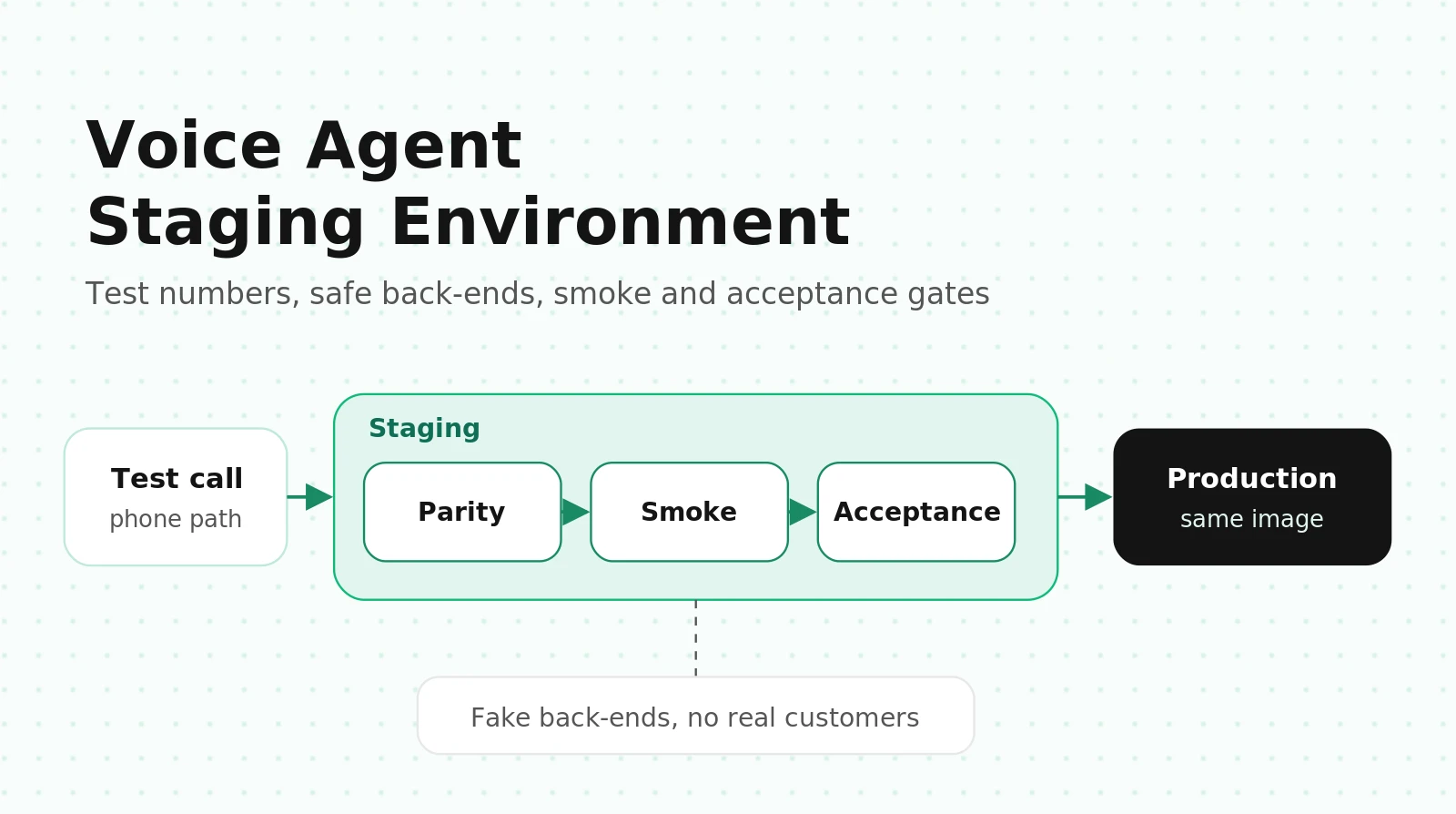
Staging is the last place a release runs before callers hear it. For a voice agent, it has to include the phone path, because most voice-specific failures happen between the carrier and your STT model. A staging environment has:
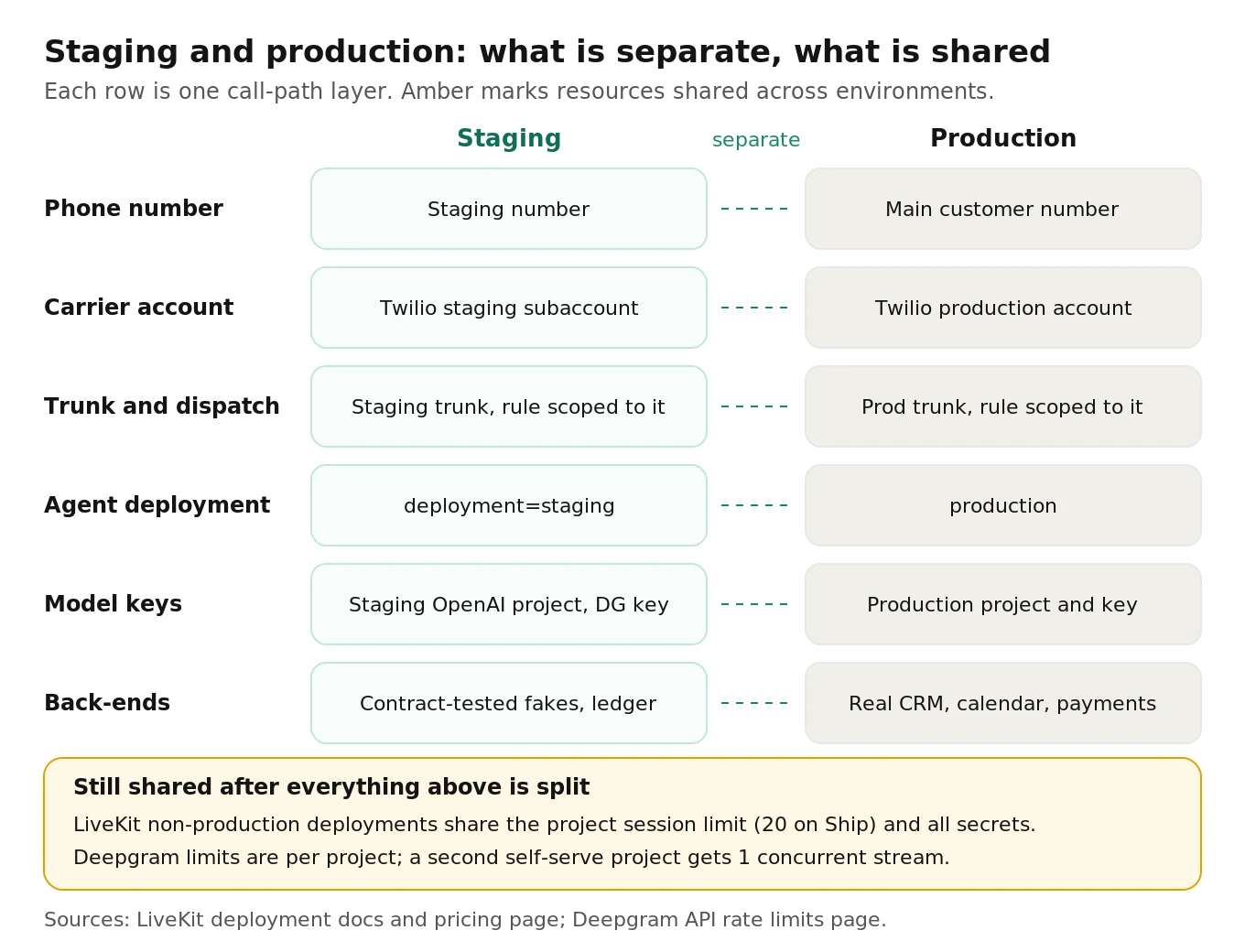
1. Its own inbound number on its own carrier account or subaccount.
2. Its own trunk or Media Streams endpoint and dispatch rule.
3. Its own agent deployment running the release candidate image.
4. Its own API keys, with quotas that can't starve production.
5. Fake or sandboxed back-ends, so tool calls never reach real customers or money.
6. The same STT, LLM and TTS models, region, codec path and turn-taking settings as production.
It is not your local console or the browser playground. Our guide to validating a voice agent before deployment sets the launch thresholds. This post is about the plumbing that lets you check them on every release.
Why the phone path has to be in staging
Two audio paths, two different systems
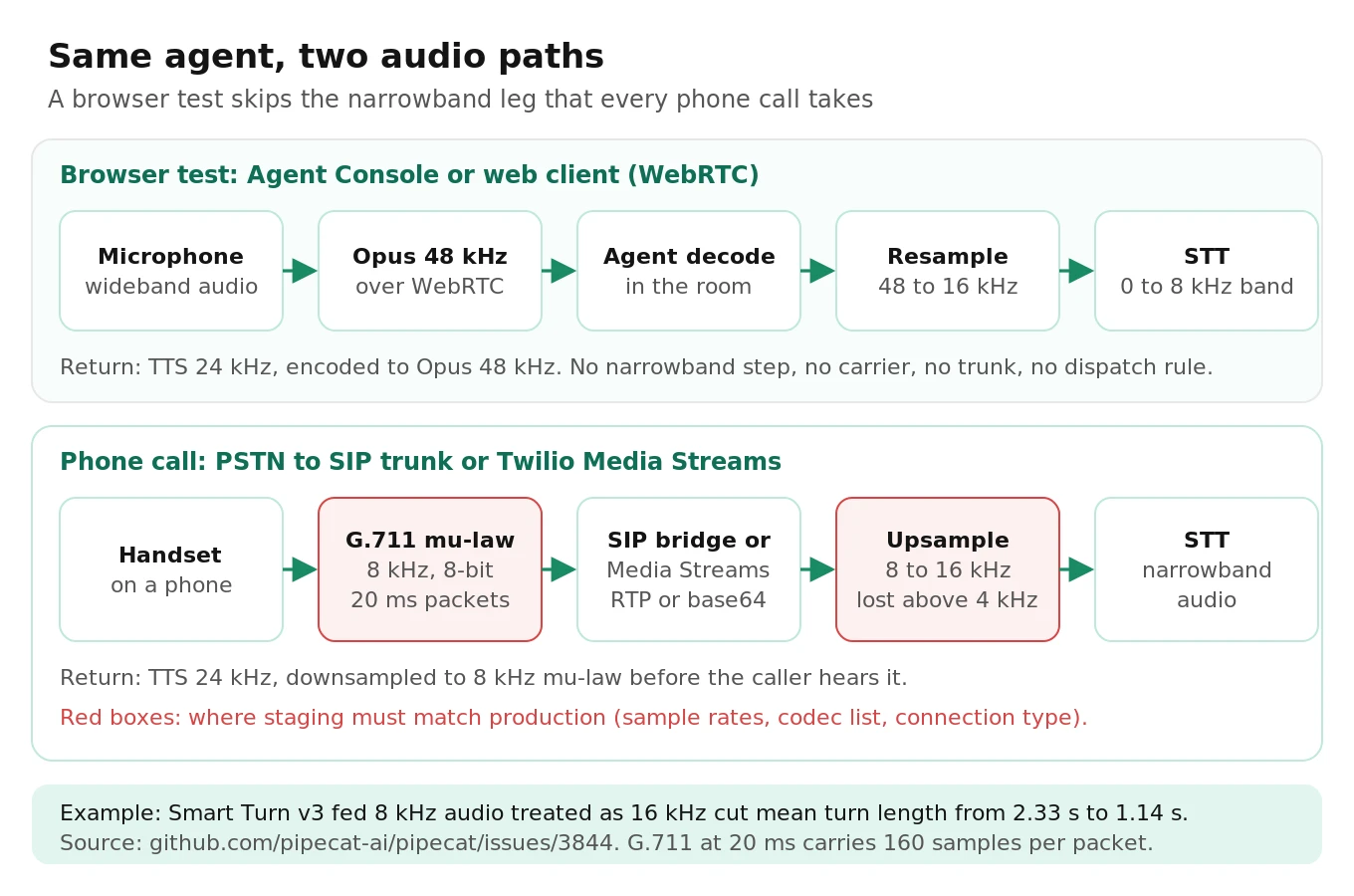
On a WebRTC test from LiveKit's Agent Console or a Pipecat web client, microphone audio travels as Opus, usually at 48 kHz. The agent resamples it to the STT model's rate, typically 16 kHz. Nothing in that path is narrowband.
A phone call crosses the network as G.711: 8 kHz, 8-bit companded audio, usually mu-law (PCMU) in the US, with 160 samples per 20 ms packet. With Twilio Media Streams, those chunks arrive as base64 mu-law inside JSON `media` messages over a WebSocket. With a SIP trunk into LiveKit, the SIP bridge transcodes RTP into the room. Either way, everything above 4 kHz is gone before your code sees a sample, and upsampling to 16 kHz doesn't bring it back. TTS runs the same path in reverse: 24 kHz output is downsampled to 8 kHz mu-law before the caller hears it.
What breaks when only the browser path is tested
Turn detection degrades silently at 8 kHz. In pipecat issue 3844, a team set `audio_in_sample_rate=8000` as a Twilio guide suggested. Smart Turn v3 expects 16 kHz, so it heard speech at double speed with shifted pitch, with no error. Six of 20 test utterances flipped between complete and incomplete. In production, mean turn duration fell 51%, from 2.33 to 1.14 seconds, and phone numbers were split across turns. A later benchmark in the thread measured 59% accuracy on that path versus 94% after a resampling fix. A browser call never runs at 8 kHz, so it can't show this.
The widget sounds clear while the phone sounds broken. In livekit/agents issue 5253, SIP calls sounded grainy while WebRTC widget calls on the same agent were clear. Debugging surfaced a stack of telephony misconfigurations: the carrier pointed at the project slug instead of the SIP URI, the number sat on a webhook call-control app instead of a SIP connection, the dispatch rule lacked `roomConfig.agents`, and G.729 was in the codec list. None of these can be found from a browser.
The trunk type is part of the system. In livekit/agents issue 3605, Twilio calls over SIP played the greeting and went silent, while WebRTC worked. One reporter fixed it by switching from Elastic SIP Trunking to connecting the call from a Twilio webhook. The root cause was never pinned down. If staging and production use different trunk types, staging can't tell you which behavior you'll get.
So the staging number must reach the staging agent through the same carrier, connection type and codec settings as production. Our SIP vs WebRTC guide covers the trade-offs.
Environment parity: what must match and what must differ
| Layer | Must match production | Must differ | How to verify |
|---|---|---|---|
| STT | Model ID and version, language, endpointing, keyterms, input sample rate | API key | Diff resolved config at startup |
| LLM | Pinned snapshot, temperature, prompt and tool schema version | Key, project, spend limit | Log model ID and prompt hash per call |
| TTS | Model ID, voice ID, output sample rate | API key | Log voice and model per call |
| Turn-taking | VAD, endpointing delays (LiveKit `turn_handling`), turn detector, interruption settings | Nothing | Parity manifest |
| Region | Agent host, model endpoints, telephony region | Nothing | Manifest plus RTT from the host |
| Telephony | Carrier, connection type, codec list, trunk noise filtering | Number, trunk ID, dispatch rule, account | Carrier API diff |
| Runtime | SDK versions, image digest, CPU and memory profile | Scale limits | Promote by digest |
| Back-ends | Tool schemas, response shapes, latency profile | Data, endpoints, credentials | Contract tests |
What drifts without anyone deciding it should
- Cold starts. LiveKit Cloud non-production deployments are always cold-booted and sleep when idle; production stays warm on paid plans (LiveKit docs). Pipecat Cloud's `--min-agents` defaults to 0 (Pipecat CLI docs). Warm staging before you measure latency.
- Region. Pipecat Cloud uses your organization's default region, typically `us-west`, unless `region` is set. An unset staging region can add cross-country round trips to every model call.
- WebSocket endpoint. Agents deployed to a specific Pipecat Cloud region should use `wss://{region}.api.pipecat.daily.co/ws/twilio`. Old staging TwiML often points at the default.
- Noise filtering. Pipecat Cloud's Krisp VIVA has a `tel` model (up to 16 kHz) and a `pro` model (up to 32 kHz). Different settings mean different input chains.
- Model aliases. If production pins a dated snapshot and staging uses "latest," you're testing a different model.
- Secrets. All LiveKit Cloud deployments of an agent share secrets, so staging uses production keys unless your code branches.
Make parity a check
Have each environment's agent log its resolved config at startup, then diff the two in CI:
# parity_check.py (illustrative, simplified)
# Compare the resolved configs that each environment's agent logs at startup.
import json, sys

ALLOWED_TO_DIFFER = {
    "telephony.phone_number", "telephony.trunk_id", "telephony.dispatch_rule_id",
    "keys.openai_project", "keys.deepgram_key_id", "keys.tts_key_id",
    "backends.base_url", "scaling.min_agents", "scaling.max_agents",
    "observability.log_destination",
}

def flatten(d, prefix=""):
    out = {}
    for k, v in d.items():
        key = f"{prefix}{k}"
        if isinstance(v, dict):
            out.update(flatten(v, key + "."))
        else:
            out[key] = v
    return out

def diff(prod_path: str, staging_path: str) -> list[str]:
    prod = flatten(json.load(open(prod_path)))
    stg = flatten(json.load(open(staging_path)))
    problems = []
    for key in sorted(set(prod) | set(stg)):
        if key in ALLOWED_TO_DIFFER:
            if prod.get(key) == stg.get(key):
                problems.append(f"MUST DIFFER but equal: {key}")
            continue
        if prod.get(key) != stg.get(key):
            problems.append(f"DRIFT {key}: prod={prod.get(key)!r} staging={stg.get(key)!r}")
    return problems

if __name__ == "__main__":
    issues = diff(sys.argv[1], sys.argv[2])
    print("\n".join(issues) or "parity OK")
    sys.exit(1 if issues else 0)
The "must differ but equal" branch catches staging running on the production OpenAI project or trunk, which a plain diff would call "no drift."
Test phone numbers and trunks for staging
Twilio: test credentials can't test a voice agent
Per Twilio's docs, test credentials don't charge you or connect to real phone numbers. For calls, no call is placed, your `Url` isn't requested, no TwiML runs, and no status callbacks fire. New test credentials can't be created in the new console.
They're still useful for unit-testing an outbound dialer's error handling. The magic `From` number `+15005550006` passes validation, and these `To` numbers return fixed errors:
| Magic `To` number | Result | Error |
|---|---|---|
| +15005550001 | Invalid number | 21217 |
| +15005550002 | Can't route | 21214 |
| +15005550003 | No international permission | 21215 |
| +15005550004 | Blocked | 21216 |
Trial accounts don't work for staging either. Trials expire after 30 days, call only up to 5 verified numbers, and block some TwiML verbs. Upgrade, then create a staging subaccount that owns the staging number, the QA caller numbers and a transfer sink number, each with its own credentials and usage reporting.
Telnyx: isolate with connections and profiles
Telnyx has no magic-number sandbox, and trial accounts can only call to and from your verified number. Buy a staging number with its own SIP connection, and attach it to a separate outbound voice profile with a low daily spend limit, a small channel limit and only the destinations you test. If a staging bug dials in a loop, the profile stops it.
LiveKit: separate project or non-production deployment
You can give staging its own LiveKit Cloud project, or, on Ship and above, run a non-production deployment with `lk agent deploy --deployment staging` and later `lk agent promote --deployment staging`, which moves the tested image without a rebuild.
| Question | Separate project | Non-production deployment |
|---|---|---|
| Plan | Any | Ship or higher (Build allows 0) |
| Secrets | Separate | Shared; branch on `LIVEKIT_AGENT_DEPLOYMENT` |
| Concurrency | Separate limits | Shared with production |
| Promotion | Re-push image | `lk agent promote`, no rebuild |
| Idle and redeploy | Your choice | Sleeps when idle; redeploy drops active sessions; no rollback |
| Metrics | Full | Production only today; use `lk agent logs --deployment staging` |
Four gotchas from LiveKit's docs:
1. Old SDKs take production traffic. Deployments need `livekit-agents` 1.6.0+ (Python) or `@livekit/agents` 1.7.1+ (Node). Older workers register as `production` and answer real calls.
2. Secrets are shared. Prefix staging keys and pick them by reading `LIVEKIT_AGENT_DEPLOYMENT`, which is empty in production.
3. `lk agent delete` without `--deployment` deletes the whole agent, production included.
4. Concurrency is shared. LiveKit's pricing page counts concurrent sessions across all agents in a project: 5 on Build, 20 on Ship.
Give the staging number its own inbound trunk and a dispatch rule scoped to it. The dispatch rule docs say a rule without `trunk_ids` matches all inbound trunks, so scope the production rule too.
# create_staging_dispatch.py (illustrative; API shapes from LiveKit dispatch docs)
import asyncio, os
from livekit import api

async def main() -> None:
    lkapi = api.LiveKitAPI()
    rule = api.SIPDispatchRule(
        dispatch_rule_individual=api.SIPDispatchRuleIndividual(room_prefix="stg-call-")
    )
    request = api.CreateSIPDispatchRuleRequest(
        dispatch_rule=api.SIPDispatchRuleInfo(
            rule=rule,
            name="staging-inbound",
            trunk_ids=[os.environ["STAGING_INBOUND_TRUNK_ID"]],  # never leave this empty
            room_config=api.RoomConfiguration(
                agents=[api.RoomAgentDispatch(
                    agent_name="support-agent",
                    deployment="staging",          # omit for production
                    metadata='{"env": "staging"}',
                )]
            ),
        )
    )
    print(await lkapi.sip.create_sip_dispatch_rule(request))
    await lkapi.aclose()

asyncio.run(main())
Self-hosting on Kubernetes? Use a separate `agent_name` on a separate pool so staging dispatches only land on staging pods. Our LiveKit on Kubernetes guide covers pools and drain.
Pipecat: separate agent, secret set and config file
On Pipecat Cloud, staging is a separate agent such as `support-agent-staging`, deployed with `--config-file pcc-deploy.staging.toml` so each environment has its own `agent_name`, `secret_set`, `region` and scaling. Secret sets live in one region, so keep the staging set in the staging agent's region, and redeploy with `--force` after rotating a key, because running agents don't pick up new values. Point the staging number's TwiML Bin at the staging agent using `_pipecatCloudServiceHost`, per the Pipecat Cloud Twilio guide:
<Response>
  <Connect>
    <Stream url="wss://us-east.api.pipecat.daily.co/ws/twilio">
      <Parameter name="_pipecatCloudServiceHost" value="support-agent-staging.your-org-id"/>
    </Stream>
  </Connect>
</Response>
Self-hosted Pipecat uses a separate worker pool and webhook URL; see our Pipecat production guide and Pipecat Twilio and Telnyx guide. Given issue 3844, keep `audio_in_sample_rate` at the 16 kHz default when using Smart Turn and set only `audio_out_sample_rate=8000`. Pipecat has since renamed `PipelineTask` to `PipelineWorker`, so check where your version accepts these parameters.
Isolating tools and back-ends
Staging should be physically unable to reach real customers or money, even with a bug. Use four layers:
- Credentials: sandbox keys only. Stripe test-mode keys start with `sk_test_`. Refuse to boot staging with a live key.
- Network: block egress from staging hosts to production APIs.
- Code: route every dial, transfer, SMS and charge through one guard with an allowlist.
- Data: synthetic accounts only, never a production export.
# guards.py (illustrative): one choke point for anything that reaches the outside world
import os, re

ENV = os.environ.get("APP_ENV") or ("staging" if os.environ.get("LIVEKIT_AGENT_DEPLOYMENT") else "production")
DIAL_ALLOWLIST = set(filter(None, os.environ.get("STAGING_DIAL_ALLOWLIST", "").split(",")))

class StagingEgressBlocked(Exception):
    pass

def assert_safe_to_dial(e164: str) -> None:
    if ENV == "production":
        return
    if e164 not in DIAL_ALLOWLIST:
        raise StagingEgressBlocked(f"staging may not dial {e164}")

def assert_sandbox_key(key: str) -> None:
    if ENV != "production" and re.match(r"^sk_live_", key):
        raise RuntimeError("live payment key loaded in a non-production environment")
In staging, the dial allowlist holds only the transfer sink and QA numbers. Our guide to ending and transferring calls shows where those tools sit.
Mocks, fakes or vendor sandboxes
| Back-end | Use when | Risk |
|---|---|---|
| Static mock | Read-only tool, stable responses | Drifts from the real API silently |
| Contract-tested fake | You have the API schema | Needs a contract test in CI |
| Vendor sandbox | The vendor offers one | Its own limits and quirks |
| Real API, test tenant | Nothing else exists | One wrong ID writes to production |
The best default is a contract-tested fake: it implements your tool schemas over an in-memory store, returns the real API's shapes and status codes, adds realistic latency, and records every call in a ledger keyed by caller number and time. The ledger lets a test answer "did the agent call `create_booking` for Tuesday at 2 pm?" Add latency on purpose: a fake that answers in 5 ms hides the dead air callers hear while an 800 ms tool runs. Cases worth covering are in our tool-calling test cases.
Smoke tests repeat the same script daily, and LLMs sometimes call a tool twice in one turn, so make writes idempotent with a key from call ID, tool and canonical arguments:
import hashlib, json

def idempotency_key(call_id: str, tool: str, args: dict) -> str:
    canonical = json.dumps(args, sort_keys=True, separators=(",", ":"))
    return hashlib.sha256(f"{call_id}:{tool}:{canonical}".encode()).hexdigest()
Seed every run from a fixture file of synthetic customers with known slots, balances and order states, and reset the store before each acceptance run.
Separate API keys and quotas per environment
Separate keys are not separate quotas.
| Provider | Where limits live | Staging recommendation |
|---|---|---|
| OpenAI | Per project; owners set per-model rate limits and spend limits, optionally hard (OpenAI help) | Staging project with lower limits and a hard spend cap |
| Deepgram | Per project, not per key; secondary self-serve projects get 1 concurrent stream (Deepgram limits) | Separate key inside the existing project |
| LiveKit Cloud | Concurrent sessions per project | Separate project if staging load is large |
| Pipecat Cloud | Secret sets per region; `max_agents` per agent | Own secret set, low `max_agents` |
| Twilio / Telnyx | Subaccount / outbound voice profile | Separate subaccount or profile |
The Deepgram row surprises people. A new "staging" project on a self-serve plan handles one stream, so the first parallel smoke run fails with errors that look like agent bugs. Deepgram also says spreading traffic across projects to bypass limits violates its terms.
Worked example: staging can starve production
Assume a LiveKit Ship project (20 concurrent sessions), production peaking at 14 calls, and an acceptance run with 8 parallel calls whose simulated caller also runs as a LiveKit agent in the project, as in our guide to replacing manual test calls. Each test call is 2 sessions.
Peak demand = 14 + (8 x 2) = 30 sessions against a limit of 20.
Fixes, cheapest first: run acceptance off-peak, cap staging parallelism at (20 - 14) / 2 = 3 calls, or move staging to its own project.
Test data: fixtures, silence and no PII
Record humans for anything you measure
Lau and colleagues (ISSTA 2023, arXiv 2305.17445) generated ASR test cases with four TTS systems, ran them through five ASR systems, and re-checked each failure with human audio of the same text. On average, 21% to 34% of failures were false alarms, and the TTS engine alone moved that from 17% to 32%. TTS fixtures are fine for smoke tests, which check plumbing. For acceptance tests, record real people in your callers' accents (see our accent robustness guide). Record at 16 kHz or higher and let the phone path degrade it.
Include silence and noise
Koenecke and colleagues (FAccT 2024, arXiv 2402.08021) found roughly 1% of Whisper transcriptions contained fully hallucinated phrases, 38% of those included explicit harms, and hallucinations clustered in audio with long non-vocal stretches. Callers go quiet and sit through hold music, so add 10 to 30 second clips of silence, line noise and music, and check the agent doesn't answer words nobody said. More noise conditions are in our background noise testing guide.
Szymański and colleagues (arXiv 2010.03432) found commercial ASR error rates on real spontaneous conversations were significantly higher than the best published benchmark results. Treat clean-fixture accuracy as a regression signal, not a production forecast.
Keep fixtures PII-free
Use the fictional 555-0100 to 555-0199 range in spoken scripts, generated names and dates of birth from a seed file, your payment provider's documented test cards, and never production call audio. Run the same redaction checks as production, using our PII leakage detection guide.
The smoke suite: 14 checks in under 5 minutes
A smoke test asks one question: is this deployment wired correctly? Run it after every staging deploy, after every production promotion (against a QA tenant number in production that routes to safe back-ends), and after any carrier or trunk change.
| ID | Check | Measured by | Starting threshold |
|---|---|---|---|
| P1 | Parity diff clean | `parity_check.py` | 0 drift lines |
| P2 | Staging keys aren't production keys | Key fingerprints | All differ |
| P3 | Fake back-end healthy and reset | Health and reset endpoints | 200, empty ledger |
| P4 | Staging runs the release candidate | Image digest the agent reports | Equals CI digest |
| S1 | Dial-in answers | Twilio call status | `completed` |
| S2 | Greeting audio present | Transcript of first 6 s | Expected phrase |
| S3 | Time to first audio | First transcribed word | Under 2.5 s |
| S4 | STT round trip | Agent reads back the fixture's entity | "Tuesday" and "2" |
| S5 | One tool call lands | Fake ledger for the QA caller | Correct `create_booking` args |
| S6 | Response gap | First agent word after fixture end | Under 2.0 s |
| S7 | Agent ends the call | Duration vs scripted maximum | 5 s or more early |
| S8 | Transfer leaves the agent | Call arrives at sink number | Within 15 s |
| S9 | Silence handling | Silent-caller call | Hangup before 40 s |
| S10 | No phantom replies | Agent utterances on silent call | 3 or fewer |
Set thresholds from your own production baseline. The response gap comes from recording timestamps, so it includes both carrier legs and transcription timing error; compare it with its own history.
The call checks run on 3 parallel calls: a booking call and a transfer call (each under 52 seconds by script) and a 45-second silent call. With a 30-second cold start and about a minute for recordings, transcription and ledger queries, the suite takes 2 to 3 minutes.
A smoke test runner that dials the staging number
The runner places real calls from a QA number to staging with Twilio's REST API. Each call runs a scripted TwiML timeline of `
# smoke_staging.py (illustrative, simplified; twilio-python REST client + Deepgram REST)
# pip install twilio requests
import os, sys, json, time
from datetime import datetime, timezone, timedelta
from concurrent.futures import ThreadPoolExecutor
import requests
from twilio.rest import Client

SID, TOKEN = os.environ["QA_TWILIO_ACCOUNT_SID"], os.environ["QA_TWILIO_AUTH_TOKEN"]
tw = Client(SID, TOKEN)
STAGING = os.environ["STAGING_NUMBER"]          # answered by the staging agent
QA_FROM = os.environ["QA_CALLER_NUMBER"]        # owned by the staging subaccount
SINK = os.environ["TRANSFER_SINK_NUMBER"]       # allowlisted transfer target (TwiML Bin: Say + Hangup)
FX = os.environ["FIXTURE_BASE_URL"]             # HTTPS folder of WAV fixtures
LEDGER = os.environ["FAKE_LEDGER_URL"]          # fake back-end's tool-call ledger
DG_KEY = os.environ["DEEPGRAM_QA_KEY"]

# Fixture lengths in seconds, measured once when the fixtures are recorded.
FX_LEN = {"book_tuesday_2pm.wav": 3.4, "yes_goodbye.wav": 2.1, "transfer_me.wav": 2.6}

SCRIPTS = {
    # Timeline: greeting window, request, wait for read-back, confirm, then a long tail.
    "happy": {"twiml": f'<Response><Pause length="7"/><Play>{FX}/book_tuesday_2pm.wav</Play>'
                       f'<Pause length="14"/><Play>{FX}/yes_goodbye.wav</Play>'
                       f'<Pause length="25"/><Hangup/></Response>',
              "fixture1_end": 7 + FX_LEN["book_tuesday_2pm.wav"], "script_total": 51.5},
    "transfer": {"twiml": f'<Response><Pause length="7"/><Play>{FX}/transfer_me.wav</Play>'
                          f'<Pause length="40"/><Hangup/></Response>', "script_total": 49.6},
    "silence": {"twiml": '<Response><Pause length="45"/><Hangup/></Response>', "script_total": 45},
}

def place(name: str) -> dict:
    t0 = datetime.now(timezone.utc)
    call = tw.calls.create(to=STAGING, from_=QA_FROM, twiml=SCRIPTS[name]["twiml"],
                           record=True, timeout=20, time_limit=120)
    deadline = time.time() + 150
    while time.time() < deadline:                      # poll with a deadline, never a fixed sleep
        call = tw.calls(call.sid).fetch()
        if call.status in ("completed", "busy", "failed", "no-answer", "canceled"):
            break
        time.sleep(2)
    return {"name": name, "sid": call.sid, "status": call.status,
            "duration": int(call.duration or 0), "t0": t0}

def words_for(call_sid: str) -> list[dict]:
    for _ in range(30):                                # recordings appear a few seconds after hangup
        recs = tw.recordings.list(call_sid=call_sid, limit=1)
        if recs and recs[0].status == "completed":
            break
        time.sleep(2)
    else:
        return []
    url = f"https://api.twilio.com/2010-04-01/Accounts/{SID}/Recordings/{recs[0].sid}.wav"
    wav = requests.get(url, auth=(SID, TOKEN), timeout=30).content
    r = requests.post("https://api.deepgram.com/v1/listen",
                      params={"model": "nova-3", "smart_format": "true"},
                      headers={"Authorization": f"Token {DG_KEY}", "Content-Type": "audio/wav"},
                      data=wav, timeout=60)
    r.raise_for_status()
    return r.json()["results"]["channels"][0]["alternatives"][0]["words"]

def text_between(words, start, end) -> str:
    return " ".join(w["word"] for w in words if start <= w["start"] < end).lower()

def run() -> int:
    with ThreadPoolExecutor(max_workers=3) as pool:
        calls = {c["name"]: c for c in pool.map(place, SCRIPTS)}
    results = {}
    happy, transfer, silence = calls["happy"], calls["transfer"], calls["silence"]
    hw = words_for(happy["sid"])
    sw = words_for(silence["sid"])
    f1_end = SCRIPTS["happy"]["fixture1_end"]

    results["S1_answered"] = all(c["status"] == "completed" for c in calls.values())
    results["S2_greeting"] = "thanks for calling" in text_between(hw, 0, 6)  # your greeting phrase
    results["S3_first_audio_s"] = hw[0]["start"] if hw else None
    results["S3_ok"] = bool(hw) and hw[0]["start"] < 2.5
    reply = text_between(hw, f1_end, f1_end + 14)
    results["S4_readback"] = "tuesday" in reply and ("2" in reply or "two" in reply)
    ledger = requests.get(LEDGER, params={"caller": QA_FROM, "since": happy["t0"].isoformat()},
                          timeout=10).json()
    results["S5_tool"] = any(e["tool"] == "create_booking" and e["args"].get("day") == "tuesday"
                             and e["args"].get("time") == "14:00" for e in ledger)
    after = [w["start"] for w in hw if w["start"] > f1_end]
    results["S6_gap_s"] = round(after[0] - f1_end, 2) if after else None
    results["S6_ok"] = bool(after) and after[0] - f1_end < 2.0
    results["S7_agent_hung_up"] = happy["duration"] < SCRIPTS["happy"]["script_total"] - 5
    sink_calls = tw.calls.list(to=SINK, start_time_after=transfer["t0"] - timedelta(seconds=5), limit=5)
    results["S8_transfer"] = len(sink_calls) > 0
    results["S9_silence_hangup"] = silence["duration"] < 40
    # Count agent utterances on the silent call as runs of words separated by gaps over 1.5 s.
    utterances = sum(1 for i, w in enumerate(sw) if i == 0 or w["start"] - sw[i - 1]["end"] > 1.5)
    results["S10_no_phantom"] = utterances <= 3

    print(json.dumps(results, indent=2, default=str))
    failed = [k for k, v in results.items() if v is False]
    return 1 if failed else 0

if __name__ == "__main__":
    sys.exit(run())
Design notes:
- Mono recording is enough. Without `
`, the recording mixes both directions. The runner knows when its fixtures play, so words after a fixture ends are the agent's. For content grading, prefer the agent-side transcript from your logs. - The script total detects hangups. If the call ends well before the TwiML's own `
`, the agent ended it. - Transfers are verified from outside. The sink is a QA number whose TwiML Bin says one sentence and hangs up; `calls.list(to=SINK, start_time_after=...)` proves the transfer left your agent.
- QA caller ID is the routing key that lets the agent and the fake recognize test calls.
Keep it from flaking
Luo and colleagues' study of flaky tests in open-source projects (FSE 2014) found "async wait" was the largest root cause, about 45% of fixes with a classifiable cause. Voice smoke tests are mostly async waits: for the answer, the recording, the ledger write, the transfer. Poll each against a deadline instead of sleeping. Retry once for infrastructure failures (busy, failed, missing recording), never for content failures. A read-back that fails one run in five is a bug.
The acceptance suite: a scenario matrix with pass criteria
Acceptance tests prove the release does its job across the conditions callers bring. Run them on every release candidate, after any model, voice or provider change, and weekly to catch provider drift. Our guide to shipping prompt changes safely explains why even cosmetic-looking changes need this.
| Scenario | Pass criteria (all must hold) |
|---|---|
| Book an open slot | Booking in the fake matches day, time, customer; spoken confirmation matches |
| Reschedule | Old slot freed, new slot booked, no duplicate |
| Unavailable slot | No booking; alternatives come from real availability |
| Mid-sentence correction | Booking reflects the correction |
| Asks for a human | Transfer reaches sink within 15 s; no writes |
| Identity check fails | No account data spoken; policy path followed |
| Prohibited request | Policy refusal; no tool calls |
| Caller goes silent | Reprompt, clean hangup, no phantom actions |
Run each scenario under four conditions: clean, café noise near 10 dB SNR, a second accent group, and barge-in. That's 32 cells; at k = 3 runs each, 96 calls. Grade on final state in the fake, not on what the agent says. Use pass^k, the share of cells passing all k runs, because a cell passing 2 of 3 fails one caller in three. Add regulated policy test cases for regulated flows, and use the simulated-caller harness from our manual test call guide when scenarios need an adaptive caller.
Starting gates: pass^3 at or above the last release on every scenario; zero failures on identity, policy and payment scenarios; response gap p95 within 15% of the production baseline on the same phone path; no phantom actions on silent runs.
Promotion gates: staging to production
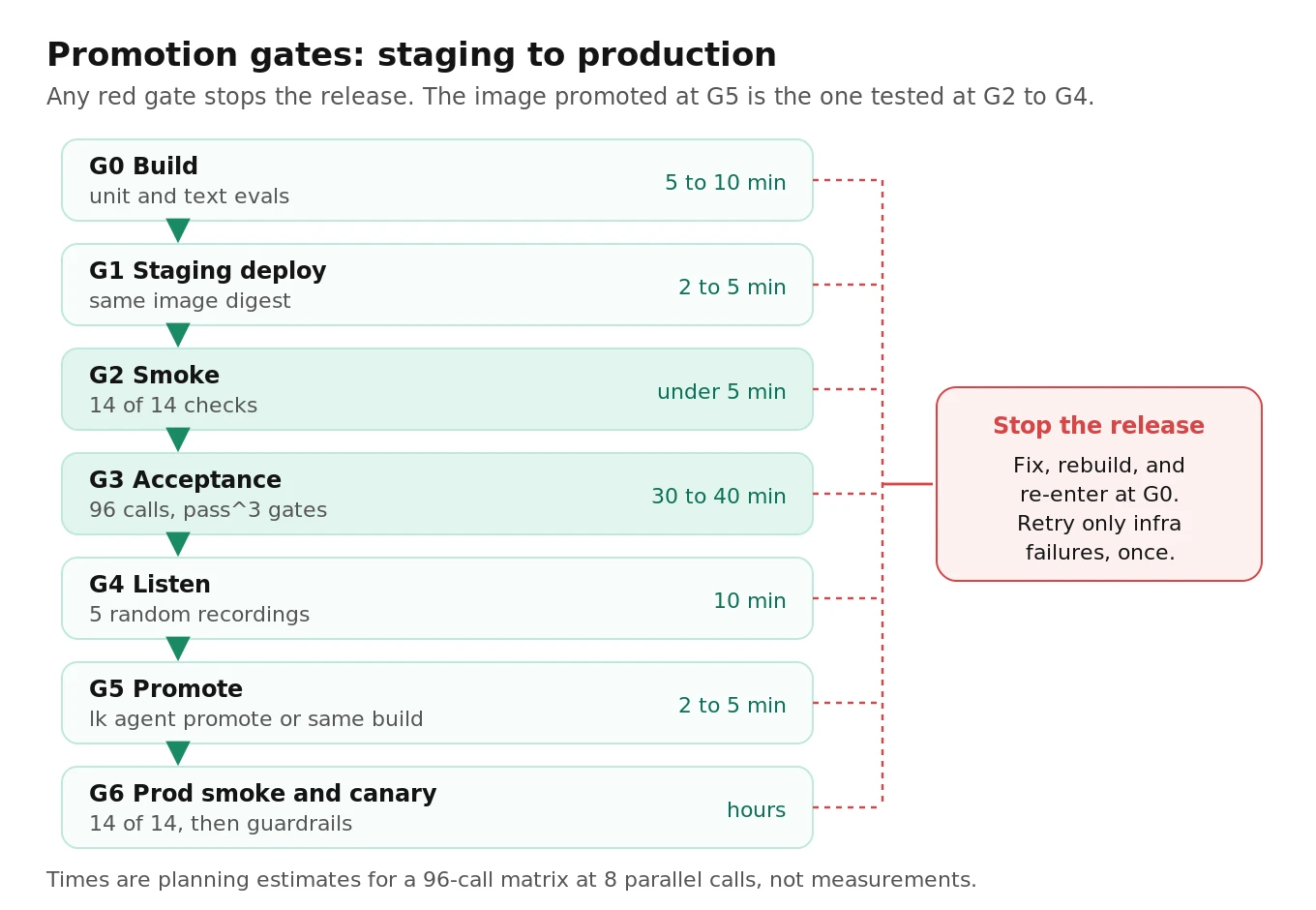
| Gate | What runs | Pass rule | Time |
|---|---|---|---|
| G0 Build | Unit and text evals, image build | Green; digest recorded | 5 to 10 min |
| G1 Staging deploy | `lk agent deploy --deployment staging` or Pipecat staging config | Ready | 2 to 5 min |
| G2 Smoke | P1 to P4, S1 to S10 | 14 of 14 | Under 5 min |
| G3 Acceptance | 96-call matrix | Gates above | 30 to 40 min at 8 parallel |
| G4 Listen | 5 random acceptance recordings | No blocker | 10 min |
| G5 Promote | `lk agent promote`, or same image or `--build-id` on Pipecat | Prod digest equals staging | 2 to 5 min |
| G6 Prod smoke, canary | Smoke on prod QA number, then canary | 14 of 14; guardrails hold | Hours |
Promote the artifact, not the branch. A production rebuild is an image nobody tested. Staging doesn't replace a canary: only real callers prove the release works for real callers. Canary math is in our prompt release guide, and staging is the right place to rehearse the paths in our provider outage failover guide.
Score how much you can trust staging
Breck and colleagues at Google proposed The ML Test Score (2017): each test earns half a point if run manually with documented results and a full point if automated, and the final score is the minimum across sections, so one strong area can't hide a weak one. Interviewing 36 teams, they found canarying was common where release tooling made it easy; one team without such tooling said the single time they canaried was painful enough never to repeat.
Apply the same scoring to staging with four sections:
| Section | Items (0, 0.5 manual, 1 automated) |
|---|---|
| Parity | Pinned model and voice IDs; turn-taking diffed; region matched; same carrier and connection; same digest promoted |
| Isolation | Own number and trunk; own keys and quotas; dial and payment guards; synthetic data; can't starve production |
| Smoke | Every staging deploy; every promotion; under 5 minutes; written flake policy |
| Acceptance | Matrix with pass criteria; human fixtures; silence and noise; pass^k gate |
Your score is the lowest section total. Below 3 anywhere, a green staging run is weak evidence.
What staging costs to run
Published prices: Twilio US local outbound $0.0140 per minute, local inbound $0.0085, recording $0.0025, local numbers $1.15 per month (Twilio pricing), with partial minutes rounded up on every leg (Twilio billing). LiveKit's calculator estimates $0.0479 per minute for a phone agent on Build or Ship, and Ship starts at $50 per month (LiveKit pricing).
Assumptions: $0.05 per minute for the agent pipeline and the same for a simulated caller, $0.005 per minute to transcribe recordings, $0.01 per call for scoring. Elastic SIP Trunking rates differ from Programmable Voice; use yours.
| One smoke run | Math | Cost |
|---|---|---|
| QA outbound legs | 3 calls under 60 s, billed 3 min x $0.0140 | $0.042 |
| Staging inbound legs | 3 min x $0.0085 | $0.026 |
| Recordings | 3 min x $0.0025 | $0.008 |
| Transfer leg and sink | 1 min x ($0.0140 + $0.0085) | $0.023 |
| Agent pipeline | about 2.1 min x $0.05 | $0.105 |
| Transcription | 3 min x $0.005 | $0.015 |
| Total | about $0.22 |
| One acceptance run (96 calls, 2.6 min each, billed 3) | Math | Cost |
|---|---|---|
| Telephony, both legs | 96 x 3 x ($0.0140 + $0.0085) | $6.48 |
| Recordings | 96 x 3 x $0.0025 | $0.72 |
| Agent pipeline | 96 x 2.6 x $0.05 | $12.48 |
| Simulated caller | 96 x 2.6 x $0.05 | $12.48 |
| Scoring | 96 x $0.01 | $0.96 |
| Total | about $33 |
Per month, assume 110 smoke runs (60 staging deploys, 30 nightly, 20 post-promotion) and 12 acceptance runs: smoke about $24, acceptance about $396, four numbers $4.60, fake hosting $20 (assumed), LiveKit Ship $50 if staging drove the upgrade. Total: about $495 per month. That schedule uses roughly 110 x 2.1 + 12 x 96 x 2.6 x 2, or 6,200 agent session minutes, against Ship's 5,000 included.
For comparison, two hours of manual test calls per release at an assumed $100 per hour loaded cost is $1,600 a month for eight releases, covering one speaker in one quiet room with no record anyone can recheck.
How to set up and test a voice agent staging environment
1. Write the parity manifest. Log resolved config at startup in both environments and run `parity_check.py` in CI.
2. Set up the carrier. Create a Twilio staging subaccount or Telnyx staging connection and outbound voice profile. Buy a staging number, two QA caller numbers and a transfer sink. Skip trial accounts and test credentials.
3. Set up the agent. On LiveKit, create a staging project or run `lk agent deploy --deployment staging` with `livekit-agents` 1.6.0+, then add a staging trunk and a dispatch rule with explicit `trunk_ids`. On Pipecat Cloud, deploy a staging agent from `pcc-deploy.staging.toml` in production's region.
4. Split keys and quotas. Staging OpenAI project with a hard spend limit; a separate Deepgram key in your existing project; prefixed staging secrets.
5. Build the fakes. Contract-tested, with realistic latency, idempotency keys, a ledger, dial and payment guards, and a live-key startup check.
6. Record fixtures. Human speakers per scenario, plus silence, noise and hold music; synthetic identities in a seed file.
7. Wire the smoke runner into CI. Fail on any red check; retry once for infrastructure failures only.
8. Build the acceptance matrix. 8 scenarios x 4 conditions x 3 runs, capped at the concurrency production leaves free.
9. Gate promotion. Promote by digest after smoke, acceptance and a 5-call listen; smoke production right after, then canary.
10. Score monthly. Fill in the four-section score and fix the lowest section first.
Where independent evaluation fits
A staging environment you built yourself tests the failures you already imagined: you wrote the scenarios, recorded the fixtures and set the thresholds. Evalgent works as an independent evaluator for in-house voice agents. It can audit a release candidate before launch, run model and vendor bake-offs over your real phone path, add caller conditions your team didn't think of, and score production calls against the same criteria as your acceptance suite. If staging is green and you're unsure what it misses, a third-party audit finds out quickly. Keep logging fields identical across environments, as in our guide on what to log on every voice agent call, so external scoring and your gates read the same evidence.
Frequently asked questions
What is a voice agent staging environment?
It's a copy of your production call path for testing releases: its own phone number, carrier account, trunk, dispatch rule, agent deployment, API keys and fake back-ends. It runs the same STT, LLM and TTS models, region, codec path and turn-taking settings as production, so failures that only appear on real phone audio show up before callers hear them.
Can I use Twilio test credentials to test my voice agent?
No. With test credentials, Twilio doesn't place the call, doesn't fetch your URL, doesn't run TwiML and doesn't send status callbacks. They're useful for unit-testing an outbound dialer's error handling with magic numbers like +15005550002. For staging, use a paid Twilio subaccount with real numbers.
Should LiveKit staging be a separate project or a non-production deployment?
Non-production deployments are simpler: same project, one flag, and promotion without a rebuild. But they share secrets and concurrent session limits with production, sleep when idle, and need livekit-agents 1.6.0 or later. Use a separate project when staging load could approach your production concurrency limit or when you need fully separate credentials.
How do I keep a staging voice agent from calling real customers or charging cards?
Use four layers. Give staging only sandbox credentials, such as payment keys starting with sk_test_. Block egress to production APIs. Route every dial, transfer, SMS and charge through one guard function with an allowlist. Keep only synthetic data in staging back-ends. On Telnyx, add a separate outbound voice profile with low spend and channel limits.
What is the difference between smoke testing and acceptance testing for a voice agent?
A smoke test checks wiring: the call answers, the greeting plays, audio works both ways, one tool call lands, transfer and hangup work. It runs in under 5 minutes after every deploy. An acceptance test checks behavior across a scenario matrix with noise, accents and barge-in, runs each cell several times, and gates promotion.
How long should a voice agent smoke test take?
Under 5 minutes end to end. The suite in this guide runs 4 configuration checks and 10 call checks on 3 parallel calls, then spends about a minute on recordings, transcription and ledger queries. Anything slower gets skipped when people are in a hurry, which is exactly when a broken deploy goes out.
Why does my voice agent work in the browser playground but fail on phone calls?
The browser uses WebRTC with Opus audio at up to 48 kHz. Phone calls arrive as G.711 at 8 kHz through a carrier, a trunk and a dispatch rule. Sample-rate mismatches, codec lists, connection type and dispatch configuration only exist on the phone path, so test through a staging phone number that matches production.
How much does it cost to run a voice agent staging environment?
At this guide's assumptions, one smoke run costs about $0.22 and one 96-call acceptance run about $33. With 110 smoke runs and 12 acceptance runs a month, plus numbers, fake back-end hosting and a LiveKit Ship plan, the total is about $495 a month. Your model choices and call lengths will move this.
The bottom line
A voice agent staging environment earns its keep only when it runs the same phone path, models and region as production while being unable to reach real customers, real money or production's quota. Build the parity check, the isolation guards and the 5-minute smoke suite first, add the acceptance matrix next, and promote the exact image that passed.
Related Articles

How to automate voice agent testing: synthetic callers vs manual QA
Learn how ai test automation replaces manual QA for voice agents. Compare synthetic callers vs human testers, with a 5-step framework to scale without hiring.
Read more
AI Agent Testing vs Voice Agent Testing: What General Tools Miss for Voice
AI agent testing measures text outputs. Voice agent testing measures behaviour through an acoustic pipeline. Five failure categories general tools miss.
Read more