Go-Live Checklist for Every New Customer's AI Phone Agent
On this page
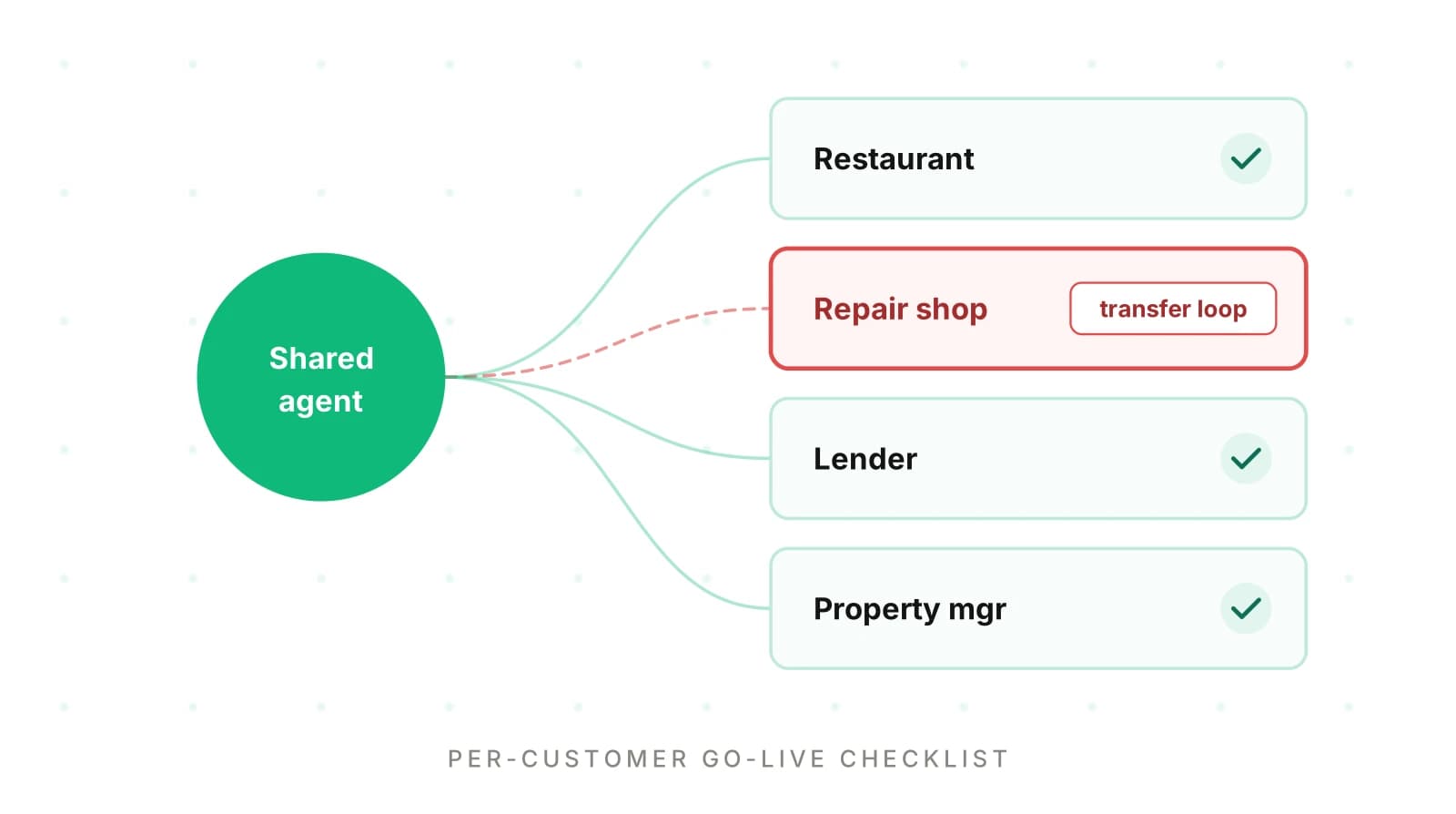
Your team built one multi-tenant voice agent. It answers phones for pizzerias, repair shops, lenders and property managers. A new one goes live every week, with a new greeting, hours, menu, transfer numbers and API credentials. The prompt barely changes. The configuration is brand new and has handled zero calls.
This is the AI phone agent go live checklist for that moment: an AI receptionist onboarding checklist run per customer. A general voice agent launch checklist covers the shared agent. See our voice agent testing checklist, pre-deployment validation guide and production readiness bar. Prompt changes are covered in how to ship prompt changes safely.
Why new-customer launches break on config, not the prompt
Your shared prompt has run thousands of calls. Each customer's config has run none. That gap is where week-one failures come from.
Systems research has measured this pattern for years. Yin and colleagues studied support cases at a commercial storage company and four open-source systems. They found that 27% of customer cases related to configuration issues. Configuration also caused 31% of high-severity requests, the largest share of any category. Two other findings map directly onto voice agent customer onboarding:
- 38.1% to 53.7% of parameter mistakes were illegal values. They clearly violated a format or rule. A machine check catches these. Think of a transfer number typed as "(312) 555-0100" or a time zone spelled wrong.
- 21.7% to 57.3% of misconfigurations involved settings outside the system itself. For a phone agent, that means the carrier's forwarding, the customer's POS and the calendar they forgot to share.
A later study adds the timing problem. Xu and colleagues looked at "latent" config errors: settings that are not used at startup. In their data, latent errors were 47.6% of cases but 75% of high-severity ones. They stay hidden until a rare path runs. A phone agent has many rare paths. Holiday hours run on one day a year. The after-hours transfer runs at 9:47 pm. The "speak to a manager" route runs once a week. None of them show up in a happy-path demo call.
Google's SRE book makes the same point at the change level. It says "roughly 70% of outages are due to changes in a live system". Its remedies are progressive rollouts, fast detection and safe rollback. Onboarding a customer is a live change, so the pack applies all three per tenant.
Tenant config: the per-customer data your shared agent reads at call time. It covers identity, hours, catalog, staff routing, booking rules, integrations, language and legal settings.
A worked example of the odds
Here is illustrative math, not measured data. Say a tenant config has 60 fields. Say each field has a 1% chance of being wrong at intake. The chance that at least one field is wrong is:
P(at least one error) = 1 - (1 - p)^n
                      = 1 - 0.99^60
                      = 1 - 0.547
                      = 0.453   (about 45%)
Nearly half of launches would carry a defect. The AI phone agent go live checklist exists to find them before a caller does.
The per-customer config surface
Start by listing what differs per customer. The right-hand column is what breaks downstream, often silently.
| Config area | Typical failure at intake | What breaks downstream |
|---|---|---|
| Business name and greeting | Old brand name, unfilled `{location}` token | Caller thinks they dialed wrong, hangs up |
| Hours, holidays, time zone | Hours entered in UTC, Thanksgiving missing, overnight span | Agent books a slot when the shop is closed |
| Menu, services, prices | Price of zero, retired item still active | POS ticket at the wrong total |
| Staff and transfer numbers | Wrong format, number is the forwarded main line | Transfer loops back to the agent |
| Booking rules | Lead time, slot length or capacity wrong | Double bookings, no-shows |
| Integrations | Expired token, wrong location ID, wrong field map | Order or lead lands in another store or nowhere |
| Languages | Spanish enabled, Spanish menu names missing | Agent translates item names the POS cannot match |
| Recording disclosure | Disclosure missing for an all-party-consent state | Legal exposure on every recorded call |
| Forwarding and porting | Carrier voicemail answers first, port rejected | Calls never reach the agent |
Restaurants feel the catalog rows most; see the restaurant phone ordering playbook and allergy and add-on errors. Repair shops feel booking and transfers (auto repair AI receptionist guide). Lenders feel disclosure and data rows (lending QA guide, escrow and payoff testing).
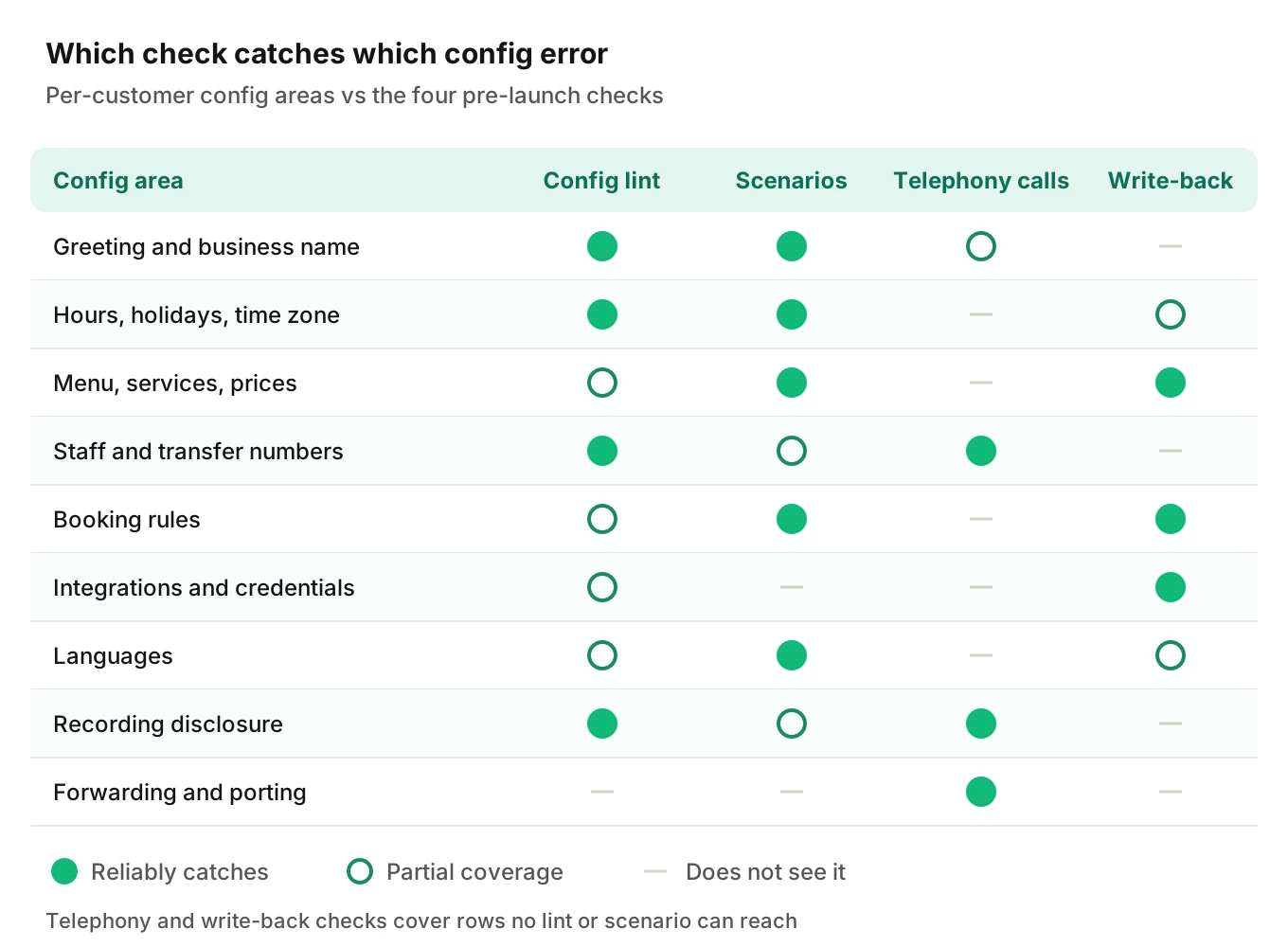
No single check covers every row. A lint cannot hear the carrier's voicemail answer first. That is why the pack has six gates.
The six gates of the go-live pack
Each gate has one job, an owner and a pass criterion. Run them in order. A failure at one gate blocks the next.
Gate 1: config lint (machine checks)
Config validation comes first, before any call. It catches the "illegal value" class from the Yin study in seconds. Below is a simplified Python validator using only the standard library.
import re
from datetime import date, time
from zoneinfo import ZoneInfo, ZoneInfoNotFoundError

E164 = re.compile(r"^\+[1-9]\d{1,14}$")
# Maintained with your counsel. Not a complete list.
ALL_PARTY_STATES = {"CA", "WA"}
DAYS = ["mon", "tue", "wed", "thu", "fri", "sat", "sun"]


def lint_tenant(cfg: dict, main_line: str) -> list[str]:
    errs = []
    # 1. Identity and greeting
    if cfg["business_name"].lower() not in cfg["greeting"].lower():
        errs.append("greeting does not say the business name")
    if "{" in cfg["greeting"]:
        errs.append("greeting has an unfilled template variable")
    # 2. Time zone, hours, holidays
    try:
        ZoneInfo(cfg["timezone"])
    except ZoneInfoNotFoundError:
        errs.append(f"unknown IANA time zone {cfg['timezone']!r}")
    for day in DAYS:
        for open_t, close_t in cfg["hours"].get(day, []):
            if time.fromisoformat(open_t) >= time.fromisoformat(close_t):
                errs.append(f"{day}: opens {open_t} after close {close_t}")
    if not any(date.fromisoformat(h) >= date.today() for h in cfg["holidays"]):
        errs.append("no upcoming holidays listed")
    # 3. Phone numbers
    for name, num in cfg["transfer_numbers"].items():
        if not E164.match(num):
            errs.append(f"transfer {name} not E.164: {num}")
        if num == main_line:
            errs.append(f"transfer {name} is the forwarded main line (loop)")
    # 4. Catalog
    for item in cfg["catalog"]:
        if item["price"] <= 0:
            errs.append(f"price missing or zero: {item['name']}")
    # 5. Recording disclosure
    if cfg["state"] in ALL_PARTY_STATES and not cfg["disclosure_in_greeting"]:
        errs.append("all-party state but no recording disclosure")
    return errs
Run against a deliberately broken pizzeria config, it prints:
greeting does not say the business name
greeting has an unfilled template variable
unknown IANA time zone 'America/Chicgo'
fri: opens 23:00 after close 02:00
transfer manager not E.164: (312) 555-0100
transfer kitchen is the forwarded main line (loop)
price missing or zero: Garlic knots
all-party state but no recording disclosure
Four details are worth explaining.
1. E.164. Twilio's glossary defines it as a `+`, a country code that does not start with zero, and "a total of 15 digits" at most. Store transfer numbers this way. Then your dialer never guesses.
2. Time zones. Store an IANA zone name, never a fixed offset. As of October 2026, IANA's latest tz release is 2026e, dated September 29, 2026. It notes Manitoba moves to a permanent -05 offset on October 31, 2026. A tenant saved as "UTC-6" would be wrong overnight.
3. Overnight hours. A bar open until 2 am trips the Friday check. Store overnight spans as two ranges so the lint stays strict.
4. The transfer loop. If the main line forwards to your agent, a transfer to that line rings your agent again. Our post on ending and transferring calls covers the transfer mechanics.
Pass criterion: zero lint errors. Waivers need a written reason.
Gate 2: scenarios built from this customer's own data
Generic test calls miss tenant bugs. "A large pepperoni" passes at every pizzeria. Generate scenarios from the tenant config itself: their best sellers, their weirdest modifier, their real holiday and staff names. The shared agent is already tested, so 20 to 30 calls is enough. A good mix:
- Catalog (8): top items, one item with required options, one retired item, one price question.
- Hours (5): open now, closed now, holiday, the last slot before close, an overnight edge.
- Routing (4): ask for a named staff member, ask for a manager, after-hours transfer, transfer target busy.
- Booking or order (5): a normal booking, a full slot, a change, a cancel, a deposit or payment step.
- Language and disclosure (2 to 4): the greeting with disclosure, and one call per enabled language.
- Caller conditions: run a subset with a noisy line and a fast talker.
A scenario generator saves the most time here. Evalgent generates scenarios from an agent's prompt and flows. It calls the agent over PSTN, SIP or WebRTC with caller profiles for accent, pace, interruptions and noise. That turns this gate into review work, not dialing work.
Score calls from the audio, not just the transcript. The half-and-half ordering post shows how small speech slips become wrong tickets.
Pass criterion: every scenario passes, or each failure has a fix and a re-run.
Gate 3: forwarding, porting and telephony
Most businesses keep their number. Call forwarding to an AI receptionist and number porting both fail in ways a direct dial never shows.
Conditional call forwarding. Carriers use their own star codes. Google's help page lists AT&T's 61 for unanswered, 62 for unreachable and 67 for busy. It lists 71 for Verizon. It also warns that "these commands may vary by carrier." Verizon's own page says *71 forwards when you don't answer "after three or four rings". So a forwarded caller hears several rings before your agent speaks. Measure that delay. Some callers hang up during it.
Forwarded calls behave differently. They can carry extra signaling and a different caller ID. One forum thread describes forwarded calls failing with 0-second durations while direct dials worked. No root cause was posted. The lesson holds anyway: test through the customer's real forwarding, not only your number.
Porting. Under 47 CFR 52.35(a), carriers must complete a simple wireline or intermodal port "within one business day." Twilio lists the usual rejection causes: a PIN, address or zip code that does not match the carrier's records, an unauthorized requester, or no customer service record. A safe default is to go live on forwarding first. Port later, once the agent has a clean week.
Then run a smoke test of six real calls from an outside phone:
1. Direct to the agent's number.
2. To the customer's main line while it rings unanswered.
3. To the main line while it is busy.
4. After hours.
5. A transfer to each staff number.
6. A transfer when the staff line does not answer.
Pass criterion: every call reaches the right place, and ring-to-greeting time is recorded.
Gate 4: integration write-back checks
The call is the front door to a ticket, appointment, lead or payment record. A wrong write-back is worse than a dropped call, because nobody notices it. Check each record in the customer's system, not your own logs.
- Right place: correct store, location ID, calendar or pipeline.
- Right content: items, modifiers, quantities, total, date and time in the tenant's zone.
- Right identity: caller name and callback number as said, not the forwarding number.
- Exactly once: a retried tool call must not create a duplicate order.
- Visible to staff: the record shows where the customer's staff actually look.
These are the silent failures described in detecting silent tool failures. Argument-level errors, such as a wrong date or wrong quantity, are covered in tool argument accuracy.
Pass criterion: every expected record exists once, with every field correct.
Gate 5: recording disclosure and sign-off
Call recording consent by state is the rule to encode here. Federal law sets a one-party consent floor. Under 18 U.S.C. 2511(2)(d), recording is lawful when "one of the parties to the communication has given prior consent." Some states require all-party consent. California Penal Code 632 targets recording "without the consent of all parties to a confidential communication". The California Supreme Court applied that law to calls with California residents recorded in Georgia (Kearney v. Salomon Smith Barney, 2006). So the caller's state can matter, not just the business's.
Washington adds a detail engineers miss. RCW 9.73.030(3) treats consent as obtained when one party announces the recording. It also says that announcement "shall also be recorded." If recording starts after your greeting, the disclosure is not in the file. Check the recording, not the prompt. This is not legal advice. Have counsel set the disclosure rule per tenant.
Then get sign-off. Send three recorded test calls, write-back screenshots and the rollback plan. Ask the customer to confirm business hours, prices and staff numbers in writing. Most corrections arrive here.
Pass criterion: disclosure audible in the recording where required, plus written customer sign-off.
Gate 6: first-week monitoring and rollback triggers
Latent errors surface in week one. Watch every call until the tenant has a clean week. The production monitoring guide covers setup. Define the rollback rule before launch.
Suggested starting triggers (tune them to your volume):
| Signal | Trigger | Action |
|---|---|---|
| Transfer fails or loops | Any single occurrence | Route that path to voicemail or human now |
| Write-back mismatch | Any wrong record in the first 20 | Pause agent for this tenant, fall back to staff |
| Call never reaches agent | Any forwarded call with 0-second duration | Fix forwarding, keep old voicemail live |
| Missing disclosure | Any recorded call without it | Stop recording for this tenant until fixed |
| Caller hangs up in greeting | Clearly above your fleet baseline | Review greeting and ring delay |
Rollback should be a per-tenant config flag, not a deploy. Every other tenant keeps running.
Evalgent's production monitoring fits this gate. Teams push call recordings, and each call is transcribed, mapped to scenarios and judged. It flags tool-call failures, latency spikes, PII leakage and policy failures with fix recommendations.
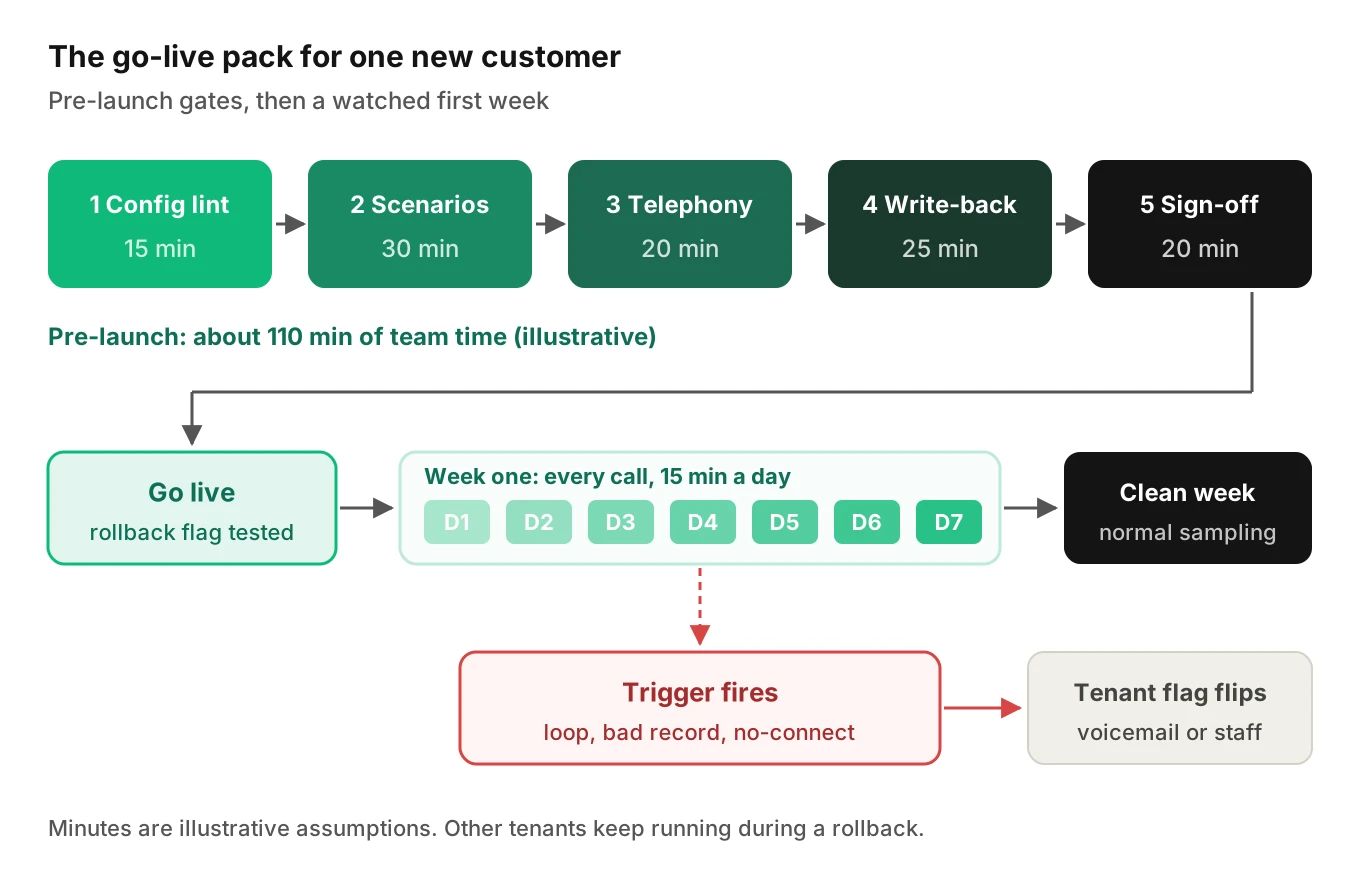
Timing math: what the pack costs as onboardings scale
The pack must be cheap enough to run every week. All minutes below are illustrative assumptions, not measured data.
| Gate | Go-live pack (min) | Fully manual (min) | Why they differ |
|---|---|---|---|
| 1. Config lint and fixes | 15 | 20 | Script vs reading the config by eye |
| 2. 24 scenarios | 30 | 144 | Review flagged calls vs dial 24 calls at 6 min each |
| 3. Six telephony calls | 20 | 20 | Must be real calls either way |
| 4. Write-back checks | 25 | 25 | Must open the customer's system either way |
| 5. Disclosure and sign-off | 20 | 20 | Human conversation either way |
| 6. Week-one monitoring | 75 | 150 | 15 vs 30 min a day for 5 business days |
| Total per customer | 185 (3.1 h) | 379 (6.3 h) |
Weekly hours are simple: hours per week = onboardings per week × hours per customer.
4 customers/week:   4 × 3.1 h = 12.3 h   (manual: 25.3 h)
10 customers/week: 10 × 3.1 h = 30.8 h   (manual: 63.2 h)
Week-one watches overlap. Little's law gives the load: tenants in watch = arrival rate × time in watch. At 10 new tenants a week and a one-week window, about 10 are always in watch. At 15 minutes each, that is 150 minutes of review per business day. A two-week window doubles it.
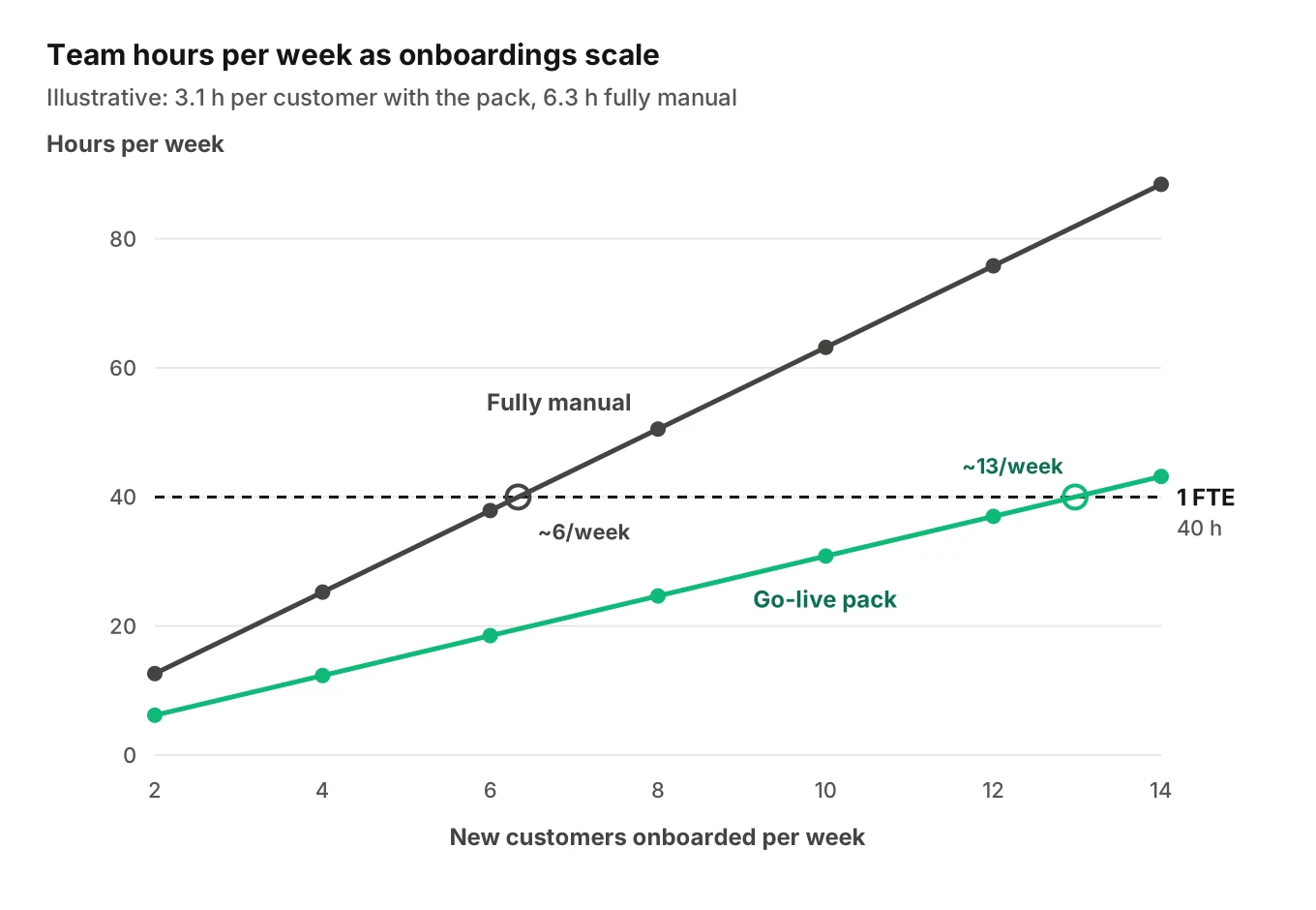
Manual testing crosses one full-time engineer at about six onboardings a week. The pack stays under until about 13. The gap is gates 2 and 6.
How to run the go-live pack for a new customer
Every AI phone agent onboarding follows the same ten steps.
1. Freeze the intake. Export the tenant config as one versioned file, so every fix is a diff.
2. Run the config lint. Fix every error or record a waiver with a reason. Re-run until clean.
3. Generate 20 to 30 scenarios from the tenant's data. Use their real items, hours, holidays, staff and booking rules. Add one call per enabled language.
4. Run scenarios against a staging copy of the tenant. Point integrations at the customer's sandbox if one exists. Our staging environment guide shows how to set one up.
5. Place the six telephony calls from an outside phone. Use the customer's real forwarding. Record ring-to-greeting time.
6. Verify every write-back in the customer's system. Check location, fields, identity and duplicates.
7. Check the disclosure in the recording. Listen to the first seconds of a recorded call, not the prompt text.
8. Send the sign-off pack and get written approval. Include the rollback plan and who flips it.
9. Go live with the rollback flag tested. Flip it once on purpose before launch day ends.
10. Monitor every call for seven days. Close the watch only after a clean week. Then move the tenant into normal sampling.
The copyable checklist
Paste this AI phone agent go live checklist into your onboarding ticket template.
| # | Check | Owner | Pass criterion |
|---|---|---|---|
| 1 | Tenant config exported and versioned | Onboarding lead | One file, one version ID |
| 2 | Greeting says the right business name, no template tokens | Lint script | Zero errors |
| 3 | IANA time zone, hours, overnight spans, next 12 months of holidays | Lint script + customer | Zero errors, holidays confirmed |
| 4 | Catalog prices non-zero, retired items off | Lint script + customer | Zero errors, menu confirmed |
| 5 | Transfer numbers in E.164, none equal the forwarded line | Lint script | Zero errors |
| 6 | Integration credentials valid, correct location ID | Engineer | Test write succeeds in the right location |
| 7 | 20 to 30 tenant-specific scenarios | QA owner | All pass or fixed and re-run |
| 8 | Each enabled language tested with real item names | QA owner | Item names match the POS |
| 9 | Six telephony calls via real forwarding | Engineer | All routed correctly, ring delay logged |
| 10 | Write-back verified in the customer's system | Engineer | Each record exists once, all fields right |
| 11 | Recording disclosure present in the recording | Compliance owner | Audible within the recorded file |
| 12 | Customer sign-off on hours, prices, staff numbers | Account manager | Written approval on file |
| 13 | Rollback flag tested once | Engineer | Calls reach voicemail or staff within one call |
| 14 | Seven-day monitoring with triggers set | On-call owner | Clean week before closing the watch |
Keep owners distinct. Whoever typed the config should not be its only checker.
Frequently asked questions
How long does it take to get a new customer's AI phone agent live?
A new customer's AI phone agent needs about 110 minutes of team time before launch, in the illustrative model above. Week-one monitoring adds about 75 minutes. Calendar time is often set by the customer: confirming hours, sharing integration access and setting up forwarding. Porting a number can take longer because carrier record mismatches cause rejections.
What should I test before an AI receptionist goes live?
Test the parts unique to that customer. That means a config lint, 20 to 30 scenarios built from their own catalog, hours and staff, six real calls through their forwarding, and a check that every booking or order lands correctly in their system. Also confirm the recording disclosure appears in the recorded audio. The shared agent should already pass its own launch bar.
Can a customer keep their existing number?
A customer can keep their existing number in two ways. They can forward it to the agent with their carrier's conditional forwarding codes, or port it to your provider. Forwarding is faster to start and easy to undo. Porting removes the ring delay but needs carrier records to match exactly. Many teams forward first and port after a clean week.
Why do forwarded calls fail when direct calls work?
Forwarded calls take a different path from direct dials. The carrier may ring the original line three or four times first. Its voicemail may answer before forwarding triggers. Extra signaling and a different caller ID can also arrive with the call. Always test through the customer's real forwarding setup, not only through your agent's own number.
Do I need a recording disclosure for every customer?
A recording disclosure is the safe default for every tenant. Federal law allows one-party consent, but states such as California and Washington require all parties to consent. California courts have applied that rule to out-of-state recorders calling Californians. Washington requires the announcement itself to be recorded. Have counsel set the rule per tenant. This is not legal advice.
How many customers can one engineer onboard per week?
In the illustrative model, the go-live pack costs about 3.1 hours per customer, including week-one monitoring. A 40-hour engineer could cover about 13 onboardings a week, with no time for anything else. Fully manual testing at about 6.3 hours per customer caps out near six. Plug in your own minutes per gate to get your real number.
When should a new customer's agent roll back to voicemail?
A new customer's agent should roll back to voicemail or a human on any failed or looping transfer, any wrong record in the first 20 write-backs, any forwarded call that never reaches the agent, or any recording without a required disclosure. Rollback should be a per-tenant config flag, tested once before launch, so one customer's problem never touches the rest.
Should the shared prompt be retested for every new customer?
The shared prompt does not need a full retest for every new customer. It needs its own regression suite whenever the prompt or model changes. For a new customer, test what is new: their config, their data, their phone path and their integrations. The exception is a tenant that enables a new feature, language or flow for the first time.
The bottom line
Most first-week failures for a new customer come from that customer's config, phone path and integrations, not from the shared prompt. Run the same six-gate pack for every tenant, and keep a per-tenant rollback flag ready before the first real call.
Related Articles

How to automate voice agent testing: synthetic callers vs manual QA
Learn how ai test automation replaces manual QA for voice agents. Compare synthetic callers vs human testers, with a 5-step framework to scale without hiring.
Read more
AI Agent Testing vs Voice Agent Testing: What General Tools Miss for Voice
AI agent testing measures text outputs. Voice agent testing measures behaviour through an acoustic pipeline. Five failure categories general tools miss.
Read more