How to reduce latency in AI voice agents
On this page
Latency is the difference between an agent that feels human and one that feels broken. A pause past about a second makes callers talk over the agent or hang up. Evalgent measures this on real calls. Here is what drives the delay and how to cut it.
Voice agent latency: the time from the caller finishing speaking to the agent starting to speak, measured end-to-end across every stage of the pipeline.
What high latency looks like
These are the symptoms callers notice:
- A dead pause after the caller stops talking, before any reply.
- The caller repeats themselves, thinking the agent did not hear.
- Both sides talk at once because the gap felt like a turn ending.
- The agent starts fast but stalls mid-sentence while a tool runs.
- The delay grows worse under load, at peak call volume.
The pause itself is the failure. A correct answer delivered a second late still feels like a bad call.
Why voice agents are slow
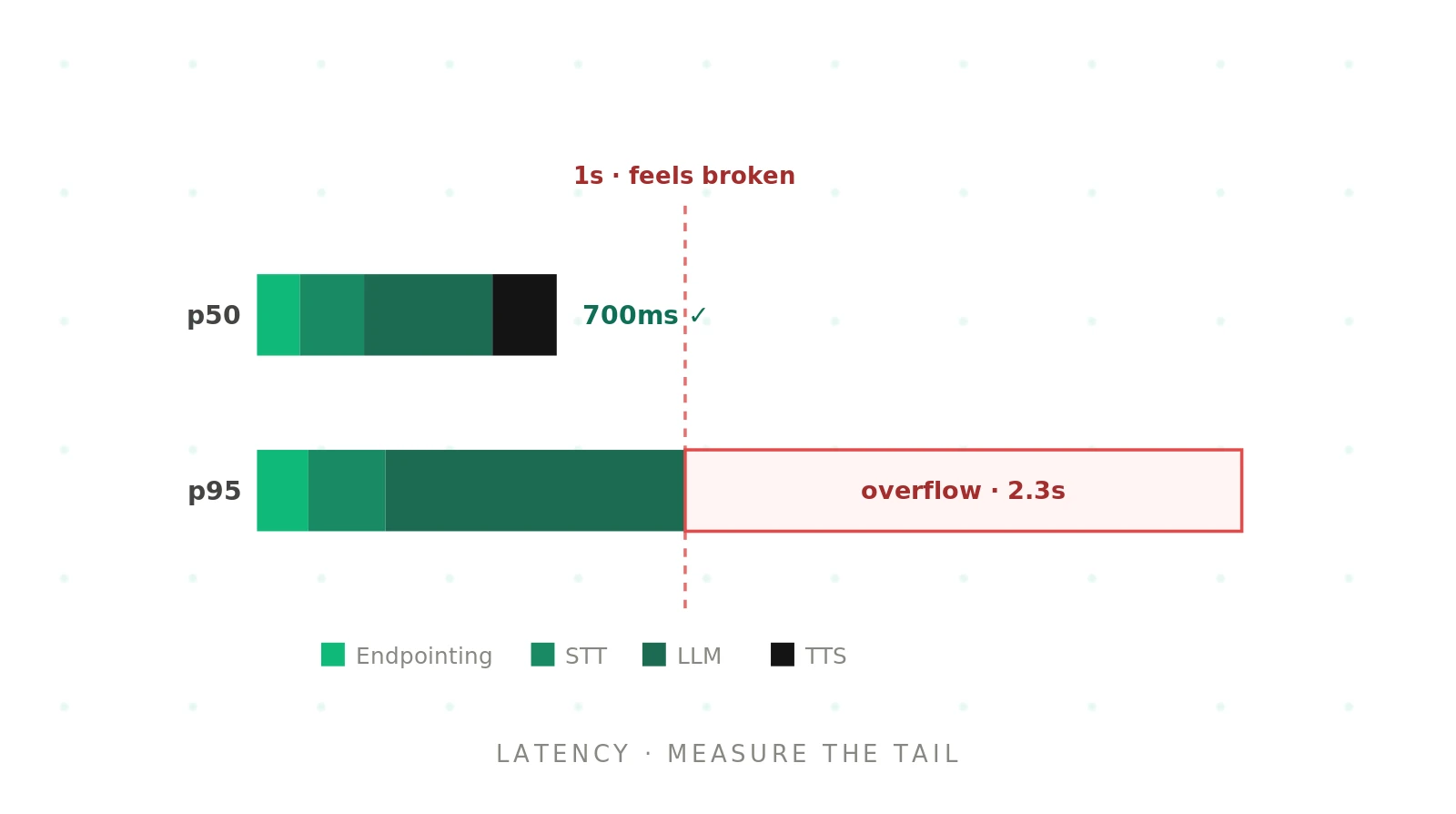
Latency is not one number. It is a chain, and each stage adds delay. The most common mistake is optimizing the average while the tail — the p90 and p99 — is what callers actually feel. The table maps each cause to what you hear and how to fix it.
| Cause | How it shows on a call | Fix |
|---|---|---|
| Slow endpointing | Long gap before the agent even starts | Tune VAD and end-of-turn detection to fire sooner |
| Non-streaming stages | Reply waits for the full LLM output before speech | Stream STT, LLM tokens, and TTS so stages overlap |
| Large or reasoning model | Consistent multi-second pause every turn | Use a faster model; keep reasoning off for the live turn |
| Slow first token (TTFT) | Noticeable lag before the voice begins | Pick a model with low time-to-first-token; warm it |
| Cold starts | The first call of a session is far slower | Keep instances warm; pre-load models |
| Distant hops | Steady extra delay across the pipeline | Colocate STT, LLM, and TTS in one region |
| Slow tool calls | Agent stalls mid-turn waiting on an API | Stream a filler line; set tool timeouts and fallbacks |
How to reduce latency in AI voice agents
1. Measure the tail — Track end-to-end latency at p50, p90, and p99, not just the average.
2. Stream everything — Overlap STT, LLM tokens, and TTS so no stage waits for the previous to finish.
3. Pick for speed — Choose a model with low time-to-first-token, and keep reasoning off for the caller-facing turn.
4. Tune endpointing — Adjust VAD so the agent starts as soon as the caller is done, without cutting them off.
5. Cover slow tools — Stream a short filler line during slow API calls, and set timeouts with fallbacks.
6. Re-test under load — Run the latency suite at peak concurrency, since delay grows worst when it matters most.
A worked example
A team measured an average latency of 900 milliseconds and shipped. Callers still complained. The average looked fine, but the p95 was 2.3 seconds, driven by cold starts and a reasoning mode left on for the live turn. Turning reasoning off and keeping instances warm pulled the p95 under a second. The average barely moved. The tail was the whole problem, and only percentile testing exposed it.
Reducing latency with Evalgent
Evalgent measures latency the way callers experience it, on realistic calls. Scenarios reproduce real conversations, including the slow paths where tools run. Profiles vary caller voice and pace so endpointing is tested across speaking styles. Metrics record end-to-end latency at p50, p90, and p99, with pass/fail thresholds you set. Evaluations run the suite at concurrency, so the tail under load is visible before launch. Reviews let you replay a slow call and see which stage ate the budget. For model choice, see best LLM for voice agents. For the full pipeline, see the voice agent stack guide.
The bottom line
Latency is a chain across endpointing, speech-to-text, the LLM, and text-to-speech, and the tail is what callers feel. Stream every stage, keep reasoning off the live turn, and test the p95 under load — not the average.
Frequently asked questions
What is a good latency for a voice agent?
Aim for under 800 milliseconds end-to-end, from the caller finishing to the agent starting to speak. Under 500 milliseconds feels natural; past about one second, callers start talking over the agent or repeating themselves. Judge it by the p90 and p95, not the average, since the tail is what breaks calls.
What causes latency in a voice agent?
Latency accumulates across stages: end-of-turn detection, speech-to-text, the LLM, and text-to-speech, plus network hops and cold starts. The biggest single causes are non-streaming pipelines and slow or reasoning-enabled models. Each stage that waits for the previous one to finish, instead of streaming, adds a full delay.
How do you measure voice agent latency?
Measure end-to-end latency from the caller finishing to the agent's first audio, and report it at p50, p90, and p99. Averages hide the slow calls that callers actually notice. Break the number down per stage — endpointing, STT, LLM time-to-first-token, TTS — so you can see which part of the pipeline to fix.
What is time to first token and why does it matter?
Time to first token, or TTFT, is how long the LLM takes to produce its first token, not the whole reply. It matters in voice because speech can begin streaming as soon as the first tokens arrive. A model with low TTFT lets the agent start talking sooner, even if the full answer takes longer to finish.
Does turning on model reasoning increase latency?
Yes, significantly. Reasoning or thinking modes spend extra compute before the model answers, which delays the first token and wrecks the caller-facing turn. Keep reasoning off for the live response. Reserve it for offline work like call planning or post-call analysis, where an extra pause does not matter.
How does streaming reduce latency?
Streaming lets stages overlap instead of running in sequence. Speech-to-text streams partial transcripts, the LLM streams tokens, and text-to-speech starts speaking before the full reply is ready. Without streaming, each stage waits for the previous one to finish, stacking every delay end to end and producing a long, obvious pause.
Why is my voice agent slower under load?
Latency usually degrades at high concurrency because of queuing, cold starts, and shared model capacity. An agent that feels fast in a demo can stall at peak volume. Always test latency at realistic concurrency, and keep instances warm, so the tail does not blow out exactly when call volume is highest.
How do you keep a voice agent responsive during slow tool calls?
Stream a short filler line — "let me check that for you" — while the tool runs, so the caller hears progress instead of silence. Set a timeout on every tool call with a fallback path, so a slow or failed API does not freeze the turn. Then test the slow path directly, not just the happy path.
Related guides
How to test tool calling in AI voice agents
Tool calling fails when a voice agent picks the wrong function, fills bad arguments, or acts silently. Learn how to test tool calling and catch it.
How to test for hallucinations in AI voice agents
Voice agents hallucinate when they state wrong facts confidently. Learn how to test for hallucinations, catch them before production, and ground answers.