Concurrency Failure in Voice Agents: Causes and Fixes
On this page
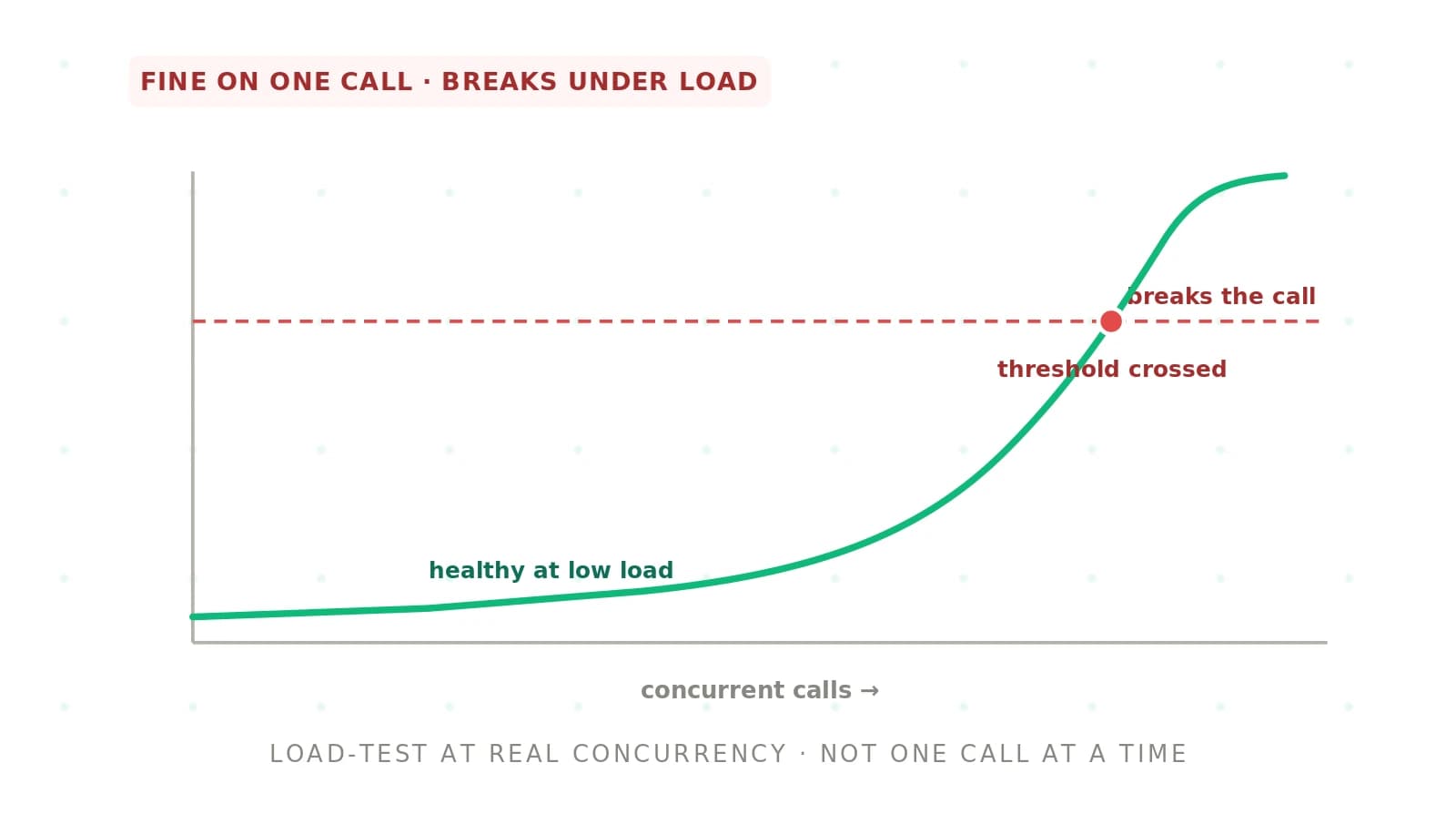
Your agent aced every test call. Response times sat near 300 milliseconds. Entities were accurate. The demo was clean. Then Monday morning arrived. Three hundred callers dialed in at once. The same agent began pausing for full seconds. It dropped context. It returned tool errors. Nothing about the agent changed. What changed was the load.
This is concurrency failure. It is one of the most common ways a voice agent that looked ready falls over in production. We will cover what it looks like on a real call. Then we cover the causes, how to detect it before launch, and the fixes that keep an agent stable at peak.
This sits alongside the broader pattern of why voice agents fail in production. It is distinct from the how-to of stress testing voice AI. That guide is the method. This piece is the failure mode itself and how you engineer it away.
What concurrency failure looks like
Concurrency is the ability to handle many operations at once. In software, concurrency) is a well-studied source of hard-to-reproduce bugs. A voice agent is not one system. It is a chain. Speech-to-text, a language model, tool calls, text-to-speech, and telephony each form a link. Every link has its own capacity ceiling.
Under light load, every link has room. Under heavy load, the weakest link saturates first. Its slowdown then ripples through the whole chain. The caller does not see a stack trace. They hear a pause.
A turn that took 300 milliseconds in testing stretches past a second. The agent talks over the caller. It forgets what they just said. Sometimes the call simply drops. The failure is real. But it stays invisible in any test that sends one call at a time. Solo tests never create contention. That is exactly why so many teams ship the failure unaware.
Why voice agents degrade under load
Concurrency failure is rarely one bug. It is usually several capacity limits hit at once. Each one amplifies the others. Naming the distinct causes lets you fix the right one instead of guessing.
Latency amplification under queueing. Requests queue when they arrive faster than a component can process them. Queue time adds directly to response time. A component that answers in 200 milliseconds when idle can take a full second when its queue is deep. In a real-time medium, that tail is the pause the caller feels.
Provider rate limits. Every hosted model and speech API enforces a request ceiling. Rate limiting protects the provider. From your side, it means requests above a threshold get rejected or throttled. If your peak traffic exceeds your quota, a share of calls fail outright. They fail immediately, not slowly.
Dropped context or state. Sessions compete for memory and connections under load. A poorly isolated agent can leak one caller's context into another's turn. It can lose conversation history mid-call. It can reset state when a worker recycles. The agent stops being coherent when the most people are listening.
Resource exhaustion. CPU, memory, file descriptors, and sockets are finite. Concurrent sessions can consume them faster than they are released. The process then thrashes, garbage-collects constantly, or crashes. One exhausted host sheds its load onto the others. The failure spreads.
Cascading tool failures. Voice agents call external tools. A CRM lookup, a payment API, a database each have limits. Under load, a slow tool holds a connection open. Connections pile up. A timeout in one dependency cascades into failures across every call that needs it.
Cause, symptom, and fix at a glance
The table maps each cause to the symptom a caller feels under load. It then names the fix that addresses it. Most incidents combine several of these. So treat the fixes as a layered defense, not a menu.
| Cause | Symptom under load | Fix |
|---|---|---|
| Latency amplification from queueing | Turn latency spikes from ~300ms past 1s | Autoscaling, backpressure, capacity headroom |
| Provider rate limits | Calls rejected or throttled at peak | Negotiate quotas, distribute keys, queue |
| Dropped context or state | Agent forgets or crosses caller context | Session isolation, stateless workers, sticky routing |
| Resource exhaustion | Hosts thrash, garbage-collect, or crash | Connection pooling, resource limits, horizontal scale |
| Cascading tool failures | Tool errors ripple across many calls | Timeouts, circuit breakers, graceful degradation |
| No load headroom at all | Everything degrades at once at peak | Load test at peak, provision above forecast |
How to detect and fix concurrency failure
Fixing concurrency failure is an engineering loop. Reproduce it under realistic load. Find the link that saturates first. Fix that link. Then re-test. Guessing wastes time, because the bottleneck rarely sits where intuition points.
1. Load test at expected peak — Run load testing at your realistic peak, not a comfortable average. Simulate the simultaneous calls of your busiest hour, plus a margin. The failure then surfaces in your test rather than in production.
2. Watch latency percentiles, not averages — Track p95 and p99 turn latency as load climbs. Averages hide the tail, and the tail is what callers feel. The ITU-T G.114 standard puts the comfortable one-way delay ceiling at 150 milliseconds. Watch how far your tail drifts past it.
3. Find the first link to saturate — Instrument every stage. Trace transcription, model, tools, and synthesis to see where time and errors appear first. An observability baseline with distributed tracing names the true bottleneck.
4. Add autoscaling and connection pooling — Scale worker capacity horizontally so new hosts absorb rising load. Pool connections to your providers and databases. Sessions then reuse them instead of opening a new one per turn. This attacks queueing and resource exhaustion directly.
5. Apply backpressure and graceful degradation — Shed or queue load deliberately when a component nears its ceiling. Do not let it collapse. Wrap tools in timeouts and circuit breakers. Degrade to a simpler path — a held message, a callback, a human handoff — instead of a hard failure.
6. Secure provider quota headroom — Confirm your rate limits exceed your forecast peak. Negotiate higher quotas before launch. Distribute requests to avoid a single-key ceiling. Design for scalability so adding capacity is a config change, not a rewrite.
7. Re-test and set a concurrency gate — Re-run the load test after each fix. Confirm the tail holds. Make "latency and accuracy hold at peak concurrency" an explicit line in your production-readiness bar. No build ships without clearing it.
How concurrency failure differs from single-call bugs
A single-call bug is deterministic. It happens every time you send that input. A normal test catches it. Concurrency failure is a load-dependent bug. The same input passes at low volume and fails at high volume. That is what makes it dangerous. It survives every test suite that runs calls one at a time. It only appears once the agent meets real traffic.
This is why single-call evaluation is necessary but not sufficient. An agent can clear your entire testing checklist on task success, accuracy, and latency. It can still fail on launch day. None of those tests ran under concurrency. Load behavior is a separate axis of readiness. It has to be measured separately.
Frequently asked questions
What is concurrency failure in a voice agent?
It is when a voice agent that performs well on solo test calls degrades once it handles many at once. Latency spikes, rate limits reject calls, session state drops, resources exhaust, and tools cascade into failure. It is invisible in single-call testing. It only appears under realistic concurrent load, which is why it so often ships undetected.
Why does my voice agent slow down under load?
Because requests queue. When calls arrive faster than a component can process them, each request waits behind others. That queue time adds to response time. A stage that answers in 200 milliseconds when idle can take over a second when its queue is deep. The slowest saturated link sets the pace for the whole call.
How do I detect concurrency failure before launch?
Load test at your expected peak, not an average. Simulate your busiest hour plus a margin. Watch p95 and p99 latency and error rates as concurrency climbs. Instrument every stage so you see which link saturates first. The failure then surfaces in the test instead of on launch day, when it is far cheaper to fix.
What causes provider rate limit errors under high concurrency?
Every hosted speech or language API enforces a request ceiling to protect its own infrastructure. When your peak traffic exceeds that quota, requests above the limit are rejected or throttled. A share of calls then fail immediately. The fix is confirming your quota exceeds your forecast peak, negotiating headroom, and distributing load so no single key hits its ceiling.
How does autoscaling fix concurrency failure?
Autoscaling adds worker capacity as load rises. Incoming calls then land on fresh hosts instead of queueing behind saturated ones. It attacks latency amplification and resource exhaustion directly. But it is not a complete fix alone. Providers still have rate limits, and scale-up takes time. Pair it with connection pooling, backpressure, and provider quota headroom for a stable peak.
What is backpressure in a voice agent pipeline?
Backpressure is deliberately slowing or shedding incoming load when a component nears capacity, rather than letting it collapse. Instead of accepting more work than it can handle, the system queues, rejects, or routes work elsewhere. In a voice agent it keeps the pipeline from cascading into failure. It trades a controlled slowdown for a total outage.
Does load testing catch every concurrency bug?
No, but it catches the ones that matter most. Load testing at peak surfaces queueing latency, rate limits, and resource exhaustion that single-call tests miss entirely. Rare race conditions and state-leak bugs may still need targeted testing and production observability. Load testing is the essential first line, not a guarantee that no load-dependent bug remains.
How is concurrency failure different from a voice agent just being slow?
Baseline slowness is present on every call, including solo tests. It reflects the pipeline's inherent latency. Concurrency failure is load-dependent. The agent is fast at low volume and slow only under many simultaneous calls. Fixing baseline latency means optimizing the pipeline. Fixing concurrency failure means engineering capacity, scaling, and backpressure so the pipeline holds at peak.
Catching concurrency failure with Evalgent
Evalgent surfaces concurrency failure before your callers do. Scenarios capture the calls you need to hold up under load, including the hard ones. Profiles vary accent, pace, and noise, so the load you test looks like real traffic. Evaluations run that suite at concurrency, replaying many calls at once. Latency spikes, rate-limit rejections, and dropped state then show up as failures instead of surprises. Metrics express your ceilings — p95 latency, error rate, task success under load — as explicit pass/fail thresholds. Reviews let your team replay any call behind a degraded number to find which link saturated. Because the whole suite runs as a batch on every change, a regression that only appears under load is caught before it ships. To pressure-test your agent at peak, book a demo.
The bottom line
Concurrency failure is a load-dependent bug that lets an agent pass every solo test and still spike latency, hit rate limits, and drop state under real traffic. You cannot fix what you never measured, so load test at peak, find the first link to saturate, and engineer capacity and backpressure until the tail holds.
Single-call evaluation proves an agent can succeed, while concurrency testing proves it will on the busiest hour you do not control. Make holding at peak an explicit gate, and validate it the same way you would evaluate any vendor or wire up production observability.
Related Articles

Why AI voice agents fail in production: 9 failure layers, how to detect each, and how to prevent them
Voice agents fail in production across 9 layers, from 8 kHz audio to silent tool errors. Symptoms, root causes, alerts, and fixes in one master table.
Read more
Voice agent regression testing: how to detect regressions from model updates you don't control
Voice agent regression testing for changes you don't control: pin each layer, run a nightly pinned-vs-latest canary, and use paired stats to detect drops.
Read more