Tracing OpenAI Realtime and Other Speech-to-Speech Agents
On this page
A speech-to-speech agent hides its stages. Audio goes in and audio comes out of one model session. You cannot wrap a speech-to-text span, an LLM span and a speech synthesis span around anything. What you get instead is a stream of server events. Tracing realtime voice agent sessions is the work of turning that stream into a trace you can read.
This post is the how-to. It lists the events the OpenAI Realtime API sends, the timing each one gives you, and the spans they map to. It also covers what to attach to every turn. This guide on tracing realtime voice agent work was checked against OpenAI, OpenTelemetry and Google documentation as of November 19, 2026. Realtime event names and model names change, so recheck the linked pages before you pin anything.
Three earlier posts cover neighbouring ground: the generic OpenTelemetry trace and span model, the span attribute fields, and the GenAI semantic conventions. This post goes one level down. It works at the level of individual Realtime events and the clock problems they create.
Evalgent Observe, which is launching, ingests client data in OpenTelemetry format from any stack. It never sits in the media path, so nothing touches live audio or slows a call. Spans built as below are the kind of data it works from. You do not need Observe to use any of this, and the same spans work in any OTLP backend.
Why a speech-to-speech agent needs a different tracing recipe
A cascaded agent gives you three service calls, and each is a natural span. Our cascading vs speech-to-speech comparison covers the architecture. For tracing, the difference is simple. A speech-to-speech session is one long-lived connection, and everything happens inside it.
- The unit of work is an event, not a request. Events arrive while audio streams both ways.
- Stage boundaries are gone. You can only time the moments the server reports.
- The clock is yours. The server gives offsets inside the audio. You decide what wall-clock time each event gets.
What the OpenAI Realtime API tells you, and when
The server emits typed JSON events over a WebSocket, WebRTC or SIP connection. The conversations guide lists the response lifecycle in this order, and warns that some events, such as the delta events, can overlap:
1. conversation.item.added and conversation.item.done
2. response.created
3. response.output_item.added and response.content_part.added
4. response.output_audio.delta (repeated), then response.output_audio.done
5. response.output_audio_transcript.delta (repeated), then response.output_audio_transcript.done
6. response.content_part.done and response.output_item.done
7. response.done
Input-side events come from the voice activity detector. The table lists the ones that matter for tracing. Field names come from the server events reference and the typed models in OpenAI's Python SDK.
| Event | What it tells you | Fields worth keeping |
|---|---|---|
input_audio_buffer.speech_started | Server VAD detected speech | item_id, audio_start_ms |
input_audio_buffer.speech_stopped | Server VAD detected the end of speech | item_id, audio_end_ms |
input_audio_buffer.committed | The audio became a user message item | item_id, previous_item_id |
conversation.item.input_audio_transcription.completed | The separate transcription finished | item_id, transcript, usage |
response.created | A response started, status in_progress | response.id |
response.output_audio.delta | A chunk of base64 audio | response_id, item_id, delta |
response.output_audio.done | Audio finished, or ended early | response_id, item_id |
response.done | The response finished in any state | status, status_details, usage |
conversation.item.truncated | Unplayed audio was cut from context | item_id, audio_end_ms |
output_audio_buffer.started, .stopped, .cleared | Server-side playback buffer state (WebRTC and SIP only) | response_id |
error | Something failed; the session usually stays open | error.type, error.code, event_id |
Three details in that table drive the rest of the post.
The VAD events are tied to server VAD. The SDK docstring says speech_started is sent "in server_vad mode". The VAD guide shows server_vad as the default where VAD is supported, with semantic_vad as the alternative. If you turn turn detection off, you commit the audio buffer yourself, and you own those moments.
The item ID is your join key. speech_started, speech_stopped and committed all carry the item_id of the user message that will be created. The transcription events carry the same item_id. The audio deltas carry response_id and item_id for the assistant side. Join on these, never on arrival order.
The reference calls response.done the end for any outcome. The embedded response leaves out raw audio. You check its status to learn what happened: completed, cancelled, failed or incomplete.
Beta and GA names
OpenAI's Realtime guide tells beta integrations to migrate to GA. It recommends the newer names response.output_text.delta, response.output_audio.delta and response.output_audio_transcript.delta, and says to remove the OpenAI-Beta: realtime=v1 header. The developer notes say the beta interface will eventually be deprecated.
The page does not list the old names, so we cannot name them from the source. Log the raw type strings you receive for a day and build your mapping from that list. A handler keyed to an old name never fires, and first audio goes missing from every trace.
The clock problem: events carry offsets, not timestamps
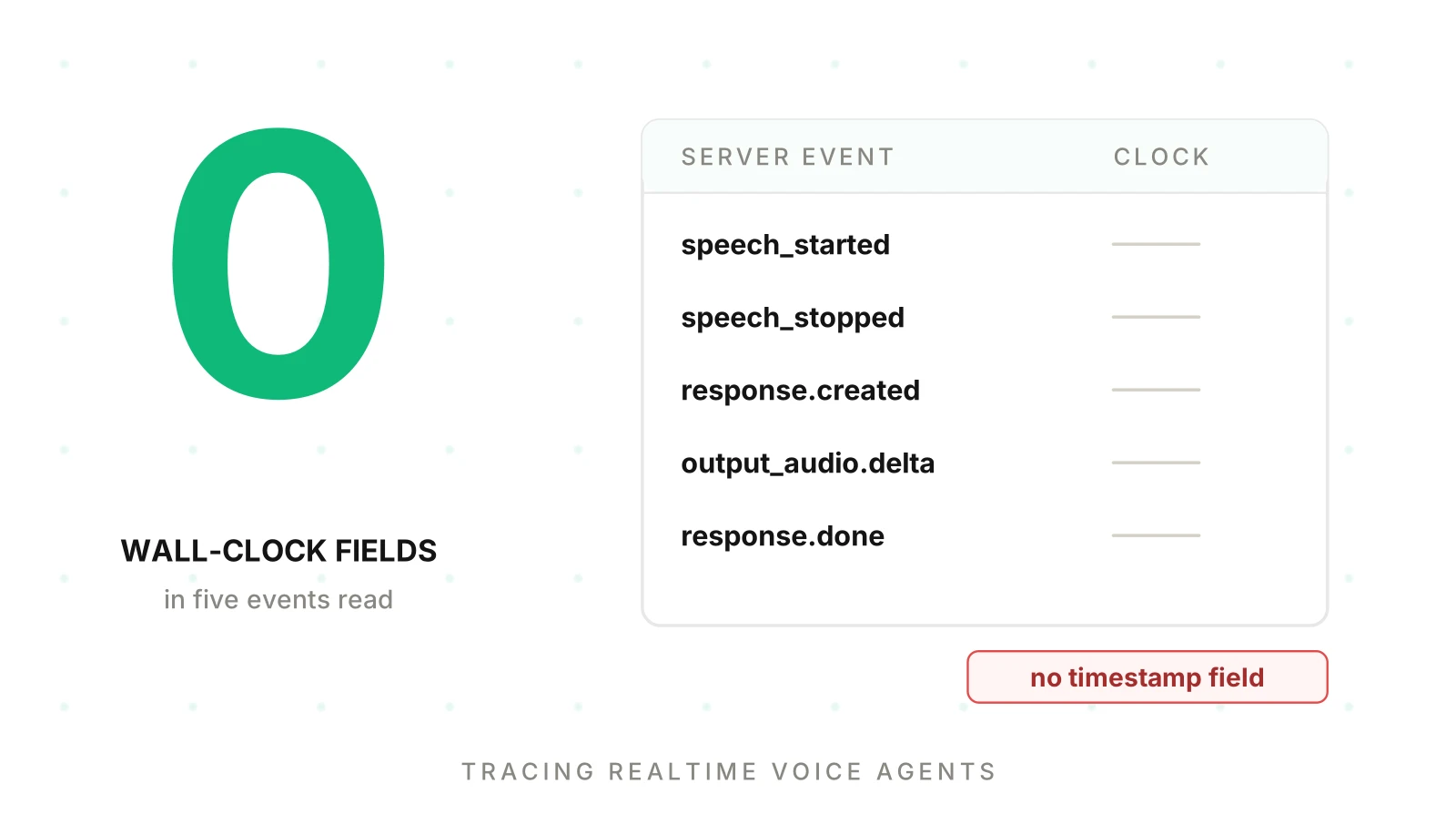
This is the part that surprises people. In the event payloads we read for this post, there is no wall-clock timestamp field. The speech and response events carry an event_id. The only time-like values are audio offsets.
The SDK docstrings define the time-like values. audio_start_ms on speech_started counts from the start of the audio written to the session buffer and includes the prefix_padding_ms setting. audio_end_ms on speech_stopped marks the end of audio sent to the model and includes the configured silence duration. audio_end_ms on conversation.item.truncated is where assistant audio was cut off.
The two VAD docstrings word their reference point differently, buffer start versus session start. Verify with a test call before doing arithmetic across them.
These offsets measure position in audio. They do not tell you when something happened on your servers. So you stamp each event yourself when your code receives it. Record that choice on the span, for example voice.clock = client_receive. Network delay and your own event loop add error. On a WebSocket you own it is usually small. Through a long bridge it can matter, and the end-to-end tracing post shows how to mark hops you only partly see.
Mapping Realtime events to spans
Use the tree from the span model post as the frame. Add one span per Realtime session under the call, then one turn span and one span per response under each session. The names are suggestions.
voice.call
  voice.session               one per Realtime connection (session.id)
    voice.turn (index 1)      speech_started -> response.done
      realtime_inference <model>     response.created -> response.done
        voice.tool                   function call -> output submitted
Sessions
The first server event on a new connection is session.created, and its session object carries an id. Use that as your session identifier. The OpenTelemetry GenAI realtime page defines gen_ai.realtime_session.id for exactly this and forbids reusing gen_ai.conversation.id for it. That page is at Development status, so recheck it before you pin names. See our semantic conventions post for the status detail.
A Realtime session lasts at most 60 minutes, per the conversations guide, so a long call can outlive one. Start a new session span for the next connection and add a span link to the previous one. Links associate spans with a causal relationship, per the OpenTelemetry traces documentation.
Turns
Open the turn span when speech_started arrives. Set its start to your arrival stamp. Store the item_id and audio_start_ms as attributes. Close it when response.done arrives for the response that answered, or when playback ends if you can observe that.
A turn with speech and no response child is useful data. It is the shape of a silent failure.
Responses
Open a response span on response.created. The GenAI realtime page calls one provider-identified generation a realtime_inference span with kind CLIENT, named {gen_ai.operation.name} {gen_ai.request.model}. It says that if a tool round trip ends one generation and starts another, you record two spans. Close the span on response.done.
Add span events for moments inside the response. OpenTelemetry's rule is that if the timestamp is meaningful, attach the data to a span event, and if it is not, use an attribute. First audio is a timestamp that matters, so it is an event. Add it when the first response.output_audio.delta for that response arrives. Do not add an event per delta. Audio arrives in many small chunks.
Tool calls
The conversations guide says response.done also contains the complete data needed to call a function. You then create a conversation item containing the result, and send response.create to get the model's reply. So a tool span starts when you dispatch the call and ends when you submit the result. The next response span starts on the following response.created. Our span attributes post lists the tool fields.
Transports change what you can see
OpenAI's developer notes say clients can connect directly over WebRTC or SIP, and that a sideband connection lets your application server attach to the same session. The server can then monitor the session and respond to tool calls. Without a sideband, the events go to a client you may not control. See the phone-call wiring guide for the SIP path.
The output_audio_buffer.* events exist only for WebRTC and SIP. Over a WebSocket you own playback, so you must record playback position yourself.
Reading timing from the stream
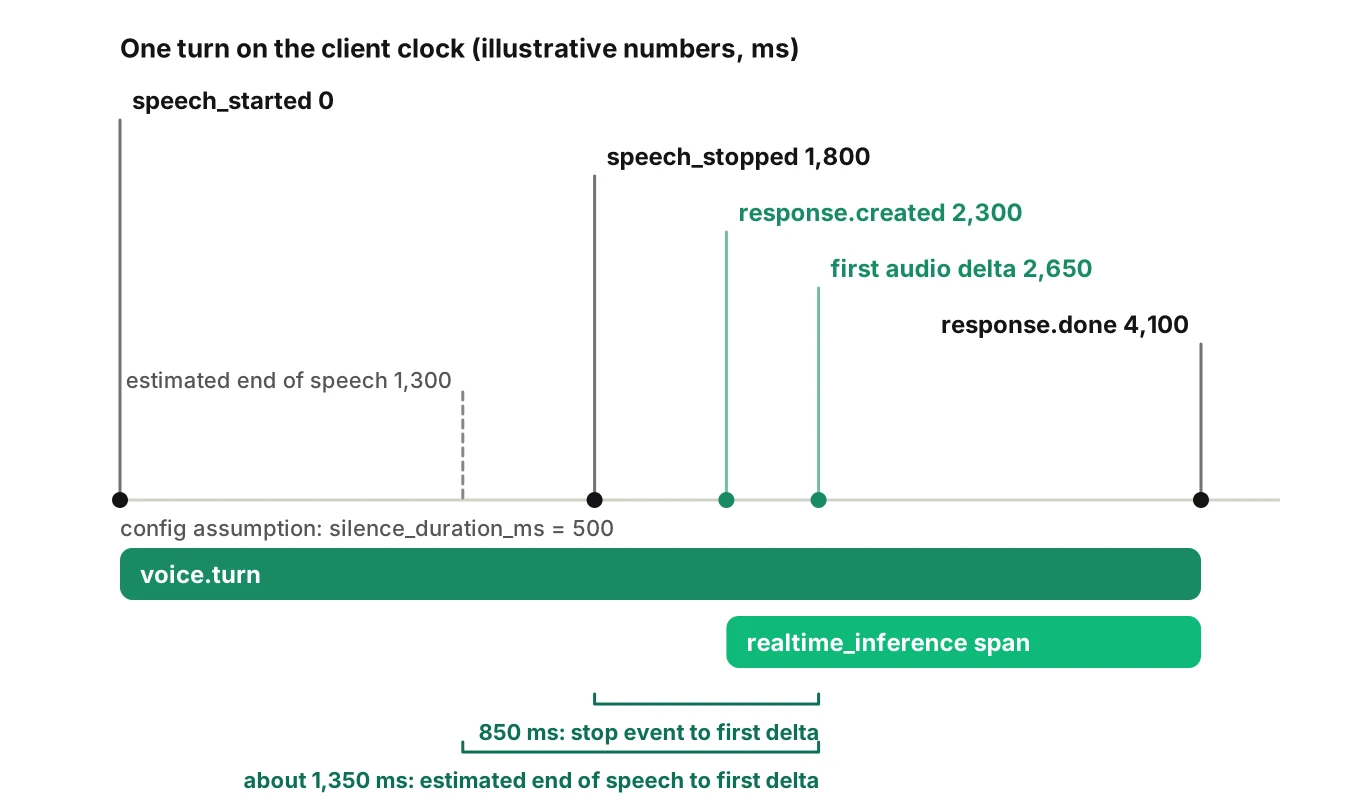
The intervals you can derive are differences between your arrival stamps. Four are worth computing. Endpoint wait is the configured silence_duration_ms, which is a setting, not a measurement. Response start runs from speech_stopped to response.created, and includes server queueing. First audio at the client runs from speech_stopped to the first audio delta. The generation span runs from response.created to response.done. Treat each as an estimate and name its clock.
Here is a worked example with illustrative numbers. Say you configured silence_duration_ms at 500. Your code receives speech_stopped at 1,800 ms after the call began. The caller probably stopped talking about 500 ms earlier, near 1,300 ms. response.created arrives at 2,300 ms and the first audio delta at 2,650 ms. The first delta came 850 ms after the stop event, and roughly 1,350 ms after the caller stopped. These numbers are made up to show the arithmetic. They are not measurements.
Two warnings apply.
First delta is not first sound. The audio still has to cross the network and be played. Our time to first audio post explains why you need the caller-side onset for a true figure. Over WebRTC or SIP, output_audio_buffer.started gives you a server-side marker closer to playback than the first delta. It still stops short of the caller's ear.
Generation is faster than playback. The generation span ends at response.done. The caller may still be hearing audio. Do not read a short generation span as a short spoken answer. For the full latency vocabulary, see what to measure for voice agent latency.
Tracing a barge-in
Interruptions are where realtime traces earn their keep. OpenAI documents the mechanism in three places:
- On
input_audio_buffer.speech_started, the guide says the client should immediately stop playback and discard any queued audio for that item. - Over WebRTC or SIP, the server automatically truncates unplayed audio on interruption. Over a WebSocket, the client manages playback and must handle truncation by sending the milliseconds the user heard as
audio_end_ms. - The SDK describes
response.donewith statuscancelledand reasonturn_detectedfor a response cut off by new speech detected by server VAD, andclient_cancelledwhen the client sent a cancel.
So a barge-in leaves a recognisable set of marks in the stream. A speech_started arrives while a response is open. The response ends cancelled with reason turn_detected. A conversation.item.truncated follows with an audio_end_ms. Record all of it.
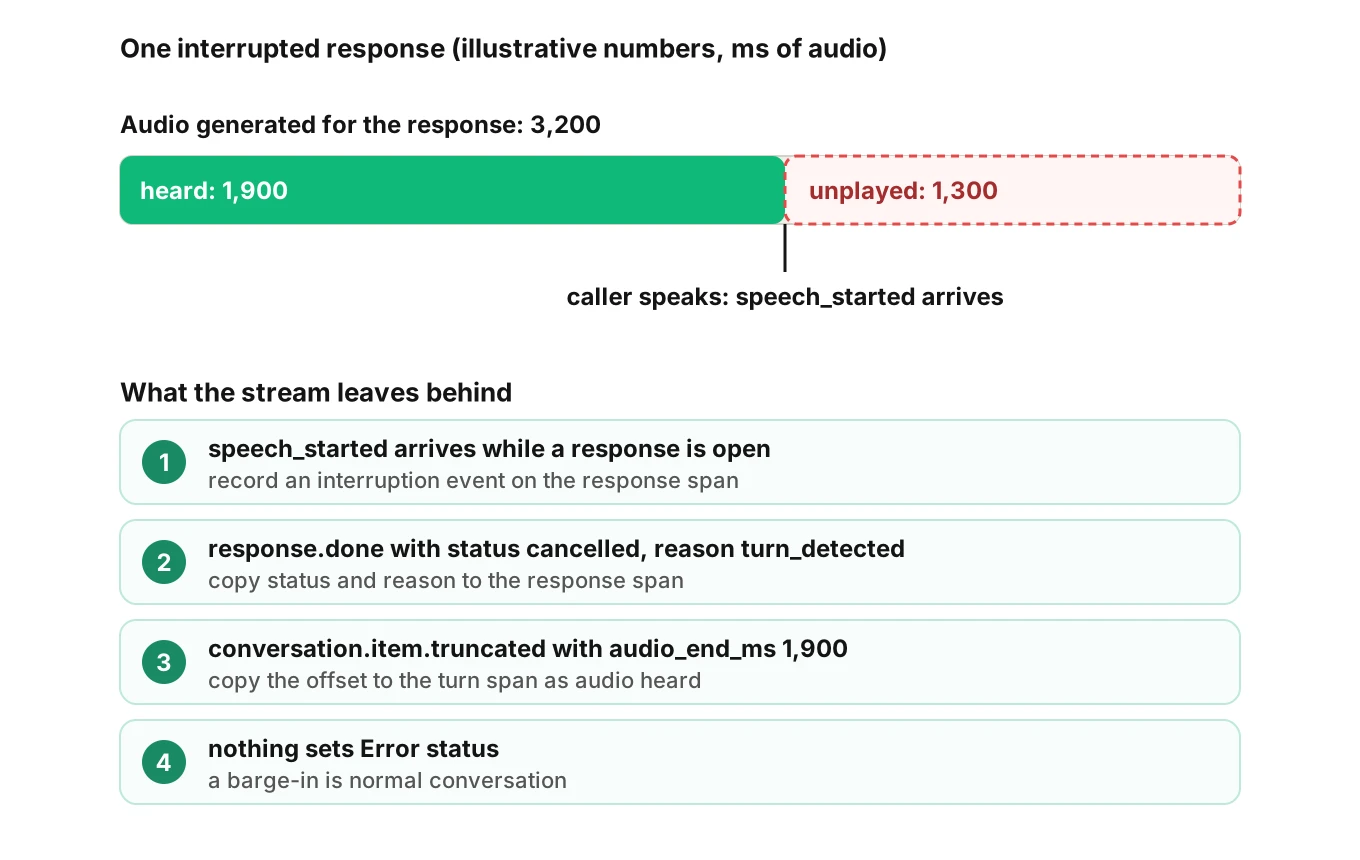
Add a voice.interruption event on the response span at the arrival time of speech_started. Set the final status and reason as attributes. Record audio_end_ms from the truncation event on the turn span. If you tally audio received per response, you can compute how much was never heard. In the illustration, 3,200 ms was generated and 1,900 ms heard, so 1,300 ms was cut. The figures are invented.
Do not set Error status for a cancelled response. Barge-in is normal conversation. The span model post makes the same point. Reserve Error for failed responses and error events. For the metric side, see interruption rate.
What to attach to every turn
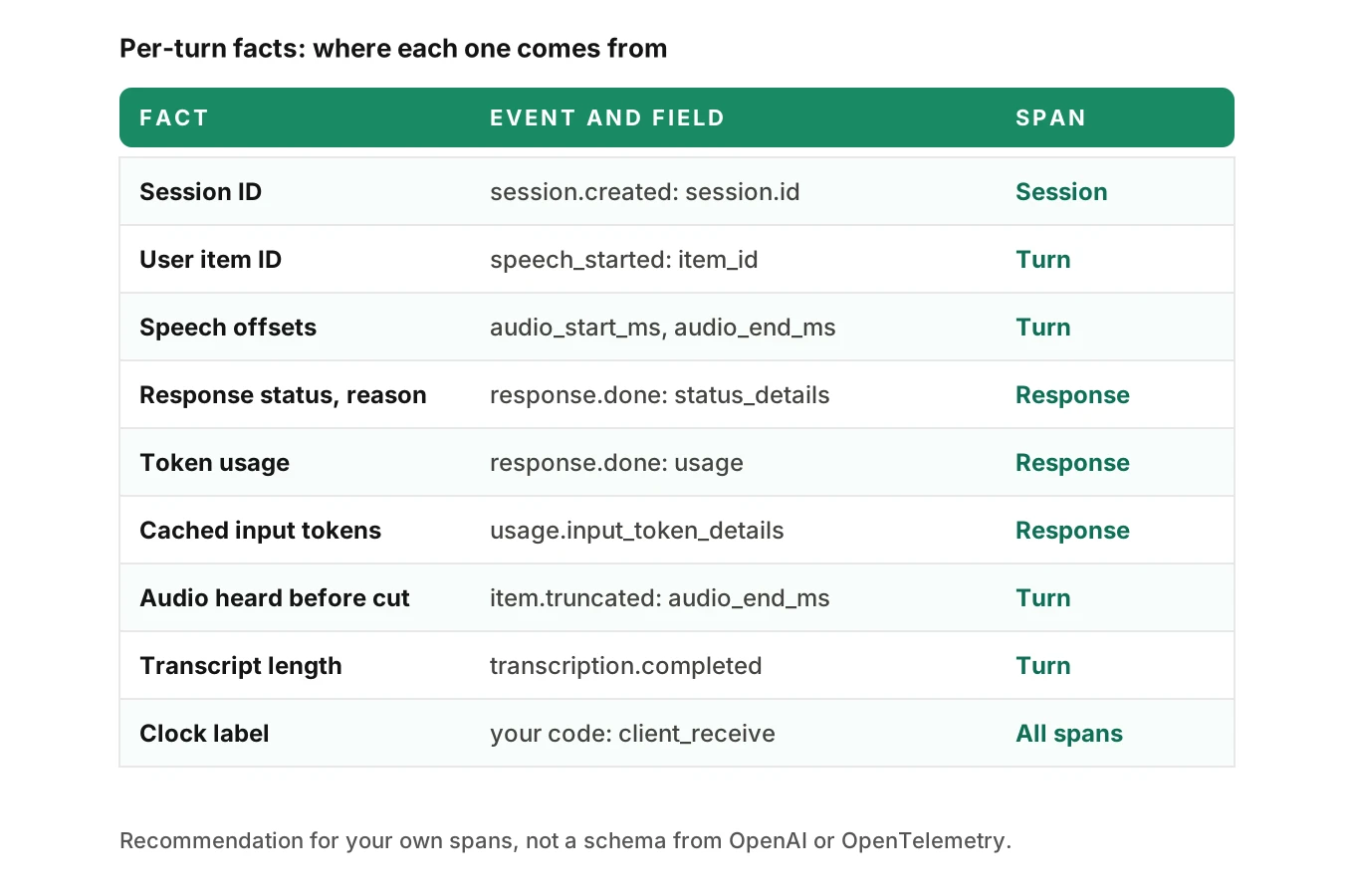
Attributes are facts about a span. OpenTelemetry advises adding them at span creation where possible, so sampling can use them. Some of these facts only exist at the end, so add those on close. The list below is a recommendation for your own spans, not a schema from OpenAI or OpenTelemetry.
| Fact | Where it comes from | Span |
|---|---|---|
| Session ID | session.created, session.id | Session |
| User item ID | speech_started, item_id | Turn |
| Speech start and end offsets | audio_start_ms, audio_end_ms | Turn |
| Response ID | response.created, response.id | Response |
| Final status and reason | response.done, status, status_details | Response |
| Input and output tokens | response.done, usage | Response |
| Cached input tokens | usage.input_token_details.cached_tokens | Response |
| Transcript length, not text | transcription.completed, transcript | Turn |
| Audio heard before cut | conversation.item.truncated, audio_end_ms | Turn |
| Clock label | Your code | All |
A few notes on that list.
Token usage grows turn over turn. The SDK says usage corresponds to billing, and that output from earlier turns becomes input for later turns. Input tokens climb across a call, and cached tokens are a subset of them. A rise is normal. A sudden jump, or a drop in cached tokens, is worth a look. The GenAI realtime page recommends gen_ai.usage.input_tokens and gen_ai.usage.output_tokens for naming.
Treat the input transcript as guidance. The SDK says transcription is off by default and runs asynchronously, and that its output is guidance, not an exact record of what the model heard. Our speech-to-speech testing guide covers why. Record its length and language, not the text.
Keep audio out of spans. The delta field is base64 audio. Never put it, or a transcript, in an attribute. See redacting logs and traces and what to log on each call.
What OpenAI already traces, and where your own spans still matter
OpenAI's developer notes say the Realtime API logs traces to the developer console. The Agents SDK tracing guide says that with RealtimeAgent and RealtimeSession, tracing happens on the Realtime API side, and you can turn it off. That helps with one session by hand. It does not join to your telephony records or deploy history, which your own spans can carry. See the end-to-end tracing guide.
What other speech-to-speech APIs expose
The recipe changes by vendor, because each exposes different moments. Google's Live API reference lists voiceActivity with an audioOffset, serverContent.interrupted, generationComplete and turnComplete, inputTranscription and outputTranscription, usageMetadata, and goAway with a timeLeft. These map to the same ideas: speech detected, interruption, end of generation, text, usage and a session about to end.
The page we read defines no absolute timestamps. Its time values are relative durations, such as transcription startOffset and endOffset. So the same rule holds. Stamp arrivals on your own clock and keep the vendor offsets as attributes. For a side-by-side of five APIs, see evaluating a realtime voice API.
How to trace a realtime voice agent in seven steps
These steps cover tracing realtime voice agent sessions end to end, from the first event to the first test call.
1. Log raw event types first - Record every type string you receive for a day, beta or GA. Build your handler list from that, not from memory.
2. Pick one clock and label it - Stamp each event with time.time_ns() on arrival. Put the clock name on every span.
3. Open a session span from session.created - Use session.id as the session identifier. Link a new session span to the previous one when a call passes 60 minutes.
4. Open a turn span on speech_started - Keep item_id and audio_start_ms. Join later events by item_id, not by order.
5. Open a response span on response.created - Add a first-audio event on the first audio delta. End the span on response.done and copy status, reason and usage.
6. Record barge-in as marks, not errors - Add an interruption event, the cancel reason and the truncation offset. Reserve Error status for failed and error.
7. Strip content, then test - Keep audio and transcripts out of attributes. Then place a test call and compare your trace with what you know happened.
A sketch of the event loop
The code below is a sketch, not production code. It uses the OpenTelemetry Python calls start_span, add_event, set_attribute and end from the API reference. The reference states no time unit. The SDK source uses integer nanoseconds from time_ns(), so we do too. Connection handling, auth, errors and the tool loop are left out.
import json, time
from opentelemetry import trace
from opentelemetry.trace import SpanKind

tracer = trace.get_tracer("realtime-voice")

class RealtimeTrace:
    def __init__(self, call_ctx, model):
        self.call_ctx, self.model = call_ctx, model
        self.session = self.turn = self.resp = None
        self.turn_ctx = self.session_ctx = None
        self.first_audio_done = False
        self.items = {}

    def on_event(self, raw):
        ev = json.loads(raw)
        t = time.time_ns()                      # our clock, stamped on arrival
        kind = ev["type"]

        if kind == "session.created":
            self.session = tracer.start_span("voice.session", context=self.call_ctx, start_time=t,
                attributes={"gen_ai.realtime_session.id": ev["session"]["id"], "voice.clock": "client_receive"})
            self.session_ctx = trace.set_span_in_context(self.session)

        elif kind == "input_audio_buffer.speech_started":
            if self.resp:                       # speech while a response is open
                self.resp.add_event("voice.interruption", timestamp=t)
            self.turn = tracer.start_span("voice.turn", context=self.session_ctx, start_time=t,
                attributes={"voice.item_id": ev["item_id"], "voice.speech_start_offset_ms": ev["audio_start_ms"]})
            self.turn_ctx = trace.set_span_in_context(self.turn)

        elif kind == "input_audio_buffer.speech_stopped" and self.turn:
            self.turn.add_event("voice.speech_stopped", timestamp=t,
                attributes={"voice.speech_end_offset_ms": ev["audio_end_ms"]})

        elif kind == "response.created":
            self.first_audio_done = False
            self.resp = tracer.start_span(f"realtime_inference {self.model}", context=self.turn_ctx or self.session_ctx,
                kind=SpanKind.CLIENT, start_time=t,
                attributes={"gen_ai.operation.name": "realtime_inference", "voice.response_id": ev["response"]["id"]})

        elif kind == "response.output_audio.delta" and self.resp and not self.first_audio_done:
            self.first_audio_done = True        # one event, never one per delta
            self.resp.add_event("voice.first_audio_delta", timestamp=t)

        elif kind == "conversation.item.truncated" and self.turn:
            self.turn.set_attribute("voice.audio_heard_ms", ev["audio_end_ms"])

        elif kind == "response.done" and self.resp:
            r = ev["response"]
            usage = r.get("usage") or {}
            details = usage.get("input_token_details") or {}
            self.resp.set_attribute("voice.response.status", r.get("status", "unknown"))
            self.resp.set_attribute("voice.response.reason", (r.get("status_details") or {}).get("reason", ""))
            self.resp.set_attribute("gen_ai.usage.input_tokens", usage.get("input_tokens", 0))
            self.resp.set_attribute("gen_ai.usage.output_tokens", usage.get("output_tokens", 0))
            self.resp.set_attribute("gen_ai.usage.cache_read.input_tokens", details.get("cached_tokens", 0))
            self.resp.end(end_time=t)
            if self.turn:
                self.turn.end(end_time=t)
            self.resp = self.turn = None
The sketch ends the turn at response.done, earlier than playback ends. It also assumes one response per turn, which fails when a tool call starts a second one. Real code keeps the turn open until the last response for that user item is done.
Testing the trace before callers do
A trace you never checked is a guess, and tracing realtime voice agent calls is no exception. Place test calls where you know the truth, then compare. Evalgent can run test calls against a voice agent with Profiles that vary the caller: interruption level, speech pace, language, response delay, behaviour, accent and background noise. It also measures call timestamps such as endpointing and first audio. A Review replays a test call with audio and transcript together and shows the exact tool payloads. Compare those against your spans. If the interruption profile cuts the agent off at a known moment, your trace should show a cancelled response near that moment. Teams setting up evals for a first agent can book a demo.
For sampling traces without losing failures, see sampling live calls.
Where Evalgent Observe fits
A trace shows what happened, not why. Good tracing realtime voice agent data is what makes a root cause findable. Evalgent Observe, which is launching, works from the OpenTelemetry data you send. It traces each failure to the step or handoff that caused it and groups failures into root causes. It gives no verdict without evidence in the data. Where the data is blind, it says "undetermined" and shows the coverage gap. A realtime trace has an honest blind spot: the model's inside is one span.
Frequently asked questions
How do you trace the OpenAI Realtime API?
Receive the server events, stamp each on arrival, and map them to spans. Open a session span from session.created, a turn span on speech_started, and a response span on response.created. Close the response on response.done, and copy its status and usage onto the span. Join events by item_id and response_id.
Do OpenAI Realtime events include timestamps?
In the speech, response and truncation events we read, no wall-clock timestamp field is documented. They carry IDs and audio offsets such as audio_start_ms and audio_end_ms. That is why you stamp each event with your own clock on arrival and label which clock you used.
What is the difference between audio_start_ms and a wall-clock time?
audio_start_ms is a position inside the audio stream sent to the session, not a moment on your servers. It tells you where in the audio speech began. Wall-clock time is what your code records when the event arrives. You need both, and you should not subtract one from the other.
How do you trace a barge-in in a realtime voice agent?
Add an interruption event on the response span when speech_started arrives during a response. Record the final response status and reason, which is cancelled with turn_detected for server VAD. Add the audio_end_ms from conversation.item.truncated. Do not set Error status, because an interruption is normal conversation.
How do you measure time to first audio in the Realtime API?
Subtract your speech_stopped arrival stamp from the arrival of the first response.output_audio.delta. That gives first audio at the client, not audible onset. Network and playback add delay. Over WebRTC or SIP, output_audio_buffer.started is a closer server-side marker. Name the clock on the span.
Which OpenTelemetry span name fits a realtime model call?
The GenAI realtime page, at Development status, defines a realtime_inference operation with span kind CLIENT, named {gen_ai.operation.name} {gen_ai.request.model}. It records one provider-identified generation. If a tool round trip ends one generation and starts another, record two spans. Recheck the page before pinning names.
Should I put transcripts or audio in span attributes?
No. The audio delta is base64 audio, and transcripts often hold personal data. The input transcript is also guidance, not an exact record of what the model heard. Record lengths, language and outcome categories on spans. Keep content in a separate, access-controlled store, or redact it in your collector.
Can I trace a SIP or WebRTC call that connects straight to OpenAI?
Yes, through a sideband connection. OpenAI's developer notes say a sideband lets your application server attach to the same session, monitor it and respond to tool calls. Without it, the event stream goes to the client. The output_audio_buffer events appear only on WebRTC and SIP.
The bottom line
Tracing realtime voice agent calls means stamping each event on your own clock, joining events by item and response ID, and recording interruptions as marks instead of errors. The model's inside stays one span, so name that blind spot in your trace rather than guess across it.
Related Articles
How to automate voice agent testing: synthetic callers vs manual QA
Learn how ai test automation replaces manual QA for voice agents. Compare synthetic callers vs human testers, with a 5-step framework to scale without hiring.
Read more
AI Agent Testing vs Voice Agent Testing: What General Tools Miss for Voice
AI agent testing measures text outputs. Voice agent testing measures behaviour through an acoustic pipeline. Five failure categories general tools miss.
Read more