Observability for Speech-to-Speech Voice Agents: What You Can and Can't See
On this page
A cascaded agent hands you a record at every stage boundary. The transcript is exactly what the language model read. The reply text is exactly what the voice engine spoke. A speech-to-speech model removes those boundaries. Audio goes in and audio comes out.
This post maps what stays visible and what goes dark. Speech to speech agent observability is the subject, and the reader is a Head of AI, an AI product manager or an engineer running a live agent on the OpenAI Realtime API, the Gemini Live API or similar. It is a foundations view, not a setup guide. For the architecture trade-offs, read cascading vs speech-to-speech voice agents. For ground truth in tests, read testing speech-to-speech voice agents. For scoring models, read how to evaluate a speech-to-speech model.
Every provider fact below comes from official documentation opened on November 19, 2026. APIs change, so recheck before you build.
What changes when ASR, LLM and TTS are one model
In a cascaded pipeline, you own the seams. You see when voice activity detection fired, when the transcript went final, when the first model token arrived and when the first audio byte left. Each seam is a place to attach a timestamp. A slow reply points to one component. The OpenTelemetry span model for voice agents is built on those seams.
The Moshi paper describes the alternative. It says Moshi "solves these independent issues altogether by casting spoken dialogue as speech-to-speech generation." The authors report a theoretical latency of 160 ms and about 200 ms in practice.
For an operator, the seams are now inside the model, and no log line crosses them. Observability does not disappear. It moves to the edges.
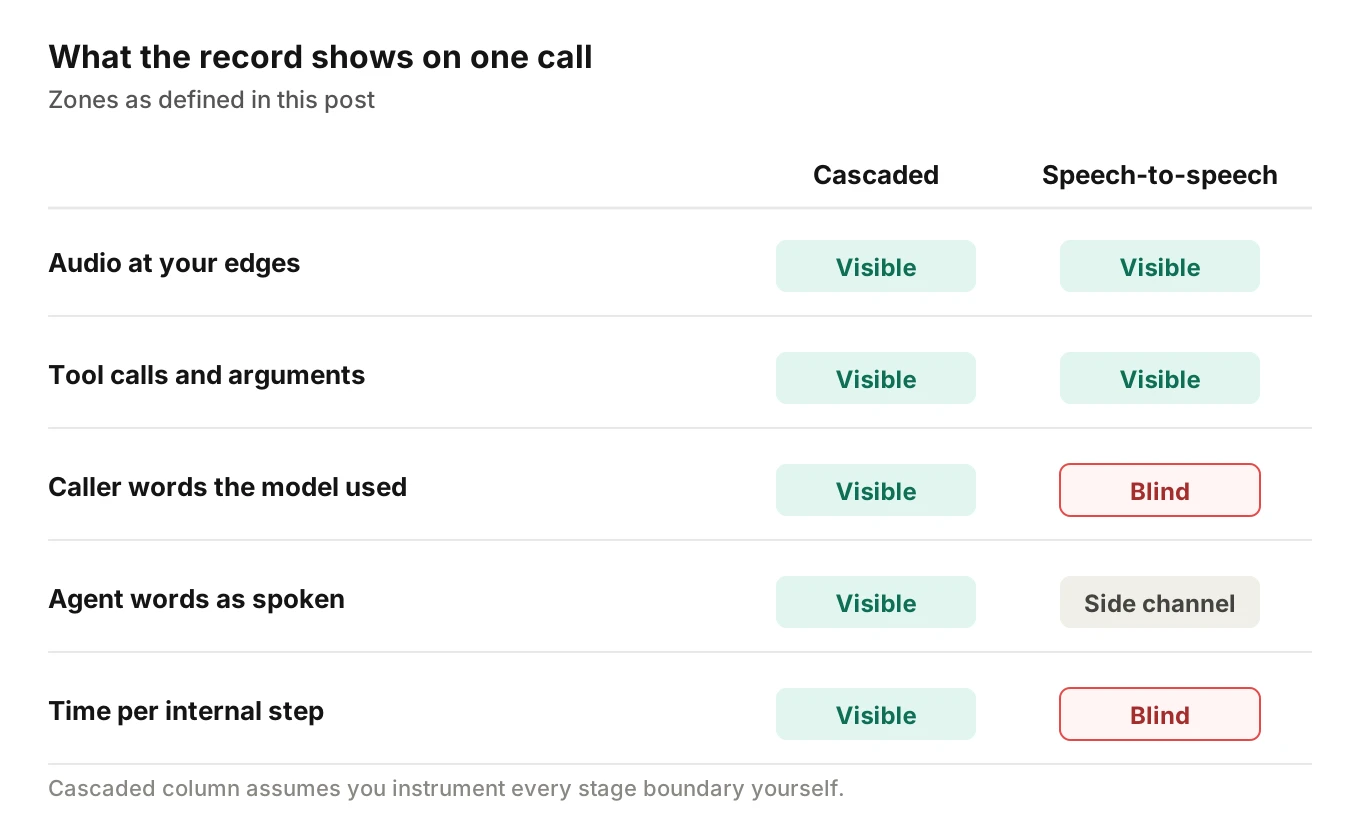
The map above sorts every call question into three zones.
- Visible. Facts that cross your own code, such as audio you send, audio you receive and tool calls you execute.
- Side channel. Signals the provider emits next to the audio, such as turn events, transcripts and token usage.
- Blind. Anything that happens inside the model and has no event.
The goal is not to hide the blind zone. It is to name it, so your team stops treating a side channel as proof.
What you can see: the signals a session still emits
A speech-to-speech session is a long-lived stream of session events. The three providers documented below name them differently, but the shapes match. The table lists the signals that matter for debugging, with the exact names from each provider's documentation.
| Signal | Names in the docs | The catch |
|---|---|---|
| Caller speech turn | OpenAI Realtime: input_audio_buffer.speech_started and speech_stopped | These are voice activity decisions, not proof of what was said |
| Caller transcript | OpenAI: conversation.item.input_audio_transcription.delta and .completed. Gemini Live: inputTranscription | A separate pass that arrives on its own schedule |
| Agent transcript | OpenAI: response.output_audio_transcript.delta and .done. Gemini Live: outputTranscription | A parallel stream, not the audio itself |
| Agent audio | OpenAI: response.output_audio.delta | The only direct record of what the caller heard |
| Interruption | Gemini Live: interrupted flag on server content. OpenAI: response.done status field, which can be cancelled | Tells you generation stopped, not how much the caller heard |
| Tool calls | OpenAI: function call argument events and response.done. Gemini Live: toolCall and toolCallCancellation | Arguments and ids are visible. Reasons are not |
| Usage | OpenAI: response usage "will correspond to billing". Gemini Live: usageMetadata | Token counts, not time per step |
Sources: the OpenAI VAD guide, Realtime conversations guide and response.done reference, and the Google Live API reference. All were read on November 19, 2026.
Three things stand out.
First, the audio edges are fully yours. You send the caller audio and you receive the agent audio. If you record both at your own boundary, you hold the one record no provider can rewrite. Our guide on what to log on every voice agent call covers recording fields.
Second, turn events are decisions, not facts. Turn detection can be wrong. The OpenAI VAD guide defines speech_started as the start of a speech turn and speech_stopped as the end. Those events mark what the detector decided. Background noise can start a turn. A long pause can end one early.
Third, usage is real but coarse. Token counts by modality help with cost. They do not locate a slow step. The OpenTelemetry realtime conventions include audio, text and reasoning token counts among the usage attributes. They also say that recording intermediate realtime events is outside the scope of the convention. So the standard gives you a span per generation, and you add the events yourself.
What you cannot see: the blind zone
The blind zone is the set of questions the record cannot answer. Each row below names the reason, and what to record instead.
| Question | Why the record cannot answer it | What to keep instead |
|---|---|---|
| What did the model actually hear? | The caller transcript comes from a separate pass | The caller audio, with an offset into the call |
| Which internal step was slow? | There are no stage boundaries to time | Caller-side clocks at your own edge |
| Why did it choose that action? | Docs name token counts, including reasoning tokens, not the reasoning | Tool arguments, tool results and the reply that followed |
| Does the agent transcript match what was spoken? | The output transcript is a parallel stream | The agent audio you received |
| When exactly did a word start? | Transcripts carry coarse timing or none | Audio offsets, measured by you |
Speech to speech agent observability starts by naming this zone. The first row needs the most care, because teams lean on the transcript for everything.
The transcript is a side channel, not a log
OpenAI is direct about this. In the Realtime client events reference, input transcription "should be treated as guidance of input audio content rather than precisely what the model heard." It runs asynchronously through the audio transcriptions endpoint. The server events reference says the transcript "may diverge somewhat from the model's interpretation, and should be treated as a rough guide."
The details matter for observability, because they limit how you can use the text.
- No word timing, speakers or confidence. For the recommended transcription model, the OpenAI transcription guide says it "doesn’t return word-level timestamps, speaker labels, or transcription confidence scores." You cannot flag a shaky word.
- No guaranteed order. The same guide says ordering between completion events from different speech turns is not guaranteed. You must join transcripts to turns by
item_id, not by arrival time. - Independent of the model's turn. Google's Live API reference says the input transcription "is sent independently of the other server messages and there is no guaranteed ordering." Output transcription has no guaranteed exact ordering against the model's output either.
- Subject to revision. xAI's speech-to-speech docs describe an
updatedinput transcript event that "contains the cumulative transcript (which may include corrections to previous updates)." A transcript you logged at turn two can change by turn three.
Output text has its own gap. xAI documents a pronunciation replace map, so that "only the spoken audio changes; the transcript the user sees keeps the original text." The OpenAI GPT-Live guide adds that transcript fragments "describe approximate fragment timing rather than exact word boundaries," and that model context includes "audio tokens that don’t appear in the transcript."
Speech-to-speech transcript reliability is therefore limited. Transcripts are good for search, captions and a first look. They are poor evidence. If a verdict depends on exact wording, such as a required disclosure, the audio is the proof. The post on transcript vs audio voice agent evaluation covers when a transcript-only check is enough.
The practical rule for your logs is to store transcripts with a label. Mark each one as a side-channel text, and keep the provider's item id beside it.
Latency with no stage boundaries
In a cascade, you can split a slow reply into speech recognition, model time and voice synthesis. Speech-to-speech voice agent latency gives you one number per turn. It runs from a caller-side moment to the first audio you receive. Our guide to time to first audio explains why that is the clock the caller feels.
There is a trap in how that clock starts. The speech_stopped event fires only after the detector has waited through silence. OpenAI defines silence_duration_ms as the duration of silence used to detect speech stop, and says shorter values detect turns more quickly. Google's Live API capabilities page says its server waits through silence before ending a turn, with an internal default of approximately 800 ms.
So a clock that starts at the end-of-speech event leaves out the wait. The caller heard that wait as silence.
| Clock (illustrative numbers) | Starts at | Reads |
|---|---|---|
| Event clock | The end-of-speech event | 700 ms |
| Caller clock | The caller's last spoken sound | 1,500 ms |
| Difference | The detector's silence window | 800 ms |
The example is illustrative. It assumes a detector wait near Google's documented default and a 700 ms model time. Your numbers will differ. The point is that two honest clocks can disagree by the full silence window. Record both, and record the detector settings on the call.
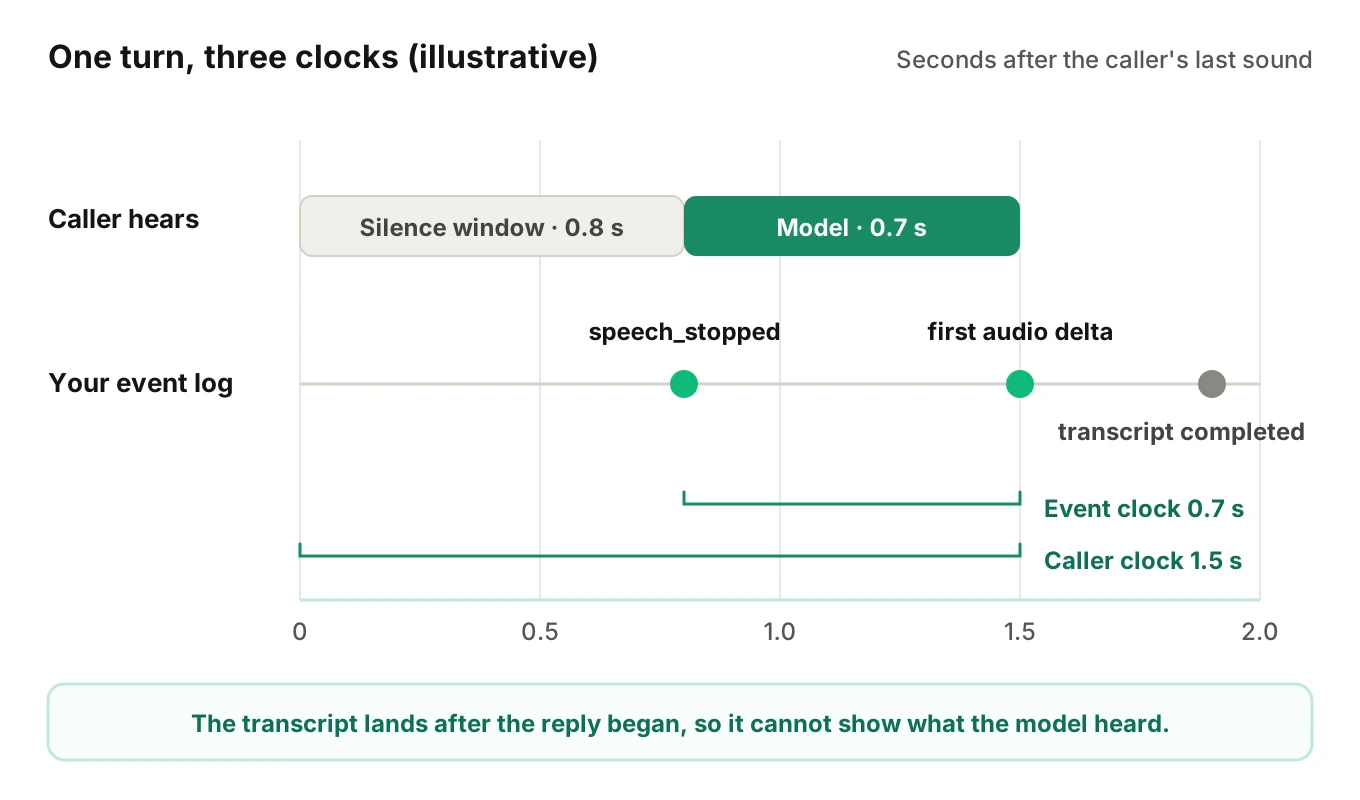
The timeline shows a second effect. In this illustrative turn, the caller transcript completes after the agent has begun to speak. That is normal for an asynchronous side channel. It means the transcript cannot tell you what the model had heard when it chose to reply. It can only tell you what a second system later wrote down.
Interruptions: what the log says and what the caller heard
Interruption handling is where a log and a caller's experience drift apart. Interruptions are normal events in a phone call.
Here is what the documentation says happens.
- OpenAI over WebRTC. The server "will automatically truncate unplayed audio when there's a user interruption."
- OpenAI over WebSockets. The client must send
conversation.item.truncatewithaudio_end_msset to the played duration. The docs say it "will cut the audio at a given place and remove the text transcript for the unplayed portion." - Gemini Live. "When VAD detects an interruption, the ongoing generation is canceled and discarded."
- xAI Grok Voice. For a forced message marked non-interruptible, "caller audio is dropped until playback completes."
Each line changes what your log can claim. The model may have generated a full sentence. The caller may have heard half of it. If you log the generated text and not the played duration, your record says the agent said something the caller never heard.
The xAI case is a different kind of blind spot. Dropped caller audio never reaches the model, so no transcript exists for it. Only your own edge recording shows the missing speech.
Our post on interrupted tool calls covers a related risk. Google's capabilities page says the server discards pending function calls on interruption and reports the cancelled call ids through toolCallCancellation. If your code ran the tool anyway, the agent state and the caller's belief now disagree.
Tool calls: where the model is most visible
Tool call logging is the best news in this post. When the model decides to act, it emits a structured request. That request is loggable, and it is the model's decision in a form you can audit.
For each tool call, a useful record holds:
- The call id from the provider.
- The tool name and the arguments, as sent.
- The result your code returned, and how long it took.
- Whether a cancellation arrived before or after your code ran.
- The agent reply that followed.
That last item is the one teams skip. A tool can fail while the agent tells the caller it worked. Only a record that joins the result to the next reply shows it. Our guide to silent tool failures goes deep on the pattern.
Tool arguments also help with the blind spot on hearing. If the caller said an order number and the arguments carry a different one, you have a concrete mismatch. You still cannot say whether the model misheard or the caller misspoke. But you have narrowed the question to one turn.
Reading a failure: determined or undetermined
Observability also means knowing which verdicts the signals support. With one model in the middle, many verdicts are honest only as "undetermined."
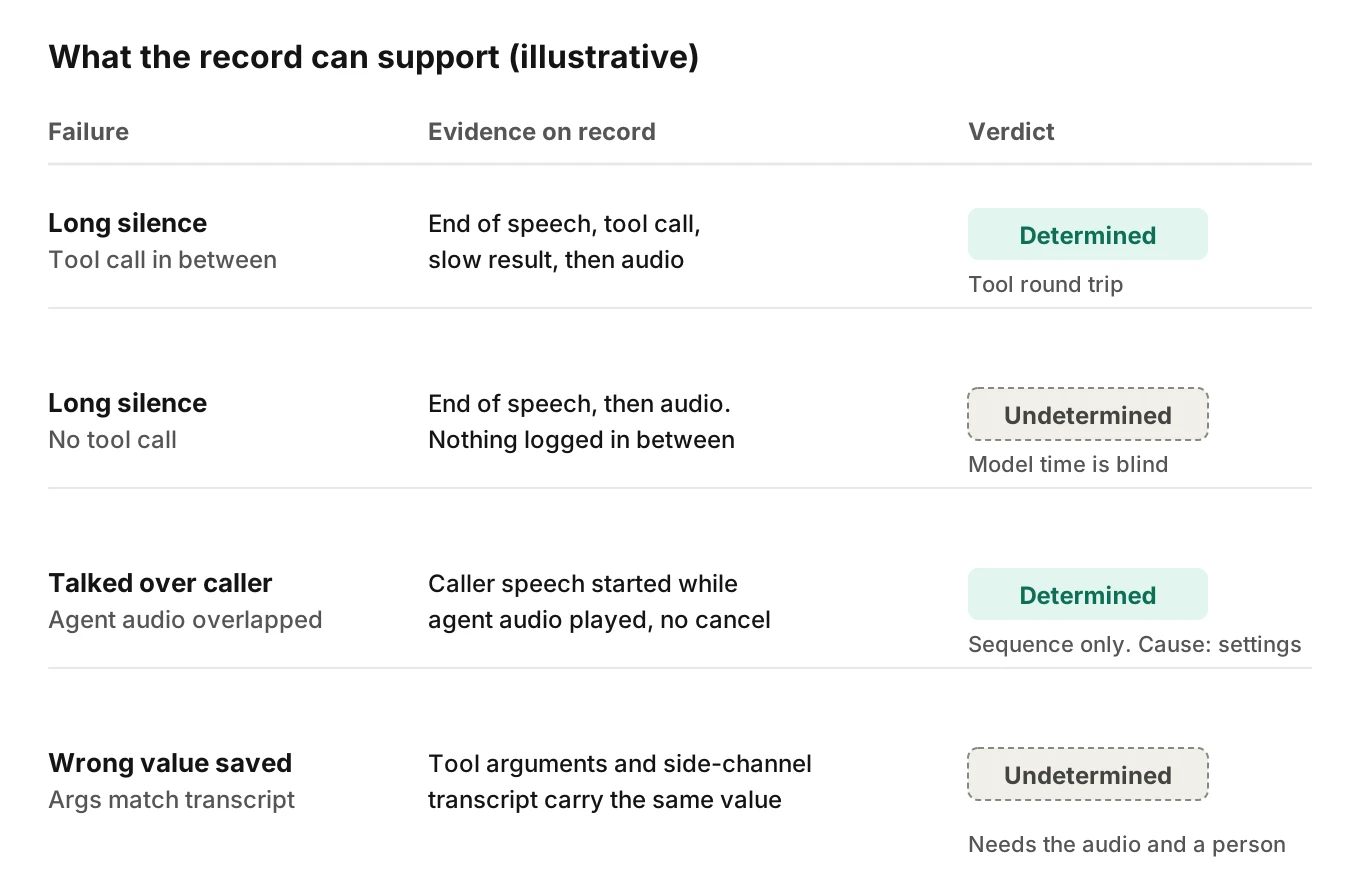
The diagram shows four illustrative cases.
- A long silence before a reply. The record shows an end-of-speech event, a tool call, a slow tool result and then audio. The cause is determined: the tool round trip. Without a tool call between them, the cause is undetermined, because the model's internal time is blind.
- The agent talked over the caller. The record shows caller speech starting while agent audio was playing, with no cancellation. The sequence is determined. The cause, a missed detection or a non-interruptible setting, depends on your configuration, which you can check.
- A wrong value was saved. The record shows the tool arguments and the side-channel transcript. If both agree, the cause is undetermined. The caller may have misspoken, the model may have misheard, or the transcript may have copied the same error. The call audio and a person settle it.
The discipline is to write "undetermined" in the analysis instead of guessing. A guess hardens into a root cause that sends your team to fix the wrong layer. The same discipline underpins voice agent root cause analysis.
How to make a speech-to-speech agent observable: a capture checklist
Use this checklist to close the gaps you can close. It cannot open the blind zone, but it makes the visible zone complete and the blind zone explicit. For the span layout, see voice agent traces in OpenTelemetry.
1. Give every call one id - Create a call id at the start and attach it to every event, log line and recording. The call id correlation guide covers joining across vendors.
2. Log every provider event raw - Store the event name, the provider item or call id, the payload and your own receive time. Raw events let you replay a turn later, and they survive schema changes.
3. Label transcripts as side channels - Store input and output text with their item ids and a field that marks them as side-channel text. Never let a grader treat them as ground truth.
4. Record audio at your edge, both ways - Keep caller audio and agent audio with an offset from call start. This is your only record of what was heard, and of what was spoken.
5. Log tool calls end to end - Capture the call id, arguments, result, duration and any cancellation, plus the reply that followed.
6. Record interruption facts - Store what was cancelled, how much audio was actually played, and whether the session type truncates for you.
7. Keep two latency clocks - Record the event clock and a caller-side clock, plus the detector settings in force on that call.
8. Write down what is undetermined - Add a field for verdicts the evidence cannot support, so gaps are visible in reports instead of buried.
Mask personal data before it reaches storage. The guide on PII redaction in voice agent logs and traces shows where to mask. If your calls fall under a recording or privacy rule, check the rule itself and take legal advice. This post is not legal advice.
Where Evalgent fits
Evalgent is a testing, evaluation and monitoring platform for voice agents, and its Observe product is launching for speech-to-speech voice agent observability and every other stack. It works from the traces and call data you send it. It traces a failed call to the step or handoff that caused it, and it clusters failures into root causes so a team fixes causes, not single calls. It is stack-agnostic, it ingests OpenTelemetry data, and it never sits in the media path, so nothing touches live audio or slows a call.
The behaviour that matters for this post is how it treats blind data. Findings come from the data you supply. Where that data cannot support a verdict, Evalgent says "undetermined" and shows the coverage gap instead of hiding it. That is the same discipline as the section above, applied across every call.
Before launch, tests give you something production cannot: a known script. In Evalgent test calls, you know what the simulated caller said. Reviews replay a test call with the audio and transcript together and show the exact tool payloads. That gives you ground truth for the turns where a production record has to say "undetermined." If you want to see this on your own agent, you can book a demo.
For the wider picture, start with what voice agent observability is, then the 14-point buyer's checklist. For standard names, see the GenAI semantic conventions for voice agents. For phone-call specifics, see OpenAI Realtime and Gemini Live on phone calls.
Frequently asked questions
What is speech to speech agent observability?
It is the practice of explaining why a call behaved as it did when one model handles listening, reasoning and speaking. You work from the audio edges, turn events, tool calls and usage. You record what stays unknowable, such as what the model heard, as undetermined instead of guessing. The definition hub covers the general idea.
Can you trace a speech-to-speech agent with OpenTelemetry?
Partly. The OpenTelemetry realtime conventions define a span for one server-side model generation, with usage and finish reasons. They say recording intermediate realtime events is out of scope, so you add those yourself. Realtime voice agent observability has no separate recognition or synthesis spans, because those stages are not exposed.
Is the transcript from a speech-to-speech model reliable?
Treat it as a rough guide. OpenAI says input transcription is guidance rather than precisely what the model heard. Google says transcriptions arrive independently with no guaranteed ordering. Use transcripts for search and review, and use the audio when exact wording matters.
How do you measure latency in a speech-to-speech voice agent?
Measure from the caller's last spoken sound to the first agent audio at your own edge. Also record the event-based clock. They differ by the detector's silence window, which Google's docs put near 800 ms by default. You get one number per turn, not a per-stage split.
What can you not see inside a speech-to-speech model?
You cannot see what the model heard, why it chose an action, or which internal step was slow. The docs expose token counts, including reasoning tokens in OpenTelemetry usage attributes, not the reasoning. Tool arguments are the clearest window into a decision.
Do speech-to-speech agents need call recordings for debugging?
Yes, if exact wording or timing matters. Recordings are the only record of what the caller heard and said. Store them at your own boundary with an offset from call start. Mask personal data, and check the recording and privacy rules that apply to your calls.
How do you debug an interruption in a speech-to-speech agent?
Line up caller speech start, agent audio and any cancellation event. Then check how much audio actually played. Gemini cancels and discards generation on interruption, and OpenAI truncates unplayed audio. A forced non-interruptible message can also drop caller audio. Check each against your settings.
How is observability different for cascaded and speech-to-speech agents?
Observability for speech-to-speech agents differs because the stages are one model. A cascade gives you records at every stage boundary, so you can time each one. A speech-to-speech agent gives you edges and side channels. You gain simpler pipelines and lose attribution. Our cascading comparison covers the trade.
The bottom line
Speech to speech agent observability gives you the audio edges, turn events, tool calls and usage, but not what the model heard or why it acted. Capture every edge you own, label every side channel as one, and write "undetermined" wherever the record cannot support a verdict.
Related Articles
How to automate voice agent testing: synthetic callers vs manual QA
Learn how ai test automation replaces manual QA for voice agents. Compare synthetic callers vs human testers, with a 5-step framework to scale without hiring.
Read more
AI Agent Testing vs Voice Agent Testing: What General Tools Miss for Voice
AI agent testing measures text outputs. Voice agent testing measures behaviour through an acoustic pipeline. Five failure categories general tools miss.
Read more