Voice Agent Call ID Correlation: Joining Twilio, LiveKit and LLM Logs
On this page
Your Twilio console, your LiveKit logs and your LLM provider each describe the same phone call. None of them uses the same ID. A voice agent correlation id is the key you add so they stop being three separate stories.
This post covers the join-key problem only. We list the identifiers that exist, design one canonical ID, and show where to attach it. Then come the mapping table, a join query and the pitfalls. The field-by-field log record lives in what to log on every voice agent call. The span fields live in voice agent span attributes. We do not repeat either.
Evalgent Observe, which is launching, ingests OpenTelemetry data and call details from any stack. A clean join key is the best input you can give it.
Why joining voice agent logs is harder than it looks
A single call touches many systems. The carrier knows the phone leg. The media layer knows the room or stream. The speech-to-text provider knows a streaming request. The model provider knows an API request per turn. Your own code knows the business context.
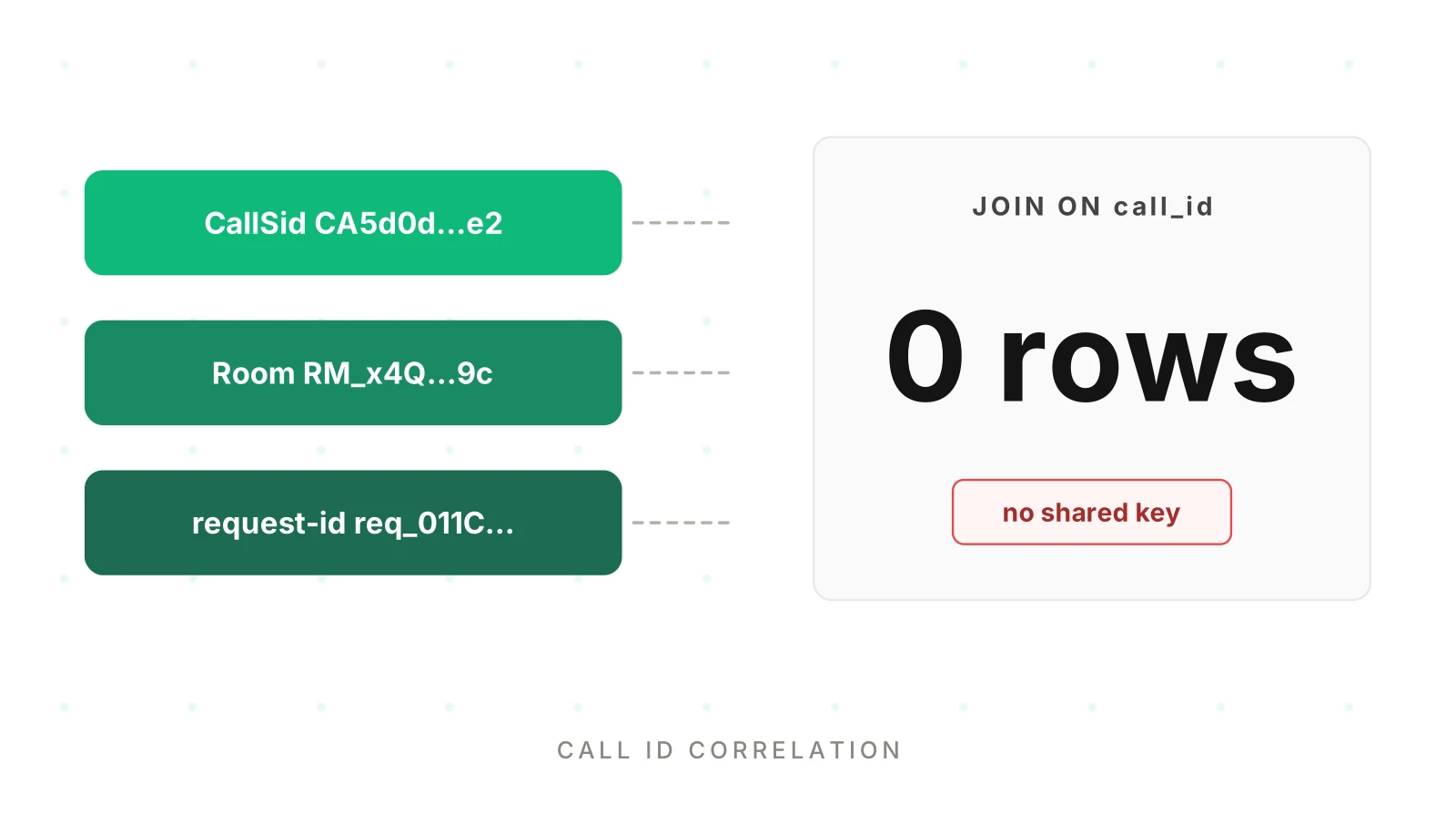
Each system issues its own ID. The trouble starts at the boundary. A ticket says "the 2:14 pm call went wrong." You hold five IDs from five consoles and no rule that links them.
Teams fall back on joining by time and phone number. That fails when two callers share a minute, or one caller phones twice. It also puts a phone number into every log line. A voice agent correlation id with no personal data avoids this. Our post on PII redaction in logs and traces explains why that is a leak you chose.
The fix is one voice agent correlation id that you own, attached early and logged everywhere. Provider IDs become lookup values, not primary keys.
The identifiers that exist in practice
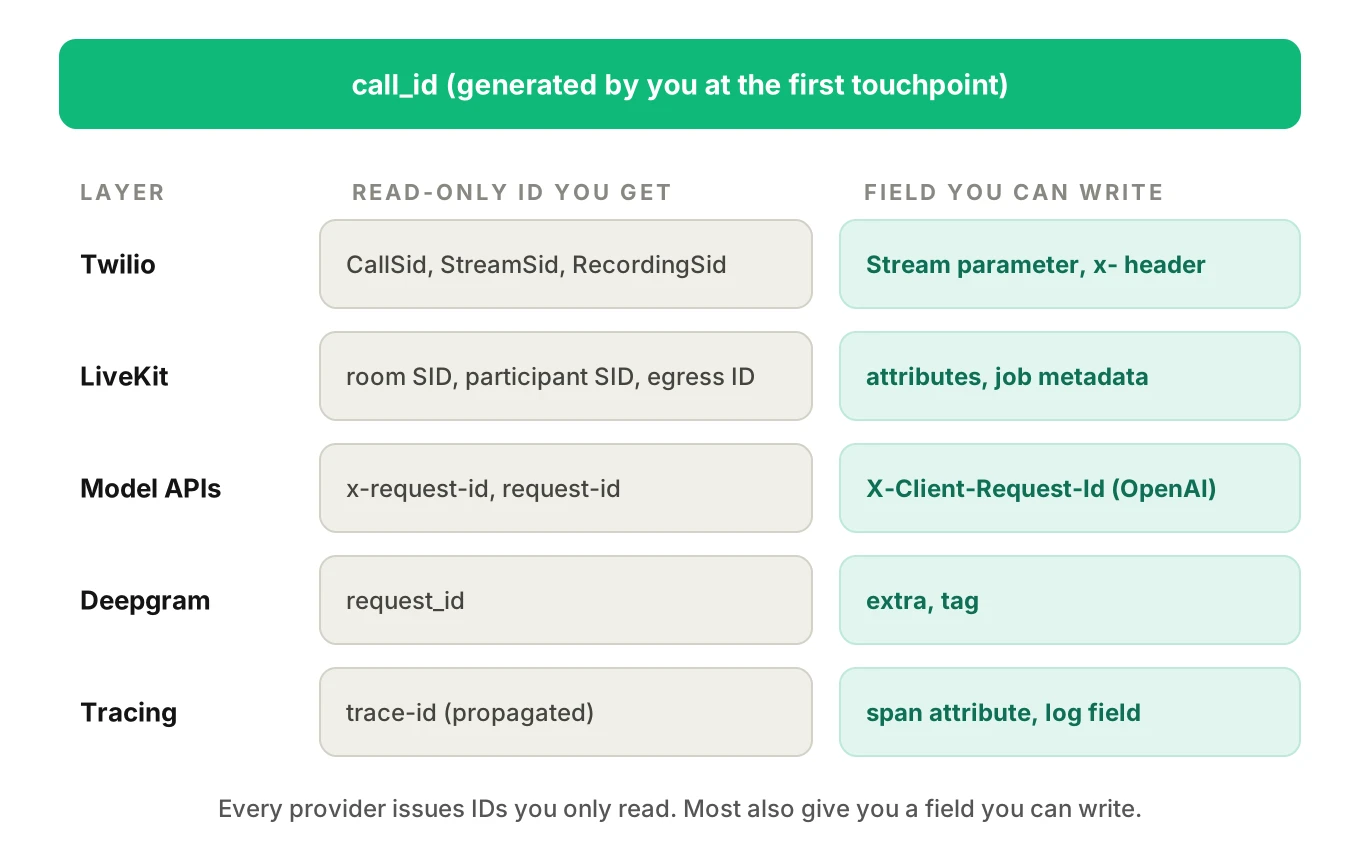
Here is what each layer gives you, as read from provider documentation on November 19, 2026. The last column matters most. It says whether you can set the value or only read it.
| Layer | Identifier | Issued by | Can you set it? |
|---|---|---|---|
| Twilio | CallSid (CA plus 32 hex characters) | Twilio | No, you read it |
| Twilio | ParentCallSid on child legs | Twilio | No |
| Twilio | StreamSid | Twilio | No |
| Twilio | RecordingSid (RE plus 32 hex characters) | Twilio | No |
| LiveKit | Room name | You or the dispatch rule | Yes, but see the privacy warning below |
| LiveKit | Room SID | LiveKit | No |
| LiveKit | Participant identity | You, at connect | Yes, unique per room |
| LiveKit | Participant SID | LiveKit | No |
| LiveKit | sip.callID, sip.twilio.callSid | LiveKit | No, SIP participants only |
| LiveKit | Job metadata | You, in the dispatch | Yes |
| LiveKit | Egress ID | LiveKit | No |
| Model API | x-request-id (OpenAI) | OpenAI | No |
| Model API | X-Client-Request-Id (OpenAI) | You | Yes, per request |
| Model API | request-id (Anthropic) | Anthropic | No |
| STT | request_id (Deepgram) | Deepgram | No |
| STT | tag and extra (Deepgram) | You | Yes |
| Tracing | W3C trace-id | Your tracer | Yes, you propagate it |
Providers issue IDs you can only read. Most also offer a free-form field where you can write your own. The design below depends on that second group.
Twilio identifiers
The Call resource defines CallSid as the unique string Twilio created for the call. It is a CA prefix and 32 hex characters, 34 characters in total. A call started from an active call, for example with <Dial>, is a new leg with its own SID. Its parent_call_sid identifies "the call that created this leg." On status callbacks, ParentCallSid is omitted for the first leg.
The Stream message reference says the start message carries callSid, streamSid and customParameters. That last field is your hook.
LiveKit identifiers
LiveKit gives each room a name and a server-issued session ID. The server API reference describes the Room sid as a "Unique session ID" and the metadata field as "opaque to LiveKit." Participants have a sid generated by the server and an identity you specify. The participant docs say identity is unique per room.
SIP callers get extra attributes. The SIP participant reference lists sip.callID, sip.trunkID, sip.phoneNumber and, on Twilio trunks, sip.twilio.callSid. That last one is the bridge between the two worlds. If your calls arrive through a Twilio SIP trunk, the room's SIP participant already carries the CallSid.
A warning about room names. With an individual dispatch rule, the dispatch rule docs say the room name is the caller's phone number plus a random suffix. They add that these names are personal data that PII redaction does not remove from logs and traces. LiveKit's own tracing docs tag the room name as a PII attribute. Do not use that room name as your join key.
Model API request IDs
OpenAI's API overview describes the x-request-id response header as a unique identifier for the request, used in troubleshooting. It recommends logging these IDs in production. It also supports an X-Client-Request-Id request header that you set yourself, ASCII only and at most 512 characters. If a timeout hides the response header, support can look up your client ID instead.
Anthropic's API errors page says every response carries a request-id header. The same value appears as request_id in error bodies. The Python and TypeScript SDKs expose it as _request_id.
Both are per-request IDs. A thirty-turn call produces thirty or more. They explain one model call, not a call.
Deepgram request IDs and tags
Deepgram's streaming reference shows a request_id in the metadata of results messages and in the metadata message. Log it per stream. Deepgram also lets you write to the request. The extra metadata docs describe extra=KEY:VALUE on the query string, returned under metadata.extra. Each pair is limited to 2048 characters. The tagging docs describe tag, which is capped at 128 characters and cannot be changed once set.
The W3C trace ID
The W3C Trace Context standard defines trace-id as a 16-byte identifier written as 32 lowercase hex characters. Its only stated purpose is "to enable trace correlation." The OpenTelemetry log data model carries TraceId and SpanId on log records. So a trace ID joins logs to spans. It is not enough alone. Our trace and span model shows where the call span sits.
Design one canonical call ID
Your canonical voice agent correlation id is the one value everything else resolves to. Give it these properties.
- Yours. Generated by your code at the first touchpoint. That is the inbound webhook, the outbound dial request or the job start, whichever comes first.
- Opaque. No phone number, name, room name or account number inside it. A random or time-ordered ID is fine.
- One per call. Not per leg, attempt or turn. Those get their own IDs underneath.
- Short. Twilio's combined
<Parameter>name and value must stay under 500 characters. A UUID fits easily.
UUIDv7 is a good fit. RFC 9562 puts a 48-bit millisecond Unix timestamp first, so IDs sort by creation time. The same RFC says implementations should not assume UUIDs are hard to guess, and that they must not be used as security capabilities. So never use the call ID as an access token for a recording link.
Teams ask how to correlate Twilio call SID with LiveKit rooms. The canonical ID is how. Add two companions. A leg_id identifies each phone or room leg. An attempt number counts redials. The call ID never changes.
Attach it at call start
Attach the ID in the first second of the call. Later attachment misses the early events, where setup failures hide.
Twilio: stream parameters and SIP headers
For Media Streams, the Stream docs say to use the nested <Parameter> noun for custom data, because the url attribute does not accept query strings. Twilio sends the values in the start message.
<!-- Illustrative TwiML. Generate call_id in your webhook handler. -->
<Response>
  <Connect>
    <Stream url="wss://agent.example.com/media">
      <Parameter name="call_id" value="01J9ZK6T4Q8V3M2R7N5B1C0D9E"/>
      <Parameter name="attempt" value="1"/>
    </Stream>
  </Connect>
</Response>
When your WebSocket receives start, read start.callSid and start.customParameters.call_id. Write both into your mapping table in the same step. That one write links Twilio's ID to yours.
For SIP legs, the <Sip> docs allow x- headers on the SIP URI, for example sip:agent@example.com?x-call-id=.... The headers are sent in the SIP INVITE. The page limits the URI to under 255 characters and the headers to under 1024 characters in total.
LiveKit: attributes, metadata and job metadata
LiveKit gives you four places to write.
- Outbound SIP. The SIP API reference lists
participant_attributesandparticipant_metadataonCreateSIPParticipant. It also listsheaders, which are "SIP X-* headers for INVITE request." Put your call ID in an attribute and a header. - Inbound SIP. A dispatch rule is static, so it cannot hold a per-call value. The reference documents
headers_to_attributeson inbound trunks, a mapping of SIPX-*header names to participant attribute names. If your carrier leg sends anx-call-idheader, the trunk can turn it into an attribute. The SIP participant docs warn that these attributes update asynchronously. For immediate access they point to thelk.sip.GetRemoteHeadersRPC. - Agent dispatch. The job docs describe
ctx.job.metadataas a freeform string set in the dispatch request, limited to 512 KiB. Pass{"call_id": "..."}as JSON and parse it in the entrypoint. - Room metadata.
CreateRoomaccepts initialmetadata, which the server reference calls opaque to LiveKit.
For inbound calls you do not control the carrier leg. To join voice agent logs in that setup, generate the call ID in the agent on job start. Then read sip.twilio.callSid once it appears. Write both to the mapping table.
For the dial path, see LiveKit with Twilio outbound calling and Pipecat with Twilio and Telnyx.
Model and STT calls
Every model request your agent makes should carry the call ID in a field you control. Then the request ID for LLM logs resolves to a call. For OpenAI, set X-Client-Request-Id to a value that contains your call ID and the turn number, such as 01J9ZK...:t07. Keep it within the documented 512-character ASCII limit. For Anthropic, the request ID is read-only, so log it next to the call ID instead. For Deepgram, set extra=call_id:<id> on the streaming request and log request_id from the metadata.
Put the ID on every log line and span
An ID that exists only at call start is a label. An ID on every record is a join key. Two mechanisms do the work.
Logs. Put the call ID in a context variable at the start of the session. Make your log formatter read it. Every line, from every module, then carries it with no per-call-site effort.
Spans. Set the call ID as a span attribute on the root and on every child. The OpenTelemetry-style pattern is to set it at span creation, not afterward. LiveKit's tracing docs say to pass metadata to set_tracer_provider to "set attributes on every span." Pipecat's OpenTelemetry docs list a conversation_id parameter, with a generated UUID if you omit it, and a conversation.id span attribute. As of November 19, 2026 those docs place the parameter on PipelineWorker. Check the current name before you copy any code.
# Simplified and illustrative. Names are examples, not a standard.
import contextvars, logging, uuid

call_id_var = contextvars.ContextVar("call_id", default="-")

class CallIdFilter(logging.Filter):
    def filter(self, record):
        record.call_id = call_id_var.get()
        return True

def start_call():
    call_id = str(uuid.uuid4())   # or a UUIDv7 library
    call_id_var.set(call_id)
    return call_id
Be careful with OpenTelemetry baggage. The baggage docs warn that baggage goes into most outgoing network requests, so sensitive items can reach third-party APIs. A random call ID is safe to carry. A phone number is not.
Also remember that a trace ID is not a call ID. A call may produce several traces, for example when a transfer starts a new agent session. Store the trace ID as an attribute of the call, not the other way round. The full field list sits in the span attributes post.
Store a mapping table for the IDs you cannot set
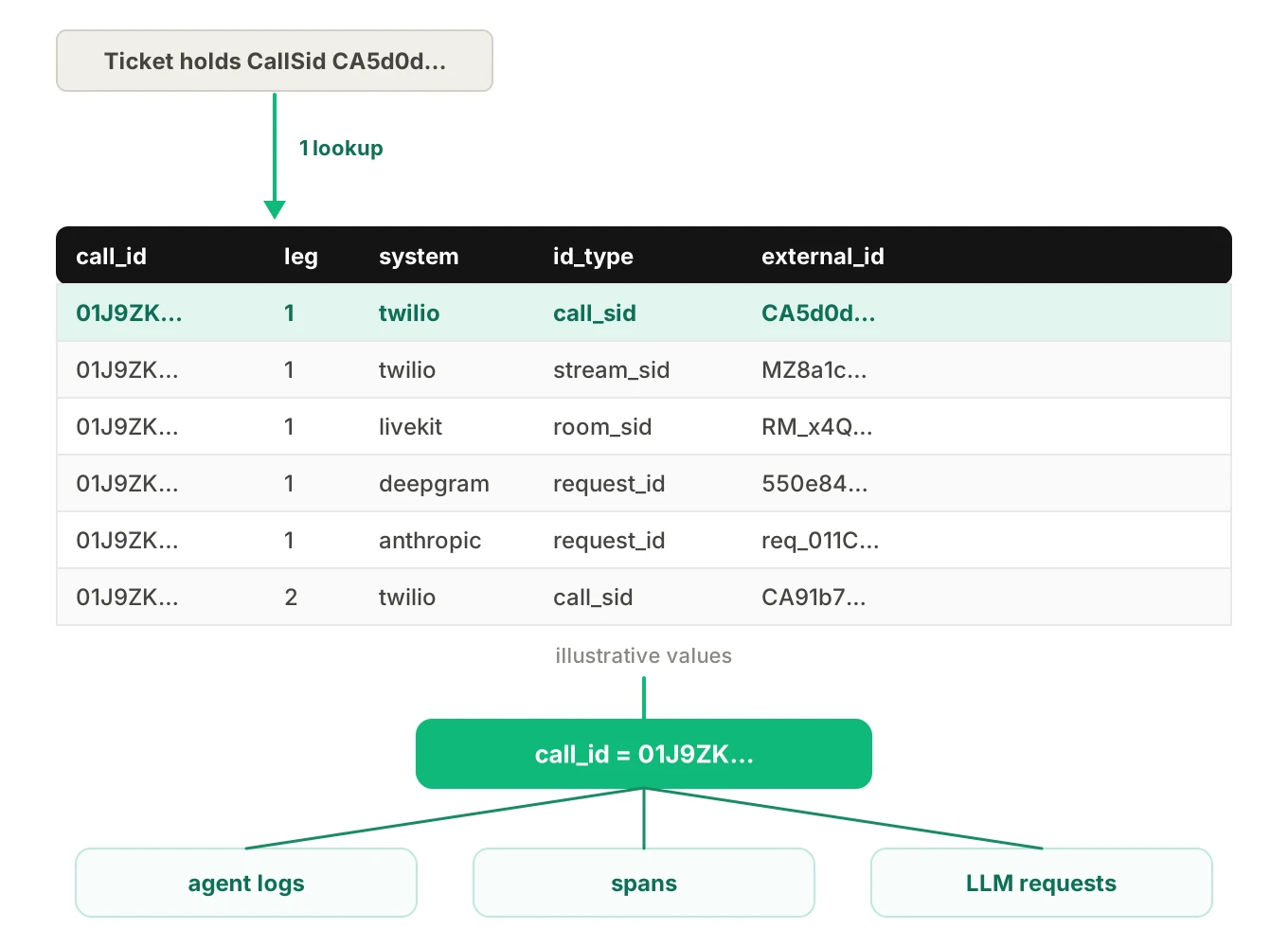
This is how you carry one call ID across services. Some IDs are read-only: Twilio's CallSid, LiveKit's room SID, Anthropic's request-id and Deepgram's request_id. Do not force them into your keys. Write one mapping row the first time you see each.
| call_id | leg_id | system | id_type | external_id | seen_at (UTC) |
|---|---|---|---|---|---|
| 01J9ZK… | 1 | twilio | call_sid | CA5d0d… | 2026-11-19T14:14:02Z |
| 01J9ZK… | 1 | twilio | stream_sid | MZ8a1c… | 2026-11-19T14:14:03Z |
| 01J9ZK… | 1 | livekit | room_sid | RM_x4Q… | 2026-11-19T14:14:03Z |
| 01J9ZK… | 1 | deepgram | request_id | 550e84… | 2026-11-19T14:14:04Z |
| 01J9ZK… | 1 | anthropic | request_id | req_011C… | 2026-11-19T14:14:09Z |
| 01J9ZK… | 2 | twilio | call_sid | CA91b7… | 2026-11-19T14:19:41Z |
All values are made up. The shape is the point: one call ID, many external IDs, each tagged with system and type. Index on (system, id_type, external_id) so a provider ID resolves to a call in one lookup.
A join query pattern
Start from whatever ID the human has. A support ticket may hold a Twilio CallSid. A provider email may hold a request ID. Resolve it to the call ID, then pull everything.
-- Illustrative. Table and column names are examples, not a standard.
WITH target AS (
  SELECT DISTINCT call_id
  FROM call_id_map
  WHERE system = 'twilio'
    AND id_type = 'call_sid'
    AND external_id = 'CA5d0d...'
)
SELECT 'agent_log' AS source, l.ts AS event_time, l.message AS detail
FROM agent_logs l JOIN target t ON l.call_id = t.call_id
UNION ALL
SELECT 'span', s.start_time, s.name
FROM spans s JOIN target t ON s.call_id = t.call_id
UNION ALL
SELECT 'llm_request', r.sent_at, r.provider_request_id
FROM llm_requests r JOIN target t ON r.call_id = t.call_id
UNION ALL
SELECT 'carrier_event', c.event_time, c.status
FROM carrier_events c
JOIN call_id_map m ON m.external_id = c.call_sid
JOIN target t ON m.call_id = t.call_id
ORDER BY event_time;
Note the shape. The first step resolves the foreign ID once. Your tables join on call_id directly. Provider tables join through the mapping table. The final ORDER BY only presents the result. Time is never the join condition.
Your root-cause review and ten-minute debugging routine both start from this query.
Pitfalls that break the join
Retries create new IDs
Redialing creates a new Twilio call, and the Call resource gives it a new SID. A model-call retry gets a new provider request ID. If your call ID is generated inside the retry loop, you now have two calls where the business saw one.
Generate the call ID before the first attempt. Give each attempt its own attempt number and leg_id. For model retries, reuse the call ID and turn number in X-Client-Request-Id but add the attempt, so you can tell the retries apart. See Twilio error 30034 for one failure that triggers redials.
Transfers and warm handoffs
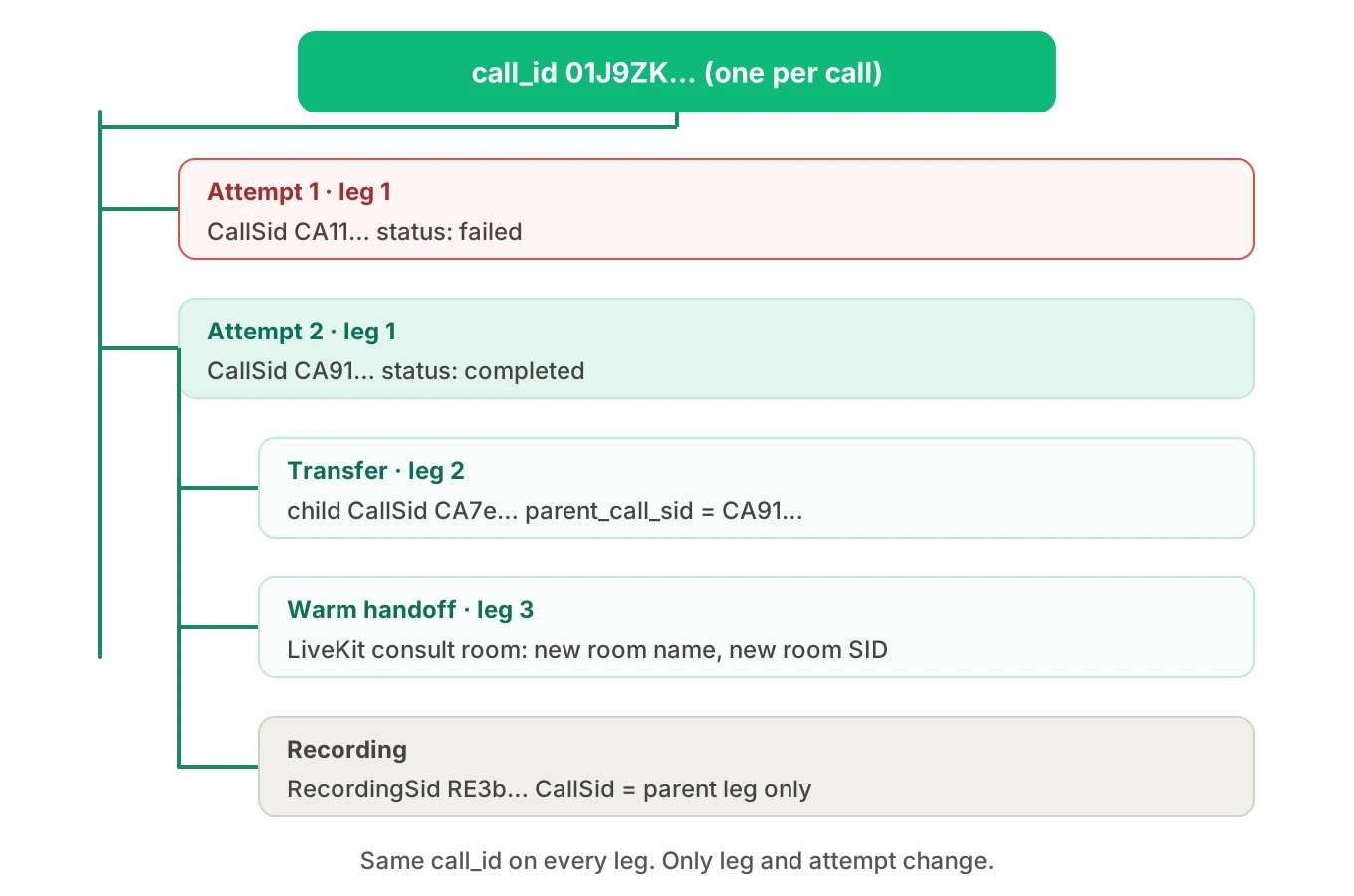
A transfer adds legs. In Twilio, <Dial> creates a child leg whose parent_call_sid points to the call that created it. A warm transfer on LiveKit uses a consult room, so there is a second room with its own name and SID. The caller's room and the consult room are different rooms and the same call.
Keep the call ID constant across legs. Add each leg to the mapping table with its own leg_id. If the handoff target is another service, send the call ID with it. The transfer patterns post covers which legs stay in your media path.
Recording IDs are not call IDs
A Twilio recording has its own RecordingSid with an RE prefix. The Recording docs say the recording's CallSid "will always refer to the parent leg of a two-leg call." So a recording of a transferred call may point at the parent only. LiveKit's egress API has its own egress_id, with room_id and room_name fields on the egress info.
Add every recording ID to the mapping table when you create it. Our post on call recording metrics for LiveKit and Pipecat explains where each leg can be recorded.
Clock skew when joining on time
Systems stamp events with their own clocks and formats. The Twilio Call resource gives date_created, start_time and end_time in UTC, in RFC 2822 format. LiveKit's webhook payload carries createdAt as a UNIX timestamp in seconds. The OpenTelemetry log model separates Timestamp, measured by the source's clock, from ObservedTimestamp, measured by the collector's.
Second-level stamps cannot order events inside one turn, and two hosts may disagree by more than a turn. So join on IDs. Use time only to order results, or as a last-resort tie-breaker with a stated window. Store both the source time and the time you received the event.
How to build the voice agent call ID join in six steps
1. Pick the canonical ID — Generate an opaque, time-ordered ID, such as UUIDv7, at the first touchpoint. Never derive it from a phone number or room name. Add leg_id and attempt as companions.
2. Inventory your IDs — List every system a call touches. For each, write down which ID it issues, whether you can set a value, and where you read it. The table in this post is a template.
3. Attach at call start — Use Twilio stream parameters or SIP x- headers, LiveKit participant attributes or job metadata, Deepgram extra, and X-Client-Request-Id for OpenAI.
4. Stamp every record — Put the call ID in a context variable that your log formatter reads. Set it as an attribute on every span at creation. Log the provider's read-only ID beside it.
5. Write the mapping table — On first sight of any read-only ID, write a row with the call ID, leg, system, type, value and time. Do the same for recordings and transfer legs.
6. Test the join — Place test calls that include a retry, a transfer and a recording. Resolve each provider ID back to one call ID, then pull every record. Any ID that fails to resolve is a hole.
A join that works on a simple call often fails on one with a transfer. Evalgent's simulator can place calls to an agent over PSTN, SIP or WebRTC with scripted callers. Run a transfer scenario through it, and then check that every layer returns your call ID. The scenario is the test, and the join query is the assertion.
Where Evalgent Observe fits
Observe, which is launching, traces each failure to the step or handoff that caused it. It ingests OpenTelemetry data from any stack, plus call details you upload. It is not in the media path. Nothing touches live audio.
A clean call ID is what lets it line up your spans, your call details and your provider data. Where the supplied data cannot be joined, Observe marks the result as undetermined and shows the coverage gap. It does not guess a link. If you see that label, the gap is usually a missing row in your mapping table. For the bigger picture, read what voice agent observability is and the older OpenTelemetry guide for voice agents.
Frequently asked questions
What is a voice agent correlation id?
A voice agent correlation id is an identifier you generate for each call and attach to every system that touches it. It lets you join carrier records, media-room logs, STT requests, model calls and spans for one call. Provider-issued IDs, such as a Twilio CallSid, are mapped to it rather than replacing it.
How do I correlate a Twilio call SID with LiveKit?
If calls arrive over a Twilio SIP trunk, LiveKit's SIP participant carries a sip.twilio.callSid attribute. Read it when the participant joins and write a row linking it to your call ID, room name and room SID. Headers mapped through headers_to_attributes can arrive asynchronously, so wait or use the documented RPC.
Can I use the LiveKit room name as my call ID?
Avoid it. With an individual dispatch rule, LiveKit builds the room name from the caller's phone number plus a random suffix. LiveKit's docs say these names are personal data that PII redaction does not strip from logs and traces. Use a random call ID and store the room name as a mapped value.
Where do I find the request ID for LLM logs?
OpenAI returns x-request-id as a response header, and you can send your own X-Client-Request-Id. Anthropic returns a request-id header and the same value in error bodies. Log the provider ID next to your call ID and turn number for every request.
Is the W3C trace ID enough to join voice agent logs?
Not alone. A trace ID joins spans and logs that share one trace context. A call can produce several traces, for example when a transfer starts a new agent session. Carry the call ID as an attribute on every span, and store the trace IDs you see as values for that call.
How do I handle transfers and retries without losing the call ID?
Create the call ID before the first dial attempt and never regenerate it. Give each attempt and each leg its own number. Twilio child legs point to their parent through parent_call_sid. Add each new leg and consult room to the mapping table.
Why do recording IDs not match call IDs?
A recording is its own resource. Twilio issues a RecordingSid, and its CallSid refers to the parent leg of a two-leg call. LiveKit egress has its own egress_id. Record each recording ID in the mapping table when you create it, so you can find the call from the file.
Should I join voice agent logs by timestamp?
Use time to order results, not to match them. Twilio reports UTC in RFC 2822 format, LiveKit webhooks use Unix seconds, and OpenTelemetry separates source time from observed time. Clocks differ across hosts. If you must use time as a tie-breaker, set a narrow window and log both timestamps.
The bottom line
A voice agent call ID correlation scheme is one ID you own, attached at call start and logged on every line and span. Provider IDs that you cannot set belong in a mapping table, and time is for ordering results, never for matching them.
Related Articles
How to automate voice agent testing: synthetic callers vs manual QA
Learn how ai test automation replaces manual QA for voice agents. Compare synthetic callers vs human testers, with a 5-step framework to scale without hiring.
Read more
AI Agent Testing vs Voice Agent Testing: What General Tools Miss for Voice
AI agent testing measures text outputs. Voice agent testing measures behaviour through an acoustic pipeline. Five failure categories general tools miss.
Read more