Voice Agent Telephony Monitoring: SIP Response Codes, Call Setup Time and Post-Dial Delay
On this page
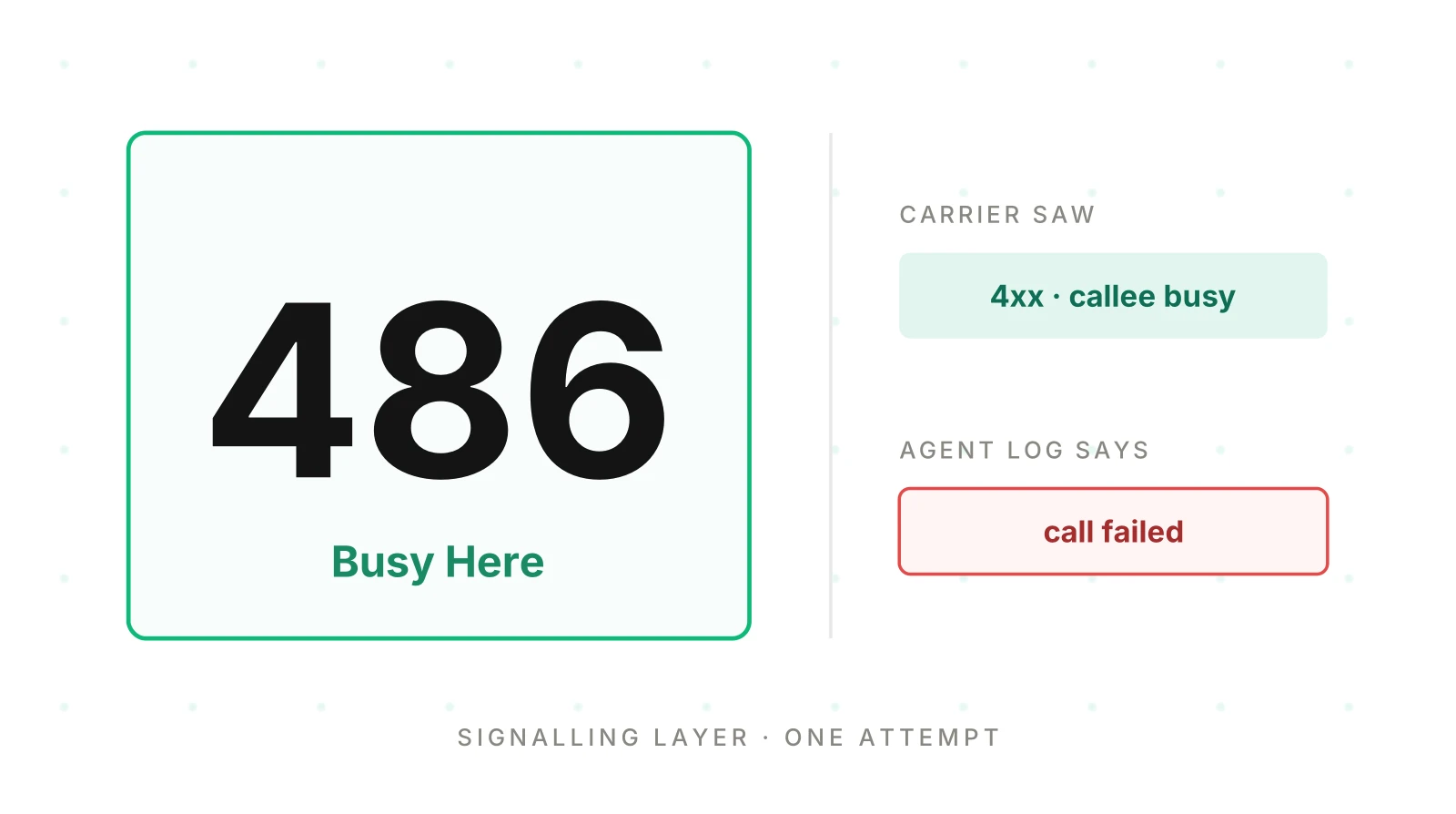
Picture a caller dialling your voice agent. Nothing happens for eleven seconds, then the line drops. Your agent platform shows a failed call with no cause. The carrier saw a SIP final response and a setup clock. Only one of those records is about the call setup.
This post is a vendor-neutral guide to voice agent telephony monitoring at the signalling layer. It shows how to read SIP response codes voice agent platforms report on inbound and outbound calls. It defines post-dial delay and call setup time. It explains answer-seizure-style ratios. It also separates the carrier's code from your agent's own view. Every definition comes from a source we opened, as of November 21, 2026. Worked numbers are illustrative.
Neighbouring posts cover transport in SIP vs WebRTC. They cover one SMS error in Twilio error 30034. They cover carrier choice in best telephony for voice agents. This one covers the codes and clocks that exist before the first word is spoken.
Two witnesses to one call setup
Setup is the stretch between the first INVITE and the answer. The carrier and the agent platform both record it. They record different things.
The carrier sees SIP messages. Your agent platform sees sessions, participants and its own error labels. A busy callee, a timed-out ring and a rejected trunk can all become one label.
Our post on voice agent logs accuracy argues that the agent's own account is one witness, not the record. The carrier's code is closer to the event. It is still a report with its own gaps.
SIP response classes in one table
RFC 3261 sorts responses by their first digit. All 2xx, 3xx, 4xx, 5xx and 6xx responses are final. A 1xx response is provisional. The class tells you what kind of event this was before you look up the number. The IANA registry lists each code as defined by RFC 3261 unless noted.
| Class | RFC 3261 meaning (paraphrased) | For a voice agent |
|---|---|---|
| 1xx | Provisional: still processing | Setup in progress, such as ringing |
| 2xx | Success: accepted | 200 OK is the answer |
| 3xx | Redirection: more action needed | The call was pointed elsewhere |
| 4xx | Client error: bad syntax, or cannot be fulfilled at this server | Wrong number, busy, unavailable, cancelled or timed out |
| 5xx | Server error: a server failed a valid request | Overload, gateway or trunk fault |
| 6xx | Global failure: cannot be fulfilled anywhere | The callee declined everywhere |
Source: RFC 3261, section 7.2 and section 6.
The first digit hints at who can fix the problem. A 5xx points at infrastructure. A 6xx points at the callee. A 4xx can point at either, so it needs the most care in any SIP response codes voice agent review.
The SIP response codes voice agent platforms report most
Reason phrases below follow the IANA registry and RFC 3261. The plain-language readings come from provider documents: Telnyx (page dated October 14, 2026), Vapi and LiveKit. We could not open RFC 3261 section 21 in full. The meaning column is a provider reading, not an RFC quote.
| Code | Reason phrase | Provider reading | Usual next step |
|---|---|---|---|
| 404 | Not Found | User or domain not found | Check the number and routing |
| 408 | Request Timeout | No timely answer from the far end | Check reachability and path |
| 480 | Temporarily Unavailable | Callee known but unavailable now | Normal; retry later |
| 486 | Busy Here | Callee busy at this address | Normal; no instant retry |
| 487 | Request Terminated | Request cancelled before it finished | Find who cancelled |
| 503 | Service Unavailable | Far end overloaded or in maintenance | Honour Retry-After, then retry |
| 504 | Server Time-out | Upstream server did not answer in time | Check routing |
| 603 | Decline | Callee refused the call | Treat as a refusal |
Two cautions apply. Telnyx lists 603 twice, as Decline and as a network block. Check which meaning your trace carries. Also, provider pages describe their own platform. Telnyx says a 404 can mean a number is not assigned to a connection.
487 is often your own timer
Twilio's Call resource page says a call that does not connect before its Timeout returns 487. Telnyx reads 487 as a cancelled call, usually a caller hangup. Both are true. A 487 only says that a pending request was cancelled. It does not say who cancelled it.
For an outbound agent, a spike in 487 can mean callers hang up fast. It can also mean your ring timeout is shorter than the callee's pickup time. Log the party that sent the CANCEL, or keep your ring timeout beside the call record.
408 and 503 may never have crossed the wire
RFC 3261 section 8.1.3.1 says a client treats a transaction timeout as if a 408 arrived. A fatal transport error becomes a 503. So some 408 and 503 codes come from the sender's own stack.
That changes how you read them. A 408 in your logs can be a silent far end or a broken path. A 503 can be a remote overload or a local transport fault. The code alone cannot separate the two. You need to know which side wrote it.
Inbound versus outbound: who sends the code
On an outbound call, your platform dials and the far end answers. The codes mostly come back to you. You read the callee's state, the carrier's state and your own timers. Many of the SIP response codes voice agent logs show here are ordinary: busy, unavailable, declined. They describe the callee, not your agent.
On an inbound call, the caller's carrier dials and your platform answers. Now your side chooses the response. If your platform answers 503 at a concurrency limit, that is your signal. The caller hears a failed call. Vapi's page notes that 503 can indicate call limits as well as routing failures. See concurrency failure in voice agents.
The practical rule for SIP response codes voice agent teams collect is short. For outbound, separate codes caused by the callee from codes caused by infrastructure. For inbound, count every final response your own platform sends, including the failures. Your carrier may not show them to you.
Post-dial delay and call setup time
Three clocks run during setup. They have different starting and ending events, so name each one.
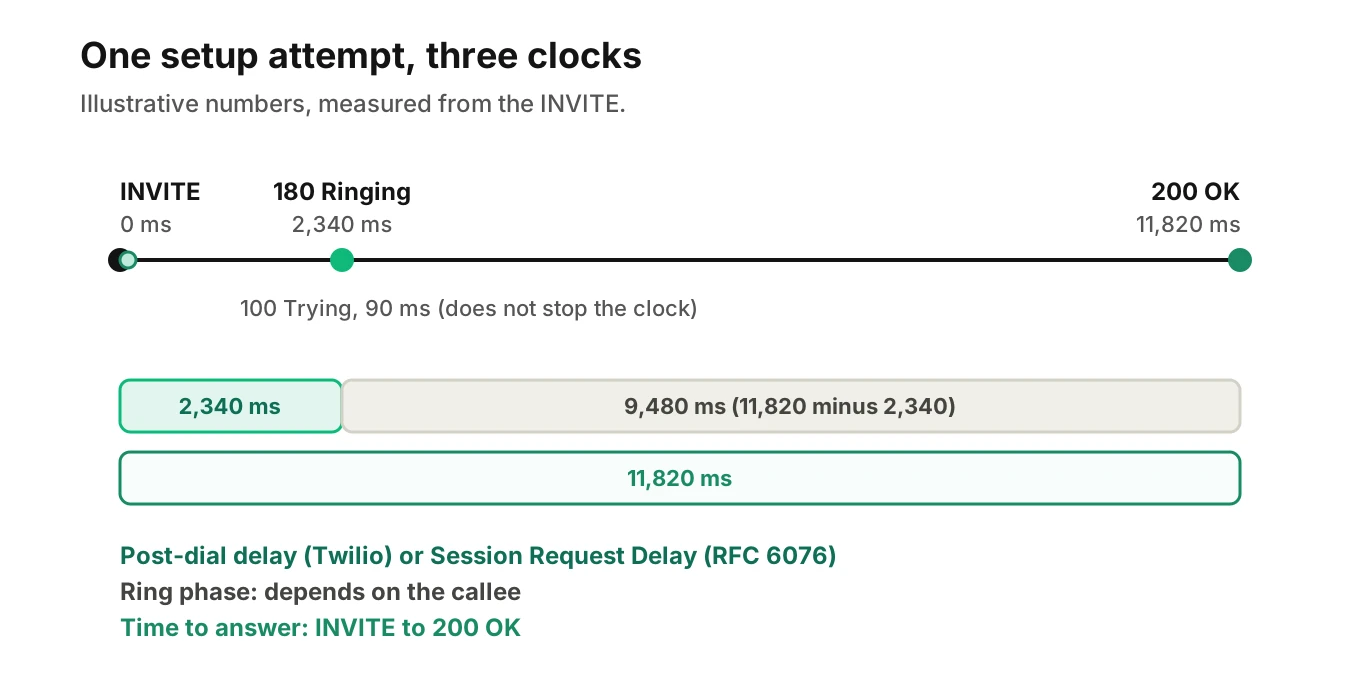
Post-dial delay (Twilio): the time from the SIP INVITE to an 18x response. It is how long the caller waited before hearing ringing. This is Twilio's Voice Insights definition. Its Call Summary API has a pdd_ms property for it.
Session Request Delay (RFC 6076): the time from the first bit of the INVITE to the first non-100 provisional response, such as 180. If none arrives, a 200 OK stops it. In failed setups, a failure response also stops it. RFC 6076 says to report successful and failed setups separately. It does not use the term post-dial delay.
Time to answer: the time from INVITE to 200 OK. This is our working name, not an RFC term. It includes ringing, so it depends on the callee.
A 100 Trying does not stop the SRD clock. It only says the INVITE was received.
A worked example, with illustrative numbers
One outbound attempt, invented to show the arithmetic. The INVITE leaves at 0 ms. A 100 Trying arrives at 90 ms. A 180 Ringing arrives at 2,340 ms. The 200 OK arrives at 11,820 ms.
The post-dial delay, or SRD, is 2,340 ms. The ring phase is 11,820 minus 2,340, which is 9,480 ms. The time to answer is 11,820 ms. A dashboard that shows one of these hides the other two. A long ring phase is a callee story. A long SRD is a network or routing story.
Setup time is not the latency a caller feels in conversation. After the answer, the next clock is time to first audio. Chart them separately. On an inbound call, you cannot see the caller's INVITE start. RFC 6076 defines these delays at the originating side. Measure what your side sees, and name the clock.
Answer-seizure-style metrics: SER, SEER and ISA
Telephony teams use ratios to summarise many attempts. RFC 6076 defines several for SIP. It says its Session Establishment Ratio (SER) is similar to the Answer Seizure Ratio (ASR) of ITU-T E.411. It says its Session Establishment Effectiveness Ratio (SEER) is similar to the Network Effectiveness Ratio. We did not open E.411, so we rely on RFC 6076 here.
| Metric | Numerator | Denominator |
|---|---|---|
| SER | INVITEs with a 200 OK | All INVITEs minus 3xx |
| SEER | INVITEs with 200, 480, 486, 600 or 603 | Same as SER |
| ISA | Setups released for failure or overload (guideline codes 408, 500, 503, 504) | All setup requests |
The split in SEER is the useful part. RFC 6076 says 480, 486, 600 and 603 clearly show the effect of an individual user. So SEER treats them as the network doing its job. SER does not. A low SER can mean a healthy network and busy callees. A low SEER means delivery failed.
A worked example, with illustrative numbers
An outbound campaign places 1,000 INVITEs in an hour. The outcomes are invented. 612 get a 200 OK. 40 get a 3xx. 90 get a 480, 60 a 486 and 30 a 603. 70 get a 408, 503 or 504. The last 98 get a 404, 488 or 403.
The denominator is 1,000 minus 40, which is 960. SER is 612 divided by 960, or 63.75%. The SEER numerator is 612 plus 90 plus 60 plus 30, which is 792. SEER is 792 divided by 960, or 82.5%. The Ineffective Session Attempts (ISA) figure is 70 over all 1,000 requests, or 7.0%.
Read together, the three numbers say: of the 960 attempts, 348 got no 200 OK. Of those, 180 were callee choices (480, 486, 603) and 70 were infrastructure. That is a different action list from a single answer rate of 61.2%.
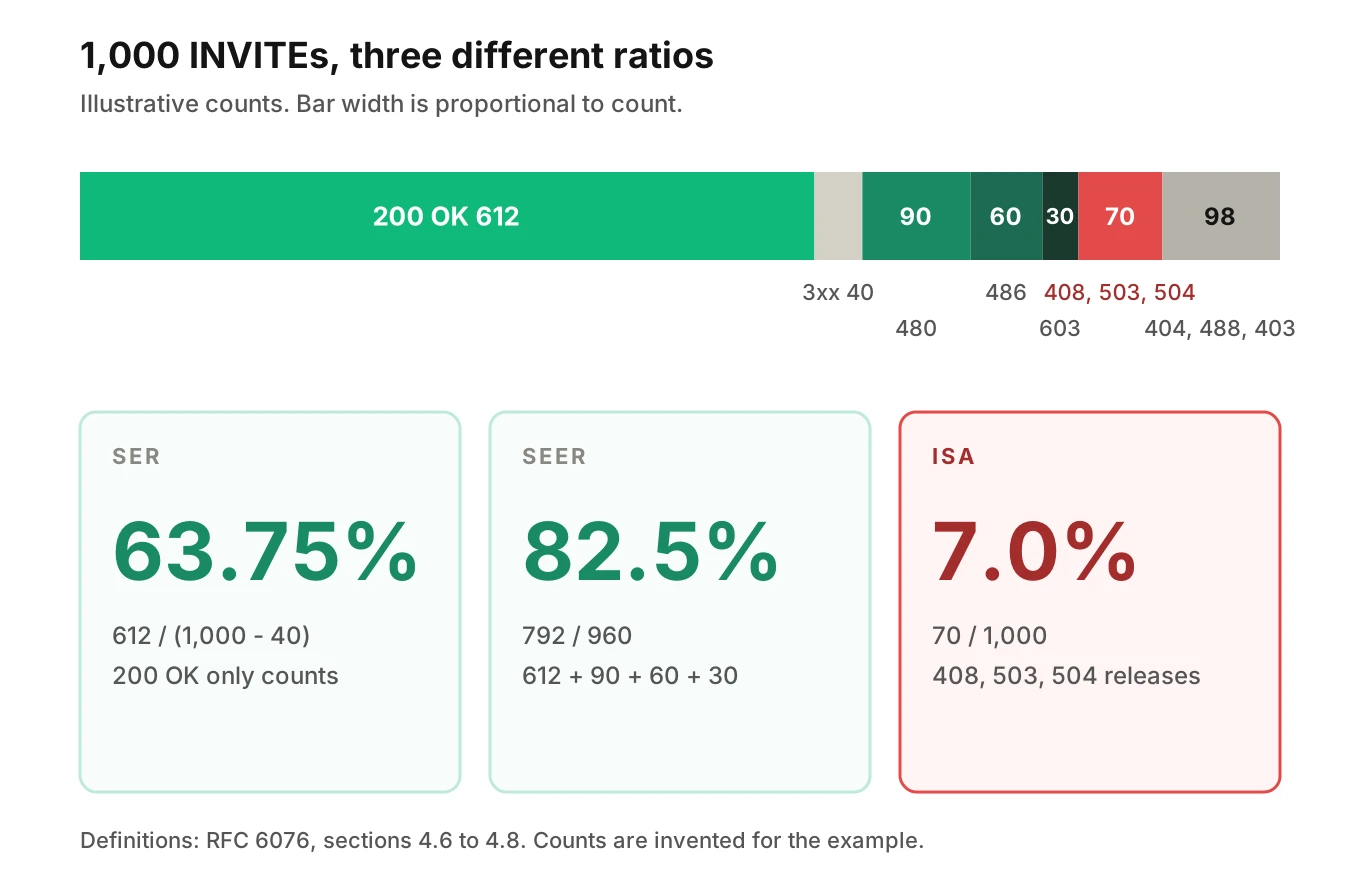
The 98 attempts with a 404, 488 or 403 sit in no numerator. They are often configuration faults, such as bad numbers, codec mismatch or policy. They still count against SER and SEER. Chart them by code so they do not hide in the gap.
Carrier code versus the agent's own view
Platforms compress SIP detail into their own labels. That is reasonable. It is also where cause gets lost.
| Source | What it records | What the label can hide |
|---|---|---|
| Twilio status callback | SipResponseCode, in terminal events only | Absent while the call rings or runs |
| Twilio call status | busy, no-answer, failed, canceled, completed | no-answer covers no answer or a rejected call |
| LiveKit disconnect reason | USER_REJECTED (486, 603); USER_UNAVAILABLE (408, 480); SIP_TRUNK_FAILURE (5xx, other errors, read as a SIP trunk failure) | Several codes share one reason |
Vapi endedReason | Includes the code for some outbound SIP failures | A 404 may show a generic SIP failure |
Sources: Twilio Call resource, LiveKit outbound calls and SIP participant reference, Vapi troubleshooting page.
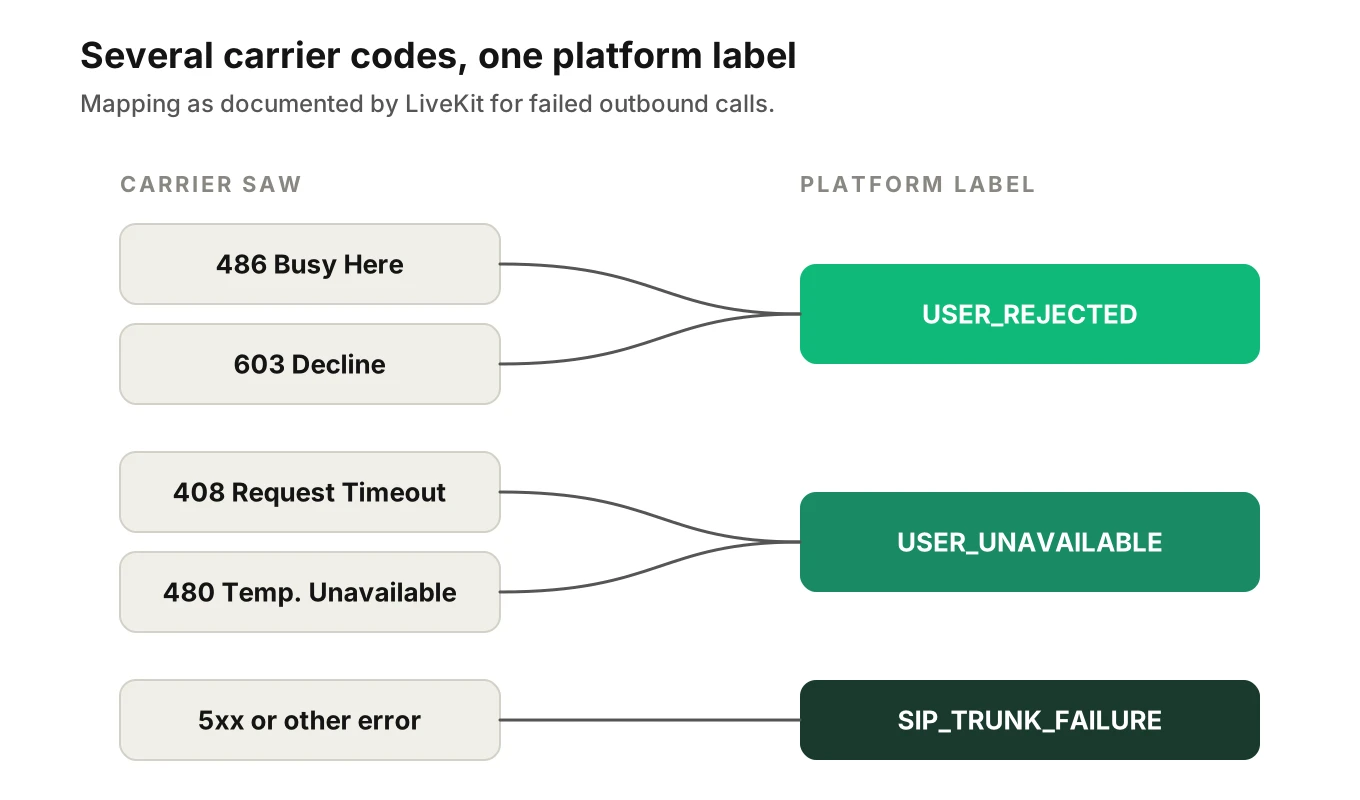
LiveKit's page says a failed outbound call raises an error exposing the carrier's SIP status code and reason. That is the right pattern. Keep the raw code and reason phrase next to the platform's label, every time.
Timing is another gap. Twilio says a partial Voice Insights call summary arrives within ten minutes of the call ending. The complete one takes about thirty minutes. A dashboard that joins on it reads incomplete data for recent calls. See the Call Summary resource.
To join these records to your own, you need a shared call identifier. See voice agent call ID correlation. The full path is in how to trace a voice call end to end.
Where Evalgent Observe fits: it ingests OpenTelemetry data from any stack. Traces explain why a call failed, and failures are clustered into root causes. If your stack attaches the carrier's final code to the call data, that code is evidence. If not, the finding says undetermined and the coverage gap is shown. Observe never sits in the media path. Native connectors for named platforms are planned. Today data arrives through OpenTelemetry and an upload path.
What to chart and what to alert on
Not every signal deserves a page. The test is whether the callee caused it. Build your SIP response codes voice agent dashboard around that test.
| Signal | Cut by | Alert? |
|---|---|---|
| Final response by class and code | Direction, carrier, country | Yes, for 5xx and 408 share |
| SER | Direction, carrier | Trend against your baseline |
| SEER | Direction, carrier | Yes; a fall means delivery failed |
| ISA (408, 500, 503, 504) | Carrier, route | Yes |
| SRD, successful setups, P50 and P95 | Carrier | Yes, on a shift from baseline |
| SRD, failed setups | Carrier | Review only |
| Ring phase, P50 and P95 | Destination | No; it describes the callee |
| 486, 480, 603 share | Campaign, list | Review; mostly user-driven |
| 487 share | Who cancelled | Review; check your ring timeout |
| 404, 488, 403 count | Code | Yes, after a config change |
Two rules do most of the work. Report percentiles for delays, not means. Set every threshold from your own baseline. This guide gives none, because each carrier, country and campaign has its own normal.
Setup failures lower connection rates. Early hangups show up in abandonment rate. Voicemail pickups answer with 200 OK, so they look like success here. That is a job for answering machine detection. Audio problems after the answer are in phone audio quality.
How to monitor telephony signals for a voice agent
1. Store the raw code - Keep the final SIP code and reason phrase on every call record.
2. Record who ended it - Note whether the caller, callee, agent or your timer ended the attempt.
3. Capture the setup clocks - Store INVITE, first non-100 provisional and 200 OK times. Derive SRD, ring phase and time to answer.
4. Split by direction and carrier - Never mix inbound with outbound in one ratio.
5. Compute SER, SEER and ISA - Use the RFC 6076 definitions. Keep failed-setup delays apart.
6. Alert on infrastructure, review the callee - Page on 5xx, 408 and SEER. Review 486, 480 and 603 as list quality.
When a number moves, open one call and read its trace. The method is in voice agent root cause analysis.
Testing the signalling path before callers do
Signals tell you what happened. Test calls tell you whether the path works before a release. Evalgent test calls reach your agent over phone, SIP or WebRTC. Evalgent measures call timestamps such as first audio, and it can measure uptime and latency percentiles. To see how a test set maps to your telephony path, book a walkthrough.
Frequently asked questions
What are the most important SIP response codes for a voice agent?
Start with 486, 480, 487, 408, 503 and 603, then 404 and 504. Read the class first: 4xx is a client error, 5xx a server error and 6xx a global failure. Then use the specific code and your provider's notes.
What does SIP 486 Busy Here mean for a voice agent?
Provider documents read 486 Busy Here as the callee being busy at that address. On an outbound campaign it is usually a callee state, not an agent fault. Telnyx advises accepting the outcome and not retrying immediately. Count it in your reports, but do not page on it.
What does SIP 503 Service Unavailable mean and should I retry?
Telnyx reads 503 as the far end being overloaded or in maintenance. It advises waiting for any Retry-After value before retrying. Vapi adds that it may signal routing failures or call limits. RFC 3261 treats a fatal transport error as a 503, so it can be local.
What is the difference between SIP 486 and 603?
Both end a call without an answer. A 486 is a 4xx client error: the callee is busy here. A 603 is a 6xx global failure: the callee declined. LiveKit maps both to its USER_REJECTED reason, so a platform label alone cannot tell them apart.
What is post-dial delay in a voice agent call?
Twilio defines post-dial delay as the time from the SIP INVITE to an 18x response. That is how long the caller waited before hearing ringing. RFC 6076 defines a related Session Request Delay that stops at the first non-100 provisional response. State which one your dashboard uses.
How do you measure call setup time?
Record the INVITE time, the first non-100 provisional time and the 200 OK time. The first gap is the post-dial delay or SRD. The full gap to 200 OK is the time to answer, which includes ringing. Keep successful and failed setups in separate series, as RFC 6076 advises.
What is answer seizure ratio and how does it differ from SEER?
RFC 6076 says its Session Establishment Ratio is similar to the ASR of ITU-T E.411. It counts INVITEs answered with 200 OK over total INVITEs minus 3xx responses. SEER also counts 480, 486, 600 and 603, because they reflect a user's choice, not a network failure.
Which SIP signals should I alert on?
Alert on infrastructure signals against your own baseline: 5xx and 408 share, ISA, SEER and successful-setup delay percentiles. Review user-driven codes such as 486, 480 and 603 as campaign quality. Check 487 against your ring timeout first, because your own timer can cause it.
The bottom line
SIP response codes tell you how setup ended, but only if you keep the raw code, the reason phrase and the setup clocks beside the platform's label. Chart codes by class, direction and carrier, and alert on failures the callee did not cause.
Related Articles
How to automate voice agent testing: synthetic callers vs manual QA
Learn how ai test automation replaces manual QA for voice agents. Compare synthetic callers vs human testers, with a 5-step framework to scale without hiring.
Read more
AI Agent Testing vs Voice Agent Testing: What General Tools Miss for Voice
AI agent testing measures text outputs. Voice agent testing measures behaviour through an acoustic pipeline. Five failure categories general tools miss.
Read more