Voice Call Quality Metrics for Voice Agents: Codecs, Packet Loss, Jitter and What They Do to STT
On this page
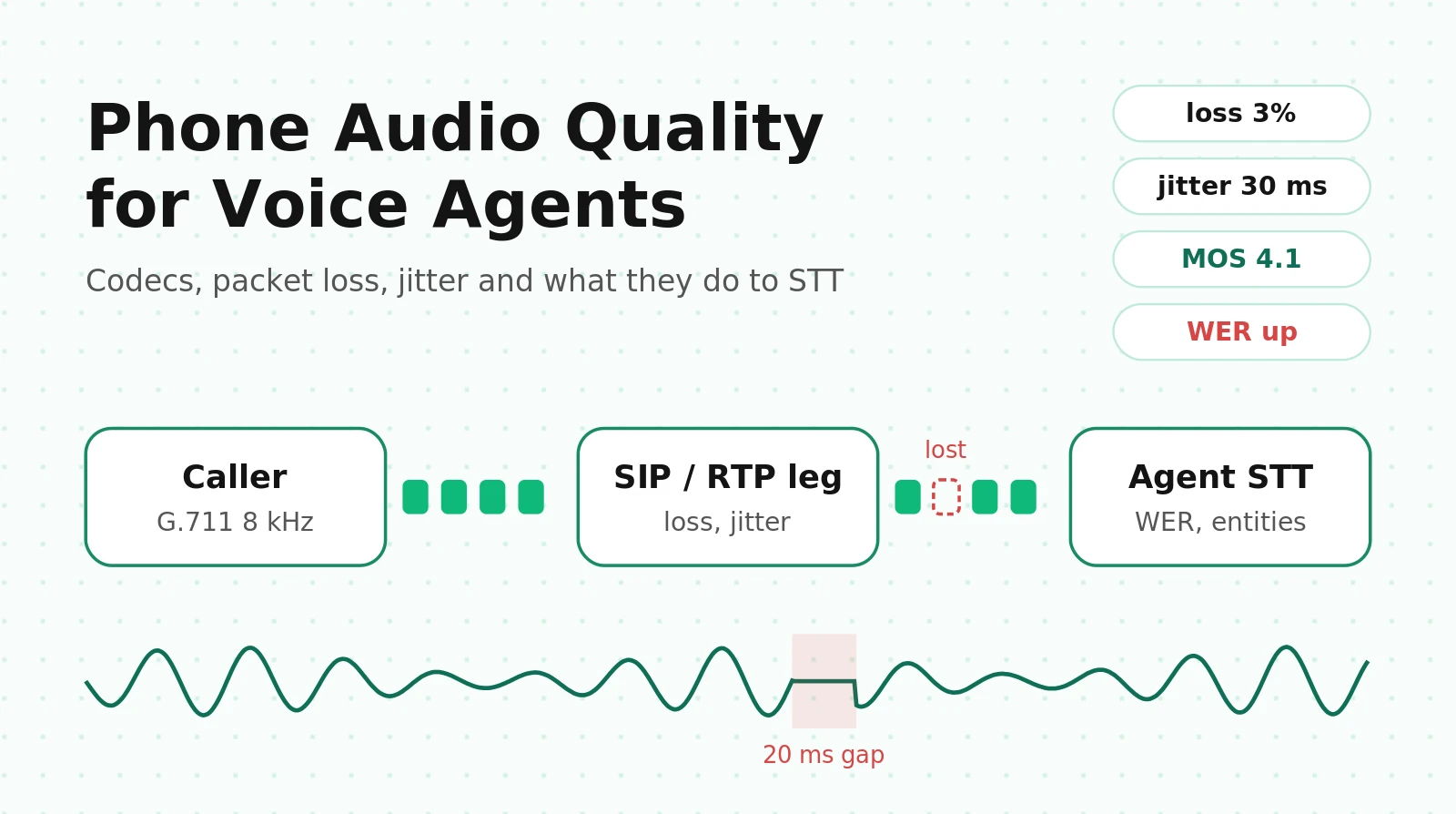
Your voice agent sounds fine in the browser playground. Then it goes on a phone line and something changes. Callers repeat themselves. Order numbers come out with a digit missing. Every so often a caller hears nothing at all while the agent hears them perfectly. The LLM, prompt and STT model are all the same. What changed is the audio path. Narrowband codecs, two or three transcodes, a jitter buffer, packet loss concealment and a SIP leg you don't control now sit between the caller's mouth and your model.
This guide covers that path for teams running their own agent on LiveKit or Pipecat with Twilio or Telnyx SIP. You get the codec chain with its sample rates, the exact stat fields to read on each leg, the ITU-T E-model with a worked example, what published research says about packet loss and ASR, a thresholds table, and a netem test plan you can run this week.
Where audio degrades: the codec chain on a real phone call
A browser-to-agent WebRTC call has one hop that matters: Opus at 48 kHz over one network path. A phone call has a chain of them, and each one can lower quality on its own. Here is the inbound direction for a typical setup.
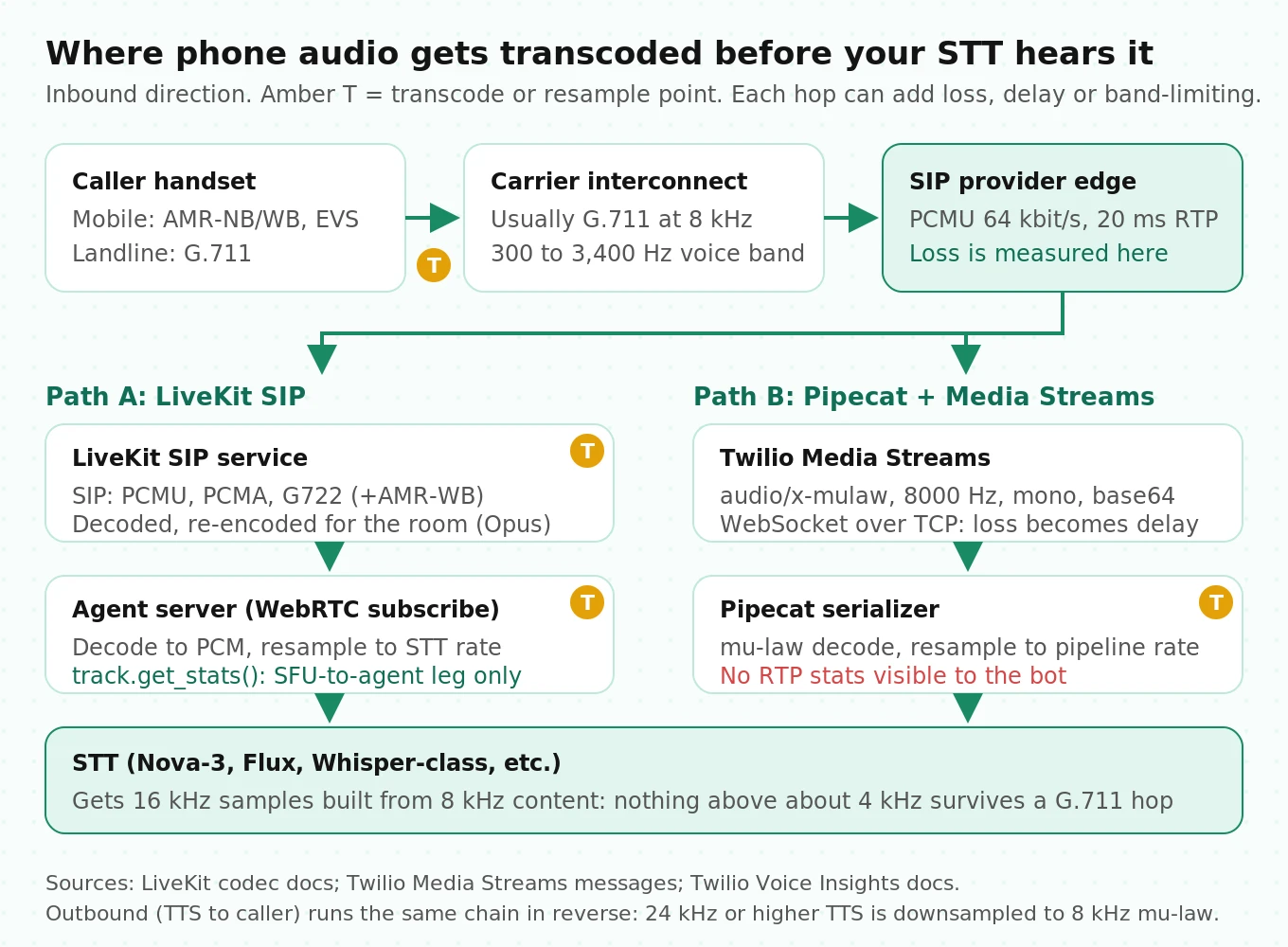
1. Handset to carrier core. Mobile callers are coded with AMR-NB, AMR-WB or EVS on the radio side. The carrier usually transcodes to G.711 at its interconnect.
2. Carrier to your SIP provider. G.711 μ-law (PCMU) at 8 kHz is the US baseline. That means 64 kbit/s, 20 ms packets, and audio band-limited to roughly 300–3,400 Hz.
3. SIP provider to your media server. With LiveKit SIP, the default SIP codecs are PCMU, PCMA and G722. AMR-WB is available if you enable it. LiveKit's docs point out that these SIP codecs are separate from the codecs used inside the room. In practice your G.711 audio is decoded and re-encoded into the room's codec before your agent ever subscribes to it. That is a transcode you didn't choose.
4. Media server to agent process. The agent decodes to PCM. Then the framework resamples to whatever the STT plugin wants, typically 16 kHz.
5. Agent to STT. If you send 16 kHz audio built from an 8 kHz source, the STT gets more samples but no new information above 4 kHz.
With Pipecat on Twilio Media Streams, steps 3–4 are a WebSocket. Twilio documents the payload as `audio/x-mulaw`, always 8,000 Hz, always mono, base64-encoded. Audio you send back must use the same format. The outbound path runs in reverse: TTS at 24 kHz or 44.1 kHz gets downsampled to 8 kHz μ-law. That takes away much of what made the voice you picked sound premium. For the wider architecture, see the voice agent stack guide. For how LiveKit and Pipecat differ on the phone leg, see LiveKit vs Pipecat telephony.
Four gotchas from this chain that the vendor docs only mention in passing:
- The WebSocket leg turns packet loss into delay. Media Streams runs over TCP. Any loss there gets retransmitted, so it shows up as audio arriving in bursts after a stall, not as missing audio. All real RTP loss happened upstream, at Twilio's edge. Your bot never sees an RTP sequence number, so it cannot measure that loss.
- G.722 says 8000 in SDP but carries 16 kHz audio. LiveKit's codec table calls this "a known quirk of the SDP specification." If your monitoring reads the clock rate from SDP, it will label G.722 calls as narrowband.
- Offering more codecs can break call setup. LiveKit warns that each codec you add makes the `INVITE` bigger, and large UDP packets can fragment and get dropped on some networks. To keep the offer small over UDP, use `only_listed_codecs`.
- Wideband only helps if every hop carries it. Twilio's Voice Insights adds a `downsampled` tag when a call had HD audio on one edge but spent most of its duration going through a narrowband component. Twilio counts only AMR-WB and Opus as HD.
The network stats that matter, and where they hide
Every RTP receiver tracks three things: packets that never arrived (loss), variation in arrival spacing (jitter), and round-trip time. The definitions come from RFC 3550. The difference between stacks is which leg you can see.
Packet loss. RTCP receiver reports carry `fraction lost` and `cumulative number of packets lost`. These count only packets that never arrived. A packet that arrives too late for the jitter buffer gets thrown away, and the STT loses it just the same, but the RTCP loss count doesn't include it. WebRTC reports these separately as `packetsDiscarded`. RTCP XR (RFC 3611) reports them as a discard rate in its VoIP Metrics block. For STT, the loss that matters is `lost + discarded`.
Jitter. RFC 3550's interarrival jitter is a running estimate, `J = J + (|D| − J) / 16`, reported in RTP timestamp units. A raw RTCP jitter of 240 on a G.711 stream (8 kHz clock) means 30 ms. Opus over RTP always uses a 48 kHz clock, so the same 240 means 5 ms. Dashboards that skip this conversion are off by a factor of six.
Jitter buffer behavior. Jitter alone doesn't hurt the audio. Jitter the buffer can't absorb does. The W3C WebRTC stats spec exposes what the buffer actually did on `inbound-rtp`:
| Field (`inbound-rtp`) | What it tells you | Derived metric |
|---|---|---|
| `packetsLost`, `packetsReceived` | Network loss | loss % = lost / (lost + received) |
| `packetsDiscarded` | Late packets the jitter buffer dropped | effective loss = lost + discarded |
| `jitter` | RFC 3550 jitter, already in seconds | Compare against buffer target |
| `jitterBufferDelay` / `jitterBufferEmittedCount` | Total time in the buffer and samples played | Average buffer delay = ratio × 1000 ms |
| `jitterBufferTargetDelay` | How much delay the buffer is aiming for | Rising target means a worsening network |
| `concealedSamples` / `totalSamplesReceived` | Audio the decoder made up | Concealment ratio, the number closest to "what STT got that was fake" |
| `silentConcealedSamples`, `concealmentEvents` | Concealed silence, and how many distinct gaps there were | Few long gaps hurt STT more than many short ones |
| `insertedSamplesForDeceleration` | Time-stretching to absorb jitter | Pitch and timing artifacts |
`roundTripTime` and `fractionLost` sit on `remote-inbound-rtp`. They describe the stream you send, as reported back by the far end.
Reading stats in LiveKit
LiveKit's Python SDK exposes transport stats at the room level (`await room.get_rtc_stats()`) and per track (`await track.get_stats()`). Per LiveKit's transport stats docs, field names are snake_case versions of the W3C names. The one catch: these stats describe the WebRTC leg between the LiveKit SFU and your agent. The PSTN and SIP leg loss sits in your SIP provider's tooling. An agent running in the same cloud region as the SFU will usually show near-zero loss even on a call that sounds bad to the caller.
# Illustrative: poll a subscribed caller audio track every 5 s and log deltas.
# Field paths follow LiveKit's documented python examples (inbound_rtp.received / .inbound).
import asyncio

async def log_audio_health(track, interval=5.0):
    prev = None
    while True:
        for s in await track.get_stats():
            if s.WhichOneof("stats") != "inbound_rtp":
                continue
            rx, ib = s.inbound_rtp.received, s.inbound_rtp.inbound
            cur = {
                "lost": rx.packets_lost,
                "concealed": ib.concealed_samples,   # snake_case of W3C concealedSamples
                "total": ib.total_samples_received,
                "jb_delay": ib.jitter_buffer_delay,
                "jb_count": ib.jitter_buffer_emitted_count,
            }
            if prev:
                d = {k: cur[k] - prev[k] for k in cur}
                conceal = d["concealed"] / d["total"] if d["total"] else 0.0
                jb_ms = 1000 * d["jb_delay"] / d["jb_count"] if d["jb_count"] else 0.0
                print(f"lost+={d['lost']} conceal={conceal:.2%} jb_avg={jb_ms:.0f}ms")
            prev = cur
        await asyncio.sleep(interval)
These counters are cumulative from the start of the subscription. Always diff two readings. A call-level average can hide a 4-second burst exactly when the caller reads out a card number. Store these per-turn deltas next to your transcripts, using the per-call record described in call recording metrics for LiveKit and Pipecat.
Reading stats in Pipecat: Daily vs Twilio
On a Daily transport, the underlying `daily-python` `CallClient` has `get_network_stats()` (reference). Daily's docs say the latest stats refresh about every two seconds. On a Twilio Media Streams transport, the bot has no RTP stats at all. You have to pull them from Twilio after the call (next section). If you're choosing between those transports, running Pipecat on Twilio and Telnyx covers the serializer side.
Reading stats in Twilio Voice Insights
Twilio's Call Summary resource (`GET https://insights.twilio.com/v1/Voice/{CallSid}/Summary`) returns per-edge metrics: `carrier_edge` for PSTN, `sip_edge` for SIP interface or trunking. Each edge has `inbound` and `outbound` blocks with `codec_name`, `packets_lost`, `packets_loss_percentage` and `jitter.avg` / `jitter.max`. Three operational details matter:
- You need Voice Insights Advanced Features turned on.
- A partial summary shows up within about 10 minutes of hangup. The complete one takes up to about 30 minutes. Don't build a real-time alert on it.
- A Media Streams call has only a `carrier_edge`. The WebSocket leg to your bot isn't measured.
# Simplified: pull Twilio edge metrics for a finished call and flag the bad ones.
from twilio.rest import Client
client = Client(API_KEY, API_SECRET, ACCOUNT_SID)

s = client.insights.v1.calls(call_sid).summary().fetch(processing_state="partial")
for edge_name in ("carrier_edge", "sip_edge"):
    edge = getattr(s, edge_name) or {}
    for direction in ("inbound", "outbound"):
        m = (edge.get("metrics") or {}).get(direction)
        if m:
            print(edge_name, direction, m.get("codec_name"),
                  m.get("packets_loss_percentage"), (m.get("jitter") or {}).get("max"))
print("tags:", s.tags)   # e.g. high_packet_loss, high_jitter, silence, downsampled
From packet loss to MOS: the E-model math, worked
MOS is a 1–5 rating of perceived quality. Nobody runs listening panels on production calls, so platforms estimate MOS from network stats with the ITU-T G.107 E-model. Seeing the formula makes clear what it measures and what it leaves out.
The rating factor is `R = Ro − Is − Id − Ie,eff + A`. With every parameter at its G.107 default, R = 93.2. For planning on a voice-agent leg, a common simplification keeps defaults for everything except delay and the codec/loss term:
- Delay impairment: for one-way delay Ta > 100 ms, `Idd = 25 × [ (1 + X⁶)^(1/6) − 3 × (1 + (X/3)⁶)^(1/6) + 2 ]`, where `X = log2(Ta / 100)`. Below 100 ms, Idd = 0. (This version ignores the echo terms. That is reasonable when echo cancellation works.)
- Codec plus loss: `Ie,eff = Ie + (95 − Ie) × Ppl / (Ppl / BurstR + Bpl)`. Ppl is the loss percentage. BurstR is 1 for random loss and above 1 for bursty loss.
- Codec constants: from G.113 Appendix I, G.711 has Ie = 0. Its Bpl is 4.3 with no concealment and 25.1 with the G.711 Appendix I packet loss concealment.
- R to MOS: `MOS = 1 + 0.035R + R(R − 60)(100 − R) × 7×10⁻⁶` for 0 < R < 100.
Worked example. G.711 with PLC, 2% random loss, 250 ms one-way mouth-to-ear delay:
1. X = log2(2.5) = 1.322 → Idd = 8.92
2. Ie,eff = 0 + 95 × 2 / (2 + 25.1) = 7.01
3. R = 93.2 − 8.92 − 7.01 = 77.3
4. MOS = 1 + 2.706 + 77.3 × 17.3 × 22.7 × 7×10⁻⁶ = 3.92
Same call, but the gateway zero-fills lost packets instead of concealing them (Bpl 4.3): Ie,eff = 30.2, R = 54.1, MOS = 2.79. Concealment is worth more than a full MOS point at just 2% loss.
# R-factor and MOS per ITU-T G.107 (simplified: default Ro/Is/A, echo terms ignored).
import math

def idd(ta_ms):
    if ta_ms <= 100: return 0.0
    x = math.log2(ta_ms / 100)
    return 25 * ((1 + x**6) ** (1/6) - 3 * (1 + (x/3)**6) ** (1/6) + 2)

def ie_eff(loss_pct, ie=0.0, bpl=25.1, burst_r=1.0):
    return ie + (95 - ie) * loss_pct / (loss_pct / burst_r + bpl)

def mos_from_r(r):
    if r <= 0: return 1.0
    if r >= 100: return 4.5
    return 1 + 0.035*r + r*(r - 60)*(100 - r)*7e-6

def estimate_mos(one_way_ms, loss_pct, bpl=25.1, burst_r=1.0):
    r = 93.2 - idd(one_way_ms) - ie_eff(loss_pct, bpl=bpl, burst_r=burst_r)
    return round(r, 1), round(mos_from_r(r), 2)

print(estimate_mos(250, 2))            # (77.3, 3.92)  G.711 + PLC
print(estimate_mos(250, 2, bpl=4.3))   # (54.1, 2.79)  G.711, no PLC
print(estimate_mos(150, 5))            # (77.3, 3.92)  5% loss still "fair to good"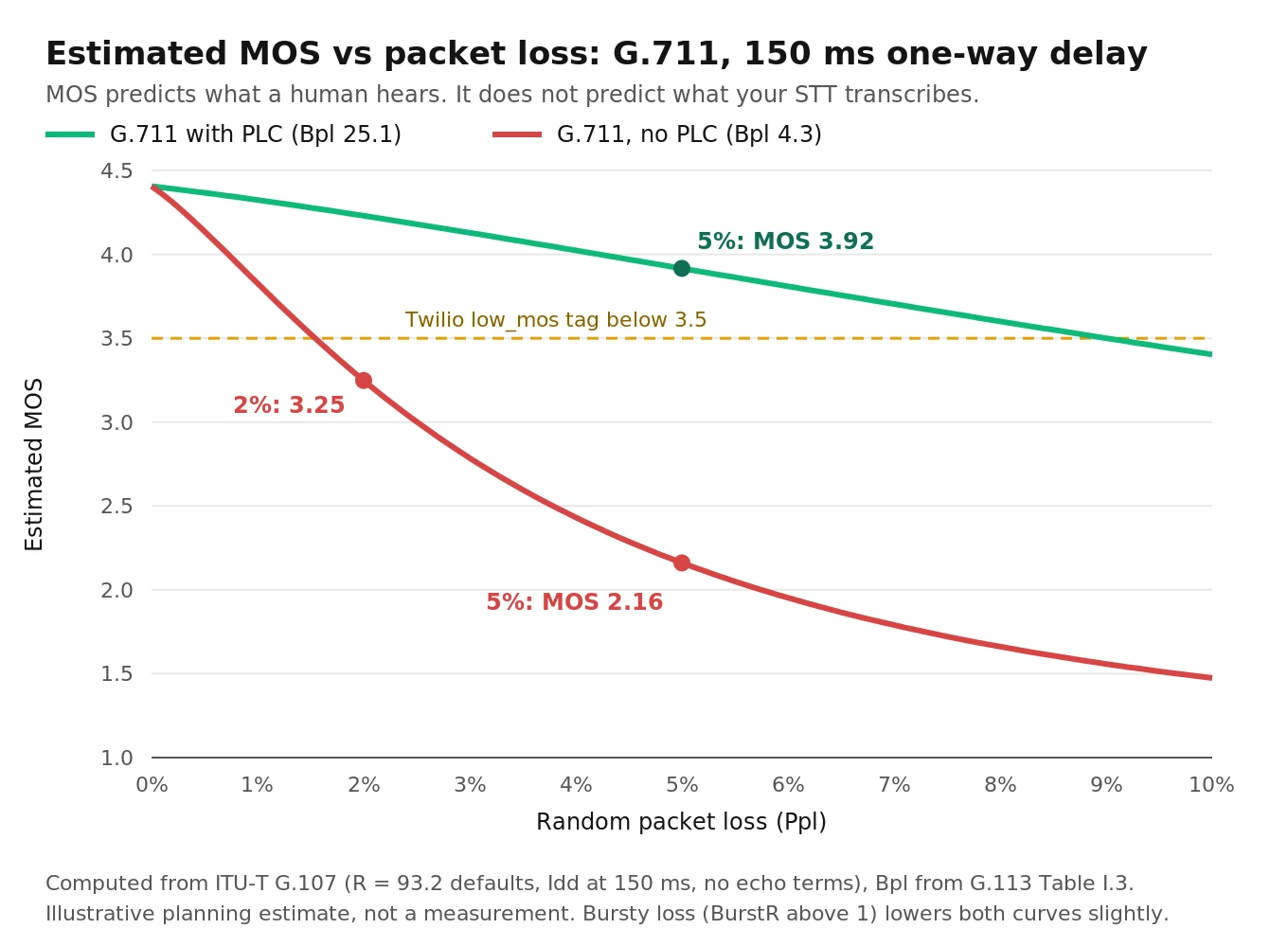
What the chart doesn't show is the reason this post exists. The E-model's Ta is network and media delay. It knows nothing about your agent's STT, LLM and TTS processing, so a call with MOS 4.3 can still feel slow (see the cost of latency in voice agents). Worse, MOS is tuned for human listeners. PLC smooths gaps so they sound natural, which keeps MOS high, but it can make the words harder for a machine to recognize. That brings us to the research.
What packet loss and codecs do to STT: the research
Three papers give a builder usable numbers. Every figure below comes from the linked paper. None are extrapolated.
1. Small Whisper models degrade from the first percent of loss. Large ones hold up longer. Dissen et al., Interspeech 2024 (arXiv:2406.18928), simulated packet loss by zero-filling mel-spectrum frames and tested Whisper on FLEURS. With Whisper base on Spanish, WER went from 10.3% clean to 12.7% at 5% loss, 15.8% at 10%, and 24.7% at 20%. Whisper large-v2 on Spanish barely moved: 3.7% clean, 3.7% at 5%, 3.9% at 10%. The authors note that the large model "only start[s] to seriously degrade at PLRs larger than 20%, whereas the base model starts degrading immediately." Production lesson: the smaller, faster model you picked for latency is also the one most sensitive to loss. Re-run your STT bake-off under loss, not only on clean audio.
2. PLC tuned for human ears can make ASR worse. In the same paper, on the Interspeech 2022 PLC Challenge blind set, Whisper large-v2 scored 15.4% WER on the corrupted audio and 16.2% after a published neural PLC model (tPLCnet) cleaned it up. The "better-sounding" audio transcribed worse. A small adapter trained on Whisper's own loss got to 14.2%. The paper's explanation: perceptual PLC "can introduce artifacts or distortions in the signal that are not well-received by an ASR model."
3. Codec bitrate matters only at the low end. Büthe et al. (arXiv:2309.14521) measured a SpeechBrain conformer on LibriSpeech through Opus. Clean WER was 2.01%. Through Opus it was 3.08% at 6 kbit/s, 2.15% at 9, 2.07% at 12 and 2.03% at 20 kbit/s. LPCNet resynthesis, which sounds better, raised the 6 kbit/s WER to 3.26%. Production lesson: wideband Opus at normal WebRTC bitrates costs almost nothing in WER. The gap that matters is narrowband G.711 versus wideband, plus the transcodes in between.
The challenge itself (Diener et al., arXiv:2204.05222) scored entries on crowd-sourced CMOS and word accuracy, weighted equally. That was a clear statement that sounding good and being transcribable are separate goals.
These papers measured WER on read or scripted speech. On your calls, what matters is whether the agent captured the ZIP code, the date and the last four digits. Losing one 20 ms packet in the middle of "fifteen" versus "fifty" costs very little in WER and breaks the order. Measure entity accuracy separately (STT entity accuracy for voice agents).
One-way audio and DTMF: the two classic SIP failures
One-way audio means signaling works (the call connects, both sides show "in call"), but RTP flows in only one direction. The usual causes, roughly in the order to check:
1. Private IP in SDP. The `c=` line or the `m=` port advertises an address behind NAT, so the far end sends RTP to a place it can never reach.
2. Firewall or security group blocking the RTP UDP port range (separate from SIP's 5060/5061).
3. Asymmetric RTP. The far end sends to a different port than the one it receives on, and your side doesn't latch onto the source.
4. Re-INVITE or hold handling. After a transfer, `a=sendonly` or `a=inactive` stays in place.
5. Codec mismatch after a re-INVITE. Both sides think they agreed on a codec but one is decoding the wrong one.
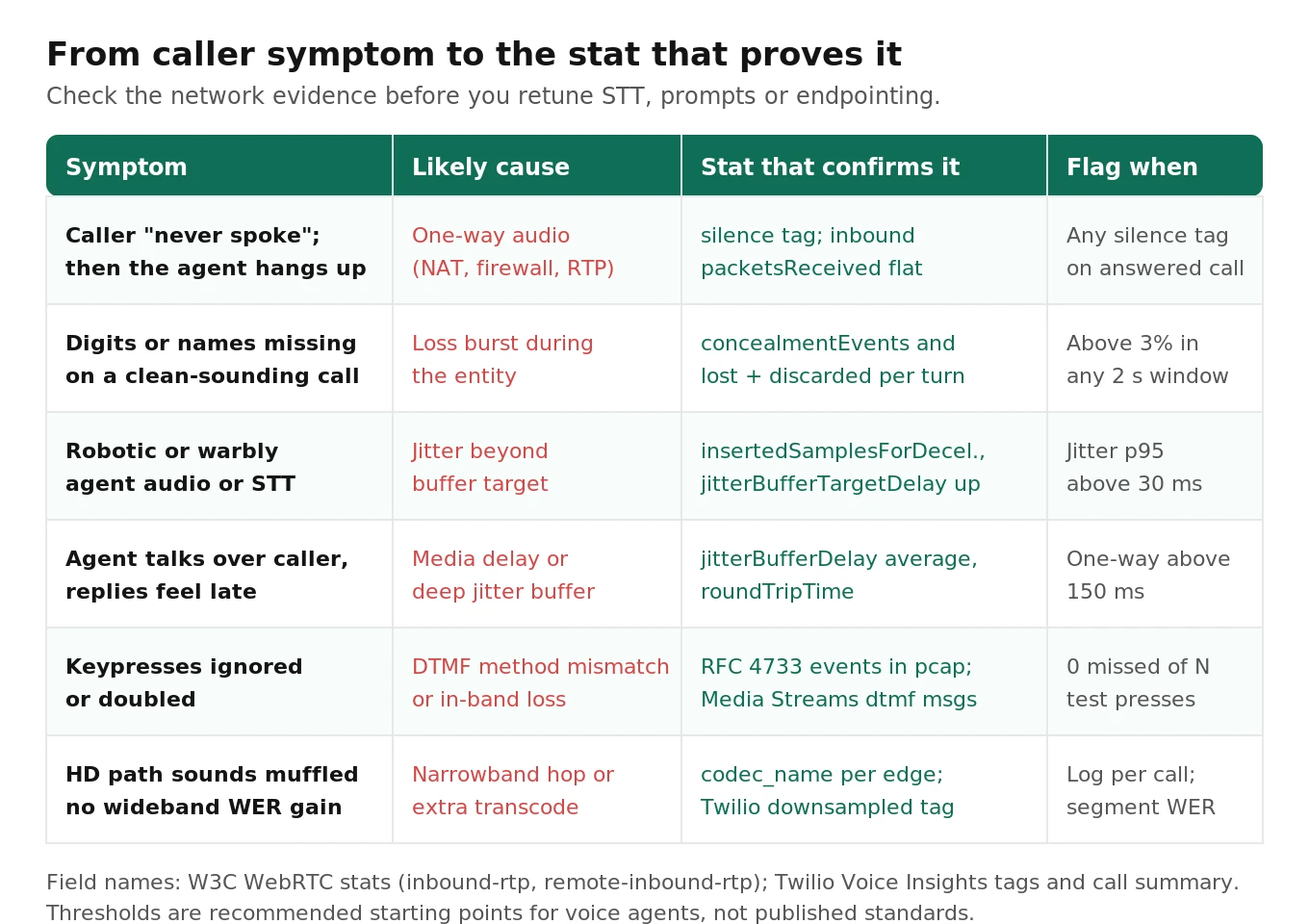
For an agent, one-way audio in the caller-to-agent direction looks like a caller who "never spoke." The agent re-prompts until its timeout, then hangs up. Twilio tags this as `silence`, meaning "a missing audio stream or a completely silent stream received." Treat a run of `silence` tags plus agent "no-input" endings as a network incident, not an STT problem. SIP vs WebRTC for voice agents covers the NAT side in more depth.
DTMF can travel three ways. It can be in-band tones inside the audio, it can be RTP telephone-event packets (RFC 4733, which replaced RFC 2833), or it can be SIP INFO. In-band tones survive G.711 but get distorted by compressed codecs and concealment. A lost packet in the middle of a tone can split one keypress into two or drop it. RFC 4733 events are sent redundantly, so they hold up well under loss. Both sides of every hop need to agree on the method. A trunk sending RFC 4733 into a leg that expects in-band produces silent keypresses. With Twilio Media Streams, `dtmf` messages are only delivered on bidirectional streams. The full test approach is in testing DTMF navigation in voice agents.
Voice call quality thresholds for voice agents
The vendor and ITU thresholds below are quoted from their sources. The "agent target" column is a starting point we recommend, not a published standard. The bar is tighter because STT and endpointing are less forgiving than human listeners.
| Metric | Twilio Voice Insights flags | Human-quality reference | Agent target (recommended starting point) |
|---|---|---|---|
| Packet loss | `high_packet_loss` above 5% (gateway edges) | G.107 with G.711+PLC: about MOS 3.9 at 5% | ≤1% per call, and no 2-second window above 3% |
| Effective loss (lost + discarded) | Not reported separately | Not part of RTCP RR | ≤1.5% |
| Jitter | `high_jitter`: avg 5 ms and max 30 ms, or more than 1% of packets delayed 200 ms or more | Depends on buffer depth | p95 under 30 ms on the leg you control |
| One-way media latency | `high_latency`: Twilio-internal RTP time above 150 ms; SDK RTT above 400 ms | ITU-T G.114 planning guidance: 150 ms | ≤150 ms; every network ms adds to agent response time |
| MOS (estimated) | `low_mos` below 3.5 (SDK edge) | 4.4 is the G.711 ceiling (R = 93.2) | Alert below 4.0, but never gate on MOS alone |
| Concealment ratio | Not exposed | Not part of E-model | ≤1% of samples per turn |
| Codec | `hd_audio`, `downsampled` | Wideband preferred | Log per call; segment WER by codec |
How to test a voice agent under codec, packet loss and jitter impairment
This is the protocol we recommend. It runs in two tiers: a cheap offline tier that isolates STT, and a live tier that measures the whole agent, including endpointing, barge-in and task completion.
1. Build the scenario set. Write 40–60 scripted caller utterances that carry the entities your agent must capture: names, ZIP codes, dates, dollar amounts, order IDs, yes/no confirmations. Record them with real voices at 16 kHz or above, with a few accents and a few noisy rooms. Noise is covered in testing STT under background noise and noise and echo cancellation for self-hosted LiveKit.
2. Define the condition matrix. Baseline: G.711 μ-law, 0% loss. Loss: 1%, 3%, 5% random, plus 3% bursty (Gilbert-Elliott). Jitter: 30 ms and 60 ms. Codec swap: G.711 versus G.722 or Opus where your trunk supports it. Combined: 3% loss with 30 ms jitter on G.711. That's 9 conditions × 50 scenarios = 450 runs per tier.
3. Run the offline tier on STT only. Encode each WAV to μ-law at 8 kHz, drop 20 ms frames following the loss model, decode with zero-fill and with simple PLC, and send the result to your STT exactly as production does. Score WER and entity error rate.
# Simplified offline impairment: 8 kHz mu-law, 20 ms frames, Gilbert-Elliott loss.
import numpy as np, soundfile as sf, jiwer
from scipy.signal import resample_poly

MU = 255.0
def mulaw_roundtrip(x):                      # quantize like G.711 PCMU
    y = np.sign(x) * np.log1p(MU * np.abs(x)) / np.log1p(MU)
    q = np.round((y + 1) / 2 * 255) / 255 * 2 - 1
    return np.sign(q) * ((1 + MU) ** np.abs(q) - 1) / MU

def ge_mask(n, p=0.01, r=0.3, seed=0):       # p: good->bad, r: bad->good (loss in bad state)
    rng, bad, keep = np.random.default_rng(seed), False, []
    for _ in range(n):
        bad = (rng.random() < p) if not bad else (rng.random() >= r)
        keep.append(not bad)
    return np.array(keep)

def impair(path, p, r, plc=True, seed=0):
    x, sr = sf.read(path)
    x8 = mulaw_roundtrip(resample_poly(x, 8000, sr).clip(-1, 1))
    frames = x8[: len(x8)//160*160].reshape(-1, 160)          # 160 samples = 20 ms
    keep = ge_mask(len(frames), p, r, seed)
    out, last = [], np.zeros(160)
    for f, k in zip(frames, keep):
        if k: last = f; out.append(f)
        else: out.append(last * 0.5 if plc else np.zeros(160))  # naive repeat-and-fade vs zero-fill
    return np.concatenate(out), 8000, 1 - keep.mean()

# audio, sr, loss = impair("zip_code_07.wav", p=0.01, r=0.3)
# hyp = transcribe(audio, sr)                 # your production STT call, same params as prod
# print(loss, jiwer.wer(ref_text, hyp))
The long-run loss rate of this model is p / (p + r). For p = 0.01 and r = 0.3 that's about 3.2%, with an average burst length of 1/r ≈ 3.3 frames. G.107's BurstR for the same chain is 1/(p + r) ≈ 3.2, so you can feed the same numbers into the MOS script and compare the predicted MOS with the measured WER.
4. Run the live tier through a real network path. Put the synthetic caller (a SIP softphone such as baresip or pjsua, or a WebRTC client) on a Linux VM, and impair that VM's interface with netem. netem shapes egress only. To impair audio coming toward the caller as well, redirect ingress through an `ifb` device.
# Run on a dedicated test VM (impairs ALL traffic on the interface). Requires root.
IF=eth0
# Egress (caller -> agent): pick one profile per run
tc qdisc add dev $IF root netem loss random 1% seed 42
tc qdisc change dev $IF root netem loss random 3% seed 42
tc qdisc change dev $IF root netem loss random 5% seed 42
tc qdisc change dev $IF root netem loss gemodel 1% 30% 100% 0% seed 42    # bursty ~3%
tc qdisc change dev $IF root netem delay 40ms 30ms distribution normal    # jitter 30 ms
tc qdisc change dev $IF root netem delay 60ms 60ms distribution normal    # jitter 60 ms
tc qdisc change dev $IF root netem delay 40ms 30ms distribution normal loss random 3% seed 42

# Ingress (agent -> caller) via IFB
modprobe ifb numifbs=1 && ip link set dev ifb0 up
tc qdisc add dev $IF handle ffff: ingress
tc filter add dev $IF parent ffff: protocol ip u32 match u32 0 0 action mirred egress redirect dev ifb0
tc qdisc add dev ifb0 root netem loss random 3% seed 42

# Clean up between conditions
tc qdisc del dev $IF root; tc qdisc del dev $IF ingress; tc qdisc del dev ifb0 root
Two netem details change your results. First, large jitter reorders packets, because netem's internal tfifo queue releases packets by send time. That's realistic for the internet, but if you want pure delay variation, the man page says to attach a `pfifo` child qdisc. Second, use `seed` so every condition replays the same loss pattern across builds. Without it, run-to-run variation hides real regressions.
5. Score four metrics per condition. WER, entity error rate on the scripted slots, task success (did the call reach the right end state with the right data), and turn behavior (false end-of-turn, false barge-in, re-prompt count). Read the stats from the previous sections at the same time, so every failure ties back to a measured loss and concealment ratio.
6. Size the run so you can trust the deltas. Task success is a yes/no outcome. Detecting a drop from 90% to 80% with independent samples at α = 0.05 and 80% power needs about n = (1.96·√(2·0.85·0.15) + 0.84·√(0.9·0.1 + 0.8·0.2))² / 0.1² ≈ 199 calls per condition. Replaying the same 50 scenarios under every condition and comparing with McNemar's test on matched pairs needs far fewer calls. Run each live scenario three times and report the spread, because LLM sampling adds variance on top of network variance. For more on reading variance, see voice agent benchmarks explained.
7. Set the gate and keep it. Ship only if, at 3% random loss on G.711, entity error stays within your agreed margin of baseline and task success doesn't drop significantly. Re-run the matrix whenever you change STT model, codec config, SIP provider or region. In production, track concealment ratio and effective loss as leading indicators and task success as the lagging one (leading vs lagging voice agent metrics).
This is the kind of matrix an independent evaluator is useful for. It lets you compare two STT vendors or two SIP trunks under identical impairment, without relying on either vendor's own benchmark. Evalgent runs this as a pre-launch audit and as a regression suite. The protocol above works just as well if you run it yourself.
Frequently asked questions
What are the most important voice call quality metrics for a voice agent?
Packet loss (including late discards), jitter, round-trip time and concealment ratio, measured per leg and per turn. MOS is a useful summary for human listening quality but a weak predictor of STT accuracy. Pair the network metrics with WER, entity error rate and task success so you can tell whether a network problem actually broke the conversation.
How much packet loss can a voice agent tolerate?
It depends on the STT model. In Dissen et al., Whisper base's WER rose by about a quarter at 5% loss while Whisper large-v2 barely changed until 20%. A practical target is under 1% per call with no short bursts above 3%. Test your own STT under loss; don't assume.
Is a MOS score from VoIP tools reliable for voice AI?
It's reliable for what it was built for: predicting how a human rates call quality. G.107 MOS ignores your agent's processing latency, and it rewards packet loss concealment that can hurt ASR. Use MOS to spot bad network legs, then confirm impact with transcription and task metrics.
G.711 vs Opus for a voice agent: which is better?
Opus wideband carries more of the speech spectrum. Published results show Opus at 12–20 kbit/s adds almost no WER over clean audio. But on PSTN calls the caller's leg is usually G.711 narrowband anyway. Use wideband where every hop supports it, and check for Twilio's `downsampled` tag or extra transcodes.
Why does my SIP voice agent have one-way audio?
Usually because NAT or the firewall breaks the RTP path while SIP signaling works fine. Check for a private IP in the SDP `c=` line, blocked RTP UDP ports, asymmetric RTP and stale `sendonly` attributes after a hold or transfer. For an agent, it looks like a silent caller who never responds.
How does jitter affect speech recognition?
Jitter by itself doesn't hurt STT. The trouble starts when packets miss the jitter buffer's playout deadline. Those late packets get discarded and concealed, which works like packet loss, and a deeper buffer adds delay to every turn. Track `packetsDiscarded`, `concealedSamples` and `jitterBufferDelay`, not just the jitter number.
Where do I find packet loss and jitter in Twilio?
Use Voice Insights. The Call Summary API returns per-edge inbound and outbound `packets_loss_percentage` and `jitter` max and average, plus tags such as `high_packet_loss`, `high_jitter` and `silence`. It requires Advanced Features. Partial summaries appear about 10 minutes after the call, and complete ones take up to about 30 minutes.
Should DTMF use in-band tones or RFC 4733?
Use RFC 4733 telephone-events wherever the whole path supports them. They are sent redundantly and hold up under packet loss. In-band tones get distorted by compressed codecs and concealment. Whichever you pick, every hop must agree on the method. A mismatch produces keypresses that simply disappear, with no error anywhere.
The bottom line
Voice call quality metrics describe the pipe, and STT accuracy depends on details the pipe metrics leave out: late discards, concealment and transcodes. Measure loss, jitter and concealment on every leg you can see, then prove with a seeded netem matrix that your agent still captures the right entities and finishes the task at 3% loss.
Related Articles

How to automate voice agent testing: synthetic callers vs manual QA
Learn how ai test automation replaces manual QA for voice agents. Compare synthetic callers vs human testers, with a 5-step framework to scale without hiring.
Read more
AI Agent Testing vs Voice Agent Testing: What General Tools Miss for Voice
AI agent testing measures text outputs. Voice agent testing measures behaviour through an acoustic pipeline. Five failure categories general tools miss.
Read more