Jev Score, Noul and Choice: Voice Agent Metrics You Can Score
On this page
Most teams score a thin sample of calls with an LLM judge. That is slow, costly, and noisy.
Jev launched on September 15, 2026, in early access. TypeSafe AI calls it the first "System One Model." It is not an LLM and does not write text. You send a state plus questions. It returns typed answers.
This post is a working catalog. Every key metric appears as a real question object, with the JSON you send and get back. Then comes the Python that turns answers into metrics, and how to validate them.
Jev Score, Noul and Choice explained
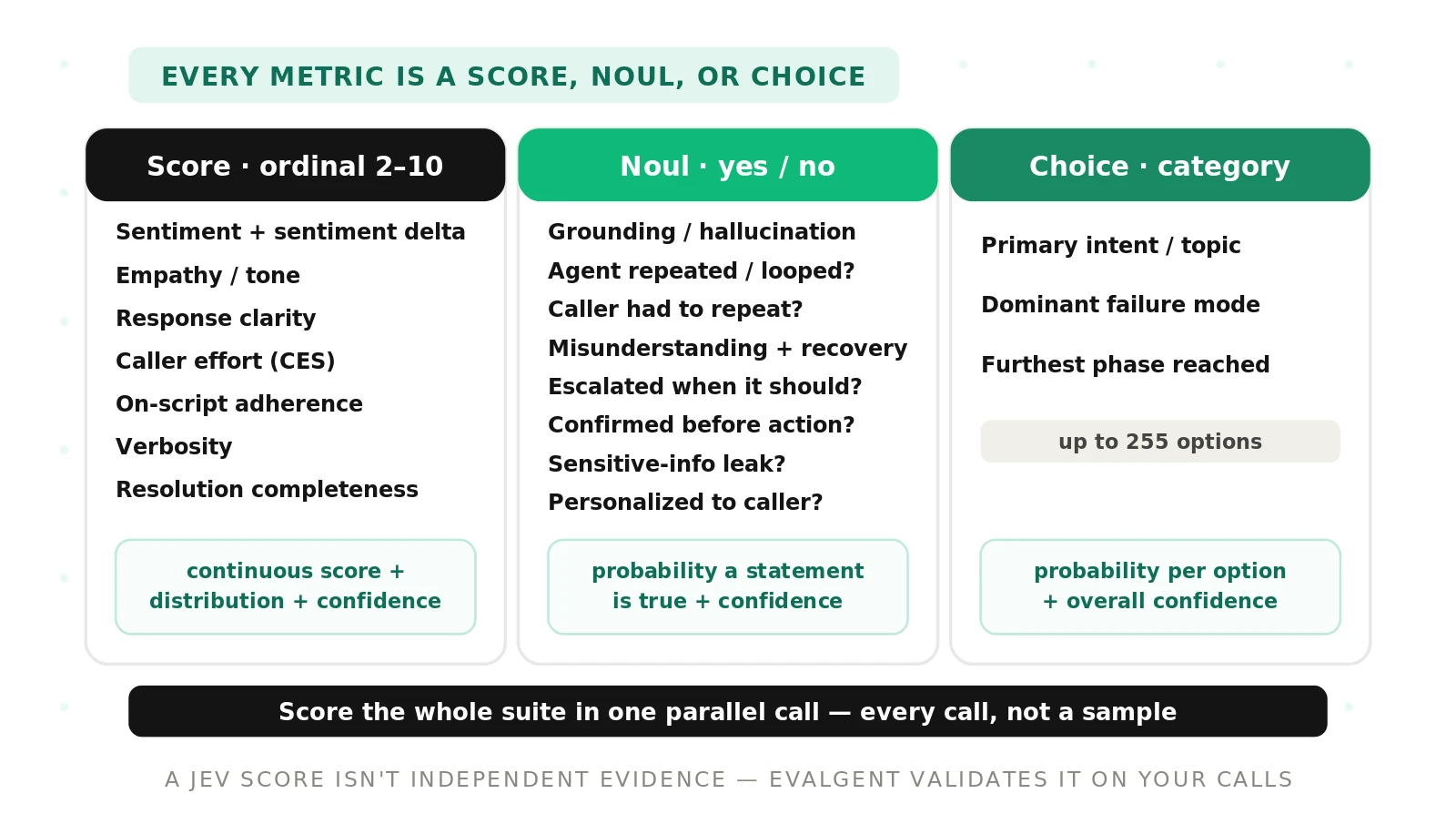
Jev answers three question types: Score, Noul, and Choice. Every voice agent metric fits one of them. Pick the type by the shape of the answer you need.
Jev: a System One model that maps a state plus questions to typed probabilistic decisions. It classifies and scores; it does not generate language.
- Score takes an ordered list of levels. It returns a continuous score, a probability per level, a legend, and a confidence. Use it for graded quality like tone or effort. A Jev score is the probability-weighted position on your levels, counted from zero, so 1.4 on a three-level scale sits between the middle and top level.
- Noul takes instructions only. It returns a yes-or-no probability. Use it for behaviors and events, such as "did the agent escalate?"
- Choice takes up to 255 named options. It returns the top option, a probability per option, and a confidence. Use it for labels like intent or failure mode.
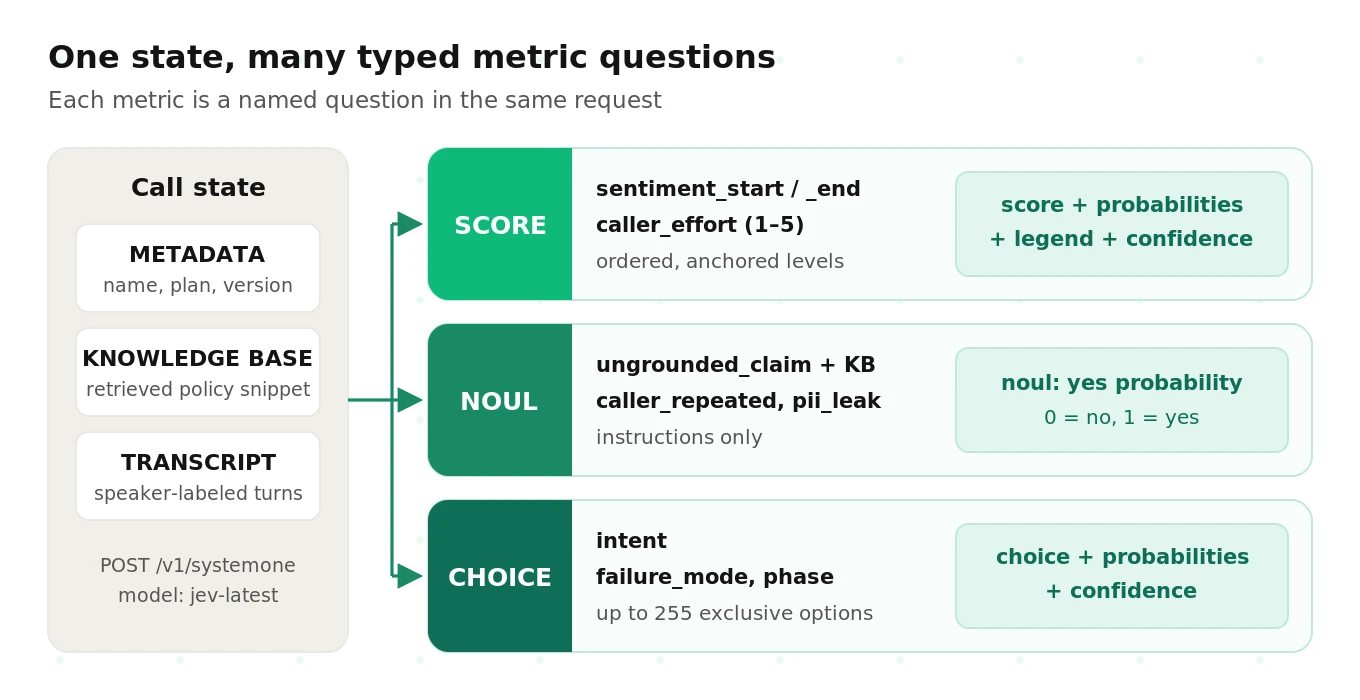
The state is one call. That means the transcript, plus any structured data you attach. You can add a knowledge-base snippet, the tools the agent called, or a CRM outcome. Then you ask questions about that state.
Here is the key move for a metric suite. You ask many questions about one state in a single request. Input is billed once for the shared state. Output is free. So grading a call on fifteen metrics costs about the same as grading it on one.
The request shape in 30 seconds
Every example below uses the same endpoint. The request goes to `POST https://api.typesafe.ai/v1/systemone`. The body has three keys: `state`, `model`, and `questions`. The TypeSafe quickstart covers setup and auth.
Each question has a type and instructions. The criteria differ by type. A Choice takes an object that maps each option to a description. A Score takes an ordered array, lowest level first. A Noul takes instructions only.
{
  "state": "TRANSCRIPT:\nAgent: Thanks for calling Acme...\nCaller: My bill doubled this month...",
  "model": "jev-latest",
  "questions": {
    "caller_frustration": {
      "type": "score",
      "instructions": "How frustrated was the caller in their final turn?",
      "criteria": ["Calm, just stating facts", "Frustrated but civil", "Very angry, strong language"]
    }
  }
}
The docs show what one Score answer looks like. This is the shape every Score below returns:
{
  "type": "score",
  "score": 1.0,
  "confidence": 1.0,
  "legend": {"0": "Calm, just stating facts", "1": "Frustrated but civil", "2": "Very angry, strong language"},
  "probabilities": {"0": 0.0, "1": 1.0, "2": 0.0}
}
Note that levels are indexed from zero. The legend maps each index back to your label. A Choice answer returns `choice`, `confidence`, and `probabilities`. A Noul answer returns a single `noul` probability.
Score metrics: graded, ordinal quality
Score fits any metric with degrees. These are ratings a human would give on a scale, not a clean pass or fail. The ordered array is your rubric. Write each level as an anchor a reviewer could apply.
Caller sentiment delta (two Scores)
Do not settle for one sentiment number. A single reading hides how the call moved. Ask two Score questions with the same levels. One reads the caller's opening turns. The other reads the closing turns.
"sentiment_start": {
  "type": "score",
  "instructions": "Rate the caller's sentiment in their first two turns only. Ignore the rest of the call.",
  "criteria": ["Very negative", "Negative", "Neutral", "Positive", "Very positive"]
},
"sentiment_end": {
  "type": "score",
  "instructions": "Rate the caller's sentiment in their last two turns only. Ignore earlier turns.",
  "criteria": ["Very negative", "Negative", "Neutral", "Positive", "Very positive"]
}
Each returns a score between 0 and 4 and a distribution over the five levels. The delta is end minus start. A positive delta means the call lifted the caller's mood. A negative delta means it soured. See sentiment analysis for the general idea. Our sentiment score for voice agents guide covers the metric in depth.
Keep the levels identical across both questions, or the delta is meaningless. Scope each instruction tightly to specific turns.
Caller effort (CES-style, five levels)
Caller effort measures how hard the caller had to work. It borrows from the customer effort score. High effort predicts churn and repeat contacts. Use five anchored levels, one per point on a 1–5 scale.
"caller_effort": {
  "type": "score",
  "instructions": "How much effort did the caller spend to get their issue handled? Count repeats, re-explanations, transfers, and dead ends.",
  "criteria": [
    "1 - Effortless: stated the need once and it was handled",
    "2 - Low: one small clarification",
    "3 - Moderate: had to re-explain or answer redundant questions",
    "4 - High: several repeats, a transfer, or a workaround",
    "5 - Very high: fought the agent and still may not be handled"
  ]
}
The index runs 0 to 4. Add one to report on the familiar 1–5 scale. Each label names a concrete behavior. That is what makes the level choice repeatable.
Empathy and tone appropriateness
Score how warm and fitting the agent's language was. This reads the words, not the voice. It catches a curt or tone-deaf reply in the transcript.
"agent_empathy": {
  "type": "score",
  "instructions": "Rate how well the agent's wording acknowledged the caller's situation and matched its seriousness.",
  "criteria": [
    "Dismissive or tone-deaf",
    "Neutral, purely transactional",
    "Polite and appropriate",
    "Warm, acknowledges the caller's situation explicitly"
  ]
}
Four levels is enough here. Tone of voice lives in the audio, which Jev does not see.
Other Score metrics in the catalog
The same pattern covers the rest of the graded rubric. Response clarity rates whether the caller could act on each answer. On-script adherence rates how closely the agent followed your playbook. It shows drift before a compliance problem. Verbosity runs from terse to rambling, with the target in the middle. Resolution completeness rates how fully the agent finished the goal. A partial fix and a full fix differ, and a Score captures the gap. Our resolution rate guide shows how that feeds a headline KPI.
Noul metrics: behaviors and events
Noul fits any metric that is a yes or no. Did a thing happen? Ask one Noul per behavior. Each returns a probability that the answer is yes.
Grounding check (with a knowledge-base snippet in the state)
This is the standout metric. Put a knowledge-base snippet into the state alongside the transcript. Then ask whether the agent said anything the snippet does not support.
"ungrounded_claim": {
  "type": "noul",
  "instructions": "Using only the KNOWLEDGE BASE section of the state, did the agent state any fact, price, date, or policy that the knowledge base does not support or that contradicts it? Greetings and questions do not count."
}
A high probability flags an unsupported claim. This is a hallucination detector for the agent under test. It feeds the hallucination rate of the tested voice agent.
Read this point carefully. The grounding check is distinct from Jev's own no-hallucination property. Jev's output is schema-constrained. It returns typed values, not prose, so it cannot invent text. That is a fact about the scorer. The grounding check is a metric about the agent you are testing. One describes the tool; the other describes your agent. Do not conflate them.
The check is only as good as the snippet. If the snippet is missing the true policy, a correct answer looks ungrounded. Pack the passage the agent actually retrieved, or the relevant policy section.
Agent loop or repetition
"agent_looped": {
  "type": "noul",
  "instructions": "Did the agent repeat the same question or the same answer three or more times, or get stuck cycling through the same steps?"
}
A "yes" points to a broken dialog state. The "three or more times" threshold keeps normal restating out of the count.
Caller had to repeat themselves
"caller_repeated": {
  "type": "noul",
  "instructions": "Did the caller have to repeat or restate information they had already clearly given, because the agent missed or dropped it?"
}
This is a friction signal. It often means speech recognition or context handling failed. The clause "clearly given" keeps a caller's own muddled first attempt out of the count.
Misunderstanding and recovery (two linked Nouls)
"misunderstanding": {
  "type": "noul",
  "instructions": "Did the agent misunderstand what the caller wanted at any point?"
},
"recovered": {
  "type": "noul",
  "instructions": "If the agent misunderstood the caller, did it notice and correct course before the call ended? If there was no misunderstanding, answer no."
}
Recovery matters as much as the error. Report the recovery rate only over calls where the first Noul is yes. The second instruction tells Jev what to do when there is nothing to recover from. That keeps the pair consistent.
Escalated when it should have
"escalation_needed_and_done": {
  "type": "noul",
  "instructions": "The caller asked for a human, or the request was outside the agent's stated scope. Did the agent offer or complete a transfer? If neither condition applies, answer no."
}
This tracks handoff quality. Pair it with a second Noul for "escalation was needed" so you can compute a true rate. Our guide on escalation in voice agents covers trigger design. Unneeded transfers drag down containment rate, so watch both sides.
Confirmed before an irreversible action
"confirmed_before_irreversible": {
  "type": "noul",
  "instructions": "Before any refund, cancellation, payment, or account change, did the agent read back the action and get an explicit yes from the caller? If no such action happened, answer yes."
}
A missing confirmation is a real risk. Listing the actions makes the question concrete. The "if no such action" rule prevents calls with no risky step from counting as failures.
PII leak or scope breach
"pii_leak": {
  "type": "noul",
  "instructions": "Did the agent read out or reveal sensitive data (full card number, full account number, government ID, or another person's details) beyond what policy allows?"
}
Pair this with your PII-handling rules for voice agents. A "yes" should trigger an alert. A second Noul can ask whether the agent went off-scope, such as giving legal or medical advice.
Personalization
"personalized": {
  "type": "noul",
  "instructions": "Did the agent use the caller's name or reference their account context from METADATA in a relevant way?"
}
Personalization lifts satisfaction. A Noul makes it measurable. Referencing METADATA tells Jev where the account context lives in the state.
Choice metrics: one label per call
Choice fits any metric that assigns a single category. It picks one option from your fixed set of up to 255. Each option gets a probability, plus an overall confidence.
Primary intent
"intent": {
  "type": "choice",
  "instructions": "What was the caller's primary reason for calling?",
  "criteria": {
    "billing": "Questions or disputes about charges, invoices, or payments",
    "technical": "Something is broken or not working as expected",
    "account_change": "Update plan, address, or account details",
    "cancellation": "Wants to cancel or downgrade",
    "sales": "Wants to buy or upgrade",
    "other": "None of the above"
  }
}
This is the backbone of your reporting. It lets you slice every other metric by reason for contact. Always include an "other" option. Without it, odd calls get forced into the nearest bucket.
Dominant failure mode
"failure_mode": {
  "type": "choice",
  "instructions": "What was the single biggest thing that went wrong on this call? Pick none if the call went well.",
  "criteria": {
    "none": "No meaningful failure",
    "wrong_information": "Agent gave incorrect or unsupported facts",
    "misunderstood_intent": "Agent pursued the wrong goal",
    "dropped_context": "Agent lost details the caller already gave",
    "bad_handoff": "Transfer was missing, wrong, or lost context",
    "policy_violation": "Agent broke a rule, such as skipping verification",
    "loop_or_dead_end": "Conversation cycled or stalled with no path forward",
    "caller_abandoned": "Caller hung up before any resolution"
  }
}
This turns vague failures into a countable distribution. The "single biggest" wording forces one label. That keeps the options mutually exclusive in practice.
Furthest phase reached
"furthest_phase": {
  "type": "choice",
  "instructions": "What is the furthest stage this conversation reached?",
  "criteria": {
    "greeting": "Only the opening exchange happened",
    "identification": "Caller identity or account was being verified",
    "discovery": "Agent was learning what the caller needed",
    "resolution_attempt": "Agent was actively solving the issue",
    "confirmation": "Agent confirmed the outcome with the caller",
    "wrap_up": "Call closed normally after confirmation"
  }
}
This shows where callers drop off. A spike at "identification" usually means verification is too hard.
One multi-question request, and what comes back
In production you send every question in one request. Here is a trimmed version. The state packs three sections: metadata, a knowledge-base snippet, and the transcript. Most question bodies are shortened; the full versions appear above.
{
  "model": "jev-latest",
  "state": "METADATA:\ncaller_name: Dana Ortiz\nplan: Pro Monthly\nchannel: inbound voice\nagent_version: v4.2\n\nKNOWLEDGE BASE:\nRefunds for duplicate charges are issued within 5 to 7 business days. Agents may not waive late fees.\n\nTRANSCRIPT:\nAgent: Thanks for calling Acme, this is the billing assistant.\nCaller: I got charged twice this month. This is the second time.\nAgent: I am sorry about that. Can I have your account email?\nCaller: I already gave it at the start. dana@example.com.\nAgent: Thanks, Dana. I see two charges of $49. I can refund the duplicate.\nAgent: Refunds arrive within 24 hours.\nCaller: Fine. Just do it.\n...",
  "questions": {
    "sentiment_start": {"type": "score", "instructions": "...", "criteria": ["Very negative", "Negative", "Neutral", "Positive", "Very positive"]},
    "sentiment_end":   {"type": "score", "instructions": "...", "criteria": ["Very negative", "Negative", "Neutral", "Positive", "Very positive"]},
    "caller_effort":   {"type": "score", "instructions": "...", "criteria": ["1 - Effortless", "2 - Low", "3 - Moderate", "4 - High", "5 - Very high"]},
    "agent_empathy":   {"type": "score", "instructions": "...", "criteria": ["Dismissive", "Neutral", "Polite", "Warm"]},
    "ungrounded_claim": {"type": "noul", "instructions": "..."},
    "caller_repeated":  {"type": "noul", "instructions": "..."},
    "confirmed_before_irreversible": {"type": "noul", "instructions": "..."},
    "pii_leak":         {"type": "noul", "instructions": "..."},
    "intent":        {"type": "choice", "instructions": "...", "criteria": {"billing": "...", "technical": "...", "other": "..."}},
    "failure_mode":  {"type": "choice", "instructions": "...", "criteria": {"none": "...", "wrong_information": "...", "dropped_context": "..."}},
    "furthest_phase": {"type": "choice", "instructions": "...", "criteria": {"discovery": "...", "resolution_attempt": "...", "wrap_up": "..."}}
  }
}
Look at the transcript. The agent promised a refund "within 24 hours." The knowledge base says 5 to 7 business days. The caller also had to repeat their email. A good metric suite should catch both.
Below is an illustrative response excerpt. The field shapes follow the TypeSafe docs. The numbers are made up to show how to read them.
{
  "answers": {
    "sentiment_start": {
      "type": "score", "score": 1.1, "confidence": 0.81,
      "legend": {"0": "Very negative", "1": "Negative", "2": "Neutral", "3": "Positive", "4": "Very positive"},
      "probabilities": {"0": 0.12, "1": 0.70, "2": 0.16, "3": 0.02, "4": 0.0}
    },
    "sentiment_end": {
      "type": "score", "score": 1.4, "confidence": 0.58,
      "legend": {"0": "Very negative", "1": "Negative", "2": "Neutral", "3": "Positive", "4": "Very positive"},
      "probabilities": {"0": 0.05, "1": 0.52, "2": 0.40, "3": 0.03, "4": 0.0}
    },
    "caller_effort": {
      "type": "score", "score": 2.15, "confidence": 0.62,
      "legend": {"0": "1 - Effortless", "1": "2 - Low", "2": "3 - Moderate", "3": "4 - High", "4": "5 - Very high"},
      "probabilities": {"0": 0.05, "1": 0.15, "2": 0.45, "3": 0.30, "4": 0.05}
    },
    "ungrounded_claim": {"type": "noul", "noul": 0.94},
    "caller_repeated":  {"type": "noul", "noul": 0.88},
    "confirmed_before_irreversible": {"type": "noul", "noul": 0.31},
    "pii_leak":         {"type": "noul", "noul": 0.02},
    "intent": {
      "type": "choice", "choice": "billing", "confidence": 0.97,
      "probabilities": {"billing": 0.98, "technical": 0.01, "other": 0.01}
    },
    "failure_mode": {
      "type": "choice", "choice": "wrong_information", "confidence": 0.74,
      "probabilities": {"none": 0.04, "wrong_information": 0.79, "dropped_context": 0.17}
    }
  },
  "usage": {"input_tokens": 1480, "output_tokens": 210}
}
Read it top to bottom. Sentiment barely moved, from about 1.1 to 1.4. The end reading is split between "Negative" and "Neutral," and its confidence is lower. Effort sits near "Moderate," with real mass on "High." The grounding Noul is 0.94, which flags the 24-hour promise. The caller-repeat Noul is 0.88. Confirmation is only 0.31, so the agent likely skipped the read-back. The failure mode lands on "wrong_information," with "dropped_context" as runner-up.
How to turn raw answers into metrics
Raw answers are not yet metrics. You must collapse distributions, weigh trust, roll up, and alert.
Expected value versus argmax
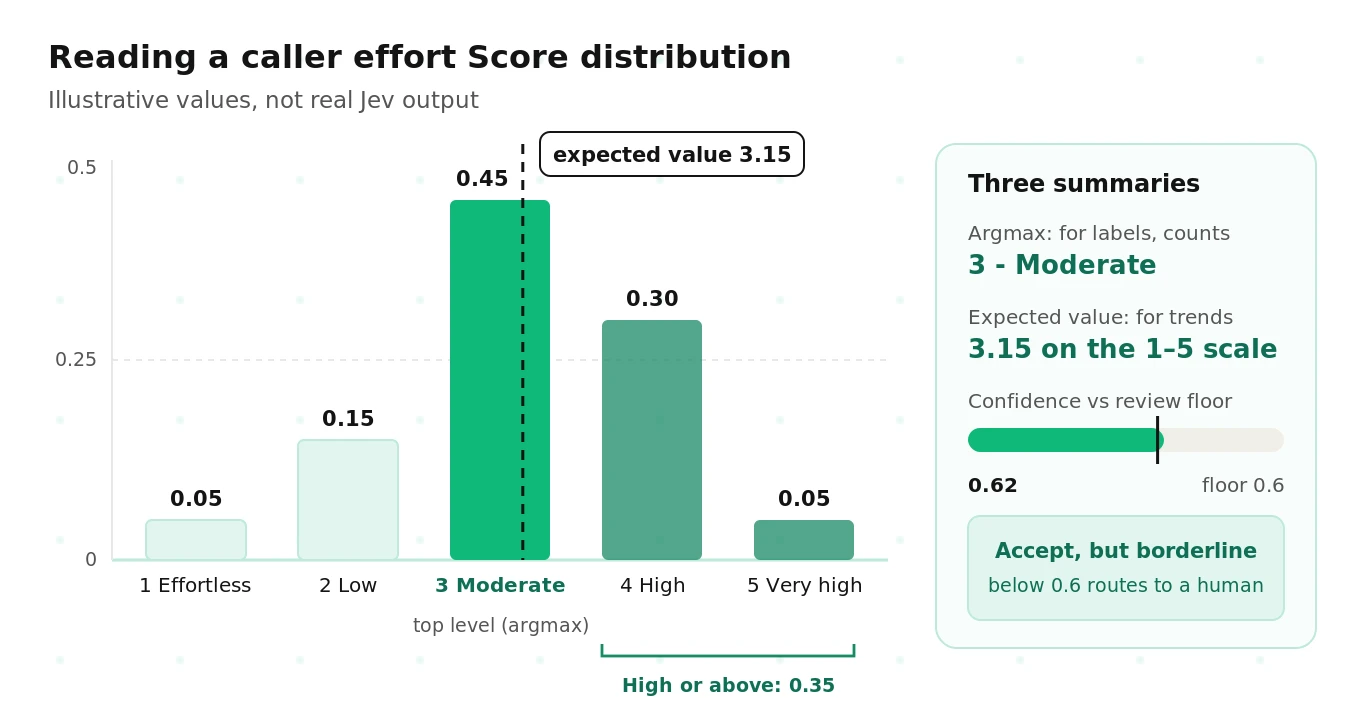
A Score distribution gives you two natural summaries. The argmax is the single most likely level. The expected value is the probability-weighted average of the level indices.
Take the illustrative effort answer above. The argmax is index 2, or "3 - Moderate." The expected value is 0×0.05 + 1×0.15 + 2×0.45 + 3×0.30 + 4×0.05, which equals 2.15. On the 1–5 scale that reads as 3.15. This arithmetic is illustrative.
Use expected value for averages and trends. It keeps the information in the tails. A call that is 45% "Moderate" and 30% "High" really is worse than one that is 90% "Moderate." Argmax throws that away.
Use argmax for labels and counts. "Share of calls rated High or Very high effort" is easier to explain with argmax. You can also sum tail mass directly. The probability of High or Very high here is 0.35.
The response also includes a continuous `score` field. Check it against your own expected value on a few calls, then pick one convention and stick to it.
Using confidence to down-weight or route
Calibrated confidence: a confidence of 0.8 should be right about 80% of the time across many answers. See calibration in statistics).
Confidence gives you two levers. First, you can route. Below a threshold, send the call to a human reviewer. Above it, accept the answer. This is confidence-gated human-in-the-loop review. Tune the threshold to your reviewer capacity.
Second, you can weight. When you average a Score across a segment, weight each call by its confidence. Low-confidence calls then pull the mean less. Report the unweighted mean too, so you can see if weighting changes the story.
Noul answers carry no separate confidence field. Treat the probability itself as the signal. Values near 0 or 1 are decisive. Values in a middle band, such as 0.2 to 0.8, go to review. The band is a starting point to tune.
Aggregating per segment
Fleet averages hide problems. Aggregate every metric by the Choice labels you already have. Intent is the main axis. Agent version, channel, and time of day come from metadata.
A 3% grounding failure rate overall can mean 11% on billing calls. That is a knowledge-base gap, not a model-wide problem. Segmenting turns one number into a to-do list. Report the count with every rate. A rate over 14 calls is not a trend.
Setting alert thresholds
Set thresholds per metric, based on risk. A few rules work well:
- Zero-tolerance events: alert on any confident PII leak. One is too many.
- Rate metrics: alert when a segment's rate exceeds its trailing baseline by a set margin. Require a minimum call count first.
- Score metrics: alert on a drop in mean expected value, or a rise in tail share.
- Release gates: compare a new agent version to the old one on the same offline test set before it ships.
Start loose and tighten.
Python: per-call metrics and fleet rates
This script scores a batch of calls and computes metrics. It uses the TypeSafe SDK. See the quickstart for install and auth. Question definitions are trimmed; paste in the full ones from above.
from collections import defaultdict
from typesafe_sdk import Choice, Noul, Score, TypeSafeClient

client = TypeSafeClient()  # configure auth per the TypeSafe quickstart

SENTIMENT = ["Very negative", "Negative", "Neutral", "Positive", "Very positive"]
EFFORT = ["1 - Effortless", "2 - Low", "3 - Moderate", "4 - High", "5 - Very high"]

QUESTIONS = {
    "sentiment_start": Score(instructions="Rate the caller's sentiment in their first two turns only.", criteria=SENTIMENT),
    "sentiment_end": Score(instructions="Rate the caller's sentiment in their last two turns only.", criteria=SENTIMENT),
    "caller_effort": Score(instructions="How much effort did the caller spend?", criteria=EFFORT),
    "ungrounded_claim": Noul(instructions="Using only the KNOWLEDGE BASE, did the agent state anything unsupported?"),
    "caller_repeated": Noul(instructions="Did the caller have to repeat information already given?"),
    "pii_leak": Noul(instructions="Did the agent reveal sensitive data beyond policy?"),
    "intent": Choice(instructions="Primary reason for calling?", criteria={
        "billing": "Charges or payments", "technical": "Something broken", "other": "None of the above"}),
}

CONF_FLOOR = 0.6          # below this, route Score/Choice answers to review
NOUL_BAND = (0.2, 0.8)    # Noul probabilities inside this band go to review


def pack_state(call):
    return (f"METADATA:\n{call['metadata']}\n\n"
            f"KNOWLEDGE BASE:\n{call['kb_snippet']}\n\n"
            f"TRANSCRIPT:\n{call['transcript']}")


def expected_value(answer):
    return sum(int(level) * p for level, p in answer.probabilities.items())


def score_call(call):
    a = client.system_one(state=pack_state(call), questions=QUESTIONS).answers
    review = [k for k in ("sentiment_start", "sentiment_end", "caller_effort", "intent")
              if a[k].confidence < CONF_FLOOR]
    review += [k for k in ("ungrounded_claim", "caller_repeated", "pii_leak")
               if NOUL_BAND[0] < a[k].noul < NOUL_BAND[1]]
    return {
        "call_id": call["id"],
        "intent": a["intent"].choice,
        "sentiment_delta": expected_value(a["sentiment_end"]) - expected_value(a["sentiment_start"]),
        "effort_1_to_5": expected_value(a["caller_effort"]) + 1,
        "effort_conf": a["caller_effort"].confidence,
        "ungrounded": a["ungrounded_claim"].noul >= 0.5,
        "caller_repeated": a["caller_repeated"].noul >= 0.5,
        "pii_leak": a["pii_leak"].noul >= 0.8,
        "needs_review": review,
    }


def fleet_rates(rows, min_calls=30):
    by_intent = defaultdict(list)
    for r in rows:
        by_intent[r["intent"]].append(r)
    report = {}
    for intent, rs in by_intent.items():
        n = len(rs)
        wsum = sum(r["effort_conf"] for r in rs) or 1.0
        report[intent] = {
            "calls": n,
            "enough_data": n >= min_calls,
            "ungrounded_rate": sum(r["ungrounded"] for r in rs) / n,
            "caller_repeat_rate": sum(r["caller_repeated"] for r in rs) / n,
            "pii_leaks": sum(r["pii_leak"] for r in rs),
            "mean_sentiment_delta": sum(r["sentiment_delta"] for r in rs) / n,
            "weighted_mean_effort": sum(r["effort_1_to_5"] * r["effort_conf"] for r in rs) / wsum,
            "review_share": sum(bool(r["needs_review"]) for r in rs) / n,
        }
    return report
The thresholds in this script are placeholders. Set them from your own validation data, covered below. Run it as a batch job over a day's calls:
python score_calls.py --input calls_2026-09-27.jsonl --output scores_2026-09-27.jsonlWhat does this cost? Input is priced at $0.042 per million tokens, and output is free. Say a packed state averages 3,000 tokens. Scoring 100,000 calls then uses 300 million input tokens, or about $12.60. That arithmetic is illustrative. The point is that full coverage is cheap. You score every call, not a sample. Our score every call post makes that case in full.
How to write a good Jev question
A metric is only as good as its question. Most bad metrics come from vague wording, not from the model. Five rules cover most of it.
Write instructions a new reviewer could follow. Name the exact behavior. "Did the agent read back the refund amount and get a yes?" beats "Was the agent compliant?" If two humans would disagree on the wording, Jev will be uncertain too.
Scope the evidence. Say which part of the state to use. "First two turns only," or "using only the KNOWLEDGE BASE section." Scoping stops the answer from drifting across the whole call.
Make Choice options mutually exclusive. Every call should fit exactly one option. Add a "none" or "other" option. Write a one-line description for each. Overlapping options, like "billing" and "refund," split probability and lower confidence.
Order Score levels, and anchor each one. List levels from lowest to highest. Tie each to observable behavior, not an adjective. "Several repeats, a transfer, or a workaround" is an anchor. "Bad" is not. Three to five levels is usually right.
Handle the not-applicable case. Tell each Noul what to answer when the event could not happen. "If no refund was requested, answer yes." Without this, the metric mixes "passed" with "not relevant."
State packing: what goes in the state
The state is a single string. Give it clear, labeled sections so instructions can point at them.
| Section | What to include | Which metrics need it |
|---|---|---|
| TRANSCRIPT | Speaker-labeled turns, in order | Every metric |
| KNOWLEDGE BASE | The retrieved passage or relevant policy text | Grounding check |
| METADATA | Caller name, plan, agent version, channel | Personalization, segmenting |
| TOOL CALLS | Actions the agent took, with results | Confirmation, resolution |
| OUTCOME | CRM disposition or ticket status | Resolution completeness |
Keep the state lean. Include only what some question actually needs.
The jev voice agent metrics catalog
This table maps the full metric set to a question type and a rollup. Use it as a starting point, then extend it.
| Metric | Jev question type | Scale / options | Rollup |
|---|---|---|---|
| Caller sentiment delta | Two Scores | Same 5 levels, start vs end | Mean of end minus start |
| Caller effort (CES-style) | Score | 5 anchored levels (1–5) | Weighted mean, high-effort share |
| Agent empathy / tone | Score | 4 anchored levels | Mean, dismissive share |
| On-script adherence | Score | 3–5 anchored levels | Mean by agent version |
| Resolution completeness | Score | 3–5 anchored levels | Mean, full-resolution share |
| Grounding check | Noul + KB in state | Yes / no probability | Ungrounded rate by intent |
| Agent looped | Noul | Yes / no probability | Loop rate |
| Caller repeated | Noul | Yes / no probability | Repeat rate |
| Misunderstanding + recovery | Two Nouls | Yes / no each | Recovery rate given a miss |
| Escalated when needed | Noul | Yes / no probability | Correct-handoff rate |
| Confirmed before irreversible | Noul | Yes / no probability | Confirmation rate |
| PII leak | Noul | Yes / no probability | Count, zero tolerance |
| Personalization | Noul | Yes / no probability | Personalization rate |
| Primary intent | Choice | Up to 255 topics | Segment key |
| Dominant failure mode | Choice | 6–8 failure options | Failure distribution |
| Furthest phase reached | Choice | Ordered phase labels | Drop-off funnel |
For a ready-made rubric to port over, start with our voice agent metrics scorecard. For satisfaction proxies, see CSAT for voice agents.
Validate every metric before you trust it
A typed answer is not a correct answer. Calibration is a property across many answers. It does not promise that Jev agrees with your team on your data. So check each metric against human labels first.
What the published evidence says
LangChain ran a study of Jev as an evaluator in LangSmith. The write-up reports these results:
That is a strong signal about the scorer, not about your metrics. Your questions and transcripts differ. Each metric needs its own check.
A validation recipe
1. Sample calls for labeling. Pull a few hundred calls per metric. Oversample rare events like PII leaks, or you will have too few positives.
2. Label blind. Have reviewers answer the same question Jev got, without seeing Jev's answer. Use two reviewers on a subset to measure human agreement.
3. Compare. For Nouls and Choices, measure accuracy plus precision and recall. For Scores, measure exact-level match and within-one-level match.
4. Check calibration. Bin answers by confidence. Within each bin, compare stated confidence to observed accuracy. A 0.8 bin should be right about 80% of the time.
5. Fix the question, not the threshold. Low agreement usually means vague wording or overlapping options. Rewrite, then re-test.
6. Set thresholds from the data. Pick confidence floors and Noul bands that hit your target accuracy.
7. Re-validate on change. A new agent version, a new policy, or a new question means a new check.
Here is a minimal calibration check:
def calibration_table(pairs, bins=(0.5, 0.6, 0.7, 0.8, 0.9, 1.01)):
    """pairs: list of (confidence, jev_label, human_label) for one Choice or Score metric."""
    rows = []
    for lo, hi in zip(bins, bins[1:]):
        bucket = [(c, j, h) for c, j, h in pairs if lo <= c < hi]
        if bucket:
            acc = sum(j == h for _, j, h in bucket) / len(bucket)
            rows.append((f"{lo:.1f}-{min(hi, 1.0):.1f}", len(bucket), round(acc, 3)))
    return rows  # compare observed accuracy to each bin's confidence range
If a metric fails, keep it off the dashboard. A wrong metric creates confident decisions on bad data.
The honest limits of transcript metrics
Jev is a strong scorer. It is not a complete evaluation program. Keep four limits in view.
Transcript, not audio. Jev reads text and structured state. Raw latency, audio quality, talk-over, and pace live in the waveform. Measure those with other instrumentation.
No narrative. Jev classifies and scores only. It gives no free-text explanation of why a call failed. For a narrative, you still need an LLM or a human.
Calibrated is not correct on your data. Treat confidence as a routing signal across thousands of calls. It is not a per-call certificate. Validation is what earns trust.
Early access. Jev launched in September 2026. Treat every published figure as a starting point to verify.
There is one more limit, and it matters most. A Jev score run in-house is still you grading your own agent. The questions, thresholds, and validation are all yours. That is useful for engineering. It is not independent evidence for a buyer or a regulator.
Where Evalgent fits: independent validation of the metric library
Evalgent is an independent third party. We do not build or sell voice agents. We use calibrated scorers like Jev where they help. Then we validate the metric library itself.
That means three things. We audit your question wording for ambiguity and overlap. We label a blind sample of your real calls and measure agreement per metric. And we report which metrics you can trust, at which thresholds, and which need rework.
We run independent voice AI evaluation on your live traffic and your own test cases. For background on the model, see our Jev for voice agents pillar. For the scoring workflow, see Jev for voice agent evaluation. For deployments, see Jev voice agent use cases.
Jev can't abstain: always include an escape option
Jev always returns one of the options you define. It has no built-in "I don't know." When a call transcript holds no evidence for any option, such as a two-word turn, a dropped call or a caller talking about something else, Jev still picks the least-wrong option, and that label looks just like a confident answer. TypeSafe's own Choice docs recommend adding an "other" or "none of the above" option when the list may not cover every input.
Every Choice and Score metric in this catalog should carry a `not_applicable` or `insufficient_evidence` option, and the metric should be computed only over calls where Jev picked a real level.
Four rules keep this from hurting you on live calls:
- Add an explicit escape option such as `not_enough_information`, `not_applicable` or `none_of_the_above` to every Choice question where evidence can be missing. Describe it as concretely as the real options, because Jev reads only the descriptions, not your option keys.
- Ask whether the evidence exists first. A Noul like "does the caller state a reason for calling?" before the Choice question separates "no evidence" from "evidence for option B".
- Check the distribution, not just the label. In one independent edge-case test, a forced choice with no valid option still returned a pick at 0.52 probability but only 0.04 confidence (jev-exploration). The numbers flagged the problem; the label did not. Set your human-review cutoff from your own labeled calls, because an independent study on data unlike Jev's training found its confidence can run high (jev-ood-calibration).
- Track the escape-option rate. If it climbs, your transcripts, STT or option set have drifted away from what callers actually say.
Frequently asked questions
What are Jev voice agent metrics?
They are your quality rubric expressed as Jev questions. Each metric becomes a Score, Noul, or Choice question about one call's state. Jev returns typed answers in 70–500ms, with distributions and confidence for Scores and Choices. You score a whole suite in one request, then validate each metric against human labels before trusting it.
Which Jev question type fits each metric?
Match the type to the answer shape. Use Score for graded quality like tone, effort, and sentiment, with ordered, anchored levels. Use Noul for yes-or-no behaviors like escalation, confirmation, or a grounding check. Use Choice for a single label like intent, failure mode, or furthest phase reached. Choice supports up to 255 options.
How do I score voice agents with Jev in one call?
Pack the call into one state: transcript, plus a knowledge-base snippet and metadata where needed. Add every metric as a named question in the same request to the System One endpoint. Jev returns all answers together. Input is billed once for the shared state and output is free, so extra metrics add little cost.
Can Jev detect hallucinations in the tested agent?
Yes, with a grounding check. Put a knowledge-base snippet in the state, then ask a Noul: did the agent state anything the snippet does not support? A high probability flags an unsupported claim. This measures the agent under test. It is separate from Jev's own schema-constrained output, which cannot produce invented text.
What is a Jev score?
A Jev score is the answer to a Score question. You give ordered levels, lowest first. Jev returns a continuous score, the probability-weighted position on those levels counted from zero, plus a probability per level and a confidence. A 1.4 on a three-level scale sits between the middle and top level. Noul and Choice cover yes/no and labels.
How many metrics can Jev score at once?
You attach many named questions to one state and send them in a single request. Input is billed once for the shared state at $0.042 per million tokens, and output is free. So fifteen metrics cost about the same as one. That makes a full metric suite on every call practical, not just a sample.
Is a Jev score independent evaluation evidence?
No. Running Jev in-house is still you grading your own agent with questions and thresholds you chose. Jev makes scoring faster, cheaper, and more consistent. Independent evidence comes from an outside party that validates the metric library against human labels on your real calls, and reports which metrics hold up.
Does Jev evaluate audio quality?
No. Jev reads the transcript and structured state, not the raw waveform. Raw latency, audio quality, pace, and overlapping speech need other instrumentation. Treat transcript scoring and acoustic measurement as two separate layers of your voice agent evaluation stack, and report them side by side.
The bottom line
Every voice agent metric maps cleanly to a Jev Score, Noul, or Choice, so your whole rubric can run on every call in one typed request. Those metrics only mean something after they are validated against human labels, which is the independent work Evalgent does.
Want your metric library scored and independently validated on your real traffic? Book a demo and we will run it on a sample of your actual calls.
Related Articles

Why AI voice agents fail in production: 9 failure layers, how to detect each, and how to prevent them
Voice agents fail in production across 9 layers, from 8 kHz audio to silent tool errors. Symptoms, root causes, alerts, and fixes in one master table.
Read more
Voice agent regression testing: how to detect regressions from model updates you don't control
Voice agent regression testing for changes you don't control: pin each layer, run a nightly pinned-vs-latest canary, and use paired stats to detect drops.
Read more