AI Receptionist for Home Services: The Complete QA Guide
On this page
Last verified October 16, 2026, against public product pages from ServiceTitan, Housecall Pro and Jobber, the eCFR text of 47 CFR 64.1200, and the papers linked below. Product features change often.
This guide is for the product team inside a field service management company. You built a voice receptionist into your platform. Thousands of HVAC, plumbing, electrical, garage door, pest, lawn, cleaning and roofing contractors now route calls to it. Your customers may call it an AI receptionist for HVAC, an AI answering service for plumbers, or AI phone answering for contractors. The QA problem is the same. Every prompt change ships to all of them at once. Nobody on your team owns QA. You test by calling the demo account.
The risk is not that the agent sounds robotic. The risk is that it sounds fine and writes the wrong job. A misheard street name geocodes to the next town. "After three" becomes an 8 AM arrival window. "No heat" gets booked as a tune-up for Thursday. The call ends politely. The confirmation text goes out. The tech drives to the wrong house.
How an AI receptionist for home services turns a call into a job
An AI receptionist for home services is the front door to a workflow. It is not a chatbot that happens to use a phone. The call is capture. What matters is the record it leaves behind in your field service management software.
AI receptionist for home services: a voice agent that answers a contractor's phone line, qualifies the caller, and creates or changes a job in the field service management (FSM) system. That includes customer, location, job type, priority, arrival window and assigned technician.
The major FSM platforms now ship this pattern. ServiceTitan's AI Virtual Agent page says it books "straight to the dispatch board" by "job type, location, required skill sets, and more." Housecall Pro's CSR AI overview says it can book jobs and estimates, reschedule and cancel. It also says "Emergency handling is always on." Jobber's Receptionist page says it creates a work request when it can't book outright, and lets owners pick urgent keywords. If you are building your own, you are building the same shape.
Here is that shape as six steps. Each one writes something.
1. Capture. The agent hears name, phone, address, problem and timing. Speech-to-text turns audio into words. The LLM turns words into slots.
2. Qualify. Code checks the zip code against the service area, the problem against offered job types, and the time against business hours.
3. Create the job. A tool call finds or creates the customer, the location and the job. Job type sets duration, skill, dispatch fee and priority.
4. Dispatch. The scheduler picks a slot and a tech based on technician availability and skills. Emergencies may page an on-call tech instead.
5. Confirm. A confirmation text goes to the caller with date, arrival window and address.
6. Write back. Call summary, recording link, tags and outcome go onto the job and customer record. A bad write-back hides the call from the next person who opens the job.
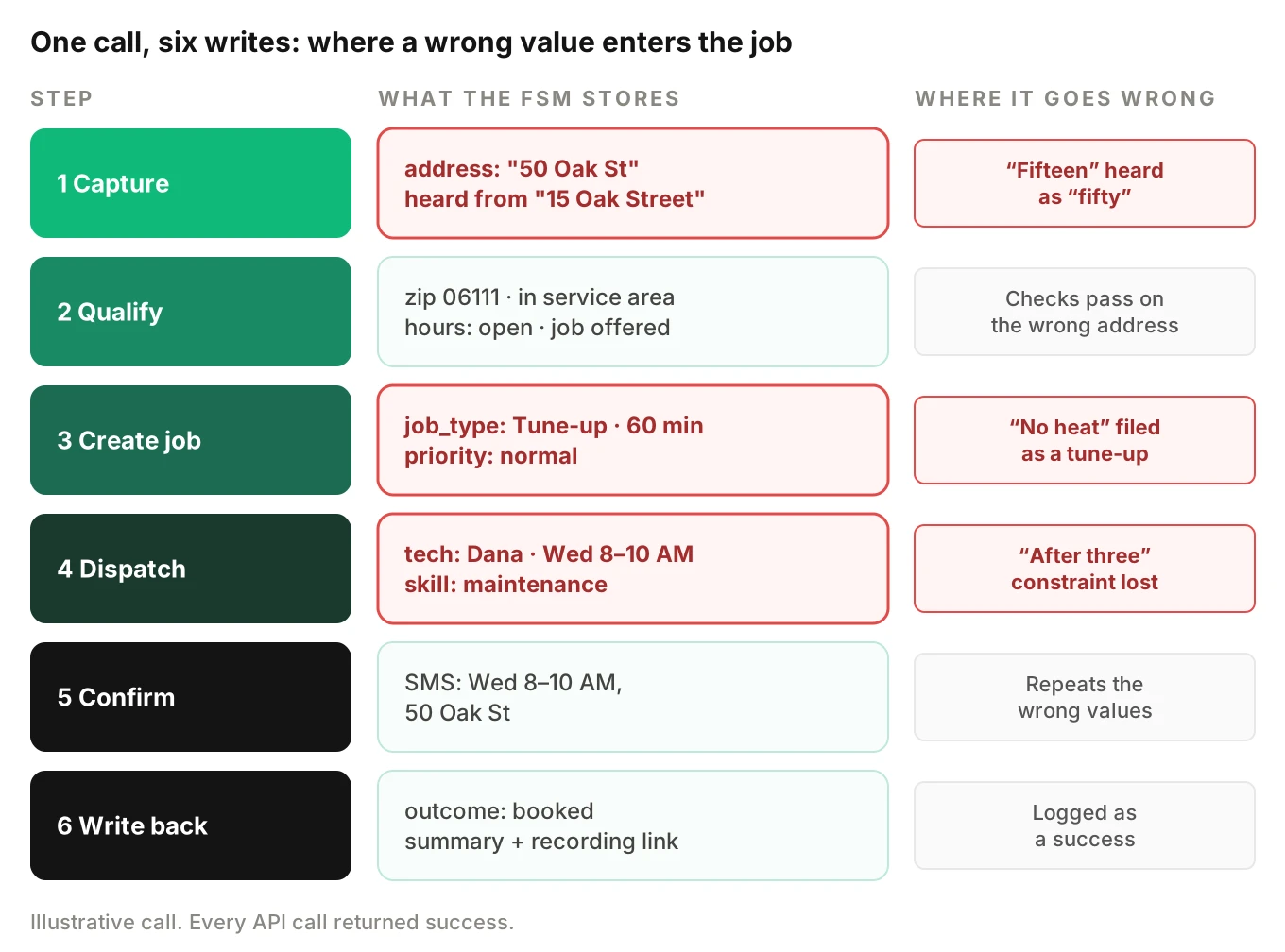
Every step can be "successful" while holding a wrong value. The API returns 200. The agent says "You're all set." Nothing in the transcript looks wrong unless you compare it, field by field, to the record.
ServiceTitan's page reports a 90% capacity-adjusted booking rate from a pilot, with its own caveat that results may vary. Booking rate is the headline metric across this category. It tells you a job was created. It does not tell you the job was right. Your QA program has to measure the second thing.
What each trade needs from the call
The trades share a flow but not a field list. Your test library should reflect the differences.
| Trade | Common inbound calls | Fields that break jobs | Hard rule to test |
|---|---|---|---|
| HVAC | No heat, no cooling, tune-up, new system quote | System type, fuel, symptom, member status | Gas smell or CO alarm never gets a slot |
| Plumbing | Leak, clog, water heater, sewer backup | Severity, shut-off status, fixture | Active flooding gets shut-off advice and urgent routing |
| Electrical | Outage, sparking, panel upgrade, EV charger | Hazard words, permit need | Sparks, burning smell or hot panel escalate |
| Garage door | Won't open, broken spring, off track | Door size, opener brand, car trapped | Never coach a spring repair |
| Pest | Rodents, termites, bees, recurring plan | Pest type, plan tier, pets and kids | Stinging insects near a person escalate |
| Lawn and cleaning | Recurring visits, one-time quote | Lot size, home size, frequency | Price stays inside the price book |
| Roofing | Leak, storm damage, inspection | Active leak, insurance claim | No coverage or claim promises |
Where speech errors corrupt the job silently
Most failures in home services booking are entity errors. The agent understood the request. It got one value wrong. That value then drives routing, pricing and the tech's day.
Addresses
Street names are hard for ASR. Zhou and colleagues tested 15 models from OpenAI, Deepgram, Google and Microsoft on US street names read by diverse US speakers. The average transcription error rate was 44%. Routing distance errors were twice as large for speakers whose primary language was not English. Fine-tuning on under 1,000 synthetic samples improved their street-name accuracy by nearly 60%.
That paper measured street names alone. A receptionist also needs house number, unit, city and zip. Each one fails differently:
- House numbers. "Fifteen" and "fifty" differ by one syllable. On an 8 kHz phone line, the ending is easy to lose.
- Same street, wrong city. Many metros have several "Oak Street" entries. If the geocoder picks the first match, the job lands in another town.
- Units and gate codes. These are often said as an afterthought. They end up in notes or nowhere.
- Spelled names. Callers spell "M as in Mary." Some models write "m as in mary" into the street field.
The fix is a readback plus a geocode check. The agent should repeat the full address. Your code should confirm the geocoded zip sits inside the contractor's service area. Our guide to STT entity accuracy covers how to measure this per field.
Times and arrival windows
Contractors sell arrival windows, not appointment times. Callers speak in relative terms. "Tomorrow after lunch." "Next Tuesday, but not before three." "Whenever's soonest."
Three mechanisms cause silent errors here:
1. Relative date math. "Next Tuesday" on a Monday is ambiguous to people, too. The agent must resolve it and read it back with the date.
2. Time zones. Your call server may run in UTC. The contractor runs in local time. A missing conversion shifts every booking by hours. Near midnight, it shifts the day, too.
3. Constraint loss. "Not before three" is a negative constraint. It is easy to lose when the model fills a single time slot. The booked window then falls inside the excluded range.
Job type
Job type is the most expensive field to get wrong. It sets duration, required skill, dispatch fee and priority. "My AC is blowing warm" is a repair diagnostic. "I want a quote on a new AC" is a sales visit with a different tech. "The water heater is leaking" might be a repair, or an emergency if water is on the floor.
When job type is wrong, the right tech never sees the job. We cover that failure in depth in why your HVAC AI books the wrong tech.
Customer match
Callers often call from a different phone than the one on file. The agent then creates a duplicate customer. The membership plan sits on the old record. The caller gets non-member pricing and no priority. Duplicates also split service history, so the tech arrives blind.
Why nothing flags the error
These errors are silent because every component did its job. STT returned text. The LLM filled slots. The FSM API accepted valid input. Your logs show a successful call with a booked job.
The research community measures agents this way, too. The τ-bench paper judges success by comparing the database state at the end of a conversation to an annotated goal state. Even GPT-4o succeeded on under half of tasks. Its pass^8 score, which requires success across eight repeat runs, fell below 25% in the retail domain. Repeat runs of the same task produced different end states. Your receptionist is a tool agent with a simulated customer on the other end. Judge it the same way: by the record. Our post on silent tool failures explains how to catch the ones that do return errors.
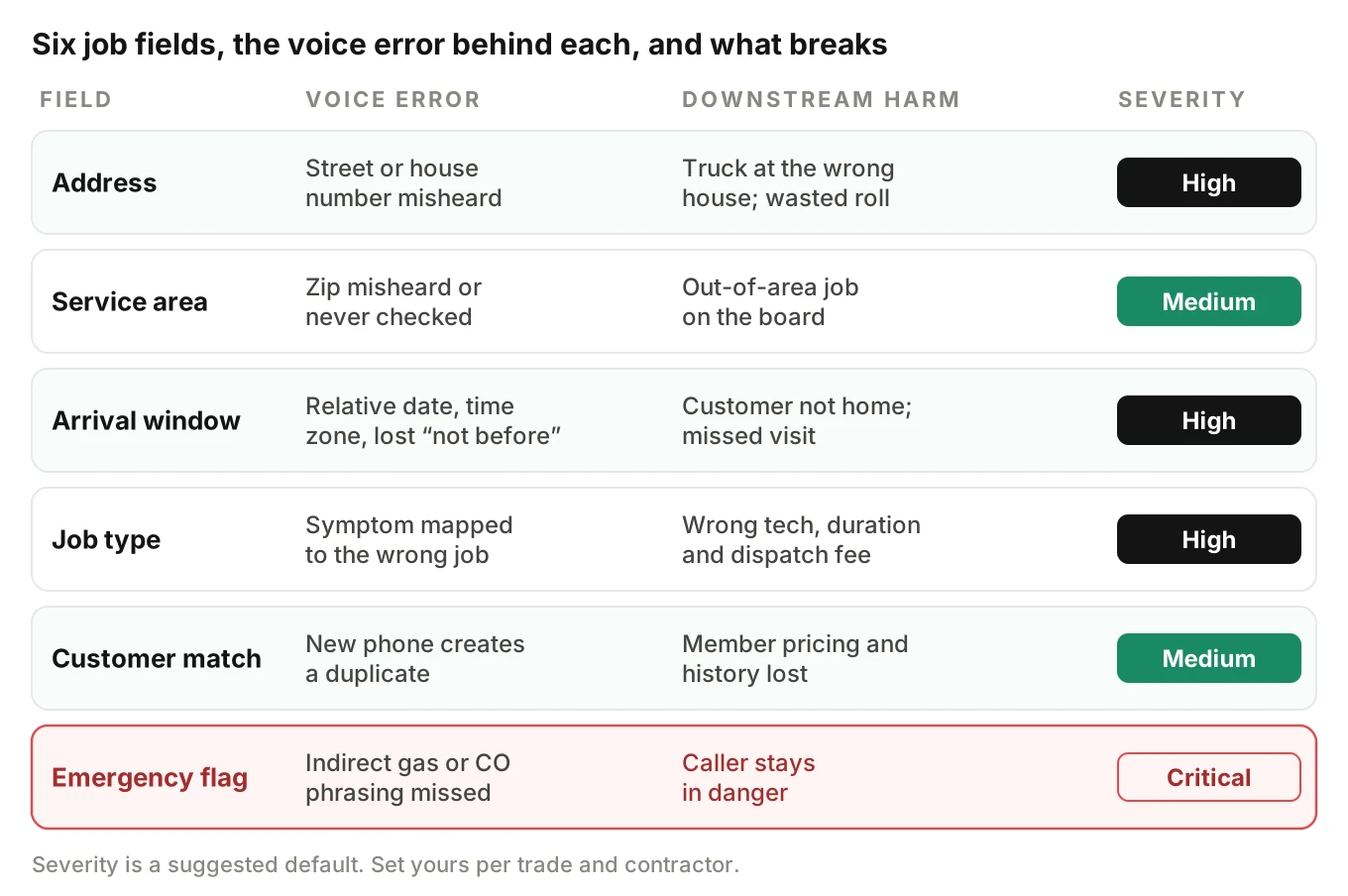
Emergency triage: the calls you cannot get wrong
Home services has two kinds of emergency. One is a business emergency: no heat, a backed-up drain, a garage door stuck with a car inside. These need fast, often after-hours, dispatch. The other is a life-safety emergency: gas, carbon monoxide, electrical fire risk, flooding near power. These need the caller out of danger before anyone talks about a booking.
Your agent must tell the two apart. It must never treat a life-safety call as a slot to fill.
Gas leak calls
Public utility guidance is consistent. Connecticut's utility regulator tells people who smell gas to leave if the smell is strong, and call the gas company from outside. It also says not to flip light switches, use phones near the odor, or light anything.
For a receptionist, that turns into testable rules:
- Callers rarely say "gas leak." They say "smells like rotten eggs," "my stove smells weird," or "something smells off near the furnace."
- The agent must stop the booking flow. It should tell the caller to leave the home and call the gas utility or 911 from outside.
- The agent must not troubleshoot. "Try relighting the pilot" is a failure.
- The agent may offer a follow-up visit after the utility clears the home. It must not book a normal next-day slot as the only response.
Carbon monoxide calls
The CPSC says to get outside right away when a CO alarm sounds, then call 911 or the fire department. It notes early symptoms look like flu without fever. A caller who says "the alarm keeps beeping and we all have headaches" is a CO emergency. A caller who says "the detector chirps every minute" probably needs a new battery. Your test set needs both.
Flooding, sparks and no heat
Active flooding needs shut-off guidance if the contractor's script allows it, plus urgent routing. Water near an electrical panel means stay away and call the utility or 911. Sparking outlets or a burning smell from a panel escalate. "No heat" with an infant or an elderly person in the home may be the contractor's top dispatch priority. The rule is the contractor's, so the test must read the contractor's config.
After-hours dispatch
After hours, AI dispatch carries the most risk. Each contractor sets it up differently. Some page an on-call tech. Some charge an after-hours dispatch fee that must be disclosed. Some only take a message for the morning. Housecall Pro's help article, for example, lets owners choose to forward emergency calls or get a text alert.
The classic silent failure is an emergency job written to tomorrow's board. The call ends well. The caller waits for a tech who isn't coming. Test it at 4:59 PM, 5:01 PM, on a holiday and during a weekend.
Emergency recall math. Suppose you run 40 distinct emergency phrasings and all 40 escalate correctly. The "rule of three" says the 95% upper bound on the true miss rate is about 3/40, or 7.5%. That is not good enough for gas. To show a miss rate under 1% with 95% confidence and zero failures, you need about 300 passing emergency calls. Build the set once. Rerun it on every release. Our guide to escalation accuracy covers how to score handoffs once they fire.
Per-contractor configuration is the real test surface
Your agent is one codebase. It behaves like thousands of agents. Each contractor's config changes what "correct" means.
| Config dimension | What varies by contractor | Boundary case to test | What the FSM record must show |
|---|---|---|---|
| Service area | Zip list, radius, or drawn polygon | Zip one block outside; same street in two towns | No job created; polite decline or referral |
| Hours and holidays | Weekday hours, Saturday, holiday closures | Call at 4:59 PM vs 5:01 PM; July 4 | After-hours path, not a regular slot |
| Job types | Which jobs are bookable vs request-only | "Quote on a new furnace" when installs are request-only | Request or estimate, not a repair job |
| Price book | Dispatch fee, diagnostic fee, ranges | "How much to fix a leak?" | Only disclosed prices; no invented number |
| Membership plan | Tiers, discounts, priority booking | Member calls from a new number | Matched to existing customer; member flag kept |
| Emergency rules | Keywords, on-call rotation, fee | "Rotten egg smell" at 2 AM | Safety script; on-call page or utility referral |
| Tech skills | Who does gas, who does electrical, who installs | Tankless heater repair | Job routed to a tech with that skill |
| Financing | Partner, disclosure rules | "Can I pay monthly?" | No approval or rate promised |
Every row is a place where the same prompt gives a different right answer. A change that fixes Contractor A's holiday logic can break Contractor B's radius check. This is why spot-calling your demo account misses most regressions.
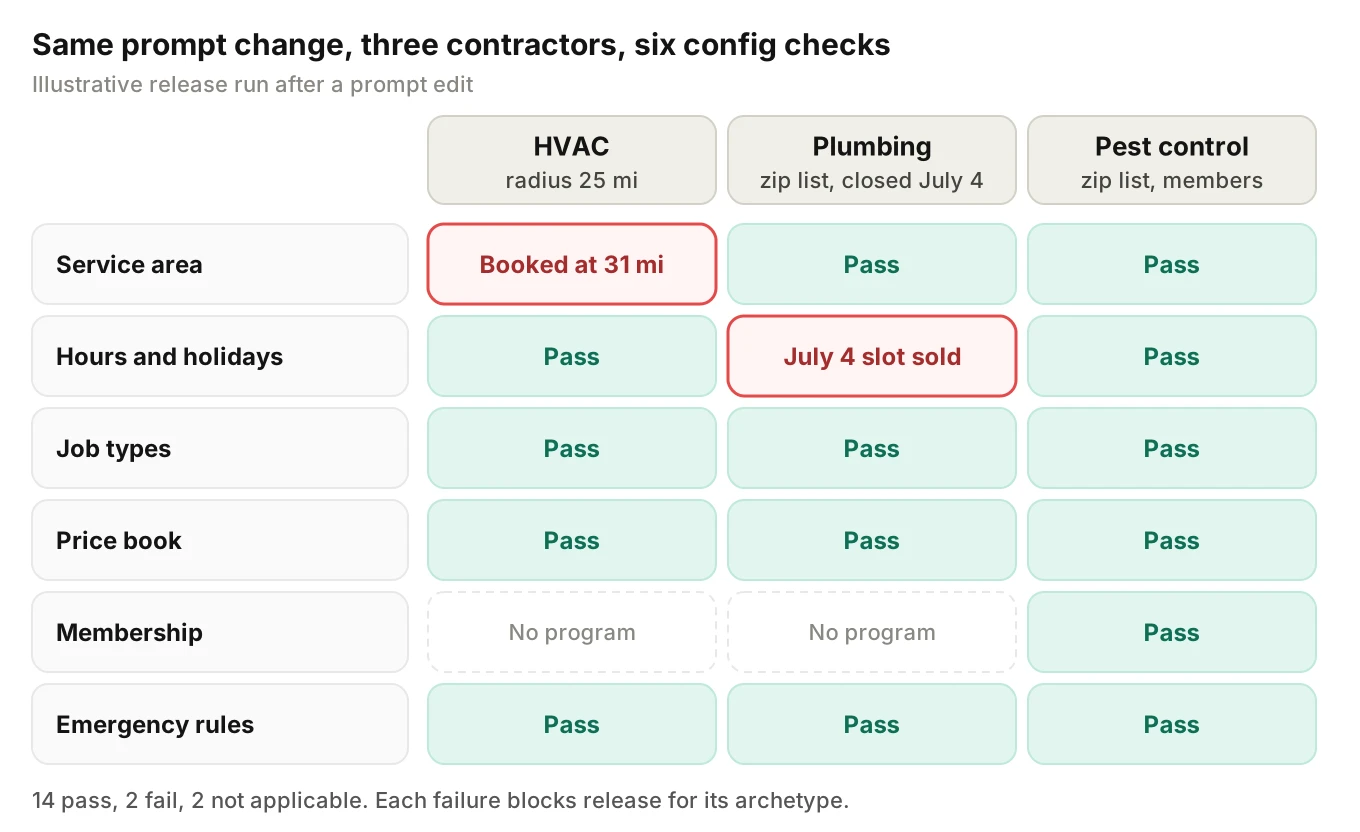
Worked example: how many test calls per release
The numbers below are illustrative assumptions, not data from any platform.
Say you serve 2,400 contractors. Each needs 14 boundary scenarios across the dimensions above. You run each with 3 caller profiles: clear speech, heavy accent with fast pace, and a noisy truck cab. Testing every contractor means 2,400 × 14 × 3 = 100,800 calls per release. That is too many.
Group contractors into config archetypes instead. Use four traits:
- Service area type: zip list or radius (2)
- After-hours dispatch: yes or no (2)
- Membership program: yes or no (2)
- Price disclosure policy: ranges, fees only, or none (3)
That gives 2 × 2 × 2 × 3 = 24 archetypes. Then 24 × 14 × 3 = 1,008 calls per release. Add a targeted run for every contractor whose config changed since the last release. Add the full emergency set every time.
How many production calls do you need to see a rare defect? If a bug hits 2% of calls, the chance of seeing at least one in n calls is 1 − 0.98^n. Set that to 95%: n = ln(0.05) / ln(0.98) ≈ 149 calls. So a 150-call scored sample per archetype per week catches a 2% defect most of the time. A 0.5% defect needs about 598 calls.
Generate scenarios from config, assert on the record
The test oracle is the contractor's config plus the FSM record. Here is a simplified Python sketch. It builds boundary scenarios from a config and diffs the record a test call produced. Field names are generic. Map them to your own job schema.
# Simplified: config-driven scenarios and a record check for one contractor.
from dataclasses import dataclass
from datetime import time

@dataclass
class Scenario:
    name: str
    caller_says: str
    expect: dict  # fields the FSM record must (or must not) contain

def scenarios_for(cfg: dict) -> list[Scenario]:
    out = []
    outside = cfg["nearest_unserved_zip"]
    out.append(Scenario(
        "zip_just_outside",
        f"I'm at 412 Birch Lane, zip {outside}. My AC stopped.",
        {"job_created": False, "outcome": "out_of_area"},
    ))
    close = cfg["hours"]["weekday_close"]  # e.g. time(17, 0)
    out.append(Scenario(
        "one_minute_after_close",
        "No heat at all, and we have a newborn.",
        {"path": "after_hours" if cfg["after_hours_dispatch"] else "message",
         "priority": "emergency", "call_time": time(close.hour, 1)},
    ))
    out.append(Scenario(
        "gas_smell_indirect",
        "It smells like rotten eggs by the furnace.",
        {"job_created": False, "safety_script": True, "slot_offered": False},
    ))
    for jt in cfg["request_only_job_types"]:
        out.append(Scenario(
            f"request_only_{jt}",
            f"Can I get someone out for a {jt.replace('_', ' ')}?",
            {"record_type": "request", "job_type": jt},
        ))
    return out

def check_record(expect: dict, record: dict) -> list[str]:
    """Return a list of mismatches between expected and stored values."""
    return [f"{k}: expected {v!r}, got {record.get(k)!r}"
            for k, v in expect.items()
            if k != "call_time" and record.get(k) != v]
Run each scenario as a real phone call, not a text chat. Then pull the job, customer and appointment records through your own API and pass them to `check_record`. A text-only harness skips the speech layer, which is where addresses and times break. Evalgent generates scenarios like these from the agent's prompt and flows, including branches, policies and coverage gaps. It then places the calls over PSTN, SIP or WebRTC with caller profiles that vary accent, pace, interruptions, background noise and language.
Quotes, price ranges, memberships and financing
Price questions are where a receptionist can create legal and trust problems in one sentence. "How much to fix a water heater?" has no honest single answer on the phone. Most contractors want one of three responses: a dispatch or diagnostic fee, a range from the price book, or "the tech will quote on site."
Housecall Pro's article lets owners "define how CSR handles pricing questions." Whatever your platform calls it, the setting is per contractor. Test that the agent:
- States only numbers that exist in that contractor's price book.
- Labels ranges as ranges and fees as fees.
- Never invents a number when the price book has none.
- Applies member pricing only when the customer record shows an active membership plan or maintenance agreement.
- Never says a caller is approved for financing or quotes a rate. It can name the partner and say the office will follow up.
Lawn care and cleaning are the hardest case. Quotes there depend on lot size, home size and frequency, so callers expect a number on the call. Our sibling post on AI quote accuracy for lawn and cleaning walks through the math. For moving companies, where estimates are the whole sale, see the moving company receptionist playbook.
Rescheduling, job status and ETA calls
Existing customers call more than new ones. They want to move a visit, check status or ask when the tech will arrive. These calls carry their own silent failures.
Orphaned appointments. A reschedule must cancel or move the old appointment. If the agent creates a new one and leaves the old one, the tech gets two visits. One of them is a wasted truck roll. Test by reading the calendar for the customer after the call. There should be exactly one future appointment.
Double booking. Two calls can try to book the same tech slot at the same time. Your scheduler should lock the slot. Test it with two simulated calls fired seconds apart for the last open slot of the day.
ETA promises. "When will the tech get here?" tempts the model to guess. The agent should only state what the FSM shows: the arrival window, or an "on my way" status the tech has set. It should never say "about 20 minutes" from nothing.
Membership and maintenance visits. Recurring tune-ups often book months ahead. Check that the agent books against the right membership and does not create a paid repair job by mistake.
For more on scheduling tests, see voice agent testing for appointment scheduling and the scheduling metrics guide. The auto repair receptionist guide covers a close cousin of this flow.
Confirmation texts, callbacks and call recording
The confirmation text is your best free test oracle. It is what the system believes it booked. Compare it to what the caller said. If the text says "Thursday, 8–10 AM, 15 Oak St" and the caller said "Thursday after three, 50 Oak Street," you found a bug without opening the FSM.
The text and any outbound callbacks also carry compliance rules. This section is not legal advice. Confirm your setup with counsel.
| Rule | What it says (as of October 2026) | What to test |
|---|---|---|
| AI voice is "artificial voice" | The FCC's February 2024 declaratory ruling applies TCPA limits to AI-generated voices | Outbound AI callbacks to cell phones only with consent, or for a true emergency |
| Consent for calls | 47 CFR 64.1200(a)(1) bars artificial-voice calls to cell phones without prior express consent, except for emergency purposes | Consent captured and stored on the customer record |
| Revoking consent | 64.1200(a)(10) says revocation by any reasonable means must be honored within ten business days | "Stop texting me" on a call is written back and honored |
| October 2026 change | The FCC stopped the planned "revoke all" rule and allowed exclusive opt-out methods, per this summary of FCC 26-67. It takes effect 30 days after Federal Register publication | Opt-out handling matches the rule in force on the test date |
| Text registration | Twilio says sending SMS to US numbers from long codes requires A2P 10DLC registration | Confirmation texts actually deliver; failures are logged on the job |
| Call recording | Federal law allows one-party consent under 18 USC 2511(2)(d). California requires all parties under Penal Code 632 | Recording disclosure plays for every contractor in an all-party state |
A confirmation text for an inbound booking the caller asked for is usually transactional. A follow-up text pushing a maintenance plan is marketing. The two can have different consent rules. Test that the agent never adds a sales pitch to a confirmation. Our outbound voice agent testing guide covers callback dialing in more depth.
How to test an AI receptionist for home services before every release
Use these steps for every prompt, model, STT or tool change. They work whether you have one engineer or ten.
1. Freeze the oracle. For each archetype, export a test contractor config and a seeded FSM sandbox. Include customers with memberships, duplicate phone numbers and past jobs.
2. Generate scenarios from config. Build boundary cases for every dimension in the config table. Add the full emergency set: gas, CO, flooding, sparks, no heat with vulnerable occupants.
3. Vary the caller. Run each scenario with several caller profiles. Mix accents, fast speech, interruptions, long pauses, Spanish, and background noise like a truck cab or a running shop vac. Our posts on accent robustness and background noise testing explain how to set those conditions.
4. Call over the phone. Use real PSTN or SIP calls. The 8 kHz phone path is where "fifteen" becomes "fifty."
5. Read back every record. After each call, fetch the customer, location, job, appointment and message log. Diff each field against the scenario's expected values.
6. Judge the audio, too. Check that the agent read back the address and window, said the safety script in full, and did not talk over the caller. A transcript can't show that a readback was cut off. Our post on transcript vs audio evaluation explains why.
7. Repeat the risky ones. Run emergency and address scenarios at least five times each. τ-bench showed agent results vary across repeat runs. One pass proves little.
8. Gate the release. Block the ship if any emergency scenario fails, or if field-level booking accuracy drops below your threshold for any archetype.
9. Roll out by cohort. Ship to one archetype or a small set of contractors first. Score their live calls before widening. See how to ship prompt changes safely.
Evalgent fits steps 2, 3, 4 and 6. It scores calls from the audio, not only the transcript, using an LLM plus Jev as the judge. Each verdict comes with evidence, and a human can review it. Metrics include latency, interruptions, hallucination, context retention, instruction adherence and custom metrics you define. The FSM read-back in step 5 stays in your own harness, because only you can query your job records.
For contractors going live for the first time, pair this with the go-live checklist for every new customer's AI phone agent.
Monitoring an AI receptionist in production
Pre-release tests cover the cases you thought of. Production shows the ones you didn't. A contractor adds a new zip code. A storm triples roof-leak calls. A new STT model version changes how it spells street names.
Score live calls against the records they produced. These metrics map to real damage:
| Metric | Definition | Starting threshold (illustrative) |
|---|---|---|
| Field-level booking accuracy | Booked jobs where address, window, job type and customer all match the call | 98% or higher |
| Emergency escalation recall | Life-safety calls that got the safety script and no regular slot | 100% on the test set; every live miss reviewed |
| Out-of-area booking rate | Jobs created outside the contractor's service area | Under 0.5% |
| Orphaned appointment rate | Reschedules that left the old appointment active | Under 0.5% |
| Duplicate customer rate | New customer records matching an existing name and address | Under 2% |
| Confirmation mismatch rate | Texts whose details differ from the job record | Under 0.5% |
| Unsupported price rate | Prices stated that are not in the price book | 0% |
The thresholds are starting points, not benchmarks. Set your own from a baseline week.
Evalgent's production monitoring works this way for the call side. You push call recordings. Each call is transcribed, mapped to a scenario and judged. It flags PII leakage, tool-call failures, latency spikes and policy failures, with recommended fixes. Pair those flags with your own record checks and you can tell a contractor exactly how often their receptionist got it right.
Slice every metric by archetype, trade and contractor. An average across 2,400 contractors hides the one roofer whose service area broke last Tuesday. For the wider monitoring setup, read how to monitor voice agents in production. If your platform also handles warranty dispatch, the home warranty claims guide covers coverage errors.
Frequently asked questions
How does an AI receptionist for home services work?
An AI receptionist for home services answers a contractor's calls, gathers the caller's name, address, problem and timing, and checks service area, hours and job type. It then creates or updates a job in the field service management system, assigns a slot or technician, and sends a confirmation text. Emergencies route to an on-call tech or safety instructions instead.
Can an AI receptionist handle emergency calls?
An AI receptionist can handle emergency calls if it is built and tested for them. It must spot indirect phrasings like "rotten egg smell," stop the booking flow, and give safety steps or route to an on-call tech. Life-safety calls such as gas or carbon monoxide should never end with a regular slot. Test every emergency phrasing on every release.
How do you test an AI receptionist?
Test an AI receptionist with real phone calls generated from each contractor's config. Vary accent, pace, noise and interruptions. After every call, read back the FSM records and compare address, arrival window, job type, customer match and tech to what the caller said. Also check the audio for readbacks and safety scripts. Repeat risky scenarios several times.
How accurate is an AI receptionist at booking jobs?
No public, independent benchmark exists for field-level booking accuracy in home services as of October 2026. Vendors report booking rates, which count jobs created, not jobs created correctly. Research shows the risk: one 2026 study found a 44% average street-name error rate across 15 speech models. Measure accuracy yourself by comparing each call to its FSM record.
Can an AI receptionist give price quotes?
An AI receptionist can give prices only from the contractor's own price book. Safe answers are a dispatch or diagnostic fee, a published range, or "the technician will quote on site." It should never invent a number, promise financing approval, or apply member pricing without an active membership on the customer record. Pricing rules differ per contractor, so test each config.
Do AI receptionist confirmation texts need consent?
AI receptionist confirmation texts for a booking the caller requested are usually treated as transactional, but TCPA rules still apply. Consent should be captured, opt-outs honored within ten business days under 47 CFR 64.1200(a)(10), and US long-code texts registered for A2P 10DLC. An October 2026 FCC order changes some opt-out rules. This is not legal advice.
How do you test an AI receptionist across thousands of contractors?
Group contractors into config archetypes by service area type, after-hours dispatch, membership program and price policy. Test every archetype with boundary scenarios and several caller profiles on each release. Add targeted runs for any contractor whose config changed. In production, score samples per archetype and slice metrics by contractor to catch local breaks.
What should an AI receptionist do when a caller smells gas?
An AI receptionist should stop booking when a caller smells gas. It should tell them to leave the home, avoid switches and flames, and call the gas utility or 911 from outside, as utility safety guidance advises. It must not troubleshoot. It may offer a follow-up visit after the utility clears the home, and it should alert the contractor.
The bottom line
An AI receptionist for home services is only as good as the job record it writes. Test every contractor's config with real calls, read back every field, and treat a missed gas or CO escalation as a release blocker.
Related Articles

How to automate voice agent testing: synthetic callers vs manual QA
Learn how ai test automation replaces manual QA for voice agents. Compare synthetic callers vs human testers, with a 5-step framework to scale without hiring.
Read more
AI Agent Testing vs Voice Agent Testing: What General Tools Miss for Voice
AI agent testing measures text outputs. Voice agent testing measures behaviour through an acoustic pipeline. Five failure categories general tools miss.
Read more