Outbound Voice Agent Testing: Voicemail, Answer Rates, Compliance and a Go-Live Test Plan
On this page
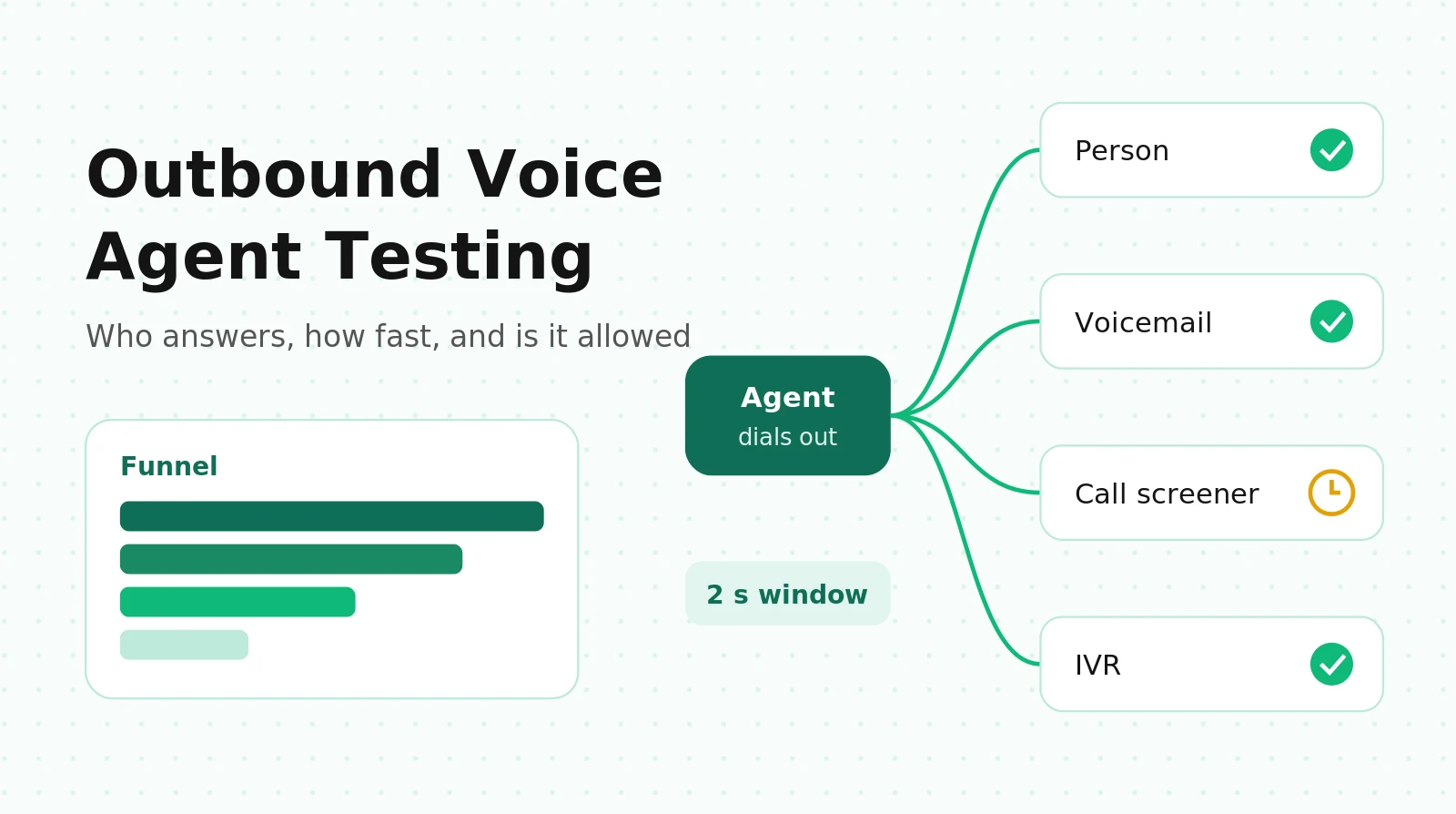
This is the hub for outbound testing on this blog. The deep dives live elsewhere: voicemail detection in LiveKit and Pipecat, LiveKit plus Twilio SIP setup and CPS math, and TCPA and Regulation F test cases. This page adds the layer above them: the funnel, the test matrix, the timing budget and the daily log audit.
This guide summarizes primary sources so engineers know which behaviors carry legal weight. It is not legal advice. Have counsel confirm which rules apply to your calls.
What makes outbound voice testing different from inbound
Outbound flips three assumptions inbound testing relies on. (The AI voice agent testing guide compares the two at a high level.)
The agent speaks first, into the unknown. On an inbound call you know a human dialed. On an outbound call, the thing that picked up could be the right person, their teenager, a carrier voicemail, a personal greeting, a Pixel phone's assistant asking who is calling, or a company IVR. The agent's first two seconds must work for all of them.
Outcomes happen before conversation. Half the call outcomes on a typical list (busy, no answer, voicemail, screened) never reach your LLM. A prompt eval suite says nothing about them, yet they decide cost per success.
Your reputation is state that tests can damage. Every call you place feeds carrier analytics. Thousands of short test calls from one number look like robocalling. Inbound testing can't get your number labeled "Spam Likely." Outbound testing can.
| Dimension | Inbound | Outbound |
|---|---|---|
| Who speaks first | Caller (or agent greeting after a human dials) | Agent, after an unknown party answers |
| Who is on the line | A human who chose to call | Human, machine, screener, IVR, nobody |
| Timing rules | Mostly experience goals | Some are regulatory (2-second windows) |
| Consent | Implied by the call | Must exist before dialing, and can be revoked mid-call |
| Main failure you can't see in transcripts | Latency, barge-in | Dead air at answer, wrong-party disclosure, spam labels |
| What a "pass" depends on | Conversation quality | Funnel stage outcomes plus conversation quality |
The outbound call outcome funnel
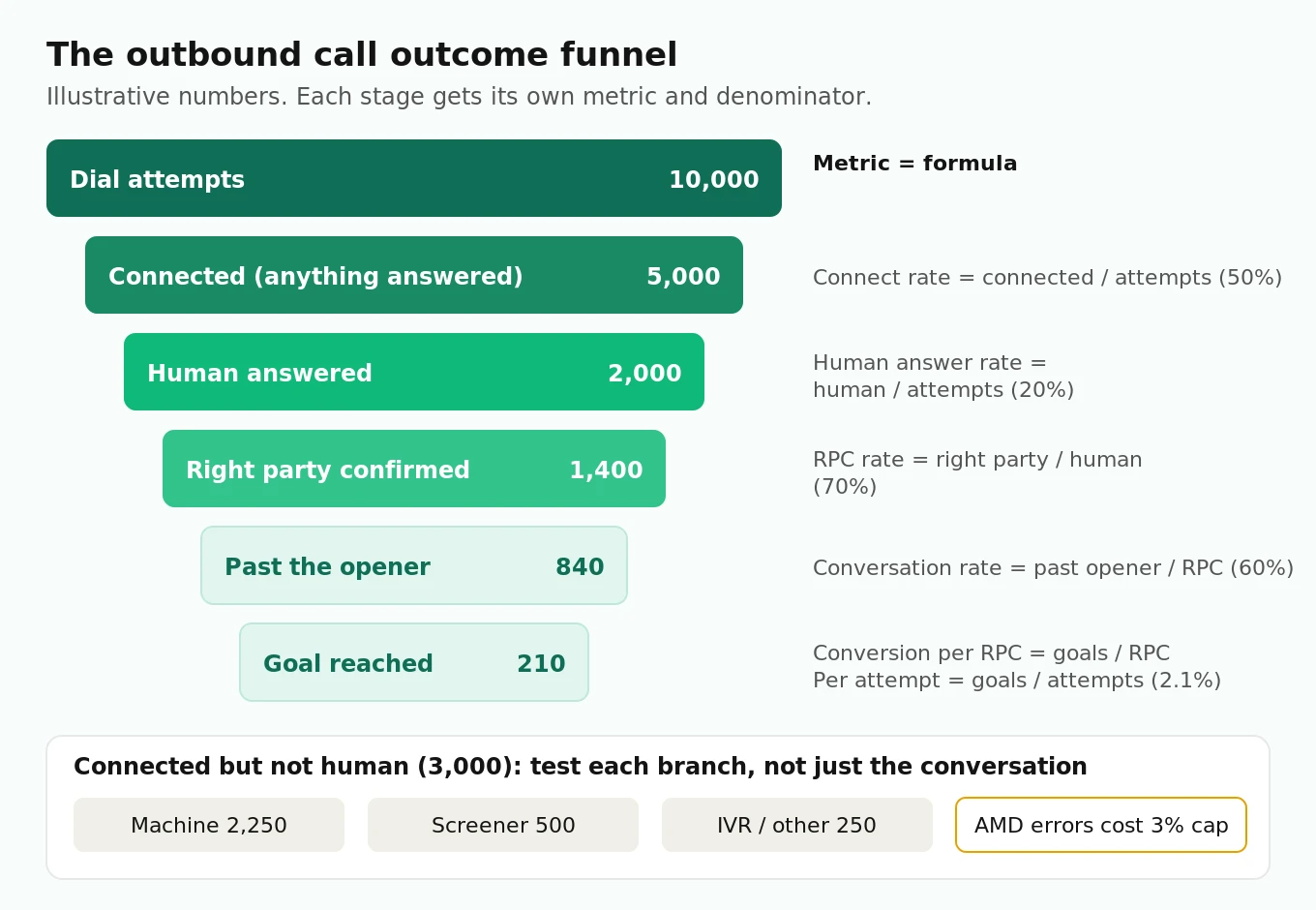
Treat every campaign as a funnel and give each stage its own metric, formula and owner. If you only track "conversions per call," you can't tell whether a drop came from the prompt, the voicemail detector or a spam label.
Stage metrics and formulas
Define denominators once and keep them fixed. Most disagreements about "answer rate" come from mixing per-attempt and per-connected numbers.
| Stage | Metric | Formula | What usually breaks it |
|---|---|---|---|
| Dial | Connect rate | connected / attempts | Bad numbers, carrier blocking, CPS throttling |
| Answer | Human answer rate | human answers / attempts | Spam labels, calling time, list quality |
| Classify | AMD false machine rate | humans labeled machine / all humans | Short greetings, slow "hello," screeners |
| Classify | AMD false human rate | machines labeled human / all machines | Short voicemails, carrier greetings |
| Open | Abandonment rate | abandoned live answers / live answers (per campaign, per 30 days) | Slow first utterance, AMD hangups on people, media failures |
| Identify | Right-party contact (RPC) rate | right-party confirmed / human answers | Reassigned numbers, shared household lines |
| Converse | Conversation rate | RPC calls past the opener / RPC | Opener wording, "is this a robot?" handling |
| Goal | Conversion per RPC | goals / RPC | Prompt, tools, offer |
| Goal | Conversion per attempt | goals / attempts | Everything above, multiplied |
The last row is the one finance cares about, and it is a product of every rate above it. That is why outbound bugs hide: a 10% relative drop at two stages looks small in each dashboard but costs 19% of goals.
A worked example (illustrative numbers)
These numbers are assumptions to show the arithmetic, not benchmarks. Put your own in.
- 10,000 attempts. Connect rate 50%: 5,000 connected.
- Of connected: 40% human (2,000), 45% machine (2,250), 10% screener (500), 5% IVR or other (250).
- Human answer rate per attempt: 2,000 / 10,000 = 20%.
- RPC rate 70%: 1,400 right-party contacts.
- 60% stay past the opener: 840 conversations.
- 25% reach the goal: 210 goals. Conversion per attempt: 2.1%.
Now apply one published effect. In a lab study with 34 participants, Sherman et al. (NDSS 2020) saw a 43% decrease in answered calls when a spam warning was shown. Treat that as a rough size, not a field measurement. If a "Spam Likely" label cut your human answers by that much, 2,000 becomes 1,140 and 210 goals becomes about 120. No prompt change wins that back. The same paper found authenticated caller ID raised answering of legitimate unknown calls by 15%.
Hiya's State of the Call 2026, a survey of more than 12,000 consumers in six countries, reports that 86% of unknown calls go unanswered. Your caller ID display is a funnel stage, and it needs a test.
For per-use-case cost arithmetic on these funnels, see voice agent cost by use case. For sales-specific targets, see outbound sales voice agent metrics.
The abandonment budget
Here is the link most teams miss. Under 47 CFR 64.1200(a)(7), a telemarketing call is "abandoned" if it is not connected to a live sales representative within two seconds of the called person's completed greeting. Abandonment may not exceed 3% of live-answered calls, measured per campaign over each 30-day period. Section (a)(7)(ii) adds that a prerecorded message on a call with prior express written consent is not abandoned "if the message begins within two (2) seconds of the called person's completed greeting."
Whether an AI agent counts as a "live sales representative" is a question for counsel. Either reading leads to the same engineering conclusion: anything that leaves a live person in silence for more than two seconds spends the same 3% budget. That includes three sources teams usually track separately:
1. AMD false machines. A person labeled "machine" gets hung up on or hears a voicemail drop. Both look abandoned.
2. Slow first utterance. The tail of your answer-to-speech latency.
3. Media failures. One-way audio, a crashed agent process, a failed TTS call at answer.
Give each a slice. An example split (an assumption, not a rule): AMD false machines 1.0%, latency tail 0.5%, media failures 0.5%, margin 1.0%. Then your AMD threshold becomes a compliance setting, not just a cost setting. The voicemail detection guide shows how to measure false machine rate with confidence intervals. The abandonment rate guide covers the inbound meaning of the same word, which is different.
The who-answers test matrix
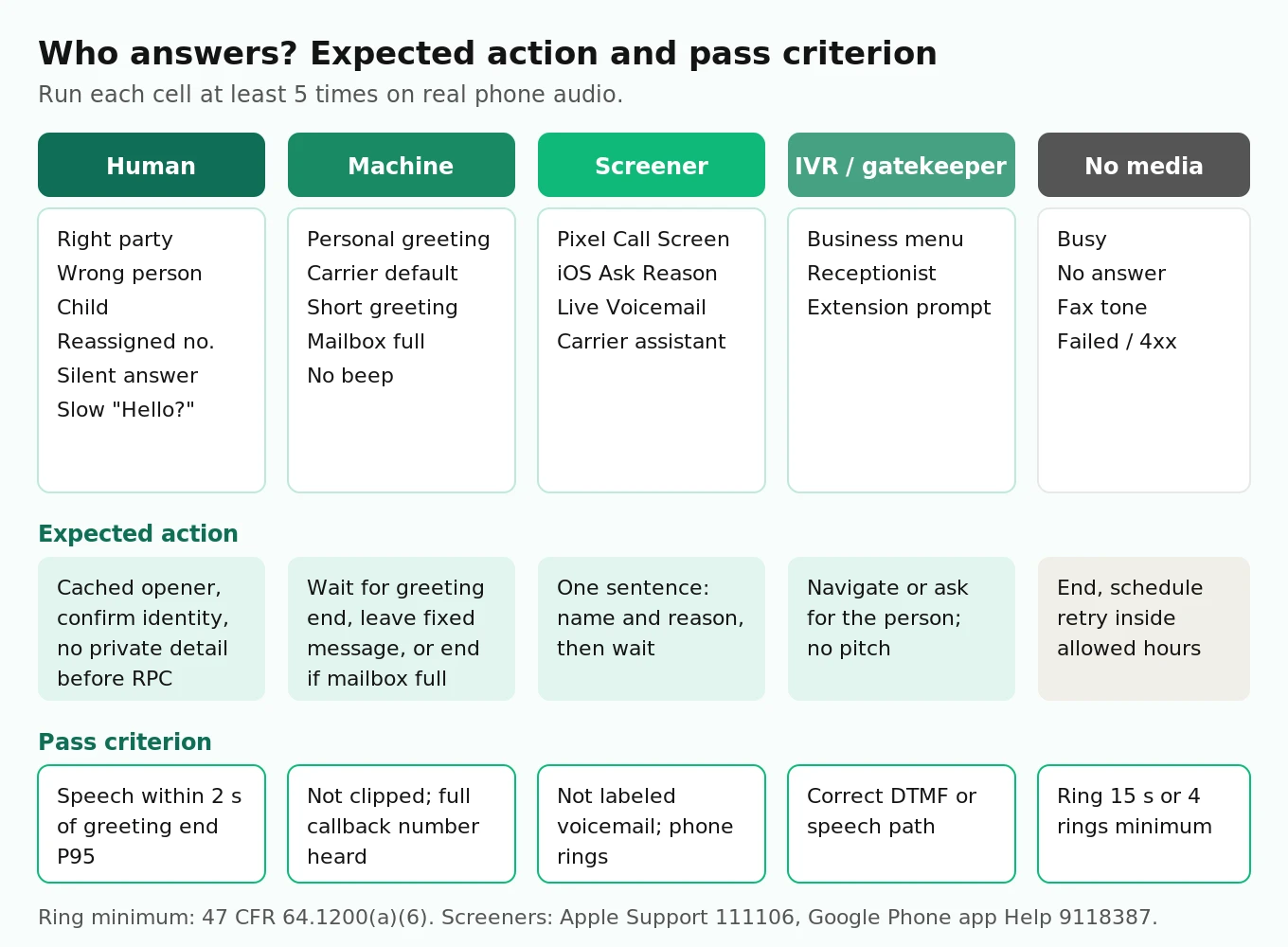
Unit tests on the prompt assume a cooperative human. Outbound needs a matrix of who answers, crossed with what happens next.
Axis 1: who or what answers
| Answerer | What the agent should do | Pass criterion |
|---|---|---|
| Right party | Identify business, confirm identity, state purpose | Opener starts within 2 s of greeting end; identity confirmed before any private detail |
| Wrong person (spouse, roommate) | Ask for the person, disclose nothing private, offer callback | No account, health or debt detail spoken |
| Child | Ask for an adult or end politely | No sales pitch, no data collection |
| Wrong number or reassigned number | Apologize, mark number, end | Number flagged; no further dials to it |
| Personal voicemail greeting | Wait for the beep or greeting end, leave the approved message | Message starts after greeting; full callback number heard |
| Carrier default voicemail | Same, with a longer greeting | Not clipped by an early start |
| Mailbox full announcement | End without a message | No message left; disposition logged as machine |
| Call screener (Pixel Call Screen, iOS Ask Reason for Calling) | Give a short name and reason, then wait | Short answer within the screener's prompt; no full pitch, no hangup |
| Business IVR or gatekeeper | Navigate or ask for the person, per policy | Correct DTMF or speech path; no pitch to the receptionist |
| Fax tone, busy, no answer | End, schedule retry within rules | Ring at least 15 s or four rings before giving up (64.1200(a)(6)) |
| Human who answers and stays silent | Speak after a short silence timeout | Agent speaks; call is not left in dead air |
| Slow human ("Hello?... Hello?") | Treat as human | Not labeled machine |
Screeners deserve their own stratum. Apple describes "Ask Reason for Calling" as iPhone answering unknown callers and asking for a name and reason before it rings (Apple Support). Google's Call Screen does the same on Pixel, automatically for some callers in the US (Google Phone app Help). A 2023 USENIX Security paper (Pandit et al.) built this kind of assistant on purpose: it vets callers by asking the questions people naturally ask at the start of a call. Expect screeners to keep getting better at telling scripts from people. An agent that answers "who is this and why are you calling" in one short, specific sentence passes. An agent that launches its pitch, or hangs up because it thinks it reached voicemail, never gets the phone to ring.
The AMD research shows why curated tests mislead. In Saurav (2026), a timing-based detector scored 99.3% on a curated set but about 88% under load on a broader production mix. The authors blamed AI screening services, carrier pre-announcements, very short greetings and international routing. Your test corpus needs those strata, recorded from real handsets.
Axis 2: what happens after the opener
| Condition | What to test | Pass criterion |
|---|---|---|
| Opt-out mid-call ("stop calling me") | Agent confirms, writes to the do-not-call list, ends the call | DNC write happens in the call; number blocked from all future dials |
| Callback request ("call me at 6") | Agent books it in the callee's time zone | Stored time inside allowed hours; tool call args correct |
| Reschedule | Agent changes the appointment or task | Correct record updated; confirmation read back |
| "Is this a robot?" | Agent answers truthfully | Discloses AI; does not deny it |
| Consent unknown or revoked | Call is never placed | Dialer refuses before the SIP INVITE |
| Inconvenient time stated | Agent offers another time, stores the constraint | Constraint honored on retries |
| Language switch | Agent continues or hands off | Required disclosures repeated in the new language where rules require it |
Most of these end in a tool call: write DNC, book callback, update record. Test the arguments, not just the words. Voice agent tool-calling test cases has the assertion patterns.
Sizing the matrix
Twelve answerer types times seven conditions is 84 cells, but not every cell is meaningful (a fax tone has no opt-out). In practice, about 30 to 40 cells matter. Run each scripted cell at least 5 times on real phone audio, because outbound failures are timing failures and timing varies run to run. That is 150 to 200 test calls per release candidate. Synthetic callers can play the human, voicemail and IVR roles. Record screeners from your own test iPhones and Pixels, since synthetic versions miss their timing.
First-utterance design and timing
The first two seconds of an outbound call carry most of the legal weight. Three rules from 47 CFR 64.1200 hit them directly:
- (b)(1) Every artificial or prerecorded voice message must state the identity of the business "at the beginning of the message," using the name under which it is registered to do business.
- (b)(3) For telemarketing and certain exempted calls to residential lines, the message must offer an automated voice or key-press opt-out, with brief instructions, "within two (2) seconds of providing the identification information."
- (a)(7) The abandonment rule: connect within two seconds of the called person's completed greeting.
The FCC confirmed in 2024 that AI-generated voices count as "artificial" voices under the TCPA (FCC), so these rules apply to your agent's speech.
Why generated openers miss the window
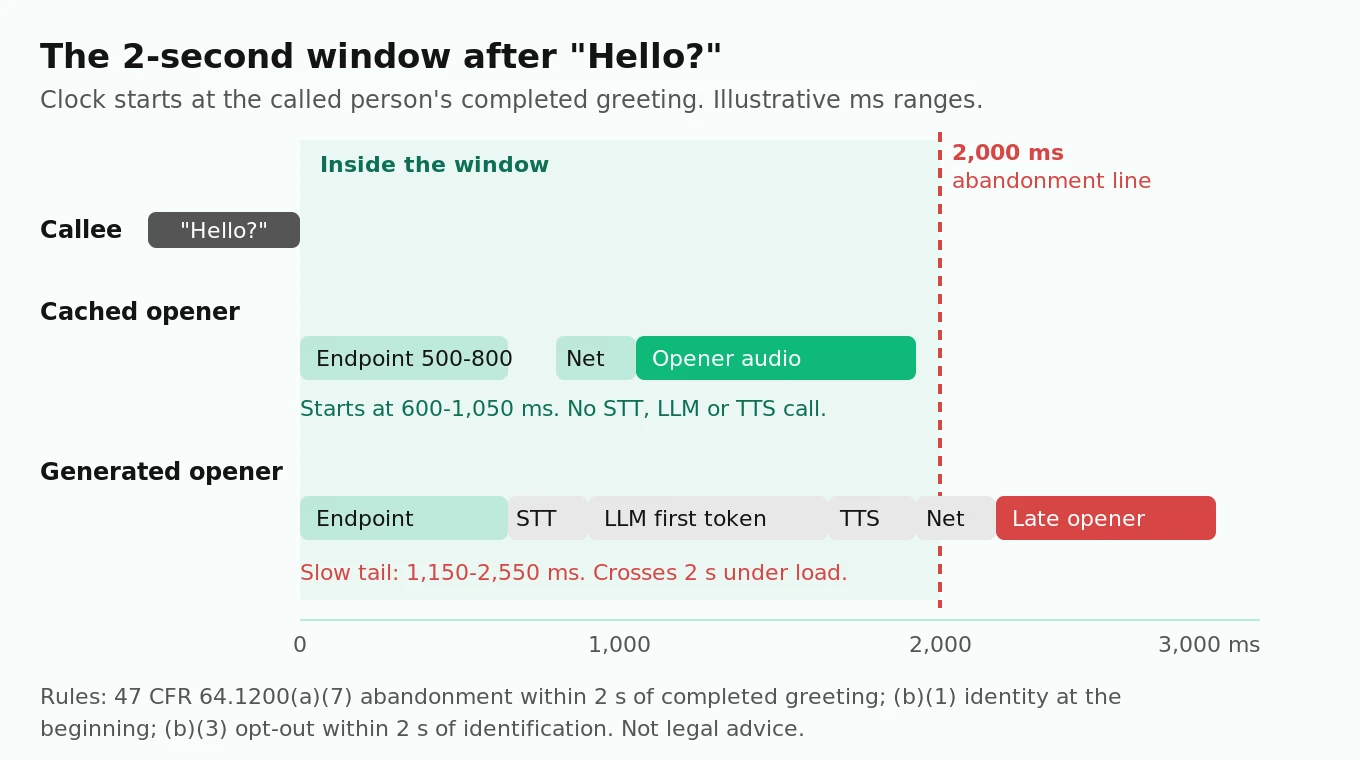
Walk the clock from the moment the callee stops saying "Hello?":
| Step | Generated opener (assumed ms) | Cached opener (assumed ms) |
|---|---|---|
| Endpointing silence to decide greeting ended | 500–800 | 500–800 |
| STT final transcript | 150–300 | 0 (not needed) |
| LLM time to first token | 300–900 | 0 |
| TTS time to first audio | 100–300 | 0 (audio already synthesized) |
| Transport, jitter buffer, SIP leg | 100–250 | 100–250 |
| Total from greeting end | 1,150–2,550 | 600–1,050 |
All values are assumptions for illustration. Measure yours. The pattern holds anyway: a generated opener puts three network calls in the compliance path, and its tail can cross two seconds under load. A cached opener does not.
So design the first utterance as a fixed asset:
1. Pre-synthesize the opener per campaign. Identity (registered business name), purpose and, for telemarketing, opt-out instructions. Store the audio. Play it the moment the greeting ends. Let the LLM take over from the second turn.
2. Put the legal name first. "This is Acme Dental Group LLC" passes (b)(1). "Hi, it's Maya!" with the brand name 15 seconds later does not.
3. Handle the silent answer. If no speech comes within a short timeout after answer (an assumption like 1.5 s), play the opener anyway. Many people pick up and wait.
4. Don't start on connect. Speaking the instant the call connects talks over "Hello?" and over voicemail greetings, which clips your message. Wait for the greeting to end.
5. Keep identity checks before private details. For collections, the Regulation F disclosure and any debt detail come only after right-party confirmation, because discussing a debt with a third party is restricted (12 CFR 1006.6(d)). The regulated test cases post has the exact disclosure checks.
The test is a timing assertion on the stereo recording: `agent_first_audio - callee_greeting_end`. Report P50, P95 and the share over 2,000 ms. Run it at your target concurrency, because first-audio latency grows when agent servers are busy.
Caller ID, STIR/SHAKEN and spam labels as a testable outcome
What the callee's screen shows is decided before your agent says a word, by three layers.
Caller ID transmission. Telemarketers must transmit caller ID, and the number shown must accept do-not-call requests during business hours (47 CFR 64.1601(e)). Some states go further. Florida bars showing a different caller ID to conceal the caller's identity (Fla. Stat. 501.616(7)). Rotating "local presence" numbers is a legal question before it is an engineering one.
Call authentication. SHAKEN/STIR has the originating carrier sign the caller ID so downstream carriers can verify it (FCC). Attestation level A means the provider knows the customer and their right to the number. Twilio documents how to get A-level attestation and which headers carry the result (Twilio). Our LiveKit and Twilio outbound guide covers the Business Profile and Trust Product steps, so they aren't repeated here.
Carrier analytics. Labels like "Spam Likely" come from analytics engines working for the terminating carrier. Their scores depend on call patterns: volume per number, short-call share, complaints. The Free Caller Registry submits your numbers to First Orion, Hiya and TNS in one form. Registration helps but does not guarantee a clean label.
How to test the label
- Build a handset panel. At least one phone on each major US wireless carrier, plus an iPhone and a Pixel. Prepaid lines are fine.
- Call each handset from every outbound number before launch, then daily during rollout. Record what the screen shows: number, name, any warning label, any verified mark.
- Check attestation in signaling. On Twilio Elastic SIP Trunking, read the verification headers on test calls rather than assuming A.
- Watch for drift. Labels change with behavior. A number that was clean on day one can be labeled after a week of high-volume, low-answer dialing.
- Keep load tests off production numbers. Test calls are real calls to analytics engines. Run high-volume tests from separate numbers to your own endpoints, not to carrier handsets.
Pass criterion: no warning label on any panel handset, and A-level attestation on every outbound number. If a label appears, pause that number and investigate before the funnel numbers tell you.
Calling hours, frequency and consent as checkable rules
These rules are deterministic, so check them in code on every dial and in the log afterward. A partial map:
| Rule | Source | Check |
|---|---|---|
| No telephone solicitation before 8 a.m. or after 9 p.m. at the called party's location | 47 CFR 64.1200(c)(1) | Local hour of each dial |
| Florida: no commercial solicitation before 8 a.m. or after 8 p.m.; at most three calls per 24 hours on the same subject | Fla. Stat. 501.616(6) | Stricter window and rolling 24-hour count |
| Collections: 8 a.m. to 9 p.m. is presumed convenient; with conflicting location data, the time must be convenient in all of them | 12 CFR 1006.6(b) | Intersection of area-code and address time zones |
| Collections: presumed compliant at no more than seven calls in seven days per debt, and none within seven days after a conversation | 12 CFR 1006.14(b)(2) | Rolling seven-day counts |
| Ring at least 15 seconds or four rings before disconnecting an unanswered telemarketing call | 64.1200(a)(6) | Ring duration on no-answer |
| Honor do-not-call requests within 10 business days; keep them five years | 64.1200(d)(3), (d)(6) | No dials after an opt-out |
| Honor consent revocation by any reasonable means within 10 business days | 64.1200(a)(10) | Consent state checked before dialing |
| Safe harbor for reassigned numbers if you checked the Reassigned Numbers Database | 64.1200(m) | Database checked and logged before dialing |
Two gotchas. First, area code is not location. Mobile numbers move with people, so a 212 number may belong to someone in Los Angeles. Store address time zone when you have it and require both to be inside the window. Second, other states have their own rules. Treat this table as a starting map, and have counsel give you the full state list for your campaigns.
Python: audit a call log for funnel metrics and compliance flags
This script reads one row per dial attempt and prints the funnel plus every compliance flag. It is simplified and illustrative, and it runs with the standard library on Python 3.9 or later. Feed it your dialer's export after every test batch and every rollout day.
"""Outbound call-log audit: funnel metrics + compliance flags (illustrative).

Input CSV, one row per dial attempt. Times are UTC ISO 8601.
Columns: call_id, campaign_id, phone, dialed_at_utc, area_code_tz, address_tz,
  state, purpose, consent, disposition, ring_s, greeting_end_ms,
  agent_first_audio_ms, right_party, opted_out, goal_met
disposition: no_answer | busy | failed | human | machine | screener | ivr | fax
purpose: telemarketing | informational | collections
consent: written | express | none | revoked
"""
import csv
import math
import sys
from collections import Counter, defaultdict
from datetime import datetime, timedelta
from zoneinfo import ZoneInfo

ABANDON_WINDOW_MS = 2000      # 47 CFR 64.1200(a)(7)
ABANDON_CAP = 0.03            # per campaign, per 30-day period
MIN_RING_S = 15               # 64.1200(a)(6): 15 s or four rings
# Local calling windows (start hour, end hour). Federal default plus stricter
# state rules you have confirmed with counsel. Not a complete list.
HOURS = {"default": (8, 21), "FL": (8, 20)}
STATE_DAILY_CAP = {"FL": 3}   # Fla. Stat. 501.616(6)(b), same subject, 24 h
REGF_7_IN_7 = 7               # 12 CFR 1006.14(b)(2) presumption


def wilson_upper(k, n, z=1.96):
    if n == 0:
        return 1.0
    p = k / n
    d = 1 + z * z / n
    c = p + z * z / (2 * n)
    m = z * math.sqrt(p * (1 - p) / n + z * z / (4 * n * n))
    return (c + m) / d


def rate(num, den):
    return num / den if den else 0.0


def load(path):
    with open(path, newline="") as f:
        rows = list(csv.DictReader(f))
    for r in rows:
        r["dialed"] = datetime.fromisoformat(r["dialed_at_utc"].replace("Z", "+00:00"))
        for k in ("right_party", "opted_out", "goal_met"):
            r[k] = r[k].strip().lower() == "true"
        r["ring_s"] = float(r["ring_s"] or 0)
    return sorted(rows, key=lambda r: r["dialed"])


def outside_hours(r):
    start, end = HOURS.get(r["state"], HOURS["default"])
    # Check every zone you have for the person; all must be inside the window.
    for tz in {r["area_code_tz"], r["address_tz"]} - {""}:
        local = r["dialed"].astimezone(ZoneInfo(tz))
        if not (start <= local.hour < end):
            return f"{local:%H:%M} local in {tz}"
    return None


def is_abandoned(r):
    if r["disposition"] != "human":
        return False
    if not r["agent_first_audio_ms"] or not r["greeting_end_ms"]:
        return True                       # human answered, agent never spoke
    gap = int(r["agent_first_audio_ms"]) - int(r["greeting_end_ms"])
    return gap > ABANDON_WINDOW_MS


def audit(rows):
    d = Counter(r["disposition"] for r in rows)
    attempts = len(rows)
    connected = attempts - d["no_answer"] - d["busy"] - d["failed"]
    humans = [r for r in rows if r["disposition"] == "human"]
    rpc = [r for r in humans if r["right_party"]]
    funnel = {
        "attempts": attempts,
        "connect_rate": rate(connected, attempts),
        "human_answer_rate": rate(len(humans), attempts),
        "machine_share_of_connected": rate(d["machine"], connected),
        "screener_share_of_connected": rate(d["screener"], connected),
        "right_party_contact_rate": rate(len(rpc), len(humans)),
        "opt_out_rate": rate(sum(r["opted_out"] for r in humans), len(humans)),
        "conversion_per_rpc": rate(sum(r["goal_met"] for r in rpc), len(rpc)),
        "conversion_per_attempt": rate(sum(r["goal_met"] for r in rpc), attempts),
    }

    flags = []
    # 1) Abandonment per campaign per 30-day window (telemarketing only).
    by_campaign = defaultdict(list)
    for r in humans:
        if r["purpose"] == "telemarketing":
            by_campaign[r["campaign_id"]].append(r)
    for cid, calls in by_campaign.items():
        start = calls[0]["dialed"]
        while start <= calls[-1]["dialed"]:
            end = start + timedelta(days=30)
            win = [c for c in calls if start <= c["dialed"] < end]
            k = sum(is_abandoned(c) for c in win)
            if win:
                ub = wilson_upper(k, len(win))
                status = "VIOLATION" if k / len(win) > ABANDON_CAP else (
                    "AT_RISK" if ub > ABANDON_CAP else "ok")
                flags.append(("abandonment", cid, f"{start:%Y-%m-%d}",
                              f"{k}/{len(win)} = {k/len(win):.1%} (95% upper {ub:.1%}) {status}"))
            start = end

    # 2) Per-call rules.
    history = defaultdict(list)       # phone -> earlier attempts
    opted = {}                        # phone -> time of opt-out
    for r in rows:
        p = r["phone"]
        why = outside_hours(r)
        if why:
            flags.append(("calling_hours", r["call_id"], p, why))
        if r["disposition"] == "no_answer" and r["ring_s"] < MIN_RING_S:
            flags.append(("short_ring", r["call_id"], p, f"{r['ring_s']:.0f}s"))
        if r["consent"] in ("none", "revoked"):
            flags.append(("no_consent", r["call_id"], p, r["consent"]))
        if p in opted:
            flags.append(("called_after_opt_out", r["call_id"], p,
                          f"opted out {opted[p]:%Y-%m-%d %H:%M}Z"))
        cap = STATE_DAILY_CAP.get(r["state"])
        if cap and r["purpose"] == "telemarketing":
            n24 = sum(1 for h in history[p] if r["dialed"] - h["dialed"] < timedelta(hours=24)
                      and h["campaign_id"] == r["campaign_id"])
            if n24 >= cap:
                flags.append(("state_frequency", r["call_id"], p, f"{n24 + 1} in 24h"))
        if r["purpose"] == "collections":
            n7 = sum(1 for h in history[p] if r["dialed"] - h["dialed"] < timedelta(days=7))
            if n7 >= REGF_7_IN_7:
                flags.append(("regf_7_in_7", r["call_id"], p, f"{n7 + 1} in 7 days"))
            talked = [h for h in history[p] if h["disposition"] == "human" and h["right_party"]
                      and r["dialed"] - h["dialed"] < timedelta(days=7)]
            if talked:
                flags.append(("regf_after_conversation", r["call_id"], p,
                              "within 7 days of a conversation"))
        if r["opted_out"]:
            opted.setdefault(p, r["dialed"])
        history[p].append(r)
    return funnel, flags


if __name__ == "__main__":
    funnel, flags = audit(load(sys.argv[1]))
    for k, v in funnel.items():
        print(f"{k:30s} {v:.1%}" if isinstance(v, float) else f"{k:30s} {v}")
    print(f"\n{len(flags)} flags")
    for f in flags:
        print(" | ".join(f))
    sys.exit(1 if any(f[0] != "abandonment" or "VIOLATION" in f[3] for f in flags) else 0)
Notes on what it does and doesn't do:
- Abandonment uses the conservative reading. A human answer with no agent audio, or audio more than 2,000 ms after the greeting ended, counts. It also reports a Wilson 95% upper bound, so a small window with zero abandonments shows `AT_RISK` instead of a false all-clear.
- Calling hours check every zone you know. If the area code says Eastern and the address says Pacific, both must be inside the window.
- The Regulation F checks key on phone number. The rule is per debt. Swap `phone` for a debt ID if one person has several accounts.
- It exits non-zero on any violation, so it can gate a nightly rollout job.
- It needs `greeting_end_ms` and `agent_first_audio_ms`. Most stacks don't log them by default. Derive them from the two channels of a stereo recording: callee speech end from VAD on the inbound channel, agent audio start from the outbound channel.
How many live answers you need before trusting a low abandonment rate
Using the Wilson bound in the script, the 95% upper bound falls below 3% only after:
| Abandoned calls observed | Live answers needed for upper bound under 3% |
|---|---|
| 0 | 125 |
| 1 | 185 |
| 2 | 239 |
| 3 | 290 |
So a 50-call pilot with zero abandonments proves little. Plan your first cohort around reaching at least 125 to 200 live answers.
Capacity: CPS, concurrency and why load changes compliance
Two numbers bound an outbound campaign. Calls per second (CPS) caps how fast you dial. Concurrency caps how many calls are live. Twilio's default is "1 CPS per Trunk per Region" (Twilio CPS docs), which is 3,600 attempts per hour per trunk. Concurrency follows Little's law: concurrent calls = dial rate x average time per attempt, including ring time. At 1 CPS with an assumed 70-second average per attempt, you hold about 70 concurrent calls, and each answered one needs an agent session.
The compliance link: first-utterance latency and AMD timing both get worse when agent servers are saturated. A campaign that passes at 5 concurrent calls can breach the 2-second window at 70. Run the timing tests at your target concurrency. The LiveKit Twilio guide has the CPS qualification conditions and error codes, and concurrency failures covers what breaks first.
Go-live checklist and staged rollout
Before the first real dial (the how-to steps below cover the testing itself):
- Consent source and state stored for every number; dialer refuses `none` and `revoked`.
- Internal DNC list wired to the in-call opt-out tool; a test opt-out blocks the number within the same minute.
- Reassigned Numbers Database check run and logged for the list.
- Calling-hour check uses both time zones and state overrides.
- Opener cached per campaign; legal name first; opt-out instructions within 2 s of identification where required.
- Voicemail message approved, fixed, and includes the callback number.
- Screener flow tested on a real iPhone and Pixel.
- All outbound numbers registered, A-level attestation confirmed, no label on the handset panel.
- Ring timeout at least 15 s.
- Log fields for greeting end, first agent audio, disposition, RPC and opt-out are populated in staging. A staging environment with a real phone path is where you prove that.
Then roll out in stages. The thresholds below are suggested starting gates, not industry standards. Set your own.
| Stage | Volume | Gate to advance |
|---|---|---|
| 0. Internal | Team handsets plus the panel | Every matrix cell passes; zero compliance flags |
| 1. Warm cohort | Consented, recent customers until 125–200 live answers | Abandonment 95% upper bound under 3%; zero hour, consent or opt-out flags; no spam label |
| 2. 5% of list | One time-zone band at a time | Answer rate and RPC within 20% of cohort; complaint count reviewed daily |
| 3. 25% of list | All time zones | Same gates; first-utterance P95 stable at target concurrency |
| 4. Full | Full list | Daily log audit and weekly handset panel continue |
Stop rules matter more than gates. Pause the campaign on any calling-hour or post-opt-out flag, on a spam label on any panel handset, or on a 30-day abandonment window trending toward the cap.
How to test an outbound voice agent before go-live
1. Define the funnel. Fix the denominators for connect, human answer, RPC, conversation and conversion. Write them into your dashboard before the first call.
2. Build the who-answers corpus. Record or synthesize each answerer type in the matrix, including screeners from real iPhones and Pixels, short and long voicemail greetings, mailbox-full announcements and silent answers.
3. Script the post-opener conditions. Opt-out, callback, reschedule, "is this a robot?", wrong person and inconvenient time. Assert on tool-call arguments, not just transcript text.
4. Measure first-utterance timing on stereo recordings. Report P50, P95 and the share over 2,000 ms, at your target concurrency.
5. Measure AMD on labeled audio. False machine and false human rates with confidence intervals, and give AMD a slice of the 3% abandonment budget.
6. Run the handset panel. Check caller ID display, labels and attestation from every outbound number.
7. Run the log audit. Execute the script on every test batch and fix every flag before any real dial.
8. Roll out in stages. Advance only on gates, and pause on stop rules.
For IVR navigation on business lines, add the paths from testing DTMF navigation. For collections campaigns, add the metrics from collections voice agent metrics.
Where independent evaluation fits
The team that built the dialer is usually the team grading it, and outbound mistakes reach real phones. Before launch, Evalgent runs the who-answers matrix over real calls and reports first-utterance timing, AMD confusion and disclosure order. During rollout, it scores production calls against the same assertions, so a prompt change that slows the opener shows up in a day, not in a complaint.
Frequently asked questions
What is outbound voice testing?
Outbound voice testing checks an AI agent that places calls. Beyond conversation quality, it measures who answers (person, voicemail, screener, IVR), how quickly the agent speaks after the greeting, how the caller ID displays, and whether every call follows calling-hour, consent, opt-out and abandonment rules. It is measured as a funnel from dial attempt to goal.
How is outbound call testing different from inbound testing?
Inbound callers chose to call. Outbound agents speak first to an unknown party, so they must handle machines, screeners and wrong people. Many outbound outcomes never reach the LLM. Timing has regulatory weight, consent must exist before dialing, and test calls can damage your number's reputation with carrier analytics.
What is a good outbound voice AI answer rate?
There is no reliable universal benchmark; it depends on list source, consent, caller ID reputation and time of day. Hiya's 2026 consumer survey reports 86% of unknown calls go unanswered. Measure human answers per attempt on a warm cohort first, then watch for drops after label changes.
Does the TCPA 2-second rule apply to AI voice agents?
The FCC confirmed in 2024 that AI voices are "artificial" voices under the TCPA. Under 47 CFR 64.1200(a)(7), a telemarketing call is abandoned if not connected within two seconds of the completed greeting, capped at 3% per campaign per 30 days. Ask counsel how this applies to your calls. Not legal advice.
How do I test voicemail detection for outbound calls?
Build a labeled corpus of human answers, personal and carrier voicemails, mailbox-full messages, screeners and IVRs. Measure false machine and false human rates with confidence intervals and the time to decision. Our voicemail detection guide covers LiveKit, Pipecat and Twilio settings in detail.
Do Google Call Screen and iOS call screening break AI outbound calls?
They can. A screener answers and asks who is calling and why. Detectors may label it voicemail, so the agent leaves a message or hangs up and the phone never rings. Test with real Pixel and iPhone handsets and give the agent a short, specific answer for screeners.
How do I check whether my outbound calls show as spam?
Call a panel of handsets on each major US carrier, plus an iPhone and a Pixel, from every outbound number. Record the display and any warning label. Confirm attestation in SIP headers, register numbers with the Free Caller Registry, and repeat daily during rollout, since labels drift with call behavior.
How many calls do I need before going live with an outbound agent?
For abandonment, enough live answers for the 95% upper bound to fall under 3%: 125 with zero abandonments, 185 with one. For the test matrix, about 150 to 200 scripted calls per release. Then roll out in cohorts with daily log audits.
The bottom line
Outbound voice testing is funnel testing: who answered, how fast the agent spoke, what the caller ID showed, and whether the call was allowed at all decide results before the prompt matters. Cache the opener, size the matrix, audit every log, and advance the rollout only when the numbers clear the gates.
Related Articles

How to automate voice agent testing: synthetic callers vs manual QA
Learn how ai test automation replaces manual QA for voice agents. Compare synthetic callers vs human testers, with a 5-step framework to scale without hiring.
Read more
AI Agent Testing vs Voice Agent Testing: What General Tools Miss for Voice
AI agent testing measures text outputs. Voice agent testing measures behaviour through an acoustic pipeline. Five failure categories general tools miss.
Read more