Voice Agent Call Replay: Reproduce a Production Failure in a Test
On this page
A caller says "tomorrow at ten." The agent books the day after. You read the trace and write a fix. Then you ring the agent yourself, and it books the right day. Was it fixed, or did the bug just not show up this time?
A replay answers that. This post covers voice agent call replay: how to reproduce a production failure as a test you can run again and again. It does not cover finding the cause. For that, see how to root-cause a bad call in 10 minutes and why traces need context. The full production-to-test loop has its own post. The angle here is narrower: what to freeze, what stays random, and how to read the result.
Google's SRE book says a solid reproducible test case makes debugging much faster. It also says reproducing a problem in live production may not be an option. A replay is that test case for a phone call.
What a replay is, and what it is not
To replay voice agent call data is to re-run a past call's inputs against the agent under test. You then check whether the same failure appears. Use it to reproduce voice agent bug reports on demand. It is not audio playback for a human listener.
It is also not a perfect rerun. Models sample, providers update and timing shifts. Treat each replay as one draw from a distribution.
Three levels of voice agent call replay
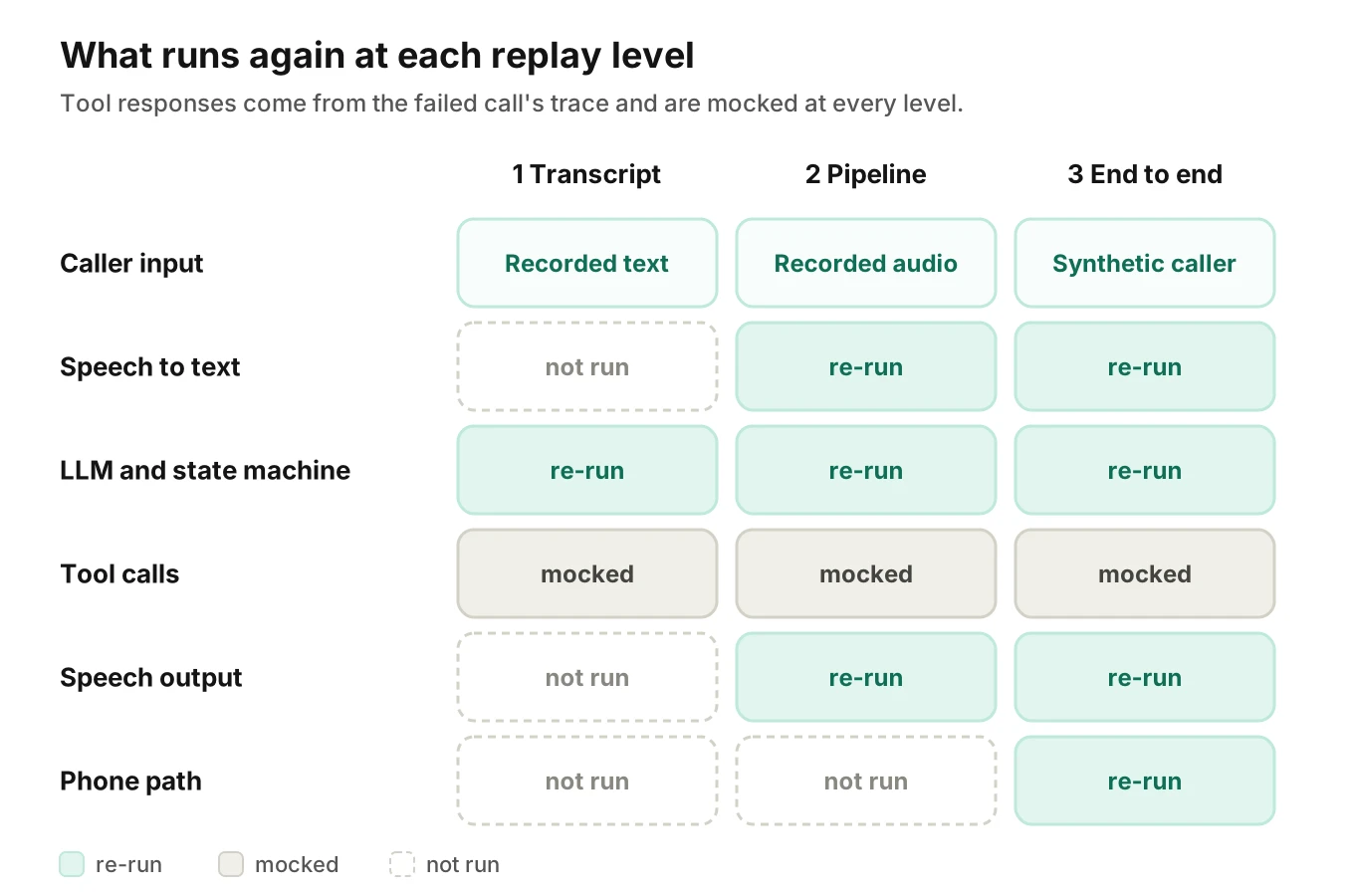
The levels differ in how much of the call path runs again. Higher levels catch more but cost more and vary more.
| Level | Input | Re-runs | Misses |
|---|---|---|---|
| 1. Transcript | Caller turns as text | LLM, prompt, state machine, tools | Speech-to-text, audio, timing |
| 2. Pipeline | Recorded caller audio | Speech-to-text onward | Phone path, live timing |
| 3. End to end | Synthetic caller, same script | The whole path over a real call route | The original voice and exact timing |
Level 1: transcript replay
Take the caller turns as text. Send them in order to the agent's LLM and state machine. Record the tool calls it makes.
This is the cheapest level and the right first try. Wrong tool arguments, bad branches and prompt gaps show here. LiveKit's guide describes this style: unit tests run in text mode and assert on messages, tool calls and handoffs turn by turn. Its unit test reference shows a run method for one turn and a mock_tools helper. If the failure was a misheard word, Level 1 cannot show it. The text you feed in is already correct.
Level 2: pipeline replay
To replay recorded audio through speech to text and everything after it is to keep the acoustic cause. That covers accent, noise, a clipped word or an endpointing split. Two limits apply. A provider change since the call may alter the transcript, so keep the original transcript to compare. And the audio is personal data. Do not replay production call as test input until it is cleaned; see the privacy section. To find one turn's audio, link the recording to the trace.
Level 3: end-to-end replay
A synthetic caller follows the same script, under the same conditions, over a real call path: phone, SIP or WebRTC. Only this level exercises latency, turn-taking and telephony together. The caller reproduces the words and conditions, not the original voice or timing. A pass is evidence about the scenario, not that one call. See synthetic callers.
Which level to start with
Start at the lowest level that can show the failure. A wrong tool argument from correct text is Level 1. Wrong words in the transcript are Level 2. Talk-over, dead air or long gaps are Level 3. If Level 1 reproduces it, stop there. It is cheap enough to run many times.
What to freeze for a faithful replay
Rerun a bug with today's prompt, model and date, and you may test a different system. Freeze the prompt version and everything else the call depended on. Write it into one record.
| Freeze this | Why it matters | Where to get it |
|---|---|---|
| Release and prompt version | One prompt edit can flip a branch | Call metadata, deploy log |
| Model and model version | A provider can change a model behind one name | The trace |
| Tool responses | Live tools return today's data | Recorded from the trace, mocked |
| Knowledge base version | Retrieved text changes with documents | Index version on the call |
| Time and date | "Tomorrow" depends on the clock | Call start time and zone |
| Caller metadata | Account state can change routing | Call record, personal fields replaced |
| Language | Locale changes behaviour | Session config |
Tool responses and the clock cause most failed reproductions.
Tool responses come from the trace
Production tools hit calendars and CRMs. Tomorrow those hold different data. So record each tool's input and output from the failed call, then mock them. OpenTelemetry's trace model gives each span a name, timestamps, attributes, events, links and a status. Tool payloads can live in attributes or events, if you logged them. An Unset status only means the operation finished without an error. If payloads are missing, the replay cannot be exact. Fix logging first: see what to log on every call and call ID correlation.
The clock is an input
"Tomorrow," "next Tuesday" and "this afternoon" read the clock. Freeze the call's start time and time zone, and make the agent read that time, not the system clock.
An illustrative failure to replay
Everything below is made up to show the method. No real call or customer.
A clinic agent takes bookings. At 11:40 pm on Sunday, December 6, 2026 (US Pacific), a caller says, "Move my visit to tomorrow at ten." The correct date is Monday, December 7. The system injects today's date into the prompt from a UTC clock. In UTC it is already Monday, so the agent thinks tomorrow is Tuesday. It calls the booking tool with date=2026-12-08 and says "Done, Tuesday at ten."
Replay it on Monday at noon with the live clock and it passes. The bug needs the call's clock. That is why the clock is on the freeze list.
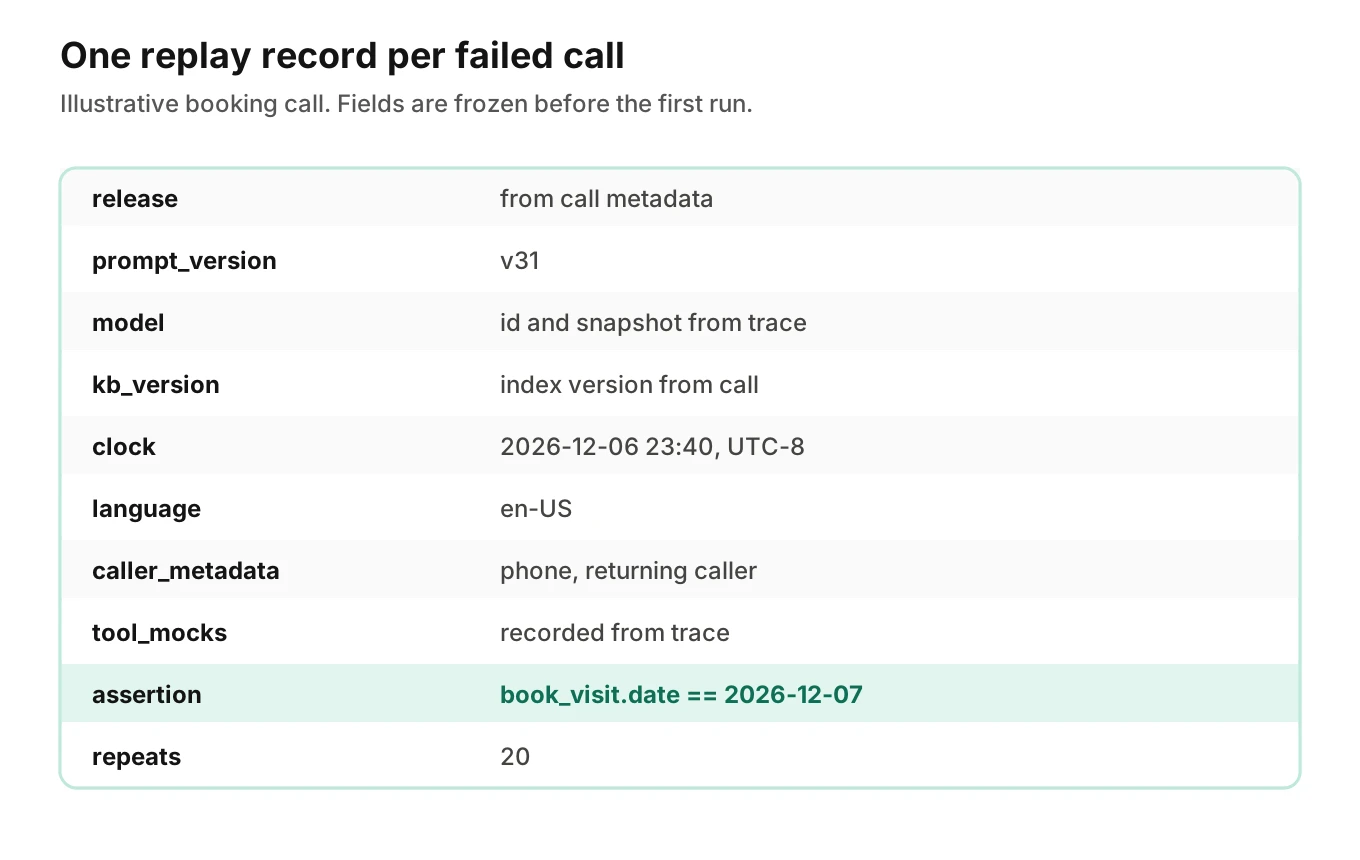
The replay record for this call looks like this. It is simplified.
{
  "case_id": "replay-booking-tomorrow-001",
  "source_call": "hash-of-call-id",
  "frozen": {
    "release": "release id from the call metadata",
    "prompt_version": "v31",
    "model": "model id and snapshot from the trace",
    "kb_version": "index version from the call",
    "clock": "2026-12-06T23:40:00-08:00",
    "language": "en-US",
    "caller_metadata": {"channel": "phone", "returning": true}
  },
  "caller_turns": ["Move my visit to tomorrow at ten."],
  "tool_mocks": {"get_visit": "recorded response from the trace"},
  "assertion": "book_visit.date == 2026-12-07",
  "repeats": 20
}
Why a replay is not exactly deterministic
You can freeze inputs. Four sources of variation remain.
Sampling. Models pick tokens with some randomness. Lower temperature reduces it, but providers differ. Google's prompting guide says a temperature of 0 selects the highest probability response. It also says Gemini 4 and Gemini 3.6+ models ignore custom values for temperature, top_p and top_k (as of November 23, 2026). On such models you cannot turn this knob at all.
Provider changes. OpenAI's advanced usage guide says chat completions are non-deterministic by default. A seed gives some control if the prompt and other parameters stay identical, and it calls outputs only mostly deterministic. The system fingerprint field tracks backend configuration changes, and a different value can mean different outputs. Log it on every call. When a replay disagrees with production, a changed fingerprint is a cheap first suspect.
Timing. A tool that took 200 ms in production may take 900 ms now. Level 1 ignores timing. Levels 2 and 3 do not.
Interruptions. Barge-in depends on when the caller speaks against the agent. A synthetic caller will not interrupt at the exact millisecond the person did. Overlap bugs may show in some runs only.
LiveKit's docs call scripted text-mode tests deterministic. That holds for scripted input and explicit assertions. A live model still samples, so treat even those runs as draws.
Run N repeats and read the pass rate
One passing replay tells you little. One failing replay shows the bug exists. So run N repeats and report a rate. A pass means the run did not meet the failure condition. The pass rate is passes divided by N.
Confirm the replay reproduces
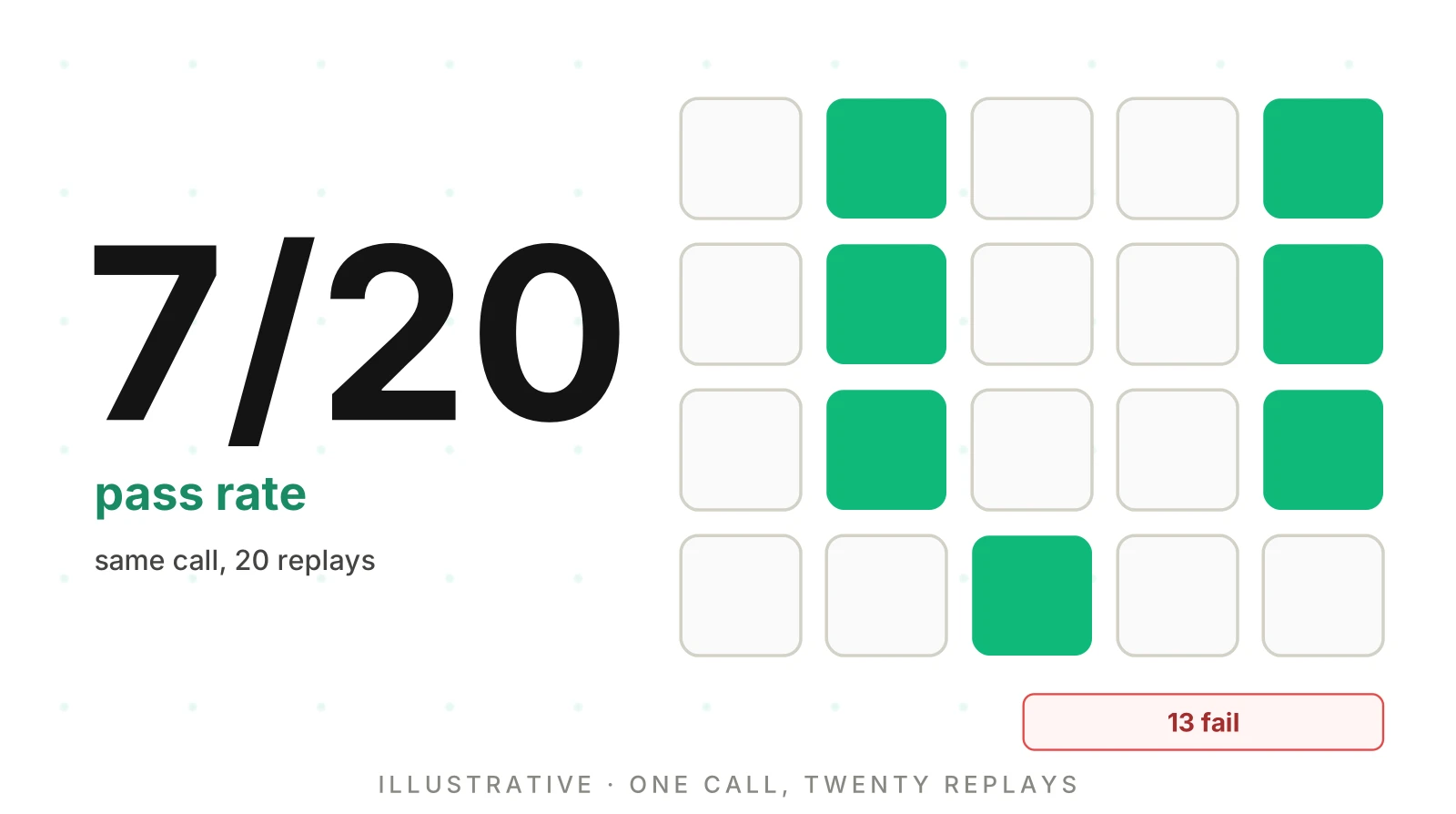
Run N on the original release. Illustrative result: 13 failures in 20 runs, a pass rate of 7 of 20, or 35%. That reproduces the bug often enough to use. If it fails 0 of 20, the replay is not faithful, so revisit the freeze list.
Run it on the fix
Run the same N on the fixed release. Illustrative result: 0 failures in 20, a pass rate of 100%.
Know what 20 clean runs prove
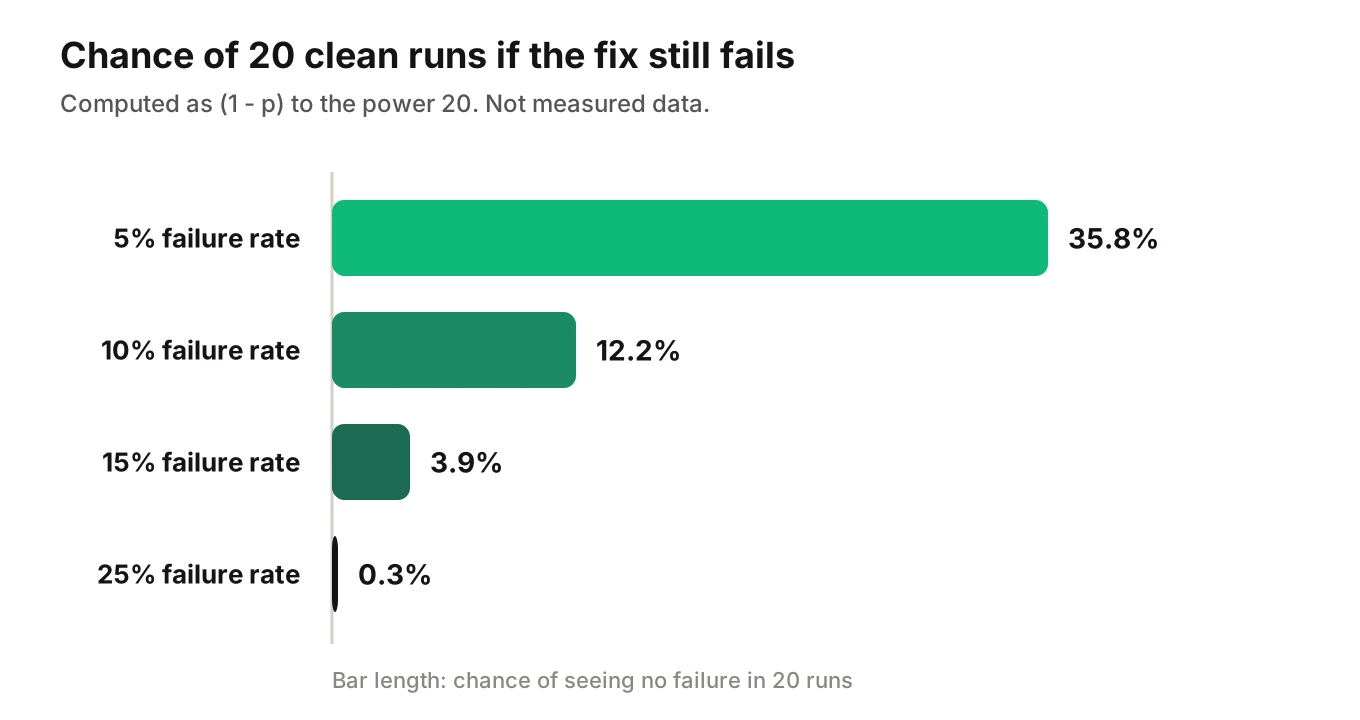
They do not show the failure rate is zero. If the true failure rate on the fix were p, the chance of 20 clean runs is (1 - p) to the power 20.
| True failure rate on the fix | Chance of 20 clean runs | Repeats for 95% chance of at least one failure |
|---|---|---|
| 5% | 35.8% | 59 |
| 10% | 12.2% | 29 |
| 15% | 3.9% | 19 |
| 25% | 0.3% | 11 |
These come from the formula, not measurement. Twenty clean runs make a failure rate of 15% or more unlikely. A 5% rate would still pass about a third of the time. The 95% upper bound on the failure rate after 20 clean runs is 13.9%.
Pick N from the failure rate you need to rule out. Rare bugs need more runs, so use a cheap Level 1 replay. For suite-wide repeat arithmetic, see flakiness control. Log every failed run, even if a retry passes. A suite that retries until green hides a bug that fails one run in ten.
Pick the assertion from the trace
The assertion is the failure condition, written so code can check it. Take it from the first wrong step in the trace, as in the 10-minute runbook. In the illustrative failure above, that step is a tool argument: book_visit.date == 2026-12-07. It does not depend on how the agent words its reply.
Prefer, in order: tool arguments or written records; required or forbidden events such as a transfer or a repeated tool call; text checks, which are brittle; and a judge model only for qualities code cannot check, like tone. Never assert on the exact reply. Write one assertion per cause, so each case fails for one reason. Test cases versus assertions covers types and severity.
Remove personal data before you save the call
A production call holds names, numbers and addresses. A test in a repo outlives the call's retention period. To remove personal data from a test call:
- Transcript and metadata. Use surrogates of the same shape. A ten-digit number becomes another ten-digit number. A
[REDACTED]token can delete the bug, since many voice bugs depend on format. - Tool payloads. Mocks carry real account data. Replace it, keeping the fields the assertion needs.
- Audio. Mute sensitive spans, which keeps accent and noise, or re-synthesize the turns from redacted text. See where to mask.
- Call ID. Keep a hashed link to the source call, not the raw ID.
Masked is not anonymous. GDPR Recital 26 says pseudonymised personal data should be considered information on an identifiable person. Anonymous information falls outside data protection principles. Check recording consent and retention rules too. This is not legal advice.
Promote the replay into a regression suite
Promote a replay once it fails on the original release at a useful rate, passes on the fix across N, has no personal data, and fails for one reason. Store the freeze record with it and tag provenance: a hash of the source call, the date and the release.
Then run it on every prompt, model or tool change as a voice agent regression test. Keep regression cases apart from the golden set that measures overall quality; the golden dataset guide explains the split. Try new cases in staging first. Add the case ID to the post-incident review as the recurrence guard. In a live incident, the runbook can point to the replay that already exists.
How to turn a failed production call into a replay test
1. Pin the wrong step - Use the call ID and trace to find the first step that went wrong. Write it as one checkable sentence.
2. Choose the level - Pick the lowest level that can show the failure: text, recorded audio or a synthetic end-to-end call.
3. Write the freeze record - Capture release, prompt version, model snapshot, knowledge base version, clock, language and caller metadata.
4. Mock the tools - Copy each tool input and output from the trace and serve them from mocks.
5. Remove personal data - Use same-shape surrogates, and mute or re-synthesize audio at Level 2.
6. Write the assertion - Check a tool argument, record or event, not the reply wording.
7. Repeat on the original release - Confirm the failure reproduces at a useful rate.
8. Repeat on the fix - Read the pass rate against the table above.
9. Promote the case - Add it to the regression suite with provenance.
Where Evalgent fits
Evalgent is a testing, evaluation and monitoring platform for voice agents. For the end-to-end level, its test calls use caller Profiles made of seven parameters: interruption level, speech pace, language, response delay, behaviour, accent and background noise. You write the conditions from your failed call into a Profile and a scenario. The caller is synthetic, and you write the case from the trace yourself. Reviews replay each test call with audio and transcript together and show the exact tool payloads, which helps when you read each of your N repeats.
On the production side, Evalgent's Monitor flags problems such as tool-call failures and latency spikes, with fix recommendations. Observe, which is launching, traces a failure to the step or handoff that caused it, from the data you supply, and says "undetermined" where that data is blind. It works with any stack through OpenTelemetry and an upload path for call details. If you want to set up evals for your first agent, you can book a demo.
Frequently asked questions
What is voice agent call replay?
It turns a failed production call into a repeatable test. You feed the call's recorded inputs, as text, audio or a scripted synthetic caller, to the agent under test. You freeze what the call depended on and assert the failure condition. The goal is to see the same failure again on demand.
Can I replay a voice agent call exactly?
Not exactly. You can freeze the prompt, model, tool responses, knowledge base and clock. Sampling, provider changes, timing and interruptions still vary. OpenAI's guide describes seeded output as only mostly deterministic. So run N repeats and read the pass rate.
What should I freeze when I replay a call?
Freeze the release and prompt version, the model and its snapshot, tool responses recorded from the trace, the knowledge base version, the call's date, time and zone, the caller metadata and the language. If one differs from the original call, you may be testing a different system.
How many times should I repeat a replay?
It depends on the failure rate you want to rule out. In the illustrative math above, 20 clean runs make a failure rate of 15% or more unlikely, but ruling out 5% needs about 59. Cheap text-level replays can run hundreds of times. Pick N before you run.
What is the difference between replaying a transcript and replaying audio?
A transcript replay sends caller text to the model and state machine. It tests logic, prompts and tools. An audio replay also re-runs speech to text, so it can show misheard words and endpointing problems. It is more realistic and carries more personal data.
How do I pick the assertion for a replay?
Take it from the first wrong step in the trace. Prefer a tool argument, written record or required event over reply wording. Write one assertion per failure cause, so each case fails for one reason. Use a judge model only for qualities code cannot check.
Can I save a production call as a test case?
Yes, after removing personal data. Use same-shape surrogates, mute or re-synthesize sensitive audio, and keep only a hashed link to the source call. Masked data can still be personal data under GDPR Recital 26, so check retention and consent. This is not legal advice.
How do I add a replay to a regression suite?
Confirm it fails on the original release and passes on the fix across N runs. Make sure personal data is gone and the assertion has one reason to fail. Store it with the freeze record and provenance, then run it on every prompt, model or tool change.
The bottom line
A faithful voice agent call replay freezes what the call depended on, asserts the failure condition from the trace, and reads a pass rate over N repeats instead of a single pass. Remove personal data before you save it, and promote it to the regression suite so that bug stays fixed.
Related Articles
How to automate voice agent testing: synthetic callers vs manual QA
Learn how ai test automation replaces manual QA for voice agents. Compare synthetic callers vs human testers, with a 5-step framework to scale without hiring.
Read more
AI Agent Testing vs Voice Agent Testing: What General Tools Miss for Voice
AI agent testing measures text outputs. Voice agent testing measures behaviour through an acoustic pipeline. Five failure categories general tools miss.
Read more