The Voice Agent Production-Readiness Bar
On this page
"Is the agent ready to ship?" is the most consequential question in a voice AI project, and most teams answer it with a feeling. Someone ran a few calls, it seemed fine, and the launch date was already on the calendar. A production-readiness bar replaces that feeling with a line: a set of thresholds the agent either clears or doesn't. Below the line, it does not ship — no matter how good the demo looked. This is what that bar contains and how to set yours.
We will cover why an explicit bar matters, the dimensions and reference thresholds it should include, how to adapt it to your use case, and how to apply it as a launch gate. It puts numbers behind the pre-launch testing checklist and the validate-before-deployment discipline.
Why you need an explicit bar
Without a written bar, "ready" is whatever the loudest person in the room says it is. That is how agents ship on the strength of a demo and fail on the first real call — the gap that makes voice agents break in production. An explicit bar fixes the target before the pressure of a deadline distorts it.
The bar also makes readiness defensible and repeatable. Instead of "it seems good," you can say "it cleared every threshold on our own calls," which is something procurement, security, and leadership can trust. And because the bar is written down, it guards every future release, not just the first: the same thresholds that clear launch catch the regression a model update introduces months later.
The production-readiness bar
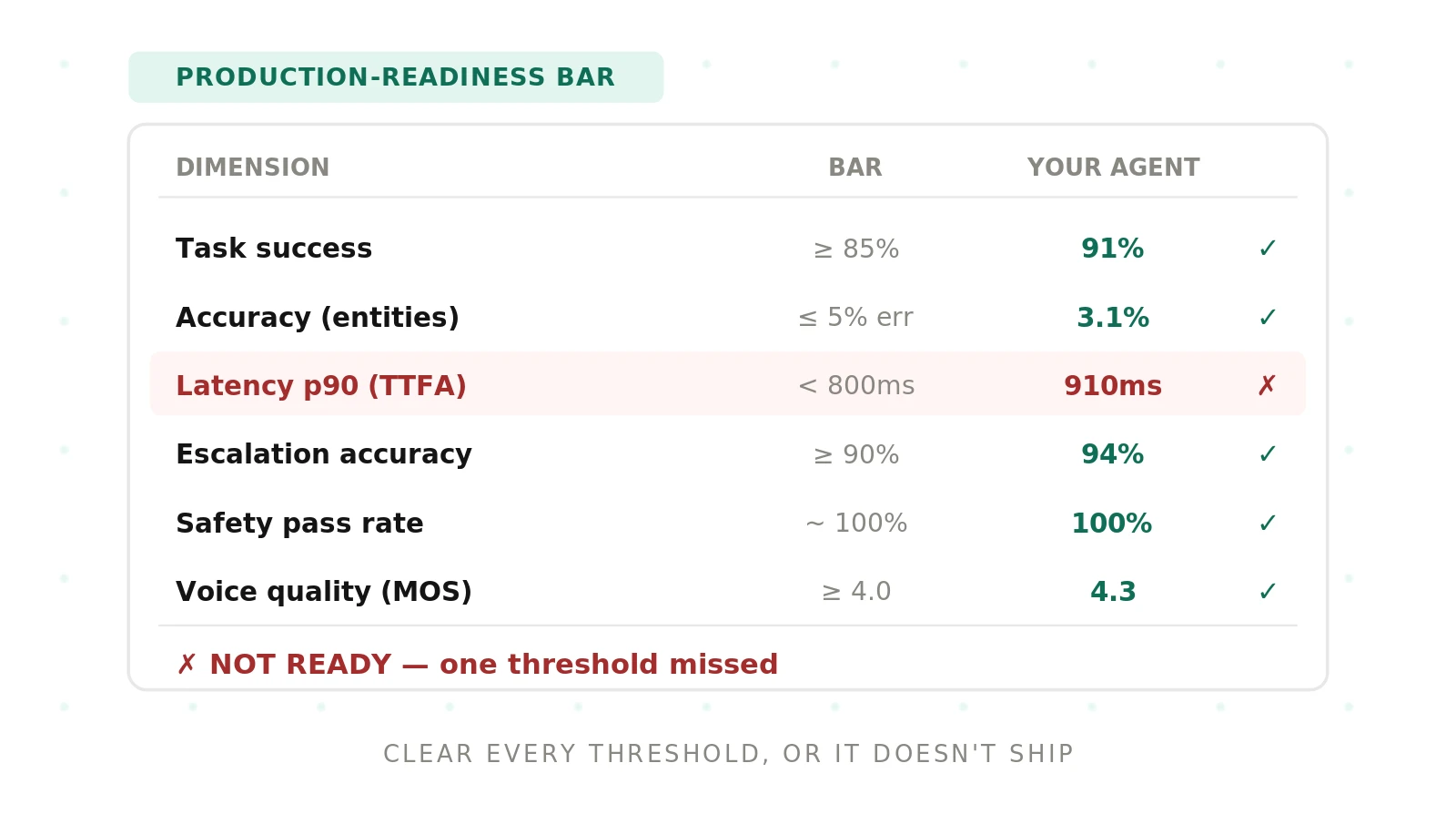
A useful bar covers the dimensions that decide whether a caller's experience is good. The thresholds below are a reasonable starting bar for a general customer-facing agent — treat them as defaults to adapt, not universal law, since the right numbers depend on your use case and risk tolerance.
| Dimension | Starting threshold | Why it matters |
|---|---|---|
| Task success rate | ≥ 85% | Whether the caller's goal was actually met |
| Accuracy (critical entities) | ≤ 5% error | A wrong name or amount fails the task |
| Time to first audio (p90) | < 800ms | The pause the caller feels as responsiveness |
| Turn latency (p95) | Under your target | The tail is what feels broken |
| Escalation accuracy | ≥ 90% | Stuck callers reach a human, not a loop |
| Safety pass rate | ~ 100% | Refusals, policy, and data protection |
| Voice quality (MOS) | ≥ 4.0 | Natural, intelligible speech |
| Concurrency | Holds at peak | Accuracy and latency survive load |
Task success is the headline: an agent can transcribe perfectly and still fail the call, so it outranks the component metrics. Accuracy is a word error rate weighted for the critical entities your tasks depend on, not a clean-audio average. Latency is judged at the tail — human sensitivity to conversational delay is well established, with the ITU-T G.114 standard putting the comfortable one-way limit at 150ms. Voice quality uses a mean opinion score. And every number is read at a percentile, because an average hides the calls that felt broken.
Set the bar to your use case
The dimensions are constant; the thresholds are yours to set. A healthcare intake or financial services agent raises the safety and accuracy bars far higher — a single mishandled disclosure outweighs a small latency edge — and maps its safety threshold to a framework like the NIST AI Risk Management Framework. A sales or reception agent raises the latency and voice-quality bars, because a laggy or robotic opener loses the call in seconds. A high-volume support line raises the concurrency and escalation bars.
Write the bar down before you test, and agree it with the stakeholders who own the launch, so no one renegotiates the line after seeing results. A threshold set after the fact is not a bar; it is an excuse.
How to apply the readiness bar
The bar is only useful as a gate.
1. Define the bar in advance — Set the threshold for each dimension for your use case, and get sign-off before testing begins.
2. Measure on your own calls — Test against representative traffic — accents, noise, edge cases — not clean audio or a vendor's numbers.
3. Read every number at the tail — Report latency and accuracy at p90/p95, since averages hide the failures.
4. Test under load — Re-check the bar at expected peak concurrency, because rankings and latency shift under load.
5. Gate the launch — Block go-live on any threshold missed; a single hard failure is a no-go, not a discussion.
6. Re-run the bar on every change — Apply the same thresholds after each prompt edit, model swap, or vendor update, and keep the passing run as a baseline.
The number isn't enough on its own
A bar clears only if it was measured honestly. Two agents can both report "90% task success" while one measured it on clean, cooperative calls and the other on real traffic — and only the second number means anything. So the bar must be measured on your own data, at the tail rather than the average, and under the concurrency you expect at peak. A readiness bar cleared on easy calls is not cleared; it is deferred until production finds the gap. This is why the same independent evaluation discipline that compares vendors also decides readiness: the bar is trustworthy only when the measurement behind it is.
Readiness bar, SLA, and monitoring
Three things are easy to conflate. A readiness bar is your internal gate, measured on your own calls before launch. A service-level agreement is a contractual promise a vendor makes — usually on uptime and support — that you enforce after launch. Monitoring is the ongoing measurement of live calls once the agent is serving traffic.
They share the same performance expectations but act at different moments: the bar decides whether you ship, the SLA defines what you are owed, and monitoring confirms reality still matches the bar. A strong program sets all three from one set of numbers, so the threshold you cleared at launch is the same one your contract enforces and your monitoring watches. When they drift apart, an agent can pass the bar, meet the SLA on uptime, and still degrade on quality unnoticed.
Common mistakes
The errors are familiar. Shipping on a demo because no bar was written. Setting the bar after seeing results, so it conveniently matches whatever the agent scored. Measuring against clean audio instead of real calls. Reporting averages that hide a bad tail. Testing at one call at a time and being surprised under load. Treating a safety failure as a tunable preference rather than a hard blocker. And clearing the bar once at launch, then never re-checking as the agent changes. Each turns a readiness gate back into a rubber stamp.
Setting a readiness bar with Evalgent
Evalgent encodes your readiness bar as an automated gate. Metrics express each threshold — task success, accuracy on critical entities, latency percentiles, escalation, safety, voice quality — as an explicit pass/fail, so the result is a clear go or no-go rather than a judgment call. Scenarios run your real calls, including the hard ones, and Profiles vary accent, pace, and noise, so the bar is measured on the traffic you will actually get. Evaluations run the suite at concurrency, so the bar is tested under load, and Reviews let your team replay any call behind a failing number. Because the bar runs as a batch on every change, it guards every release, not just the first.
The result is a launch decision you can defend: the agent cleared every threshold on your own calls, at the tail, under load — or it didn't ship. To set and measure your production-readiness bar, book a demo.
The bottom line
A voice agent production-readiness bar is a written set of thresholds — task success, accuracy, latency at the tail, escalation, safety, voice quality, and concurrency — that an agent must clear to ship. It turns readiness from a feeling into a pass/fail gate that anyone can check.
Set the bar to your use case before you test, measure it on your own calls at the tail and under load, and block launch on any miss. A demo tells you the agent can succeed; a readiness bar tells you whether it will, on the calls you can't control.
Frequently asked questions
What is a voice agent production-readiness bar?
It is a written set of numeric thresholds a voice agent must clear before going live — task success, accuracy, latency percentiles, escalation accuracy, safety, voice quality, and concurrency. It converts "is it ready?" from a subjective judgment into a pass/fail gate. You set the thresholds for your use case, measure them on your own calls, and block launch on any miss.
What thresholds make a voice agent production-ready?
A reasonable starting bar for a general agent is task success above 85%, critical-entity error under 5%, time to first audio under about 800ms at p90, escalation accuracy above 90%, a near-100% safety pass rate, and voice quality around a 4.0 mean opinion score, all holding under peak concurrency. Treat these as defaults to adapt to your use case and risk tolerance, not universal numbers.
How do you set a production-readiness bar for your use case?
Keep the dimensions constant but set the thresholds to your risks. Raise safety and accuracy for regulated workflows like healthcare or finance, raise latency and voice quality for sales or reception, and raise concurrency and escalation for high-volume support. Write the bar down and get stakeholder sign-off before testing, so no one renegotiates the thresholds after seeing the agent's results.
Why measure the readiness bar at percentiles instead of averages?
Because callers experience the worst calls, not the average one. An average latency can look fine while a slice of calls pause long enough to feel broken. Reading latency and accuracy at p90 and p95 exposes that tail, so the bar reflects what callers actually get. A bar cleared on averages can still ship an agent that fails a meaningful share of real calls.
Does the production-readiness bar change by industry?
The dimensions stay the same, but the thresholds shift. Regulated industries set much higher safety and accuracy bars, since a single compliance failure outweighs minor performance gains, and map safety to a recognized risk framework. Latency-sensitive uses like sales raise the responsiveness bar. Set each threshold to the cost of failure in your context rather than copying a generic number.
How often should you check the readiness bar?
Check it before the first launch and re-run it on every change — each prompt edit, model swap, or vendor update — because regressions creep in with every one. Keep the passing run as a baseline so a later drop is visible. In production, sample and score live calls continuously, so a threshold slipping between full checks surfaces before callers are broadly affected.
Is a readiness bar the same as an SLA?
No, though they connect. A readiness bar is your internal gate for shipping an agent, measured on your own calls. An SLA is a contractual commitment a vendor makes, often on uptime and support. You can turn readiness thresholds into SLA terms, but the bar is what you test before launch; the SLA is what you enforce after. Both should reflect the same performance expectations.
What happens if a voice agent misses the bar?
It does not ship. A missed threshold means the agent will fail a share of real calls in that dimension, so the honest outcome is a no-go until it is fixed — not a launch with a caveat. Treat a hard safety miss as an absolute blocker. For softer misses, fix the specific weakness, re-run the bar, and ship only once every threshold clears.
Related Articles

Why AI voice agents fail in production: 9 failure layers, how to detect each, and how to prevent them
Voice agents fail in production across 9 layers, from 8 kHz audio to silent tool errors. Symptoms, root causes, alerts, and fixes in one master table.
Read more
Voice agent regression testing: how to detect regressions from model updates you don't control
Voice agent regression testing for changes you don't control: pin each layer, run a nightly pinned-vs-latest canary, and use paired stats to detect drops.
Read more