The Voice Agent Stack: Every Layer, the Latency Budget and the Real Cost (2026)
On this page
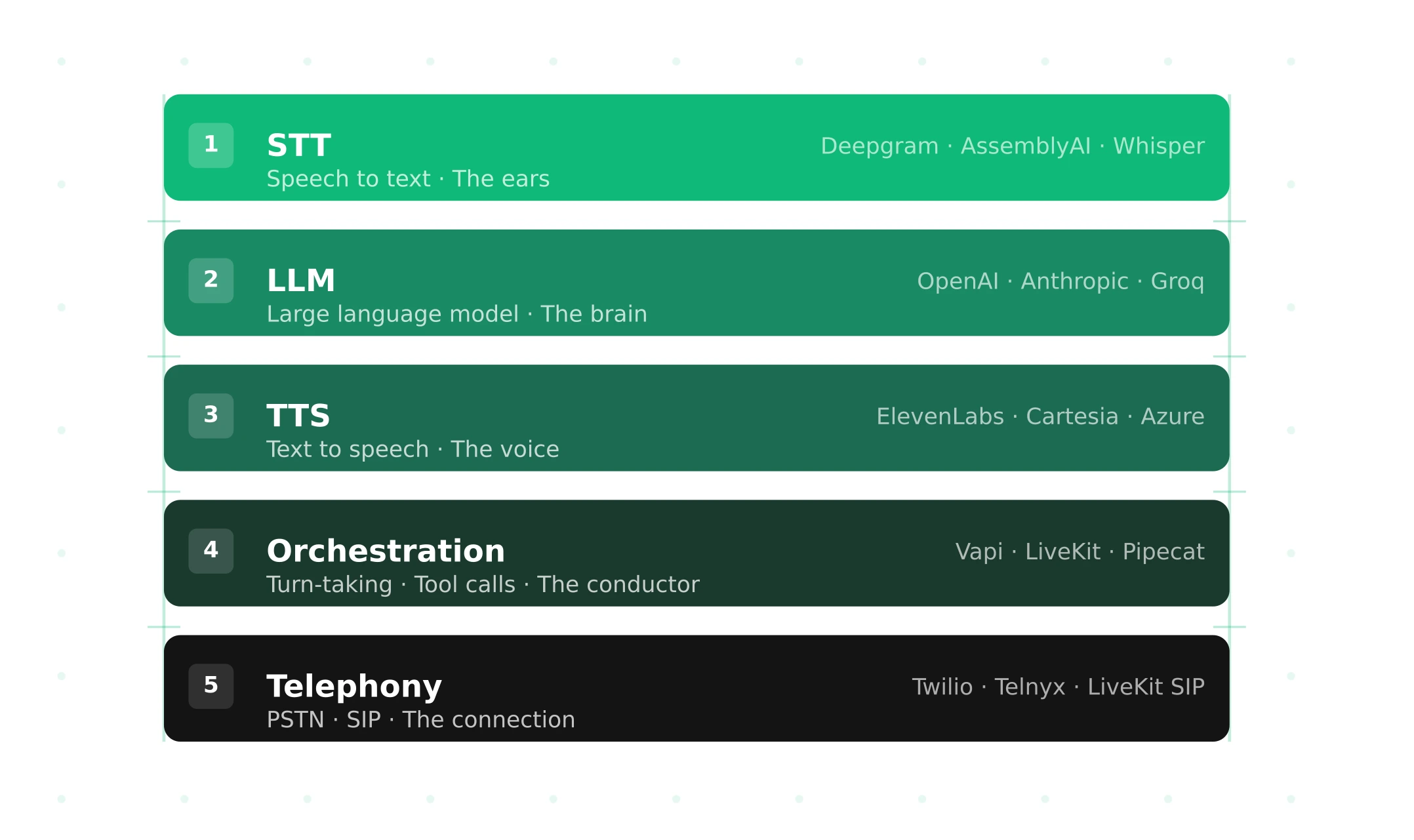
Most "voice agent stack" diagrams show three boxes: speech-to-text, a language model and text-to-speech. That picture is why teams get surprised in production. The three boxes are maybe 40% of the latency and well under half of the failure modes. The rest lives in layers nobody drew: the SIP leg, the codec, the resampler, the noise filter, the silence timer and the jitter buffer.
This guide walks the stack the way a phone call travels through it. For each layer: what it does, what it adds to latency, how it fails and how to measure it. Then come a worked 800 ms budget, per-minute costs from list prices checked October 2, 2026, three reference architectures and a map of where to evaluate.
Why the three-box diagram misleads
Humans leave very short gaps between turns. Levinson and Torreira's review of turn-taking timing puts the average gap around 200 ms. Yet producing even a single word takes a speaker 600 ms or more. The only way both facts hold is that listeners plan their reply while the other person is still talking. They predict the end of the turn.
A cascaded voice agent cannot do that by default. It waits for silence, confirms it, transcribes, thinks, synthesizes and ships audio back across a phone network, and each step has its own timer or buffer. Stivers and colleagues' 10-language study in PNAS found that all languages avoid overlap and minimize silence, with language averages within 250 ms of the cross-language mean. So callers everywhere notice a slow machine, and the gap belongs to the whole stack, not the LLM.
You do not have a model problem. You have a pipeline with 15 places to lose time and 15 places to break.
The full voice agent stack, layer by layer
The sections after this table explain each row. Figures marked "assumption" are worked-example values, not measurements.
| # | Layer | What it does | Typical latency added | Main failure | How to measure |
|---|---|---|---|---|---|
| 1 | Carrier / PSTN / SIP trunk | Routes the call, negotiates media | Tens of ms per direction (assumption) | Codec mismatch, one-way audio | SIP traces, carrier CDRs |
| 2 | Media transport | Moves audio packets (RTP, WebRTC, WebSocket) | 10 to 50 ms per hop (assumption) | Loss, jitter, reconnect gaps | getStats, packet loss %, RTT |
| 3 | Codec and sample-rate chain | Encodes, decodes, resamples 8k/16k/24k/48k | 20 ms G.711 packet; 26.5 ms Opus default | Band-limited audio, aliasing | Spectrogram at each tap |
| 4 | Noise suppression | Removes background noise | 10 to 30 ms (frame plus lookahead) | Eats quiet speech, adds artifacts | WER with and without, at fixed SNR |
| 5 | VAD | Labels frames as speech or silence | Silence window, often 200 ms | False triggers, missed onsets | False start rate, clipped-onset rate |
| 6 | Turn detection / endpointing | Decides the user is done | 300 ms to 3 s of deliberate wait | Cuts users off, or waits too long | Endpoint latency, false cutoff rate |
| 7 | STT | Audio to text, streaming | Final flush after end of speech | Entity errors, hallucinated text | WER, entity error rate |
| 8 | LLM | Decides what to say and which tool to call | Time to first token | Slow TTFT, wrong tool args | TTFT P50/P95, tool-arg accuracy |
| 9 | Tools and RAG | Fetch data, take actions | 0 to seconds | Timeouts, silent failures | Tool latency, downstream state checks |
| 10 | TTS | Text to audio, streaming | Time to first audio | Mispronounced entities, odd prosody | TTFA, pronunciation error rate |
| 11 | Playout / jitter buffer | Smooths packet arrival | Adaptive, tens of ms (assumption) | Choppy audio, stale audio after barge-in | jitterBufferDelay, concealedSamples |
| 12 | Orchestration | Wires frames, handles interruptions | Small, but owns every timer | Race conditions on barge-in | Event timeline per turn |
| 13 | Session runtime | Launches one agent per call | Cold start before first word | Silence on pickup | Ring-to-first-word time |
| 14 | Observability | Logs, traces, recordings | None if async | Missing joins, missing versions | Can you rebuild one call? |
| 15 | Evaluation | Scores calls against outcomes | Offline | Testing one point, not a spread | Task success by condition |
Layer 1: carrier, PSTN and SIP trunk
The carrier owns the phone number and the path to the public phone network. When someone dials, the carrier sends a SIP `INVITE` to your SIP endpoint. The `INVITE` usually carries an SDP offer: a list of codecs in order of preference. Your side answers with the codec it picked in the `200 OK`. Media starts after the `ACK`.
What fails. Codec negotiation is the classic trap. LiveKit's codec negotiation docs note that a call can connect while audio fails if no common codec exists. LiveKit SIP offers `PCMU`, `PCMA` and `G722` by default. It does not add every codec, because each extra codec grows the `INVITE`, and large UDP packets can fragment and get lost. Two more gotchas sit in that doc. An inbound `INVITE` with no SDP (a "delayed offer") gets a `400 Bad Request` until LiveKit support enables delayed offers. And `G722` is declared at 8000 Hz in SDP even though it carries 16 kHz audio, a known quirk of the spec.
How to measure. Keep SIP traces for a sample of calls. Track call setup failure rate and the share of calls that negotiated narrowband versus wideband audio.
Layer 2: media transport (SIP/RTP vs WebRTC vs WebSocket)
Three transports dominate. SIP/RTP sends audio in RTP packets over UDP, usually 20 ms per packet. WebRTC adds encryption, congestion control and adaptive jitter buffering, and it is what LiveKit and Daily rooms use. WebSocket media streams wrap audio in JSON over TCP. Twilio's Media Streams protocol sends base64 `audio/x-mulaw` at 8000 Hz in `media` messages.
What fails. TCP has no packet loss in the RTP sense. It has head-of-line blocking instead: one lost segment stalls everything behind it. And WebSocket barge-in has a hidden step. Twilio buffers outbound audio. If your pipeline stops speaking but never sends a `clear` message, the caller keeps hearing the old reply. Twilio also echoes a `mark` message when buffered audio finishes playing. Without marks, your bot does not know which words the caller actually heard, so its context drifts from reality.
How to measure. On WebRTC legs, read packet loss and round-trip time from getStats. On WebSocket legs, log the gap between `clear` sent and the last audio played. For the full trade-off, see SIP vs WebRTC for voice agents.
Layer 3: codecs and the sample-rate chain
This is the most underrated layer. A phone call is G.711 at 8 kHz. That keeps roughly the 300 Hz to 3.4 kHz band and discards the rest. Every later step that "upsamples" to 16 kHz or 48 kHz adds samples, not information.
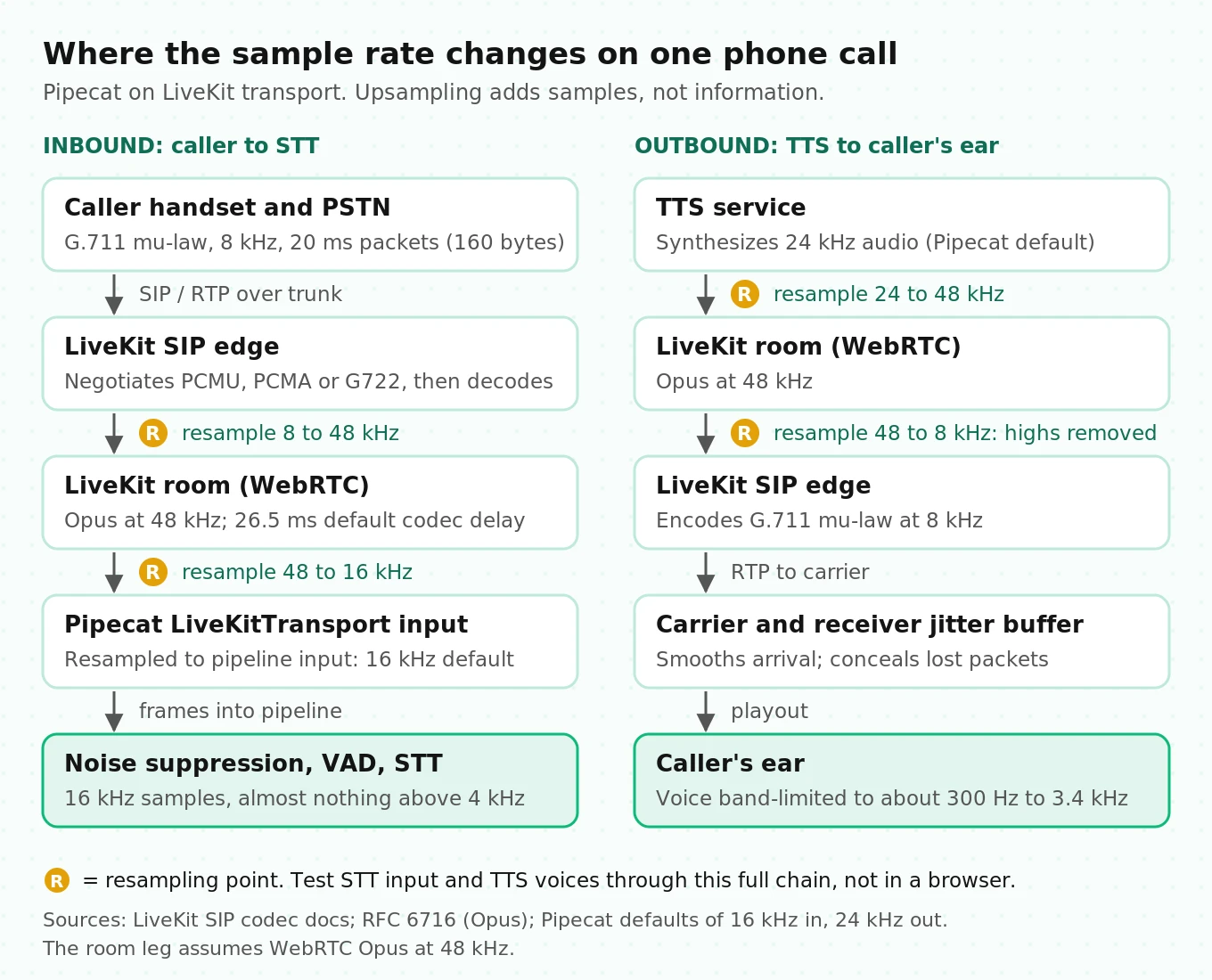
Follow one call through the hybrid stack. The caller's audio arrives as 8 kHz mu-law in 20 ms packets, 160 bytes each. LiveKit SIP bridges it into a room, where WebRTC audio travels as Opus. RFC 6716 gives Opus a default algorithmic delay of 26.5 ms with 20 ms frames. Pipecat's LiveKit transport then resamples the track to the pipeline's input rate, 16 kHz by default. Your STT sees 16 kHz audio with an empty band above 4 kHz.
The reverse path matters just as much. Pipecat's default output is 24 kHz. Your TTS voice is synthesized at 24 kHz, then encoded to Opus, then squeezed to 8 kHz mu-law at the SIP edge. Sibilants and the breathy texture that made the voice sound premium in a browser demo get cut off.
What fails. Three things. First, a TTS voice picked in a browser at 24 kHz can sound noticeably worse on a phone. Second, an STT model tuned on wideband audio meets upsampled narrowband audio. Third, every resampler is a place where a misconfigured rate produces sped-up or "chipmunk" audio. That bug is easy to spot by ear and easy to miss in transcripts.
How to measure. Capture audio at three taps: the SIP edge, the STT input and the TTS output. Plot spectrograms. Pick TTS voices by listening through the full 8 kHz chain, never in the browser.
Layer 4: noise suppression
Noise suppression runs before VAD so that a TV or a fan does not look like speech. Modern suppressors work on short frames. Valin's RNNoise paper is a good mental model: 20 ms frames with 50% overlap and only 10 ms of lookahead, because real-time systems cannot wait longer. LiveKit Cloud offers Krisp and ai-coustics noise cancellation and voice isolation, listed on its pricing page.
What fails. Suppressors can remove quiet speech along with noise. The first syllable of a soft-spoken caller is the usual casualty. They also run on audio that the carrier may have already processed, so you can stack two suppressors without knowing it.
How to measure. Run the same test set at fixed signal-to-noise ratios, for example 20, 10 and 5 dB, with suppression on and off. Compare word error rate and clipped-onset rate. If suppression lowers WER at 5 dB but raises it at 20 dB, you have tuned for the wrong callers. Our guide to testing STT under background noise has a full protocol.
Layer 5: voice activity detection
VAD labels each audio window as speech or not speech. Silero VAD, the default in many stacks, uses fixed windows of 512 samples at 16 kHz, which is 32 ms. Pipecat wraps it with timers. Its `VADParams` defaults are `confidence=0.7`, `start_secs=0.2`, `stop_secs=0.2` and `min_volume=0.6`. So a user must speak for 200 ms before the pipeline treats it as speech, and stay silent for 200 ms before VAD reports a stop.
What fails. Too low a `start_secs` and a cough or a keyboard click becomes a turn or an interruption. Too high and short answers like "yes" get clipped or ignored. `min_volume` interacts with whatever gain the carrier applied, so a value tuned on headset audio can miss quiet phone callers.
How to measure. Track false start rate (VAD fired, no words transcribed) and missed short answer rate. Our post on testing VAD misfires lists the scenarios.
Layer 6: turn detection and endpointing
VAD tells you there is silence. Turn detection tells you whether the silence means "I am done." This is the single biggest deliberate wait in the stack.
Each framework does it differently, and the defaults are worth memorizing:
- Pipecat: as of v0.0.102, the default stop strategy is `TurnAnalyzerUserTurnStopStrategy` with `LocalSmartTurnAnalyzerV3`. Per the Smart Turn docs, the model runs when VAD detects a pause, looks at up to the last 8 seconds of the turn, and runs on CPU in under 100 ms. If it says "incomplete" but silence continues, a fallback `stop_secs` of 3.0 s ends the turn anyway.
- LiveKit Agents: settings live under `turn_handling`. EndpointingOptions default to `min_delay` 0.5 s and `max_delay` 3.0 s, or 0.3 s and 2.5 s when you use LiveKit's audio turn detector. A `dynamic` mode adapts the delay with an exponential moving average, `alpha` 0.9 by default.
- Deepgram: Nova-3's streaming `endpointing` defaults to 10 ms of silence before `speech_final`. Flux adds model-based end of turn with `eot_threshold` 0.7 and `eot_timeout_ms` 5000 by default, per the Flux configuration docs.
The gotcha that doubles your wait. LiveKit's docs state that in STT turn detection mode, `min_delay` is applied after the STT provider's end-of-speech signal, in addition to it. Set Deepgram endpointing to 300 ms and keep the 0.5 s default, and your agent waits 800 ms before the LLM sees a word. Nobody chose 800 ms. Two defaults added up.
What fails. Early cutoffs on people reading numbers, and long waits on decisive speakers. Research points to the fix. The Voice Activity Projection model from Ekstedt and Skantze (Interspeech 2022) predicts both speakers' voice activity over the next 2 seconds from raw audio, instead of reacting to silence. That is how modern turn detectors approach the human trick of predicting the end of a turn.
How to measure. Endpoint latency (last user speech to turn committed), false cutoff rate (agent spoke and user kept talking within 1 s) and P95 wait. See the best endpointing options in 2026.
Layer 7: speech-to-text
Streaming STT emits partial transcripts as audio arrives and a final transcript after end of speech. In a well-built pipeline, most transcription happens while the user talks. What you pay at the turn boundary is the final flush.
What fails. Word error rate hides the errors that matter. A wrong "the" costs nothing, and a wrong digit in an account number costs the call. STT can also invent text. The Careless Whisper study (FAccT 2024) found that about 1% of Whisper transcriptions contained entirely fabricated phrases. 38% of those hallucinations included explicit harms. They were more common for speakers with long non-vocal pauses. In a voice agent, a long pause is normal, so silence handling is a test case, not an edge case.
How to measure. Report WER and entity error rate separately, and add a silence-and-noise set where the correct transcript is empty. Our guide on STT entity accuracy covers the scoring.
Layer 8: the LLM
The LLM receives the transcript plus context, decides what to say and whether to call a tool, and streams tokens. For latency, time to first token is what counts, plus the tokens needed to form the first speakable chunk.
What fails. Long system prompts, growing history and big RAG chunks raise TTFT and cost on every turn. Replies must also be speakable: markdown, URLs and long lists confuse TTS.
How to measure. TTFT at P50 and P95 under concurrent load, plus tool-argument accuracy against downstream state. See tool call accuracy for voice agents.
Layer 9: tools and RAG
Tools turn talk into action: look up an order, book a slot, take a payment. Most agents speak a filler line while the tool runs.
What fails. The worst tool failure is the silent one. The tool returns an error or a stale value, and the agent confidently says something false. Transcript review will not catch it, because the transcript sounds fine.
How to measure. Log tool latency and status per call. Check the downstream system's state after test calls, not the transcript.
Layer 10: text-to-speech
Streaming TTS starts synthesizing from the first sentence fragment. Vendors quote model-only figures, such as about 75 ms for ElevenLabs Flash v2.5 and about 90 ms for Cartesia Sonic. Those numbers exclude network and your own buffering. TTS is usually billed per character, so cost tracks how much your agent talks, not how long the call lasts.
What fails. Names, numbers, dates and addresses. Prosody that sounds fine in isolation and odd mid-conversation. And the 8 kHz downsampling covered in Layer 3.
How to measure. TTFA at P95, a pronunciation test set of your domain entities, and listening tests through the phone chain. See time to first audio and the best TTS for voice agents in 2026.
Layer 11: playout and the jitter buffer
Packets arrive unevenly. The receiver's jitter buffer holds a little audio so playback stays smooth, then grows or shrinks as network conditions change. When a packet never arrives, the receiver "conceals" the gap with synthetic audio.
What fails. Choppy audio under loss, and audio that keeps playing after a barge-in because it was already buffered somewhere downstream.
How to measure. The W3C WebRTC stats spec gives you the counters. Average jitter buffer delay is `jitterBufferDelay` divided by `jitterBufferEmittedCount`. `concealedSamples` counts samples faked because packets were missing. Track both per call.
Layers 12 and 13: orchestration and session runtime
The orchestration framework, such as Pipecat or LiveKit Agents, moves frames, runs the timers, cancels TTS on interruption and aggregates context. It adds little latency itself, but it owns every timer that does.
The session runtime launches one agent per call. LiveKit now calls its hosted workers "agent servers." In a hybrid build you write the launcher yourself. Cold start shows up as silence after pickup.
What fails. Race conditions around barge-in: the user interrupts, TTS stops, but the half-spoken reply still lands in the context as if the caller heard it.
How to measure. An event timeline per turn, plus ring-to-first-word time on real calls.
Layers 14 and 15: observability and evaluation
Observability is the record that rebuilds one call: audio, transcripts, timings, tool calls and every model and prompt version. Evaluation scores those calls against outcomes. What to log on every voice agent call gives the field schema.
The 800 ms latency budget, hop by hop
"Latency" in voice means the turn gap: from the last sound of the caller's speech to the first sound of the agent's reply, both measured at the caller's ear. Here is a worked budget for a Pipecat-on-LiveKit phone agent. Every value is labeled. The assumptions are reasonable starting points, not benchmarks.
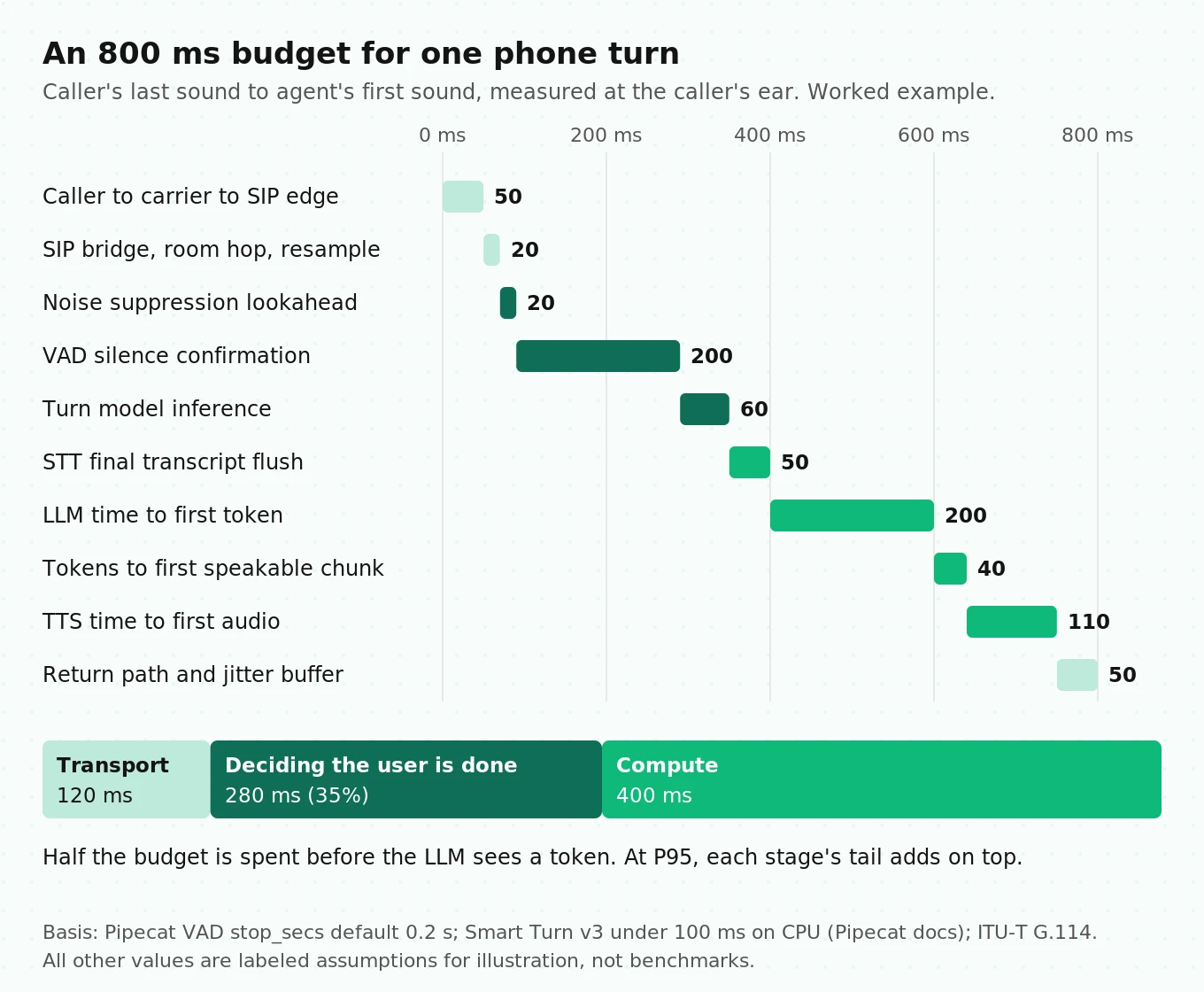
| # | Hop | Budget | Basis |
|---|---|---|---|
| 1 | Caller to carrier to SIP edge, incl. 20 ms G.711 packet | 50 ms | Assumption, inside G.114's 150 ms one-way planning figure |
| 2 | SIP bridge, decode, room hop, resample to 16 kHz | 20 ms | Assumption |
| 3 | Noise suppression frame plus lookahead | 20 ms | Assumption, RNNoise-style 10 ms lookahead |
| 4 | VAD silence confirmation | 200 ms | Pipecat `stop_secs` default 0.2 s |
| 5 | Turn model inference | 60 ms | Assumption, Smart Turn v3 runs under 100 ms on CPU |
| 6 | STT final transcript flush | 50 ms | Assumption |
| 7 | LLM time to first token | 200 ms | Assumption, measure your own |
| 8 | Tokens to first speakable chunk | 40 ms | Assumption |
| 9 | TTS time to first audio, incl. network | 110 ms | Assumption, vendor model-only claims are 75 to 90 ms |
| 10 | Return path to caller's ear, incl. jitter buffer | 50 ms | Assumption |
| Total turn gap | 800 ms |
Group the rows and a pattern appears:
- Transport tax (rows 1, 2, 10): 120 ms. You mostly cannot remove it. You can only avoid adding to it, for example by keeping the agent in the same region as the SIP edge.
- Deciding the user is done (rows 3, 4, 5): 280 ms, or 35% of the budget. This is deliberate waiting, and it is the cheapest place to win or lose time.
- Compute (rows 6 to 9): 400 ms. This is where vendor benchmarks focus.
Two lessons follow. First, half the budget is gone before the LLM sees a token. A faster LLM saves tens of milliseconds; misconfigured endpointing costs hundreds. Second, the budget only holds at P50. At P95, each stage's tail adds. A 300 ms LLM spike plus a 200 ms TTS spike turns 800 ms into 1.3 s.
How to measure it properly. Server-side metrics miss rows 1, 2 and 10. Pipecat's `enable_metrics=True` reports per-service time to first byte. LiveKit reports per-turn spans. Both are useful, but neither is the caller's experience. Record calls in stereo at the carrier side, with caller on one channel and agent on the other. Compute the turn gap from the audio itself:
# turn_gap.py - compute turn gaps from a two-channel call recording (illustrative)
# Channel 0 = caller, channel 1 = agent, both captured at the carrier edge.
import numpy as np
import soundfile as sf

def speech_mask(x, sr, win_ms=20, thresh_db=-40.0):
    n = int(sr * win_ms / 1000)
    frames = x[: len(x) // n * n].reshape(-1, n)
    rms = np.sqrt((frames ** 2).mean(axis=1) + 1e-12)
    return 20 * np.log10(rms) > thresh_db, win_ms / 1000

def turn_gaps(path, min_silence_s=0.15):
    audio, sr = sf.read(path)  # shape: (samples, 2)
    caller, hop = speech_mask(audio[:, 0], sr)
    agent, _ = speech_mask(audio[:, 1], sr)
    gaps, i = [], 1
    while i < len(caller):
        if caller[i - 1] and not caller[i]:          # caller stopped
            j = i
            while j < len(agent) and not agent[j] and not caller[j]:
                j += 1
            if j < len(agent) and agent[j] and (j - i) * hop >= min_silence_s:
                gaps.append((j - i) * hop)         # seconds of silence
            i = j
        i += 1
    return np.percentile(gaps, [50, 95]) if gaps else None
An energy threshold is crude, but it hears what the caller heard. For a framework comparison, see LiveKit vs Pipecat latency.
What a voice agent costs per minute, built from list prices
Costs below come from vendor pricing pages checked on October 2, 2026. Usage assumptions are labeled. They are a worked example, not a quote.
Assembled hybrid stack: Pipecat on LiveKit, US inbound call
| Line item | Price used | Per minute | Source |
|---|---|---|---|
| Carrier: Twilio Elastic SIP origination, local | $0.0034/min | $0.0034 | Twilio SIP pricing |
| LiveKit third-party SIP minutes (Ship plan, after 5,000 included) | $0.004/min | $0.0040 | LiveKit pricing |
| LiveKit WebRTC minutes for the bot participant | $0.0005/min | $0.0005 | LiveKit pricing (assumes the bot counts as a participant) |
| Pipecat compute, self-hosted | Your cloud bill | $0.0020 | Assumption |
| STT: Deepgram Nova-3 streaming, PAYG | $0.0048/min promo ($0.0077 regular) | $0.0048 | Deepgram pricing |
| LLM: GPT-5.6 Luna, 6-minute call, with caching | $0.20 in, $0.02 cached, $1.20 out per 1M tokens | $0.0007 | OpenAI pricing plus token assumptions below |
| TTS: Deepgram Aura-2 | $0.030 per 1,000 characters | $0.0108 | Deepgram pricing, assumes 360 characters per call minute |
| Total | about $0.026 |
Swap in regular Nova-3 pricing, no prompt caching and a TTS priced near $0.03 per minute (LiveKit's calculator lists Cartesia Sonic 3 at that rate), and the same stack lands near $0.05 per minute. Recording, storage and engineering time are extra.
The LLM math, because it is not linear. Assume 4 agent turns per minute, a 1,500-token system prompt, 150 tokens added per turn and 60 output tokens per reply. Each turn re-sends the whole context. Without caching, LLM cost per minute rises with call length: about $0.0017 per minute for a 1-minute call and about $0.0038 per minute for a 10-minute call. With cached prefixes billed at the cached rate, it stays near $0.0007 to $0.0008 per minute. Without caching, total LLM cost per call grows roughly with the square of the turn count, so long calls deserve their own cost line.
The TTS math. TTS bills per character, so the driver is how much the agent talks. At about 150 words per minute and about 6 characters per word including spaces, continuous speech is roughly 900 characters per minute. If the agent speaks 40% of the time, that is 360 characters per call minute. LiveKit's calculator lists Aura-2 at $0.018 per minute, which implies it assumes about 600 characters per minute. A wordy prompt can double your TTS bill without changing anything else.
Managed platforms and speech-to-speech
| Option | What you pay | Per minute | Source |
|---|---|---|---|
| Vapi | $0.05 hosting plus pass-through models; calculator shows Deepgram $0.0095 to $0.0099, OpenAI $0.0077 to $0.0452, ElevenLabs $0.0146 to $0.0238; Twilio inbound $0.008 | about $0.09 to $0.14 | Vapi pricing |
| Retell | $0.055 voice infra, $0.015 TTS (ElevenLabs $0.040), $0.015 telephony, LLM priced per model ($0.0064 for GPT-5.6 Luna) | about $0.09 and up | Retell pricing |
| LiveKit Agents on LiveKit Cloud | Calculator default for a phone call: agent session $0.01, telephony $0.01, LLM $0.0014, STT $0.0075, TTS $0.009, observability $0.01 | about $0.048 | LiveKit pricing |
| GPT-Live (`gpt-live-1`) | $0.05 voice, billed per second, plus backend model tokens and your SIP leg | $0.05 plus extras | GPT-Live guide |
| Grok Voice | $0.08 audio, plus $0.01 on a free xAI number | about $0.09 | xAI announcement |
Cost per resolved call is the number that matters. The formula is cost per minute times average handle time, divided by resolution rate. At an assumed $0.03 per minute, 4-minute calls and 70% resolution, that is $0.03 × 4 / 0.70, about $0.17 per resolved call. At $0.10 per minute and 80% resolution, it is $0.50. A cheaper stack only wins if it resolves calls at a similar rate. That is why cost per resolution belongs in every vendor comparison.
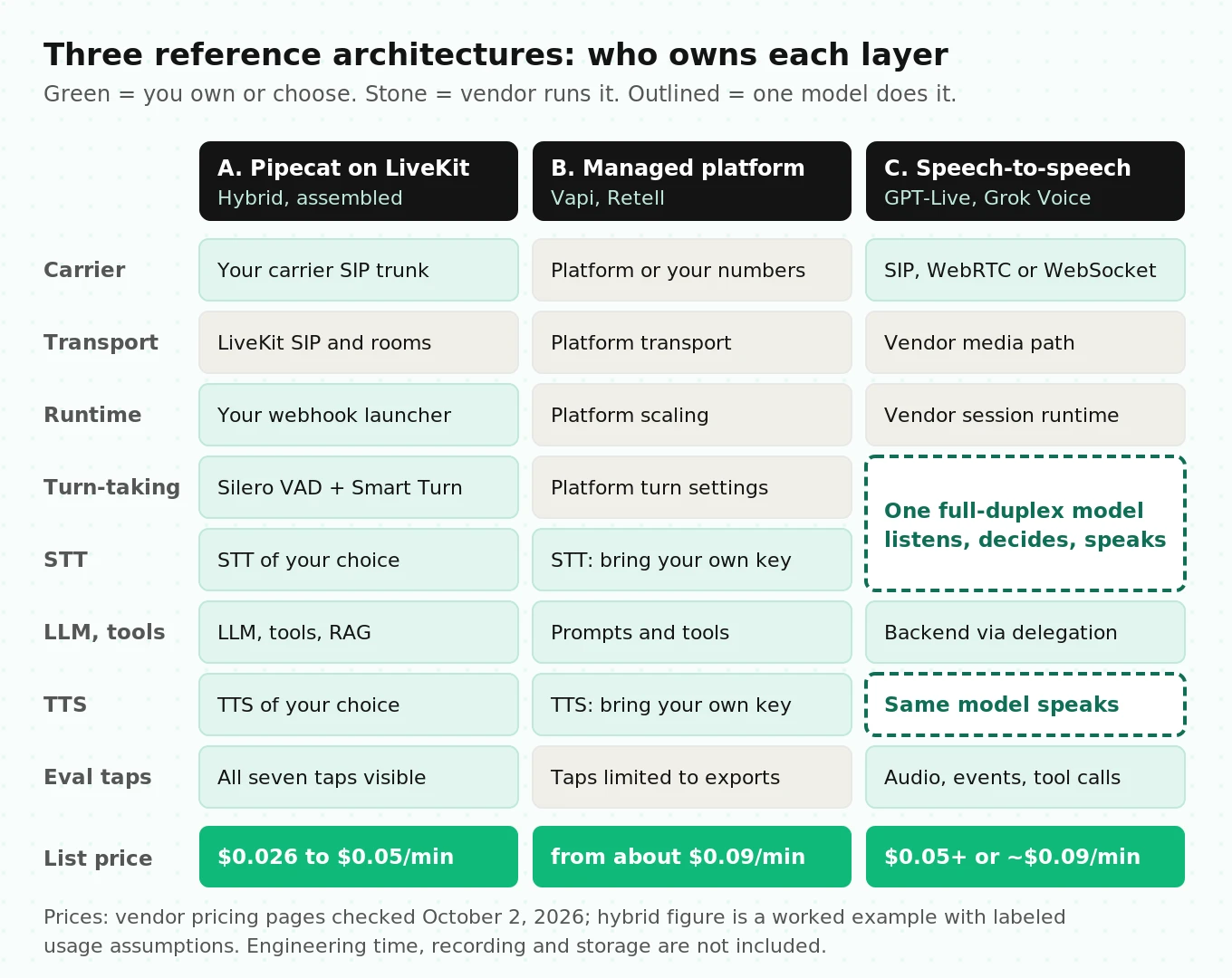
Three reference architectures
Architecture A: Pipecat orchestration on LiveKit transport
This is the stack we run ourselves. Calls arrive from a carrier over a SIP trunk into LiveKit SIP. A dispatch rule puts each caller in a room. A webhook launches a Pipecat bot, which joins the room through `LiveKitTransport` and runs STT, LLM, TTS and turn-taking.
Why not Pipecat alone? Pipecat does not terminate SIP itself. Its telephony overview offers Daily PSTN, Daily plus a SIP provider, or WebSocket media streams from Twilio, Telnyx, Plivo and Exotel. The docs list a limitation for the WebSocket path: no advanced call-center features like transfers or reconnects. So proper SIP in Pipecat meant Daily. LiveKit offered native SIP trunks, dispatch rules, codec control and phone numbers, while we kept Pipecat's frame pipeline. LiveKit carries the media. Pipecat does the thinking.
A simplified version of the turn-taking setup, following the Pipecat Smart Turn docs:
# Simplified - check the docs for your Pipecat version
from pipecat.audio.turn.smart_turn.local_smart_turn_v3 import LocalSmartTurnAnalyzerV3
from pipecat.audio.vad.silero import SileroVADAnalyzer
from pipecat.audio.vad.vad_analyzer import VADParams
from pipecat.processors.aggregators.llm_context import LLMContext
from pipecat.processors.aggregators.llm_response_universal import (
    LLMContextAggregatorPair,
    LLMUserAggregatorParams,
)
from pipecat.turns.user_stop import TurnAnalyzerUserTurnStopStrategy
from pipecat.turns.user_turn_strategies import UserTurnStrategies

context = LLMContext()
user_agg, assistant_agg = LLMContextAggregatorPair(
    context,
    user_params=LLMUserAggregatorParams(
        # Silence window before Smart Turn runs. 0.2 s is the recommended default.
        vad_analyzer=SileroVADAnalyzer(params=VADParams(stop_secs=0.2)),
        user_turn_strategies=UserTurnStrategies(
            stop=[TurnAnalyzerUserTurnStopStrategy(turn_analyzer=LocalSmartTurnAnalyzerV3())]
        ),
    ),
)
Strengths: full control of every timer, any STT, LLM or TTS, carrier choice and multi-party rooms. Costs: two SDKs to upgrade, two logs to join and a bot launcher you own. The hybrid build guide has the launcher, token and outbound-dialing code.
If you run LiveKit Agents instead, the equivalent knobs are in `turn_handling`:
# Simplified - from LiveKit's turn handling reference
from livekit.agents import AgentSession, TurnHandlingOptions, inference

session = AgentSession(
    turn_handling=TurnHandlingOptions(
        turn_detection=inference.TurnDetector(),
        endpointing={"mode": "dynamic", "min_delay": 0.3, "max_delay": 2.5},
        interruption={"mode": "adaptive", "min_duration": 0.5, "resume_false_interruption": True},
    ),
    # ... stt, llm, tts
)
Architecture B: fully managed platform
Vapi or Retell runs transport, orchestration, turn-taking and hosting. You configure prompts, tools and models, often with your own keys, and can take a first call in hours.
What you give up is visibility below the API. You usually cannot see the endpointing timer, the resampler or the audio at each tap. You get the platform's latency metric, which may not measure the caller's experience. You also pay the platform fee on every minute, which is the main reason costs start near $0.09.
Architecture C: native speech-to-speech
One model listens and speaks. GPT-Live is full duplex: it can listen while it talks. Its architecture splits the work in two. The voice model owns the conversation and decides when to ask for help. A backend handles "delegated" tasks: reasoning, tools and business rules. You pick Responses delegation, where OpenAI runs the backend model, or client delegation, where your own agent runs it. The mode is fixed when you create the session. Connections are WebRTC, WebSocket or SIP. Grok Voice follows a similar single-model approach at $0.08 per minute with direct SIP.
The research lineage explains the appeal. Kyutai's Moshi paper models the user's and the system's speech as parallel streams, removing explicit turns. It reports a theoretical latency of 160 ms and 200 ms in practice. Layers 5 to 10 collapse into one model. What remains is transport, the codec chain and your tools.
What changes for evaluation. There is no transcript in the middle to inspect, and turn-taking becomes a model behavior rather than a timer you can set. Full-Duplex-Bench is useful here. It evaluates pause handling, backchanneling, turn-taking and interruption management as separate behaviors. Test those four directly, on phone audio. Our GPT-Live build guide and cascading vs speech-to-speech cover the trade-off in depth.
Layer-choice decision table
| Layer | Choose this when | Choose that when | Watch for |
|---|---|---|---|
| Transport | LiveKit SIP: you need SIP control, transfers, rooms | Carrier WebSocket: a prototype or simple inbound flow | `clear` and `mark` handling on WebSocket |
| Codec | G.722 or AMR-WB: carrier supports HD voice end to end | G.711: you need universal compatibility | UDP `INVITE` size when adding codecs |
| Noise suppression | Server-side: callers in noisy places | None: carrier already suppresses | Double suppression clipping onsets |
| Turn detection | Model-based (Smart Turn, TurnDetector, Flux) | VAD-only: strict scripted prompts | `min_delay` stacking on STT endpointing |
| STT | Conversational model with end-of-turn: low latency | Highest-accuracy model: entity-heavy flows | Entity error rate, not just WER |
| LLM | Small fast model: short scripted turns | Larger model: multi-step reasoning, tools | TTFT P95 under load |
| TTS | Fastest TTFA: short transactional replies | Most expressive: sales, care | Voice quality after 8 kHz |
| Orchestration | Pipecat on LiveKit: control plus SIP | Managed platform: speed to launch | Who owns the timers |
| Architecture | Cascaded: audit trail, tool-heavy, regulated | Speech-to-speech: naturalness, simple tools | Audio-native evaluation |
For provider-by-provider picks, see the best STT and best telephony roundups. For the ownership question, read build vs buy for the voice agent stack.
The seven evaluation taps
Evaluation is not one score at the end. It is a set of measurement points, each at a layer boundary. We call them taps. Each tap captures what one layer received and produced, so a failure can be traced to the layer that caused it.
| Tap | Boundary | Capture | Core metric | Example threshold to set |
|---|---|---|---|---|
| T1 | Carrier to SIP edge | SIP trace, raw 8 kHz audio | Setup failure rate, packet loss | Your SLA, per carrier |
| T2 | Audio front end | Pre- and post-suppression audio | Clipped-onset rate | Flat versus baseline at 20 dB SNR |
| T3 | Turn boundary | VAD and turn events, timestamps | Endpoint latency P95, false cutoff rate | Set from your own baseline |
| T4 | STT output | Partial and final transcripts | WER, entity error rate, hallucination on silence | Zero text on silent clips |
| T5 | LLM and tools | Prompt version, tool calls, results | Tool-arg accuracy, downstream state match | 100% on payment and booking fields |
| T6 | TTS output | Text in, audio out | TTFA P95, entity pronunciation | No misread entities in the test set |
| T7 | Caller's ear | Stereo carrier recording | Turn gap P50/P95, task success | Turn gap and success per condition |
Copying someone else's thresholds is how teams ship agents tuned for a different caller population. Run a baseline, then hold the line.
Sample size matters too. To detect a change in task success from 85% to 88% at 80% power and 5% significance, the standard two-proportion formula gives n = (1.96 + 0.84)² × (0.85 × 0.15 + 0.88 × 0.12) / 0.03², about 2,030 calls per arm. A 20-call smoke test can catch a broken build. It cannot tell you a new STT model is better.
This is where independent evaluation earns its place. A vendor's dashboard measures from inside its own layers. Evalgent runs scripted and synthetic calls over real phone paths, captures the taps above and scores each call against its outcome. Teams use it for pre-launch audits and vendor bake-offs, then for regression checks after every model or prompt change.
How to assemble and validate a production voice agent stack
1. Write down the turn-gap target and the caller conditions. Pick a P50 and P95 target, then list your real conditions: carriers, codecs, noise levels, accents and call lengths.
2. Choose the architecture before the vendors. Decide between cascaded, hybrid and speech-to-speech based on tool complexity, audit needs and control. Use the decision table above.
3. Fix the audio path first. Confirm the negotiated codec on real calls, then map every sample-rate change from SIP edge to STT and from TTS back to the caller.
4. Set every timer on purpose. Write down VAD `stop_secs`, turn model fallback, framework `min_delay` and STT endpointing. Add them up and check they match your budget.
5. Instrument the seven taps. Log timestamps, versions and audio at each boundary with one call ID, so any call can be rebuilt end to end.
6. Build a test matrix. Cross your top scenarios with conditions, for example 20 scenarios × 3 noise levels × 2 codecs × 2 speaking styles, which is 240 call types.
7. Measure at the caller's ear. Record stereo at the carrier side and compute turn gaps from audio, not from server metrics.
8. Price the stack per resolved call. Multiply cost per minute by handle time and divide by resolution rate for each option you test.
9. Gate releases on regression. Re-run the matrix after every model, prompt, codec or timer change, and compare against the stored baseline.
Frequently asked questions
What are the layers of a voice agent stack?
A production stack has roughly 15 layers: carrier and SIP, media transport, codecs and resampling, noise suppression, VAD, turn detection, STT, LLM, tools, TTS, playout buffering, orchestration, session runtime, observability and evaluation. The three-box STT, LLM and TTS view misses most of the latency and many failure modes, which sit in transport, timers and audio processing.
What is a good end-to-end latency target for a phone voice agent?
Humans average about 200 ms between turns, but a cascaded phone agent pays transport and endpointing costs a human does not. A worked budget lands near 800 ms at P50. Measure the turn gap at the caller's ear from a stereo recording, and set a separate P95 target, because each layer's tail adds up.
How much does a voice agent stack cost per minute in 2026?
At October 2026 list prices, an assembled Pipecat-on-LiveKit stack costs about $0.026 to $0.05 per minute before engineering time. LiveKit's own calculator shows about $0.048 for a hosted phone agent. Vapi and Retell typically land at $0.09 or more. GPT-Live starts at $0.05 plus backend tokens, and Grok Voice is about $0.09.
Should I use a single voice agent API or build my own STT-LLM-TTS stack?
Use a single API or managed platform when speed to launch matters more than control and volume is modest. Build your own when you need to tune timers, choose carriers, meet audit needs or cut per-minute cost at scale. Either way, measure turn gap and task success yourself, because each option's built-in metrics measure different things.
What is the real switching cost between a single-API provider and a multi-vendor stack?
The code is the small part. The big costs are re-tuning endpointing and VAD, re-picking voices through the phone chain, rebuilding prompts and tool flows, and re-establishing baselines. A multi-vendor stack makes later swaps cheaper only if you log the seven taps. Our post on voice AI vendor lock-in covers exit planning.
Why run Pipecat on LiveKit instead of Pipecat alone?
Pipecat does not terminate SIP itself. Its documented options are Daily PSTN, Daily plus a SIP provider, or carrier WebSocket streams, which lack transfers and reconnects. Running Pipecat on LiveKit transport gives you LiveKit's native SIP trunks, dispatch rules and codec control while keeping Pipecat's pipeline. The cost is two systems to upgrade and debug.
What is the GPT-Live architecture?
GPT-Live splits a voice agent in two. The full-duplex voice model, `gpt-live-1`, listens, speaks and decides when to delegate. A backend handles reasoning and tools, either through Responses delegation run by OpenAI or client delegation run by your own agent. Sessions connect over WebRTC, WebSocket or SIP, and voice time costs $0.05 per minute.
How do teams log every voice agent turn and feed it into nightly evals?
Give every record one call ID, then write one row per turn with timestamps for each tap, transcripts, tool calls, audio pointers and version fields for prompts and models. Land rows in object storage or a warehouse. A nightly job samples or scores every call, compares metrics against the last baseline and flags regressions by layer.
The bottom line
A voice agent stack is a chain of timers, buffers and resamplers wrapped around three models, and most lost latency and silent failures live in the layers nobody drew. Measure the turn gap at the caller's ear, instrument the seven taps and price the stack per resolved call, and the vendor choices become much easier to make.
Related Articles

Why AI voice agents fail in production: 9 failure layers, how to detect each, and how to prevent them
Voice agents fail in production across 9 layers, from 8 kHz audio to silent tool errors. Symptoms, root causes, alerts, and fixes in one master table.
Read more
Voice agent regression testing: how to detect regressions from model updates you don't control
Voice agent regression testing for changes you don't control: pin each layer, run a nightly pinned-vs-latest canary, and use paired stats to detect drops.
Read more