One Voice Agent, 500 Customer Setups: How to QA Them All
On this page
Your voice agent has one codebase and one base prompt. It also has 500 versions of itself. Each customer has its own hours, menu or price book, service area, transfer number, integrations, greeting and language mix. A prompt edit can sound fine on your demo tenant. It can still break a pizza shop in Phoenix, a plumber in Denver and a lender in Utah. You won't hear about it until their customers complain.
This post is for the Head of AI or VP Eng who owns that agent with a few engineers and no QA team. It covers multi-tenant voice agent testing: how to QA one change across hundreds of tenant configs without placing 500 test calls by hand. You get a way to group tenants, the sample-size math, a rollout order and a monitoring plan. If you are earlier than this, with one agent and a handful of customers, start with our voice agent testing guide for founders. This post picks up when the fleet is the problem.
Multi-tenant voice agent: one agent build that serves many customer accounts. Each call loads that account's config at runtime and assembles the prompt, tools and routing from it.
Why one passing tenant proves almost nothing
The config is part of the program. At call time, your agent fetches the tenant's settings and builds a prompt. A LiveKit community thread describes this exact pattern: one deployed agent reads SIP attributes, calls `POST /call-config`, and gets back "the system prompt, model, voice, temperature, and start message" (LiveKit community). SignalWire's docs show the same idea. Its `on_swml_request` hook is "called before SWML is generated for each request" and is pitched for "multi-tenant applications" (SignalWire).
So 500 tenants means 500 different prompts. Research says small prompt differences move behaviour a lot.
- Formatting alone shifts accuracy. Sclar et al. found "performance differences of up to 76 accuracy points" from prompt formatting changes on LLaMA-2-13B (arXiv 2310.11324). Tenant fields render into your template with different lengths and punctuation.
- More rules, fewer followed. IFScale tested up to 500 instructions in one prompt. The best frontier models reached only 68% accuracy at that density (arXiv 2507.11538). A tenant with 40 custom rules is a different test than one with 4.
- Position matters. Liu et al. found models do best when key facts sit "at the beginning or end of the input context" (arXiv 2307.03172). A 300-item menu pushes your policy text into the middle.
- Reruns differ. Atil et al. saw "accuracy variations up to 15% across naturally occurring runs" in settings meant to be deterministic (arXiv 2408.04667). One call per tenant is a coin flip, not a test.
The takeaway is simple. Your demo tenant tests one point in a large config space. Bugs live in the corners of that space.
The per-tenant config surface across industries
Before you can sample tenants, list what varies. Most ICP3 platforms have 8 to 15 config fields that change agent behaviour. The table shows the common ones across the verticals this blog covers.
| Config field | Restaurant POS | Home services FSM | Property management | Lending |
|---|---|---|---|---|
| Hours and timezone | Store hours, holiday closures | Dispatch windows, after-hours fee | Office vs on-call hours | Permitted call windows |
| Catalog | Menu version, modifiers, price book | Service list, trip charge | Unit list, amenities | Products, rates, fee schedule |
| Geography | Delivery radius | Service area ZIPs | Property addresses | State licensing |
| Routing | Transfer to store line | On-call tech rota | Emergency vendor pager | Licensed loan officer queue |
| Integration | POS ticket API | FSM job create | PMS work order | LOS or servicing system |
| Language | English, Spanish | English, Spanish | English, Spanish | English, Spanish |
| Compliance toggles | Allergen script | Recording notice | Fair Housing script | Disclosures, consent |
Each industry pillar goes deeper on its own fields. See food ordering voice agent testing, home services receptionist QA, property management answering QA and financial services testing. This post covers what they share: one change, many configs.
How one config value corrupts a record silently
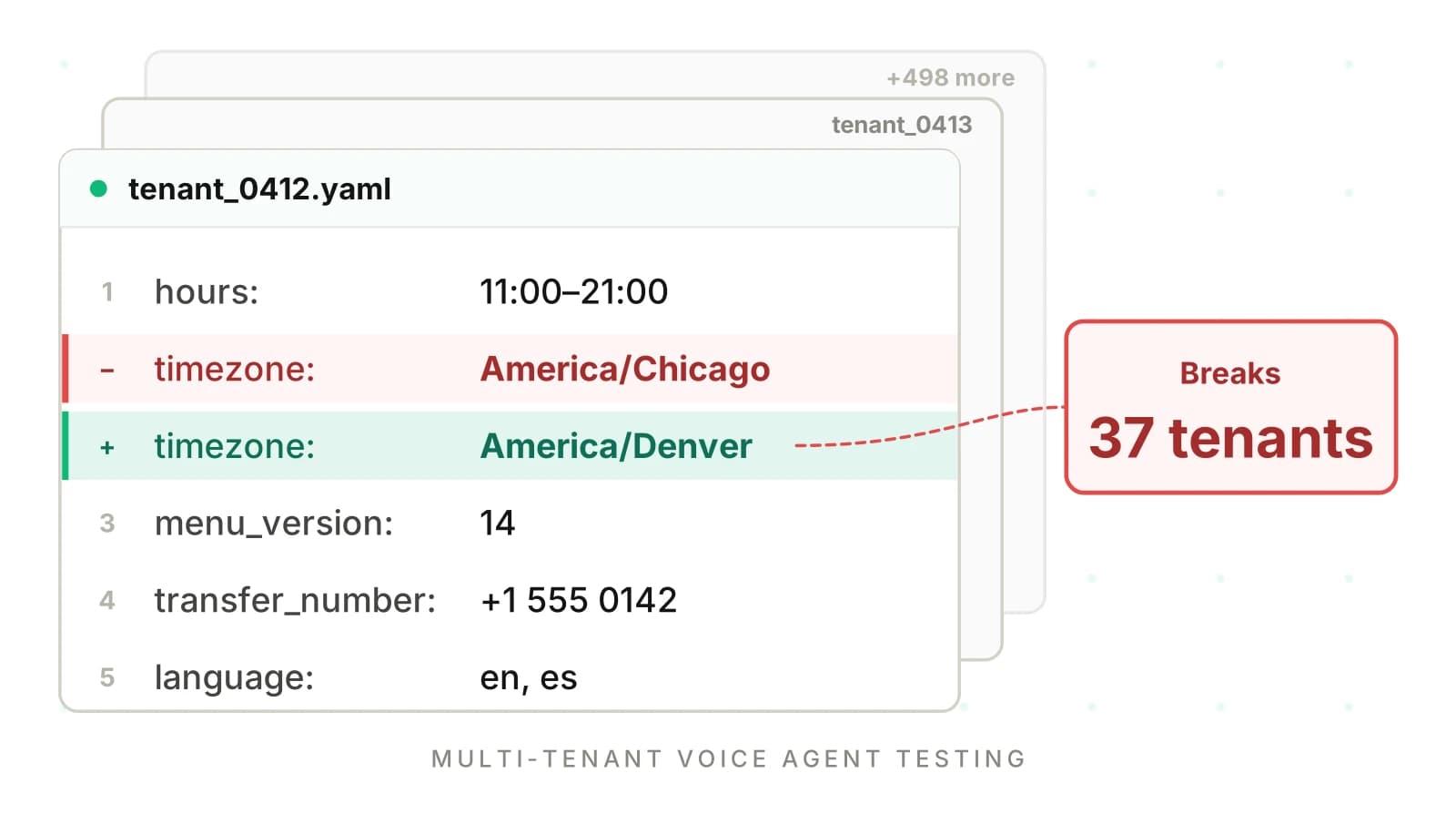
Take the hero image's example. A tenant's timezone moves from `America/Chicago` to `America/Denver`. On its own that is a correct edit. Now ship a shared change: the prompt template starts saying "we're open until 9." It computes local time with a helper that only knows Eastern, Central and Pacific offsets. Every Mountain and Arizona tenant falls back to Central. In our illustrative fleet, that is 37 tenants.
Nothing errors. The agent says the store is open when it closed an hour ago. In a restaurant, the POS accepts a ticket for a closed kitchen. In home services, the FSM books a 7 a.m. slot that is really 6 a.m. local. In property management, the after-hours emergency path never fires. Each call sounds fine on the transcript. The damage is in the record that gets written back.
Lending makes it a compliance issue. The TCPA rule bars telephone solicitations to residential subscribers "before the hour of 8 a.m. or after 9 p.m. (local time at the called party's location)" (47 CFR 64.1200(c)(1)). Regulation F treats "a time before 8:00 a.m. and after 9:00 p.m. local time at the consumer's location" as inconvenient for debt collection calls (12 CFR 1006.6(b)(1)(i)). A timezone bug in an outbound callback flow can push calls outside those windows. This is not legal advice; check the rules with counsel for your use case.
Timezones also hide a DST trap. The Department of Transportation notes daylight saving time is not observed in Hawaii and "most of Arizona" (DOT). A Phoenix tenant and a Denver tenant share an offset for half the year. A test run in January will not catch a bug that only appears in July. For more on how silent write-back errors slip past, read detecting silent tool failures.
Start with the change, not the tenant list
The first question is not "which tenants do I test?" It is "which tenants does this change touch?" This is the core move in multi-tenant voice agent testing. Most changes touch a subset. A new allergen prompt touches restaurant tenants with an allergen toggle on. A new transfer tool touches tenants with live transfer enabled.
Write a small impact query. It reads every tenant config, finds the fields your change reads, and groups tenants by the values of those fields. That grouping is the config shape.
# Simplified: group tenants by the config fields a change reads.
import json, glob, hashlib
from collections import defaultdict

CHANGE_READS = ["hours.timezone", "hours.shape", "language", "transfer.mode"]

def get(cfg, path):
    for key in path.split("."):
        cfg = cfg.get(key, {}) if isinstance(cfg, dict) else None
    return cfg

def tz_class(tz):
    if tz in ("America/Phoenix", "Pacific/Honolulu"):
        return "no_dst"
    return tz

def shape(cfg):
    vals = [str(get(cfg, p)) for p in CHANGE_READS]
    vals[0] = tz_class(get(cfg, "hours.timezone"))
    return hashlib.sha1("|".join(vals).encode()).hexdigest()[:8], vals

clusters = defaultdict(list)
for path in glob.glob("tenants/*.yaml.json"):
    cfg = json.load(open(path))
    key, vals = shape(cfg)
    clusters[key].append((cfg["tenant_id"], vals))

for key, members in sorted(clusters.items(), key=lambda kv: -len(kv[1])):
    print(key, len(members), members[0][1])
The output is a list of shapes with tenant counts. For the timezone change you might get six shapes, as in the chart below. The largest holds 210 tenants. The smallest holds 12. Those 12 matter as much as the 210, because a bug there rarely shows up in a random sample.
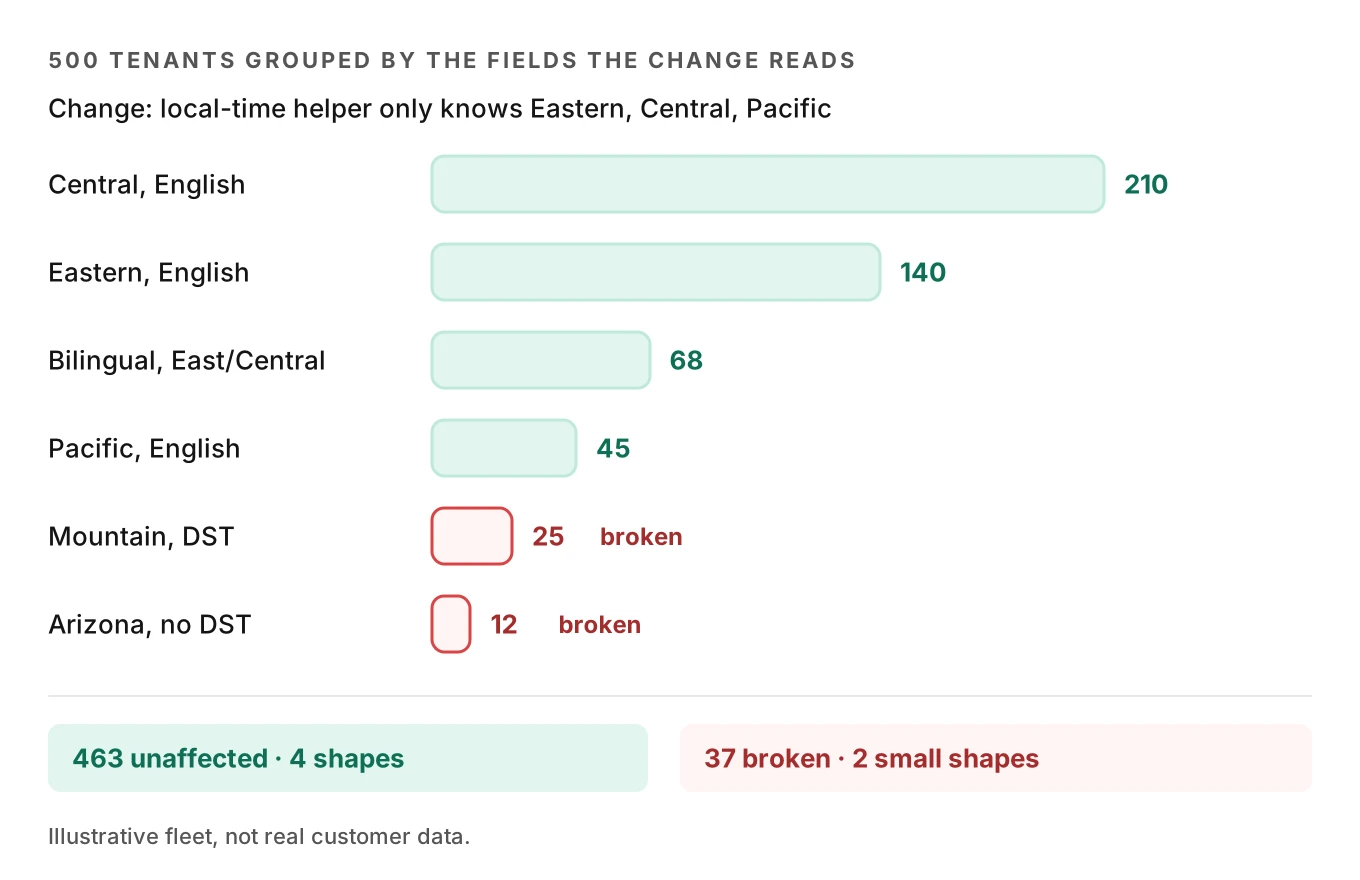
Bucket values coarsely. "America/Chicago" and "America/New_York" behave the same for most changes. "Arizona, no DST" does not. Bucketing is where domain knowledge pays off.
Cluster by config shape, then cover the pairs
Real changes read more than one field. If a change reads six fields, the full product of values gets big fast. With 4 timezone classes, 3 language modes, 3 integrations, 2 transfer modes, 2 compliance toggles and 3 hours shapes, there are 432 combinations.
You don't need all 432. NIST's combinatorial testing research found "most failures were caused by one or two parameters," and that "all or nearly all failures involve only 1 to 6 factors" (NIST). A pairwise covering array puts every pair of values in at least one test row. For the six fields above, a simple greedy generator covers every pair in 14 rows. The floor is 12, the product of the two largest dimensions.
Then map each row to a real tenant. Pick a live tenant whose config matches the row. If none exists, the combination is not in production yet, so skip it or flag it. Real configs beat invented ones. They carry the messy details: a 412-item menu, a transfer number with an extension, a greeting with a brand name the TTS mispronounces.
Config shape: the set of values a tenant has for the fields a specific change reads. Two tenants with the same shape should behave the same under that change.
Sample-size math for a 500-tenant fleet
Three formulas cover most decisions. All numbers below are illustrative assumptions, not measured results.
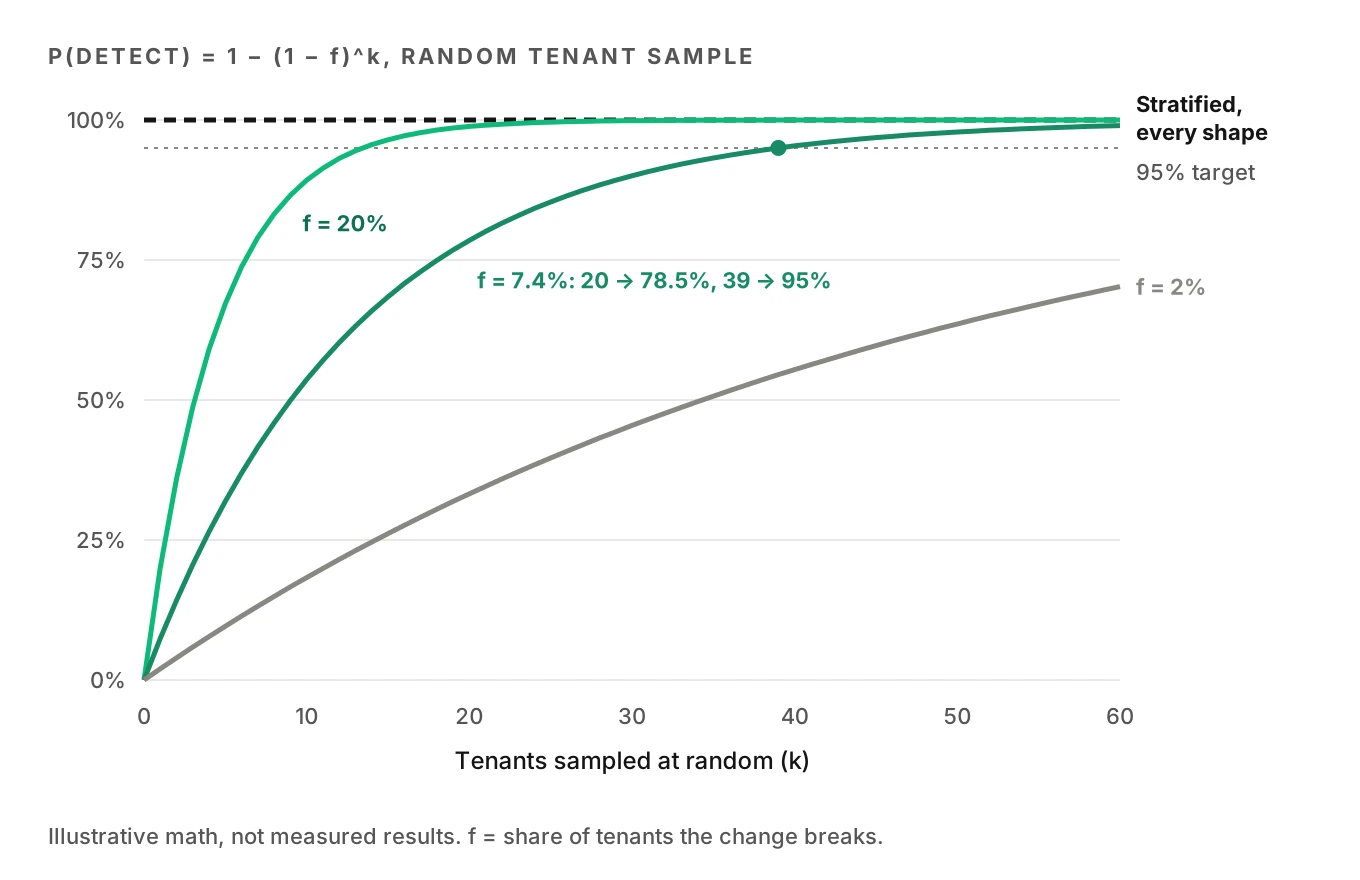
1. Will a random sample even find the bug? Suppose a change breaks a fraction f of tenants. If you test k tenants picked at random, the chance at least one broken tenant is in the sample is:
P(detect) = 1 - (1 - f)^k
k needed for 95% detection = ln(0.05) / ln(1 - f)
The hero case breaks 37 of 500 tenants, so f = 0.074. A random sample of 20 tenants finds it 78.5% of the time. You need 39 random tenants to reach 95%. If only 10 tenants break (f = 0.02), you need 149. Random sampling fails on exactly the bugs that hide in small shapes.
2. Stratify so small shapes are always covered. Test at least one tenant from every shape the change touches. Detection for a bug confined to one shape then depends on that shape's test, not on luck. The drive-thru version of this idea, with stores as strata, is in our 500-store drive-thru rollout plan.
3. Zero failures is not zero risk. If a shape passes n test calls with no failures, the rule of three gives an upper 95% bound on its failure rate of about 3/n (Newman, JAMA). Pass 12 calls and the true rate could still be 25%. Pass 40 and it is about 7.5%. Pick n from the failure rate you can tolerate, not from what fits in an afternoon.
Spread a fixed call budget by risk. Neyman allocation splits a sample across strata "in proportion to stratum sizes and stratum variances" (SAS docs). For pass/fail calls, use S = sqrt(p(1 - p)) with a prior failure guess p:
n_h = n * (N_h * S_h) / sum(N_k * S_k)| Shape | Tenants N | Prior fail p | S | Proportional (of 200) | Neyman (of 200) |
|---|---|---|---|---|---|
| Central, English, POS A | 260 | 2% | 0.14 | 104 | 73 |
| Eastern, bilingual, POS B | 140 | 5% | 0.22 | 56 | 61 |
| Mountain, English, FSM | 70 | 10% | 0.30 | 28 | 42 |
| No DST, new integration | 30 | 20% | 0.40 | 12 | 24 |
Neyman doubles the calls on the risky small shape. That is where your bug is most likely to be. Inside each shape, run each scenario more than once, given the run-to-run variance noted above. For statistics on the canary step itself, see the canary math in shipping prompt changes safely.
Golden tenants and config-driven scenarios
A golden tenant is a real or cloned tenant config you keep as a fixed reference. It gets the full suite on every release. Pick 5 to 15 of them to cover your shapes: your largest customer, your messiest menu, a Spanish-first account, an Arizona account, one per integration. Clone them into a staging account so test calls never hit a live POS or FSM.
Scenarios should come from config, not from a static script. If a tenant's config says delivery stops at 5 miles, generate a caller at 5.2 miles. If hours end at 9, call at 8:58 and 9:02 local. If the transfer number has an extension, test the transfer. If Spanish is on, switch languages mid-call. Every boundary in the config becomes a test.
| Config value | Generated scenario | What to check in the record |
|---|---|---|
| `delivery_radius: 5mi` | Address at 5.2 miles | No delivery ticket created |
| `close: 21:00` | Call at 20:58 and 21:02 local | Open vs closed answer, ticket time |
| `menu_version: 14` | Item removed in v14 | Agent declines, no ghost line item |
| `emergency_types: [leak, no_heat]` | Calm caller reporting a leak | Emergency priority, pager fired |
| `call_window: 08-21 local` | Callback request at 20:50 | Callback scheduled inside the window |
Evalgent generates test scenarios from the agent's prompt and flows, including branches, policies, hard constraints and coverage gaps. Point it at a golden tenant's assembled prompt and you get that tenant's boundary cases. Its caller profiles vary accent, pace, interruptions, response delay, background noise and language. That matters because tenants differ in callers too. A drive-thru, a plumber's emergency line and a loan servicing line sound nothing alike. For per-industry scenario lists, see restaurant allergy and add-on errors, HVAC scheduling errors and maintenance request errors.
How to QA a change across 500 tenant configs
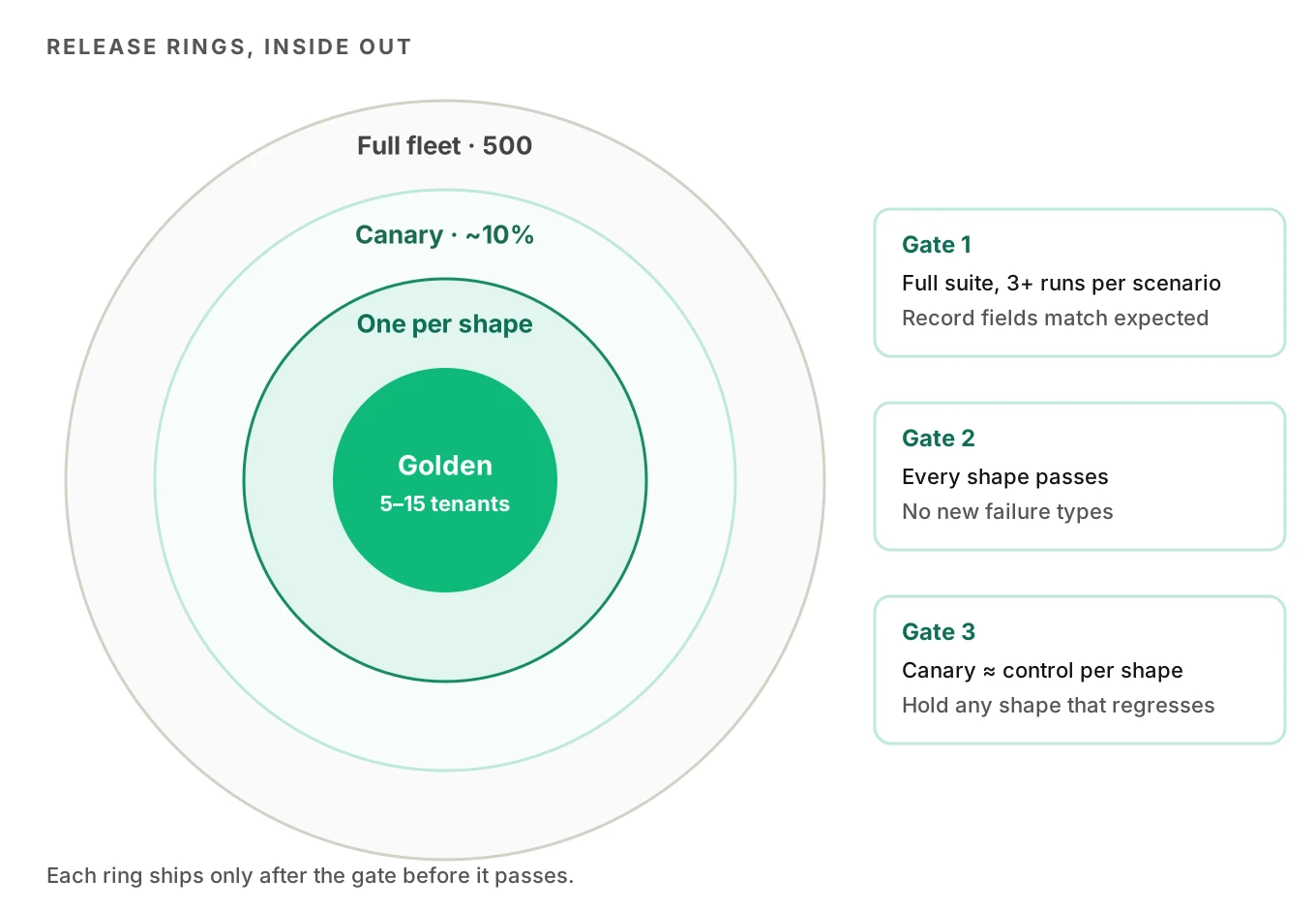
1. Classify the change. Is it a base prompt edit, a tool change, a model swap, or a config schema change? A model swap touches every tenant. A field-level change touches a subset.
2. Run the impact query. List the fields the change reads. Group tenants into config shapes by those fields. Note the size of each shape.
3. Build a covering set. Use pairwise rows across the fields, then map each row to a real tenant. Add one tenant from every shape the pairwise set missed.
4. Generate scenarios from config. For each chosen tenant, turn its boundaries into test calls. Add the tenant's top 3 real call intents from production.
5. Run golden tenants first. Run the full suite on cloned golden tenants in staging, several times per scenario. Grade the call audio and the record written back, not just the transcript.
6. Diff against each tenant's baseline. Compare each tenant's scores to its own last release. A 2-point drop on one tenant can matter more than a flat fleet average.
7. Canary by cohort. Run a canary release to about 10% of tenants, chosen to include every shape. Watch the same metrics on canary and control. Google's SRE workbook says you "must be able to compare the canary signals to the control signals" (SRE workbook).
8. Promote or roll back per shape. If one shape regresses, hold it and promote the rest. Fix the shape, then re-run step 5 for it.
Per-tenant regression diffs
Voice agent regression testing has to happen per tenant. A fleet average hides tenant failures. If 463 tenants hold at 96% and 37 drop to 70%, the fleet average falls only about 2 points. That is easy to miss in a dashboard. Report per tenant and per shape instead.
A useful per-tenant diff has four parts:
- Score deltas. Task success, instruction adherence, transfer accuracy and latency, each against that tenant's previous release.
- Record deltas. The fields written back: ticket items, appointment time, work order priority, callback time. Compare them to expected values from the scenario.
- New failure types. Any failure category the tenant never had before. A first-time tool-call failure is a stronger signal than a small score change.
- Shape roll-up. Group deltas by config shape. If every tenant in "No DST, new integration" regresses, the bug is in that shape, not in one customer.
Pass/fail assertions on the record catch more than vibes on the transcript. Our post on test cases vs assertions shows how to write them. Keep each tenant's golden results as a fixed dataset, as covered in building a golden dataset.
Production monitoring by tenant
Multi-tenant voice agent testing doesn't stop at release. Testing covers the shapes you thought of. Production finds the ones you didn't. Every live call should carry `tenant_id`, `config_version` and `release_id` in its metadata. Without them, you can't tell a bad release from a bad config edit a customer made on Tuesday.
Customers also change their own configs. A restaurant uploads a new menu at 4 p.m. A property manager changes the on-call number. Those edits are releases too. Treat a config change on a high-volume tenant like a code change: run that tenant's golden scenarios before or right after it lands.
Watch per-tenant rates, not just fleet rates. Alert when one tenant's transfer failures, tool-call errors or dead air jump against its own trailing week. Score a share of calls per tenant, weighting small tenants up so they get enough volume to show a trend. The live call sampling guide covers how to pick that share, and monitoring voice agents in production covers the alerts.
Evalgent's production monitoring takes pushed call recordings, transcribes them, maps each call to a scenario and judges it. It flags PII leakage, tool-call failures, latency spikes and policy failures with fix recommendations. Evaluation runs from the audio, not only the transcript. If you tag calls by tenant, those flags roll up into the per-tenant view this section describes. Evalgent works with teams to set up evals for their first agent, which is a good point to define shapes and golden tenants together.
Frequently asked questions
How do you test a voice agent across hundreds of customers?
Test a voice agent across hundreds of customers by grouping them into config shapes. Find the config fields your change reads, group tenants by those values, and test at least one real tenant per shape. Generate scenarios from each tenant's config boundaries. Run golden tenants in staging first, then canary to about 10% of tenants covering every shape.
How many tenants should you test before a release?
The number of tenants to test depends on shape count and risk, not fleet size. Cover every config shape the change touches. Random sampling needs about 39 tenants to catch a bug hitting 7.4% of tenants 95% of the time, and 149 for a 2% bug. Stratifying by shape catches shape-specific bugs with far fewer tenants.
What is a golden tenant?
A golden tenant is a real or cloned customer config kept as a fixed reference for regression tests. It runs the full scenario suite on every release, usually in a staging account so no live POS or CRM is touched. Teams keep 5 to 15, chosen to cover their largest customer, messiest catalog, each integration and each language mode.
How do you test per-tenant prompts?
Per-tenant prompts are tested by assembling the exact prompt each tenant gets at runtime, then generating scenarios from that tenant's config. Test boundaries such as closing time, delivery radius, removed menu items and transfer rules. Grade the record written back as well as the conversation. Compare each tenant's results to its previous release to catch regressions.
What is config-driven test generation?
Config-driven test generation turns each tenant's settings into test calls automatically. A 5-mile delivery radius becomes a caller at 5.2 miles. A 9 p.m. close becomes calls at 8:58 and 9:02 local. A Spanish toggle becomes a mid-call language switch. It scales testing with the number of config values, not the number of tenants.
How do you canary a voice agent change by tenant?
Canary a voice agent change by shipping it to a cohort of tenants, about 10%, that includes every config shape. Keep the rest on the old release as control. Compare task success, tool-call errors, transfer failures and latency between the groups per shape. Promote shapes that hold and roll back any shape that regresses.
How do you monitor a voice agent per tenant?
Monitor a voice agent per tenant by tagging every call with tenant ID, config version and release ID. Track each tenant's metrics against its own trailing baseline, not the fleet average. Alert on jumps in tool-call failures, transfer errors and dead air. Weight scoring toward small tenants so they produce enough scored calls to show trends.
Why does a voice agent work for one customer and fail for another?
A voice agent works for one customer and fails for another because each customer's config builds a different prompt and toolset. Timezones, menu size, transfer rules and language settings change behaviour. Research shows prompt formatting alone can swing accuracy by up to 76 points. A bug often lives in one config combination that your demo tenant never had.
The bottom line
Multi-tenant voice agent testing works when you test config shapes, not customers. Diff the change, cover every shape with real tenants, canary by cohort and watch each tenant against its own baseline.
Related Articles

How to automate voice agent testing: synthetic callers vs manual QA
Learn how ai test automation replaces manual QA for voice agents. Compare synthetic callers vs human testers, with a 5-step framework to scale without hiring.
Read more
AI Agent Testing vs Voice Agent Testing: What General Tools Miss for Voice
AI agent testing measures text outputs. Voice agent testing measures behaviour through an acoustic pipeline. Five failure categories general tools miss.
Read more