Wrong Work Orders From AI Maintenance Calls? Here's Why
On this page
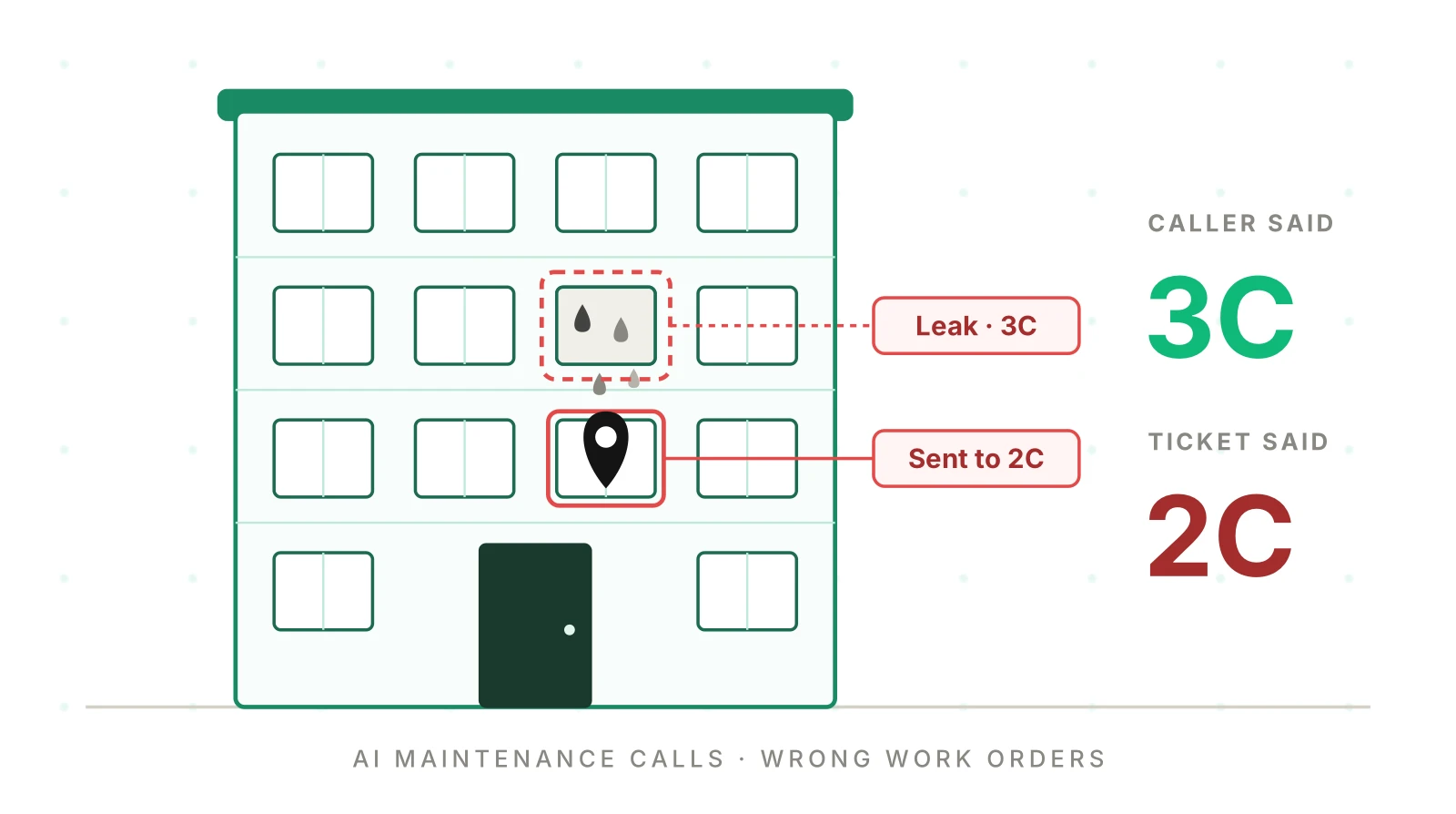
A resident in 3C calls about water under the kitchen sink. The AI agent is polite, quick and confident. A plumber is dispatched within the hour. He knocks on 2C. Nobody is home, the lockbox code is wrong, and the trip charge lands on the owner's bill.
The transcript looks fine. The ticket looks complete. Every field is filled. That is what makes AI maintenance request errors expensive. They don't look like errors until a vendor is standing at the wrong door.
This post is for product teams at maintenance-coordination software companies. Your agent handles maintenance call intake for many property managers at once. You need to know how often it files wrong work orders. You also need to catch each kind before your customers do. For the wider program, start with the property management AI answering QA playbook.
Why AI maintenance request errors stay hidden
A maintenance call is a short form filled in by voice. The agent looks up the resident and picks a category. It sets a priority, records access details and hands off to vendor dispatch. Each step writes one field of the maintenance work order. Each field can be wrong while still looking valid.
Real products in this category work this way. Latchel's help center describes Harphonia, an AI voice assistant that "answers incoming maintenance calls from your residents". A "work order or on-call alert is created automatically" from the conversation (Latchel help center). The same page notes that its emergency second-level troubleshooting and dispatch "remains fully human." That is a sensible design line. It also means the AI must classify the emergency correctly so the human gets it.
Property Meld lists the same core jobs for maintenance triage by AI. They include "assessing urgency, routing emergencies, and logging non-urgent issues". It adds a candid line: "Good systems escalate when uncertain; less good ones may misclassify" (Property Meld).
Here is the problem for a platform team. Your agent serves dozens or hundreds of property managers. Each has its own emergency rules, vendor list, entry policy and pet notes. One prompt change ships to all of them at once. A wrong field shows up days later as a vendor complaint, a callback or an owner dispute.
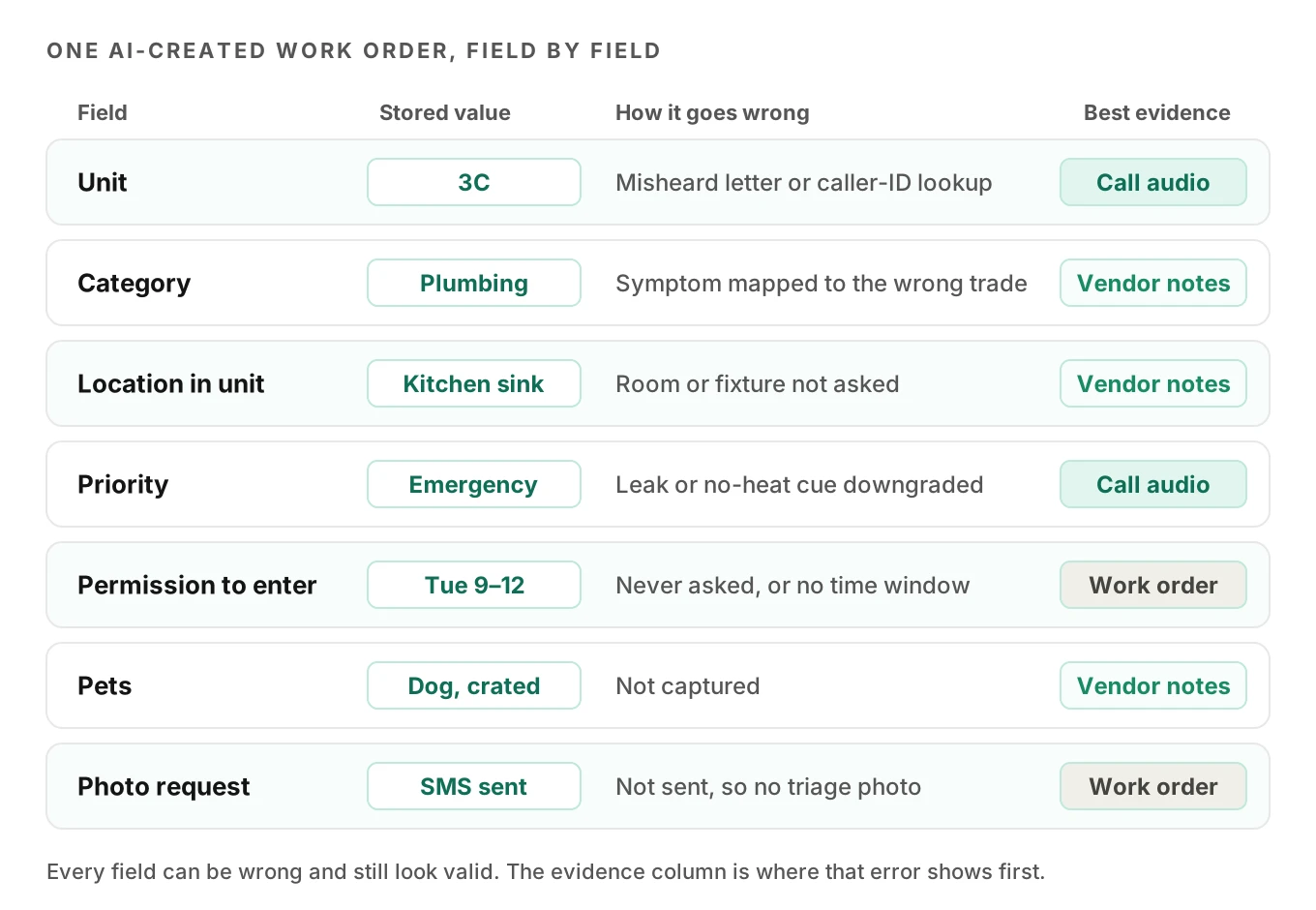
The fix starts with naming the failure. A vague "the agent got it wrong" is not a bug report. A label like "severity downgraded on an active leak" is.
Six kinds of wrong work orders
Every bad ticket gets one label. If none fits, it is either a genuine change by the resident or a seventh type worth adding.
| Type | What happened | Call audio shows | Work order shows | Vendor notes show |
|---|---|---|---|---|
| 1. Wrong unit | Agent stored the wrong unit or resident | "Three C" | Unit 2C or 3D | "No issue found" or "wrong unit" |
| 2. Wrong category | Symptom mapped to the wrong trade | "Water under the fridge" | Plumbing | "Ice maker line, needs appliance tech" |
| 3. Severity downgraded | Emergency filed as routine | "Water through the ceiling" | Priority: routine | Damage beyond the original issue |
| 4. Missing access | Permission or pet detail not captured | "Come in, but the dog is loose" | Entry: blank | "No access" or trip charge |
| 5. Duplicate | Second ticket for a known issue | "I called yesterday" | New ticket, same unit and category | Two visits, one job |
| 6. Unsafe troubleshooting | Agent gave a step it shouldn't | "Should I flip the breaker again?" | Nothing | Burned outlet, or nothing |
1. Wrong unit or wrong resident
Unit numbers are short alphanumeric codes, and speech models are weak on exactly that. The Sheffield SNuC corpus studied spoken identifiers. A baseline recognizer got 96.6% of words right on partner data. It got only 77% of whole identifiers right (Barker et al., LREC 2022). That is roughly one identifier in four with an error. The authors list confusable letter pairs such as "tee/dee" and "see/zee". Those pairs turn 3C into 3Z, or 4T into 4D.
Numbers are no easier. Google researchers found end-to-end ASR weak on long numeric sequences. Targeted fixes cut WER by up to 8x on the longest ones (Peyser et al.). Building numbers like "1204" and unit numbers like "12-04" sit right in that weak zone.
The second cause is resident lookup. Many agents match caller ID to the lease. If a parent pays rent for a student, or roommates share a phone, the lookup returns the wrong unit. The agent then confirms the name, not the unit, and moves on.
One wrong-unit case is not a speech error at all. A ceiling leak in 2C often comes from 3C above. The resident calling is in 2C, and the right ticket names both units. Your schema needs a "suspected source unit" field, or this case will be filed wrong every time. Our guide to STT entity accuracy covers the general method for scoring names and codes.
2. Wrong category, so the wrong vendor
The category picks the trade, and the trade picks the vendor. Residents describe symptoms, not trades. "Water on the kitchen floor" could be a supply line, which is plumbing. It could also be a dishwasher or a fridge ice maker line, which is appliance work. "No heat" could be a furnace (HVAC), a tripped breaker (electrical) or an empty propane tank.
A wrong category costs a full vendor visit. The plumber arrives, finds a dishwasher pump, and writes it up for an appliance tech. The vendor completion notes are the best evidence you have. If the vendor reassigns the trade, the original category was wrong. Hotels face the same routing logic: which team gets the request. See hotel AI guest request routing for the parallel.
3. Severity downgraded
This is the costly one. Emergency maintenance usually covers an active leak, no heat in cold weather, sewage backup and a gas leak. The agent must escalate them to on-call, not file them for Monday.
Habitability law is why these classes exist. Under California Civil Code §1941.1, a dwelling can be "untenantable" without working plumbing or gas facilities. The list also covers hot and cold running water and heating (Cal. Civ. Code §1941.1). Most states have a warranty of habitability in some form. The details vary by state and city.
Some cities set exact numbers. New York City's heat season runs from October 1 to May 31. By day, when it is below 55°F outside, the inside must be at least 68°F. At night the floor is 62°F regardless of the weather (NYC HPD). So "it's 60 degrees in here" at 11 p.m. in November is an escalation for a New York building. The same sentence in Phoenix in May is not.
Water has its own clock. The EPA's mold guide lists steps to respond to water damage "within 24-48 hours" to avoid mold remediation (EPA). A leak filed as routine on Friday evening can blow through that window.
This is not legal advice. Each property manager should define its own emergency rules with counsel, and your agent should load them as data.
4. Missing permission to enter, or missing pet details
A vendor who can't get in bills a trip and leaves. The cause is usually one unasked question. Did the resident give permission to enter? Is there a dog, cat or other pet? Is there an alarm or a lockbox?
Entry rules are state law too. California's §1954 presumes 24 hours to be "reasonable notice". It also lets tenant and landlord "agree orally to an entry to make agreed repairs". The date and time must fall within one week (Cal. Civ. Code §1954). An agent that records "resident agreed to entry Tuesday, 9 to 12" captures something useful. An agent that records "OK to enter" with no time window may not.
Pets are both a safety and an access issue. A loose dog stops a vendor. A cat that slips out becomes a complaint. Capture the pet and where it will be.
5. Duplicate tickets
Residents call back. They call because nobody came, because the leak got worse, or because a neighbor reported the same thing. A good agent finds the open ticket and adds to it. A weak one files a new one.
Duplicates waste vendor visits and confuse the status story. Worse, an escalation can hide inside a duplicate. Picture "it's worse now, it's coming through the light fixture". That call should upgrade the open ticket to emergency. A fresh routine ticket buries it.
6. Unsafe troubleshooting
Troubleshooting steps save visits. "Check if the breaker tripped" fixes a lot of dead outlets. But some steps are unsafe in some situations. Resetting a breaker that keeps tripping is one. Telling someone who smells gas to check the stove is another.
Gas leak guidance from a state regulator is blunt. Connecticut PURA says "Don't flip light switches on or off" near the odor. It also says "Don't use a telephone" there. If the smell is strong, "leave the premises immediately and tell others to leave" (CT PURA). The resident is already on the phone. So the agent's first job is to tell them to leave and call from outside. It should not walk them through anything.
Write troubleshooting as an allowlist per category, with stop conditions. One breaker reset, then stop if it trips again. No troubleshooting at all when gas, sparks, burning smells or standing water near outlets come up.
How the three records catch each error
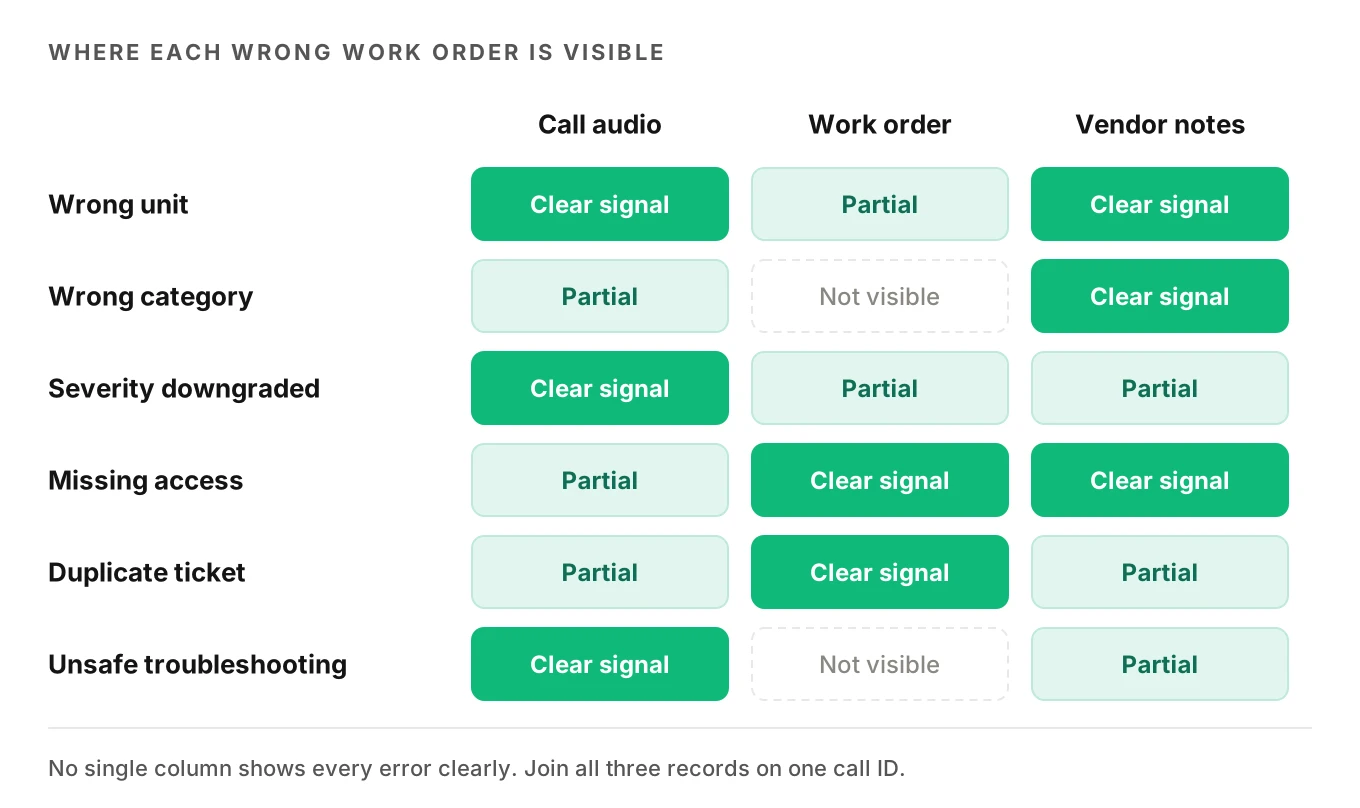
No single record shows all AI maintenance request errors. The transcript is the weakest. It is the speech model's guess, and if the guess was "3D," the transcript says "3D" all the way through. Only the call audio holds "three C". That is the core Evalgent view. Most eval tools read transcripts, so the referee is deaf. Our post on transcript vs audio evaluation goes deeper.
Join three records on one key: call ID to ticket ID to vendor visit. Then run simple rules.
- Call audio: a second, careful pass over the unit number, emergency cues and any troubleshooting the agent spoke.
- Work order: category, priority, unit, entry fields, pet field, photo request status, created time.
- Vendor completion notes: trade reassignments, "no access," "wrong unit," "no issue found," and visit count.
Here is a simplified labeler. It assumes you already have a careful re-read of the audio stored on the call record.
from datetime import timedelta

UNSAFE = {
    "electrical": {"reset_breaker_again", "remove_cover_plate"},
    "gas": {"check_stove", "relight_pilot", "any_troubleshooting"},
}
EMERGENCY_CUES = {"active_leak", "ceiling_water", "sewage", "gas_smell", "no_heat_below_threshold"}

def label_work_order(wo, call, notes, open_tickets):
    """Simplified: returns wrong-work-order labels for one ticket."""
    labels = set()
    # 1. Wrong unit: audio re-read or vendor disagrees with the ticket
    if call.audio_unit and call.audio_unit != wo.unit:
        labels.add("wrong_unit")
    if notes.found_in_unit and notes.found_in_unit != wo.unit:
        labels.add("wrong_unit")
    # 2. Wrong category: vendor reassigned the trade
    if notes.reassigned_trade and notes.reassigned_trade != wo.category:
        labels.add("wrong_category")
    # 3. Severity downgraded: emergency cue heard, routine filed
    if EMERGENCY_CUES & set(call.cues) and wo.priority != "emergency":
        labels.add("severity_downgraded")
    # 4. Missing access: vendor blocked and no entry consent stored
    if notes.outcome == "no_access" and not wo.entry_window:
        labels.add("missing_access")
    # 5. Duplicate: same unit and category open in the last 72 hours
    for t in open_tickets:
        if (t.id != wo.id and t.unit == wo.unit and t.category == wo.category
                and wo.created_at - t.created_at < timedelta(hours=72)):
            labels.add("duplicate")
    # 6. Unsafe troubleshooting: agent spoke a blocked step
    if set(call.agent_steps) & UNSAFE.get(wo.category, set()):
        labels.add("unsafe_troubleshooting")
    return sorted(labels)
Two notes on this code. First, the 72-hour window is an assumption; tune it per property manager. Second, vendor notes are free text. You will need a small classifier or a fixed set of vendor outcome codes. Push for codes in your vendor app if you can.
Severity rules need a test matrix, not a prompt line
"Escalate emergencies" in a system prompt is not a rule. It is a hope. The model must map messy speech to a class, apply a property manager's threshold, and act. Each of those is a test.
Research suggests why one test run isn't enough. In tau-bench, top function-calling agents succeeded on fewer than 50% of tasks. Their pass^8 fell below 25% in retail (Yao et al.). That metric asks whether the agent succeeds on all k tries of one task. An agent that escalates a sewage call four times out of five is not safe. Spoken dialogue makes it harder. On SpokenWOZ, the best dialogue state tracker reached only 25.65% joint goal accuracy (Si et al.).
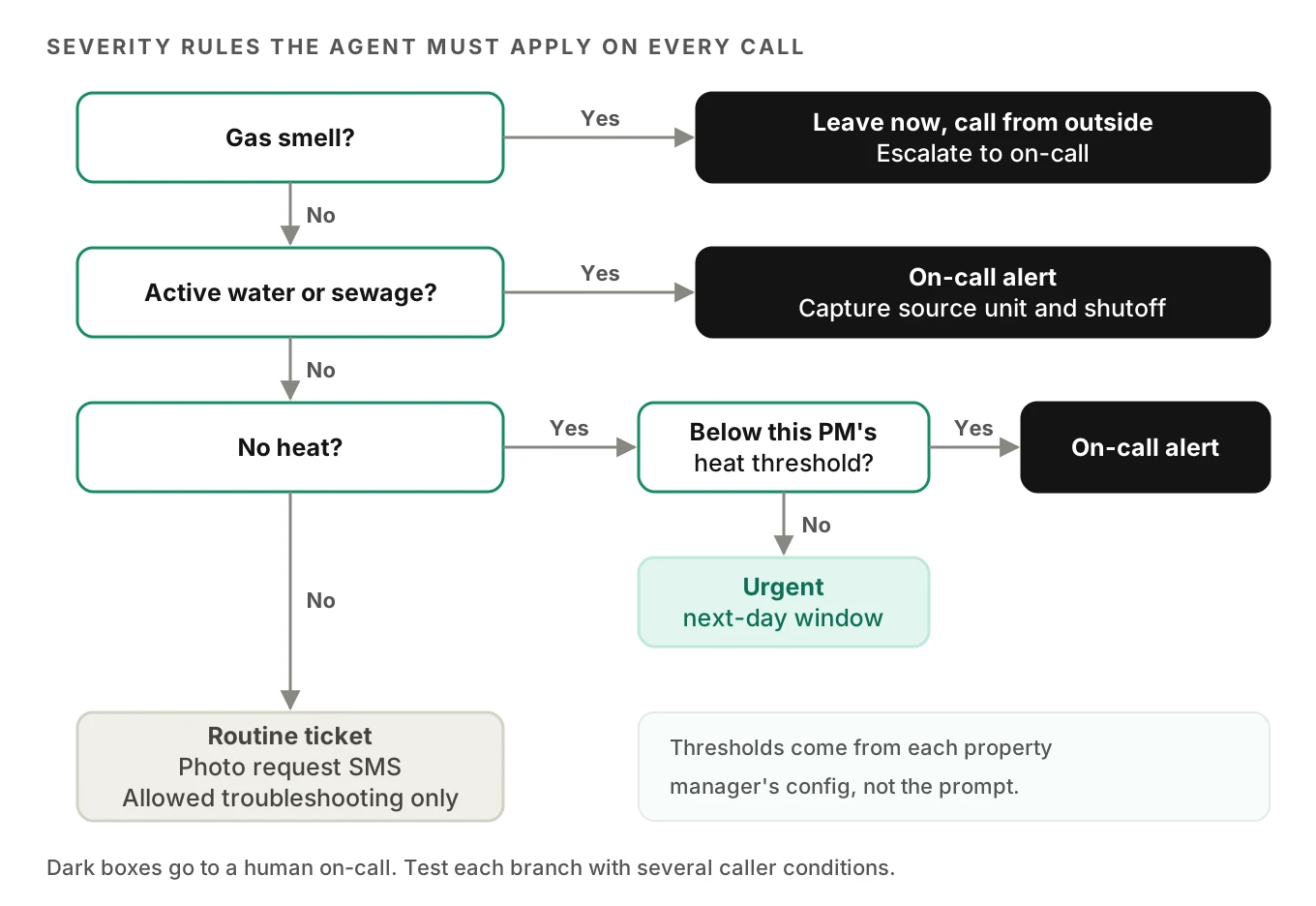
Build the matrix as scenarios crossed with caller conditions. Here is a starting point.
| Scenario | Expected priority | Expected action | Conditions to run |
|---|---|---|---|
| Water through the ceiling, upstairs unit unknown | Emergency | On-call alert, capture both units | Running water noise, fast speech |
| Gas smell in kitchen | Emergency | Tell resident to leave, call from outside | Panic, interruptions |
| No heat, 58°F inside, November, NYC property | Emergency | On-call per PM threshold | Elderly caller, slow pace |
| No heat, 66°F inside, mild night | Routine or urgent per PM | Ticket with next-day window | Accent |
| Toilet overflowing, will not stop | Emergency | On-call, shutoff valve guidance only | Background TV |
| Dishwasher leaking a little | Routine | Appliance ticket, photo request SMS | Normal |
| Outlet dead, breaker tripped once | Routine | One reset allowed, ticket if it trips again | Normal |
| Caller says "I called yesterday" | Same as open ticket | Attach, upgrade if worse | Spanish |
Worked math: how many emergency runs you need
Say you want to claim the agent misses fewer than 1 in 100 emergencies, at 95% confidence. With zero misses, you need n runs where 0.99^n ≤ 0.05. That gives n ≥ 299. The "rule of three" shortcut, 3/n, says the same thing.
Relax the bar to 2% and you need about 149 clean runs. Those are runs across all emergency classes, not per class. If one property manager has its own heat threshold, its no-heat scenarios need their own budget. This is why manual test calls stop scaling past a few customers.
Illustrative assumption: 40 property managers, 5 emergency classes, 3 caller conditions. That is 600 scenario cells before repeats. Nobody on a small team places 600 test calls by hand after each prompt change.
How to test AI maintenance intake before a change ships
Use these steps for each prompt, model or flow change. They work for a new property manager going live too.
1. Load each property manager's rules as data. Export emergency classes, heat thresholds, entry policy, pet policy and vendor mappings per customer. The agent and the tests should read the same config.
2. Generate scenarios from the flows. List every branch: lookup found or not, each category, each severity, entry yes or no, open ticket or not. Evalgent generates scenarios from the agent's prompt and flows, including hard constraints like "always escalate gas," and shows coverage gaps.
3. Add realistic callers. Residents with leaks call from noisy rooms. Vary accent, pace, interruptions, response delay and background noise. Evalgent's caller profiles cover those settings, plus language, and reach the agent over PSTN, SIP or WebRTC. Our guide to testing STT under background noise covers noise levels.
4. Assert on the work order, not the reply. Check unit, category, priority, entry window, pet field, photo request and on-call alert. A friendly reply with a wrong unit is a fail. See detecting silent tool failures for the write-back checks.
5. Judge the audio. Score whether the agent heard the unit right and whether it said anything unsafe. A transcript-only judge misses both.
6. Repeat each scenario. Run emergencies at least five times each and report pass^k, not average pass rate.
7. Gate the release per property manager. Block the rollout for any customer whose emergency scenarios fail. Our post on shipping prompt changes safely covers staged rollouts.
What to monitor on a live maintenance line
Testing catches the AI maintenance request errors you thought of. Production shows what residents actually do. Track these per property manager, weekly.
| Metric | Formula | What it catches |
|---|---|---|
| Vendor trade reassign rate | Reassigned visits / dispatched visits | Wrong category |
| No-access rate | "No access" visits / dispatched visits | Missing permission or pet details |
| Wrong-unit rate | Visits noted "wrong unit" / dispatched visits | Unit or lookup errors |
| Human upgrade rate | Tickets upgraded by staff to emergency / routine tickets | Severity downgrades |
| Duplicate rate | Tickets merged as duplicates / all tickets | Missed open-ticket lookup |
| 24-hour callback rate | Residents calling again within 24 h / all callers | Any of the above |
The human upgrade rate is the one to watch closest. A staff member promoting a ticket to emergency means the agent missed it. Pull every one of those calls and listen. The escalation accuracy guide explains how to score handoffs.
Evalgent's production monitoring takes pushed call recordings, transcribes them, maps each call to a scenario and judges it. It flags tool-call failures, latency spikes and policy failures with fix recommendations. On a maintenance line, score two policies on every call: "always escalate gas" and the troubleshooting allowlist. Each confirmed failure should become a new test case; see the production feedback loop.
Search for "AI maintenance requests property management" and you mostly find triage feature pages. The failure side repeats across the property stack. See testing AI tour booking for wrong units, HOA AI phone call testing for lookups, home warranty claims AI for coverage, and HVAC AI scheduling for wrong trades.
Frequently asked questions
Why does the AI create the wrong work order?
AI maintenance request errors have six usual causes. The agent mishears the unit number or maps a symptom to the wrong trade. It files an emergency as routine or misses entry and pet details. It duplicates an open ticket or gives an unsafe troubleshooting step. Compare call audio, ticket fields and vendor notes to label which one happened.
How do you test an AI maintenance line before launch?
Test an AI maintenance line by loading each property manager's emergency rules and vendor map as data. Generate scenarios for every branch. Run them with noisy, fast or accented synthetic callers. Assert on the work order fields, not the agent's reply. Repeat every emergency scenario several times and block release if any run fails to escalate.
What counts as a maintenance emergency for an AI agent?
A maintenance emergency for an AI agent is whatever the property manager defines, loaded as config. Common classes are an active leak, sewage backup, a gas smell and no heat below a local threshold. New York City, for example, requires 68°F by day when it is below 55°F outside.
Should an AI agent tell residents to reset a breaker?
An AI agent can suggest one breaker reset for a dead outlet if the property manager allows it. It should stop and file a ticket if the breaker trips again. It should give no troubleshooting at all for sparks, burning smells, water near outlets or a gas odor. Keep allowed steps as a per-category allowlist.
How do you detect duplicate maintenance tickets?
Detect duplicate maintenance tickets by matching each new ticket to open ones with the same unit and category. Use a set window, such as 72 hours. Also flag calls where the resident says they called before. The agent should attach the new call to the open ticket and upgrade priority if the problem got worse.
Can an AI agent get permission to enter a unit?
An AI agent can record a resident's permission to enter. It should store the specific window, any pet details and access notes. California, for example, allows an oral agreement for agreed repairs within one week under Civil Code §1954. Entry rules vary by state, so load each property manager's policy and check it with counsel.
How many emergency calls do you need to test?
Proving a miss rate under 1 in 100 at 95% confidence takes about 299 emergency test runs with zero misses. At a 2% bar you need about 149. Property managers with different thresholds need their own runs, which is why manual test calls stop scaling.
What should you monitor on an AI maintenance line?
Monitor an AI maintenance line with six rates: vendor trade reassign, no-access, wrong-unit, duplicate, 24-hour callback and human upgrade. Track each per property manager every week. The human upgrade rate matters most, because each staff upgrade to emergency is a severity call the agent missed.
The bottom line
Wrong work orders come from six specific failures, and each leaves a trace in the audio, the ticket or the vendor notes. Name the type, test it per property manager before each change, and watch the human upgrade rate in production.
Related Articles

How to automate voice agent testing: synthetic callers vs manual QA
Learn how ai test automation replaces manual QA for voice agents. Compare synthetic callers vs human testers, with a 5-step framework to scale without hiring.
Read more
AI Agent Testing vs Voice Agent Testing: What General Tools Miss for Voice
AI agent testing measures text outputs. Voice agent testing measures behaviour through an acoustic pipeline. Five failure categories general tools miss.
Read more