The Best Way to Load Test Deepgram's Voice Agent API (2026 Harness)
On this page
Most load-testing advice stops at "ramp up connections and watch p95." That misses four ways a voice load test lies to you: average concurrency that looks safe but still rejects callers, audio streamed faster than anyone talks, a generator that slows down when the server does, and p99 numbers built on too few turns.
This guide fixes all four for Deepgram's Voice Agent API, with the wire protocol, plan limits and costs, capacity math, sample sizes, and a 140-line asyncio harness built on the documented message types.
Load testing a voice agent API: running many concurrent, realistic, real-time conversations against the API to find where latency, admission (429s), and stability break, measured per turn and per call rather than per request.
What one Voice Agent session does on the wire
You can't build an honest harness until you know which messages mark which moments. The Voice Agent API is one WebSocket per conversation at `wss://agent.deepgram.com/v1/agent/converse`, authenticated with an `Authorization: Token
The lifecycle has a strict order. Deepgram's message-flow guide says not to send anything until `Welcome` arrives. Then you send exactly one `Settings` message. A second one returns `SETTINGS_ALREADY_APPLIED`, and anything sent before it returns `NON_SETTINGS_MESSAGE_BEFORE_SETTINGS`. You wait for `SettingsApplied` before streaming audio. From then on, the client sends binary audio continuously, and the server sends a stream of JSON events with binary agent audio mixed in.
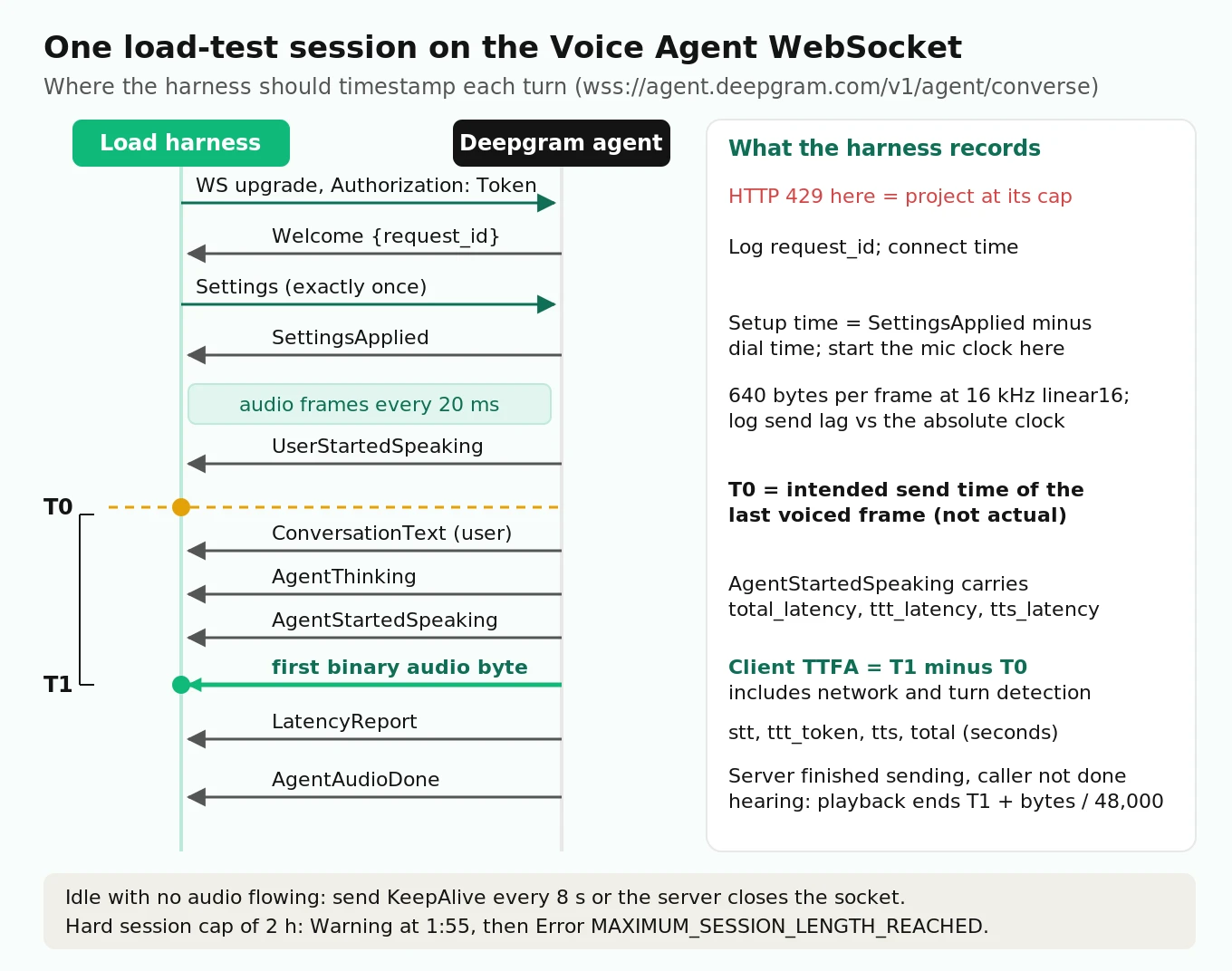
Here is what each server event means for a load test.
| Event | When it arrives | What the harness should do with it |
|---|---|---|
| `Welcome` | Right after the upgrade | Log `request_id`; you need it for any support ticket |
| `SettingsApplied` | After a valid `Settings` | Mark session setup time; start the mic clock |
| `UserStartedSpeaking` | Server hears the caller | Barge-in signal; a real client stops playback here |
| `ConversationText` | User turn confirmed, then agent text | Store transcripts to spot STT errors under load |
| `AgentThinking` | LLM working | Optional; useful to see think time |
| `AgentStartedSpeaking` | Reply audio is about to flow | Carries `total_latency`, `ttt_latency`, `tts_latency` |
| Binary frames | Agent audio | First byte after end of speech is T1 |
| `LatencyReport` | After each turn | Per-stage latency: `stt_latency`, `ttt_token_latency`, `ttt_text_latency`, `ttt_tool_latency`, `ttt_thinking_latency`, `tts_latency`, `total_latency` |
| `AgentAudioDone` | Last audio chunk sent | Server is done sending; the caller is not done hearing |
| `Warning` / `Error` | Problems | Count by `code`; every `Error` ends the session |
Two timeouts shape long tests. The server closes sockets that go quiet: the KeepAlive docs say to send `{"type": "KeepAlive"}` every 8 seconds whenever you stop sending audio, and the failure shows up as `CLIENT_MESSAGE_TIMEOUT`. Separately, every session has a hard 2-hour cap. You get a `Warning` with `MAXIMUM_SESSION_LENGTH_APPROACHING` at 1 hour 55 minutes and an `Error` with `MAXIMUM_SESSION_LENGTH_REACHED` at 2 hours. KeepAlive does not extend it. A soak test that holds one socket for three hours isn't testing stability. It's testing a documented limit.
The `LatencyReport` is the most useful message for load testing, and most guides skip it. According to the Latency Report docs, it arrives automatically after each turn with a per-stage breakdown. Every field is optional, so parse defensively. It lets you separate "the LLM got slow under load" from "TTS got slow" without guessing.
The limits you are actually testing against
Deepgram enforces concurrency, not request rate. The concurrency guide says Deepgram doesn't cap requests per time window, only simultaneous ones. When you go over, you get `429: Too Many Requests`. For the Voice Agent API, that rejection happens at the WebSocket handshake.
| Plan | North America | Europe | Australia | India |
|---|---|---|---|---|
| Pay As You Go | 45 connections | 45 | 45 | 45 |
| Growth | 60 connections | 45 | 45 | 45 |
| Enterprise | Starting at 100 | Starting at 100 | Starting at 100 | Starting at 100 |
Source: Deepgram API Rate Limits, checked October 2026. Pay As You Go and Growth limits can't be raised; Enterprise customers can request more.
So, can Deepgram handle thousands of simultaneous calls without degradation? Not on a self-serve plan. Thousands of concurrent sessions means an Enterprise agreement with a negotiated limit, and then your load test has to prove the latency holds at that number. The cap being high enough is necessary but not sufficient.
Three details in the docs change how you design the test:
1. Limits are per project, and your test shares the pool with production. All API keys in a project draw from the same concurrency. Running a 45-session test in your live project at 2 p.m. means real callers get 429s. Run off-peak, or get a temporary Enterprise allocation for the test window.
2. You can't use a side project to dodge this. Secondary projects on a self-serve account are limited to one concurrent stream. Spreading traffic across projects to get around limits violates Deepgram's terms.
3. Billing is connection time. The build guide says one hour of WebSocket connection equals one hour of usage. Idle sockets held open with KeepAlive cost the same as busy ones. Sessions your harness forgets to close cost money until the 2-hour cap closes them.
Current Voice Agent pricing is $0.075 per minute for the Standard tier on Pay As You Go and $0.068 on Growth, with lower rates for bring-your-own LLM or TTS and higher rates for the Advanced tier. That makes a load test a line item you can predict, which we will do below.
Capacity math: Little's law first, then Erlang B
The first question teams ask, "how many concurrent agents do I need," has a precise answer. It isn't "your average."
Little's law (Little, 1961) says the average number in a system equals arrival rate times average time in the system: L = λ × W. For a voice agent, λ is calls per minute in your busiest hour and W is average handle time plus session setup and teardown.
Worked example (assumed traffic): a pharmacy line gets 600 calls in its peak hour with a 4-minute average handle time. λ = 10 calls per minute, W = 4 minutes, so L = 40 concurrent sessions on average. Telephony engineers call that 40 erlangs of offered load.
Forty is under the 45-session Pay As You Go cap, and that's where most capacity plans stop. They shouldn't. Calls arrive randomly, so the number in progress swings around the average. With Poisson arrivals and no blocking, concurrency follows a Poisson distribution with mean 40. Its 95th percentile is 51 and its 99th is 55. For a meaningful share of the hour, you need more than 45 sessions.
Erlang B gives the exact share of callers who get rejected when the system has N slots and no waiting room. That's how the Voice Agent API behaves at its cap: a new handshake past the limit gets a 429. The blocking probability for A erlangs and N slots comes from a simple recursion, B(0) = 1 and B(n) = A × B(n−1) / (n + A × B(n−1)). A useful property: the result depends only on the average call length, not its distribution, so you don't need to model your handle-time curve.
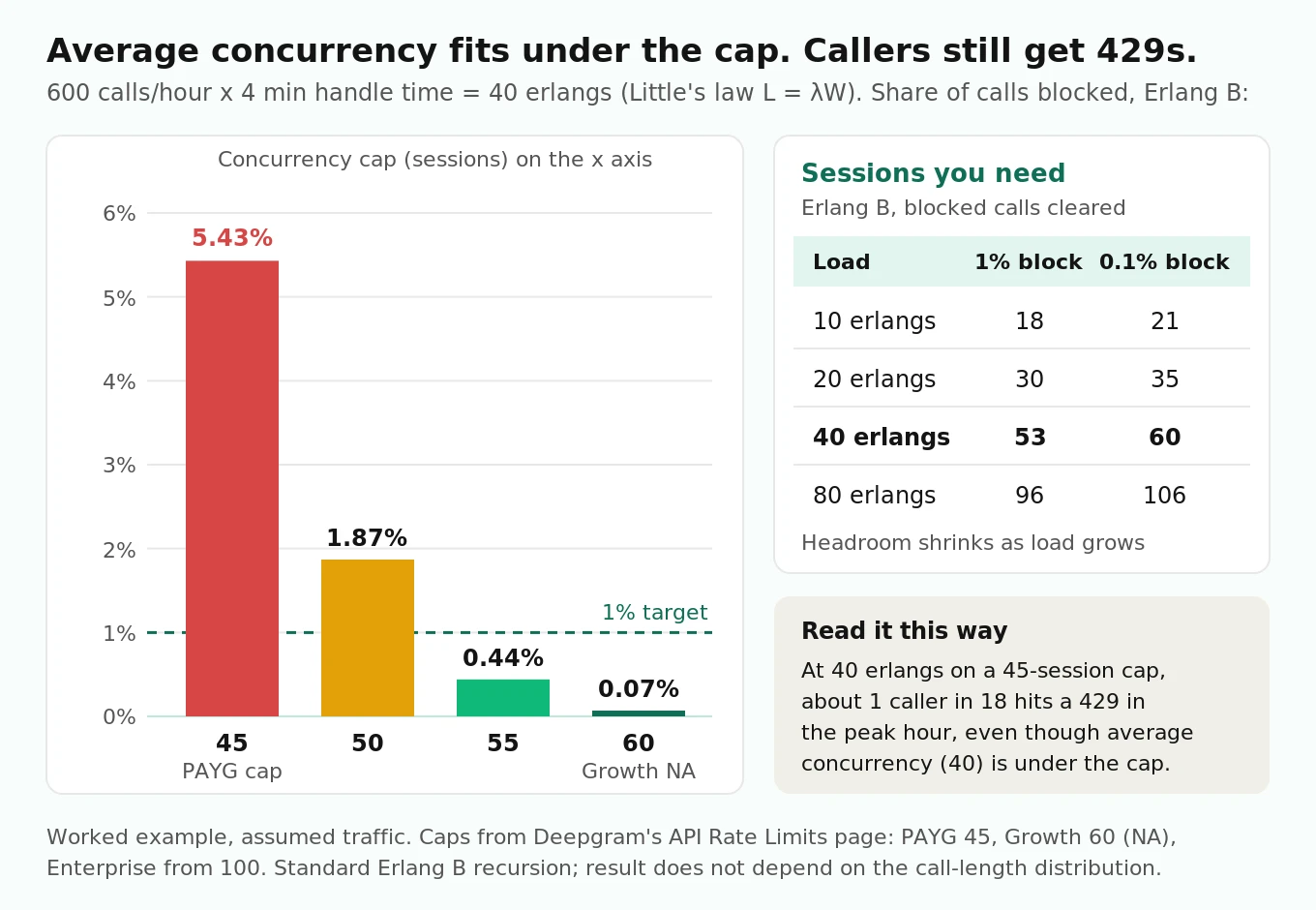
At 40 erlangs:
| Concurrency cap | Callers blocked (429) | What it means at 600 calls/hour |
|---|---|---|
| 45 (PAYG) | 5.43% | About 33 rejected calls in the peak hour |
| 50 | 1.87% | About 11 rejected |
| 55 | 0.44% | About 3 rejected |
| 60 (Growth, NA) | 0.07% | Fewer than 1 |
To hold blocking at or below 1%, you need 53 sessions for 40 erlangs. For 0.1%, you need 60. The headroom ratio also shrinks as you grow: 10 erlangs needs 18 slots for 1% blocking (1.8x), and 80 erlangs needs 96 (1.2x). Small deployments pay the biggest randomness tax.
Two adjustments make this real. If your telephony layer queues calls instead of failing them, Erlang C applies, and you size for the answer-time target in your voice agent SLA. And W is longer than talk time: add handshake and `Settings` time at the front and your close at the back.
For the full story on how concurrency failures show up for callers, see why voice agents fail under concurrency.
Why the harness must stream audio in real time
A voice agent's input is a clock, not a file. Deepgram's own latency measurement guide recommends streaming buffers of 20 to 100 ms of audio. A load test should send 20 ms frames at exactly the rate a phone or browser would.
The frame size depends on your encoding:
| Input format | Bytes per 20 ms frame | Frames per second |
|---|---|---|
| linear16, 16 kHz, mono | 640 | 50 |
| linear16, 24 kHz (the Voice Agent default) | 960 | 50 |
| mulaw, 8 kHz (telephony) | 160 | 50 |
Sending faster than real time breaks the test in three ways:
1. Turn detection runs on audio time. Flux confirms a turn using end-of-turn confidence, with `eot_timeout_ms` defaulting to 5,000 ms after speech. Compress the audio and the silence your caller leaves after a sentence shrinks too. You measure a turn-taking system that never sees a real pause.
2. Speculative replies get distorted. Per Deepgram's speculative replies doc, the agent starts an LLM request when it is moderately confident the turn ended. It holds the audio until the turn is confirmed. Function calls go out right away unless marked `defer_until_eot`. Faster-than-real-time audio changes how often that speculation fires and gets thrown away.
3. It overstates capacity. A session that pushes a 60-second call in 10 seconds holds a slot for a sixth of the real time. Your concurrency numbers stop meaning anything.
Two more rules: keep the mic open between utterances with silence frames, as a real client does (otherwise send KeepAlive every 8 seconds), and pace frames against an absolute clock (`t_start + i × 20 ms`). Relative "sleep 20 ms" loops drift late under load and quietly lower your offered load.
Open versus closed load: the mistake most harnesses make
Schroeder, Wierman, and Harchol-Balter's NSDI 2006 paper, Open Versus Closed: A Cautionary Tale, compared two kinds of load generators. In a closed system, a new job starts only when an old one finishes, like N virtual users looping. In an open system, jobs arrive on their own schedule whether or not the server keeps up. Their first principle is the one that matters here: for the same load, mean response times are much lower in closed systems than in open ones. A closed-loop generator makes your system look faster than it is.
Callers are open. Nobody waits for your agent to finish one call before dialing. The paper also describes a partly-open model: sessions arrive open, and requests inside a session are closed. It reports that the partly-open model acts like a closed system once sessions average 10 or more requests. That's the right model for a voice agent. Calls should arrive on a Poisson schedule. Turns inside a call are closed, because the caller does wait for the agent's reply before speaking again.
In harness terms:
- Wrong: start 45 workers, and when a call ends, have the worker redial immediately. When the agent slows down, calls run longer and new calls stop arriving. The test eases off at exactly the moment it should push.
- Right: draw the gap between call starts from an exponential distribution with your target rate. Let concurrency float. If the system slows, sessions pile up and more 429s appear, just like in production.
Coordinated omission, applied to voice
Gil Tene named the measurement version of this bug "coordinated omission." The wrk2 README explains it: when a load generator waits for each response before sending the next request, slow responses delay the next measurement. The generator ends up skipping the very moments when latency is worst. wrk2's fix is to schedule requests at a constant rate and measure each one from its planned start time, not its actual start.
Voice harnesses have their own version of the bug, and it's easy to miss:
- Late frames move T0. If your event loop is overloaded with JSON parsing, audio decoding, or too many sessions in one process, the last voiced frame goes out late. If you measure from when it actually went out, the server's slowness and your harness's slowness cancel. Time-to-first-audio looks better exactly when things are worst. Measure from the intended send time of that frame.
- Record harness lag as data. Every time a frame is due and the loop is already late, log how late. If the p99 of that lag passes a few milliseconds, the harness is the bottleneck. Split sessions across more processes or machines before you trust any latency number.
- Library pings can fake disconnects. The Python `websockets` client sends a keepalive ping every 20 seconds by default, and `ping_timeout` is also 20 seconds. A starved event loop can miss its own pong deadline and close the socket. That looks like a server drop when it was your harness.
- Don't auto-reconnect. `websockets` supports `async for ws in connect(...)` with built-in retries. That's great in production and wrong in a load test, because it hides the failure you're trying to count.
Measuring time-to-first-audio from end of speech
The metric callers feel is the gap between when they stop talking and when they hear the agent. Define it on the client:
Client TTFA = T1 − T0, where T0 is the intended send time of the last voiced audio frame of the caller's utterance, and T1 is when the first binary agent-audio frame arrives after T0.
You can know T0 exactly because you made the audio. Find the end of speech on the clean source file before adding noise, and store it as a byte offset. Deepgram's measurement guide warns that transcript `start` and `duration` timestamps aren't accurate to the millisecond and shouldn't be used for latency. Ground truth has to come from your audio.
Then compare client TTFA with the server's `total_latency` from `LatencyReport`, which the docs define as time from the end of the user's utterance to the first audio byte. The gap between the two is what the server can't see: network time in both directions, any audio buffering, and harness lag. Under load, watch the trend in that gap separately. A widening gap with a flat `total_latency` points at your network path or your generator, not at Deepgram.
What number should you aim for? Stivers and colleagues' 2009 PNAS study of turn-taking in 10 languages (PubMed) found that the most common gap between turns falls between 0 and 200 ms. Average gaps differ by language, but only within about 250 ms of the cross-language mean. No cascaded agent matches human timing. The study's practical lesson is that callers notice delay well before a second, so set your threshold in hundreds of milliseconds. Our time-to-first-audio guide covers per-hop budgets, and the endpointing comparison covers the turn-detection part of the gap.
How many turns you need for a stable p99
A p99 from 200 turns is mostly noise. The math is distribution-free. The number of samples that land below the true p99 follows a binomial distribution, so you can compute which sorted samples bracket the true value.
| Turns measured at one load step | 95% confidence range for the true p99 |
|---|---|
| 300 | No upper bound possible; even the slowest turn may be below the true p99 |
| 367 | The minimum for the slowest sample to bound the p99 at 97.5% confidence (0.99^367 ≈ 0.025) |
| 1,000 | Between the sample's p98.3 and p99.7 |
| 2,000 | Between p98.55 and p99.45 |
| 5,000 | Between p98.7 and p99.3 |
For p95, 1,000 turns pins the true value between the sample's p93.6 and p96.4.
Two practical points:
- Turns in the same call are correlated. A slow session tends to stay slow. Treat the per-call worst turn as a second metric, and report how many distinct calls each step contains, not just turns.
- The tail grows with call length. Dean and Barroso's The Tail at Scale shows how component tails grow at the service level. If a request fans out to 100 servers with a 1-in-100 slow rate, 63% of requests are slow. A phone call is a chain of turns, not a fan-out, but the arithmetic works the same way. If each turn independently has a 1% chance of passing your p99 threshold, a 10-turn call has a 9.6% chance of hitting at least one such turn, and a 20-turn call has 18.2%. A "p99 turn" target is a "1 in 10 calls" experience for a 10-turn conversation. Set per-call targets on purpose.
With a turn every 8 to 10 seconds per session (an assumption; measure yours), a 15-minute step at 45 sessions yields roughly 4,000 to 5,000 turns, but at 5 sessions only about 500, so low steps need to run longer.
Generating synthetic caller audio
The caller side of the test needs three properties: it's realistic enough to make STT work, it has known end-of-speech timestamps, and it doesn't compete with the system under test for capacity.
That last point is easy to miss. Aura-2 TTS over REST is limited to 15 concurrent requests on Pay As You Go, and the limit is per project, the same project your agent sessions run in. Generating caller audio live during the test means rationing those slots, and your generator can fall behind. Generate the audio once, ahead of time, and store raw PCM with its metadata.
# make_callers.py -- pre-generate caller audio before the test (illustrative)
import json, os
import httpx
import numpy as np

KEY = os.environ["DEEPGRAM_API_KEY"]
VOICES = ["aura-2-thalia-en", "aura-2-orion-en", "aura-2-luna-en", "aura-2-zeus-en"]

def speak(text, voice):
    r = httpx.post(
        "https://api.deepgram.com/v1/speak",
        params={"model": voice, "encoding": "linear16",
                "sample_rate": 16000, "container": "none"},   # no WAV header
        headers={"Authorization": f"Token {KEY}"},
        json={"text": text}, timeout=30)
    r.raise_for_status()
    return r.content

def speech_end_byte(pcm, frame=320, thresh=400):
    """Last 20 ms frame whose mean amplitude passes a threshold, on CLEAN audio."""
    x = np.frombuffer(pcm, dtype=np.int16)
    for i in range(len(x) // frame - 1, -1, -1):
        if np.abs(x[i * frame:(i + 1) * frame]).mean() > thresh:
            return (i + 1) * frame * 2
    return len(pcm)

def mix(pcm, noise, snr_db):
    """Add noise at a target signal-to-noise ratio. Compute speech end BEFORE this."""
    s = np.frombuffer(pcm, dtype=np.int16).astype(np.float32)
    n = np.resize(noise, s.shape).astype(np.float32)
    k = np.sqrt((s ** 2).mean() / ((n ** 2).mean() * 10 ** (snr_db / 10)))
    return np.clip(s + k * n, -32768, 32767).astype(np.int16).tobytes()
A few details matter more than they look:
- Use `container=none`. The REST default is a WAV container. Stream a WAV file as raw linear16 and its 44-byte header goes out as noise at the start of every utterance.
- Find end of speech on clean audio, then add noise. Amplitude-based detection on noisy audio stretches the speech region into the noise, and every TTFA you measure comes out too short.
- Vary the callers. Use several voices, short and long utterances, and an SNR mix such as clean, 20 dB, and 10 dB. A load test with one clean voice hides the groups of callers who make STT work hardest. Our synthetic callers guide covers persona and script design.
- Test the codec you'll ship. If production traffic comes through phone lines, convert the bank to 8 kHz mulaw (for example, `ffmpeg -f s16le -ar 16000 -ac 1 -i in.raw -ar 8000 -f mulaw out.ulaw`), set `audio.input` to `mulaw` at 8000 Hz, and send 160-byte frames. TTS audio that never went through a phone codec is easier than real calls.
- Script whole calls, not single lines. Each script is a list of utterances that make a coherent conversation for your agent's prompt. That way, turn counts, tool calls, and handle time look like production.
Load profiles: step ramp, soak, and spike
Each profile answers a different question. The stress testing guide covers the broader discipline. Here they are, sized to a 45-session Pay As You Go cap with real costs.
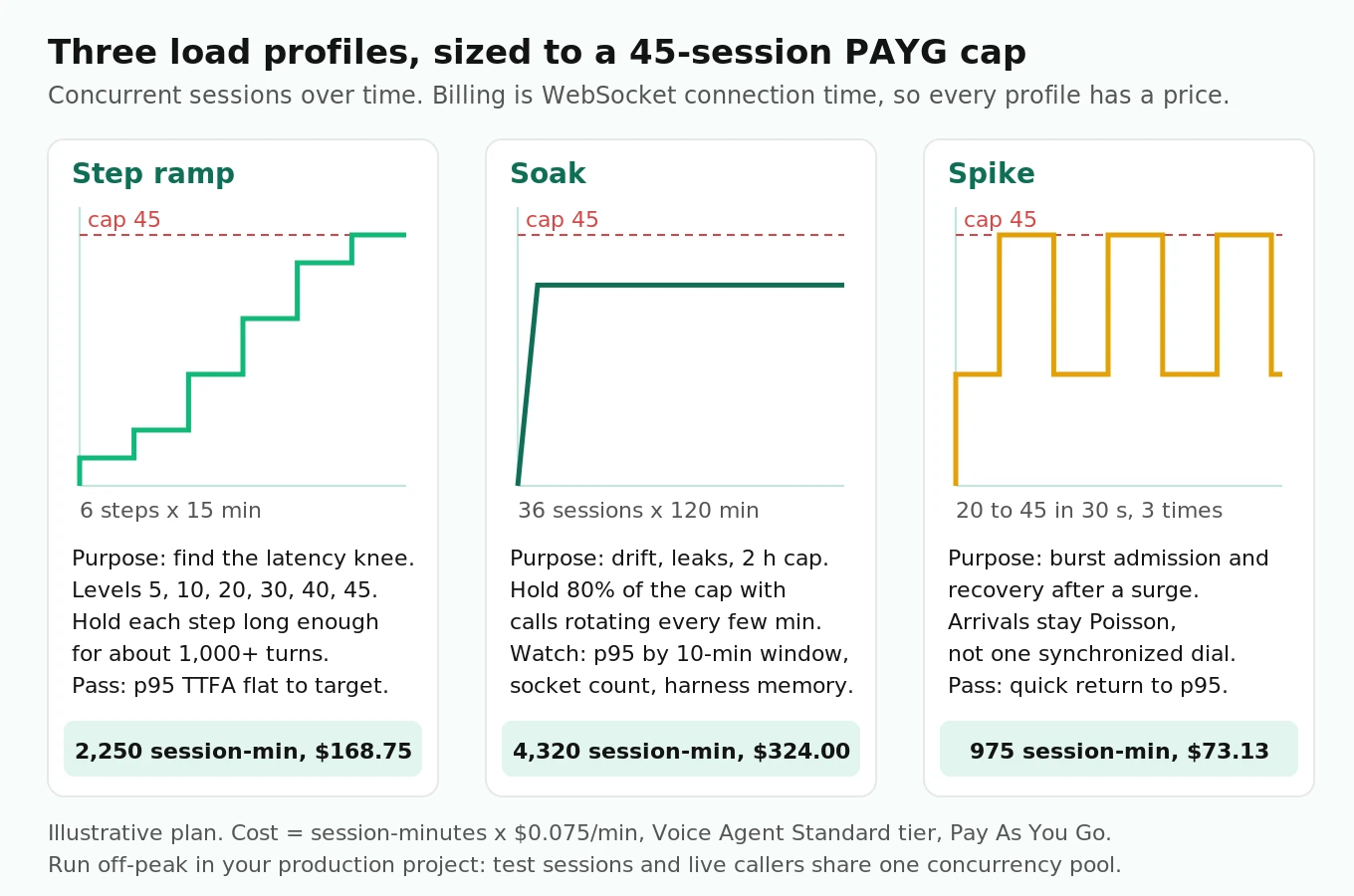
| Profile | Shape (illustrative) | Question it answers | Session-minutes | Cost at $0.075/min |
|---|---|---|---|---|
| Step ramp | 5, 10, 20, 30, 40, 45 sessions; 15 min each | Where is the latency knee? | 2,250 | $168.75 |
| Soak | 36 sessions (80% of cap) for 120 min, calls rotating | Does latency drift? Do sockets or memory leak? | 4,320 | $324.00 |
| Spike | Baseline 20, jump to 45 within 30 s, hold 5 min, three times in 30 min | How do admission and recovery behave? | 975 | $73.13 |
| Over-cap probe | Offer 55 for 5 min against a cap of 45 | Do 429s get handled, logged, and retried with backoff? | About 225 (only accepted sessions bill) | About $17 |
About $580 covers a full Pay As You Go plan, and that's worth budgeting before you start. Drive the ramp by arrival rate, not by a fixed session count. Using Little's law backward, a target of 30 concurrent sessions with 4-minute calls means 7.5 call starts per minute. The spike should raise the arrival rate sharply while arrivals stay random. A burst where every session dials in the same millisecond tests your NAT gateway, not Deepgram.
The soak profile is where the 2-hour cap shows up. Use normal call lengths, so sessions rotate every few minutes and none reaches the cap. Then run one dedicated long session that deliberately crosses 1 hour 55 minutes. That checks that your client handles `MAXIMUM_SESSION_LENGTH_APPROACHING` by starting a new session and carrying the history over in `agent.context.messages`. That's the honest answer to "how stable is Deepgram for long-duration calls": a single session can't go past 2 hours, so the real test is your handover.
How to load test Deepgram's Voice Agent API
1. Size the target. Take your peak-hour call count and average handle time, compute erlangs with Little's law, and use Erlang B to choose the concurrency you need at your blocking target. Check that number against your plan's regional cap.
2. Pick the project and window. Test in the project and region you'll use in production, outside peak hours, because test sessions take production concurrency. Tag sessions with `"tags": ["loadtest"]` in `Settings` so the usage can be filtered later.
3. Build the caller bank. Pre-generate scripted multi-turn calls with several voices and noise levels, in your production codec. Store end-of-speech byte offsets measured on the clean audio.
4. Place the generator correctly. Run it on cloud machines in the same region your production client runs in. Give them dedicated outbound IPs or a properly sized NAT gateway, and run few enough sessions per process that harness lag stays near zero.
5. Run a single-session baseline. Thirty minutes at concurrency 1 gives the uncontended TTFA distribution that every later step is compared against.
6. Run the step ramp with open arrivals. Poisson call starts, real-time 20 ms frames, silence between utterances, and steps long enough for at least 1,000 turns.
7. Record every turn and every failure. Store T0, T1, playback length, the full `LatencyReport`, all `Warning` and `Error` codes, handshake status, and harness lag, keyed by `request_id`.
8. Run the soak and spike profiles, plus the over-cap probe, once the ramp is clean.
9. Find the knee and the error onset, then split any slowdown by stage using the diagnosis table below.
10. Write the capacity number down. Record the highest concurrency at which every threshold passed, the plan, region, models, and date. Re-test after any model, prompt, region, or plan change.
A runnable-shaped asyncio harness
The harness below follows the documented message flow and the rules above: Poisson call arrivals, an absolute 20 ms frame clock, silence between utterances, T0 taken from intended send time, T1 from the first audio byte, caller playback time taken into account before the next utterance, and 429s recorded as outcomes instead of being retried. It's simplified. There's no barge-in, no tool handling, and one process. It runs end to end against a local mock WebSocket server. Read the cost section before pointing it at Deepgram.
# loadtest_agent.py -- simplified, illustrative harness. Python 3.11+, websockets 14+.
import asyncio, json, os, random, time
from websockets.asyncio.client import connect
from websockets.exceptions import ConnectionClosed, InvalidStatus

URL = os.environ.get("AGENT_URL", "wss://agent.deepgram.com/v1/agent/converse")
KEY = os.environ["DEEPGRAM_API_KEY"]
IN_RATE, OUT_RATE = 16000, 24000
FRAME_S = 0.020
FRAME_BYTES = int(IN_RATE * FRAME_S) * 2          # 640 bytes, linear16 mono
SILENCE = b"\x00" * FRAME_BYTES

SETTINGS = {
    "type": "Settings",
    "tags": ["loadtest"],
    "audio": {
        "input": {"encoding": "linear16", "sample_rate": IN_RATE},
        "output": {"encoding": "linear16", "sample_rate": OUT_RATE, "container": "none"},
    },
    "agent": {
        "listen": {"provider": {"type": "deepgram", "version": "v2", "model": "flux-general-en"}},
        "think": {"provider": {"type": "open_ai", "model": "gpt-4o-mini"},
                  "prompt": "You are a brief, friendly pharmacy phone agent."},
        "speak": {"provider": {"type": "deepgram", "model": "aura-2-thalia-en"}},
    },
}

class Caller:
    """One synthetic caller: a script of (pcm, speech_end_byte) utterances."""
    def __init__(self, script):
        self.script, self.idx = list(script), 0
        self.buf, self.pos, self.end_byte = b"", 0, 0
        self.next_start = None            # monotonic time the next utterance may begin
        self.turn = None                  # dict for the turn in flight
        self.turns, self.lag = [], []

    def frame(self, due):
        if not self.buf and self.idx < len(self.script) and self.next_start and due >= self.next_start:
            self.buf, self.end_byte = self.script[self.idx]
            self.pos, self.idx, self.next_start = 0, self.idx + 1, None
            self.turn = {"t0": None, "t1": None, "bytes": 0, "server": None}
        if not self.buf:
            return SILENCE
        chunk = self.buf[self.pos:self.pos + FRAME_BYTES].ljust(FRAME_BYTES, b"\x00")
        self.pos += FRAME_BYTES
        if self.turn["t0"] is None and self.pos >= self.end_byte:
            self.turn["t0"] = due + FRAME_S   # intended time the last voiced frame is fully sent
        if self.pos >= len(self.buf):
            self.buf = b""
        return chunk

async def mic(ws, caller, stop):
    t_start, i = time.monotonic(), 0
    try:
        while not stop.is_set():
            due = t_start + i * FRAME_S   # absolute clock: never "catch up" by sleeping less
            wait = due - time.monotonic()
            if wait > 0:
                await asyncio.sleep(wait)
            else:
                caller.lag.append(-wait)  # harness fell behind; keep it as evidence
            await ws.send(caller.frame(due))
            i += 1
    finally:
        stop.set()

async def listen(ws, caller, stop, gap_s=0.6):
    try:
        async for msg in ws:
            now, t = time.monotonic(), caller.turn
            if isinstance(msg, bytes):
                if t and t["t0"] and t["t1"] is None:
                    t["t1"] = now            # first agent audio byte after end of speech
                if t:
                    t["bytes"] += len(msg)
                continue
            ev = json.loads(msg)
            kind = ev.get("type")
            if kind == "LatencyReport" and t:
                t["server"] = ev
            elif kind == "AgentAudioDone" and t and t["t1"]:
                playback_end = t["t1"] + t["bytes"] / (OUT_RATE * 2)
                caller.turns.append(t)
                caller.turn = None
                caller.next_start = max(playback_end, now) + gap_s
                if caller.idx >= len(caller.script):
                    return
            elif kind in ("Error", "Warning"):
                caller.turns.append({"event": kind, "code": ev.get("code"), "at": now})
                if kind == "Error":
                    return
    finally:
        stop.set()

async def session(sid, script, out):
    rec = {"sid": sid, "dial": time.monotonic(), "outcome": "ok"}
    caller, stop = Caller(script), asyncio.Event()
    try:
        async with connect(URL, additional_headers={"Authorization": f"Token {KEY}"},
                           open_timeout=10) as ws:
            welcome = json.loads(await ws.recv())
            rec["request_id"] = welcome.get("request_id")
            await ws.send(json.dumps(SETTINGS))
            while json.loads(await ws.recv()).get("type") != "SettingsApplied":
                pass
            rec["setup_s"] = time.monotonic() - rec["dial"]
            caller.next_start = time.monotonic() + 0.5
            tasks = [asyncio.create_task(mic(ws, caller, stop)),
                     asyncio.create_task(listen(ws, caller, stop))]
            await stop.wait()
            for task in tasks:
                task.cancel()
    except InvalidStatus as e:
        rec["outcome"] = f"http_{e.response.status_code}"      # 429 = at project cap
    except (ConnectionClosed, OSError, asyncio.TimeoutError) as e:
        rec["outcome"] = type(e).__name__
    rec["turns"], rec["lag"] = caller.turns, caller.lag
    out.append(rec)

async def run(calls_per_min, minutes, scripts):
    out, tasks = [], []
    t, end = time.monotonic(), time.monotonic() + minutes * 60
    while True:
        t += random.expovariate(calls_per_min / 60)   # open, Poisson call arrivals
        if t > end:
            break
        await asyncio.sleep(max(0.0, t - time.monotonic()))
        tasks.append(asyncio.create_task(session(len(tasks), random.choice(scripts), out)))
    await asyncio.gather(*tasks)
    return out

def summarize(out):
    ttfa = sorted((t["t1"] - t["t0"]) * 1000 for r in out for t in r["turns"] if t.get("t1"))
    lag = sorted(l * 1000 for r in out for l in r["lag"])
    q = lambda xs, p: xs[min(len(xs) - 1, int(p * len(xs)))] if xs else None
    return {"sessions": len(out),
            "outcomes": {o: sum(r["outcome"] == o for r in out) for o in {r["outcome"] for r in out}},
            "turns": len(ttfa), "ttfa_p50": q(ttfa, .50), "ttfa_p95": q(ttfa, .95),
            "ttfa_p99": q(ttfa, .99), "harness_lag_p99_ms": q(lag, .99)}
Run it with a script bank from the generator above:
# Each script is a list of (pcm_bytes, speech_end_byte) tuples for one whole call.
out = asyncio.run(run(calls_per_min=7.5, minutes=15, scripts=scripts))   # about 30 concurrent at 4-min calls
print(summarize(out))
Notes on the choices it makes:
- `next_start = max(playback_end, now) + gap_s`. `AgentAudioDone` means the server finished sending, and TTS audio can arrive faster than real time. A real caller is still listening. Speaking again on `AgentAudioDone` turns the test into a barge-in stress test and shortens every call. Playback length is bytes ÷ (24,000 × 2) for 24 kHz linear16.
- `InvalidStatus` carries the HTTP status. In `websockets` 14 and later, a rejected upgrade raises `InvalidStatus`, and `e.response.status_code` holds the 429.
- One `Settings` per socket. The harness never sends `Settings` twice, and it never streams before `SettingsApplied`.
- Scaling out. If `harness_lag_p99_ms` rises, run more processes and merge the results.
For what to persist from each session beyond latency, see what to log on every voice agent call.
Reading the results: the knee, error onset, and per-stage attribution
Plot four lines against concurrency: client TTFA p50, p95, and p99, and the 429 rate. You're looking for two points.
The latency knee is the lowest concurrency where p95 TTFA rises clearly above the single-session baseline and stays there. A workable rule is the first step where p95 is more than 20% above baseline, or where its slope against concurrency doubles. Use the confidence ranges from the sample-size table, so you don't call noise a knee. Your safe operating point sits one step below the knee.
Error onset is the lowest concurrency where any of these become non-zero: handshake 429s, `Error` events, abnormal closes, or timed-out handshakes. If the knee shows up before the cap, the bottleneck is downstream, usually the LLM. If 429s show up before the cap, something is holding slots: leaked sessions from an earlier run, production traffic, or a misread plan.
Then attribute every slowdown before acting on it:
| Symptom under load | Check first | Likely cause | What to do |
|---|---|---|---|
| `ttt_token_latency` climbs; `SLOW_THINK_REQUEST` warnings | LLM provider metrics | LLM queueing or rate limits, especially with your own LLM endpoint and key | Raise provider rate limits, add a fallback `think` provider, shorten prompts |
| `THINK_REQUEST_FAILED`, then `FAILED_TO_THINK` | Provider 429s or errors | LLM provider throttling | Fallback provider; this is a capacity limit, not a Deepgram fault |
| `tts_latency` climbs; `SLOW_SPEAK_REQUEST` | TTS provider | TTS contention or a third-party voice provider's limit | Fallback `speak` provider; compare a Deepgram voice |
| `stt_latency` climbs | Audio format, noise mix | STT under heavier audio, or a mismatched `Settings` format | Check for `USER_AUDIO_FORMAT`; compare clean vs noisy cohorts |
| Client TTFA rises, `total_latency` flat | Harness lag, RTT | Network path or an overloaded generator | Fix the generator before blaming the API |
| Handshake timeouts with no `request_id` | NAT metrics | NAT port exhaustion on your side | See gotchas; failed attempts never reach Deepgram |
| `CLIENT_MESSAGE_TIMEOUT` | Event-loop lag | Harness stopped sending audio | Fewer sessions per process |
| More tool hits than turns at your mock backend | `FunctionCallCancelled` count | Speculative tool calls dispatched before turn confirmation | Mark side-effect tools `defer_until_eot: true` |
The last row surprises teams. Under the speculative-reply design, a function call can go out before the turn is confirmed. If the caller keeps talking, the call is cancelled, but a server-side endpoint has already run. Under load, with slower turns and more resumed speech, your tool backend can see more requests than there are confirmed turns. Load test the backend at that inflated rate, and count `FunctionCallCancelled` events per turn.
For deeper STT-side analysis, including stability across long sessions, pair this with our guide to Deepgram STT latency and stability.
Gotchas that only appear at scale
- NAT port exhaustion looks like a Deepgram outage. Deepgram's NAT exhaustion guide describes intermittent handshake timeouts that never reach Deepgram's edge, so there's no `request_id` to trace. On AWS, a NAT Gateway supports up to 55,000 concurrent connections per unique destination (protocol, IP, port). That budget is shared by everything routed through the gateway. Check `ErrorPortAllocation` in CloudWatch. Avoid tight reconnect loops and narrow source-port ranges.
- Leaked sessions eat your cap and your budget. A crashed harness can leave sockets open. They count against concurrency and bill until they close. Before each run, make sure no stale sessions are still holding slots.
- The audio format is in two places. The `audio.input` encoding and sample rate must match the bytes you send. If they don't, you get `USER_AUDIO_FORMAT` or bad transcripts, which can look like STT degradation.
- The default output may limit your choices. Flux TTS, the default `speak` provider when you leave it out, streams only raw `linear16`, `mulaw`, or `alaw`. Asking it for a container or compressed format returns `INVALID_SETTINGS`. Set the voice explicitly so the harness and production match.
- Prompt length is capped. `PROMPT_TOO_LONG` warns that a managed-LLM prompt over 25,000 characters was truncated. A truncated prompt changes behavior and token counts, which changes latency.
- Regions differ. Growth gets 60 Voice Agent connections in North America but 45 in Europe, Australia, and India. A test that passes on `agent.deepgram.com` doesn't certify an EU deployment.
A pass/fail scorecard you can copy
These are starting thresholds, not industry standards. Tune them to your callers and your SLA.
| Metric (per load step) | Definition | Suggested pass | Minimum sample |
|---|---|---|---|
| Client TTFA p50 | T1 − T0, intended end of speech to first audio byte | Within 15% of single-session baseline | 1,000 turns |
| Client TTFA p95 | Same | At or below your SLA target (for example 1,200 ms) | 1,000 turns |
| Per-call worst-turn p90 | Slowest turn in each call | At or below 2x the p95 target | 200 calls |
| Admission | Handshakes rejected with 429 at target concurrency | 0 below cap; matches Erlang B above it | All attempts |
| Fatal errors | `Error` events per 1,000 sessions | 0 excluding the planned 2-hour test | All sessions |
| Client–server gap | Client TTFA − `total_latency`, p95 | Stable within 50 ms across steps | 1,000 turns |
| Harness lag | Lateness of scheduled frames, p99 | Under 5 ms, or the step is invalid | All frames |
| Soak drift | p95 TTFA, last 10 min vs first 10 min | Within 10% | 2 hours |
The harness-lag row is a validity check, not a performance metric. If it fails, throw out the step. Keep the scorecard fixed across runs. A capacity number only means something when it was measured the same way each time, which is why Evalgent re-runs the same protocol as a regression check after model, prompt, or plan changes.
Where independent evaluation fits
A load test answers one question: does latency and admission hold at your number? It doesn't tell you whether the agent still does the job at that number. That includes whether transcripts of noisy callers stay accurate, whether tool arguments stay correct when the LLM is queued, and whether prompts still get followed when the speculative window resumes more often. Evalgent runs this kind of real-time synthetic load as an independent auditor. It scores each conversation for task success, not only timing, so a pre-launch capacity sign-off or a vendor bake-off rests on measurements nobody on the vendor side controls. For the wider testing picture, see the Deepgram STT testing guide and the AI voice agent testing pillar.
Frequently asked questions
What is the best way to load test Deepgram's Voice Agent API?
Size the target with Little's law and Erlang B. Pre-generate multi-turn caller audio, open sessions on a Poisson schedule, and stream 20 ms frames in real time. Measure time-to-first-audio from the intended end of speech, and log every `LatencyReport`. Run a step ramp, a soak, and a spike in your production project's region, off-peak.
How many concurrent connections does the Deepgram Voice Agent API allow?
Per Deepgram's rate-limit docs, Pay As You Go allows up to 45 concurrent Voice Agent connections in every region. Growth allows 60 in North America and 45 elsewhere. Enterprise starts at 100 and can be raised through sales. Limits apply per project, and extra projects don't add concurrency.
Can Deepgram handle thousands of simultaneous calls without degradation?
Not on self-serve plans, which top out at 60 Voice Agent connections. Thousands of concurrent sessions needs an Enterprise agreement with a negotiated limit. Even then, a higher cap only allows the traffic. Prove latency holds with a real-time load test at that concurrency, and check that your LLM provider's rate limits scale too.
What happens when you exceed the concurrency limit?
New connections get `429: Too Many Requests` at the WebSocket handshake, and existing sessions continue. Treat the 429 as a blocked call. Back off exponentially instead of retrying in a tight loop. Rapid reconnects can also exhaust NAT ports on your side, which causes timeouts that look like a Deepgram problem.
How is Deepgram's Voice Agent API usage billed?
By WebSocket connection time. One hour connected equals one hour of usage, whether audio is flowing or the socket is idling on KeepAlive. The Standard tier is listed at $0.075 per minute on Pay As You Go and $0.068 on Growth. A 45-session, 15-minute step costs about $50.63 at the Pay As You Go rate.
How quickly can Deepgram's voice agent respond to user utterances?
Measure it yourself, because it depends on the models you choose, your region, and your load. Use client TTFA, from the intended end of speech to the first agent audio byte, and compare it with `LatencyReport.total_latency`. Deepgram's docs list Flux end-of-turn detection at about 100 to 500 ms, before LLM and TTS time.
How many samples do you need for a stable p99 latency?
At least 367 turns before the slowest sample can bound p99 at 97.5% confidence. About 1,000 turns pins the true p99 between the sample's p98.3 and p99.7. About 5,000 narrows it to p98.7 to p99.3. Turns within a call are correlated, so also report distinct calls and per-call worst turns.
Why must voice load tests stream audio in real time?
Turn detection, speculative replies, and session occupancy all run on audio time. Compressed audio shortens the pauses the endpointer relies on. It changes how often speculative LLM work gets thrown away, and it holds each slot for less time than a real call. The result is lower latency and higher capacity than production will deliver.
The bottom line
A Deepgram Voice Agent load test is only as honest as its clock: open Poisson arrivals, real-time 20 ms frames, T0 taken from intended send time, and enough turns per step to bound the p99. Size with Erlang B rather than average concurrency, attribute every slowdown by `LatencyReport` stage, and write down the highest concurrency where every threshold held.
Related Articles

How to automate voice agent testing: synthetic callers vs manual QA
Learn how ai test automation replaces manual QA for voice agents. Compare synthetic callers vs human testers, with a 5-step framework to scale without hiring.
Read more
AI Agent Testing vs Voice Agent Testing: What General Tools Miss for Voice
AI agent testing measures text outputs. Voice agent testing measures behaviour through an acoustic pipeline. Five failure categories general tools miss.
Read more