Deepgram STT latency, diarization, and long-call stability: how they work and how to measure them
On this page
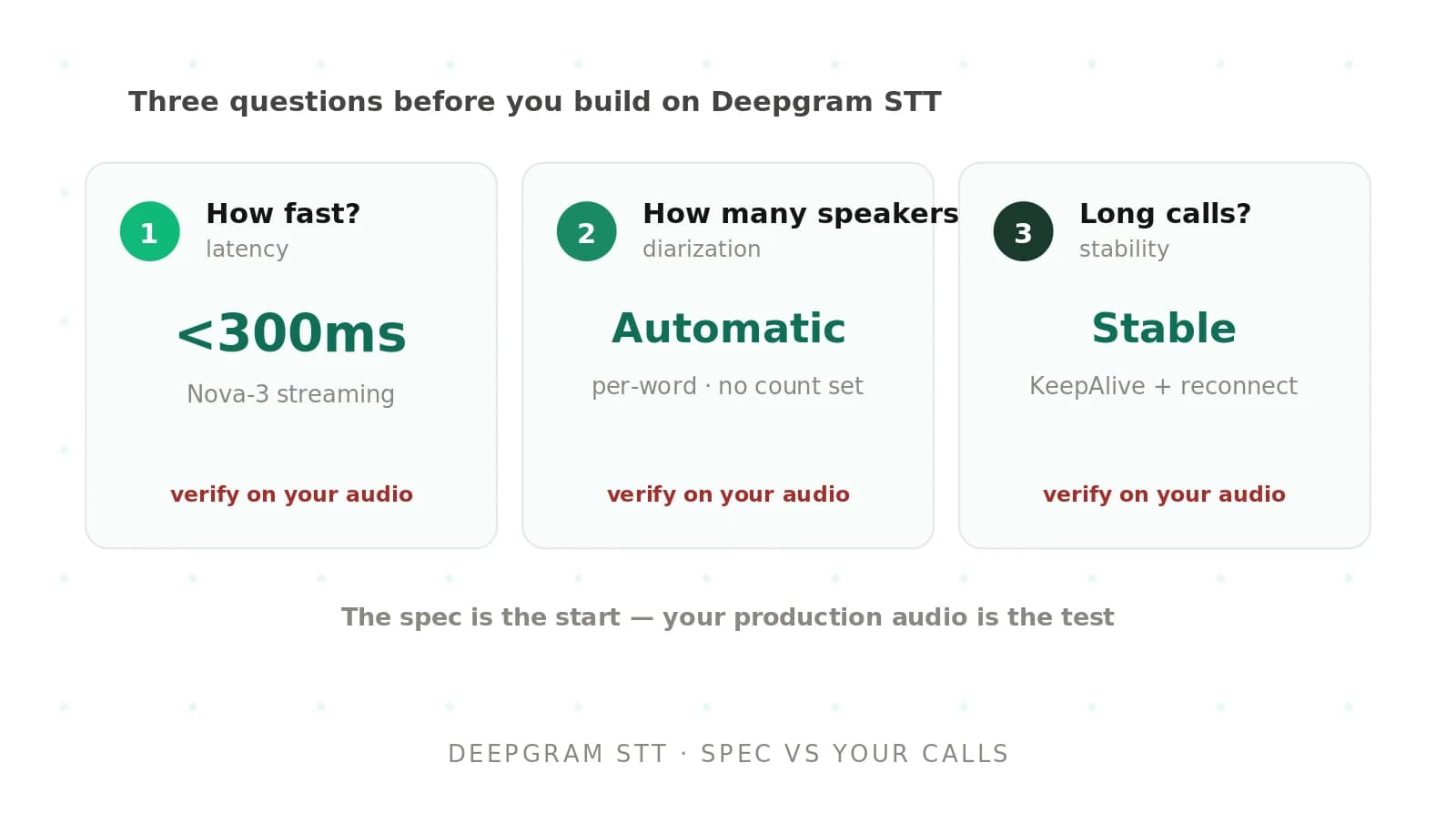
Three questions come up before a team commits to Deepgram for a voice agent. How fast is it? How many speakers can it tell apart? Does it hold up on a 30-minute call with hold music? The short answers are in the docs. The useful answers are not, because each one depends on a clock you have to define yourself.
This post goes one level below the docs: how Nova-3 and Flux finalize a transcript, how to measure latency so the number means something, how diarization error rate is scored and why phone calls break benchmark intuition, and what fails at minute 20 of a long call.
For the full Deepgram test plan (WER, keyterms, load, pricing), read our Deepgram STT testing guide. Every Deepgram parameter below was checked against developers.deepgram.com in October 2026. Evalgent evaluates voice agents across STT vendors, so the focus here is on what you can measure yourself, not on any vendor's promise.
Four latency numbers that get confused
"Deepgram latency" can mean four intervals that differ by hundreds of milliseconds.
| Metric | Clock starts | Clock stops | What it captures |
|---|---|---|---|
| Transcription latency | Audio reaches Deepgram | Result leaves Deepgram | Server processing only; the vendor number |
| Transcript latency | Audio leaves your client | Interim result arrives | Network, buffering, and processing |
| First-partial latency | Caller starts a word | First interim contains it | How fast you can react, for example to barge-in |
| Finalization latency | Caller stops speaking | `speech_final` or `EndOfTurn` arrives | How long the agent waits before it can answer |
Deepgram's latency guide uses the first two terms and adds a voice agent metric it calls end-of-turn (EOT) latency. Its rough ranges are worth knowing: 20 to 200 ms of network transit, 150 to 300 ms of transcription latency, 200 to 500 ms of total transcript latency, and 100 to 500 ms from speech end to a Flux `EndOfTurn` event.
For a voice agent, finalization latency is the one that matters, because the caller hears silence until it ends. Our guide to time to first audio covers the rest of the chain.
How Nova-3 decides a transcript is final
Nova-3 streams on `/v1/listen`. It returns `Results` messages carrying two booleans that people often confuse.
`is_final`: Deepgram will not revise the text for this audio segment again. Without `interim_results=true`, every message you receive is final.
`speech_final`: Deepgram's endpointing detected a pause long enough to mark the end of an utterance.
Deepgram's endpointing and interim results guide spells out the trap. A long utterance can produce several `is_final: true` messages before `speech_final: true` arrives. Read only the `speech_final` message and you lose the start of the sentence. Buffer every `is_final` transcript and flush when `speech_final` arrives.
Here is an illustrative message sequence for a caller reading a phone number with a short hesitation:
| Msg | Audio window (s) | `is_final` | `speech_final` | Transcript |
|---|---|---|---|---|
| 1 | 0.00 to 1.10 | false | false | my number is |
| 2 | 0.00 to 2.20 | false | false | my number is four one five |
| 3 | 0.00 to 2.60 | true | false | my number is four one five |
| 4 | 2.60 to 4.30 | false | false | five five five |
| 5 | 2.60 to 4.80 | true | true | five five five two one two |
The full utterance is message 3 plus message 5. An agent that waits for message 5 gets the right text. An agent that acts on message 3 because it "looks final" answers before the caller has finished.
What endpointing actually waits for
The endpointing parameter sets how many milliseconds of silence Deepgram's voice activity detector must see before it sets `speech_final`. It is on by default at 10 ms. Deepgram's own guidance is 10 ms for chatbots that expect short utterances and 300 to 500 ms for conversations where people pause mid-thought. You can also set `endpointing=false`, in which case finals arrive at a cadence Deepgram's chunking decides.
The 10 ms default surprises teams that start from sample code. Its `speech_final` flags fire inside digit strings, after "um", and at short breath pauses. The usual fix, raising endpointing to 500 ms, removes the cut-offs and adds 490 ms to every turn. The best endpointing approaches post compares the alternatives.
UtteranceEnd is a backstop, not a turn detector
`utterance_end_ms` adds a separate `UtteranceEnd` message. Per Deepgram's utterance end docs, it watches for a gap of the configured length after the last finalized word. Five details matter for voice agents:
- It requires `interim_results=true`.
- The accepted range is 1,000 to 5,000 ms on hosted Deepgram. Interim results typically arrive about once per second, so values under 1,000 ms would not help even if allowed.
- It ignores gaps inside a single final result. If a final contains a 2-second pause between two words, `UtteranceEnd` will not fire on that pause.
- It fires on a gap even when speech continues after the gap. Deepgram says this makes it less suited to voice agents that need complete thoughts.
- A message with `last_word_end: -1` means the result was already finalized before the condition was met. Ignore it, or you will process a stale turn end twice.
Use `UtteranceEnd` as a safety net for noisy lines where the VAD never sees clean silence, not as your primary turn signal.
Finalize is your manual flush
Sending `{"type": "Finalize"}` forces Deepgram to process buffered audio and return finals now. The response may carry `from_finalize: true`, though not when little audio is buffered. Use it when your own turn detector decides the caller is done, and before closing a connection you plan to replace.
How Flux changes the clock
Flux runs on `/v2/listen` and replaces endpointing with model-based turn detection. Instead of `Results` messages with booleans, it emits turn events. The Flux state machine documents the rules:
- `Update` messages arrive for about every 0.25 seconds of transcribed audio.
- `StartOfTurn` always carries a non-empty transcript, which is why Deepgram recommends it over an external VAD as the barge-in trigger.
- `EagerEndOfTurn` fires early when the model is moderately confident the turn is over. `TurnResumed` cancels it if the caller keeps talking.
- `EndOfTurn` carries a `trigger` field: `model`, `manual` (you sent `ForceEndTurn`), or `timeout` (the silence limit hit).
- If no `TurnResumed` occurs, the `EndOfTurn` transcript exactly matches the preceding `EagerEndOfTurn` transcript, so a response you start generating on the eager event stays valid.
The tuning knobs, from Deepgram's end-of-turn configuration:
| Parameter | Range | Default | Effect when raised |
|---|---|---|---|
| `eot_threshold` | 0.5 to 1.0 | 0.7 | Fewer false turn ends, slightly slower |
| `eager_eot_threshold` | 0.3 to 0.9 | Not set | Fewer speculative LLM calls, smaller latency gain |
| `eot_timeout_ms` | 500 to 60,000 | 5,000 | Longer wait for callers who pause |
`eager_eot_threshold` must be less than or equal to `eot_threshold`, or the connection is rejected. Setting `eot_threshold=1.0` turns off natural end-of-turn detection so your own logic drives turns with `ForceEndTurn`.
On Flux you measure time to `EndOfTurn`, broken out by `trigger`. A `timeout` turn means the model never became confident the caller was done, and it adds the full `eot_timeout_ms` of dead air. With eager mode on, also track the `TurnResumed` rate: each resume is an LLM call you paid for and threw away.
Nova-3 and Flux on the three topics in this post
| Topic | Nova-3 (`/v1/listen`) | Flux (`/v2/listen`) |
|---|---|---|
| Turn signal | `speech_final` from VAD endpointing; optional `UtteranceEnd` | `EndOfTurn` from the model; optional `EagerEndOfTurn` |
| Partial results | `interim_results=true` | `Update` events about every 0.25 s |
| Diarization | Supported in streaming | Not supported, per the comparison table |
| Idle connection | KeepAlive messages; Deepgram lists 10 s on the KeepAlive page and 12 s in the comparison table | Pings replace KeepAlive; 60 s timeout |
| Multichannel | Supported | Listed as supported on the multichannel page |
The diarization row is a real constraint. Deepgram's Flux and Nova-3 comparison marks diarization as unavailable on Flux, while the diarization page's badges list Flux streaming. When Deepgram pages disagree, test on your account before designing around either. If you need real-time speaker labels and Flux turn detection, plan on separate channels. For the idle timeout, design for the stricter 10 seconds.
A worked latency budget for one turn
Here is the STT share of one turn, written as an upper bound. The values are illustrative assumptions, not measurements:
time to final ≤ chunk wait + uplink + endpoint silence + server processing + downlink + client handling
| Component | Assumption | Why |
|---|---|---|
| Chunk wait | 20 ms | You send 20 ms frames; Deepgram recommends 20 to 100 ms buffers |
| Uplink | 30 ms | Same-region client; Deepgram's range is 20 to 200 ms |
| Endpoint silence | 300 ms | `endpointing=300` |
| Server processing | 200 ms | Inside Deepgram's 150 to 300 ms transcription range |
| Downlink | 30 ms | Symmetric with uplink |
| Client handling | 5 ms | JSON parse and dispatch |
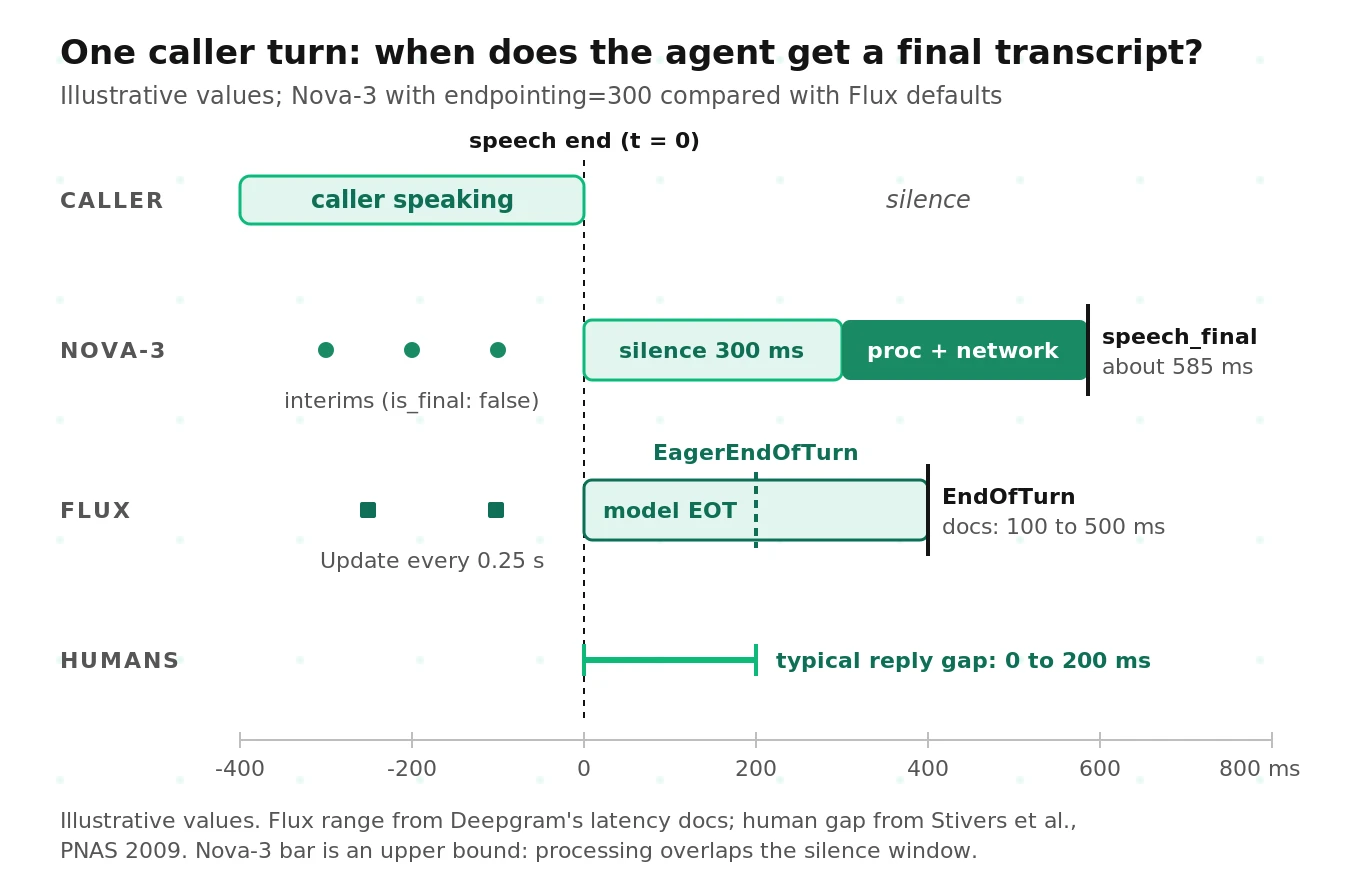
That sums to 585 ms. It is an upper bound because the server keeps processing during the silence window, so some of the 200 ms overlaps the 300 ms. Real finalization latency at `endpointing=300` is usually somewhere between the silence window and this sum.
Now change one knob:
| Setting | Upper-bound time to final | Risk |
|---|---|---|
| `endpointing=10` | 295 ms | Cuts callers off mid-number |
| `endpointing=300` | 585 ms | Balanced starting point |
| `endpointing=500` | 785 ms | Few cut-offs; slow turns |
Compare those numbers to human conversation. Stivers and colleagues measured turn transitions in 10 languages and found the most common gap falls between 0 and 200 ms in every one. A 300 ms silence rule exceeds the human norm before the LLM even starts. That is the case for Flux's `EagerEndOfTurn` and for speculative generation: you cannot hit human timing by waiting for certainty.
Google's study of user-perceived latency in streaming ASR points the same way. Model size and compute measures (parameters, FLOPS, real-time factor) were not always strongly correlated with the latency users experienced; token emission delay and endpointing mattered more. An endpointing change usually moves your turn latency more than a model change. Our STT latency reduction guide lists the other levers.
Measuring Deepgram latency without fooling yourself
A latency number is only as good as its clock. Two methods hold up; several common mistakes break them.
Method 1: the audio cursor, for transcript latency
Deepgram's latency guide recommends this. Keep an audio cursor X, the seconds of audio sent. When an interim arrives, read its transcript cursor Y, which is `start + duration`. Latency is X minus Y.
Use only interims, because finals are held back by endpointing. Deepgram also warns that `start` and `duration` are not millisecond-accurate, so average X minus Y over thousands of messages.
Method 2: wall-clock against labeled speech end, for finalization latency
Label each turn's true speech end in audio time with forced alignment or a careful VAD pass, and record the monotonic time you sent the chunk containing it. Finalization latency is the arrival of the first `speech_final` (or `EndOfTurn`) covering that instant, minus that send time. Deepgram's support-toolkit `stt_stream_file` tool uses the same idea with VAD-derived speech ends.
Mistakes that corrupt the number
- Streaming faster than real time. Deepgram then receives audio before it would exist on a live call, so finals look early and endpointing behaves differently. Pace sends to the audio clock.
- Counting the handshake in turn one. DNS, TCP, TLS, and the WebSocket upgrade are one-time costs. Measure them separately with the toolkit's `network_latency` tool, or pre-open connections.
- Mixing clocks. Use one monotonic clock on one machine for send and receive stamps, not `time.time()`.
- Stamping after your own work. If your event loop is busy with audio encoding or an LLM call, messages wait in the socket buffer. Stamp arrival first.
- Treating the vendor figure as end-to-end. Deepgram's formula is transcription latency ≈ total transcript latency minus network transit, with TCP connect time as the transit estimate. At 450 ms total and 60 ms connect time, about 390 ms is processing plus buffering.
Partials have a stability cost
If you act on interim results (barge-in, early routing, speculative LLM calls), you also need to know how often partials get rewritten.
Shangguan and colleagues at Google defined two instability metrics: unstable partial word ratio (UPWR), revised words divided by final words, and unstable partial segment ratio (UPSR), revised partials per utterance. In their RNN-T experiments, raising the partial emission interval from 50 to 200 ms added about 75 ms of mean partial delay but cut UPWR by 71.6%. They also found that text formatting (capitalization, punctuation, numerals) caused nearly half of all revisions.
You cannot change Deepgram's emission interval, but you can measure revision rate with your formatting options on. Spoken digits that `smart_format` rewrites into a formatted number are a revision your intent router sees. The script below counts revisions. For entity checks, see STT entity accuracy.
A measurement script you can adapt
This harness streams a mono 16-bit WAV to Nova-3 at real-time pace, stamps every message with a monotonic clock, and computes transcript latency, finalization latency, and an interim revision count. It is simplified: no reconnect logic, and it assumes interims for one segment share a `start` value.
# Simplified: measure Deepgram Nova-3 streaming latency and partial stability.
# pip install "websockets>=14"
import asyncio, json, os, statistics, time, wave
from urllib.parse import urlencode
import websockets

CHUNK_MS = 20
PARAMS = {"model": "nova-3", "encoding": "linear16", "sample_rate": 8000,
          "channels": 1, "interim_results": "true", "endpointing": 300,
          "utterance_end_ms": 1000, "vad_events": "true"}

def chunks(path):
    with wave.open(path, "rb") as wf:
        assert wf.getsampwidth() == 2 and wf.getnchannels() == 1
        n = int(wf.getframerate() * CHUNK_MS / 1000)
        while (b := wf.readframes(n)):
            yield b                      # never send b'': empty frames close the stream

async def stream(path):
    url = "wss://api.deepgram.com/v1/listen?" + urlencode(PARAMS)
    hdrs = {"Authorization": f"Token {os.environ['DEEPGRAM_API_KEY']}"}
    sent, log, cursor = [], [], 0.0      # sent: (audio_s, t); log: (t, cursor, msg)
    async with websockets.connect(url, additional_headers=hdrs) as ws:
        req_id = ws.response.headers.get("dg-request-id")   # keep for support tickets
        async def sender():
            nonlocal cursor
            t0 = time.perf_counter()
            for b in chunks(path):
                await ws.send(b)
                cursor += len(b) / 2 / PARAMS["sample_rate"]
                sent.append((cursor, time.perf_counter()))
                await asyncio.sleep(max(0, t0 + cursor - time.perf_counter()))
            await ws.send(json.dumps({"type": "CloseStream"}))
        async def receiver():
            async for raw in ws:
                log.append((time.perf_counter(), cursor, json.loads(raw)))
        await asyncio.gather(sender(), receiver())
    return req_id, sent, log

def analyze(sent, log, speech_ends):
    res = [(t, cur, m) for t, cur, m in log if m.get("type") == "Results"]
    # 1) Transcript latency: audio cursor minus transcript cursor, interims only.
    lag = [cur - (m["start"] + m["duration"]) for _, cur, m in res if not m["is_final"]]
    # 2) Finalization latency per labeled turn end (audio seconds).
    fin = []
    for end in speech_ends:
        t_end = next(t for a, t in sent if a >= end)
        hit = next((t for t, _, m in res if m.get("speech_final")
                    and m["start"] + m["duration"] >= end - 0.05 and t >= t_end), None)
        fin.append(None if hit is None else hit - t_end)
    # 3) Revisions: an interim that is not an extension of the previous one.
    revisions, prev = 0, {}
    for _, _, m in res:
        text = m["channel"]["alternatives"][0]["transcript"]
        old = prev.get(m["start"], "")
        if old and not text.startswith(old):
            revisions += 1
        prev[m["start"]] = text
    ok = [f for f in fin if f is not None]
    q = statistics.quantiles(ok, n=20) if len(ok) >= 20 else []
    return {"lag_p50": statistics.median(lag) if lag else None,
            "final_p50": statistics.median(ok) if ok else None,
            "final_p95": q[18] if q else None,
            "missed_turns": fin.count(None), "interim_revisions": revisions}

if __name__ == "__main__":
    req_id, sent, log = asyncio.run(stream("calls/acct_0412.wav"))
    print(req_id, analyze(sent, log, speech_ends=[3.42, 9.87, 15.10]))
Store the raw `log` with the `Metadata` message for every run, so you can rescore old runs when your metric definitions change. For Flux, point the URL at `/v2/listen` with `model=flux-general-en`, replace `speech_final` with `event == "EndOfTurn"`, and group results by `trigger`. For CI-sized versions of this test, see unit testing voice interactions with Deepgram.
What Deepgram diarization returns in streaming
Deepgram's diarization docs now version the diarizer, and several details trip up older integrations:
- Use `diarize_model`, not `diarize`. The boolean `diarize` parameter is deprecated and routes to the v1 diarizer. Setting both parameters in one request gets the request rejected.
- Streaming is v1 only. `diarize_model=latest` resolves to v2 for batch but v1 for streaming. Requesting `diarize_model=v2` on a stream returns a validation error.
- Streaming has no speaker confidence. Batch words carry `speaker` and `speaker_confidence`. Streaming words carry only `speaker`.
- Check `diarize_info`. Metadata includes a `diarize_info` block only when a diarizer actually ran. If it is missing, you have a broken config, not a single-speaker call.
- Self-hosted gotcha. Deployments provisioned at the May 2026 release (`release-260514`) or later get only the v2 batch diarizer by default, so `diarize=true` returns success with no speaker labels.
- No speaker cap is documented. You do not declare a speaker count. Numbers start at 0 within a stream, and nothing links them across streams, which matters for reconnects.
Diarization error rate, defined properly
Diarization error rate (DER) is the standard metric. The pyannote.metrics documentation defines it as:
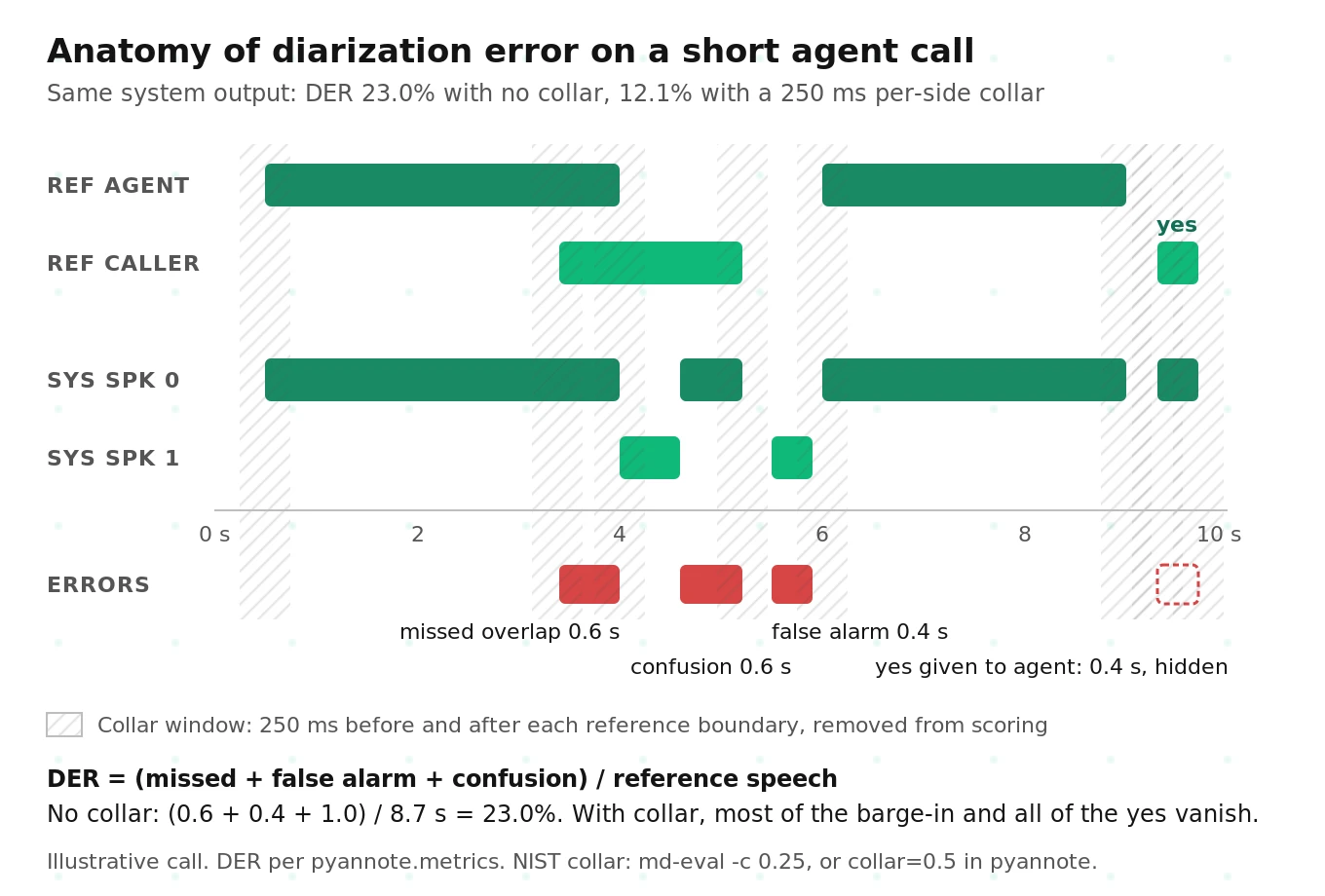
DER = (false alarm + missed detection + confusion) / total reference speech
- False alarm: time the system labels as speech when nobody is talking.
- Missed detection: reference speech the system labels as silence. Overlapped speech counts here when the system outputs only one speaker for a two-speaker region.
- Confusion: speech assigned to the wrong speaker, after an optimal one-to-one mapping between reference and system speakers (the Hungarian algorithm in pyannote).
Two scoring choices change DER more than most model upgrades: the forgiveness collar and overlap handling.
The collar, and a units trap
Human annotators cannot place turn boundaries to the millisecond, so NIST-style scoring ignores a window around each reference boundary. The convention is 250 ms on each side. NIST's md-eval tool takes the collar as a per-side value, so `-c 0.25` means 250 ms before and after.
pyannote.metrics takes the collar as the total width, split half before and half after. To match the NIST convention in pyannote you pass `collar=0.5`. Passing `collar=0.25` because "the standard is 0.25" scores with a 125 ms per-side window. Your DER then comes out higher than a paper using the same name.
Overlap and the DIHARD convention
The Third DIHARD Challenge evaluation plan broke with NIST practice: no collar, and overlapped speech is scored. pyannote's benchmark table uses the same strict "Full" setup. Many older papers used oracle speech activity and skipped overlap, which removes most missed and false-alarm time. Check three settings before comparing any two DER figures:
| Protocol | Collar | Overlap scored | Speech activity |
|---|---|---|---|
| NIST RT style | 250 ms per side | Varies by paper | System or oracle |
| DIHARD / pyannote "Full" | None | Yes | System |
| Many older papers | 250 ms per side | No | Oracle |
Why the collar hides voice agent errors
Take a caller's "yes" lasting 400 ms. Its reference boundaries sit at t and t + 0.4 s. A 250 ms per-side collar removes t − 0.25 to t + 0.25 and t + 0.15 to t + 0.65. Together those windows cover the whole word. Under NIST-style scoring, a diarizer that assigns the caller's "yes" to the agent costs nothing. In the illustrative call in the diagram below, the same system output scores 23.0% DER with no collar and 12.1% with a 250 ms per-side collar.
On a voice agent call, short turns carry the consent, the verification answer, and the "no, that's wrong." Score your calls with no collar, or report both numbers.
JER and WDER: two metrics that fit voice agents better
The DIHARD plan also defines Jaccard error rate (JER), which averages a per-speaker error so every speaker counts equally, however much they talked. The plan notes JER usually runs higher than DER when one speaker dominates. On agent calls the bot often talks most, so DER mostly reflects the bot's labels. JER shows whether the caller is labeled well.
Word-level diarization error rate (WDER) fits Deepgram's output better still, because Deepgram labels words, not time regions. El Shafey, Soltau, and Shafran used WDER to evaluate joint recognition and diarization. On physician-patient conversations, their joint model cut WDER from 15.8% to 2.2% against a separate recognizer and diarizer, partly by using linguistic cues about who says what. To compute it, align Deepgram's words to reference words, map speakers, and count the share of words with the wrong speaker.
Why phone-call DER is not meeting DER
The self-attentive EEND paper by Fujita and colleagues (ASRU 2019) reports the error breakdown that matters. On the two-speaker CALLHOME telephone test set (250 ms collar, overlap scored, 13.0% overlap), the x-vector clustering baseline scored 11.53% DER: 7.74 points missed speech, 0.54 false alarm, 3.25 confusion. Only 1.4 points of the misses came from speech detection; the rest was overlap. Two-thirds of the error on two-person calls was speech nobody was credited with, not speakers swapped. Their end-to-end model, which handles overlap directly, reached 10.76%.
Meetings are a different problem. pyannote 3.1's table, under the strict Full protocol, lists 18.8% DER on AMI headset-mix and 22.4% on a single distant microphone, with more speakers adding confusion.
Streaming adds its own penalty. Xue and colleagues' online EEND with a speaker-tracing buffer reached 12.54% on CALLHOME at 1.4 seconds of latency, against 10.76% offline. Labeling speech before hearing what comes next costs accuracy.
For a Deepgram voice agent, expect errors to cluster where caller and agent overlap: barge-ins, backchannels ("mm-hmm"), and both sides starting at once after a pause. Build your diarization test set around those moments, not clean alternating turns. And compare streaming scores only with streaming scores.
Multichannel beats diarization on stereo calls
On most voice agent calls you do not need diarization at all. Caller and agent are on separate call legs. Keep them on separate channels and the channel tells you who spoke.
Deepgram's `multichannel=true` transcribes up to 20 channels independently. In streaming, each `Results` message carries `channel_index: [i, n]`: channel i of n. Per Deepgram's multichannel vs diarization guide, two behaviors look like bugs but are correct:
- With multichannel and diarization both on and one person per channel, both people come back as `speaker: 0`, because each is the only speaker on their channel.
- If both channels return identical transcripts, the file is probably joint stereo. The channels were mixed before encoding, and nothing downstream can separate them.
| Audio you have | Use | Why |
|---|---|---|
| Live agent, caller leg only | Neither | You already know the agent's words from your TTS input |
| Recorded call, one channel per leg | `multichannel=true` | Speaker is known from the channel |
| One leg with several people (speakerphone, conference) | Multichannel plus `diarize_model` | Channel separates sides; diarizer splits the shared leg |
| Mixed mono recording | `diarize_model=latest` (batch uses v2) | Only option; expect overlap errors |
Two voice-agent checks belong in your tests. First, echo leakage: on speakerphone, the agent's TTS can bleed into the caller channel as caller words, so search caller-channel transcripts for your agent's scripted phrases. Second, diarization on the caller leg alone can be a signal. A speaker change mid-call can mean the phone was handed to someone else, which some regulated flows need to know before reading out account details.
Long-call stability: what actually closes a stream
Deepgram's WebSocket troubleshooting guide lists the close codes. Map each one to a client action:
| Close code | Payload | Meaning | Client action |
|---|---|---|---|
| 1008 | DATA-0000 | Payload is not decodable audio | Fix encoding or sample rate; check raw vs containerized audio |
| 1011 | NET-0000 | Deepgram sent no text frame in its window | Retry; check status page |
| 1011 | NET-0001 | Deepgram received no binary or text frame in the window | Send audio within 10 s of opening; KeepAlive during silence |
| 1011 | NET-0002 | No audio within the no-audio timeout (`no_audio_timeout`) | Send audio or KeepAlive; KeepAlive resets this timer |
Three details in that guide cause most long-call drops:
- An empty frame closes the stream. Sending `b''`, for example when your audio source returns zero bytes during a pause, causes an unexpected closure. Guard every send with a length check.
- KeepAlive does not replace the first audio. Deepgram states KeepAlive alone will not prevent NET-0001; the connection needs at least one audio message. Send real or silent audio as soon as the socket opens.
- KeepAlive must be a text frame. Deepgram warns that a binary frame may be mishandled.
Deepgram's KeepAlive docs recommend one every 3 to 5 seconds, which gives at least two chances inside the 10-second window even if one is delayed by a blocked event loop.
Hold music: KeepAlive or audio?
Streaming hold music produces junk transcripts, and music can trigger `SpeechStarted` events that fire your barge-in logic. KeepAlive avoids both, and Deepgram positions it as a way to optimize costs during silence. The trade-off is a timestamp gap, explained next.
Timestamps after KeepAlive and reconnects
Deepgram word timestamps measure audio time, not connection time. Two events break the link to your call clock.
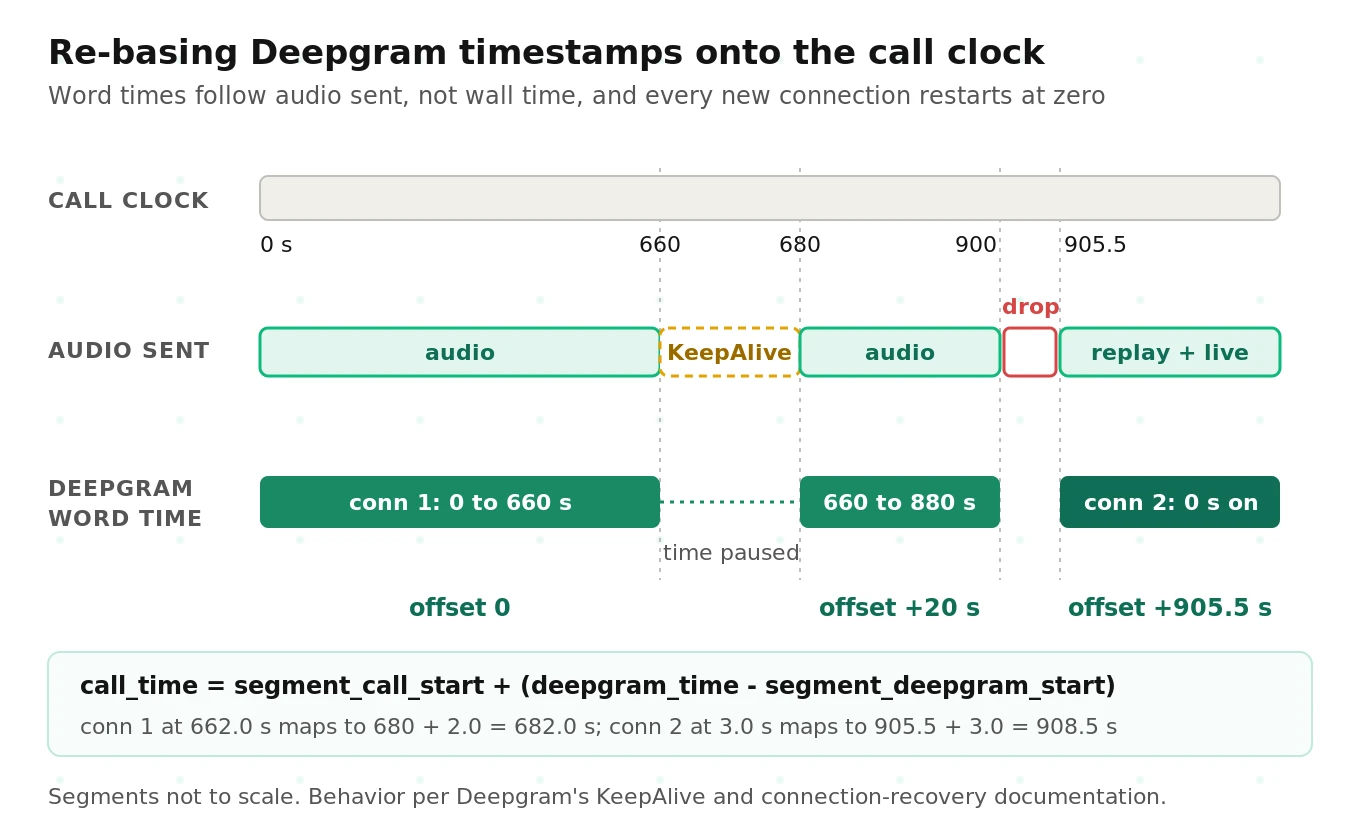
KeepAlive gaps. Per Deepgram's KeepAlive docs, if you stop sending audio for 20 seconds and send KeepAlive instead, the next words continue from where the audio left off. A word spoken at call minute 12 can carry a Deepgram timestamp of minute 11.
Reconnects. Per Deepgram's recovery guide, every new connection starts its timestamps at zero. Deepgram recommends keeping a starting offset and adding it to every returned timestamp.
A single offset breaks once a call has several holds and reconnects. Keep a piecewise map instead, with a new segment whenever audio resumes after KeepAlive or a connection opens.
# Simplified: map Deepgram audio time to call time across KeepAlive gaps and reconnects.
import bisect

class CallClock:
    def __init__(self):
        self.segs = {}   # conn_id -> sorted list of (dg_audio_start, call_time_start)

    def mark(self, conn_id, dg_audio_start, call_time_start):
        """Call when a connection opens (dg_audio_start=0.0) and when audio resumes after KeepAlive."""
        self.segs.setdefault(conn_id, []).append((dg_audio_start, call_time_start))

    def to_call_time(self, conn_id, dg_t):
        segs = self.segs[conn_id]
        i = bisect.bisect_right([s[0] for s in segs], dg_t) - 1
        dg0, call0 = segs[max(i, 0)]
        return call0 + (dg_t - dg0)

clock = CallClock()
clock.mark("c1", 0.0, 0.0)        # call starts, connection 1 opens
clock.mark("c1", 660.0, 680.0)    # 20 s hold on KeepAlive; audio resumes at call 680 s
clock.mark("c2", 0.0, 905.5)      # reconnect; first replayed sample is call time 905.5 s
print(clock.to_call_time("c1", 662.0), clock.to_call_time("c2", 3.0))   # 682.0, 908.5
Run every word through this map before you write transcripts, align recordings, or compute per-minute metrics. Our guide to what to log on every voice agent call lists the timing fields worth keeping alongside it.
Replay math: why a short drop can stall the agent
Deepgram recommends buffering audio during a reconnect and sending it once the new connection opens, and it caps streaming at 1.25x real time. While you replay a backlog of B seconds, live audio keeps arriving at 1.0x, so the backlog shrinks by only 0.25 seconds per second:
catch-up time = B / (1.25 − 1.0) = 4 × B
A 2-second reconnect gap takes 8 seconds to clear, and every final in that window arrives late, by up to 2 seconds. To the caller, the agent seems to stop listening. An illustrative policy for live agents:
- Gap under about 1 second: replay the buffer. The 4-second catch-up is tolerable.
- Gap over about 1 second during a caller turn: replay for the transcript record, but have the agent say "Sorry, could you repeat that?" instead of waiting for the late final.
- Gap during agent speech or hold: skip replay of silence; mark a new clock segment.
Replay from the last final word, not from the drop
Replay from the moment the socket dropped and you lose the in-flight utterance Deepgram had not finalized. Replay too far back and you get duplicates. Keep a ring buffer of recent audio with call-time stamps, replay from the end of the last `is_final` word you received, and drop any new word whose mapped end time falls at or before that point.
For planned shutdowns, such as a deploy or a scheduled connection rotation on a very long stream, send `Finalize`, wait for the final results, then send `CloseStream`. Closing without a flush throws away the tail of the last utterance.
Context that does not survive a reconnect
A new connection is a new session. Plan for four resets:
- Speaker labels restart. Speaker 0 on the new connection may be the old speaker 1. Re-map by channel, or on mono audio by matching speakers across the replayed overlap.
- Flux `turn_index` restarts at 0. Key turns by your own call-level ID.
- Configuration resets to the URL. Re-send keyterms or thresholds you changed mid-stream with a Flux `Configure` message.
- Acoustic context is gone. The new session has no prior audio, so do not let the replay boundary fall in the middle of an account number.
Drift checks for 30-minute calls
Long-call failures usually show up as slow drift, not a single error. Five checks catch most of it:
1. Transcript-latency slope. Regress per-message transcript latency (X minus Y) on call minute. A rising line usually means your client is falling behind: a growing send queue, garbage collection, or a blocked event loop.
2. Cursor agreement. At each final, compare Deepgram's `start + duration` with your audio-seconds-sent counter. A growing gap means dropped chunks or a resampler emitting the wrong sample count.
3. Monotonic timestamps. After mapping, word start times per channel should never go backward. A backward jump marks a reconnect you mapped wrong.
4. Accuracy by call minute. On labeled long calls, compare WER and WDER for minutes 1 to 5 against minutes 25 to 30.
5. Client resources. Track memory and event-loop lag of the process holding the socket. An in-memory message log that grows forever is a classic cause of agents that degrade only on long calls.
An illustrative starting rule: flag any metric that moves more than 20% between the first and last five minutes, then calibrate against your baseline. See setting voice agent metric thresholds.
The latency, speaker, and stability test matrix
Here is a matrix you can copy. The thresholds are illustrative starting points to calibrate, not Deepgram guarantees.
| Slice | Content | Conditions | Metrics | Starting threshold |
|---|---|---|---|---|
| L1 Clean turns | 100 labeled turns, single caller | Linear16 at 16 kHz | Transcript latency p50, finalization p95 | p95 within your turn budget |
| L2 Telephony turns | Same 100 turns | μ-law 8 kHz; 1% and 3% packet loss | Same, plus revision rate | p95 rises no more than 20% vs L1 |
| L3 Pause turns | 100 turns with mid-sentence pauses and digit strings | 8 kHz | Premature cut-off rate, late-final rate | Cut-offs at or below your bar |
| S1 Stereo calls | 40 two-leg calls with labeled overlap | One channel per leg | Echo leakage, channel WER | Zero agent phrases on caller channel |
| S2 Mono calls | Same 40 calls mixed to mono | Streaming and batch | DER (no collar), JER, WDER | Report both collars; track WDER |
| T1 Long calls | 10 calls of 30 minutes with three holds of 60 to 180 s | KeepAlive during holds | Closures by code, timestamp error after mapping | Zero unexpected closes |
| T2 Forced drops | Same 10 calls with two socket kills each | Replay from last final | Lost words, duplicate words, catch-up time | Zero lost words; catch-up near 4 × gap |
How many turns you need
Percentile estimates are noisier than most teams expect. For an estimate of p95 from N samples, the 95% confidence interval spans order statistics around 0.95N ± 1.96 × √(N × 0.95 × 0.05).
- With N = 200: 190 ± 6, so ranks 184 to 196. Your "p95" could be anything between the 92nd and 98th percentile values.
- With N = 1,000: 950 ± 13.5, so roughly the 93.7th to 96.4th percentile. That is tight enough to compare configurations.
Rates need even more data. Suppose you want to confirm that raising `endpointing` cut premature cut-offs from 4% to 2%. With a two-sided test at 95% confidence and 80% power:
n per arm = (1.96 + 0.84)² × (0.04 × 0.96 + 0.02 × 0.98) / (0.04 − 0.02)² = 7.84 × 0.058 / 0.0004 ≈ 1,140 turns
A 200-turn pause slice will show you the trend. It will not prove a two-point improvement. Our golden dataset guide covers building labeled sets at this size, and pause handling evaluation covers labeling turn ends.
How to test Deepgram latency, diarization, and stability before launch
1. Pin the configuration. Record model, endpoint, turn settings, `diarize_model`, `multichannel`, and formatting options. Store every run's `Metadata` message so model changes are visible.
2. Build labeled audio. Mark true speech ends, overlapped speaker segments, and short confirmations. Include digit strings, mid-sentence pauses, and barge-ins.
3. Measure the network floor. Run Deepgram's `network_latency` tool from your deployment region and note TCP connect time.
4. Stream at real-time pace. Use the harness above: transcript latency from interims only, finalization latency against labeled speech ends.
5. Sweep the turn knobs. Try Nova-3 `endpointing` at 10, 300, and 500 ms, and Flux `eot_threshold` at 0.7 and 0.85 with and without eager mode. Count cut-offs, late finals, timeout turns, and `TurnResumed` events.
6. Score diarization three ways. Report DER with no collar and with 250 ms per side (`collar=0.5` in pyannote), plus JER and WDER, streaming and batch separately.
7. Run the long-call slices. Play 30-minute calls with KeepAlive holds and two socket kills each. Check close codes, lost and duplicate words, catch-up time, and mapped timestamp error.
8. Check drift. Compute latency slope, cursor agreement, and early-versus-late accuracy on every long call.
9. Size the sample. Use about 1,000 turns per configuration for p95 comparisons, more for small rate differences.
10. Gate releases on the baseline. Re-run on every Deepgram model change and client release. Our guide to load testing the Deepgram Voice Agent API adds concurrency.
Where independent evaluation fits
Every number in this post depends on a choice of clock, collar, turns, and network. Vendor dashboards make those choices for you, and they rarely match your calls.
Evalgent runs this kind of matrix as an independent evaluator, with no stake in which STT vendor wins. Before launch, it measures finalization latency, diarization error, and long-call stability on audio that matches your traffic, using scoring settings you can audit. In a vendor bake-off, it runs Deepgram and alternatives through the same slices so the comparison is like for like. After launch, it re-runs the baseline when a model or client version changes, so a regression shows up as a failed gate instead of a support ticket.
Frequently asked questions
What is the typical latency of Deepgram's real-time speech recognition?
Deepgram says its models target 300 ms or less of server-side transcription latency, and lists 200 to 500 ms of total transcript latency measured at the client. A voice agent waits longer, for finalization: the endpointing silence window plus processing and network. With `endpointing=300`, expect roughly 300 to 600 ms from speech end to `speech_final`. Flux end-of-turn typically lands 100 to 500 ms after speech ends.
How many speakers can Deepgram's STT distinguish in a conversation?
Deepgram does not document a maximum speaker count, and you do not declare one. Each word gets a `speaker` number starting at 0. Streaming uses the v1 diarizer and returns no speaker confidence. Accuracy, not count, is the real limit. Overlapping speech and short turns cause most errors, so score diarization on your own calls with no collar.
How stable is Deepgram for long-duration voice calls?
Streams can run for long calls if your client handles three things. Send KeepAlive every 3 to 5 seconds during silence, because Nova-3 closes after 10 seconds without data. Reconnect cleanly, replaying buffered audio from the last finalized word. Re-base timestamps, since every new connection restarts at zero and KeepAlive gaps are not counted in Deepgram's audio time.
What is the difference between is_final and speech_final in Deepgram?
`is_final: true` means Deepgram will not revise that segment's text again. `speech_final: true` means endpointing detected a pause marking the end of an utterance. One utterance can produce several `is_final` messages before `speech_final` arrives. Buffer every `is_final` transcript and send the combined text to your LLM when `speech_final` arrives.
Does Deepgram Flux support speaker diarization?
Deepgram's Flux and Nova-3 comparison table marks speaker diarization as unavailable on Flux, although the diarization page's feature badges list Flux streaming. Test on your account before you depend on it. If you need speaker identity with Flux turn detection, put each call leg on its own channel instead of relying on a diarizer.
Why does my measured Deepgram latency differ from the documented number?
The documented 300 ms is server-side transcription latency. Your measurement usually adds network transit, chunk buffering, client processing, and, for finals, the endpointing silence window. Common measurement errors add more: streaming files faster than real time, including the connection handshake, or timestamping after your own processing. Subtract TCP connect time to estimate the server's share.
How often should I send KeepAlive messages to Deepgram?
Deepgram recommends one `{"type": "KeepAlive"}` text frame every 3 to 5 seconds during silence. The Nova-3 window is 10 seconds, so this gives at least two chances before a NET-0001 close. KeepAlive does not replace the first audio message, which must arrive within 10 seconds of opening. Flux uses pings instead, with a 60-second timeout.
Should I use multichannel or diarization for phone calls?
Use multichannel whenever each call leg is on its own channel. The channel tells you the speaker, with no model error, and Deepgram supports up to 20 channels. Use diarization only for mixed mono recordings or for a leg shared by several people, such as a speakerphone. A live agent streaming only the caller leg usually needs neither.
The bottom line
Deepgram's headline numbers are real, but the latency your callers feel is finalization latency, your diarization score depends on the collar and overlap rules you pick, and long-call stability depends on client code Deepgram does not write for you. Measure all three on your own audio with explicit clocks and scoring settings, and re-run the matrix whenever the model or your client changes.
Related Articles

Why AI voice agents fail in production: 9 failure layers, how to detect each, and how to prevent them
Voice agents fail in production across 9 layers, from 8 kHz audio to silent tool errors. Symptoms, root causes, alerts, and fixes in one master table.
Read more
Voice agent regression testing: how to detect regressions from model updates you don't control
Voice agent regression testing for changes you don't control: pin each layer, run a nightly pinned-vs-latest canary, and use paired stats to detect drops.
Read more