How to Reduce STT Latency in Voice Agents
On this page
Speech-to-text is the ear of a voice agent. It listens, then hands words to the rest of the stack. Every later step waits on it. So when the ear is slow, the whole agent feels slow.
This post is about that one stage. Not the language model. Not the voice. Just the transcription step, and the delay it adds. For the wider picture, see our latency for voice agents guide. Here we stay focused on STT.
What STT latency actually is
Let us pin the term down before we cut it.
> STT latency: the delay between a caller producing speech and the transcript being available to the rest of the agent. It is measured in milliseconds, and it has two key checkpoints.
The general idea is covered under latency). For a voice agent, the definition needs two numbers, not one. A single average hides where the delay lives.
> Time to first partial: the delay from the caller starting to speak until the first draft words appear. This is what makes the agent feel awake.
> Time to final: the delay from the caller finishing a phrase until the settled, final transcript is ready. This is what the language model waits on before it replies.
Both matter, for different reasons. A fast first partial keeps the interaction lively. A fast final keeps the reply from lagging. You have to watch both, or you will fix the wrong one. Our STT evaluation for voice agents post goes deeper on scoring the transcript itself.
Where STT sits in the latency budget
A voice agent has a delay budget. It is small.
Callers notice delay fast. The telecom world has studied this for decades. ITU-T Recommendation G.114 sets a widely cited target for one-way voice delay, around 150 milliseconds, before conversation quality starts to suffer. A voice agent has to fit its whole turn inside a budget of that shape.
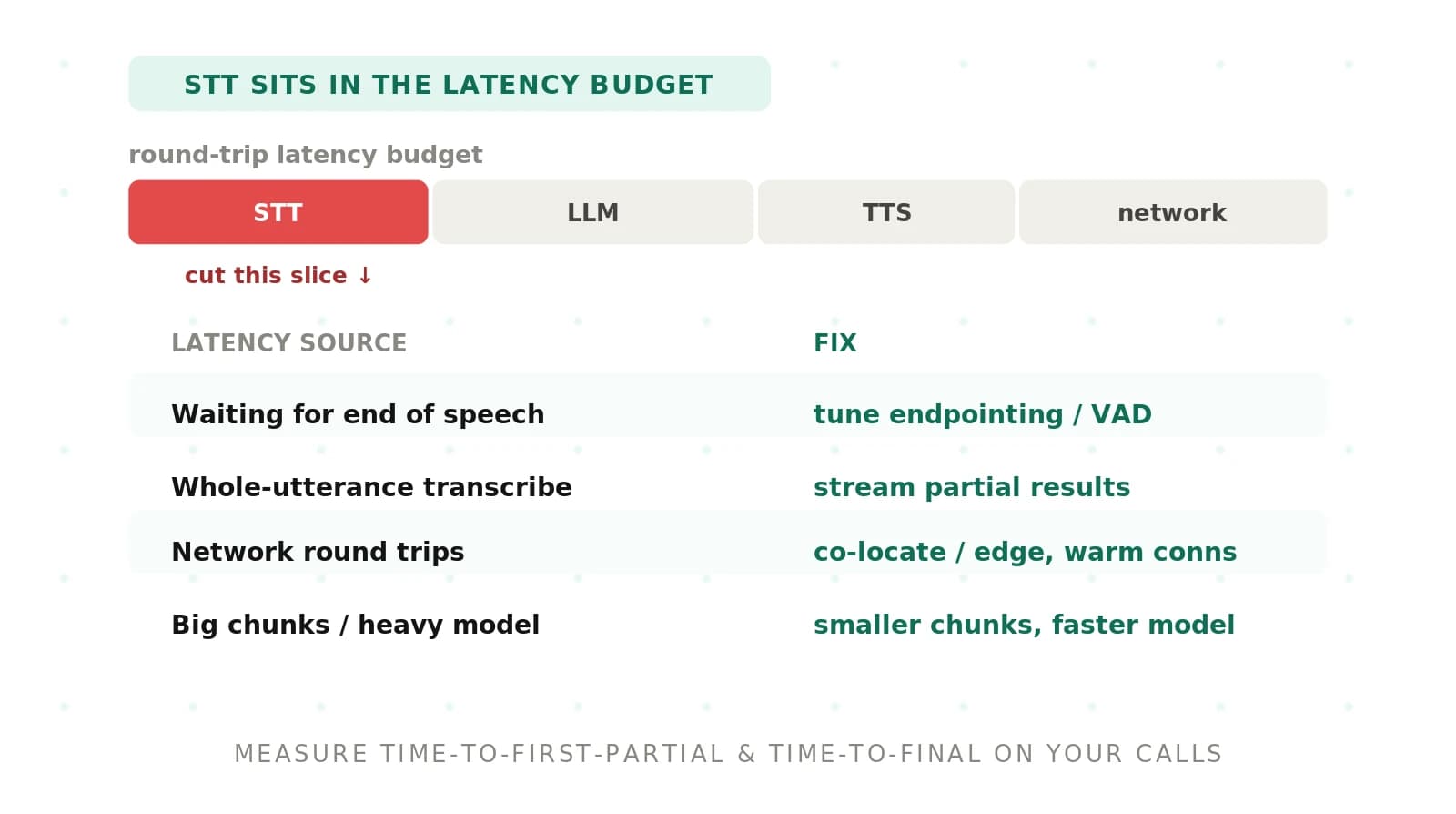
That budget has several tenants. The audio has to reach your stack. STT has to transcribe it. The language model has to think. Text-to-speech has to speak. Each stage takes a slice. STT sits early, so its delay pushes everything after it.
Because STT is early, its cost compounds. A slow final transcript delays the language model, which delays the voice. The caller hears one long gap, not four small ones. That is why the transcription stage is worth tuning first.
Note the difference between raw latency and the caller's felt wait. They are not the same number. Our latency vs response time guide unpacks that gap. For STT, the felt wait usually tracks time to final most closely.
Common sources of STT latency and how to fix them
Most STT delay comes from a short list of causes. Here they are, with the typical impact and the fix for each. This is the map for the rest of the post.
| Latency source | Typical impact | Fix |
|---|---|---|
| Batch mode, no partials | Agent waits for the whole utterance before any text | Stream audio and consume partial results as they arrive |
| Over-eager endpointing wait | Long pause added after the caller stops talking | Tune the end-of-speech silence threshold to your callers |
| Distant STT region | Extra network hops and higher round trip time | Co-locate the engine with the media path or use an edge region |
| Network jitter and congestion | Unstable, spiky tail latency | Prioritize the audio path and measure the tail, not just the mean |
| Cold connection setup | First request pays handshake and warm-up cost | Warm the connection and reuse it across turns |
| Large audio chunks | Text arrives in slow, bursty updates | Send smaller frames so partials stream more often |
| Heavy or oversized model | Slower inference per chunk | Pick a low-latency streaming model sized for the task |
| Lossy or mismatched codec | Extra transcode and quality loss | Use a low-delay codec the engine ingests natively |
No fix here is exotic. Most are configuration, not code. The sections below walk the important ones.
How to reduce STT latency in a voice agent
Work through these in order. Early steps give the biggest wins for the least effort.
1. Baseline first. Measure time to first partial and time to final on real calls before changing anything. You cannot cut what you have not measured.
2. Switch to streaming. If you send whole utterances in batch mode, move to a streaming connection that returns partial results as the caller speaks.
3. Consume partials downstream. Let the language model start planning on interim text, not only the final transcript, where your logic allows it.
4. Tune endpointing. Shorten the end-of-speech silence window so the engine does not wait long after the caller stops. Test it against real speaking styles.
5. Co-locate the engine. Put STT in the same region as your media path, or at an edge location near your callers, to cut network round trips.
6. Warm the connection. Open and reuse a persistent connection so the first turn does not pay handshake and model warm-up cost.
7. Shrink the chunk size. Send smaller audio frames so partials update more often and text feels continuous.
8. Right-size the model and codec. Choose a low-latency streaming model and a low-delay codec the engine accepts without transcoding.
9. Measure the tail. Track p95 and p99, not just the average. A good mean with a bad tail still feels broken.
10. Re-test after every change. Confirm each tweak actually helped, on your own audio, and did not hurt accuracy.
That last step is the one teams skip. A latency fix that quietly raises word error rate is not a fix. It is a trade you did not agree to.
Stream audio and use partial results
This is the single biggest lever. Start here.
In batch mode, the engine waits. It collects the whole utterance, transcribes it, then returns text. The caller has finished speaking, and the agent is still silent. That gap is pure, avoidable delay.
Streaming changes the shape. The audio flows in as the caller talks. The engine returns partial results, draft words that update in place. Time to first partial drops from seconds to a few hundred milliseconds. The agent feels awake because it is already listening.
Partials are drafts, so they change. A word can appear, then get revised as more context arrives. That is fine. You use partials to feel responsive and to start light planning. You commit on the final transcript. The two roles do not conflict.
Tune endpointing so you stop waiting too long
Endpointing decides when the caller has finished. Get it wrong and you add dead air.
> Endpointing: the decision that a caller has stopped speaking, which triggers the final transcript and the agent's turn to respond.
Most engines wait for a set stretch of silence before calling end-of-speech. Set that window too long and every turn ends with an awkward pause. Set it too short and the agent cuts the caller off mid-thought. Neither is acceptable.
The fix is to tune the silence threshold to how your callers actually speak. People who pause to think need a slightly longer window. Fast, transactional callers need a shorter one. There is no universal number, only the right number for your traffic. Our endpointing for voice agents guide covers the tuning in detail.
Endpointing leans on voice activity detection to tell speech from silence. The two are related but distinct. Voice activity detection flags whether sound is speech. Endpointing decides the turn is over. Our VAD vs endpointing guide draws the line clearly. Tuning both together is how you shave the pause without clipping words.
Co-locate STT with the media path
Distance is delay. Every network hop costs milliseconds.
If your media path lands in one region and your STT engine sits in another, the audio has to travel between them. That trip adds round-trip time to every chunk. Worse, it exposes you to the public internet, where jitter makes latency spiky and unpredictable.
The fix is to shorten the path. Run STT in the same region as your telephony or media servers. Better still, push it toward the caller. Edge computing places the workload close to where the audio originates, which cuts the hop and steadies the tail.
How your audio arrives shapes this too. The transport you choose affects the path length and its stability. Our SIP vs WebRTC post compares the two for voice agents. Whichever you use, the goal is the same. Keep the audio's journey short and its timing steady.
Pick low-latency models, codecs, and chunk sizes
Once the path is short, tune what flows through it.
Model choice matters. A large, accuracy-optimized model can be slower per chunk than a streaming model built for real-time work. For a live agent, a real-time streaming model usually wins, as long as it holds accuracy on your audio. Size the model to the task, not to a leaderboard.
Codec choice matters too. A low-delay codec like Opus) is built for interactive speech. If your audio arrives in a format the engine cannot read natively, you pay a transcode step. Match the codec to what the engine ingests and you skip that cost.
Chunk size is the quiet lever. Big audio frames make text arrive in slow bursts. Smaller frames let partials stream more often, so the transcript feels continuous. There is a floor. Too small and overhead grows. Find the frame size that keeps partials flowing without flooding the connection.
Warm connections and reuse
The first turn is the slow one. Fix it once.
A cold connection pays setup cost. There is a handshake. The model may need to warm up. On the first request of a call, that overhead lands right when the caller expects a quick hello. It is the worst possible moment for a delay.
The fix is simple. Open a persistent connection and reuse it across turns and calls where the engine allows. Keep a small pool ready so no caller waits on a cold start. The setup cost happens once, in the background, not in front of a live caller.
How Evalgent measures STT latency on your calls
Tuning is half the job. Proof is the other half.
Evalgent is an independent, third-party evaluator for voice agents. We measure STT latency on your own calls, not on a vendor's demo clips. Time to first partial and time to final, per engine, on the audio your callers actually produce. That is the only test that predicts production.
Vendor latency numbers come from ideal conditions. Clean audio, a short path, no load. Your calls are noisier and busier than that. An independent evaluator runs the same real audio through each option and reports the honest gap. For the wider case, see independent voice AI evaluation.
We also watch the tail and the trade. A change that cuts the mean but spikes p99 is not a win. A change that cuts latency but raises word error rate is a hidden cost. We surface both, so you tune STT latency without quietly breaking accuracy.
Frequently asked questions
What is STT latency in a voice agent?
STT latency is the delay between a caller speaking and the transcript being ready for the rest of the agent. It has two checkpoints: time to first partial, the first draft words, and time to final, the settled transcript. Because speech-to-text runs early in the pipeline, its delay pushes every later stage.
What is a good STT latency target for voice agents?
A good target keeps the whole turn inside a conversational budget, often framed around the ITU-T G.114 guidance of roughly 150 milliseconds one-way for voice. In practice, teams aim for a few hundred milliseconds to first partial and a fast final. The honest target is whatever your callers tolerate, measured on real calls.
What is time to first partial versus time to final?
Time to first partial is the delay until the engine returns its first draft words as the caller speaks. Time to final is the delay until the settled transcript is ready after the caller stops. First partial makes the agent feel awake. Final is what the language model waits on before replying. Measure both.
Does streaming reduce speech-to-text latency?
Yes, streaming is usually the biggest single win. Batch mode waits for the whole utterance before returning any text, which adds seconds of dead air. Streaming returns partial results as the caller talks, dropping time to first partial to a few hundred milliseconds. You feel responsive on partials and commit on the final transcript.
How does endpointing affect STT latency?
Endpointing decides when the caller has finished, which triggers the final transcript. If the silence threshold is too long, every turn ends with an awkward pause added to your latency. If it is too short, the agent cuts callers off. Tuning the end-of-speech window to your callers removes needless waiting without clipping speech.
Where should STT run to reduce latency?
STT should run as close to the media path as possible. Co-locating the engine in the same region as your telephony servers removes extra network hops and round-trip time. Pushing it to an edge location near callers cuts the path further and steadies the tail against jitter. Short, stable paths beat distant ones.
Does audio codec or chunk size affect STT latency?
Yes, both matter. A mismatched codec forces a transcode step, adding delay; a low-delay codec the engine reads natively avoids it. Large audio chunks make text arrive in slow bursts, while smaller frames let partials stream more often. Tune chunk size down until partials flow smoothly, without adding so much overhead that it backfires.
How do you measure STT latency in a live voice agent?
Measure time to first partial and time to final on real call audio, not demo clips. Track the average and the tail, at p95 and p99, because a good mean can hide bad spikes. An independent evaluator like Evalgent runs your own calls through each engine and reports latency alongside accuracy, so trades stay visible.
The bottom line
STT latency is the delay from speech to transcript, and it sets the pace for everything downstream. Stream partials, tune endpointing, shorten the path, and measure time to first partial and time to final on your own calls.
Want to know how fast your transcription really is? Book a demo and we will measure STT latency on your own audio.
Related Articles

Why AI voice agents fail in production: 9 failure layers, how to detect each, and how to prevent them
Voice agents fail in production across 9 layers, from 8 kHz audio to silent tool errors. Symptoms, root causes, alerts, and fixes in one master table.
Read more
Voice agent regression testing: how to detect regressions from model updates you don't control
Voice agent regression testing for changes you don't control: pin each layer, run a nightly pinned-vs-latest canary, and use paired stats to detect drops.
Read more