How to Unit Test Deepgram Voice Interactions: Fake Servers, Cassettes, and Assertions That Don't Flake
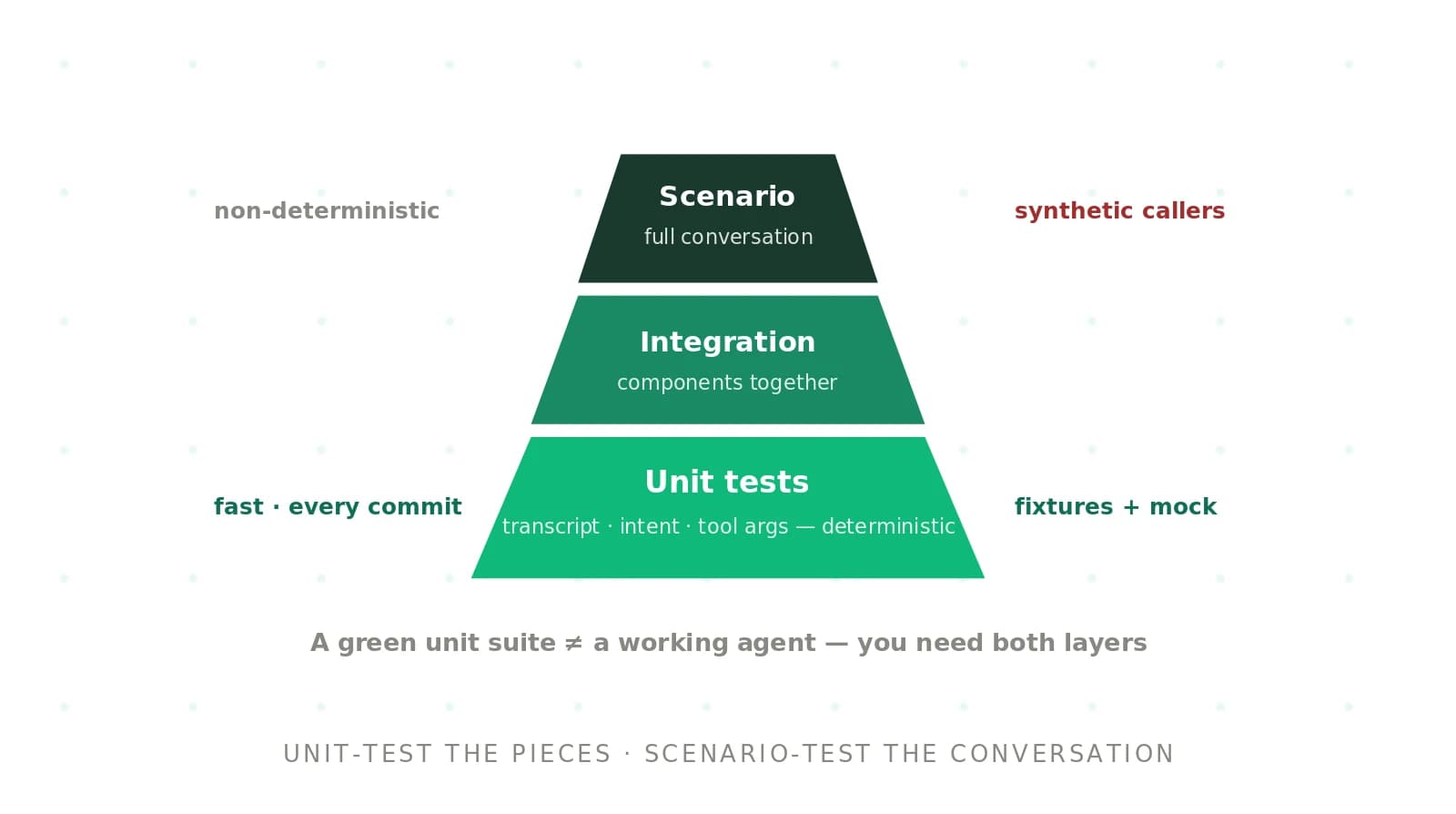
On this page
Most advice on testing voice code stops at "use recorded audio and mock the API." That is where the real problems start. Which part do you mock? The Python SDK reshaped its websocket API twice after v3 and renamed generated types again in v7. Which assertion do you write? A transcript that is 94% correct can still carry the wrong account number. And when do you stop trusting the suite? Once a few tests flake, people stop reading red builds.
This guide is the unit-test layer of our Deepgram STT testing guide. Everything below is built against the documented Deepgram wire protocol and the current `deepgram-sdk` for Python (v7, which requires Python 3.10+). The code is runnable-shaped and labeled where it is simplified.
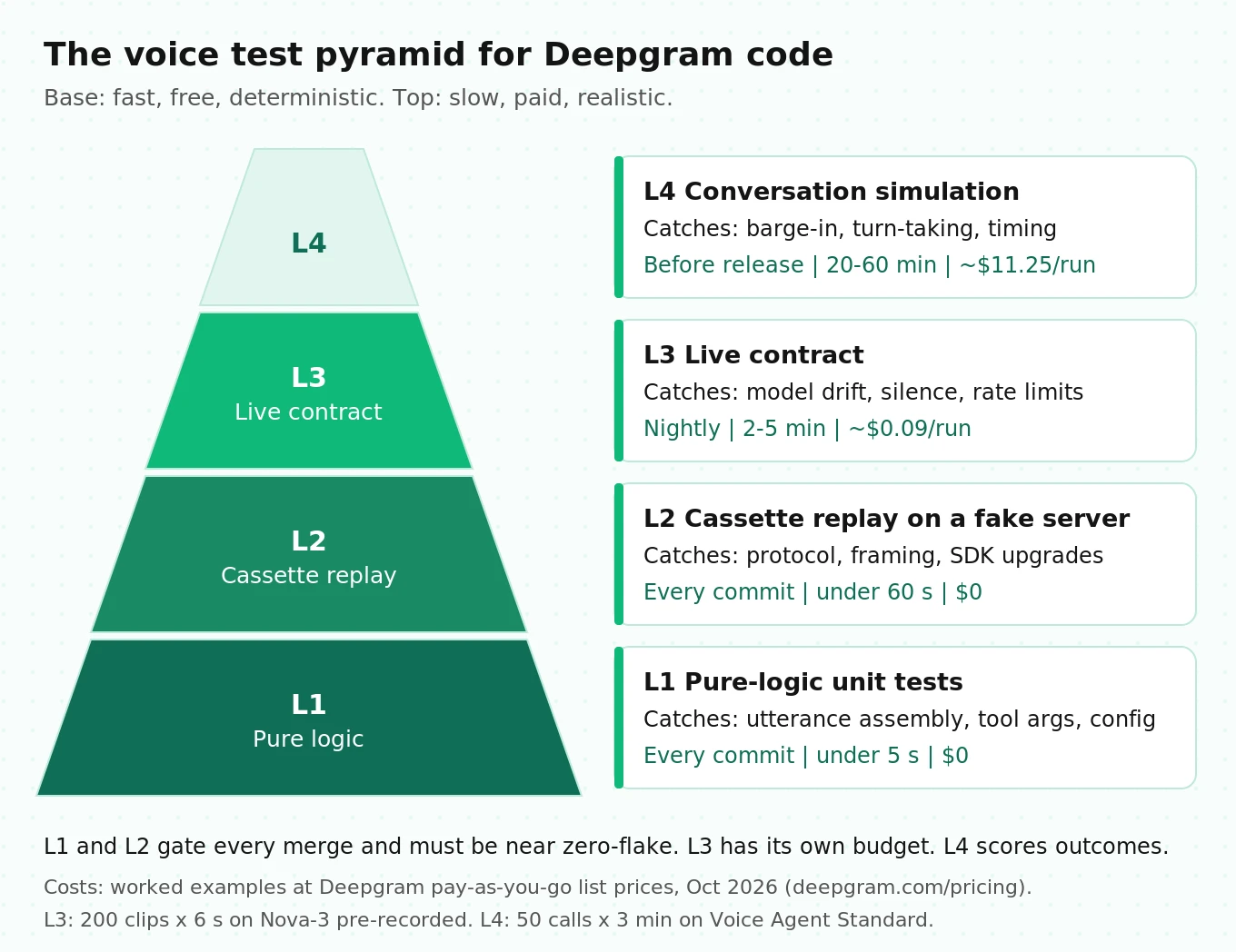
The four-layer test pyramid for Deepgram voice code
A voice interaction is not one unit. It is a chain: audio frames go over a websocket, Deepgram returns interim and final results, your code assembles an utterance, an LLM picks a tool, the tool runs, and a reply is spoken. Each link fails in its own way, so each link needs its own kind of test.
The pyramid below sorts those tests by speed, cost, and determinism. The cost column uses Deepgram's published pay-as-you-go pricing as of October 2026: Nova-3 pre-recorded at $0.0043 per minute, Aura-2 at $0.030 per 1,000 characters, and the Voice Agent API Standard tier at $0.075 per minute. Corpus sizes are illustrative assumptions; plug in your own.
| Layer | What it tests | Runs | Time budget | Cost per run (worked example) |
|---|---|---|---|---|
| L1 Pure logic | Utterance assembly, text normalization, tool dispatch, Settings payload | Every commit | Under 5 s | $0 |
| L2 Cassette replay | Your real client and the real SDK against a fake Deepgram server | Every commit | Under 60 s | $0 |
| L3 Live contract | Pinned model version, transcript quality on a fixed corpus, silence, rate limits | Nightly, and on any SDK or model bump | 2–5 min | 200 clips x 6 s = 20 min x $0.0043 = $0.09 |
| L4 Conversation simulation | Turn-taking, barge-in, speculative tool calls, accents and noise | Before release | 20–60 min | 50 calls x 3 min x $0.075 = $11.25, plus LLM if you bring your own |
The ratio matters more than the numbers. L1 and L2 must be fast and close to zero-flake because they gate every merge. L3 talks to a real service, so it runs on a schedule and has its own failure budget. L4 measures outcomes rather than asserting exact behavior, so it never gates a commit directly.
What breaks, and which layer catches it
Before writing tests, list the failures you are trying to catch. This taxonomy comes from Deepgram's own docs, SDK migration notes, and protocol reference. Each row names the cheapest layer that reliably catches it.
| Failure | Mechanism | Cheapest layer |
|---|---|---|
| Truncated utterances | Code reads only `speech_final: true` and drops earlier `is_final` segments | L1 |
| Wrong audio format | `sample_rate` or `encoding` query params don't match the bytes you send | L2 (params), L3 (real audio) |
| Silent disconnects | No audio or KeepAlive for 10 s triggers `NET-0001` during a long tool call | L2 |
| KeepAlive ignored | KeepAlive JSON sent as a binary frame instead of text | L2 |
| SDK upgrade breakage | `send_control()` removed in v6; types renamed in v7 | L2 |
| New server message type | Your handler receives a payload it never saw before | L2 |
| Model drift | `version=latest` moves when Deepgram ships an update | L3 |
| Text on silence | Model emits words on a silent or noise-only clip | L3 |
| Irreversible speculative tool call | `end_call` or a booking fires before the turn is confirmed | L1 (config), L4 (timing) |
| Barge-in and turn-taking regressions | Endpointing or eager end-of-turn thresholds change behavior | L4 |
Layer 1: pure-logic unit tests
Layer 1 tests take a Python dict in and assert a Python value out. No sockets, no audio, no SDK. That is what makes them fast and deterministic. The trick is choosing what to test here, because a few of the costliest Deepgram bugs are pure logic.
Assemble utterances the way Deepgram documents it
Deepgram's streaming API sends two flags on each `Results` message. `is_final: true` means a segment of audio is done and won't be revised. `speech_final: true` means endpointing saw a pause long enough to count as the end of speech. They aren't the same thing.
Deepgram's endpointing and interim results guide shows a caller reading a card number. The first finalized segment arrives with `is_final: true, speech_final: false` and ends at "two two." The second arrives with both flags true. The docs say to concatenate every `is_final` segment until `speech_final` arrives, and warn against using `speech_final` alone. Code that only reads the `speech_final` message loses the first half of the number.
Also note the endpointing default. The streaming reference lists `endpointing` as 10 ms by default, and the docs recommend 300–500 ms for conversations where people pause mid-thought. A 10 ms default produces many short final segments, which makes the concatenation bug more likely to bite.
Here is a minimal assembler and the tests that pin its behavior. The cassette lines are taken from the documented example, trimmed for length.
# voice/assembler.py
class UtteranceAssembler:
    """Turns Deepgram /v1/listen messages into complete user utterances."""
    def __init__(self):
        self._buffer: list[str] = []
        self.utterances: list[str] = []

    def handle(self, msg: dict | None) -> None:
        if msg is None:                       # see "unknown message" gotcha below
            return
        kind = msg.get("type")
        if kind == "Results":
            alt = msg["channel"]["alternatives"][0]
            if msg.get("is_final") and alt["transcript"].strip():
                self._buffer.append(alt["transcript"].strip())
            if msg.get("speech_final"):
                self._flush()
        elif kind == "UtteranceEnd":          # safety net when speech_final never comes
            self._flush()

    def _flush(self) -> None:
        if self._buffer:
            self.utterances.append(" ".join(self._buffer))
            self._buffer = []
# tests/test_assembler.py
import json, pathlib
from voice.assembler import UtteranceAssembler
CASSETTES = pathlib.Path(__file__).parent / "cassettes"
def replay(name):
lines = (CASSETTES / name).read_text().splitlines()
return [json.loads(line) for line in lines if line.strip()]
def test_concatenates_is_final_segments_until_speech_final():
a = UtteranceAssembler()
for msg in replay("card_number.jsonl"):
a.handle(msg)
assert a.utterances == [
"yeah so my credit card number is two two two two three three three three"]
def test_utterance_end_flushes_when_speech_final_never_arrives():
a = UtteranceAssembler()
a.handle({"type": "Results", "is_final": True, "speech_final": False,
"channel": {"alternatives": [{"transcript": "cancel my order"}]}})
a.handle({"type": "UtteranceEnd", "channel": [0, 1], "last_word_end": 2.1})
assert a.utterances == ["cancel my order"]
def test_interim_results_never_reach_the_agent():
a = UtteranceAssembler()
a.handle({"type": "Results", "is_final": False, "speech_final": False,
"channel": {"alternatives": [{"transcript": "book a"}]}})
a.handle({"type": "UtteranceEnd", "channel": [0, 1], "last_word_end": 0.9})
assert a.utterances == []The `UtteranceEnd` test matters on noisy lines. `speech_final` depends on detecting silence, and background noise can keep that from ever happening. `UtteranceEnd`, enabled with `utterance_end_ms`, is based on gaps between word timings instead, so it still fires. If your assembler ignores it, a caller on a busy street never finishes a turn.
If you use Flux (`/v2/listen`) instead of Nova-3, the unit changes. Flux sends `TurnInfo` messages with an `event` of `StartOfTurn`, `Update`, `EagerEndOfTurn`, `TurnResumed`, or `EndOfTurn`, and the full turn transcript rides on each one. The Flux reference says `EndOfTurn` carries a `trigger` field (`model`, `manual`, or `timeout`) and calls it an open enum: new values may appear, and clients must tolerate unknown ones. Write a test that feeds a `trigger` of `"something_new"` and asserts your turn handler still ends the turn.
Tool dispatch for the Voice Agent API
With Deepgram's Voice Agent API, the server sends a `FunctionCallRequest` when the LLM wants a tool. Three details from the docs belong in unit tests:
- `arguments` is a JSON-encoded string, not an object. Code that does `fn["arguments"]["date"]` fails on the first real call.
- `client_side: false` means Deepgram runs the function itself, and your client should not respond.
- A `FunctionCallCancelled` message can arrive for a call you already received. You must stop work and send no `FunctionCallResponse` for that `id`.
# voice/tools.py (simplified: synchronous, single worker)
import json

class ToolDispatcher:
    def __init__(self, tools: dict):
        self.tools, self.cancelled, self.calls = tools, set(), []

    def handle(self, msg: dict) -> list[dict]:
        if msg["type"] == "FunctionCallCancelled":
            self.cancelled |= {f["id"] for f in msg["functions"]}
            return []
        if msg["type"] != "FunctionCallRequest":
            return []
        replies = []
        for fn in msg["functions"]:
            if not fn.get("client_side") or fn["id"] in self.cancelled:
                continue
            args = json.loads(fn["arguments"])       # a JSON string on the wire
            self.calls.append((fn["name"], args))
            result = self.tools[fn["name"]](**args)
            replies.append({"type": "FunctionCallResponse", "id": fn["id"],
                            "name": fn["name"], "content": json.dumps(result)})
        return replies
The config test is the one teams skip. Deepgram's speculative replies doc explains that the agent starts building a reply before the turn is confirmed. TTS audio waits for confirmation. Function calls don't, by default. Their example is `end_call`: the user says "that's all I need," the call hangs up, and then the user says "actually, put me through to a person." Cancellation can't undo a hangup.
The fix is `defer_until_eot: true` on every function with an irreversible side effect. That's a property of your `Settings` payload, so you can assert it without a network:
# tests/test_settings.py
from voice.agent_config import build_settings   # your function that returns the Settings dict

IRREVERSIBLE = {"end_call", "book_appointment", "charge_card", "transfer_call"}

def test_irreversible_functions_wait_for_end_of_turn():
    think = build_settings()["agent"]["think"]
    providers = think if isinstance(think, list) else [think]   # think may be a list
    for p in providers:
        for fn in p.get("functions", []):
            if fn["name"] in IRREVERSIBLE:
                assert fn.get("defer_until_eot") is True, fn["name"]
For a deeper treatment of argument-level checks, see our guide to tool-call accuracy.
Layer 2: deterministic streaming tests with a fake Deepgram server
Layer 1 can't tell you whether your client sends the right query parameters, frames KeepAlive correctly, or survives an SDK upgrade. For that you need your real client code, the real SDK, and something on the other end of the websocket that behaves like Deepgram but never changes.
Why fake the wire protocol, not the SDK
Mocking SDK methods couples your tests to the SDK's surface, and that surface moves. The Python SDK migration guides document the churn: v3 used `listen.websocket.v("1")`; v5 moved to `client.listen.v1.connect()` with `send_control(ListenV1ControlMessage(type="Finalize"))`; v6 removed `send_control()` in favor of `send_finalize()`, `send_close_stream()`, and `send_keep_alive()`; v7 dropped Python 3.8 and 3.9 and renamed several generated agent types. A test that mocks `send_control` passes forever on v5 code and tells you nothing on upgrade day.
The wire protocol is far more stable. Deepgram publishes it as an AsyncAPI spec in the streaming reference: the client sends binary audio plus `Finalize`, `CloseStream`, and `KeepAlive` text messages; the server sends `Results`, `Metadata`, `UtteranceEnd`, and `SpeechStarted`. A fake that speaks that protocol lets you upgrade the SDK and rerun the same tests.
Record cassettes once, from real sessions
A cassette is a JSON Lines file of every server message from one real streaming session, in order. Record it once against the live API, commit it next to the audio fixture, and replay it forever. Store the audio's SHA-256 and the `metadata.model_info` block (which carries `name`, `version`, and `arch`) so you know exactly which model produced it.
# tools/record_cassette.py (illustrative; run manually, not in CI)
import asyncio, hashlib, json, sys, wave
from deepgram import AsyncDeepgramClient
from deepgram.core.events import EventType

async def record(wav_path: str, out_path: str):
    client = AsyncDeepgramClient()                     # reads DEEPGRAM_API_KEY
    with wave.open(wav_path) as w:
        rate, pcm = w.getframerate(), w.readframes(w.getnframes())
    chunk = rate * 2 // 50                             # 20 ms of 16-bit mono
    out = open(out_path, "w")
    out.write(json.dumps({"_fixture_sha256": hashlib.sha256(pcm).hexdigest()}) + "\n")
    async with client.listen.v1.connect(
        model="nova-3", encoding="linear16", sample_rate=rate,
        interim_results="true", endpointing=300, utterance_end_ms=1000,
    ) as conn:
        async def on_message(msg):
            if msg is not None and not isinstance(msg, bytes):
                out.write(json.dumps(msg.dict()) + "\n")
        conn.on(EventType.MESSAGE, on_message)
        listener = asyncio.create_task(conn.start_listening())
        for i in range(0, len(pcm), chunk):
            await conn.send_media(pcm[i:i + chunk])
            await asyncio.sleep(0.02)                  # pace at real time while recording
        await conn.send_close_stream()
        await listener
    out.close()

if __name__ == "__main__":
    asyncio.run(record(sys.argv[1], sys.argv[2]))
Pace audio at real time when recording so the session resembles a live call. In replay, you'll do the opposite.
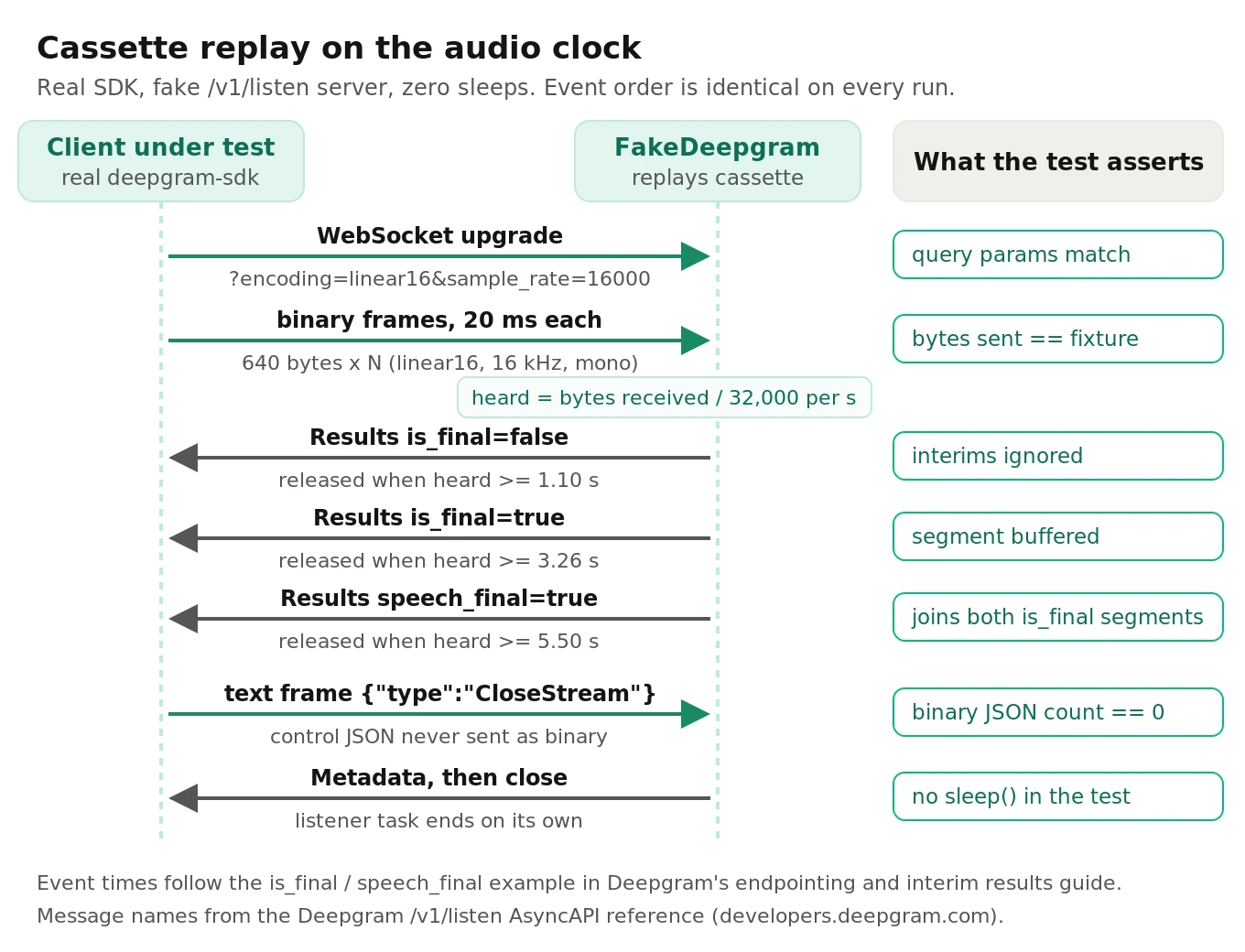
Replay on the audio clock, not the wall clock
The classic study of flaky tests, Luo et al. at FSE 2014, analyzed 201 commits that fixed flaky tests across 51 open-source projects. "Async wait" was the largest root-cause category, at nearly half of the fixes: tests that sleep for a fixed time and hope an asynchronous result has arrived. Websocket voice tests are async-wait tests by nature, so they're exposed to the most common source of flakiness there is.
The fix is to make time a function of data. The fake below releases each cassette event only when the client has sent enough audio bytes to cover that event's `start + duration`. At 16 kHz, 16-bit mono, that's 32,000 bytes per second. No timers, no sleeps. Because the client can send audio as fast as it likes, a 6-second clip replays in milliseconds, and the event order is the same on every run.
# tests/fake_deepgram.py
import json
from urllib.parse import urlparse, parse_qs
from websockets.asyncio.server import serve

class FakeDeepgram:
    """Replays a cassette for /v1/listen, releasing events on the audio clock."""
    def __init__(self, events, bytes_per_second=16000 * 2):
        self.events, self.bps = list(events), bytes_per_second
        self.query, self.audio, self.control, self.binary_control = {}, bytearray(), [], 0

    async def _handler(self, ws):
        self.query = {k: v[0] for k, v in parse_qs(urlparse(ws.request.path).query).items()}
        pending = list(self.events)
        async for frame in ws:
            if isinstance(frame, bytes):
                if frame.startswith(b'{"type"'):           # control JSON sent as binary
                    self.binary_control += 1
                    continue
                self.audio.extend(frame)
                heard = len(self.audio) / self.bps
                while pending and pending[0]["start"] + pending[0]["duration"] <= heard:
                    await ws.send(json.dumps(pending.pop(0)))
            else:
                msg = json.loads(frame)
                self.control.append(msg["type"])
                if msg["type"] == "CloseStream":
                    for ev in pending:
                        await ws.send(json.dumps(ev))
                    await ws.send(json.dumps({
                        "type": "Metadata", "transaction_key": "deprecated",
                        "request_id": "00000000-0000-0000-0000-000000000000",
                        "sha256": "test", "created": "2026-10-02T00:00:00Z",
                        "duration": len(self.audio) / self.bps, "channels": 1}))
                    await ws.close()
                    return

    async def __aenter__(self):
        self._server = await serve(self._handler, "127.0.0.1", 0)
        self.port = self._server.sockets[0].getsockname()[1]
        return self

    async def __aexit__(self, *exc):
        self._server.close()
        await self._server.wait_closed()
The SDK lets you point it at any host through `DeepgramClientEnvironment`. The test then runs your real client path end to end and asserts both the transport contract and the behavior:
# tests/test_streaming_client.py  (deepgram-sdk 7.x, websockets 13+, pytest-asyncio)
import asyncio, json, pathlib, pytest
from deepgram import AsyncDeepgramClient
from deepgram.core.events import EventType
from deepgram.environment import DeepgramClientEnvironment
from voice.assembler import UtteranceAssembler
from tests.fake_deepgram import FakeDeepgram

CASSETTE = pathlib.Path(__file__).parent / "cassettes" / "card_number.jsonl"

def local_env(port):
    return DeepgramClientEnvironment(
        base=f"http://127.0.0.1:{port}", production=f"ws://127.0.0.1:{port}",
        agent=f"ws://127.0.0.1:{port}", agent_rest=f"http://127.0.0.1:{port}")

@pytest.mark.asyncio
async def test_client_streams_audio_and_assembles_utterance():
    events = [json.loads(l) for l in CASSETTE.read_text().splitlines()
              if l.strip() and not l.startswith('{"_')]
    audio = (pathlib.Path(__file__).parent / "fixtures" / "card_number.raw").read_bytes()
    chunk = 16000 * 2 // 50                                   # 20 ms frames
    async with FakeDeepgram(events) as fake:
        client = AsyncDeepgramClient(api_key="test-key", environment=local_env(fake.port))
        assembler = UtteranceAssembler()
        async with client.listen.v1.connect(
            model="nova-3", encoding="linear16", sample_rate=16000,
            interim_results="true", endpointing=300, utterance_end_ms=1000,
        ) as conn:
            async def on_message(msg):
                assembler.handle(msg.dict() if msg is not None else None)
            conn.on(EventType.MESSAGE, on_message)
            listener = asyncio.create_task(conn.start_listening())
            for i in range(0, len(audio), chunk):
                await conn.send_media(audio[i:i + chunk])
            await conn.send_close_stream()
            await asyncio.wait_for(listener, timeout=5)        # a ceiling, not a wait

    assert fake.query["encoding"] == "linear16"
    assert fake.query["sample_rate"] == "16000"
    assert fake.control == ["CloseStream"]
    assert fake.binary_control == 0
    assert len(fake.audio) == len(audio)
    assert assembler.utterances == [
        "yeah so my credit card number is two two two two three three three three"]
The `wait_for(..., timeout=5)` is a ceiling for a hung test, not a sleep the test depends on. On a healthy run it returns as soon as the fake closes the socket.
Two other seams worth knowing
`transport_factory`. The SDK README documents a custom transport hook: pass any class with `send()`, `recv()`, `__iter__()` (or the async equivalents), and `close()` as `transport_factory` when you build the client. The SDK calls `factory(url, headers)` and uses whatever you return. That gives you an in-process fake with no sockets at all. It's even faster, but you lose the check that real websocket framing (text versus binary) works, so keep at least one socket-level test.
Deepgram's own mock server. The Live Streaming Starter Kit ships a `server.py` that accepts websocket connections with an encoding, sample rate, and channel count, acknowledges how much audio it received, and saves everything to a raw file when the stream closes. It doesn't transcribe. Use it once per audio pipeline change: open the saved file in an audio editor with the declared encoding and sample rate and listen. If it sounds like chipmunks or static, your resampling or encoding is wrong, and no transcript assertion will explain why.
Gotchas your fake server should enforce
These come from Deepgram's docs and SDK source, and each one is cheap to encode in the fake:
- KeepAlive framing. The KeepAlive doc says to send it every 3–5 seconds as a text frame, and warns that sending it as binary may be mishandled. The fake counts JSON that arrives in binary frames; assert that count is zero.
- The 10-second idle close. With no audio and no KeepAlive for 10 seconds, Deepgram closes the stream with `NET-0001`. That happens in production when a slow tool call pauses your audio forwarding. Give the fake a configurable idle timeout (say 0.3 s in tests) and assert your client reconnects or keeps the stream alive. Don't make the test wait a real 10 seconds.
- Word timings follow the audio, not the clock. Per the same doc, if you pause audio and send only KeepAlive for 20 seconds, timestamps resume from where the audio left off. If your code converts word timings to wall-clock times for barge-in or analytics, test that math with a cassette that has a gap.
- Unknown message types. In `deepgram-sdk` 7.11.0, the listen socket client parses each server message against a union of known types. A message whose `type` it doesn't recognize reaches your `MESSAGE` handler as `None` rather than raising. Your handler should tolerate `None` and count it, and a test should send a novel type through the fake and assert the count, so a protocol addition surfaces as a metric instead of an `AttributeError`.
Assertions that don't flake
The second half of determinism is what you assert. A pinned input gives a stable output only when the system is deterministic, and speech models, LLMs, and network services are only mostly deterministic. Choose the weakest assertion that still catches the bug you care about.
| Assertion | Use it for | Flake risk | Catches |
|---|---|---|---|
| Exact equality | L1 pure logic, L2 cassette replay | None (inputs are frozen) | Logic and protocol regressions |
| Normalized text equality | Short command fixtures on a pinned model | Low | Real recognition changes, ignoring format noise |
| Entity-level match | Digits, dates, names, amounts | Low | The errors that break tasks |
| Corpus WER with tolerance | Accuracy regressions across a fixture set | Medium, sized by the math below | Gradual quality drift |
| Semantic classifier | LLM replies, intent, policy | Depends on classifier consistency | Meaning-level regressions |
Normalize before you compare
Raw string comparison fails on things nobody cares about: casing, punctuation, "I'm" versus "I am," and "415-555-0134" versus "four one five five five five zero one three four." Deepgram's `smart_format` and `numerals` options change exactly these surface forms, so turning one on can break every naive assertion in the suite without any change in recognition.
The Whisper paper (Radford et al., 2022) made this point at benchmark scale. The authors built a dedicated text normalizer because WER was dominated by formatting differences. On CallHome and Switchboard, where reference transcripts are full of contractions, their normalizer cut measured WER significantly. Your fixture assertions have the same problem at small scale.
# voice/textnorm.py (simplified English normalizer)
import re, jiwer

_DIGIT = {"zero": "0", "oh": "0", "one": "1", "two": "2", "three": "3", "four": "4",
          "five": "5", "six": "6", "seven": "7", "eight": "8", "nine": "9"}
_CONTRACTIONS = {"i'm": "i am", "it's": "it is", "don't": "do not", "can't": "cannot",
                 "you're": "you are", "that's": "that is"}

def normalize(text: str) -> str:
    t = re.sub(r"[^\w\s']", " ", text.lower().replace("-", " "))
    words = " ".join(_CONTRACTIONS.get(w, w) for w in t.split()).split()
    words = [_DIGIT.get(w, w) for w in words]
    out, run = [], ""
    for w in words:                     # collapse digit runs: "4 1 5" -> "415"
        if w.isdigit():
            run += w
            continue
        if run:
            out.append(run); run = ""
        out.append(w)
    return " ".join(out + ([run] if run else []))

def wer(reference: str, hypothesis: str) -> float:
    return jiwer.wer(normalize(reference), normalize(hypothesis))

def digits(text: str) -> str:
    return "".join(c for c in normalize(text) if c.isdigit())
# tests/test_textnorm.py
from voice.textnorm import normalize, wer, digits
def test_smart_formatted_and_spoken_digits_compare_equal():
assert normalize("My number is (415) 555-0134.") == normalize(
"my number is four one five five five five zero one three four")
def test_entity_check_catches_a_digit_error_that_wer_hides():
ref = "please send it to account four one five five five five zero one three four thanks"
hyp = ref.replace("three four", "three five")
assert wer(ref, hyp) < 0.2 # passes a typical WER gate
assert digits(hyp) != digits(ref) # but the account number is wrongKeep the normalizer in version control and treat changes to it like schema changes. If someone adds a rule, every historical WER number shifts.
Check entities, not just WER
Here is the worked math behind that second test. The raw reference is 16 words. One wrong digit is one substitution, so raw WER is 1/16 = 6.25%. After normalization collapses the ten digits into one token, the sentence is 7 tokens and WER is 1/7, about 14%. Either way, a WER gate of 15% passes a transcript that sends money to the wrong account.
That's why every fixture that contains a critical entity should carry a separate, exact entity assertion. Digits, dates, currency amounts, confirmation codes, and proper names get exact match after normalization. Everything else gets WER. Our post on STT entity accuracy covers how to build the entity list.
WER thresholds need tolerance math
Per-fixture WER thresholds are coarse. On a 10-word command, a single error moves WER from 0% to 10%. Setting a per-clip limit of 5% is the same as demanding perfection, and a per-clip limit of 15% lets one error through on anything under 7 words. Use per-clip assertions only for entities and short exact commands. Use WER at the corpus level.
At the corpus level, the threshold has to account for sampling noise. A worked example: 200 fixtures averaging 12 words is 2,400 reference words. If baseline WER is 8%, a binomial approximation gives a standard error of sqrt(0.08 x 0.92 / 2400), about 0.55 points, so a 95% interval of roughly plus or minus 1.1 points. Word errors cluster within hard utterances, so the real interval is wider; compute it with a bootstrap that resamples whole utterances, not words.
The rule that falls out: gate on "corpus WER rose more than about 1.5 points versus the pinned baseline," and separately on "any entity fixture failed." A gate tighter than the noise floor will flake, and the team will learn to rerun it. For what moves WER in practice, see how to improve WER for voice agents.
Semantic assertions with a classifier
When the thing under test is an LLM reply, even normalized text is too strict. Assert meaning instead: run the reply through a classifier with a fixed label set ("confirms booking," "asks for date," "refuses," "transfers") and assert the label.
Two rules keep this from becoming a new source of flake. First, the classifier has to be more consistent than the system it judges, so measure its agreement with itself on repeated runs before you trust it. Second, constrain the output to labels, not free text. A general LLM judge can work; our post on LLM-as-judge limits covers where it drifts. A purpose-built classifier such as Jev, which is highly consistent across repeated runs, costs $0.042 per million input tokens, and returns in 70–500 ms, is cheap enough to run on every L2 replay. See Jev for voice agent evaluation.
TTS-to-STT loopback tests for pronunciation
A loopback test sends a phrase through Aura-2 TTS, transcribes the audio with Nova-3, and checks that the critical entity survives. It catches TTS problems a text-only test can't see: a brand name read wrong, a date spoken as digits, "Dr." read as "drive," a confirmation code that runs together. It also catches the reverse, when STT can't recover a term you rely on.
The method is well studied. CrossASR++ (Asyrofi, Yang, and Lo, ESEC/FSE 2021) generates ASR test cases from text with TTS and cross-references several ASR systems to find failures. Adding one more ASR system for cross-referencing increased the failures it uncovered by 8–40% per system.
The warning comes from a follow-up. Lau et al. (ISSTA 2023) took failed TTS-generated test cases and played human recordings of the same text to the same ASR systems. Across five ASR systems, 21% to 34% of the "failures" were false alarms: humans saying the same words were transcribed correctly. The TTS engine mattered too, from 17% false alarms with Google TTS to 32% with eSpeak. A loopback failure tells you something is wrong with the pair, not which side, and not that a human caller would hit it.
So use loopback for what it does well:
- Pronunciation regressions on your own vocabulary. Product names, drug names, street names, and the formats your agent speaks (dates, times, amounts).
- Keyterm checks. Confirm a term added via `keyterm` actually comes back.
- Not WER estimation. Synthetic audio is cleaner than callers. Measure accuracy on human recordings.
Aura-2 has no seed parameter. The speak request reference lists `model`, `encoding`, `sample_rate`, `container`, `bit_rate`, `speed`, `tag`, and callback options, and nothing for sampling randomness. Don't regenerate audio on every run and hope it matches. Generate once, commit the audio with a manifest, and regenerate only when the voice, model, or text changes.
# tools/freeze_tts.py (illustrative)
import hashlib, json, pathlib
from deepgram import DeepgramClient

PHRASES = {"appt_confirm": "Your appointment is on Tuesday, October 14th at 3:30 PM.",
           "code_readback": "Your confirmation code is K 7 Q 4 9."}
VOICE = "aura-2-thalia-en"     # always set it: the endpoint's default is an Aura-1 voice

def freeze(out_dir="tests/fixtures/tts"):
    client, out = DeepgramClient(), pathlib.Path(out_dir)
    out.mkdir(parents=True, exist_ok=True)
    manifest = {}
    for key, text in PHRASES.items():
        audio = b"".join(client.speak.v1.audio.generate(
            text=text, model=VOICE, encoding="linear16", sample_rate=16000, container="wav"))
        (out / f"{key}.wav").write_bytes(audio)
        manifest[key] = {"text": text, "model": VOICE, "encoding": "linear16",
                         "sample_rate": 16000, "sha256": hashlib.sha256(audio).hexdigest()}
    (out / "manifest.json").write_text(json.dumps(manifest, indent=2))
Two parameter gotchas. The REST reference lists the default `model` as `aura-asteria-en`, an Aura-1 voice, so a call that omits `model` silently tests the wrong engine. The default `encoding` is MP3. Request `linear16` at 16 kHz to match a web pipeline, or `mulaw` at 8 kHz if your callers arrive over the phone network, so the loopback hears what production hears.
The cost is small enough to ignore. A worked example: 200 phrases at about 60 characters is 12,000 characters, or $0.36 at Aura-2's $0.030 per 1,000 characters, paid once per voice change. For broader TTS quality measurement, see our TTS evaluation guide.
Layer 3: contract tests that catch API and model drift
Cassettes freeze Deepgram's behavior on the day you recorded them. That's the point, and it's also the risk: your L2 suite stays green while the real service moves. Layer 3 is a small set of live tests that answer one question every night. Does the real service still behave the way our cassettes claim?
How Deepgram versions models
Deepgram's Version feature takes a `version` query parameter that defaults to `latest`. To pin an earlier standard model, you pass a version string in the format the docs show, `2021-03-17.0`, which you find in the changelog. Custom models take a `version_id` UUID. Both the streaming and pre-recorded endpoints accept it, and the current SDK exposes it as a `version=` argument on `listen.v1.connect()` and `listen.v1.media.transcribe_file()`.
Every response tells you what actually ran. A streaming `Results` message carries `metadata.model_info` with `name`, `version`, and `arch`, plus a `model_uuid`. A pre-recorded response carries `metadata.models` (a list of UUIDs) and `metadata.model_info` keyed by those UUIDs.
`latest` does move. The February 5, 2026 changelog entry shipped an updated Nova-3 multilingual model with lower WER "without changing APIs or configuration." The September 22, 2026 entry shipped improved Nova-3 models for nine languages and notes that the updates are live for all users with no request changes. Each is good news for accuracy, and each can change a transcript your tests assert on. The contract test turns that into an explicit event: the build fails, a human reviews the diff, and the approved version list gets one more entry.
# tests/contract/test_deepgram_contract.py (runs nightly; needs DEEPGRAM_API_KEY)
import json, os, pathlib, pytest
from deepgram import DeepgramClient
from voice.textnorm import wer, digits

pytestmark = pytest.mark.skipif("DEEPGRAM_API_KEY" not in os.environ, reason="live")
FIX = pathlib.Path(__file__).parent.parent / "fixtures" / "contract"
APPROVED = json.loads((FIX / "approved_models.json").read_text())  # {"general-nova-3": ["..."]}
CORPUS = json.loads((FIX / "corpus.json").read_text())             # [{"wav", "ref", "entity"}]

@pytest.fixture(scope="module")
def results():
    client, out = DeepgramClient(), []
    for item in CORPUS:
        resp = client.listen.v1.media.transcribe_file(
            request=(FIX / item["wav"]).read_bytes(), model="nova-3", language="en",
            smart_format=True, request_options={"max_retries": 0})
        out.append((item, resp))
    return out

def test_model_version_is_approved(results):
    for _, resp in results:
        for info in resp.metadata.model_info.values():
            info = info if isinstance(info, dict) else info.dict()
            assert info["version"] in APPROVED.get(info["name"], []), info

def test_corpus_wer_within_tolerance_of_baseline(results):
    scored = [(wer(i["ref"], r.results.channels[0].alternatives[0].transcript), i)
              for i, r in results if i["ref"]]
    corpus_wer = sum(w for w, _ in scored) / len(scored)   # simplified; weight by words in practice
    baseline = json.loads((FIX / "baseline.json").read_text())["wer"]
    assert corpus_wer <= baseline + 0.015

def test_entities_exact(results):
    for item, resp in results:
        if item.get("entity"):
            hyp = resp.results.channels[0].alternatives[0].transcript
            assert digits(hyp) == digits(item["entity"]), item["wav"]

def test_silence_and_noise_produce_no_words(results):
    for item, resp in results:
        if item["ref"] == "":                               # silence and noise-only clips
            assert resp.results.channels[0].alternatives[0].transcript.strip() == ""
This test transcribes without `version`, so it detects when `latest` moves. If you'd rather freeze production and upgrade on purpose, pass the pinned `version` in your production client and run this suite twice: once pinned (must match the baseline) and once on `latest` (an early warning).
Why the silence fixture is not optional
Speech models can produce words from silence. Koenecke et al. (FAccT 2024) found that roughly 1% of OpenAI Whisper transcriptions in their study contained entire hallucinated phrases that didn't exist in the audio, and 38% of those hallucinations included explicit harms. Hallucinations were more frequent for speakers with longer non-vocal pauses. That study is about Whisper, not Deepgram, and it doesn't tell you any Deepgram model's rate. It tells you the failure mode exists in modern ASR and that pauses trigger it, so test your provider directly. Include clips of pure silence, line hiss, hold music, and a long pause mid-sentence, and assert no invented words.
Contract gotchas: retries, concurrency, and benchmark optimism
- The SDK retries for you. The SDK README says it retries 408, 429, and 5xx responses with exponential backoff. That's right for production and wrong for a contract test, because it hides rate-limit problems. Set `max_retries` explicitly and log every retry.
- Concurrency caps are low on pay-as-you-go. The pricing page lists up to 50 concurrent REST requests and 150 streaming connections on pay-as-you-go. Running a contract suite with 64 parallel workers produces 429s that look like flakes. Cap workers below the limit. If you also load test, keep that separate; see our guide to load testing the Deepgram Voice Agent API.
- Clean benchmarks flatter everyone. Szymański et al., "WER we are and WER we think we are" (EMNLP Findings 2020) showed that WER on realistic, multi-domain business audio was much higher than the 2–3% figures reported on standard benchmarks. Build the contract corpus from your own call audio, with consent, not from a public test set.
Flaky-test math for voice suites
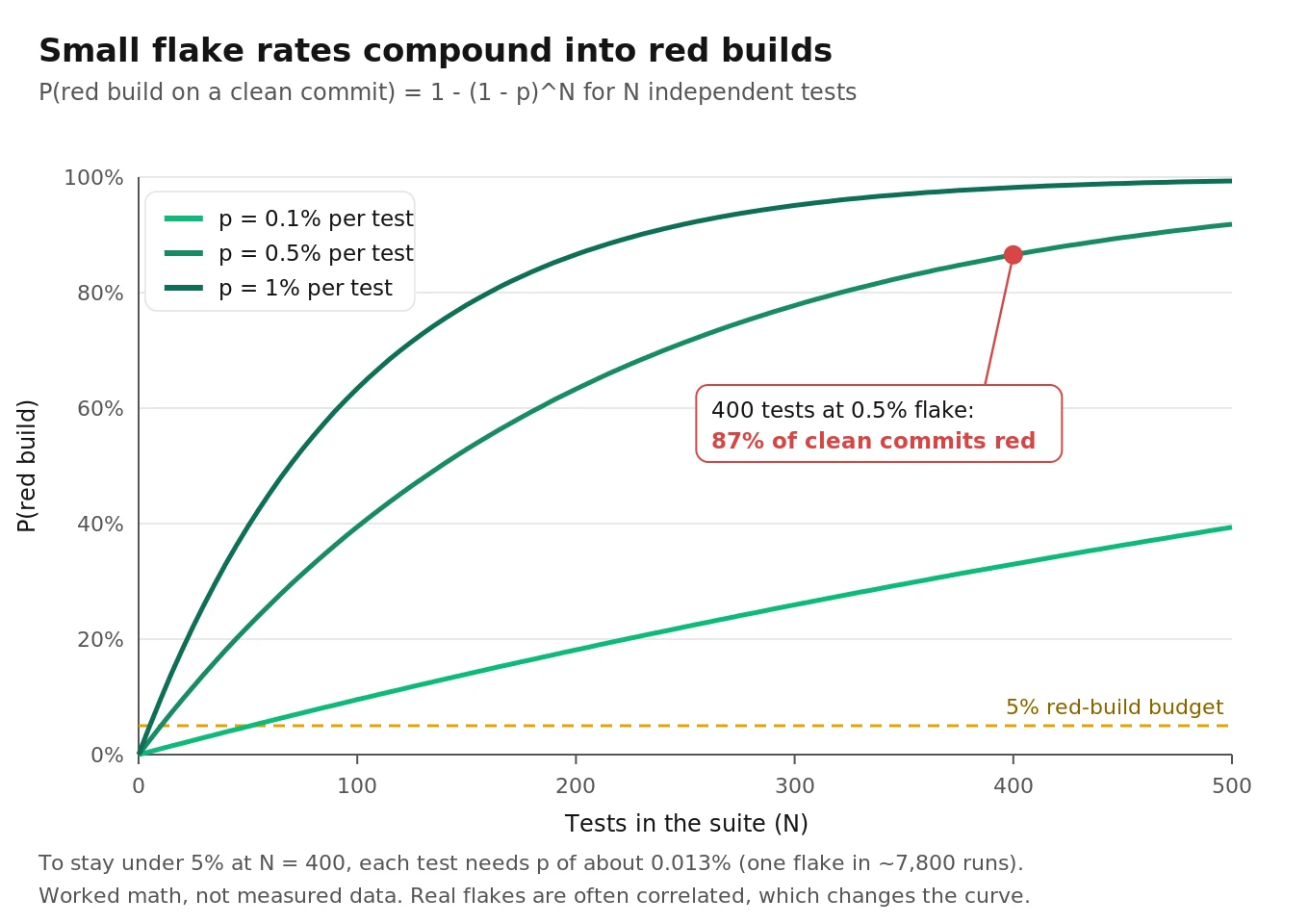
A suite's reliability compounds. If each of N independent tests flakes with probability p, the chance that a clean commit still produces a red build is:
P(red) = 1 - (1 - p)^N
| Tests (N) | Per-test flake rate (p) | P(red build on a clean commit) |
|---|---|---|
| 200 | 0.1% | 18% |
| 200 | 0.5% | 63% |
| 400 | 0.5% | 87% |
| 400 | 1.0% | 98% |
| 20 live tests | 2.0% | 33% |
Google's numbers show what this looks like at scale. Their testing blog reported that about 1.5% of all test runs were flaky, almost 16% of tests had some level of flakiness, and about 84% of observed pass-to-fail transitions involved a flaky test. They also note that with roughly 1,000 tests per project, a 1.5% flake rate means about 15 failures on a typical release run.
Work the budget backward. If you want a 400-test L1 and L2 suite to go red on a clean commit less than 5% of the time, solve 1 - (1 - p)^400 = 0.05. That gives p of about 0.013% per test, roughly one flake in 7,800 runs. Only fully deterministic tests hit that bar, which is why L1 and L2 use frozen inputs, the audio clock, and exact assertions.
Retries look like a fix. With one automatic retry, a test fails only if it flakes twice, so the effective rate is p squared: at p = 0.5%, that's 0.0025%, and P(red) for 400 tests drops from 87% to about 1%. The cost is that a real intermittent bug, such as a race in your KeepAlive timer, now has to fail twice in a row to be seen. Google's blog describes the same tradeoff with their "fail three times in a row" flag. Allow retries only in L3, where the network is the known source of noise, and record every retry so the retry rate is itself a tracked metric.
Layer 4: conversation simulations
Everything above tests pieces. Some failures exist only when the pieces run together at real speed with a real-sounding caller. A user who interrupts the agent mid-sentence. A caller who pauses long enough for eager end-of-turn to fire, then keeps talking, so a speculative `FunctionCallRequest` gets cancelled. Endpointing that works in a quiet room but cuts off a caller on a speakerphone. None of these show up in a cassette, because the cassette fixed the timing that causes them.
Layer 4 drives full calls with synthetic callers across a matrix of voices, accents, noise levels, and codecs, then scores outcomes: did the task complete, were tool arguments correct, how long did turns take, did the agent talk over the caller. It doesn't assert exact behavior, and it shouldn't gate individual commits. It gates releases, and it catches the class of regression described in our post on LLM updates breaking voice agents. For how to build the caller side, see synthetic callers for voice agent testing.
This is also the layer where an outside evaluator adds the most. A team that wrote the agent also wrote its test scenarios, and both carry the same blind spots. Evalgent runs independent pre-launch audits and release regression suites at this layer, scoring full calls rather than unit outputs, so a green unit suite and a broken caller experience can't coexist unnoticed.
How to build a Deepgram voice test suite
1. List your failure modes first. Start from the taxonomy table above and add the ones specific to your agent: the entities it handles, the tools that change the world, the line conditions your callers have.
2. Write L1 tests for every pure function on the voice path. Utterance assembly with `is_final` and `speech_final`, `UtteranceEnd` handling, Flux `TurnInfo` handling with unknown `trigger` values, tool argument parsing, and the `defer_until_eot` config check.
3. Record cassettes from real sessions. One per scenario: short command, long utterance with mid-sentence pause, digits, silence, noise-only, and a barge-in. Store the audio SHA-256 and `model_info` with each.
4. Build a fake Deepgram server that replays on the audio clock. Point the real SDK at it with `DeepgramClientEnvironment`. Assert query parameters, frame types, control messages, byte counts, and the assembled utterances.
5. Encode protocol gotchas in the fake. Idle timeout with a short configurable value, binary-framed JSON detection, unknown message types, and timestamp gaps after KeepAlive.
6. Write a normalizer and an entity extractor, and version them. Exact match after normalization for entities and short commands. Corpus WER for everything else.
7. Freeze TTS fixtures for loopback tests. Generate once with an explicit Aura-2 voice, encoding, and sample rate. Commit the audio and a manifest. Regenerate only on voice or text changes.
8. Add a nightly live contract suite. Approved model versions, corpus WER within about 1.5 points of baseline, exact entities, empty transcripts on silence, explicit `max_retries`, and worker counts under your concurrency cap.
9. Set flake budgets per layer. Near zero for L1 and L2 with no retries. A tracked retry rate for L3. Track P(red) on clean commits as a suite-health metric.
10. Run conversation simulations before every release. Score outcomes across a caller matrix, and bring in independent evaluation for pre-launch audits and vendor or model changes. Our guide to voice agent test automation covers wiring all four layers into CI.
Frequently asked questions
How do you implement unit tests for voice interactions using Deepgram?
Split the voice path into layers. Unit test pure logic such as utterance assembly and tool dispatch with plain dicts. Replay recorded websocket cassettes through a fake Deepgram server to test your real client and SDK. Run a small nightly suite against the live API to catch model drift. Leave turn-taking and barge-in to conversation simulations.
How do you mock the Deepgram websocket in pytest?
Run a local websocket server that speaks Deepgram's documented `/v1/listen` protocol: accept binary audio and `KeepAlive`, `Finalize`, and `CloseStream` text messages, and send `Results`, `UtteranceEnd`, and `Metadata` from a cassette. Point the SDK at it with `DeepgramClientEnvironment`. The SDK's `transport_factory` hook is a socket-free alternative.
How do you make Deepgram tests deterministic?
Freeze every input: committed audio fixtures, recorded cassettes, and frozen TTS output. Release cassette events by audio bytes received, not by timers, so ordering never depends on scheduling. Assert exactly only where inputs are frozen. Keep anything that touches the live service in a separate nightly job with its own failure budget.
How do you pin a Deepgram model version?
Pass the `version` query parameter, which defaults to `latest`, with a version string from Deepgram's changelog, or a `version_id` for custom models. Then verify it: every response includes `metadata.model_info` with the model's name, version, and architecture. A contract test should fail when that version isn't on your approved list.
What WER threshold should a voice test use?
Don't set tight per-clip WER limits; one error on a 10-word clip is already 10%. Gate on corpus WER instead, with tolerance for sampling noise. For 2,400 reference words at 8% WER, the 95% interval is roughly plus or minus 1.1 points, so a 1.5-point regression gate is reasonable. Add exact checks for entities.
Why test entities separately from WER?
Because WER weights every word equally and tasks don't. One wrong digit in a 10-digit account number is a 6.25% raw WER on a 16-word sentence, which passes most WER gates while sending the request to the wrong account. Extract digits, dates, amounts, and names, normalize them, and require exact matches.
How do you test Deepgram Voice Agent function calls?
Feed `FunctionCallRequest` payloads to your dispatcher and assert it parses `arguments` as a JSON string, ignores `client_side: false`, echoes the `id`, and never answers a cancelled call. Also assert that every irreversible function sets `defer_until_eot: true` in your `Settings`, since calls can otherwise fire before the turn is confirmed.
Can you use TTS to test STT pronunciation?
Yes, for your own vocabulary: synthesize phrases with Aura-2, transcribe them with Nova-3, and check entities survive. Treat failures as leads, not verdicts. Research on TTS-generated ASR tests found 21–34% of failures were false alarms that human audio didn't reproduce. Aura-2 has no seed, so freeze the generated audio.
The bottom line
Deepgram voice code becomes testable when you stop treating a conversation as one unit and test each layer with the cheapest deterministic tool that catches its failures: pure logic, audio-clock cassette replay, pinned-model contract tests, and outcome-scored conversation simulations. Get the assertions and the flake math right, and a green build starts to mean the agent works, with independent conversation-level evaluation covering what no unit test can see.
Related Articles

How to automate voice agent testing: synthetic callers vs manual QA
Learn how ai test automation replaces manual QA for voice agents. Compare synthetic callers vs human testers, with a 5-step framework to scale without hiring.
Read more
AI Agent Testing vs Voice Agent Testing: What General Tools Miss for Voice
AI agent testing measures text outputs. Voice agent testing measures behaviour through an acoustic pipeline. Five failure categories general tools miss.
Read more