Deepgram Testing for Voice Agents: Latency, Accuracy and Load (2026)
On this page
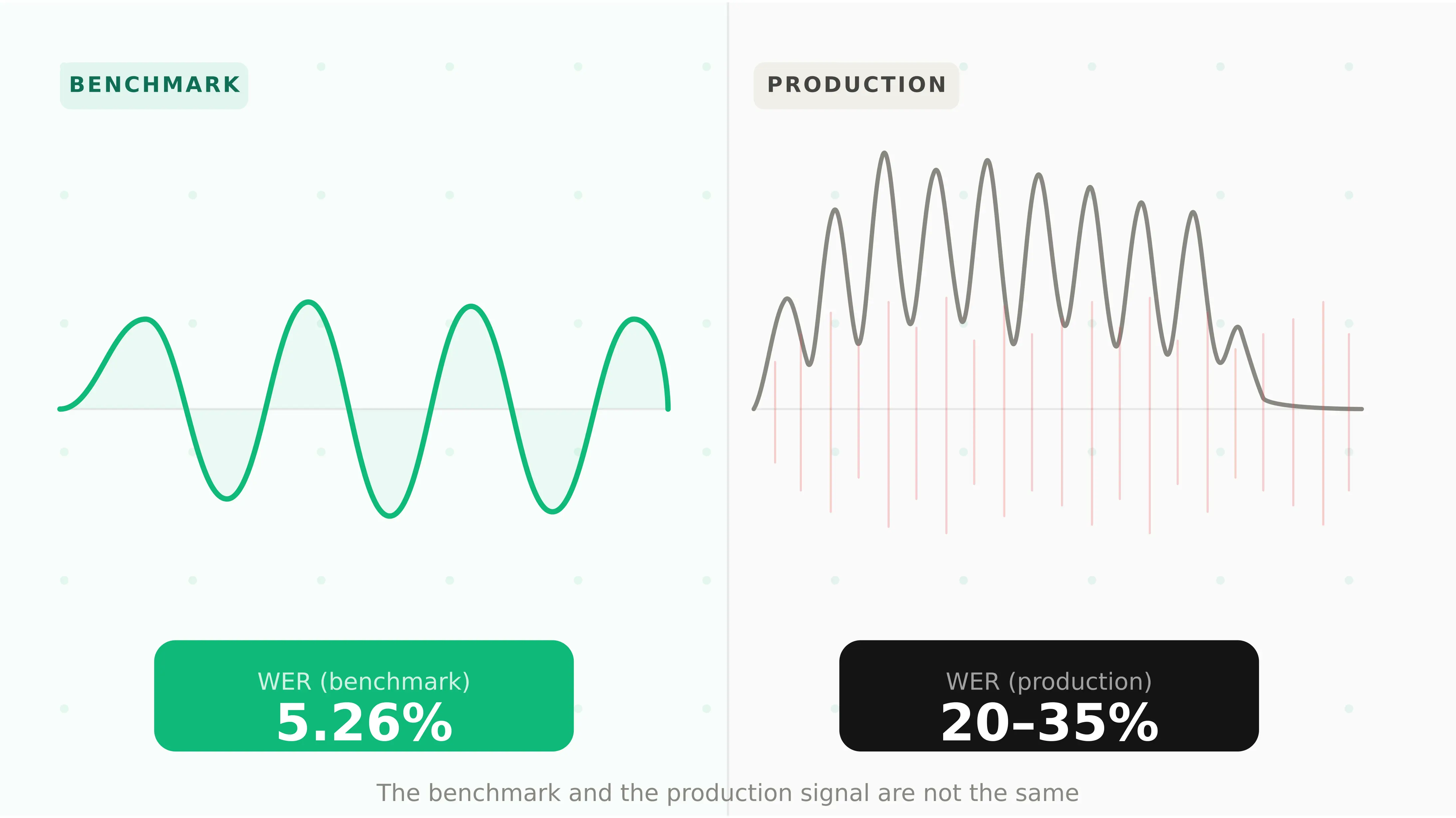
Deepgram is the default speech-to-text choice for many teams building on Vapi, Retell, LiveKit and Pipecat. Its headline numbers are strong. Deepgram's docs describe sub-300 ms streaming transcription latency for Nova-3 and Flux. The Nova-3 model page cites a 54.2% WER reduction for streaming versus competitors.
The problem is not the numbers. The problem is what they measure.
Vendor benchmarks use curated audio sets. Your voice agent runs on 8 kHz phone calls from cars, kitchens and warehouses. Callers read out account numbers, spell emails and pause mid-sentence. None of that shows up in a headline WER.
This guide is a complete Deepgram STT test plan, from test-set design to production monitoring. It includes streaming code, WER scoring, keyterm tests, endpointing tuning and load tests. Every Deepgram fact was checked against its docs as of September 2026.
Deepgram STT testing: measuring how Deepgram's models perform on your audio, vocabulary and traffic, not on vendor benchmarks.
What you are testing: Deepgram STT in 2026
Deepgram now ships two families of streaming STT that matter for voice agents. They behave differently, so they need different tests.
Flux: Deepgram's conversational STT model for voice agents. It has model-integrated end-of-turn detection and emits turn events such as `StartOfTurn`, `EagerEndOfTurn` and `EndOfTurn`. It runs on the `/v2/listen` endpoint.
Nova-3: Deepgram's general-purpose ASR model, with no built-in turn detection. It runs on `/v1/listen` for streaming and pre-recorded audio. You pair it with `endpointing`, `utterance_end_ms` or your own VAD.
| Model | Endpoint | Best fit | Turn detection | Notable options |
|---|---|---|---|---|
| `flux-general-en` | `/v2/listen` | English voice agents | Built in (`eot_threshold`) | Keyterms, eager end of turn |
| `flux-general-multi` | `/v2/listen` | 10-language agents | Built in | `language_hint`, code-switching |
| `nova-3` | `/v1/listen` | Streaming or batch, many languages | External (`endpointing`) | Smart format, diarization, redaction |
| `nova-3-medical` | `/v1/listen` | Clinical English | External | Medical vocabulary |
| `nova-3-pharma` | `/v1/listen` | Pharmacy workflows | External | Drug-name recognition |
| `nova-2` variants | `/v1/listen` | Languages not yet on Nova-3 | External | Legacy domain models |
A few details from Deepgram's Flux vs Nova-3 comparison change what you test:
- Flux has no smart formatting. If your agent needs "$50.00" rather than "fifty dollars", test formatting on Nova-3 or add your own normalizer.
- Flux replaces interim results with `Update` messages, sent about every 0.25 seconds of audio.
- Flux keeps a connection alive for 60 seconds without audio. Nova-3 closes after about 12 seconds unless you send `KeepAlive`.
- Keyterm prompting works on both Flux and Nova-3. The legacy `keywords` parameter is for older models.
- `nova-3-pharma` was added in September 2026. The changelog shows Nova-3 language models being updated almost weekly.
That last point matters. A model that changes often needs a regression suite, not a one-time check.
The Voice Agent API: Deepgram's bundled STT, LLM and TTS agent. If you use it, you test the whole agent, not just STT. Our guide to load testing the Deepgram Voice Agent API covers that path.
Why benchmark WER does not predict your agent
A benchmark is one audio distribution. Your traffic is another. Here is what typical benchmarks leave out:
- Telephony audio. PSTN calls arrive at 8 kHz, often mu-law encoded. Benchmarks usually use wideband audio.
- Your vocabulary. Drug names, SKUs, plan names and street names rarely appear in public test sets.
- Structured entities. Account numbers, emails and addresses are a small share of words but most of the task risk.
- Turn-taking. WER says nothing about whether the agent cut the caller off mid-thought.
- Load. A single test stream never shows p95 latency at 150 concurrent calls.
WER also treats every word as equal. In a voice agent, "fifty" misheard as "fifteen" is one substitution. It can still fail the whole task. That is why this plan scores entities and timings, not just WER. For the broader method, see our guide to STT evaluation for voice agents.
What to test: the Deepgram STT test matrix
Test seven things. Each maps to a failure your callers will feel.
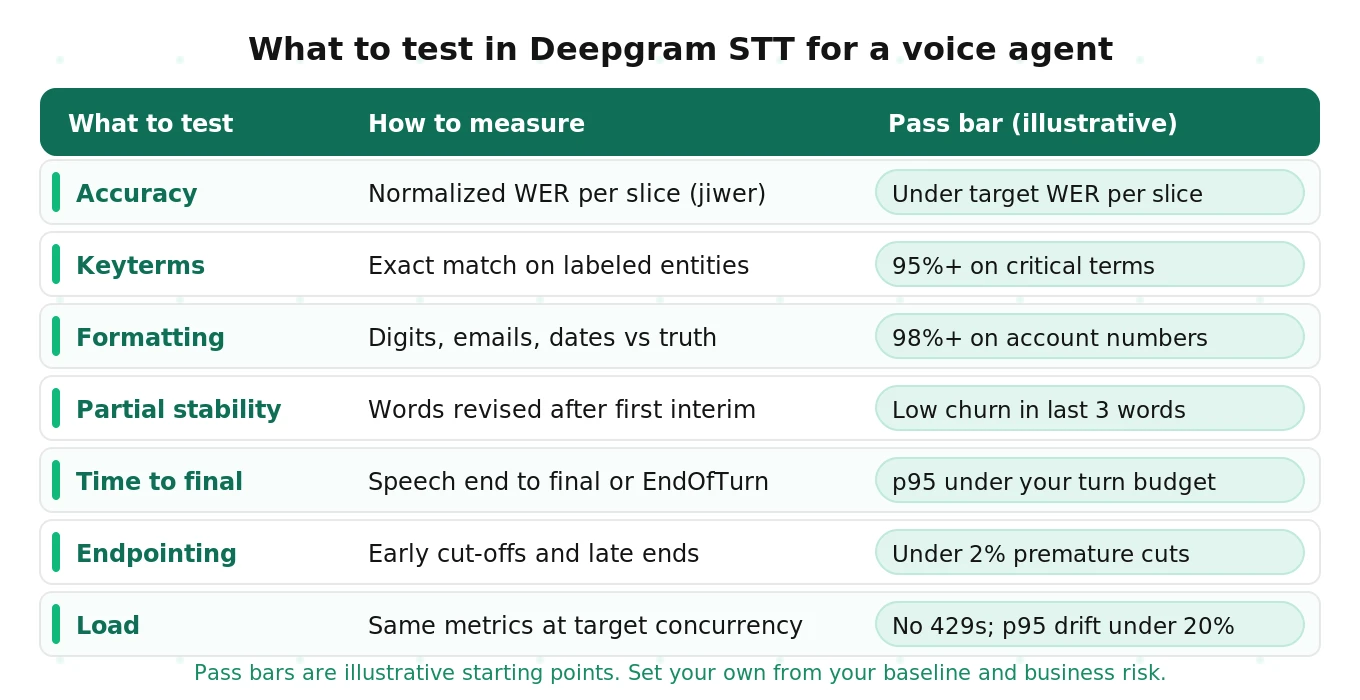
| What to test | How to measure it | Pass bar (illustrative) |
|---|---|---|
| Accuracy | Normalized WER per slice with jiwer | Under your target on every slice, not just the average |
| Keyterm and entity accuracy | Exact match of labeled entities in the final transcript | 95% or more on business-critical terms |
| Formatting accuracy | Digits, emails, dates and currency against a formatted truth | 98% or more on account and phone numbers |
| Partial-vs-final stability | Share of words revised after they first appear in an interim | Low churn in the last three words before final |
| Time to final | Speech end to `speech_final` or `EndOfTurn` arrival | p95 inside your turn-latency budget |
| Endpointing accuracy | Premature cut-offs and late finals against labeled pauses | Under 2% premature cut-offs |
| Load and stability | All of the above at target concurrency and long call length | No 429s at plan limit; p95 drift under 20% |
Treat the pass bars as starting points. Set real bars from your first baseline and your business risk. A pharmacy agent needs a stricter drug-name bar than a restaurant booking line.
Designing a Deepgram test set
Your test set decides what you can learn. A good one is small, labeled and sliced.
Start with 300 to 1,000 utterances. That is enough to see differences between slices without a huge labeling bill. Use real call recordings where consent allows. Fill gaps with recorded or synthetic speech.
Each utterance needs four labels:
1. Verbatim reference text. Exactly what was said, including false starts.
2. Formatted reference. How the entity should look, such as `ACC-4471-09` or `jane.doe@example.com`.
3. Entity spans. Which words are the critical terms, numbers or names.
4. Speech end offset. The time in the file where the caller actually stopped talking.
Then slice the set so failures cannot hide in the average.
| Slice | What to include | Why it breaks STT |
|---|---|---|
| Accents | At least three accents from your real caller base | Error rates vary by accent and hide in aggregate WER |
| Noise | Clean, plus street, car and crowd noise at fixed SNR levels | Errors rise non-linearly as SNR drops |
| Telephony | 8 kHz mu-law audio, plus codec artifacts and packet loss | Wideband tests overstate phone accuracy |
| Domain terms | Product names, drugs, plans, competitor names | Rare words get replaced by common ones |
| Numbers and IDs | Account numbers, dates, dollar amounts, phone numbers | Digit errors fail tasks outright |
| Emails and addresses | Spelled-out letters, "dot", "at", unit numbers | Letter-by-letter speech is hard to transcribe |
| Disfluency | False starts, "um", self-corrections, long pauses | Triggers early finals and confuses intent |
| Long calls | 20 to 40 minute sessions with hold silence | Exposes keep-alive and reconnect bugs |
Mix recorded noise in at set levels so results are repeatable. Our guide on testing STT under background noise covers mixing and SNR choices.
Send telephony audio as telephony audio. Do not upsample 8 kHz calls to 16 kHz before testing. Tell Deepgram the real format with `encoding=mulaw&sample_rate=8000` or `encoding=linear16&sample_rate=8000`. Testing a cleaner format than production is the most common way to fool yourself.
The test harness
The harness has five parts. A labeled test set feeds a streaming client. The client sends audio to Deepgram at real-time pace and logs every send time. A results log keeps every message with its arrival time and model version. A scorer compares the log with the truth labels. A gate passes or fails each slice against your last baseline.
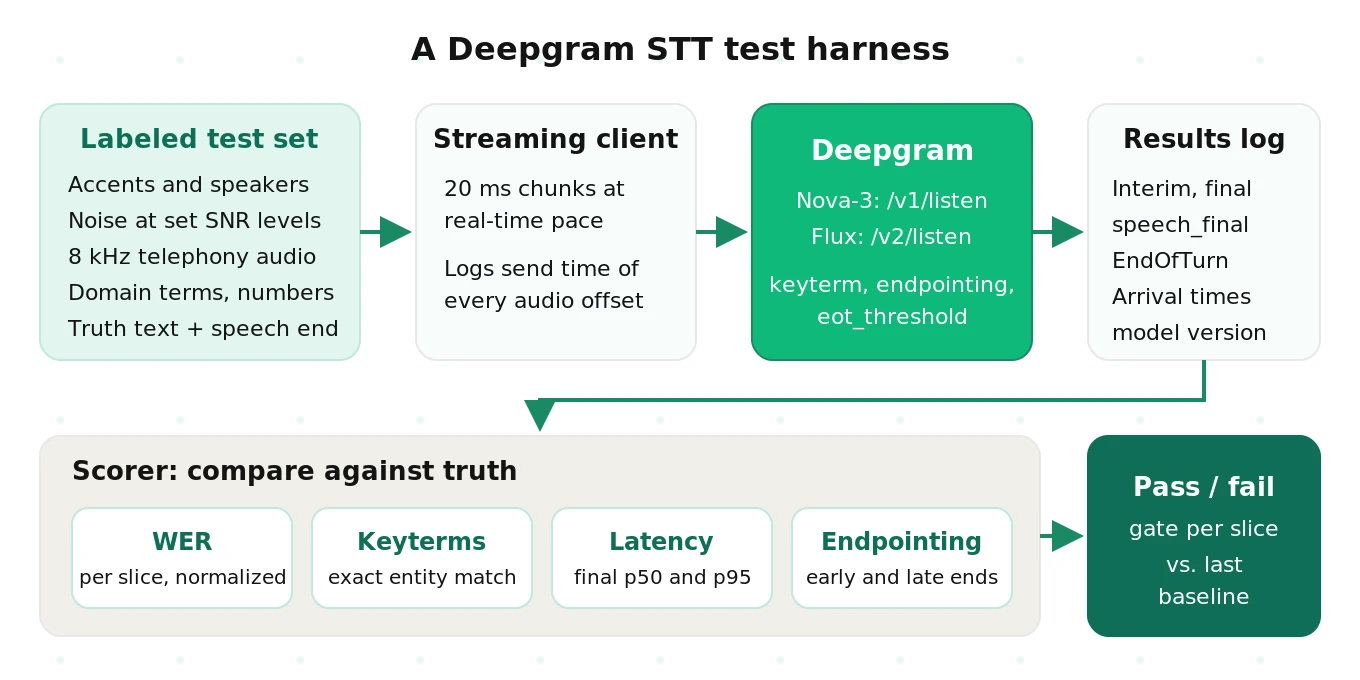
Two rules keep it honest. Stream at real-time pace, because pushing files faster hides latency and changes endpointing. And keep raw logs of every event, so you can rescore old runs later.
Streaming test code that logs every timing
The script below streams one 8 kHz WAV file to Nova-3 over a raw WebSocket. It sends 20 ms chunks at real-time pace. Deepgram's latency guide recommends 20 to 100 ms buffers. The script logs each interim and final, then computes time to final from the labeled speech end.
This is simplified for clarity. It skips reconnects and error handling. The Deepgram Python SDK wraps the same protocol if you prefer it.
# Simplified: stream one labeled file to Deepgram Nova-3 and log timings.
# pip install websockets
import asyncio, json, os, time, wave
from urllib.parse import urlencode
import websockets

API_KEY = os.environ["DEEPGRAM_API_KEY"]
CHUNK_MS = 20

def build_url(keyterms):
    params = [
        ("model", "nova-3"), ("language", "en-US"),
        ("encoding", "linear16"), ("sample_rate", "8000"), ("channels", "1"),
        ("interim_results", "true"), ("smart_format", "true"),
        ("endpointing", "300"), ("utterance_end_ms", "1000"),
        ("vad_events", "true"),
    ]
    params += [("keyterm", k) for k in keyterms]  # repeat param per term
    return "wss://api.deepgram.com/v1/listen?" + urlencode(params)

async def run(path, speech_end_s, keyterms=()):
    events, send_times = [], {}
    with wave.open(path, "rb") as wf:
        rate = wf.getframerate()
        frames = int(rate * CHUNK_MS / 1000)
        audio = [wf.readframes(frames) for _ in range(wf.getnframes() // frames + 1)]

    headers = {"Authorization": f"Token {API_KEY}"}
    async with websockets.connect(build_url(keyterms), additional_headers=headers) as ws:

        async def sender():
            t0 = time.perf_counter()
            for i, chunk in enumerate(audio):
                offset = i * CHUNK_MS / 1000
                send_times[round(offset, 2)] = time.perf_counter()
                await ws.send(chunk)
                # pace at real time
                await asyncio.sleep(max(0, t0 + offset + CHUNK_MS / 1000 - time.perf_counter()))
            await ws.send(json.dumps({"type": "CloseStream"}))

        async def receiver():
            async for raw in ws:
                msg = json.loads(raw)
                msg["_arrived"] = time.perf_counter()
                events.append(msg)

        await asyncio.gather(sender(), receiver())

    # Time to final: first speech_final at or after the labeled speech end.
    sent_at_end = send_times[min(send_times, key=lambda o: abs(o - speech_end_s))]
    finals = [e for e in events if e.get("type") == "Results" and e.get("speech_final")]
    ttf = next((e["_arrived"] - sent_at_end for e in finals
                if e["start"] + e["duration"] >= speech_end_s - 0.05), None)
    transcript = " ".join(
        e["channel"]["alternatives"][0]["transcript"]
        for e in events if e.get("type") == "Results" and e.get("is_final"))
    meta = next((e for e in events if e.get("type") == "Metadata"), {})
    return {"transcript": transcript.strip(), "time_to_final_s": ttf,
            "model_info": meta.get("model_info"), "events": events}

if __name__ == "__main__":
    out = asyncio.run(run("calls/acct_0412.wav", speech_end_s=6.84,
                          keyterms=["Evalgent", "copay"]))
    print(out["transcript"], out["time_to_final_s"])
A few notes on the measurements:
- Time to final is the voice-agent metric that matters. It is the wait between the caller stopping and your LLM getting a usable transcript.
- Transcript latency is different. Deepgram measures it on interim results only, because finals also include endpointing delay.
- Deepgram notes that `start` and `duration` are not millisecond-precise. Your wall-clock send and arrival times are the clock.
- Store `model_info` from the `Metadata` message with every run.
For Flux, connect to `/v2/listen` with `model=flux-general-en`. Measure time from speech end to the `EndOfTurn` event instead of `speech_final`. Each `EndOfTurn` carries a `trigger` field of `model`, `manual` or `timeout`. Count timeouts separately. A turn that ends by timeout means the model was never confident the caller was done.
Our deeper post on Deepgram STT latency, diarization and stability breaks down network, buffer and processing time. For fast checks inside CI, see unit testing voice interactions with Deepgram.
Computing WER with jiwer and fair normalization
WER is only comparable if you normalize both texts the same way. Otherwise you measure formatting, not recognition.
Decide your rules once and write them down:
- Lowercase everything.
- Strip punctuation, except apostrophes inside words.
- Collapse whitespace.
- Expand or collapse numbers consistently. Pick either "fifty" or "50" for both sides.
- Keep filler words out of both sides, or in both. Flux transcribes fillers by default.
- Never normalize entities in the entity metric. That metric exists to catch formatting errors.
# pip install jiwer
import re
import jiwer

NUM = {"zero": "0", "oh": "0", "one": "1", "two": "2", "three": "3", "four": "4",
       "five": "5", "six": "6", "seven": "7", "eight": "8", "nine": "9"}
FILLERS = {"um", "uh", "erm", "hmm"}

def normalize(text: str) -> str:
    text = text.lower()
    text = re.sub(r"[^\w\s']", " ", text)          # drop punctuation
    words = [NUM.get(w, w) for w in text.split() if w not in FILLERS]
    return " ".join(words)

def score(pairs):
    """pairs: list of (slice, reference, hypothesis)"""
    by_slice = {}
    for s, ref, hyp in pairs:
        by_slice.setdefault(s, ([], []))
        by_slice[s][0].append(normalize(ref))
        by_slice[s][1].append(normalize(hyp))
    return {s: round(jiwer.wer(r, h) * 100, 2) for s, (r, h) in by_slice.items()}

def entity_accuracy(items):
    """items: list of (expected_entity, hypothesis) using formatted text."""
    hits = sum(1 for ent, hyp in items if ent.lower() in hyp.lower())
    return round(100 * hits / len(items), 1)
The digit map above is deliberately small. For a real suite, use a full text normalizer. Whisper's open-source English normalizer is a common choice.
Report WER per slice, never only overall. A 7% overall WER can hide a 19% WER on one accent. Our WER vs CER guide explains when character error rate is the better metric, such as for spelled-out IDs.
Keyterm prompting: a before-and-after test
Keyterm prompting tells Nova-3 or Flux which terms to expect. It is the fastest accuracy lever you have. It is also easy to misconfigure silently.
The rules from Deepgram's docs:
- Up to 100 terms, and 500 tokens total across all keyterms. Deepgram suggests focusing on the 20 to 50 most important.
- Repeat the parameter for each term: `keyterm=copay&keyterm=Evalgent`.
- Join multi-word phrases with `%20` or `+`.
- No weights. `keyterm=term:0.15` does not error. It silently boosts nothing.
- Commas and semicolons also fail silently. The API treats the whole string as one literal term.
- Use real casing for proper nouns and lowercase for common nouns.
- On Flux, you can update keyterms mid-stream with a `Configure` message.
Silent failure is the reason to test. Run the same slice twice, once without keyterms and once with them. Compare entity accuracy and overall WER.
| Slice (illustrative numbers) | Entity accuracy, no keyterms | Entity accuracy, with keyterms | Overall WER change |
|---|---|---|---|
| Drug names | 71% | 93% | -1.8 pts |
| Plan and product names | 78% | 96% | -1.1 pts |
| Street names | 84% | 89% | -0.4 pts |
| General speech (no terms) | n/a | n/a | +0.2 pts |
Watch the last row. Keyterms can bias ordinary speech toward your terms. If a caller says "co-pay" and "copy" gets turned into "copay", general WER rises. Keep a control slice with no domain terms to catch this.
Keyterm prompting is billed as an add-on. As of September 2026, Deepgram's pricing page lists it at $0.0013 per minute on Pay As You Go. Check current pricing before you budget.
For a deeper look at entity metrics, read STT entity accuracy for voice agents.
Tuning endpointing and end-of-turn detection
Endpointing decides when the agent thinks the caller is done. Get it wrong and the agent either interrupts or feels slow. This is where many Deepgram voice agents fail first.
Endpointing: the silence length after which Deepgram finalizes a transcript and sets `speech_final=true`. On Nova-3 it defaults to 10 ms, which is very aggressive for conversation.
Utterance end: a separate `UtteranceEnd` message that fires after a gap following the last finalized word. It needs `interim_results=true` and accepts 1,000 to 5,000 ms.
The Nova-3 knobs, from Deepgram's endpointing docs and utterance end docs:
| Parameter | Default | Range | Effect when raised |
|---|---|---|---|
| `endpointing` | 10 ms | Integer ms, or `false` | Fewer premature finals, slower turns |
| `utterance_end_ms` | Off | 1,000 to 5,000 ms | Waits longer for a word gap |
| `interim_results` | Off | true/false | Required for `UtteranceEnd` |
The Flux knobs, from Deepgram's end-of-turn configuration:
| Parameter | Default | Range | Effect when raised |
|---|---|---|---|
| `eot_threshold` | 0.7 | 0.5 to 1.0 | Fewer false turn ends, slightly slower |
| `eager_eot_threshold` | Not set | 0.3 to 0.9 | Fewer speculative LLM calls, less speed gain |
| `eot_timeout_ms` | 5,000 ms | 500 to 60,000 ms | Longer wait for slow or pausing speakers |
Deepgram's docs note one trap. `UtteranceEnd` fires on a gap even if speech then continues. For voice agents that must wait for a complete thought, that can end turns too early.
To tune, build a pause slice. Include callers who pause mid-sentence, read digits slowly, or say "let me check". Label where each turn truly ends. Then sweep settings and count two errors:
- Premature cut-off: a final or `EndOfTurn` arrives before the labeled turn end.
- Late final: the final arrives well after the turn end, adding dead air.
| Setting (illustrative) | Premature cut-offs | p95 time to final |
|---|---|---|
| Nova-3, `endpointing=10` | 14.2% | 0.41 s |
| Nova-3, `endpointing=300` | 4.1% | 0.72 s |
| Nova-3, `endpointing=500` | 1.6% | 0.95 s |
| Flux, `eot_threshold=0.7` | 2.3% | 0.58 s |
| Flux, `eot_threshold=0.85` | 1.1% | 0.81 s |
There is no free setting. Pick the point where cut-offs meet your bar within your turn budget. Then retest on noisy and accented slices, because both shift the curve. For a wider view of turn detection, see the best endpointing approaches for voice agents and our endpointing guide.
Load, concurrency and long-call stability
A single stream tells you nothing about your busiest hour. Load testing answers two questions. Does quality hold at your target concurrency? And does your code handle the limits?
As of September 2026, Deepgram's pricing page lists these concurrency limits:
Deepgram's concurrency guide adds three facts. Limits apply per project, not per API key. Exceeding them returns `429 Too Many Requests`. Pay As You Go and Growth limits cannot be raised; Enterprise customers can ask sales.
So "can Deepgram handle thousands of simultaneous calls?" depends on your plan. Thousands of concurrent streams means an Enterprise agreement or a self-hosted deployment. Test that your contracted limit is what you actually get.
Run the load test in four steps:
1. Ramp to 25%, 50%, 100% and 120% of your concurrency limit.
2. Stream the same labeled slices at every step, at real-time pace.
3. Record time to final p50 and p95, WER per slice and error codes.
4. At 120%, confirm you get clean 429s and that your queue or backoff works.
Quality should stay flat as load rises. If p95 time to final drifts more than about 20% from baseline, investigate. Check your own side too. Many "Deepgram latency" spikes are client CPU, event-loop blocking or NAT port exhaustion.
Long calls need their own test. A Nova-3 stream closes after about 12 seconds without audio. Hold music, mute and long silences can trigger that. Send `{"type": "KeepAlive"}` during silence, and test 30-minute calls with hold periods. Check that transcripts, timings and memory stay stable at minute 29.
Our dedicated guide on load testing the Deepgram Voice Agent API goes further on ramp design. Stress testing voice AI covers acoustic stress at scale.
Regression testing when Deepgram updates models
Deepgram updates models often. In August and September 2026 alone, the changelog lists new and improved Nova-3 models for more than 20 languages. It also lists new Flux turn-taking controls. Updates usually improve accuracy. They can still shift behavior on your slices.
Build regression testing into your release process:
- Log the model build. Store `model_info` from each response's metadata with every test run.
- Pin when you need stability. Nova-3 supports a `version` parameter. It defaults to `latest`. Pin a version for regulated flows, and test `latest` in a canary.
- Rerun the full suite weekly. Also rerun on any changelog entry for your language or model.
- Gate on deltas, not absolutes. Fail the build if any slice's WER, entity accuracy or cut-off rate moves past a set tolerance.
- Retest your own changes too. New keyterms, a new endpointing value or a new codec in your telephony path all count as releases.
The same logic applies to your LLM and prompts. Our guide to regression testing after LLM updates applies it to the rest of the stack.
Five ways Deepgram STT fails voice agents in production
The metrics above exist to catch five recurring failures.
1. Noise degradation
Clean-audio WER does not predict production WER. Real noise spikes mid-sentence, and intent and tool parameters degrade with it. Measure a degradation curve across SNR levels, not one noisy number.
2. Accent coverage gaps
Nova-3 supports English variants such as `en-US`, `en-GB`, `en-AU` and `en-IN`. Accuracy still varies by accent, and aggregate WER hides it. Track entity accuracy per accent. Our caller profiles make accent a configurable caller trait.
3. Disfluency and early finals
Real callers say "I want to book, actually, can I change my appointment?" Aggressive endpointing finalizes the first half. The LLM may act on a sentence the caller was abandoning. Test with false starts and self-corrections, using recorded or synthetic callers. Pair this with Deepgram's September 2026 Voice Agent API option to hold function calls until the turn is confirmed.
4. Tail latency under load
p50 can look fine while p95 drifts. A slow final plus LLM and TTS time creates dead air. Track p95 time to final at every load step.
5. Error compounding
This is the costliest failure. One substitution flows through the whole pipeline:
1. The caller says "fifty". STT returns "fifteen".
2. The LLM confirms "fifteen dollars".
3. The tool call fires with `amount: 15`.
4. The downstream system records the wrong amount.
5. The agent says "Done", and the caller has no reason to object.
LLM-as-judge transcript evaluation cannot catch this. The transcript looks coherent. Only checking what the downstream system received against what the caller said catches it. Run that check across every noise and accent slice.
Deepgram STT pricing for testing and production
Pricing affects how much testing you can afford. The table shows streaming rates listed on Deepgram's pricing page as of September 2026. Several are marked as limited-time promotional rates. Check current pricing before you budget.
| Streaming model | Pay As You Go | Growth | Regular PAYG rate shown |
|---|---|---|---|
| Flux English | $0.0065/min | $0.0057/min | $0.0077/min |
| Flux Multilingual | $0.0078/min | $0.0068/min | n/a |
| Nova-3 Monolingual | $0.0048/min | $0.0042/min | $0.0077/min |
| Nova-3 Multilingual | $0.0058/min | $0.0050/min | $0.0092/min |
Pre-recorded Nova-3 monolingual is listed at $0.0043/min on Pay As You Go. Streaming add-ons are billed on top: keyterm prompting at $0.0013/min, redaction at $0.0020/min and streaming diarization at $0.0020/min. Smart formatting is included. New accounts get a $200 free credit.
The Voice Agent API is priced per minute by tier. The Standard tier is listed at $0.075/min on Pay As You Go. Tiers that bring your own LLM or TTS cost less.
Testing is cheap. A 1,000-utterance suite of 8-second clips is about 133 minutes of audio. One full Nova-3 run with keyterms costs about a dollar at these rates (illustrative). For cost trade-offs across vendors, see STT cost vs accuracy for voice agents.
How to test Deepgram STT before launch
Follow these steps in order. Each one builds on the last.
1. Pick the model and endpoint. Choose Flux on `/v2/listen` for turn-based agents, or Nova-3 on `/v1/listen` with your own turn logic.
2. Build a labeled test set. Collect 300 to 1,000 utterances with verbatim text, formatted entities and speech-end offsets.
3. Slice it. Tag each utterance by accent, noise level, telephony format, domain terms, entity type and disfluency.
4. Match production audio. Stream 8 kHz audio in its real encoding, at real-time pace, in 20 to 100 ms chunks.
5. Run a baseline. Log every message with wall-clock arrival time and `model_info`.
6. Score accuracy. Compute normalized WER per slice with jiwer, and entity and formatting accuracy without normalization.
7. Test keyterms. Run each domain slice with and without keyterms, plus a control slice.
8. Tune turn detection. Sweep `endpointing` or `eot_threshold` on a pause slice and count premature cut-offs against time to final.
9. Load test. Ramp to 120% of your concurrency limit, confirm clean 429 handling, and test 30-minute calls with silence.
10. Verify end to end. Check that tool calls receive what callers actually said, across every slice.
11. Set gates and schedule reruns. Save the baseline, set tolerances, and rerun weekly and on every model or config change.
Monitoring Deepgram in production
Testing ends at launch. Monitoring starts there. Production traffic drifts in ways no test set predicts.
Track these signals:
| Signal | What it tells you | Alert idea (illustrative) |
|---|---|---|
| p95 time to final or EndOfTurn | Turn latency your callers feel | p95 up 20% week over week |
| EndOfTurn `trigger=timeout` rate (Flux) | Model unsure when callers finish | Rate doubles from baseline |
| 429 and 5xx rate | Capacity and availability | Any sustained 429s |
| WebSocket closes and reconnects | Keep-alive or network issues | Spike above baseline |
| Mean word confidence per call | Audio quality or model drift | Drop on a traffic segment |
| Tool-parameter mismatch rate | STT errors reaching your systems | Any rise on numeric slots |
| Repeat and "that's not what I said" turns | Caller-visible misrecognition | Rise after a model update |
Tag calls by carrier, region and device. A drop in one segment often points to audio, not the model. Sample calls weekly for human-labeled WER, so you track real accuracy and not just proxies.
Use Deepgram request tagging to split usage by environment or customer. For the full picture, read our guide to monitoring AI voice agents in production. Comparing TTS voices on the same stack? See A/B testing voices in Deepgram. Why voice agents fail in production shows how STT errors become business failures.
Deepgram questions voice agent teams ask
These are the questions teams most often search for when testing Deepgram. Each answer was checked against Deepgram's developer docs in October 2026.
How do you monitor performance metrics during Deepgram development?
Log three clocks on every test stream: when each audio chunk was sent, when each interim arrived, and when the final or `EndOfTurn` arrived. Deepgram's latency guide measures transcript latency from interim results only. It also warns that `start` and `duration` are not millisecond-precise. Track p50, p95 and p99 rather than single runs, and store `model_info` with each run. Deepgram's open-source support-toolkit adds `network_latency` and `stt_stream_file` for quick checks.
What is the typical latency of Deepgram's real-time speech recognition?
Deepgram's docs list transcription latency of 150 to 300 ms and total client-side transcript latency of 200 to 500 ms. Network transit adds 20 to 200 ms depending on geography. For Flux, end-of-turn detection adds about 100 to 500 ms after speech ends. For a voice agent, end-of-turn latency is the number that matters, so measure it at p95 on your own network. Our Deepgram latency, diarization and stability deep dive shows how.
Can Deepgram handle thousands of simultaneous calls without degradation?
Not on self-serve plans. Deepgram's published limits are 150 concurrent streaming STT connections on Pay As You Go and 225 on Growth, and 45 to 60 Voice Agent API connections. Limits apply per project, extra connections get a 429, and self-serve limits cannot be raised. Thousands of concurrent calls means an Enterprise agreement or self-hosting. Then prove latency holds at that number with a real-time Deepgram load test.
How do you monitor and log Deepgram API usage and performance in production?
Add the `tag` parameter to every request, such as `tag=prod` or a customer ID. Tags then filter Deepgram's Summarize Usage and Get All Requests management endpoints. Each tag can be up to 128 characters, with 500 unique tags per day. On your side, log p95 time to final or `EndOfTurn`, 429 and 5xx rates, reconnects, word confidence and `model_info` per call. Alert on week-over-week drift, using the monitoring table above.
How many speakers can Deepgram's STT distinguish in a conversation?
Deepgram's diarization docs do not publish a maximum speaker count. Diarization assigns a `speaker` number to every word. Streaming uses the v1 diarizer and returns `speaker` without `speaker_confidence`. Batch can use the newer v2 diarizer and returns both. Use `diarize_model`, since the `diarize` flag is deprecated. If each party is on its own audio channel, multichannel transcription separates them without diarization. Test on your own multi-party calls, where overlapping speech usually breaks first.
How do you evaluate transcription accuracy in Deepgram's service?
Score Deepgram on your own labeled calls, not on benchmarks. Stream 300 to 1,000 utterances at real-time pace in the production format, such as 8 kHz mu-law. Normalize reference and output the same way, then compute WER per slice (accent, noise, entity type) with jiwer. Score entity and formatting accuracy separately, without normalization, and rerun each slice with and without keyterms. Account numbers and names matter more than average WER.
How does Deepgram handle network drops or reconnections during streaming?
Deepgram does not resume a dropped stream. Its reconnection guide says your app must open a new WebSocket and send audio within 10 seconds, or the connection closes. Buffer audio during the gap and send it after reconnecting. Streams accept at most 1.25x real time, so a large backlog adds delay. Timestamps restart at zero on each new connection, so keep an offset. Test this by killing the socket mid-call.
What is the best way to load test Deepgram's Voice Agent API?
Size the target with Erlang B, then open sessions on a Poisson arrival schedule rather than a fixed pool. Stream pre-generated caller audio in real-time 20 ms frames. Time each turn from the intended end of speech to the first agent audio byte, and run ramp, soak and spike profiles. Stay inside your project's concurrency limit and confirm clean 429s above it. The full harness is in our guide to load testing the Deepgram Voice Agent API.
How do you implement unit tests for voice interactions using Deepgram?
Keep a small set of short labeled clips for each critical intent and entity. In CI, stream each clip to Deepgram and assert on normalized transcript content, exact entity strings and time to final within a tolerance. Pin the model `version` so results stay stable, and test `latest` separately. Keep the CI suite to seconds and run the full sliced suite nightly. Our guide to unit testing Deepgram voice interactions has fixtures and assertions.
How do you evaluate different voice variations through A/B tests in Deepgram?
In the Voice Agent API, change only `agent.speak.provider` (model, version and speed) between arms in the Settings message, and tag each session with its arm. Assign by hashed caller number so repeat callers always hear one voice. Run a phone-quality listening test first to drop weak candidates. Then pre-register one primary metric, such as containment, plus guardrails. The sample-size math is in how to A/B test voices in Deepgram.
Should you test Deepgram Flux or Nova-3 for a voice agent?
Test Flux first if your agent is turn-based and in a language Flux covers. It returns `EndOfTurn` events, so you do not need a separate VAD. Test Nova-3 if you need smart formatting or a language Flux lacks, and pair it with your own turn logic. Run both on the same labeled slices and compare entity accuracy, premature cut-offs and p95 end-of-turn time. Our Deepgram Flux vs Nova-3 comparison has the side-by-side.
The bottom line
Deepgram's benchmarks show how its models perform on Deepgram's audio, not on your callers. Only a sliced test set, streamed in real time and rerun after every change, shows whether your Deepgram STT is ready.
Frequently asked questions
How quickly can Deepgram's voice agent respond to user utterances?
It depends on the LLM, TTS, region and load you pick, so measure it. Deepgram's docs put Flux end-of-turn detection at about 100 to 500 ms after speech ends, before any LLM or TTS time. Time each turn from the caller's end of speech to the first agent audio byte, and compare it with the agent's `LatencyReport` at p95.
How do you measure word error rate (WER) for Deepgram's transcripts?
WER is substitutions, deletions and insertions divided by the number of reference words. Normalize both sides with the same rules first: lowercase, strip punctuation, and treat numbers and filler words consistently. Then compute it with jiwer for each slice. Report slices separately, and use character error rate for spelled-out IDs.
What audio input restrictions apply to Deepgram streaming?
For raw audio, set `encoding` and `sample_rate` to match what you send, and use 20 to 100 ms chunks. Deepgram accepts streamed audio at no more than 1.25x real time. A new connection must receive audio within 10 seconds of opening, and a Nova-3 stream closes after about 12 seconds of silence unless you send `KeepAlive`.
Can Deepgram be integrated into CI pipelines for voice testing?
Yes. Deepgram is a standard WebSocket and REST API, so any CI runner with network access and an API key can stream test clips. Run a fast suite of short labeled clips on every pull request, pin the model version, and fail the build on entity or latency regressions. Tag CI requests, for example `tag=ci`, to track their usage separately.
How does Deepgram's ASR perform with background noise and different accents?
It varies with your audio, and aggregate WER hides it. Build a slice for each accent in your caller base and mix recorded noise in at fixed SNR levels. Compare WER and entity accuracy per slice against your clean baseline. Errors often climb sharply as SNR drops, so measure a degradation curve, not one noisy number.
How do you audit Deepgram voice interactions for regulatory reporting?
Keep your own record for each call: final transcripts, the request ID, `model_info` and the exact config used. Use Deepgram's `tag` parameter to link requests to calls, and its redaction option to remove sensitive entities from transcripts. Pin the model version on regulated flows so a later audit can reproduce the behavior.
How stable is Deepgram for long-duration voice calls?
Streams can run for long calls, but idle periods need care. A Nova-3 stream closes after about 12 seconds without audio unless you send KeepAlive messages. Flux uses a 60-second timeout. Test 30-minute calls with hold music and silence, and check latency, transcripts and client memory stay stable.
How much does Deepgram Nova-3 cost per minute?
As of September 2026, Deepgram lists Nova-3 monolingual streaming at a promotional $0.0048 per minute on Pay As You Go. The regular rate shown is $0.0077. Pre-recorded Nova-3 is $0.0043 per minute. Keyterm prompting adds $0.0013 per minute. Check current pricing before you budget.
Want an independent check of your Deepgram voice agent on real callers, accents and noise? Book a demo with Evalgent.
Related Articles
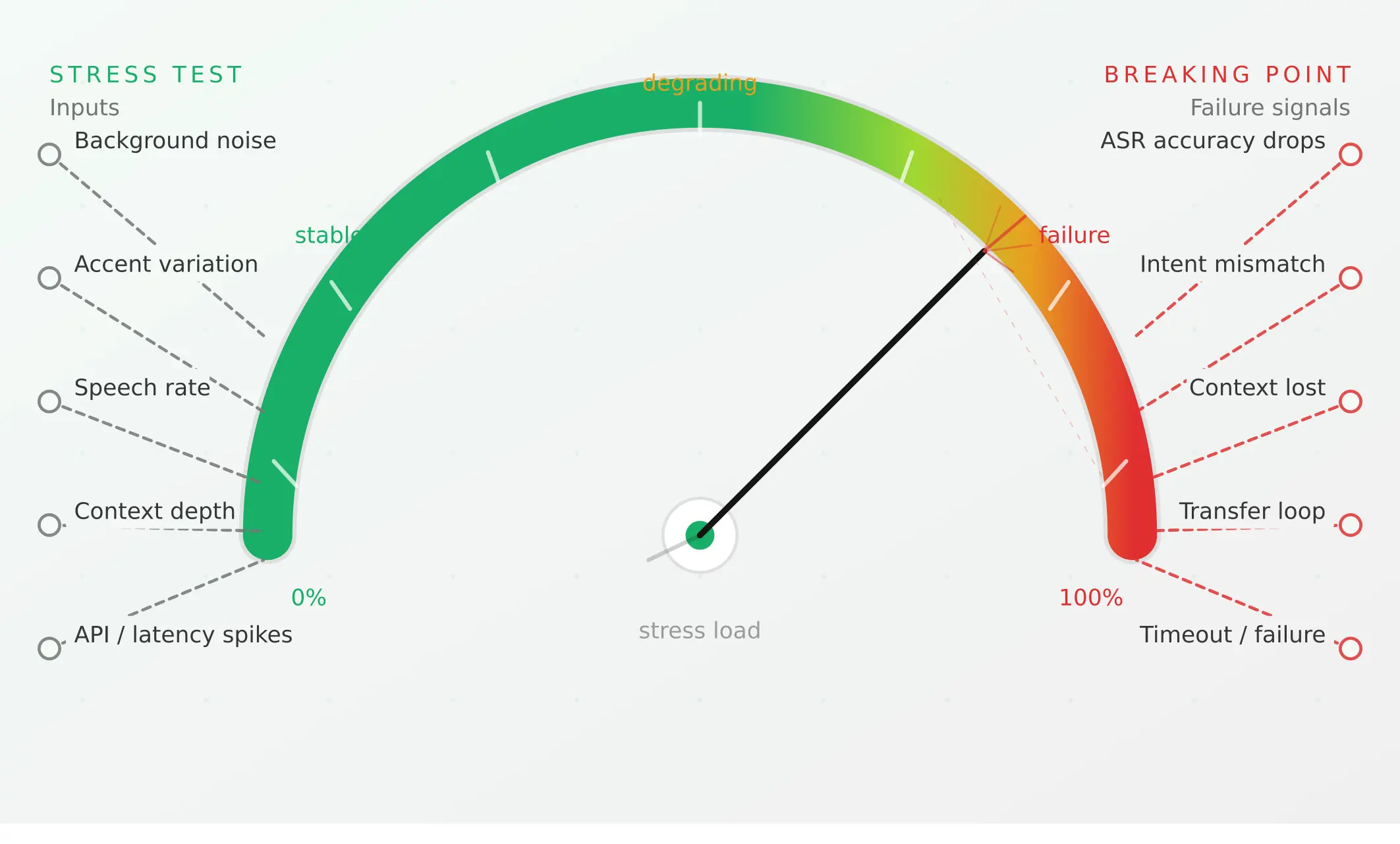
Conversational AI testing: the complete voice agent stress testing guide
Systematically stress-test voice agents to find breaking points across noise, accents, interruptions, and latency, before real users hit them.
Read more
ElevenLabs voice agent testing guide: what to check before going live
Test your ElevenLabs voice agent before launch: scenario gaps, real user behaviour, tool calls, concurrency limits, and voice-quality regression.
Read more