Multi-Tenant vs Single-Tenant Voice Agent Observability
On this page
Agencies, platforms and BPOs run one voice agent build for dozens of clients. Each client wants its own view, retention and sometimes region. Your team wants one place to find a bad call's root cause.
This post covers multi tenant voice agent observability: how to structure it, where it breaks, and when a client deserves its own stack. It is for the engineering lead who also answers client security questionnaires. For testing across tenants, read multi-tenant voice agent testing. For the basics, start with voice agent observability.
Tenant: one client account whose calls, data and policies you must keep separate from every other client's.
Sources were opened on November 23, 2026. This is general engineering information, not legal advice.
Three isolation models: pool, silo and hybrid
The AWS SaaS Lens names three footprints. In the pool model, tenants share resources. In the silo model, each tenant gets dedicated resources, such as a separate database. In the bridge model, a system mixes both. I call the mix "hybrid" here.
Applied to voice telemetry:
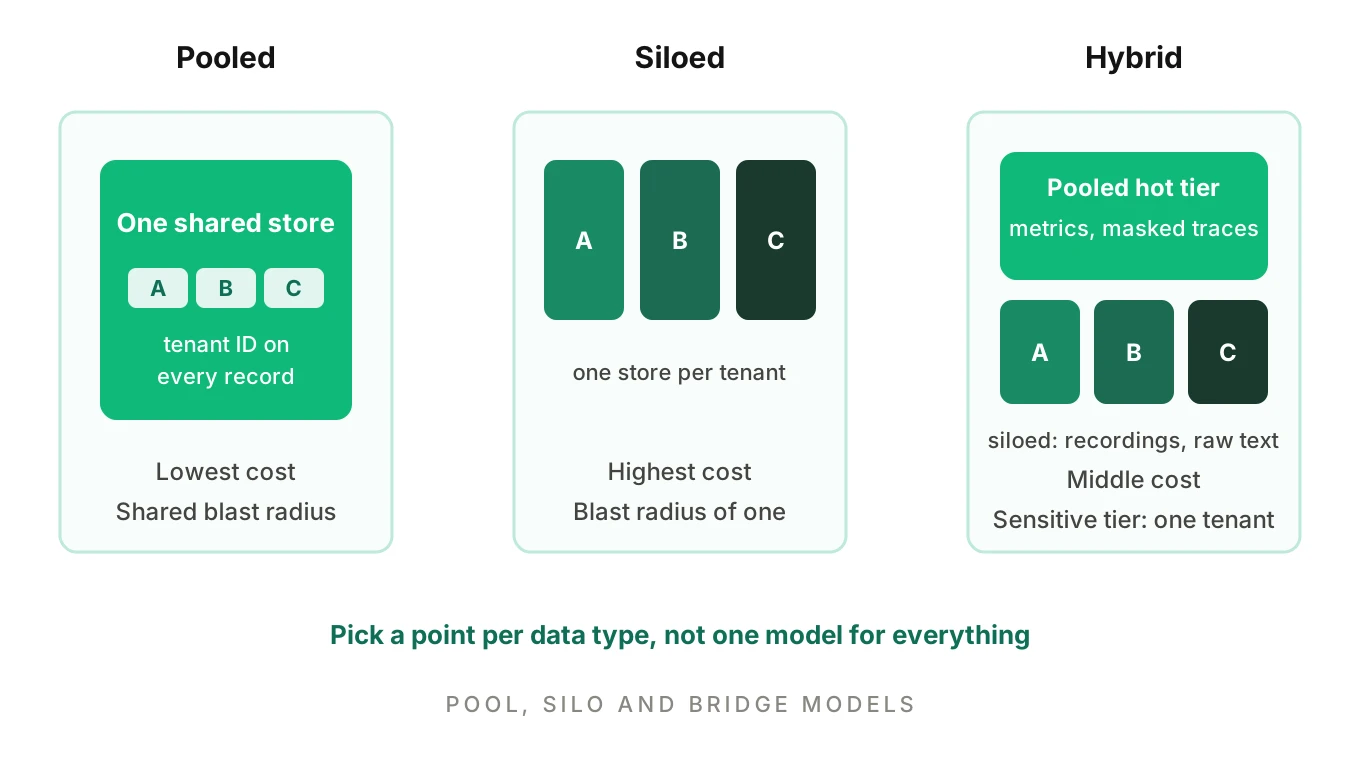
- Pooled: one trace store, one log store, one metric store. Every record carries a tenant ID. Queries filter on it.
- Siloed: one store per tenant, often in the tenant's chosen region. Nothing is shared except your tooling.
- Hybrid: pooled hot data, such as metrics and masked traces, plus siloed sensitive data, such as recordings and raw transcripts.
The same AWS page says data regulation and noisy neighbour concerns can push a service toward silo. Agility, access patterns and cost can favour pool. Azure's guidance adds that isolation is a spectrum, not one switch. You can pick a different point per data type.
A decision table: pooled vs siloed storage
Azure's tenancy guide states the trade-offs. Dedicated infrastructure per tenant isolates data and limits noisy neighbours. But "if a single tenant requires a specific infrastructure cost, 100 tenants probably require 100 times that cost." Fully shared infrastructure is cheaper. It also needs strict data separation, and a large tenant's heavy query can affect others.
The table applies that to observability. Ratings are my judgement, not measured results.
| Factor | Pooled | Siloed | Hybrid |
|---|---|---|---|
| Cost | Lowest | Highest, grows per tenant | Middle |
| Blast radius of a bug or bad query | All tenants | One tenant | Hot tier: all. Sensitive tier: one |
| Ops effort | Low, but needs strict access rules | High, one stack per tenant | Highest design effort, then moderate |
| Per-tenant region and retention | Possible per record, hard to prove | Native | Native for sensitive data |
| Cross-tenant insight | Easy, and easy to leak | Hard, needs export | Easy on the hot tier |
Pooled storage supports a per-tenant region only if you route writes by tenant. That is why many teams drift toward hybrid.
What the tenant ID must be stamped on
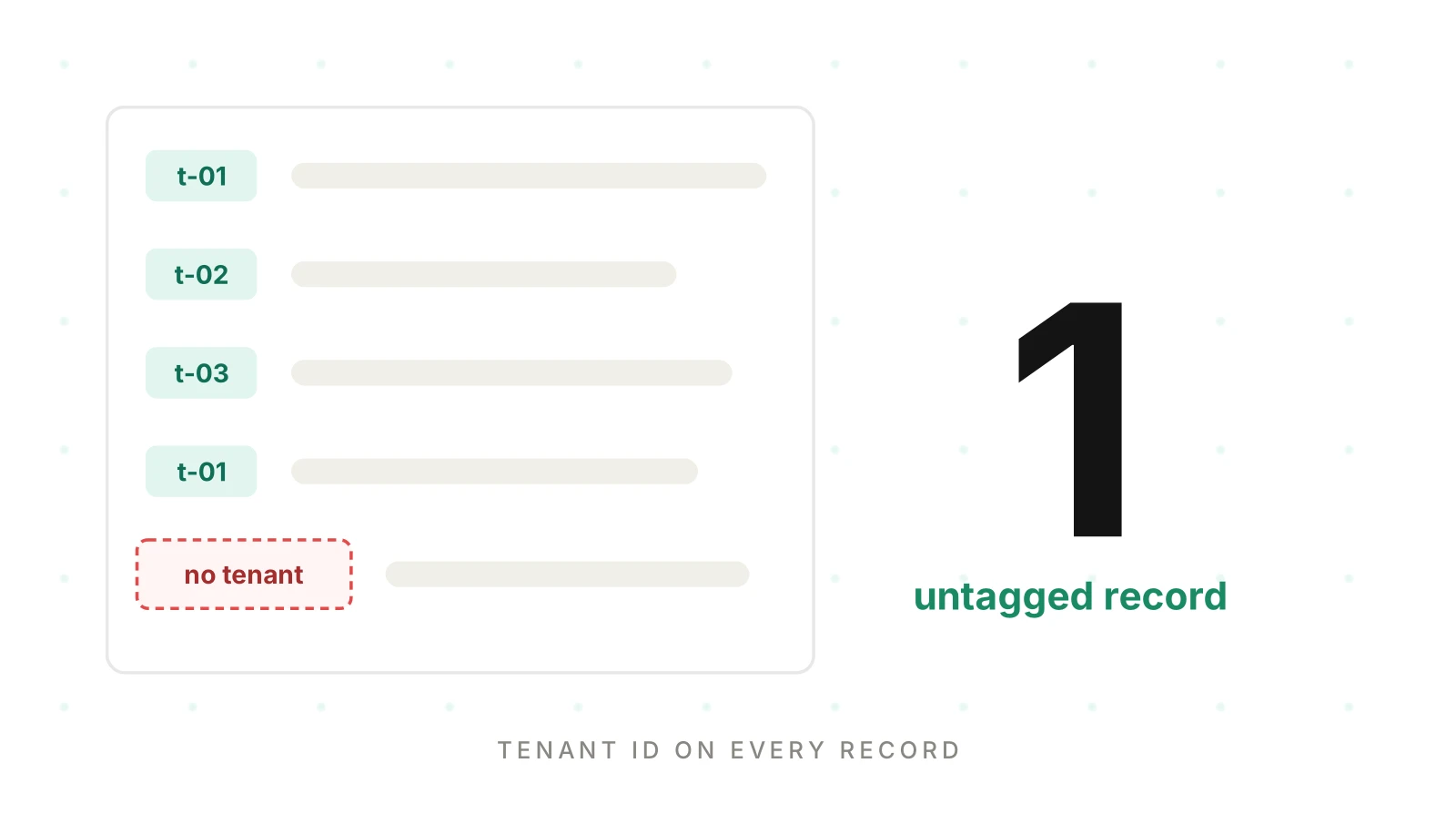
A tenant ID is only useful if it is on everything. One unlabelled record is a record you cannot delete, bill, or hide from the wrong viewer.
OpenTelemetry resource attributes describe "the entity producing telemetry." The docs say you can use that information in your backend to narrow behaviour to a specific container or pod. A tenant ID plays the same role for clients.
Stamp it in these places:
| Place | What to stamp | Why |
|---|---|---|
| Every span | Tenant ID as an attribute | Trace views filter per tenant |
| Every call event | Tenant ID next to the call ID | Joins, exports and deletes |
| Recording reference | Tenant ID in the object key or metadata | Deleting or moving one tenant's audio |
| Every log line | Tenant ID as a field | Support views stay scoped |
| Metrics | Tenant ID as a label, only when tenant count is bounded | Per-tenant dashboards and cost |
Our span attribute list and event schema reference already treat the tenant as a core field. Stamp it once, at the edge, from the call's routing data. Never trust a value the caller or the prompt supplies.
The OpenTelemetry Collector can then route by tenant. Its routing connector sends logs, metrics or traces to specific pipelines based on conditions. Its README shows a tenant example that matches request metadata. The connector is at alpha as of the date above, so test it before depending on it. Our Collector post covers routing and batching in general.
The batch processor can also batch per tenant. It creates one batcher per distinct metadata combination. That raises memory use, so the default cap is 1000 combinations. Raise it on purpose if you have more tenants.
Metric label cardinality: where tenant IDs hurt
Traces and logs can carry high-cardinality fields. Metrics cannot. Prometheus says "every unique combination of key-value label pairs represents a new time series." It warns against using labels for high-cardinality values, such as user IDs and email addresses.
So a tenant label is fine when you have tens of tenants. A call ID, caller number or session ID is never fine.
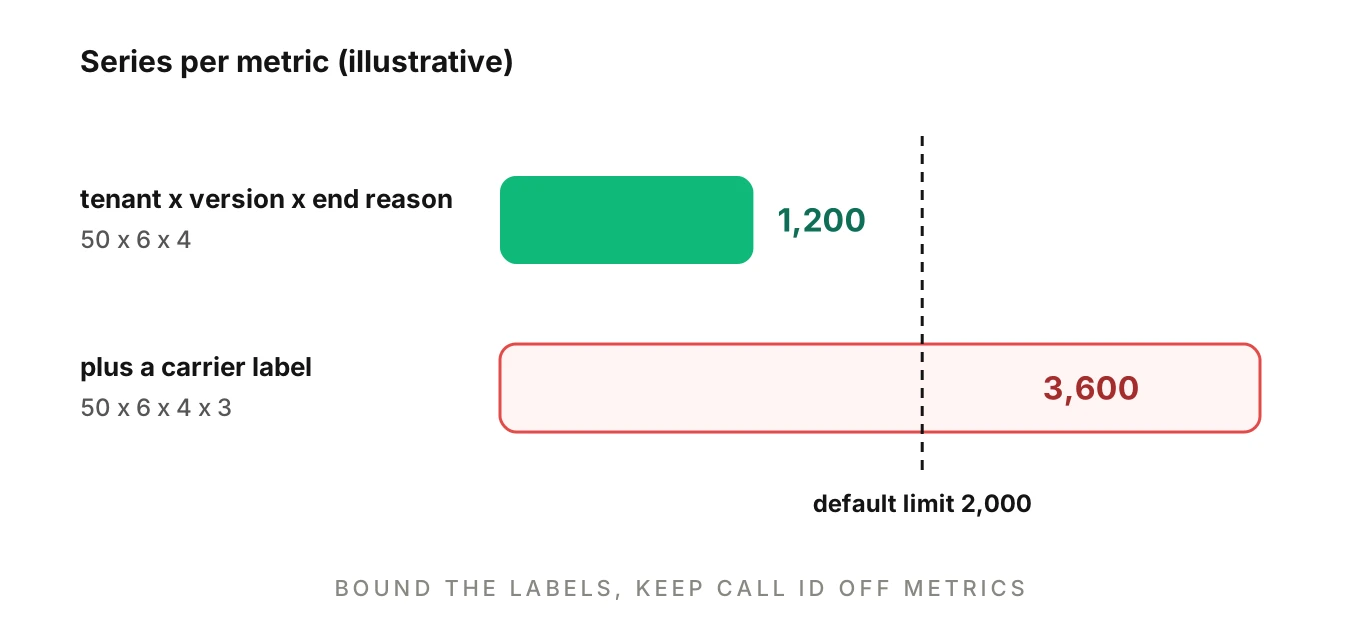
OpenTelemetry guards against the blow-up too. The metrics SDK spec defines cardinality limits: a cap on metric points per collection cycle. The default is 2000. Overflow is reported under an otel.metric.overflow attribute set. Your per-tenant data does not vanish, but it merges into one bucket you cannot split.
An illustrative example, with made-up numbers:
- 50 tenants, 6 agent versions and 4 call-end reasons make 50 x 6 x 4 = 1,200 series per metric. That is under 2,000.
- Add a carrier label with 3 values. Now it is 3,600 per metric, over the default limit.
- With 12 metrics, the first case is 14,400 series in total.
The fix is to put the tenant label on a short list of headline metrics. Keep the rest at fleet level. Answer per-tenant detail questions from traces and events instead. For the cost side, see what observability costs per minute.
Access control: per-tenant views and cross-tenant access
Decide three roles before you write a query.
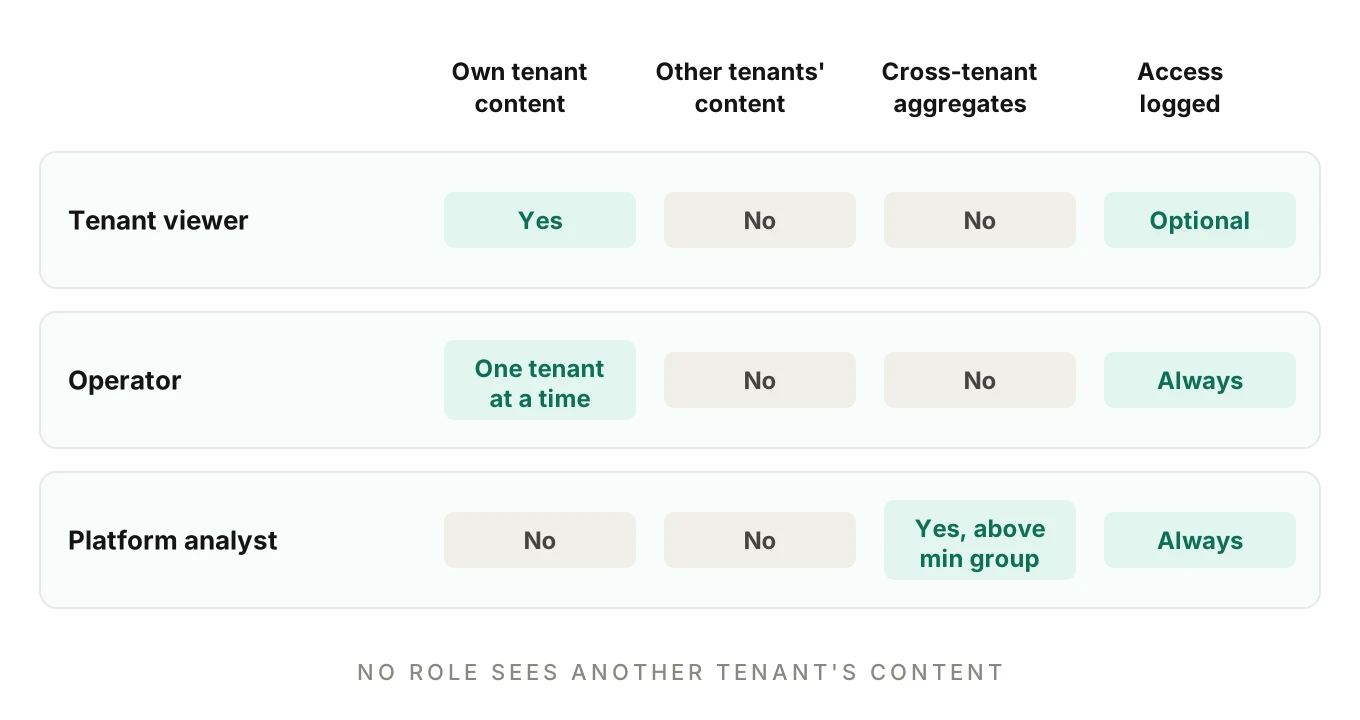
1. Tenant viewer: sees only that tenant's calls, traces and metrics. No exceptions.
2. Support or engineering operator: opens one tenant at a time, for a reason, and the open is logged.
3. Platform analyst: sees cross-tenant aggregates, never another tenant's content.
The tenant filter belongs in the data layer, not only in dashboard variables. A dashboard filter can be edited. A row-level rule or a per-tenant store cannot be edited by a viewer.
Access logging matters most for operators. Log who opened which tenant, when, and through which view. Clients ask for this in security reviews.
Noisy neighbours: one tenant should not starve the rest
Azure defines the noisy neighbour problem as one tenant's performance degrading because of another tenant's activity. Its advice is to treat it as a resource governance problem. Apply quotas, throttling and rate limits, and be transparent with tenants about them.
In observability, the noisy tenant is the one that launches a campaign. Call volume jumps tenfold. Ingest, query time and storage jump with it.
- Ingest rate limits per tenant. Cap spans and log lines per second. Return a clear signal when a tenant hits the cap.
- Per-tenant sampling. Healthy calls from a loud tenant can be sampled harder. Keep every error, slow call and handoff, as in our trace sampling post.
- Query quotas. One tenant's heavy dashboard should not slow another's.
- Reserved capacity. Azure suggests letting tenants buy it.
Limit healthy volume first, never failures.
Per-tenant retention, region and masking
Each client may ask for a different answer to the same three questions. How long do you keep it? Where does it live? What is masked? Our posts on data retention, data residency and PII redaction in logs and traces explain each in depth. Here the point is that the policy attaches to the tenant, not to the platform.
An illustrative policy table. The tenants, regions and durations are invented. They are not recommendations or legal advice.
| Tenant | Region | Recordings | Transcripts | Traces | Metrics | Masking | Model |
|---|---|---|---|---|---|---|---|
| A: clinic network | US | 30 days | 90 days, masked | 90 days | 13 months | Masked on arrival, metrics-only mode on request | Siloed |
| B: EU retailer | EU | 14 days | 30 days, masked | 30 days | 13 months | Masked on arrival | Hybrid, sensitive data siloed in EU |
| C: small agency client | US | 30 days | 60 days, masked | 60 days | 13 months | Masked on arrival | Pooled |
Store the policy as data keyed by tenant ID. Deletion jobs, routing and masking read from it.
Cost allocation per tenant
Azure's guidance says to measure actual cost to serve each tenant, since most services do not break usage down by your tenants. It prefers a single indicative measure, such as transactions. It also warns that sampled telemetry is not accurate enough for billing, so use a store that gives high accuracy.
For voice, call minutes are the natural indicator. A worked example, with invented numbers:
- A shared telemetry bill is $4,200 in a month.
- Tenant A used 60,000 call minutes, B 30,000 and C 10,000. That is 100,000 in total.
- The rate is $4,200 / 100,000 = $0.042 per minute.
- A is charged $2,520, B $1,260 and C $420. The three add up to $4,200.
Siloed stores are easy to cost, because the bill is the tenant's. Pooled costs need an allocation key like the one above. Give recordings their own key, since audio storage scales with minutes and retention.
Exporting or deleting one tenant's data
Offboarding is where weak tagging shows. Azure's tenant lifecycle guidance says to decide how long to keep customer data after a tenant leaves. It also asks whether you will support reonboarding. It does not describe a data export; I found nothing there, so the steps below are my own.
- Export: query by tenant ID across traces, events, logs and recording references. Package the results and the policy that applied.
- Delete: run the same query as a delete. Then check the backups, queues and caches, since they are copies too.
- Prove it: keep a record that the delete ran, with a count and a date, but no call content.
In a siloed store, delete is dropping the store. In a pooled store, it works only if every record carries the ID. An untagged record survives the delete and becomes a liability.
Cross-tenant analysis without leaking
You still want fleet-wide insight. Which prompt change raised failures across clients? Which carrier is slow everywhere? Keep to these rules:
1. Aggregate only. Counts, rates and percentiles. No transcripts, no call IDs, no tool payloads.
2. Set a minimum group size. Do not show a cell with fewer than some number of tenants or calls. The number is your policy. Mine, for illustration, is 5 tenants and 30 calls.
3. Never show one tenant's content to another. This includes "similar failing calls" lists and example snippets.
4. Use the platform analyst role. Do not borrow an operator account.
Our cohort analysis post covers sample sizes. Add tenant as one more dimension, then apply the group-size gate.
Baselines should also be per tenant. A client with long calls by design will look broken against the fleet average. Compare each tenant with its own history first, then look at the fleet. The live side of this is in monitoring a fleet of voice agents.
When single-tenant per client is right
Choose a dedicated stack for a client when:
- A contract requires isolation or a named region you cannot guarantee in a pool.
- The client is regulated and its auditors want a boundary they can inspect.
- The client's volume is so large that it would dominate a pool.
- The client wants to hold its own keys or retention rules.
Azure's guide notes single-tenant stamps give the highest isolation but cost more, and a fleet of them gets harder to manage. It recommends pricing that offsets the cost. Charge for it.
Choose pooled for the long tail of small clients, and hybrid when you have both. To weigh running this yourself, read build vs buy observability.
Where Evalgent fits
Evalgent is a testing, evaluation and monitoring platform for voice agents. Evalgent Monitor is live. It flags problems such as tool-call failures, latency spikes and policy failures, with fix recommendations.
Evalgent Observe is launching. It takes OpenTelemetry data from any stack, plus an upload path for call details. It never sits in the media path. Traces explain why a call failed, and failures are clustered into root causes. Where your data is blind, it says "undetermined" and shows the coverage gap.
On privacy, Evalgent offers headline controls: personal data masked on arrival, a metrics-only mode, access logging, retention you control and a data region you choose. This post does not claim a multi-tenant feature, a tenant isolation guarantee or a certification. Ask any vendor, us included, to show how each rule above works in their product. You can book a demo and bring your tenant policy table.
How to structure multi-tenant voice agent observability
1. List your tenant classes - group clients by region, regulation and volume. Most platforms have two or three classes.
2. Pick a model per data type - pooled, siloed or hybrid for metrics, traces, transcripts and recordings.
3. Stamp the tenant ID at the edge - from routing data, on every span, event, log line and recording reference.
4. Bound the metric labels - tenant ID only on headline metrics, never call IDs, and check the series count.
5. Define the three roles - viewer, operator and platform analyst, with the filter in the data layer.
6. Set per-tenant limits - ingest rate, query quota and sampling, with failures always kept.
7. Write the tenant policy table - region, retention and masking, stored as data and read by jobs.
8. Rehearse offboarding - export and delete one test tenant, then check for leftovers.
Frequently asked questions
What is multi tenant voice agent observability?
It is tracing, logging and measuring voice agents that serve many clients, with each client's data kept separate. Every record carries a tenant ID. Access, retention, region and cost are managed per tenant. The team still gets fleet-wide views, built from aggregates that never expose one client's content to another.
Should I use pooled or siloed storage for voice agent traces?
Use pooled storage for small clients and siloed storage where a contract, region or regulator requires a boundary. Pooled costs less but has a shared blast radius. Siloed isolates better but costs more per tenant. Many teams run a hybrid: pooled masked traces and metrics, siloed recordings and raw transcripts.
Is tenant ID a good Prometheus label?
It is acceptable when the tenant count is bounded and the label sits on a few headline metrics. Prometheus warns that each unique label combination creates a new time series. Never use call IDs or caller numbers as labels. Answer per-call questions from traces and events instead.
How do I stop one tenant overloading shared observability?
Apply governance per tenant. Set ingest rate limits, query quotas and sampling for healthy calls. Azure's noisy neighbour guidance recommends quotas and throttling and advises telling tenants about the limits. Never sample away errors, slow calls or handoffs to save budget.
How do I allocate observability cost to each tenant?
Pick one indicator, usually call minutes, and divide the shared bill by it. Use a store accurate enough for billing, since sampled telemetry is not. Siloed stores cost out directly. Treat recording storage as its own line, because it scales with retention.
How do I delete one tenant's voice data?
Query every store by tenant ID, delete the matches, then check backups, queues and caches. It works only if every record is tagged. Keep a deletion record with counts and a date but no call content. Rehearse it on a test tenant first.
Can I compare tenants without leaking their data?
Yes, with aggregates only. Show rates and percentiles, set a minimum group size, and never display one tenant's transcripts, call IDs or tool payloads to another. Use a separate platform analyst role. Keep per-tenant baselines for alerts, since tenants differ by design.
When is a single-tenant observability stack required?
Use one when a contract demands isolation or a named region, when auditors want an inspectable boundary, or when a client's volume would dominate a pool. Price it to cover the extra cost. Whether a rule requires it is a question for your counsel.
The bottom line
Multi tenant voice agent observability works when every record carries a tenant ID and every policy, limit and role reads from it. Pool the long tail, silo the clients who need a boundary, and rehearse the exit before the first client asks.
Related Articles
How to automate voice agent testing: synthetic callers vs manual QA
Learn how ai test automation replaces manual QA for voice agents. Compare synthetic callers vs human testers, with a 5-step framework to scale without hiring.
Read more
AI Agent Testing vs Voice Agent Testing: What General Tools Miss for Voice
AI agent testing measures text outputs. Voice agent testing measures behaviour through an acoustic pipeline. Five failure categories general tools miss.
Read more