How to improve WER: reducing word error rate for voice agents
On this page
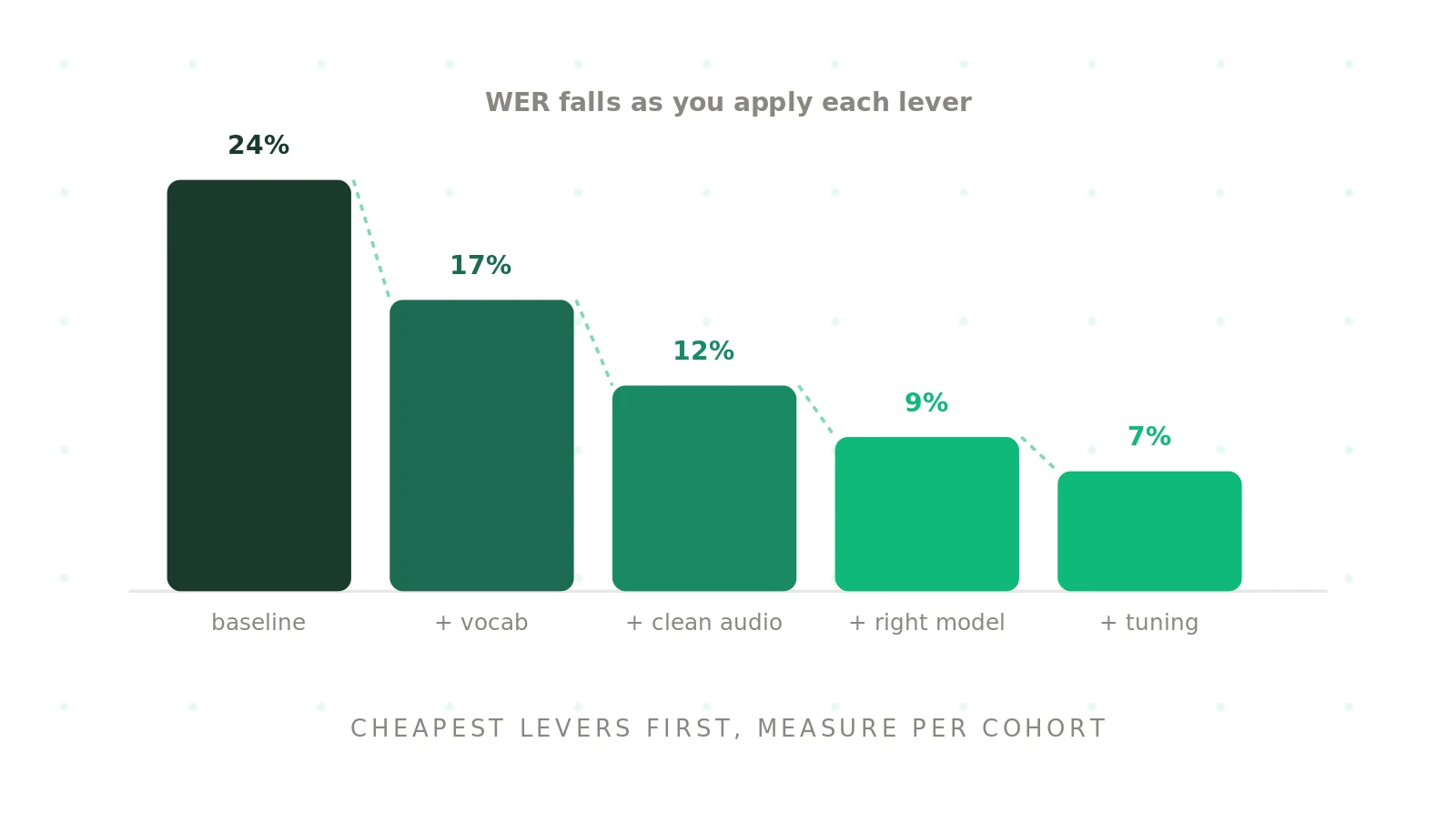
A high error rate at the transcription stage drags down the whole voice agent. The good news is that most of it is fixable, and much of the fix happens above the model. This guide walks through the practical levers to lower WER, in rough order of effort, and the discipline that makes each one stick.
Evalgent's view is that you cannot improve what you do not measure per cohort. We return to that. First, what the number means.
What does it mean to lower WER?
Word error rate, or WER, counts the wrong, missing, and extra words a speech-to-text system produces. To lower WER is to lower that count on the audio your agent actually receives. The target is not a clean benchmark; it is your real traffic.
This matters because a low lab score does not transfer. A system can post 5% on studio audio and 25% on your noisy, accented calls. Reducing the number that counts means reducing it under your conditions, which is why measurement comes first and changes come second.
Measure first, per cohort
You cannot improve what you cannot see. Before changing anything, measure WER on representative audio, broken down by accent, noise level, and call type. A single blended score hides the cohort that is actually failing.
This breakdown tells you where the errors live. If accented calls sit at 30% while clean calls sit at 6%, the work is accent coverage, not a general model swap. Our STT evaluation guide covers how to set up this kind of cohort measurement. Skip it, and every change is a guess.
Add custom vocabulary
The fastest win is usually custom vocabulary. Speech-to-text models stumble on words they rarely saw in training: customer names, product codes, drug names, and abbreviations. Feeding the model a list of your domain vocabulary teaches it to expect them.
Most STT providers support custom vocabulary, boosting, or phrase hints. Adding the names and terms your callers actually use can lower WER sharply on exactly the words that matter most. This is a configuration change, not a model change, so it is cheap and reversible. It is the first lever to pull when you want to reduce word error rate.
Clean the audio path
Garbage in, garbage out. A lot of transcription error is really audio error, introduced before the model ever runs. Improving the signal improves the score.
- Noise suppression: apply noise reduction before the audio reaches the recognizer.
- Codec and telephony: a better codec and a stable connection preserve detail the model needs.
- Echo and gain: fix echo cancellation and level the volume so speech is clear.
- Sample rate: feed the model audio at the rate it expects.
These changes improve audio quality at the source, which lifts accuracy across every cohort at once. On telephony especially, the line quality often matters more than the model.
Pick the right STT model
Not all models are equal on your audio. The model that wins a public benchmark can lose on your accents and noise. Treat model choice as something you test, not something you assume.
Run your candidates over the same representative audio and compare WER, latency, and per-entity accuracy. Some models handle accents better, others handle noise or domain terms. The Deepgram STT testing guide shows how benchmark numbers diverge from production. Pick the model that wins on your traffic, then revisit the choice when new versions ship.
Tune endpointing and streaming
Some errors come from cutting speech off, not from mishearing it. Aggressive endpointing ends the turn too early and drops the last words. Loose endpointing waits too long and adds latency. Both hurt the experience.
Tune endpointing so the system captures full utterances without lagging. Use streaming so partial transcripts arrive early and the agent can react. Getting this balance right reduces deletions at the end of turns, a common and easily missed source of WER. It is part of the broader pipeline covered in the voice agent stack guide.
Fine-tuning and model adaptation
When configuration runs out of room, adaptation is the next step. Fine-tuning or training a custom model on your own audio can improve transcription accuracy beyond what vocabulary and audio fixes reach, especially for unusual accents or specialised domains.
This is the heaviest lever, so save it for last. It costs data, time, and ongoing maintenance, and it has to be re-validated whenever the base model changes. For most teams, custom vocabulary and a clean audio path deliver most of the gain at a fraction of the effort. Reach for fine-tuning only when the cheaper levers are exhausted and the remaining errors justify it.
How to lower WER for accents
Accents are usually the largest single source of error, so they deserve focused work. A model trained mostly on standard accents degrades on everything else, and that gap shows up as failed calls for whole groups of callers.
Tackle it directly. Measure WER per accent group, add accent-relevant vocabulary, and choose a model that performs well on your specific accents. Where a gap remains, accent-targeted fine-tuning can help. The key is to never hide accent performance inside a blended average, because that is how an accent group quietly sits at 30% while the dashboard looks healthy.
WER improvement checklist
Use this checklist to drive WER optimization in order of effort.
1. Measure - Record WER per cohort on representative audio before any change.
2. Add vocabulary - Load custom and domain vocabulary for names and jargon.
3. Clean audio - Apply noise suppression and fix codec, echo, and gain.
4. Choose a model - Test candidates on your audio and pick the winner.
5. Tune endpointing - Capture full turns without adding latency.
6. Adapt if needed - Fine-tune only when cheaper levers are exhausted, then re-test.
Lower WER without breaking other metrics
One caution runs through all of this. A change that lowers errors can quietly hurt something else. Heavy noise suppression can distort speech and confuse the recognizer. A model that handles accents well might add latency. So every attempt to improve speech recognition accuracy has to be checked against the metrics you care about, not just the error count.
Normalization choices matter too. How you handle case, punctuation, and numbers changes the score without changing the audio, so keep the scoring consistent across tests. When you compare an ASR model before and after a change, hold the audio and the normalization constant, or the comparison means nothing.
The same applies at the agent level. A change that helps the transcript should help the call. If you cut the error rate but task completion does not move, the errors you fixed were not the ones that mattered. For a reduce WER voice agent effort to count, tie it to outcomes, measure per cohort, and re-run after every change. Tooling makes this manageable: a harness that reports per cohort turns a guessing game into a measured loop, so you keep the changes that help and revert the ones that do not.
How Evalgent helps you lower WER
Every lever above shares one requirement: you have to measure the result, per cohort, to know if it helped. That is exactly what Evalgent provides. Evalgent runs realistic calls and reports WER broken down by the conditions that matter. Scenarios reproduce noisy, accented, and jargon-heavy calls. Profiles vary caller voices so accuracy is reported per cohort, not on average. Metrics track WER alongside task completion, so you see when a change actually improved outcomes. Evaluations run this as automated batches of synthetic callers, and Reviews let you hear the calls a change fixed or broke.
The result is a tight loop: change one lever, re-run, and keep it only if the cohorts improved. WER optimization without per-cohort measurement is guesswork. For the full discipline, see the ai voice agent testing pillar.
Frequently asked questions
How do you improve WER?
Improve WER by fixing the conditions that cause errors before changing the model. Add custom vocabulary for names and jargon, clean the audio path with noise suppression and better codecs, choose an STT model that suits your audio, and tune endpointing. Then re-measure word error rate per cohort, since a change that helps clean calls can hurt noisy ones.
How do you reduce word error rate?
Reduce word error rate by working from cheapest lever to most expensive. Start with custom vocabulary and a cleaner audio path, which fix most errors without touching the model. Then test alternative STT models on your own audio and tune endpointing. Fine-tuning is the last resort. Measure per cohort throughout so you know which change actually helped.
What causes high WER?
High WER is usually driven by conditions rather than the model alone. Background noise, accents outside the training data, domain jargon, narrowband telephony codecs, and overlapping speech all raise errors. Aggressive endpointing that cuts off speech adds deletions too. These factors compound, so a noisy line with an accented caller using jargon produces far more errors than a clean benchmark.
Does custom vocabulary improve WER?
Yes, custom vocabulary is often the fastest way to lower WER. Speech-to-text models stumble on names, product codes, and jargon they rarely saw in training. Providing a list of your domain terms, through boosting or phrase hints, teaches the model to expect them. Because it is a configuration change rather than a model change, it is cheap, reversible, and quick to test.
How do you improve WER for accents?
Improve WER for accents by measuring per accent group first, then adding accent-relevant vocabulary and choosing a model that performs well on your specific accents. Where a gap remains, accent-targeted fine-tuning can help. The key is never hiding accent performance inside a blended average, since that lets one group sit at a high error rate while the overall number looks fine.
Can you improve WER without changing the model?
Yes. Most WER gains come from above the model. Custom vocabulary, noise suppression, better telephony, echo and gain fixes, and endpointing tuning all reduce errors without swapping the model. These configuration changes are cheaper, faster, and more reversible than fine-tuning. For many teams they deliver the majority of the improvement, and only the hardest remaining errors justify model work.
How do you improve WER for a voice agent?
Improve WER for a voice agent by measuring per cohort, adding custom vocabulary, cleaning the audio path, choosing the right STT model, and tuning endpointing, then fine-tuning only if needed. Tie each change to task completion, not just the transcript, and re-run the test after every change. Per-cohort measurement, as in platform-agnostic testing like Evalgent, is what keeps the work honest.
How much can you improve WER?
How much you can lower WER depends on where you start and what causes your errors. Teams with no custom vocabulary and a noisy audio path often see large gains from the cheap levers alone. Once those are in place, further improvement is smaller and harder, usually requiring model adaptation. The realistic goal is a strong score on your real audio, not a perfect one.
Conclusion
Improving WER is mostly about the conditions, not the model. Add custom vocabulary, clean the audio, choose the right model, and tune endpointing, in that order, before you ever reach for fine-tuning or a custom model.
Always measure per cohort at every step. The only way to know a change improved your voice agent is to test it on your real audio, broken down by the conditions where errors actually live. Keep the levers that move the cohorts, and drop the ones that do not.
Related Articles
Why AI voice agents fail in production: 9 failure layers, how to detect each, and how to prevent them
Voice agents fail in production across 9 layers, from 8 kHz audio to silent tool errors. Symptoms, root causes, alerts, and fixes in one master table.
Read more
Voice agent regression testing: how to detect regressions from model updates you don't control
Voice agent regression testing for changes you don't control: pin each layer, run a nightly pinned-vs-latest canary, and use paired stats to detect drops.
Read more