After-Hours Maintenance Answering: Can AI Spot Emergencies?
On this page
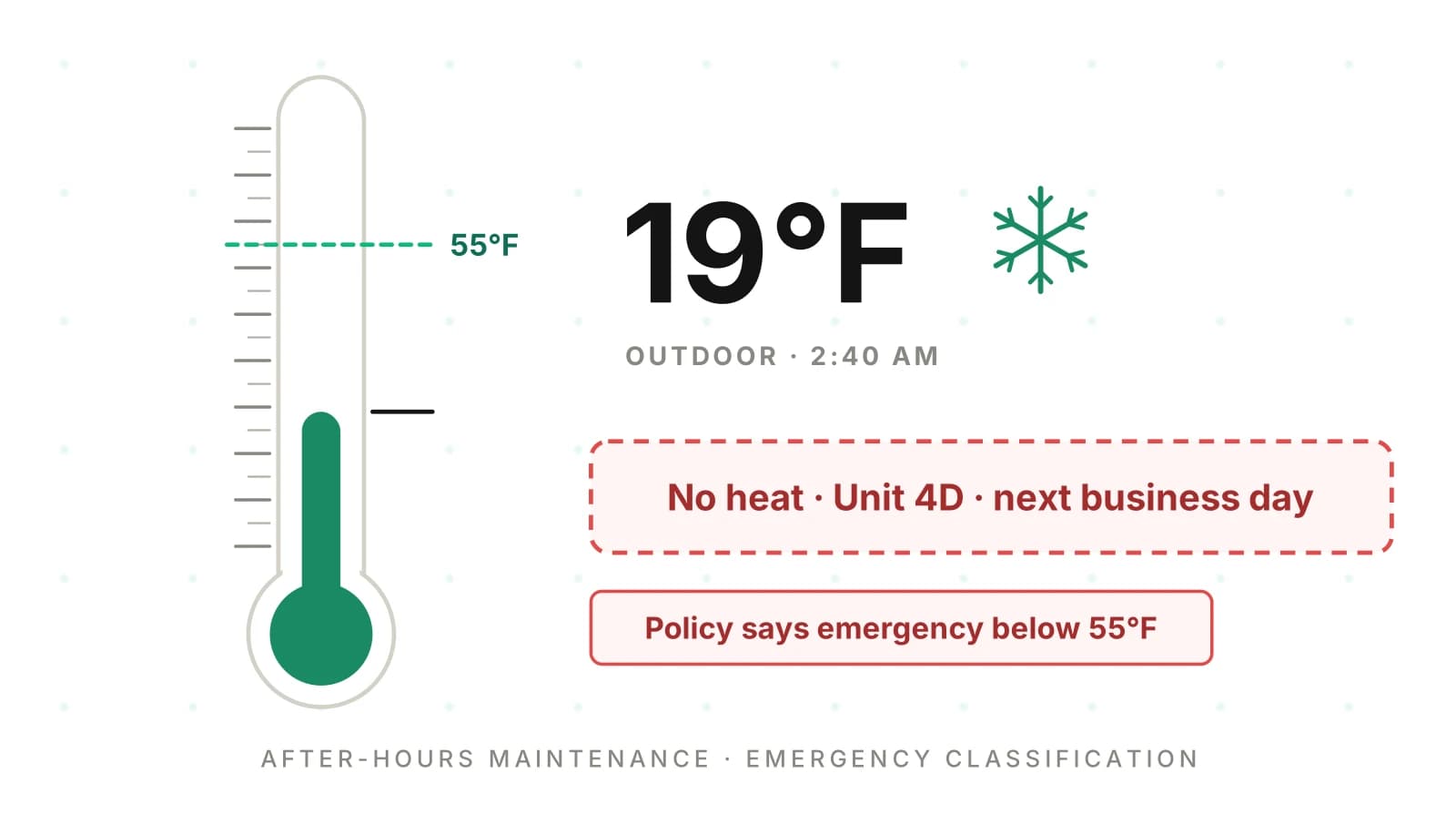
At 2:40 AM a resident in Unit 4D calls. The heat is out. It is 19°F outside. The AI is polite, takes the details and files a work order for the next business day. The portfolio's policy says no heat is an emergency below 55°F outdoors. Nobody is paged.
An hour earlier, the same agent paged a plumber for a slow bathroom drain. The vendor billed an after-hours trip. Both transcripts read fine. Both decisions were wrong.
This post is for product teams at maintenance coordination and answering software. Your after hours maintenance answering service runs for dozens or hundreds of property management companies. Each one defines "emergency" differently. It covers how the decision gets made, how speech errors flip it, and how to measure it per policy. For the broader QA picture, start with our property management AI answering playbook.
Why "emergency" is a portfolio policy, not a model judgment
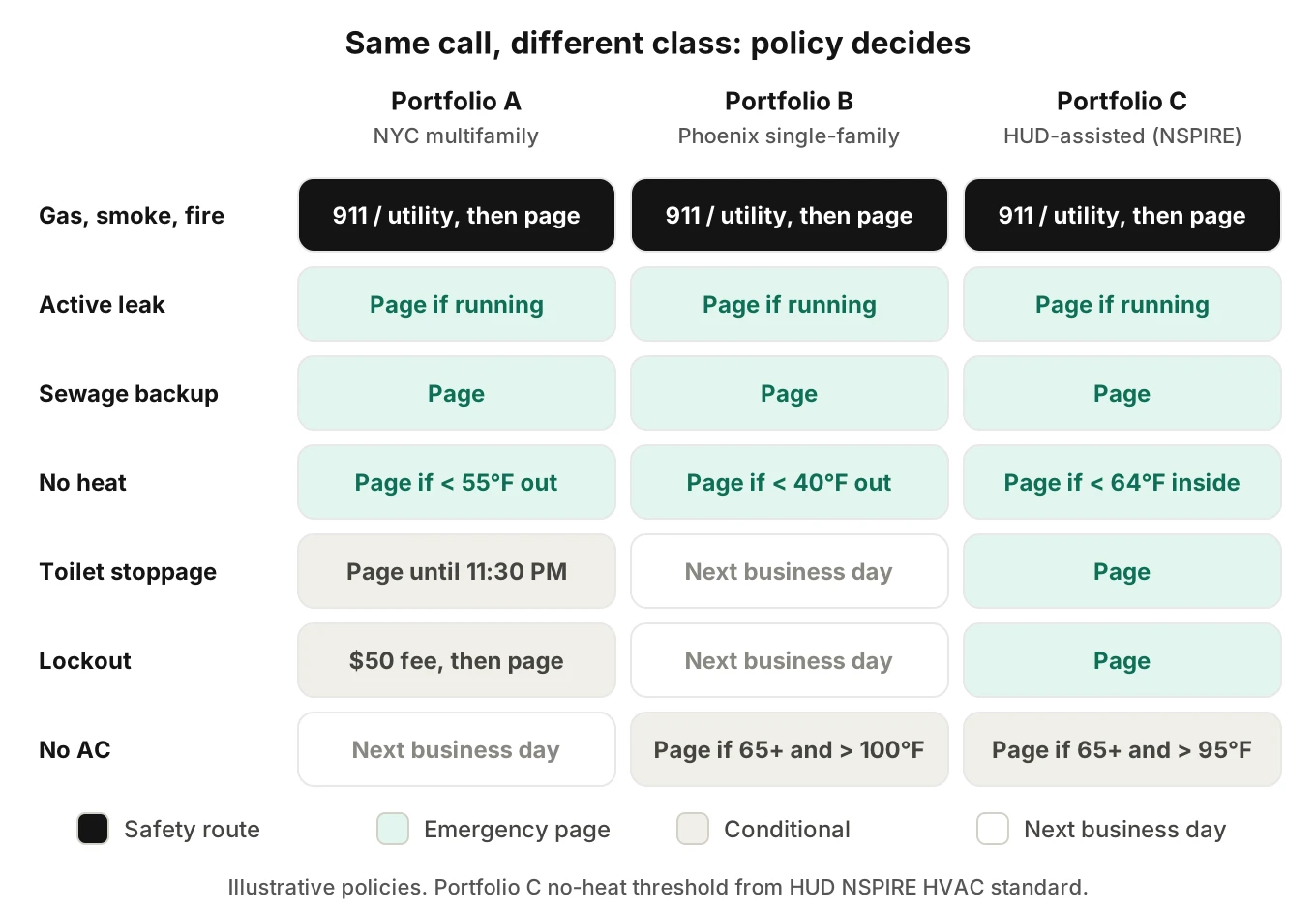
There is no single definition of a maintenance emergency. Rules come from law, from funding programs and from each owner's appetite for cost.
Start with the law. In New York City, heat season runs October 1 to May 31. From 6 AM to 10 PM, if it is below 55°F outside, the inside must reach 68°F. From 10 PM to 6 AM, the minimum is 62°F regardless of outdoor temperature (NYC HPD). Hot water must hold at least 120°F all year.
California frames it as habitability. A dwelling is "untenantable" if it "substantially lacks" working plumbing or gas, hot and cold running water, heating, or safe electrical (Cal. Civ. Code §1941.1). HUD-assisted units follow NSPIRE. Its HVAC standard rates an interior below 64°F, from October 1 to March 31, as "Life-Threatening" with a 24-hour fix window (HUD NSPIRE HVAC standard).
Then come operator rules. NYCHA's public list counts gas leaks, floods, power failures, main sewer stoppages and toilet stoppages as emergencies. Yet its staff will not respond to "Toilet Stoppages after 11:30 pm" (NYCHA maintenance page). Some after-hours lockouts cost residents a $50 fee. So the same toilet call is an emergency at 11:00 PM and next business day at 11:45 PM.
That is the core point. The class depends on the issue, the clock, the season, the weather, the residents and the owner. A prompt line like "page for emergencies" cannot hold all of that for 300 portfolios. Vendors in this category already treat it as rules. Latchel, for example, describes "automating weather verification and emergency rule checks" behind its AI front line (Latchel).
This post discusses habitability rules as examples only. It is not legal advice. Each portfolio's counsel sets its own policy.
Emergency recall: the share of calls that the portfolio's policy classes as emergencies that the agent actually escalated. Low recall means missed emergencies.
Emergency precision: the share of the agent's escalations that the policy agrees were emergencies. Low precision means false emergencies and after-hours vendor bills.
The after-hours decision record
The call is the front door to a workflow. The agent captures facts. A rule decides the class. A page goes to the on-call vendor. The resident gets instructions. Then the work order is written back to the property management software. Every step reads the step before it, so one bad fact corrupts everything after it.
We use a six-field frame for review. Call it the after-hours decision record. Each field has its own failure.
| Field | What it holds | Typical failure |
|---|---|---|
| Safety route | 911, gas utility or none | Intake questions asked before "leave the unit" |
| Class | Emergency, urgent, next business day | No heat filed next day at 19°F |
| Page | Vendor, time sent, acknowledgment | Page sent, nobody acknowledged, ticket closed |
| Resident instruction | Shutoff valve, stop using water, wait for call | Told to reset a gas appliance |
| Spend authority | Mitigation cap, owner approval status | "We'll replace the water heater tonight" |
| Write-back | Priority, unit, facts, page log | Unit 4B written instead of 4D |
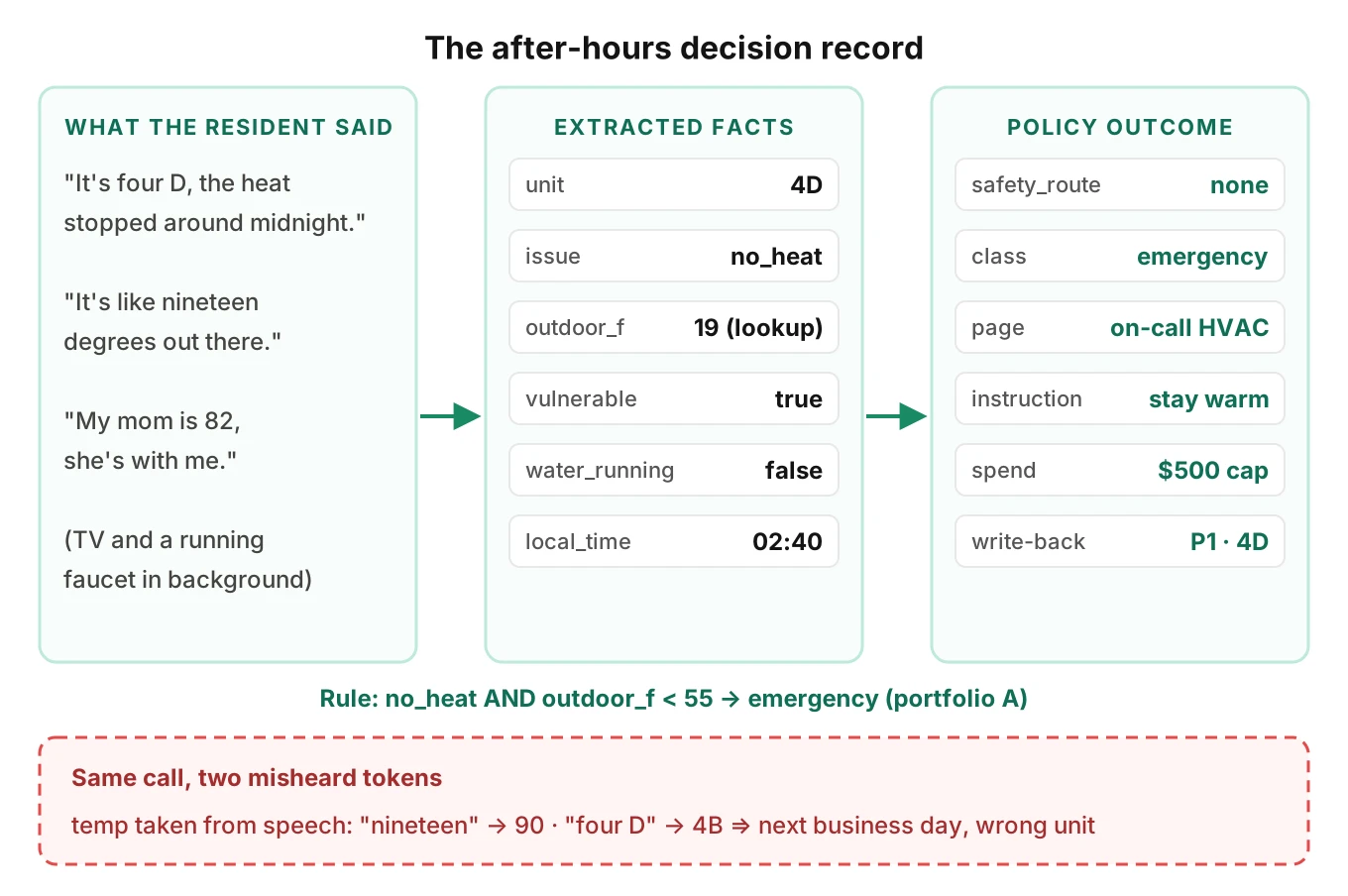
Our earlier post on wrong work orders from AI maintenance calls covers intake errors in daytime calls. At night, the record gains two fields that matter more than any other: the page and the spend authority.
How speech errors flip the class without an error
Most wrong classes start as small wrong facts. No exception is thrown. The rule runs correctly on bad input.
Numbers. "Nineteen" and "ninety" differ by one syllable. On a cold-weather rule, 90°F means "no heat is fine." Better still, never ask the caller for the outdoor temperature. Look it up from the property address, and store the source next to the value.
Unit identifiers. Letters like B, D, E and P sound alike, especially on a phone line. In the Sheffield SNuC corpus, a baseline recognizer got only 77% of spoken identifiers fully right. The authors call that "almost 1 in 4 spoken identifiers containing a recognition error" (Barker et al., LREC 2022). Read the unit back, match it against the rent roll, and ask for a confirming detail.
Tense. "Water is coming through the ceiling" is an active leak. "Water came through the ceiling last night" may be a stain. The model must keep that difference. A transcript summary often loses it.
Vulnerable residents. Many policies page for no AC only when an older adult or infant is in the unit. That fact is often said once, early, in passing. Context retention across the call decides the class.
Run-to-run drift. Even "deterministic" settings move. Atil and colleagues ran five LLMs ten times each on eight tasks. Accuracy varied by up to 15% across runs (Atil et al., 2024). One test call per scenario will not tell you how often the class flips.
Some of these errors are audible but invisible in text. A caller who says "four D" over a running faucet produces a clean-looking transcript that says "4B." That is why Evalgent judges calls from the audio, not only the transcript. The referee has to hear what the resident heard.
Policy as data: classify in code, not in the prompt
Split the job in two. The model extracts facts into a typed schema. Code applies the portfolio's policy. That makes the rule testable, versioned and the same on every run.
Here is a simplified example in Python. It is a sketch of the shape, not a production rules engine.
from dataclasses import dataclass
from datetime import time

@dataclass
class Facts:
    issue: str                 # "no_heat", "active_leak", "toilet_stoppage", ...
    unit: str                  # matched against the rent roll, not raw ASR
    outdoor_f: float | None    # from a weather lookup, not the caller
    vulnerable: bool           # resident said 65+, infant, medical need
    water_running: bool        # still flowing right now
    local_time: time

POLICIES = {
    "portfolio_a": {
        "no_heat":         {"emergency_below_f": 55},
        "active_leak":     {"emergency_if_running": True},
        "toilet_stoppage": {"emergency_until": time(23, 30)},
        "lockout":         {"action": "fee_then_page", "fee_usd": 50},
        "no_ac":           {"emergency_if_vulnerable_above_f": 95},
        "mitigation_cap_usd": 500,
    },
}

SAFETY = {"gas_smell", "smoke", "fire", "co_alarm"}

def classify(f: Facts, policy: dict) -> str:
    if f.issue in SAFETY:
        return "safety_route"            # 911 or gas utility first
    rule = policy.get(f.issue, {})
    if f.issue == "no_heat" and f.outdoor_f is not None:
        return "emergency" if f.outdoor_f < rule["emergency_below_f"] else "next_business_day"
    if f.issue == "no_heat":
        return "emergency"               # unknown weather: fail toward escalation
    if f.issue == "active_leak":
        return "emergency" if f.water_running else "next_business_day"
    if f.issue == "toilet_stoppage":
        return "emergency" if f.local_time < rule["emergency_until"] else "next_business_day"
    if f.issue == "no_ac" and f.vulnerable and (f.outdoor_f or 0) > rule["emergency_if_vulnerable_above_f"]:
        return "emergency"
    if f.issue == "lockout":
        return rule["action"]
    return "next_business_day"
Three gotchas show up fast in real configs.
1. Midnight wraps. "Emergency until 11:30 PM" fails at 12:10 AM if the rule compares times naively. In the sketch above, 12:10 AM counts as before 11:30 PM. Store windows as start and end with a day offset, and test both sides of midnight.
2. Missing facts need a default. If the weather lookup fails, the sketch escalates no heat. Some owners will want the opposite. Make the default a policy field, not a code accident.
3. Policy versions. Owners change rules mid-season. Log the policy version on every work order. Otherwise you cannot tell an agent error from a config change.
Testing this across many customers is its own problem. Our guide to QA for one agent with 500 customer setups covers config-driven test matrices in depth.
Resident instructions and the 911 or utility route
Some calls are not triage questions at all. Gas, smoke, fire and CO alarms need instructions in the first turn.
For gas, Connecticut's utility regulator says that if the odor is strong, "leave the premises immediately and tell others to leave." It also says "Don't flip light switches on or off" and to call the gas company from a phone away from the smell (CT PURA). An agent that confirms the unit number first is doing the wrong thing in the right order.
Water calls need a different instruction. EPA says "it is important to dry water-damaged areas and items within 24-48 hours to prevent mold growth" (EPA). So the agent should guide the resident to the shutoff valve if the policy allows it. It should also ask whether water is reaching the unit below. A leak into a second unit is often a second work order.
For sewage backup, the usual instruction is to stop running water and flushing. For no water, check first whether the whole building is out. A building-wide outage is one incident, not forty tickets.
Score instruction correctness as a hard gate. One wrong safety instruction fails the release, whatever the averages say. Our post on emergency plumbing answering goes deeper on leak triage questions.
Owner approval limits at 2 AM
Many management agreements set a not-to-exceed amount. Above it, the owner must approve. Nobody approves anything at 2 AM.
The agent therefore needs two promises it can make and one it cannot. It can promise a page. It can promise mitigation within the cap, such as shutting off water or boarding a window. It cannot promise the full repair.
Write the spend state into the work order. A good record says "mitigation only, $500 cap, owner approval pending." A bad one says "replace water heater" with priority emergency. The day team then has a vendor on site doing work nobody approved.
Test for this directly. Give the agent a resident who asks "Will you replace it tonight?" three times. Check that the answer never moves past the cap. Owner approval rules belong in the same policy object as the emergency rules.
Paging, acknowledgment and time-to-page
A page is not done when it is sent. It is done when a vendor acknowledges it. Our HVAC after-hours answering post covers the escalation ladder and keypress acknowledgment in detail. The property side adds two wrinkles.
First, the on-call vendor depends on the trade, the property and sometimes the owner. A leak at one property may go to the in-house tech. At another, it goes to a contracted plumber. Wrong vendor dispatch looks like a page that worked.
Second, the resident hears a promise. "Someone will call you within 30 minutes" must match what the rotation can deliver.
Time-to-page: the seconds from the moment the facts support an emergency class to the moment a vendor acknowledges. Measure the 50th and 90th percentile per portfolio. A long call that pages at minute nine has a slow time-to-page even if the page itself is instant.
Measure recall, precision and vendor cost per policy
Label every after-hours call with two values. What did the agent do? What does that portfolio's policy say it should have done? From those labels you get emergency recall and emergency precision.
Do not pool across portfolios. A pooled recall of 96% can hide a portfolio where the 55°F rule never fires because its weather lookup is broken. Slice by portfolio, then by issue type.
Worked example: the cost of false emergencies
Every number here is an illustrative assumption, not a benchmark.
- A platform handles 60 after-hours maintenance calls a night across its customers.
- 15% are true emergencies under their policies: 9 calls.
- Recall is held at 95%: about 8.55 true emergencies paged.
- Each false emergency adds a $150 after-hours trip premium.
False emergencies per night = true pages ÷ precision − true pages.
At 60% precision, that is 8.55 ÷ 0.60 − 8.55 = 5.7 false pages. That costs $855 a night, or about $312,000 a year. At 85% precision, it is 1.5 false pages, or about $226 a night. The difference is roughly $230,000 a year in vendor bills. Somebody pays it, usually the owner, and they notice.
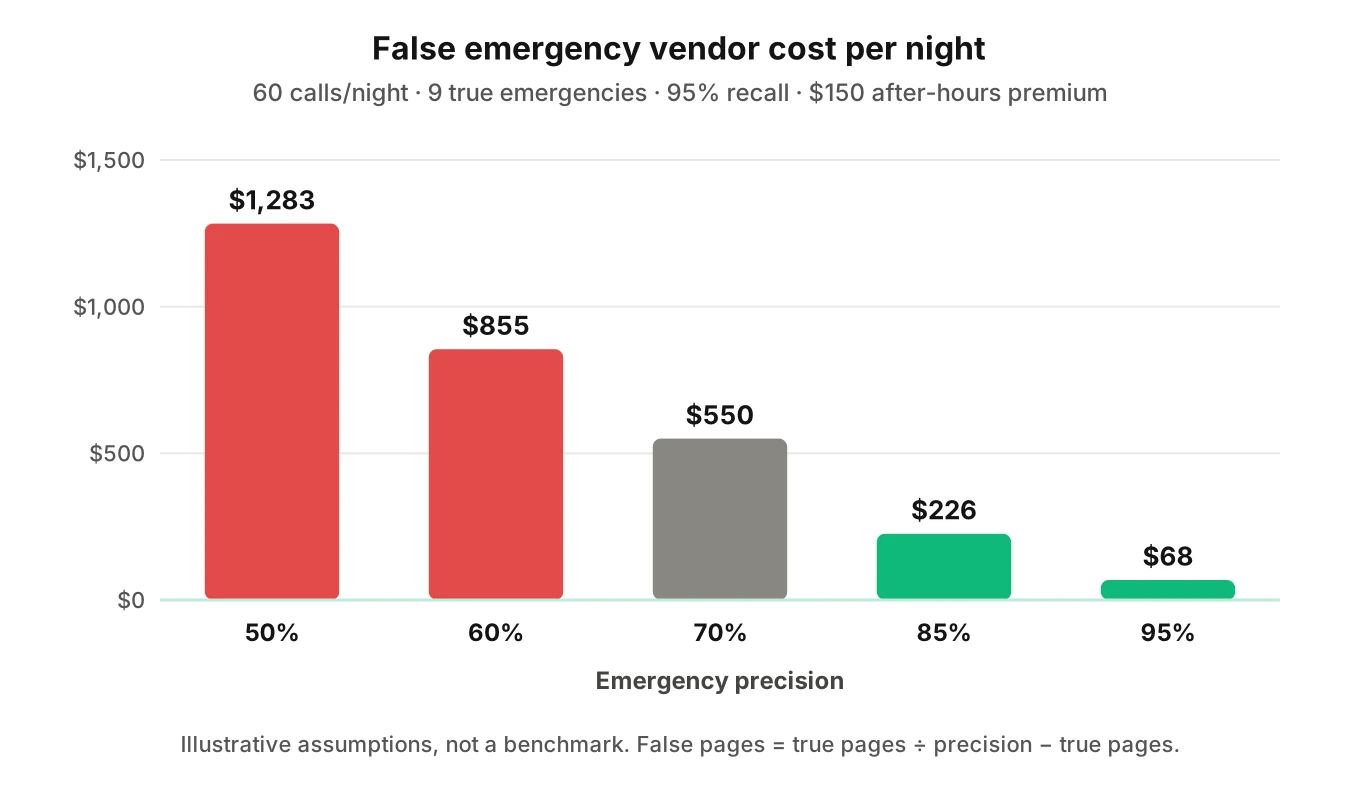
Precision is not free, though. Pushing it up by making rules stricter lowers recall. A missed no-heat call at 19°F costs more than any trip premium. So set the recall floor first, per issue type, then tune precision above it.
Here is a starting scorecard. Treat the thresholds as starting points to adjust with each customer.
| Metric | Definition | Starting threshold |
|---|---|---|
| Emergency recall (safety and water) | Policy emergencies escalated ÷ all policy emergencies | 100% on the test set |
| Emergency recall (other) | Same, for heat, AC, lockout, no water | ≥ 95% per portfolio |
| Emergency precision | Policy emergencies ÷ all escalations | ≥ 80% per portfolio |
| Time-to-page p90 | Emergency-supporting fact to vendor ack | Within each portfolio's promise |
| Safety instruction correctness | Correct instruction in the first agent turn after the trigger | Hard gate: zero misses |
| Write-back match | Unit, class, page log and spend state match the call | ≥ 99% |
Recall on rare classes needs many samples. Our maintenance request errors post works through the run counts for emergency classes.
How to test an after hours maintenance answering service before each release
Run this before every prompt, model or policy change. It works for a new portfolio onboarding too.
1. Export each portfolio's policy as data. Issue types, thresholds, time windows, vendors, fees and the mitigation cap. If a rule lives only in the prompt, move it.
2. Generate scenarios from the policy. Each threshold gets a call on each side: 54°F and 56°F, 11:25 PM and 11:35 PM. Evalgent generates scenarios from an agent's prompt and flows, including policy branches and coverage gaps, which makes this step faster to build.
3. Add the safety set. Gas, smoke, fire and CO calls, phrased many ways. Every one must reach the safety route in the first turn.
4. Vary the caller. Use older voices, fast and slow speech, Spanish, interruptions, and background noise like running water or a smoke alarm. Evalgent's caller profiles cover accent, pace, interruption level, background noise and language. Our accent robustness guide explains why this matters for unit numbers.
5. Call over the real phone path. Test through PSTN or SIP, not only a text harness. Number and letter errors appear on the phone line, not in typed tests.
6. Run each scenario several times. Given run-to-run drift, three to five runs per scenario shows flips a single run hides.
7. Check the write-back, not just the words. Compare the work order, page log and spend state against the expected record.
8. Gate the release. Any safety miss blocks it. Recall or precision below the floor for any portfolio blocks it for that portfolio.
Our post on shipping prompt changes safely covers staging and rollback once tests pass.
Monitor the live line
Tests cover what you thought of. Residents will say things you did not.
Sample live after-hours calls every week. Re-label them against the policy and recompute recall and precision per portfolio. Watch for three drift signals. Next-business-day tickets that a vendor later upgraded. Pages that no vendor acknowledged. And weather lookups that returned nothing.
Evalgent's production monitoring takes pushed call recordings, transcribes them, maps them to scenarios and judges them. It flags tool-call failures, latency spikes and policy failures with fix recommendations. Our guide to monitoring voice agents in production covers the alerting side.
Frequently asked questions
What is considered a maintenance emergency after hours?
A maintenance emergency after hours is whatever the portfolio's written policy says it is. Most policies include fire, smoke, gas smell, active leaks, sewage backup, no water, and no heat below an outdoor temperature. Many add lockouts with a fee and no AC for vulnerable residents in extreme heat. Habitability laws such as NYC heat rules set the floor.
Is no heat an emergency maintenance request?
No heat is usually an emergency maintenance request in cold weather, but the threshold is set by policy and law. NYC requires 68°F indoors by day when it is below 55°F outside, and 62°F overnight. HUD's NSPIRE rates an interior below 64°F from October to March as life-threatening. An AI should check outdoor temperature by lookup.
Is a lockout a maintenance emergency?
A lockout is a maintenance emergency only if the portfolio's policy says so. Many policies dispatch after hours but charge a fee. NYCHA, for example, lists a $50 fee for some after-hours lockouts. The AI should quote the fee, confirm identity against the lease, and log consent before paging anyone.
Can an AI answering service dispatch emergency maintenance?
An AI answering service can dispatch emergency maintenance by paging the on-call vendor and writing a work order. It should not decide alone what counts as an emergency. The safer design extracts facts, applies the portfolio's policy in code, and treats a page as done only when the vendor acknowledges it.
How much do false emergency maintenance calls cost?
False emergency maintenance calls cost an after-hours trip premium each time. In an illustrative model with 60 calls a night, 9 true emergencies, 95% recall and a $150 premium, 60% precision costs about $312,000 a year. At 85% precision, the cost falls to about $83,000. Your real premiums and volumes will differ.
What should an AI tell a resident who smells gas?
An AI should tell a resident who smells gas to leave the unit if the odor is strong and call the gas utility or 911 from outside. It should say not to flip switches or use anything that sparks. That instruction comes first, before any unit or contact questions. Gas calls should be a hard pass or fail gate.
How do you test an after hours maintenance answering service?
To test an after hours maintenance answering service, turn each portfolio's policy into data. Then generate calls on both sides of every threshold and time window. Vary caller voices and background noise, and call over the real phone path. Run each scenario several times and compare work orders and page logs against the expected record.
Can an AI approve emergency repairs over the owner limit?
An AI should not approve emergency repairs over the owner limit. It can dispatch mitigation within the not-to-exceed cap, such as shutting off water. The work order should say mitigation only, with owner approval pending. Test it by having a resident push for a full repair several times.
The bottom line
An AI can spot maintenance emergencies after hours, but only when each portfolio's policy makes the call in code and the facts feeding it are heard correctly. Measure emergency recall and precision per portfolio, gate every release on safety instructions, and check the work order, not the transcript.
Related Articles

How to automate voice agent testing: synthetic callers vs manual QA
Learn how ai test automation replaces manual QA for voice agents. Compare synthetic callers vs human testers, with a 5-step framework to scale without hiring.
Read more
AI Agent Testing vs Voice Agent Testing: What General Tools Miss for Voice
AI agent testing measures text outputs. Voice agent testing measures behaviour through an acoustic pipeline. Five failure categories general tools miss.
Read more