Backchanneling and Proactivity in Voice Agents: When to Say 'Mm-hm' and When to Speak First
On this page
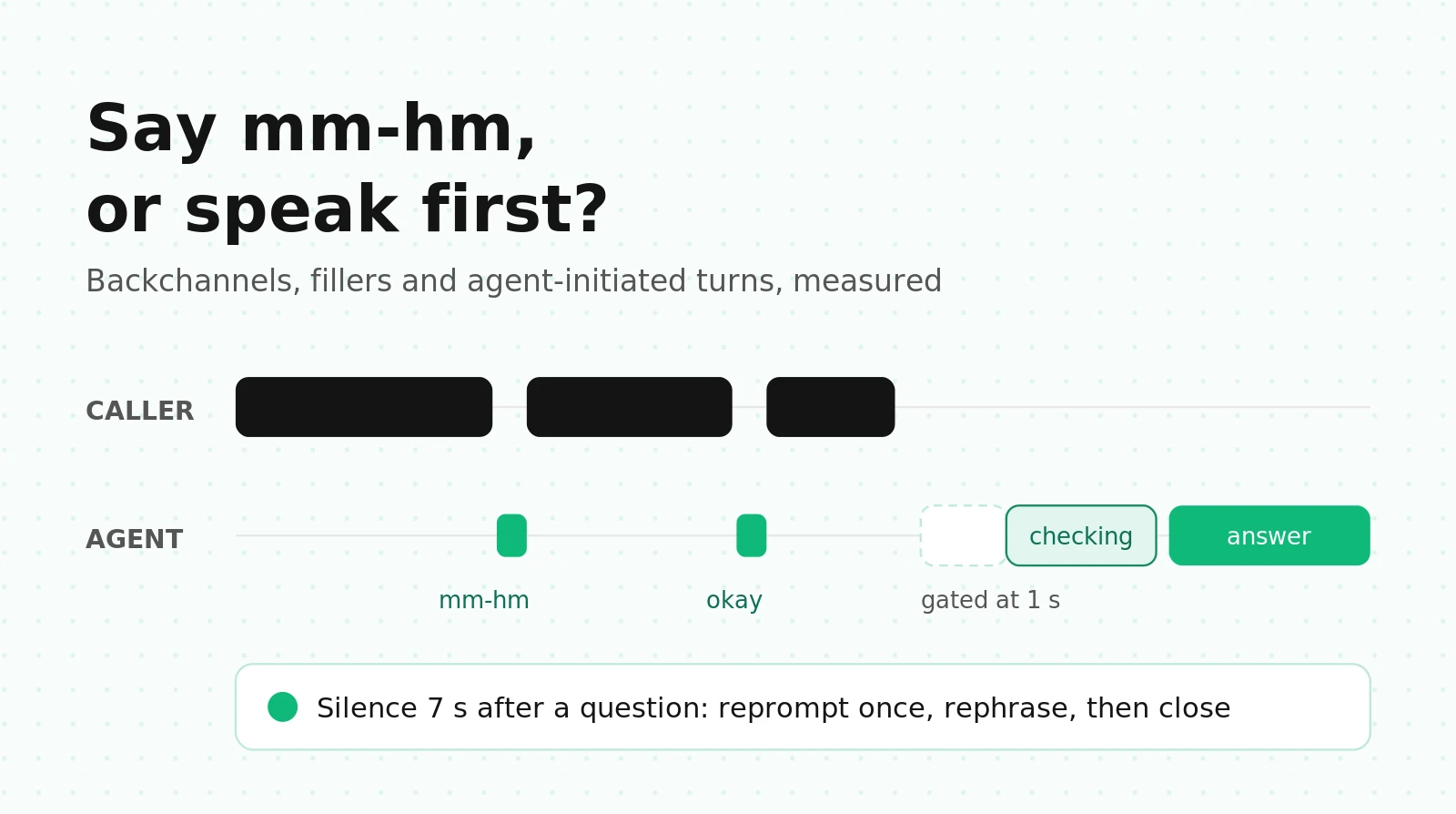
A caller spends 40 seconds explaining a billing mistake. Your agent says nothing the whole time, then answers in a flat, complete paragraph. Or the agent says "Let me check on that for you" before every answer, including the ones that came back in 200 ms. Or the caller says "hold on, let me find my card," and eight seconds later the agent asks, "Are you still there?"
All three make a voice agent "sound robotic," and none is an accuracy problem. They're about listener behavior and initiative: when the agent signals it's listening, fills a wait, or speaks unprompted.
This guide covers the agent's side of that. If your problem is the caller's "mm-hm" stopping your agent mid-sentence, read fixing false interruptions in LiveKit. If it's the agent cutting callers off at pauses, read turn-taking evaluation. Here: the research on backchannel timing, filler trade-offs, idle-prompt design in LiveKit and Pipecat, and metrics you can compute from a stereo recording.
Four behaviors that get lumped together
Teams use "backchanneling" for four different things. Each one has its own mechanism, its own risk and its own metric, so split them before you tune anything.
| Behavior | When it happens | Example | Main risk | Primary metric |
|---|---|---|---|---|
| Listener backchannel | While the caller holds the floor | "mm-hm," "right" in a caller pause | Taking the turn, or talking over | Takeover rate, timing offset |
| Turn-initial acknowledgment | First words of the agent's reply | "Okay, got it, the 14th." | Sounding scripted | Repeat rate, judge appropriateness |
| Latency mask (filler, hold audio) | Between caller's end of turn and the real answer | "Pulling up your order," typing sound | Delaying fast answers, committing too early | Filler penalty (ms), trigger rate |
| Proactive turn | After silence, or after the agent finishes a statement | "Are you still there?", "Want me to text you the confirmation?" | Interrupting a caller who's busy | False idle-prompt rate, acceptance rate |
Only the first is a true backchannel. The other three are what cascaded agents can do today, and they cause most "robotic" complaints.
What the research says about backchannel timing
Humans backchannel often, on a cue
Ward and Tsukahara (Journal of Pragmatics, 2000) cite an analysis of 1,155 Switchboard phone conversations where 19% of utterances were backchannels. Their main contribution is a timing rule for English. Listeners tend to backchannel after the speaker produces a region of low pitch (below the speaker's 26th-percentile pitch) lasting at least 110 ms, after at least 700 ms of speech. The response comes about 700 ms after the cue.
The rule is weak. It was right 18% of the time, against 13% for random placement, and covered 48% of backchannels. A prosody rule alone will put "mm-hm" in the wrong place most of the time, and a misplaced backchannel sounds like the agent grabbing the turn.
Models can learn timing, but it's hard
Voice Activity Projection is the research line that models both speakers' upcoming speech frame by frame. Inoue, Lala, Skantze and Kawahara (NAACL 2025) fine-tuned a VAP model to predict both the timing and the type of backchannel ("yeah" versus "oh") continuously, on unbalanced real-world data, and report that it ran in real time and beat the baselines. That's the shape a production backchannel predictor would take: a small model running on the caller's audio stream, separate from the LLM.
Full-duplex models still miss human timing
Full-Duplex-Bench tests this directly. Its backchannel task uses stimuli from the In Conversation Corpus, where 118 listeners voiced short backchannels over recorded speech, about 59 per stimulus turn on average. The benchmark bins those responses into 200 ms windows to get a human timing distribution. It then scores each model on three things:
- Takeover rate (TOR): did the model take the turn instead of just listening? Lower is better.
- Frequency: backchannel events per second.
- Jensen-Shannon divergence (JSD): distance between the model's backchannel timing and the human distribution, from 0 (identical) to 1 (no overlap). A model that stays silent is scored as a uniform distribution, so silence doesn't win by default.
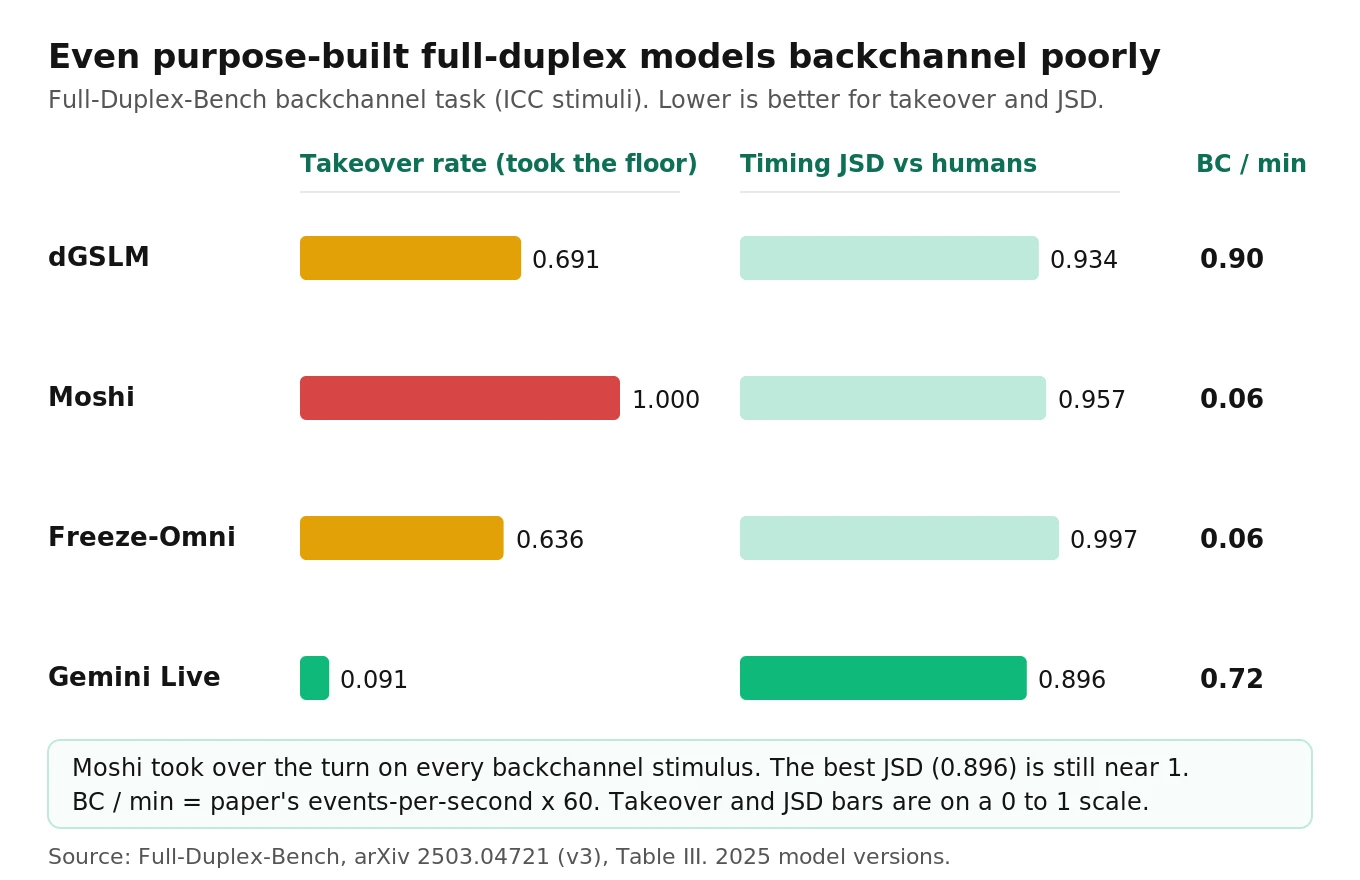
The results are sobering. Moshi is a full-duplex model with a reported 200 ms practical latency that models both speakers as parallel streams. It had a takeover rate of 1.000 on this task, meaning it took the floor on every backchannel stimulus. Gemini Live had the lowest takeover rate (0.091) and the best JSD (0.896). Even that JSD is close to the maximum. Converted to per-minute rates, the most active model produced about 0.9 backchannels per minute.
Three takeaways for an in-house team:
1. Full-duplex doesn't give you good backchannels for free. The architecture makes overlap possible. Timing still has to be learned, and in these 2025 model versions it mostly wasn't.
2. Takeover is the failure that matters. A missing "mm-hm" sounds a bit flat. A backchannel that turns into a turn derails the caller.
3. You can reuse the metric. JSD against a human timing histogram works for any system. The code below computes it.
Why cascaded agents can't backchannel mid-utterance
A LiveKit or Pipecat pipeline is half-duplex by design. STT streams the caller's words, but the LLM only runs after the turn detector decides the caller is done (or speculatively near the end, with preemptive generation). Nothing in the default pipeline is "listening" in the sense of deciding to produce sound while the caller talks.
If you push agent speech while the caller is talking, three things go wrong:
- Agent state flips to speaking. The framework now treats the caller's continued speech as an interruption of the agent. In LiveKit, that runs the interruption logic covered in the false-interruption guide, so your own "mm-hm" gets "interrupted."
- The text lands in the chat context. A Pipecat issue (#3459) reports `TTSSpeakFrame` text being added to the LLM context. Fillers and backchannels in the history teach the LLM to open its replies the same way, which feeds the patterns in our repetition loops guide.
- Echo goes into turn detection. On speakerphones and poor handsets, the agent's own audio leaks back on the caller channel and can look like caller speech.
If you want to try real listener backchannels in a cascaded stack, the least risky path is a sidecar. Run a small predictor on the caller's audio (a VAP-style model, or at minimum the Ward pitch rule). Play pre-recorded clips on a separate track that doesn't touch agent state or chat context. In LiveKit, `BackgroundAudioPlayer` plays on its own audio track. Its `play()` method accepts a list of `AudioConfig` entries with `probability` weights, so you can rotate clips and leave some probability for silence. Rate-limit hard (for example, no more than one per 8 seconds of caller speech) and only fire after the caller has held the floor for several seconds.
For most task agents (scheduling, order status, collections), our recommendation is simpler. Skip mid-utterance backchannels and move the listening signal to the start of the agent's turn: "Okay, so the charge on the 3rd is wrong." That echo of the caller's content does the job a backchannel does, which is proving you heard, without any overlap risk.
Fillers and latency masking: when they help and when they hurt
What the studies found
The filler research splits cleanly by type of filler.
- Disfluency fillers hurt task agents. Jeong, Kang and Lee (CHI EA 2019) ran a 2 x 2 study with 26 participants. An agent that used "um" and "uh" was rated less intelligent and less likable in task-oriented conversations. It wasn't rated more human-like, though it was rated more entertaining in social chat.
- Natural fillers help perceived wait, at long delays. Maslych et al. (CUI 2025) tested LLM-powered agents with 33 participants at three delays (1.5 s, 4.0 s and 6.5 s). Delay hurt every perception measure, and was less bearable beyond 4 seconds. Natural conversational fillers improved perceived response time. Artificial wait indicators didn't significantly change user experience. The setting was VR, not a phone line, so treat the absolute numbers as directional.
- Pacing that fits context beats fixed pacing. Jiang et al. (CHI 2026) compared a context-aware pacing agent against a static-pacing control (N=50). The context-aware agent scored higher on perceived human-likeness, smoothness and interactivity. That's evidence for making silence timing depend on what just happened, which is the basis of the idle-prompt design below.
So "ai voice agent filler words" isn't one decision. Don't synthesize "um." Do use short, content-bearing status phrases when the caller is actually waiting.
The filler penalty: the math most teams skip
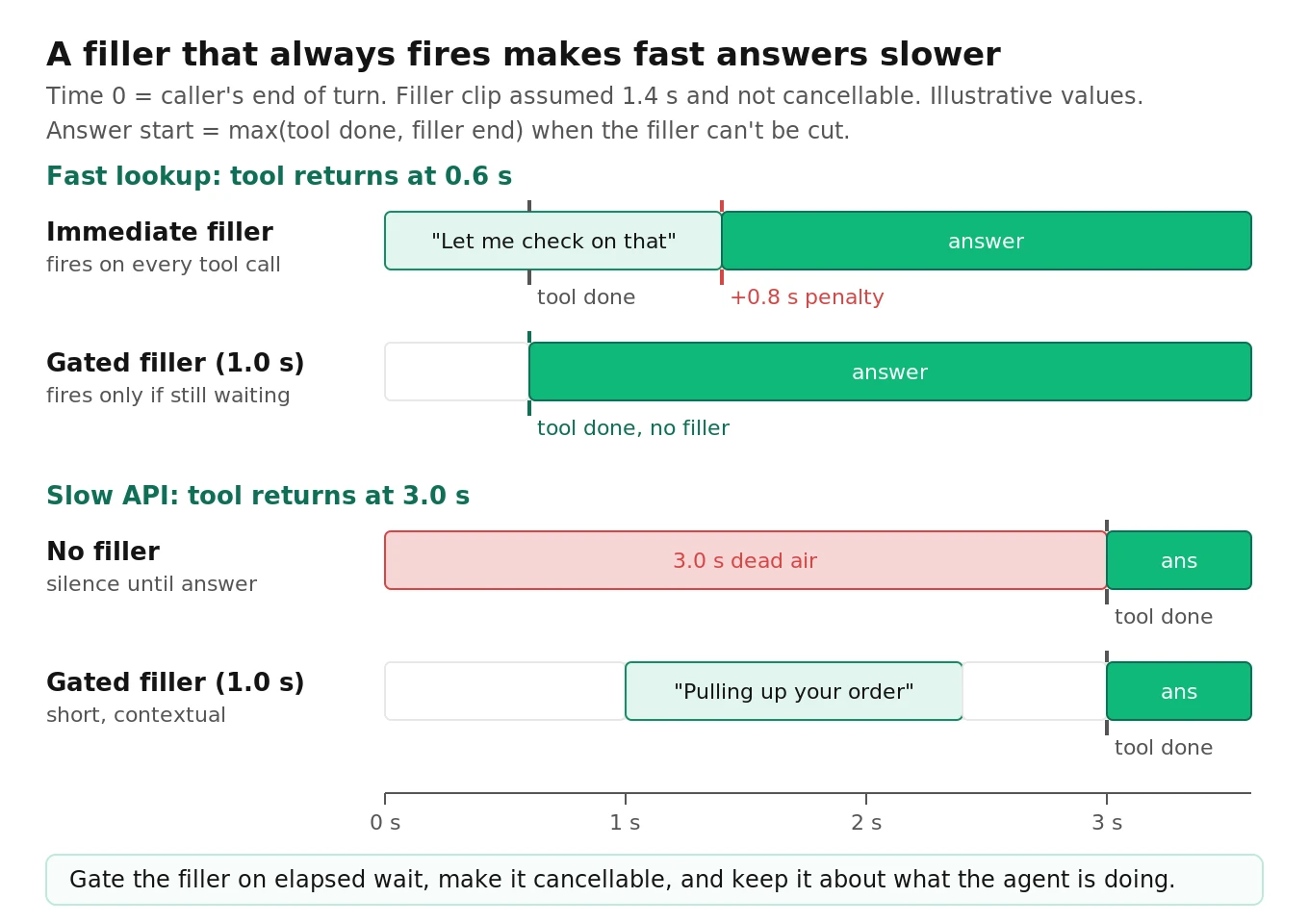
A filler that fires on every tool call has a cost that doesn't show up in your latency dashboard. If the clip can't be cut short, the answer can't start until the clip ends:
`answer_start = max(tool_done, filler_start + filler_duration)`
`filler_penalty = answer_start − tool_done` (when positive)
Here's a worked example with illustrative numbers. Assume tool latency is lognormal with a 600 ms median and a log-sd of 0.9, and a fixed 1.4 s filler ("Let me check on that for you").
| Policy | Calls where filler plays | Calls delayed by the filler | Mean added delay |
|---|---|---|---|
| Fire immediately on every tool call | 100% | 83% | 0.69 s |
| Fire only if still waiting at 1.0 s | 29% | 22% | 0.20 s |
| Gated at 1.0 s and cancellable when the result arrives | 29% | ~0% | ~0 s |
Under these assumptions, the always-on filler adds about 0.7 s on average while trying to hide latency, and the penalty lands on fast calls, which are most of your traffic. See the cost of latency for what that delay does to call outcomes.
Five filler rules
1. Gate on elapsed wait, not on the event. Start a timer when the tool call starts. Speak only if it's still running at roughly 0.7 to 1.0 s.
2. Make it cancellable. If the result arrives mid-filler, stop at the next word boundary or fade out.
3. Say what you're doing, not that you're thinking. "Pulling up your order" carries content. "Hmm, let me think" doesn't, and it reads as the disfluency the CHI study penalized.
4. Never pre-commit an outcome. "Sure, I've moved that to Thursday" before the booking API returns creates a contradiction when it fails. Fillers must be outcome-neutral.
5. Rotate, and keep fillers out of the LLM context where your framework allows it.
How LiveKit and Pipecat implement it
LiveKit. The external data guide shows the gated pattern. Inside a `@function_tool`, start an `asyncio` task that sleeps (0.5 s in the docs example), then calls `context.session.generate_reply(instructions=...)` for a brief status update. Cancel the task when the search returns. The same page points to pre-synthesized cached TTS for fixed phrases like "let me check that for you," which avoids a TTS round trip.
For non-verbal hold audio, `BackgroundAudioPlayer(thinking_sound=[...])` plays while the agent is in the "thinking" state. The built-in clips are `KEYBOARD_TYPING` and `KEYBOARD_TYPING2`. One gotcha: "thinking" covers ordinary LLM time-to-first-token, not only tool calls. Listen to a fast turn on a real phone line and check whether a burst of typing sound clips in before every answer.
Pipecat. Pipecat's docs show an `on_function_calls_started` handler that queues `TTSSpeakFrame("Let me check on that.")` straight to TTS. As written, that fires on every function call, including fast ones. That's the "fire immediately" row in the table above. Gate it inside the function handler instead, using the `params.llm.push_frame()` pattern from the function calling docs:
# Pipecat: gated, cancellable status update inside a function handler (illustrative)
import asyncio
from pipecat.frames.frames import TTSSpeakFrame
from pipecat.services.llm_service import FunctionCallParams

FILLER_GATE_S = 1.0

async def lookup_order(params: FunctionCallParams):
    async def status_update():
        await asyncio.sleep(FILLER_GATE_S)
        await params.llm.push_frame(TTSSpeakFrame("Pulling up your order now."))

    filler = asyncio.create_task(status_update())
    try:
        order = await orders_api.get(params.arguments["order_id"])  # your API
    finally:
        filler.cancel()  # fast results never trigger the filler
    await params.result_callback({"status": order.status, "eta": order.eta})

llm.register_function("lookup_order", lookup_order)
Cancelling the task stops a filler that hasn't started. It doesn't stop one that's already playing. For that, keep fillers short (under about 1 s of audio) or use your framework's interruption path.
Proactivity: when the agent should speak first
A proactive voice agent takes turns nobody asked for. There are three kinds worth building: idle prompts after silence, next-step offers after a statement, and read-backs before an irreversible action. The hard part is the first one, because silence is ambiguous. The caller may have walked away, or may be reading a 16-digit number off a card.
What the frameworks give you
LiveKit sets `user_away_timeout` on `AgentSession`, default 15.0 s, and `None` disables it (session docs). When neither the user nor the agent has spoken for that long, the user state becomes `away` and a `user_state_changed` event fires. The docs example calls `generate_reply` up to three times, sleeps 10 s between tries, then calls `session.shutdown()`. There's also `reset_away_timer()` for activity the framework can't see. A recent pull request (#7395) resets the timer on DTMF input. That exists because keypad entry isn't speech, so a caller typing an account number can look idle. Check which version you're running.
Pipecat removed `UserIdleProcessor` in 1.0. Idle detection now lives in `LLMUserAggregatorParams(user_idle_timeout=...)` and emits `on_user_turn_idle` (idle docs). The timer starts when the bot stops speaking. It's suppressed during function calls and active user turns, and it restarts after a noise-only turn with no transcript. You can change it mid-call by queuing `UserIdleTimeoutUpdateFrame(timeout=...)`, where 0 disables it. The docs suggest 5 to 10 s for voice and 2 to 3 retries.
So the two frameworks ship different defaults: 15 s against a suggested 5 to 10 s. The same "are you still there?" design will feel twice as patient on one as on the other.
Make the timeout depend on context
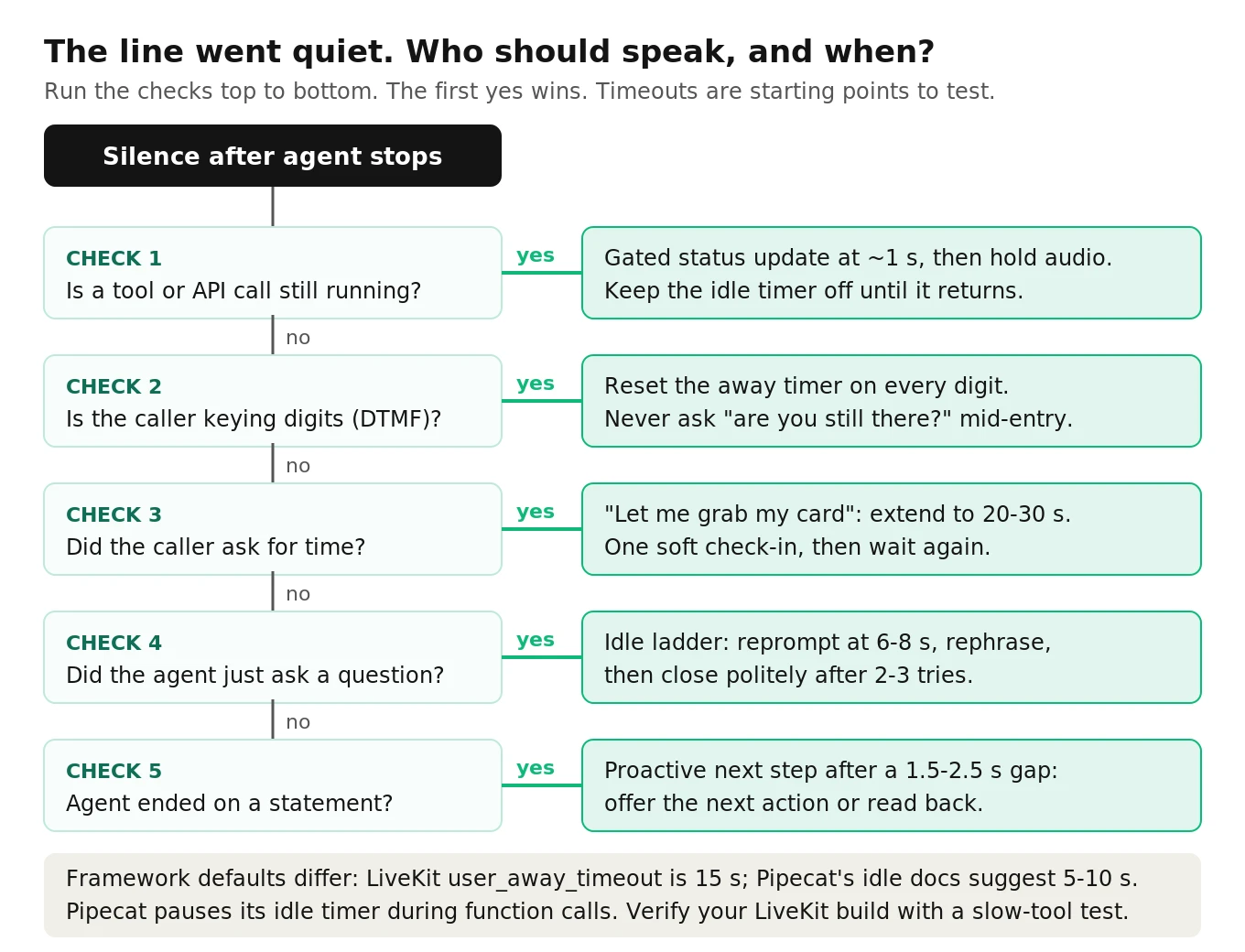
The decision tree turns into a small policy you can attach to either framework. Here's a LiveKit version (simplified):
# LiveKit: context-aware away handling (simplified, illustrative)
import asyncio
from livekit.agents import AgentSession, UserStateChangedEvent

TIMEOUTS = {"default": 8.0, "caller_asked_for_time": 25.0, "after_statement": 12.0}
session = AgentSession(user_away_timeout=TIMEOUTS["default"])  # plus stt/llm/tts
checkin: asyncio.Task | None = None
mode = {"value": "default"}

def set_mode(m: str):
    # call from your logic, e.g. when the caller says "hold on" or a read-back ends
    mode["value"] = m
    session.reset_away_timer()

async def idle_ladder():
    prompts = [
        "The caller has gone quiet after your question. Ask once, briefly, if they're still there.",
        "Still no answer. Rephrase your last question in simpler words.",
    ]
    if mode["value"] == "caller_asked_for_time":
        prompts = ["The caller asked for a moment. Say, in a few words, that you're still here and there's no rush."]
    for p in prompts:
        await session.generate_reply(instructions=p)
        await asyncio.sleep(10)
    await session.say("I'll let you go for now. Call back any time.")
    session.shutdown()

@session.on("user_state_changed")
def on_user_state_changed(ev: UserStateChangedEvent):
    global checkin
    if ev.new_state == "away":
        checkin = asyncio.create_task(idle_ladder())
    elif checkin is not None:
        checkin.cancel()
        checkin = None
`user_away_timeout` is set when the session is built. For per-moment timeouts in LiveKit, keep the session value short and add your own wait inside `idle_ladder` for the longer modes. In Pipecat, push `UserIdleTimeoutUpdateFrame` instead.
Next-step offers and read-backs
A proactive offer after a completed statement ("Your refund is processing. Want me to text you the reference number?") is the most useful kind of initiative. It's also easy to overdo. Two rules:
- Leave a gap first. If the agent finishes a statement and immediately chains an offer, it steps on the caller's natural response window. LiveKit's `min_consecutive_speech_delay` (default 0.0 s) sets a floor between consecutive agent utterances. A value around 1.0 to 1.5 s gives the caller room to speak first.
- Read back before the irreversible step, not after. "That's Thursday the 14th at 3 pm for two people. Should I book it?" turns a silent risk into a cheap correction turn. Track how often read-backs get corrected. A correction rate near zero over hundreds of calls may mean the read-back is redundant for that slot type.
Failure taxonomy
| Failure | What the caller hears | Root cause | Detect with |
|---|---|---|---|
| Backchannel takeover | "Mm-hm, so what I can do is..." while they're mid-story | Short sound treated as a turn start | Takeover rate on long-caller-turn scenarios |
| Talk-over backchannel | "Yeah" landing on top of their words | No timing model, fires mid-word | Overlap share of agent backchannels |
| Always-on filler | "Let me check on that" before an instant answer | Filler bound to the tool event, not elapsed time | Filler penalty, trigger rate on fast tools |
| Committing filler | "Done, I've booked it" then "Sorry, that time isn't available" | Filler generated before the tool result | Judge check: filler content contradicts tool result |
| Scripted sameness | The same opener on every turn | Fixed phrase plus context echo | Opener repeat rate |
| Premature idle prompt | "Are you still there?" while they read a card | One global timeout | False idle-prompt rate |
| Idle prompt over a tool call | "Are you still there?" while the agent is the one waiting | Timer not suppressed during functions | Idle prompts inside tool-call spans |
| Proactive pile-on | Offer chained onto a statement with no gap | No minimum inter-utterance delay | Gap before proactive turns |
Metrics with formulas
Compute these per call, then aggregate per scenario. You need stereo recordings or per-speaker timestamps, plus your agent event log (tool call start and end, idle events). See what to log on every call for the event schema.
Agent backchannel rate (BR):
`BR = agent_backchannels / caller_speech_minutes`
A backchannel is an agent segment of 1.0 s or less that starts while the caller holds the floor (caller speaking, or paused under 1 s and resuming within 1.5 s).
Backchannel timing offset:
`offset = bc_onset − caller_pause_onset` for backchannels that land in a pause. Report the median. Also report overlap share, the fraction of backchannels that start while the caller is still talking.
Backchannel takeover rate (TOR):
`TOR = floor_taking_agent_turns / long_caller_turn_scenarios`, using the Full-Duplex-Bench definition: any agent speech that isn't silence or a backchannel counts as taking the floor.
Timing JSD: compare agent backchannel onsets against a human reference histogram for the same stimulus, in 200 ms bins.
Filler trigger rate: `fillers_played / tool_calls`.
Filler penalty: mean of `max(0, answer_start − tool_done)` over tool calls with a filler.
Opener repeat rate: share of agent turns whose first three words match the previous agent turn's first three words.
False idle-prompt rate (FIPR):
`FIPR = idle_prompts_where_caller_was_active / idle_prompts`. "Active" means DTMF within the last 5 s, a tool call in flight, or caller speech starting within 1.0 s of prompt onset (you talked over them).
Idle recovery rate: share of idle prompts followed by a caller response within 8 s.
Proactive acceptance rate: `accepted_offers / proactive_offers`. Low acceptance means the offer is noise. Very high acceptance means it might belong in the main flow.
Appropriateness (judge): score each filler and proactive turn on a 0 to 2 rubric (0 = wrong or contradicting, 1 = harmless but unnecessary, 2 = useful). Our notes on LLM-as-judge limits apply: give the judge the tool timings and results, not just the transcript.
Starting thresholds
These are illustrative starting points to calibrate against your own baseline, not published standards.
| Metric | Starting pass bar | Why |
|---|---|---|
| Backchannel TOR | 5% or less | Takeover is the costly failure |
| Backchannel overlap share | 20% or less | Humans mostly land in pauses |
| Filler penalty | 150 ms or less mean | Fillers must not slow fast answers |
| Filler trigger rate on sub-500 ms tools | 0% | Gate is working |
| Opener repeat rate | 15% or less | Above this, callers notice |
| False idle-prompt rate | 3% or less | Each one feels like being rushed |
| Idle prompts during tool calls | 0 | Pure bug |
Code: backchannel timing from a stereo recording
This script reads a stereo WAV (caller on channel 0, agent on channel 1), finds speech segments with a crude energy VAD, classifies short agent segments as backchannels, and reports rate, overlap share, median offset and talk-overs. It also includes the JSD function. It's simplified. For production, replace the energy VAD with Silero or your STT's word timestamps, which also lets you add text-based classification.
"""Backchannel timing from a stereo call recording (illustrative, simplified).
Channel 0 = caller, channel 1 = agent. Requires numpy and soundfile."""
import sys, json
import numpy as np
import soundfile as sf

FRAME_S, MERGE_GAP_S, MIN_SEG_S = 0.02, 0.20, 0.08
BC_MAX_S, RESUME_S = 1.0, 1.5

def segments(x, sr, thresh_db=-40.0):
    hop = int(FRAME_S * sr); n = len(x) // hop
    rms = np.sqrt((x[: n * hop].reshape(n, hop).astype(np.float64) ** 2).mean(1) + 1e-12)
    active = 20 * np.log10(rms) > thresh_db
    segs, start = [], None
    for i, a in enumerate(active):
        t = i * FRAME_S
        if a and start is None: start = t
        elif not a and start is not None: segs.append([start, t]); start = None
    if start is not None: segs.append([start, n * FRAME_S])
    merged = []
    for s in segs:
        if merged and s[0] - merged[-1][1] < MERGE_GAP_S: merged[-1][1] = s[1]
        else: merged.append(s)
    return [(a, b) for a, b in merged if b - a >= MIN_SEG_S]

def active_at(segs, t):
    return any(a <= t < b for a, b in segs)

def analyze(path):
    audio, sr = sf.read(path)
    caller, agent = segments(audio[:, 0], sr), segments(audio[:, 1], sr)
    caller_min = sum(b - a for a, b in caller) / 60.0
    bcs, talkovers = [], []
    for a0, a1 in agent:
        dur, in_overlap = a1 - a0, active_at(caller, a0)
        prev_end = max([b for a, b in caller if b <= a0], default=None)
        resumes = any(a1 <= a < a1 + RESUME_S for a, _ in caller) or active_at(caller, a1)
        in_pause = prev_end is not None and a0 - prev_end < 1.0 and resumes
        if dur <= BC_MAX_S and (in_overlap or in_pause):
            bcs.append({"onset": round(a0, 2), "overlap": in_overlap,
                        "offset_s": None if in_overlap else round(a0 - prev_end, 2)})
        elif in_overlap and dur > BC_MAX_S:
            talkovers.append(round(a0, 2))
    offsets = [b["offset_s"] for b in bcs if not b["overlap"]]
    return {
        "bc_per_caller_min": round(len(bcs) / caller_min, 2) if caller_min else None,
        "bc_overlap_share": round(float(np.mean([b["overlap"] for b in bcs])), 2) if bcs else None,
        "bc_offset_median_s": round(float(np.median(offsets)), 2) if offsets else None,
        "agent_talkovers": len(talkovers), "events": bcs,
    }

def jsd(model_onsets, ref_counts, win_s=0.2):
    """Base-2 JSD (0..1) vs a human reference histogram in 200 ms bins.
    A silent model is scored as uniform, as in Full-Duplex-Bench."""
    q = np.asarray(ref_counts, float); p = np.zeros_like(q)
    for t in model_onsets:
        i = int(t // win_s)
        if 0 <= i < len(p): p[i] += 1
    p = p / p.sum() if p.sum() else np.full_like(q, 1 / len(q)); q = q / q.sum()
    m = 0.5 * (p + q)
    kl = lambda a, b: float(np.sum(a[a > 0] * np.log2(a[a > 0] / b[a > 0])))
    return 0.5 * kl(p, m) + 0.5 * kl(q, m)

if __name__ == "__main__":
    print(json.dumps(analyze(sys.argv[1]), indent=2))
For example, a synthetic 30-second file with four agent "mm-hm" clips (three in caller pauses, one over caller speech) and one long agent turn started over the caller yields four backchannels, an overlap share of 0.25, a median pause offset of 0.2 s and one talk-over. Generate files like that for your own test set first, so you know the script's behavior before trusting it on real calls.
Telephony recordings often come back as mono mixes, so request dual-channel recording. The 1.0 s cutoff is a heuristic: check classified events by ear before reporting numbers.
How to test backchanneling and proactivity in your voice agent
1. Record dual-channel audio and log events. Capture caller and agent on separate channels, plus tool-call start and end, idle or away events, DTMF digits and agent state changes, all on one clock.
2. Build a scenario set that triggers each behavior. At minimum: a 45 to 60 second caller story (backchannel and takeover), a fast tool under 500 ms and a slow tool injected at 3 s and 6 s (filler gate and penalty), "hold on, let me find my card" followed by 20 s of silence (context timeout), keypad entry of a 16-digit number with natural pauses (DTMF testing), a true walk-away (idle ladder and graceful close), and a completed statement with a natural next step (proactive offer gap).
3. Run each scenario across conditions. Use PSTN audio at 8 kHz, a speakerphone echo condition, and background noise at about 10 dB and 20 dB SNR. Echo and noise change how your VAD sees both channels.
4. Repeat enough to see rates. A false idle-prompt rate near 5% needs about 200 idle events for a ±3-point 95% interval: `n = 1.96² × 0.05 × 0.95 / 0.03² ≈ 203`. Budget runs per scenario with that in mind.
5. Compute the metrics above per scenario, not just per call. A healthy average can hide a 30% false-prompt rate on the DTMF scenario.
6. Listen to the tails. For each metric, play the five worst calls. Backchannel and filler problems are easier to hear than to read in a transcript.
7. Set pass bars and gate releases on them. Prompt edits change opener repetition. Model swaps change tool latency and so filler trigger rate. Framework upgrades change timer defaults. Re-run the set on every change. The same discipline applies to pause handling and silence rate.
8. Validate with real calls. Sample production calls weekly and compute the same metrics. Lab callers are more patient and more regular than real ones.
This is the kind of work an independent evaluation does well. Evalgent runs these scenarios against your live phone number, scores every call against the same thresholds across releases, and flags regressions before callers hear them. It's especially useful when you're comparing a cascaded stack against a full-duplex model such as those covered in our full-duplex guide.
Frequently asked questions
What is backchanneling in voice AI?
Backchanneling is the listener sending short signals like "mm-hm," "yeah" or "okay" while the other person keeps the floor. In voice AI it means the agent signals attention without taking the turn. Humans do it often: Switchboard analysis found 19% of utterances were backchannels. Most cascaded voice agents don't do it at all.
Can a LiveKit or Pipecat agent backchannel while the caller talks?
Not well with the default pipeline. It's half-duplex, and agent speech during caller speech flips agent state and triggers interruption logic. The safer option is a sidecar predictor that plays short clips on a separate audio track with strict rate limits. For most task agents, a turn-initial acknowledgment that echoes the caller's content works better.
Should my voice agent use filler words like "um"?
No, not for task-oriented calls. A CHI 2019 study found agents using "um" and "uh" were rated less intelligent and less likable in task conversations. Short status phrases that carry content, such as "pulling up your order," are different. Research on LLM agents found natural fillers improved perceived wait time at longer delays.
When should a voice agent say "let me check that"?
Only when the caller will actually wait. Start a timer when the tool call begins and speak if it's still running at about 0.7 to 1.0 seconds. Make the filler cancellable. A filler that fires on every tool call delays fast answers. In one illustrative latency distribution, it added about 0.7 seconds on average.
How long should a voice agent wait before asking "are you still there?"
It depends on context. After the agent asks a question, 6 to 8 seconds is a reasonable starting point. After the caller says "hold on," wait 20 to 30 seconds. During DTMF entry or a tool call, don't prompt at all. LiveKit defaults to 15 seconds. Pipecat's docs suggest 5 to 10 seconds.
Do full-duplex models like Moshi solve backchanneling?
Not yet, based on published benchmarks. On Full-Duplex-Bench's backchannel task, Moshi took the turn on every stimulus. The best model's timing divergence from human listeners was 0.896 on a 0 to 1 scale. Full-duplex makes overlap possible. Good timing still has to be learned and tested.
Why does my voice agent sound robotic even with a natural TTS voice?
Usually because of timing, not timbre. Common causes are dead air during tool calls, identical openers on every turn, no acknowledgment after long caller turns, and idle prompts that rush callers. Measure filler penalty, opener repeat rate and false idle-prompt rate. These problems are fixable once you can see them.
How do I measure backchannel timing?
Use dual-channel recordings. Detect speech segments per channel, treat short agent segments during the caller's floor as backchannels, and compute rate per caller minute, overlap share and median offset from pause onset. To compare against humans, compute Jensen-Shannon divergence against a reference timing histogram in 200 ms bins.
The bottom line
Backchannels, fillers and proactive turns are timing decisions, and each one has a cost when it fires at the wrong moment. Gate them on what's actually happening in the call, measure takeover, filler penalty and false idle prompts on every release, and your agent will stop sounding robotic for reasons you can prove.
Related Articles

How to automate voice agent testing: synthetic callers vs manual QA
Learn how ai test automation replaces manual QA for voice agents. Compare synthetic callers vs human testers, with a 5-step framework to scale without hiring.
Read more
AI Agent Testing vs Voice Agent Testing: What General Tools Miss for Voice
AI agent testing measures text outputs. Voice agent testing measures behaviour through an acoustic pipeline. Five failure categories general tools miss.
Read more