HVAC After-Hours Answering: When Should AI Wake a Tech?
On this page
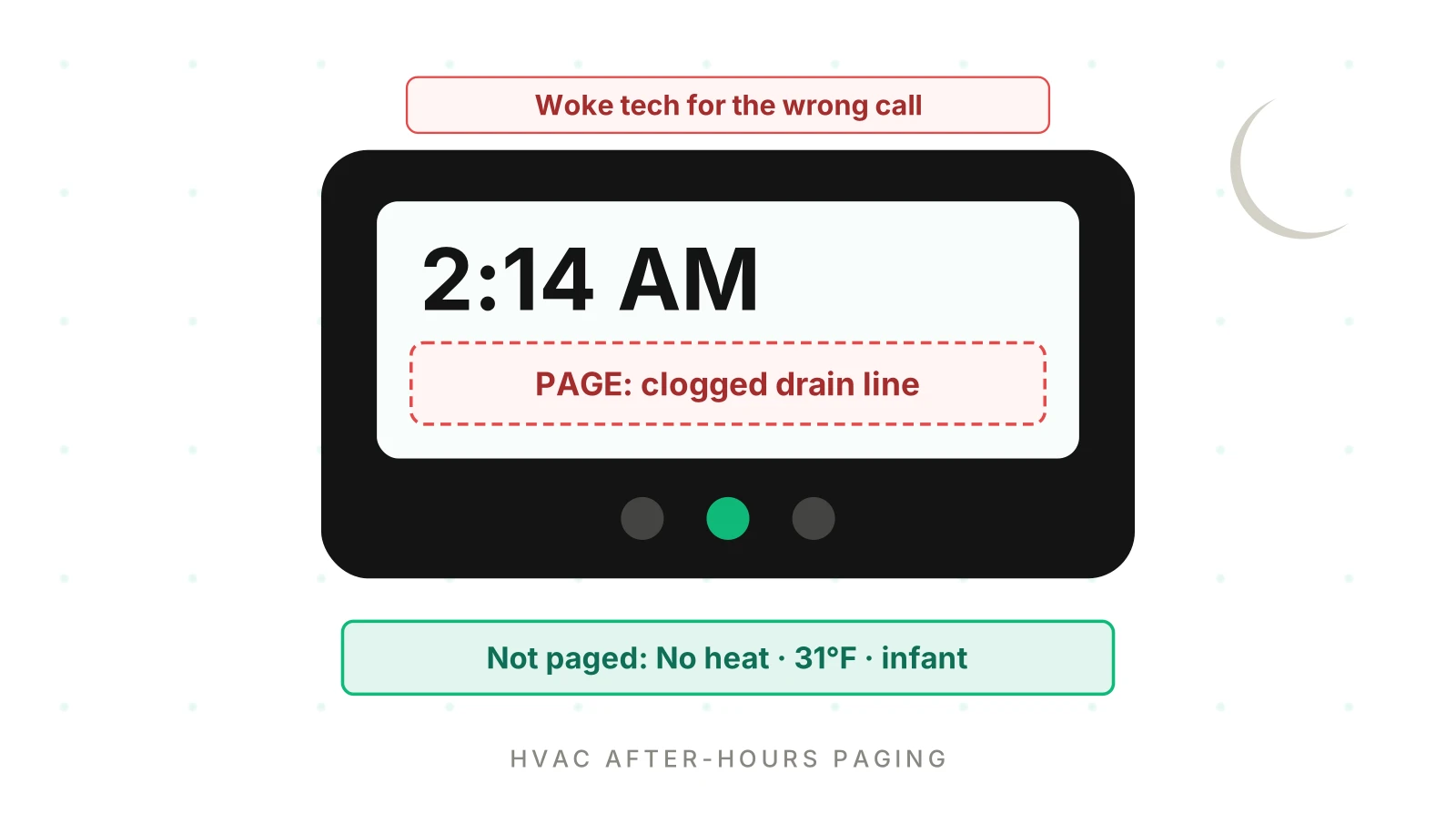
At 2:14 AM a homeowner calls about water dripping from the indoor unit. The AI pages the on-call tech. Forty minutes later the tech clears a clogged condensate line that could have waited for 8 AM. Two hours later a caller with no heat, 31°F outside and a newborn in the house gets a 9 AM slot. Nobody is paged.
Both calls "worked" in the transcript. But the one decision that mattered at night, wake someone or not, was wrong twice. This post is for product teams at field service software companies whose HVAC after hours answering service runs for many contractors. It covers the paging decision, the table behind it, and how to measure and test it.
The night call is a paging decision, not a booking
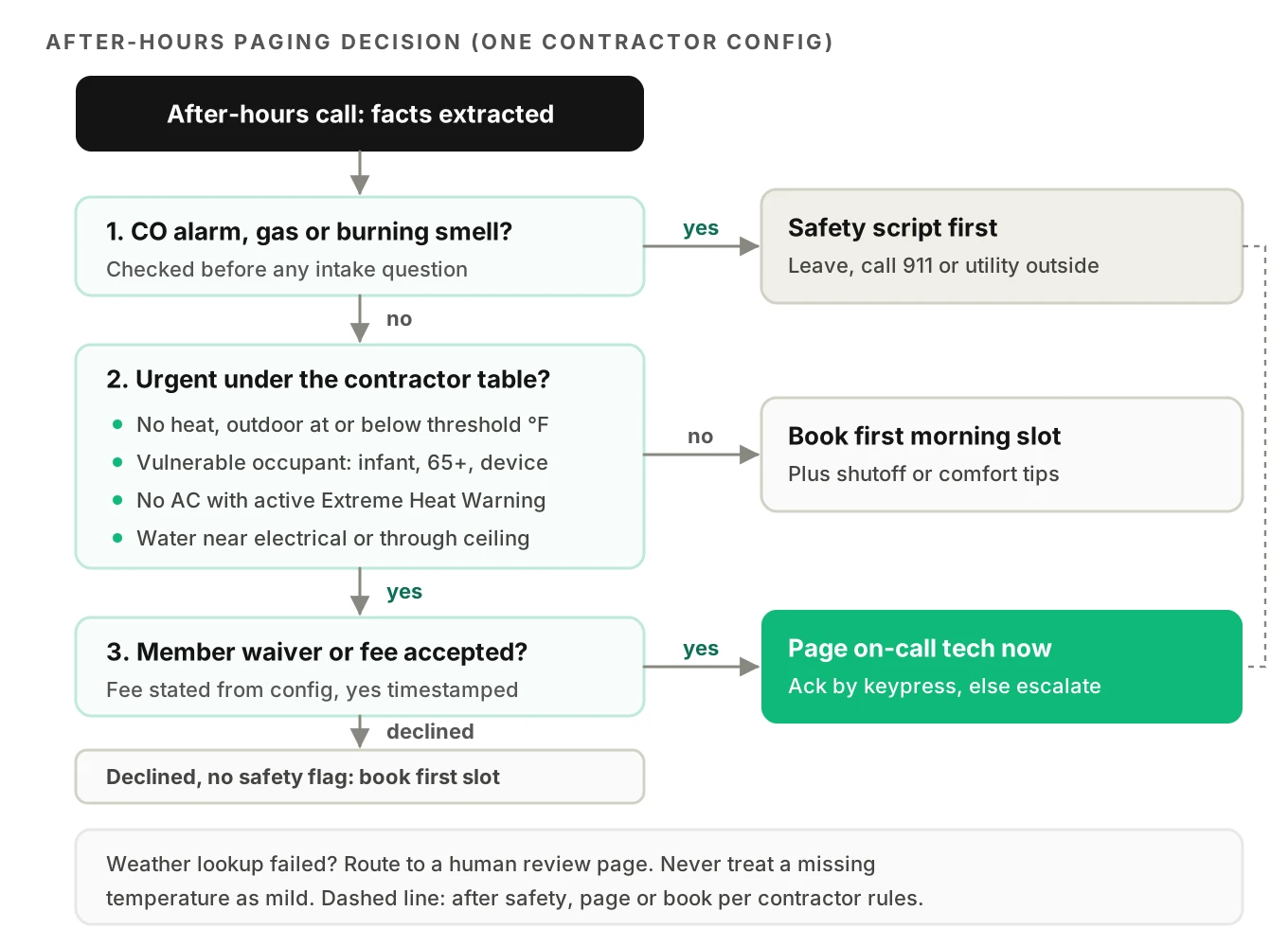
During the day, an AI receptionist's main job is to book the right job type in the right slot. Our guide to AI receptionist mistakes for HVAC covers those first-call errors. At night the main job changes. Every call ends in one of three outcomes:
1. Page now. Wake the on-call tech, confirm the fee, and tell the caller when to expect a call back.
2. Book first thing. Create a job in the first morning slot. Nobody's sleep is broken.
3. Safety first. Tell the caller to leave the house and call 911 or the gas utility. Then page or book, per the contractor's rules.
Page precision: the share of after-hours pages that the contractor's own rules say should have been sent. Low precision means false wakes.
Page recall: the share of calls that should have paged someone that actually did. Low recall means missed emergencies.
The page is the system action here. The call captures facts, a rule decides, a pager fires, and the FSM job is written back with priority, fee status and page log. A speech error early on silently corrupts every later step. If "thirty-one degrees" becomes "fifty-one," no exception is thrown. The rule simply says "book tomorrow."
Field service platforms already ship this. Workiz announced Genius Answering in December 2024, an AI answering service built into its FSM and aimed at after-hours calls. If your product sits in that category, the paging decision is now your bug surface.
The inputs that decide a page
Five groups of facts drive almost every paging decision. Each has its own failure mode.
CO alarms and gas smells: safety before the page
Carbon monoxide and gas calls are not triage questions. They are instruction questions. CPSC's guidance is blunt: "Never ignore a CO alarm when it sounds. Get outside immediately, and call 911 from a fresh-air location" (CPSC talking points). The same document cites CDC figures of more than 400 US deaths a year from carbon monoxide.
For a gas leak, Connecticut's utility regulator tells people to leave if the odor is strong and call the gas company "from a neighbor's home." It also says not to use a telephone or flip switches near the odor (CT PURA).
That creates a voice-specific gotcha. An agent tuned to "keep the caller engaged" will ask five intake questions while the caller stands in a house that smells of gas. Instead, give the instruction in the first turn after the keyword, confirm the caller is going outside, and shorten the call. Intake can wait.
Score this as a hard gate, not a rate. One missed safety instruction fails the release.
No heat and the outdoor temperature
"No heat" is not one category. At 58°F outside it is an inconvenience. At 31°F with an infant it can be a medical risk. The World Health Organization's housing guidelines say "18 °C has been proposed as a safe and well-balanced indoor temperature." They add that "a higher minimum indoor temperature than 18 °C may be necessary for vulnerable groups including older people, children and those with chronic illnesses" (WHO, via NCBI).
Some cities write thresholds into law. New York City requires 68°F indoors during the day when it is below 55°F outside. It also requires 62°F overnight regardless of outdoor temperature, from October through May (NYC HPD). Contractors serving landlords often mirror these numbers in their own rules.
Two design choices matter here. First, don't ask the caller for the outdoor temperature. Look it up from the service address. The National Weather Service API maps a location to forecasts and observation stations through `/points/{latitude},{longitude}` (NWS API docs). Second, record the source of every number. "Caller said 31" and "station reported 31" are different evidence.
No AC in extreme heat
Heat calls follow the same pattern with different inputs. CDC lists older adults, infants and children, people with chronic conditions and pregnant people among those at higher risk (CDC risk factors). For older adults it advises: "Do not rely on a fan as your main cooling source when it's really hot outside" (CDC).
A clean machine-readable trigger is an active NWS heat alert. Note the names changed. "Excessive Heat Warning" became "Extreme Heat Warning" in March 2025 (NWS). A rule that string-matches the old name now never fires. The full heat-wave booking problem is covered in our HVAC receptionist post. Here, only the paging threshold matters.
Water leaking from the unit
This is the classic false wake. A dripping indoor unit sounds urgent to a sleepy caller. Often it is a blocked condensate drain. The Department of Energy notes that "clogged drain channels prevent a unit from reducing humidity, and the resulting excess moisture may discolor walls or carpet" (DOE Energy Saver). That is property damage, but usually slow damage.
The questions that separate a page from a booking are physical. Is water reaching electrical parts or coming through a ceiling? Can the caller turn the system off at the thermostat? Is the leak growing? If the answers are no, yes and no, the right outcome is short instructions and the first morning slot.
Membership and the after-hours fee
Many contractors waive or cut the after-hours fee for service agreement members. Some only page for members at all. That makes member lookup a paging input. If the agent fails to match a member, it may quote a fee they don't owe, or skip a page they paid for. Our post on HVAC AI and service agreement customers covers the matching itself.
For non-members, the fee is a gate. The agent must state the amount from the contractor's config and get a clear yes before paging. Store the yes with its timestamp. If the caller declines, book the morning slot unless a safety or vulnerability rule overrides it.
Build a decision table per contractor config
A prompt that says "page for emergencies" will page inconsistently. Franc and colleagues ran GPT-4 on 391 simulated patient vignettes with nine prompts, ten times each. Overall accuracy was 63.9%. Overtriage was 32.9% and undertriage 3.1%. Accuracy ranged from 46.7% to 71.8% depending only on the prompt wording (Franc et al., JMIR 2024). That was disaster medicine, not HVAC. The lesson still transfers. An LLM left to judge urgency leans toward escalation, and its answer moves with the prompt.
So take the decision out of the prompt. Let the model extract facts and let code apply each contractor's table. Here is an illustrative table for one contractor. Every threshold is a config value, not a recommendation.
| Condition (from extracted facts) | Contractor A config | Action |
|---|---|---|
| CO alarm, gas smell, burning smell | Always | Safety script, then page |
| No heat, outdoor ≤ 32°F | Any occupant | Page after fee yes |
| No heat, outdoor 33–45°F | Infant, 65+, medical device | Page after fee yes |
| No heat, outdoor > 45°F | Any | Book first slot |
| No AC, active Extreme Heat Warning | Any occupant | Page after fee yes |
| No AC, no heat alert | 65+ or medical device | Page after fee yes |
| Water near electrical or through ceiling | Any | Page after fee yes |
| Water dripping, system can be shut off | Any | Instructions, book first slot |
| Member with priority after-hours | Fee waived | Page without fee step |
| Caller declines fee, no safety or vulnerability flag | Any | Book first slot |
The code that applies it can stay small. This is simplified and uses invented field names.
from dataclasses import dataclass

@dataclass
class Facts:
    symptom: str            # "no_heat", "no_ac", "water_leak", "co_alarm", "gas_smell"
    outdoor_f: float | None # from weather lookup, not from the caller
    vulnerable: bool        # infant, 65+, medical device
    heat_alert: bool        # active NWS Extreme Heat Warning
    water_hazard: bool      # near electrical or through ceiling
    member_priority: bool
    fee_accepted: bool | None

def decide(f: Facts, cfg: dict) -> str:
    if f.symptom in cfg["safety_symptoms"]:
        return "SAFETY_THEN_PAGE"
    urgent = (
        (f.symptom == "no_heat" and f.outdoor_f is not None and (
            f.outdoor_f <= cfg["no_heat_any_f"] or
            (f.vulnerable and f.outdoor_f <= cfg["no_heat_vulnerable_f"])))
        or (f.symptom == "no_ac" and (f.heat_alert or f.vulnerable))
        or (f.symptom == "water_leak" and f.water_hazard)
    )
    if f.symptom == "no_heat" and f.outdoor_f is None:
        return "PAGE_REVIEW"   # weather lookup failed: fail toward a human
    if not urgent:
        return "BOOK_FIRST_SLOT"
    if f.member_priority or f.fee_accepted:
        return "PAGE_NOW"
    return "BOOK_FIRST_SLOT" if f.fee_accepted is False else "ASK_FEE"
Notice the `outdoor_f is None` branch. Weather APIs time out. A rule that treats a missing temperature as "mild" turns an outage into silent missed emergencies. Decide the failure direction on purpose, and test it.
This split also makes each contractor's setup testable on its own. Our post on testing 500 customer setups covers config-driven test generation.
Paging is a workflow: ack, timeout, escalation
A page nobody acknowledges is a missed emergency with extra steps.
Rotation lookup. Resolve who is on call from the schedule at the moment of the call. Holiday swaps and shift handoffs at midnight are where lookups go wrong.
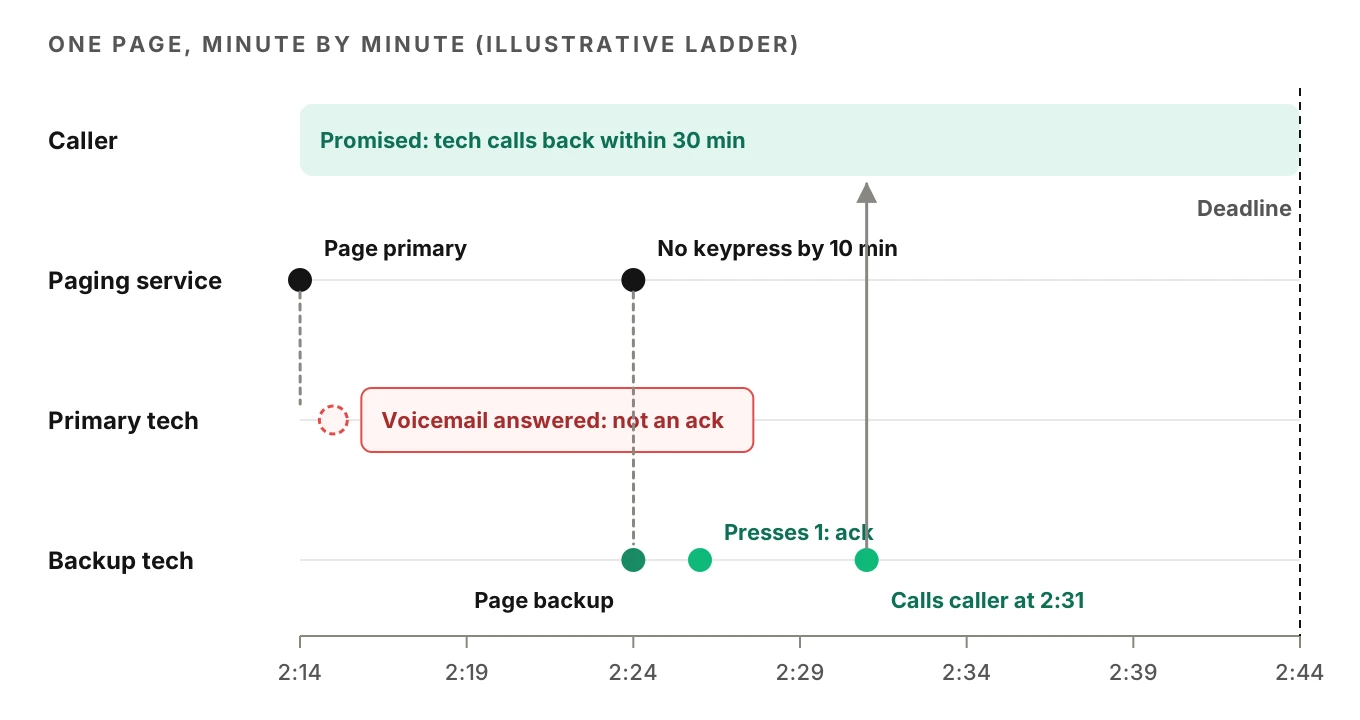
Real acknowledgment. A connected call is not an ack. Twilio's answering machine detection returns values such as `human`, `machine_start` and `unknown`, with a default 30-second detection timeout (Twilio AMD docs). Even a `human` result can be a spouse. Ask for a keypress. Twilio's `
Escalation ladder. If the primary doesn't ack, page the backup, then the owner. Each step has a timeout from the contractor's config.
Caller promise. The agent must not promise a callback time shorter than the ladder can deliver. "A tech will call you in 15 minutes" is false if the ladder needs 30 minutes to reach the owner.
Google's SRE book names the cost of noise. "When pages occur too frequently, employees second-guess, skim, or even ignore incoming alerts" (Google SRE, Monitoring Distributed Systems). An on-call tech woken for drain lines is the same human. False wakes slow the next real ack.
Measure false wakes and missed emergencies
Label every after-hours call with two values: what the agent did, and what it should have done under that contractor's table, given the true facts. True facts come from the call audio, the weather record and the tech's closeout notes. Don't use the tech's mood at 3 AM as ground truth. Use the table.
That gives a confusion matrix per contractor:
- True page: should page, did page.
- False wake: should book, did page.
- Missed emergency: should page, did book.
- Correct booking: should book, did book.
Page precision is true pages divided by all pages. Page recall is true pages divided by all calls that should page. Safety script recall is tracked separately and must be 100%.
Worked example: what the rates mean at platform scale
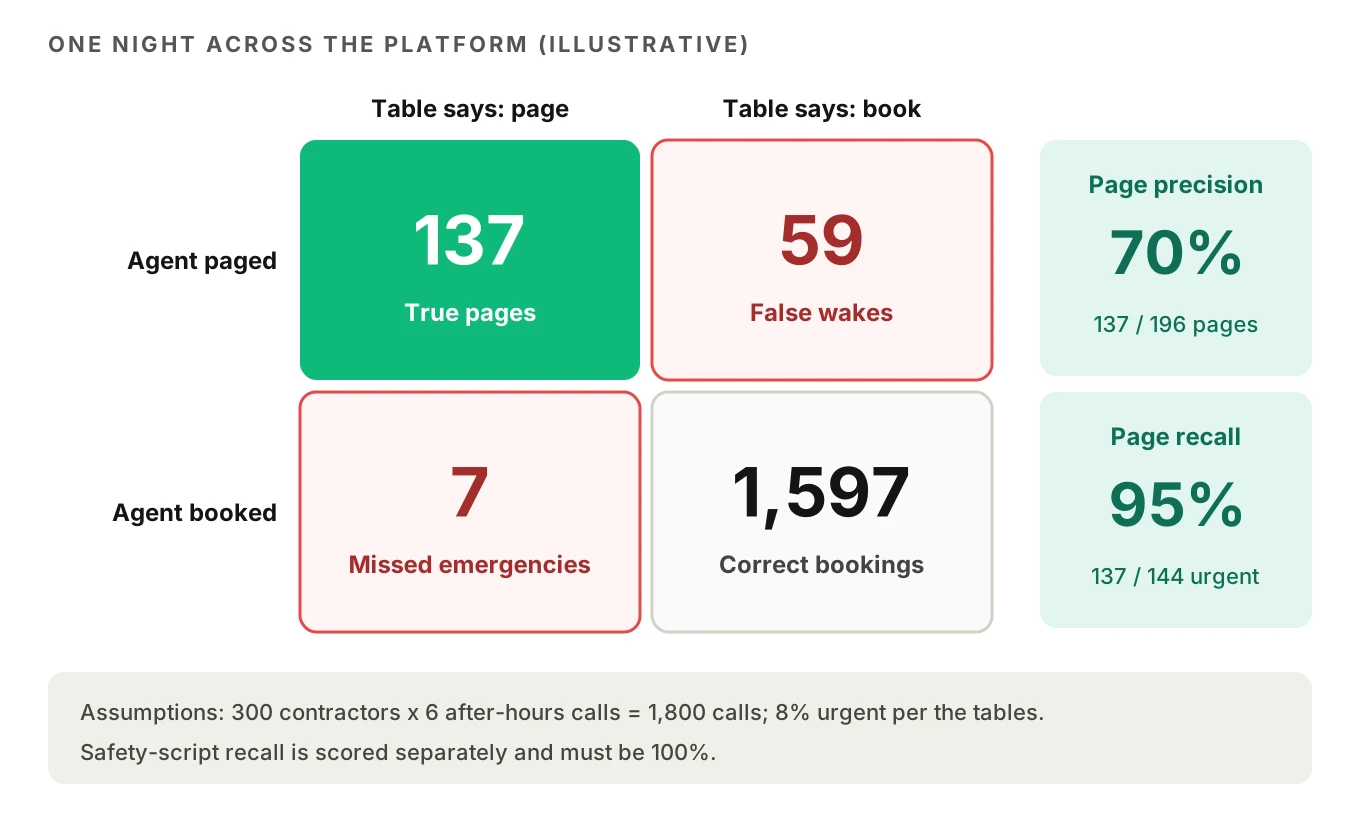
These are illustrative assumptions, not measured figures. Say your platform serves 300 HVAC contractors. Each gets 6 after-hours calls a night, so 1,800 calls. Assume 8% truly need a page. That is 144 calls.
- At 95% recall, 7 emergencies a night get a morning slot.
- At 70% precision, the agent sends 137 ÷ 0.70 ≈ 196 pages. About 59 are false wakes.
- Per contractor, that is one false wake every five nights or so. Over a winter, each tech learns the pager cries wolf.
Now the sample size. Real emergencies are rare in production, so you can't measure recall well from live calls alone. To estimate recall near 90% within ±5 points at 95% confidence, you need n = 1.96² × 0.9 × 0.1 ÷ 0.05² ≈ 139 true emergencies. One contractor might see that many in a season. That is why recall testing needs simulated calls.
Run each scenario more than once. Franc et al. found repeatability alone caused 14% of total variation in their triage results (JMIR 2024). A single pass can hide a decision that flips one run in five.
Test fixtures: weather, callers and paging failures
Each scenario should set the weather, the caller and the paging behavior on purpose.
| Fixture type | Examples | What it catches |
|---|---|---|
| Weather | 31°F night, 44°F night, 58°F night, active Extreme Heat Warning, weather API timeout | Wrong thresholds, missing-data branch, old alert names |
| Caller profile | Panicked caller who interrupts; older caller who speaks slowly with long pauses; Spanish speaker | Facts lost to talk-over, cut-off turns, translation gaps |
| Occupant facts | Newborn, 82-year-old parent, oxygen concentrator, nobody home | Vulnerability flag extraction |
| Fee path | Accepts, declines, asks "how much?" twice, member with waiver | Paging without consent, fee quoted to members |
| Paging failure | Primary no ack, voicemail answers, wrong rotation week, SMS only | Ladder gaps, false acks, broken caller promises |
| Safety | CO alarm beeping in background, "smells like rotten eggs" | Safety script latency and completeness |
Caller profiles matter because the facts that drive paging are small and fragile. Temperatures, ages and "yes" to a fee are all short tokens. Older voices are harder for speech recognition. In a longitudinal study, Vipperla, Renals and Frankel measured 47.8% word error for elderly speakers against 36.4% for adults on the same system (Interspeech 2008). Modern models are far better, but the direction of the gap is the risk. Our accent robustness guide and multilingual testing guide cover the speech side in depth.
Evalgent's caller profiles set accent, speech pace, interruption level, response delay, background noise and language, including Spanish. The simulator reaches the agent over PSTN, SIP or WebRTC, so the paging leg runs for real. Verdicts are judged from the audio, not only the transcript. That matters for safety calls. A transcript can show the evacuation line was generated while the audio shows the caller talked over it.
How to test an HVAC after hours answering service before each release
1. Export each contractor's decision table. Pull thresholds, vulnerable-occupant rules, fee amounts, member waivers and ladder timeouts from config. Freeze them per test run.
2. Generate scenarios from the table. Create at least one call per row, plus calls just above and below every threshold (32°F and 33°F, for example).
3. Attach weather fixtures. Mock the weather lookup per scenario, including a timeout. Never let tests hit live weather.
4. Cross with caller profiles. Run every urgent scenario with calm, panicked, older and Spanish-speaking callers.
5. Inject paging failures. Make the primary ignore the page in some runs. Make voicemail answer in others. Check the ladder fires and the caller promise holds.
6. Run each scenario three to five times. Flag any scenario whose outcome changes between runs.
7. Score four numbers. Safety script recall (gate at 100%), page recall, page precision and fee-consent compliance. Compare each against the last release.
8. Block or ship. Block on any safety miss or recall drop. Review precision drops with the contractor before shipping.
Our post on shipping prompt changes safely covers how to gate a release on these scores.
Monitor page precision and recall in production
Production shows whether real callers fit the rules. Join three records for every after-hours call: the call audio, the page log with acks, and the tech's closeout.
A 2 AM page whose closeout reads "cleared condensate line, no damage" is a candidate false wake. A morning job whose closeout reads "no heat since 11 PM, elderly occupant" is a candidate missed emergency. Re-score both against the contractor's table. Report precision and recall weekly per contractor and per prompt version. Sudden shifts after a prompt change are regressions, even if overall booking rates look fine.
Evalgent's production monitoring works on this loop. You push call recordings. Calls are transcribed, mapped to scenarios and judged. It flags tool-call failures, such as a paging API that errored, and policy failures, such as paging before fee consent, with fix recommendations. For the wider monitoring setup, see our guide to monitoring voice agents in production.
The same pattern covers after-hours maintenance answering for property managers and emergency plumbing answering. See also AI receptionist booking accuracy, why HVAC AI books the wrong tech and the home services QA guide.
Frequently asked questions
What counts as an HVAC emergency after hours?
An HVAC emergency after hours is whatever the contractor's written rules say justifies waking a tech. Common rules cover CO alarms, gas smells, no heat below a set outdoor temperature, no heat or AC with vulnerable occupants, and water near electrical parts. A clogged condensate drain is usually a morning job. The AI should apply the table, not its own judgment.
Should an AI answering service wake the on-call technician?
An AI answering service should wake the on-call technician only when extracted facts match the contractor's paging rules and any fee is accepted. Letting the model judge urgency freely tends to over-page. In one study, GPT-4 overtriaged 32.9% of simulated patients. Keep the decision in deterministic code and let the model collect facts.
Is no heat an emergency HVAC call?
No heat becomes an emergency HVAC call when outdoor temperature or occupants make it a health risk. WHO proposes 18°C (about 64°F) as a safe indoor minimum and notes vulnerable groups may need more. Contractors set their own outdoor thresholds, such as paging below 32°F for anyone. The agent should look up weather by address.
What should an AI say if a caller smells gas?
An AI agent should tell a caller who smells gas to leave the building and call the gas utility or 911 from outside. Utility guidance says not to use phones or switches near the odor. The agent should give the instruction first, skip intake questions, and page or book only per the contractor's rules.
How do you charge an after-hours fee on an AI call?
An after-hours fee on an AI call should be stated from the contractor's config, followed by a clear yes before any page. Store the consent with its timestamp on the job. Skip the fee step for members whose agreement waives it. If the caller declines, book the first morning slot unless a safety rule applies.
What happens if the on-call HVAC tech does not answer?
When the on-call HVAC tech does not answer, the escalation ladder should page the backup, then the owner, each after a set timeout. Only a keypress counts as acknowledgment, since voicemail can pick up a page. The caller's promised callback time must fit the full ladder, not just the first step.
How do you test an HVAC after hours answering service?
Test an HVAC after hours answering service by generating calls from each contractor's decision table. Add weather fixtures at every threshold, panicked, older and Spanish-speaking caller profiles, and paging failures like no acknowledgment. Run each scenario several times. Score safety script recall, page recall, page precision and fee consent, then compare against the last release.
Is a water leak from an AC unit an emergency?
A water leak from an AC unit is usually not an emergency if the caller can switch the system off and water is not near electrical parts or coming through a ceiling. DOE notes clogged drain channels cause excess moisture and stains. Give shutoff instructions and book the first slot, unless the contractor's rules say otherwise.
The bottom line
The hard part of after-hours answering is deciding whom to wake, not answering the phone. Put that decision in a per-contractor table, test it with weather, caller and paging fixtures, and track page precision and recall every week.
Related Articles

How to automate voice agent testing: synthetic callers vs manual QA
Learn how ai test automation replaces manual QA for voice agents. Compare synthetic callers vs human testers, with a 5-step framework to scale without hiring.
Read more
AI Agent Testing vs Voice Agent Testing: What General Tools Miss for Voice
AI agent testing measures text outputs. Voice agent testing measures behaviour through an acoustic pipeline. Five failure categories general tools miss.
Read more