Rental Delivery Scheduling by AI: Site, Window, Equipment
On this page
Rental delivery scheduling AI answers one of the most expensive phone calls a rental yard takes. A contractor says where the machine goes, when, and who meets the truck. The agent turns that into a delivery ticket. A dispatcher plans a route from it. A driver follows it to a gate.
If any field is wrong, nothing fails on the call. The call sounds fine. The failure shows up at 7 a.m. on a closed gate, with a loaded truck and no one to answer the phone.
This post on equipment rental delivery scheduling is for teams that built their own phone agent inside rental or dispatch software and now ship prompt changes to many yards. It covers what the agent writes, how each field breaks, and how to test it. It sits next to our posts on equipment rental AI ordering and extension and return calls. Those cover what was ordered and for how long. This one covers where, when and who.
What rental delivery scheduling AI actually writes
A rental delivery scheduling AI call is the front door to a small workflow. Capture, then a system action, then a confirmation, then a write-back. The caller hears one smooth conversation. The record gets seven fields.
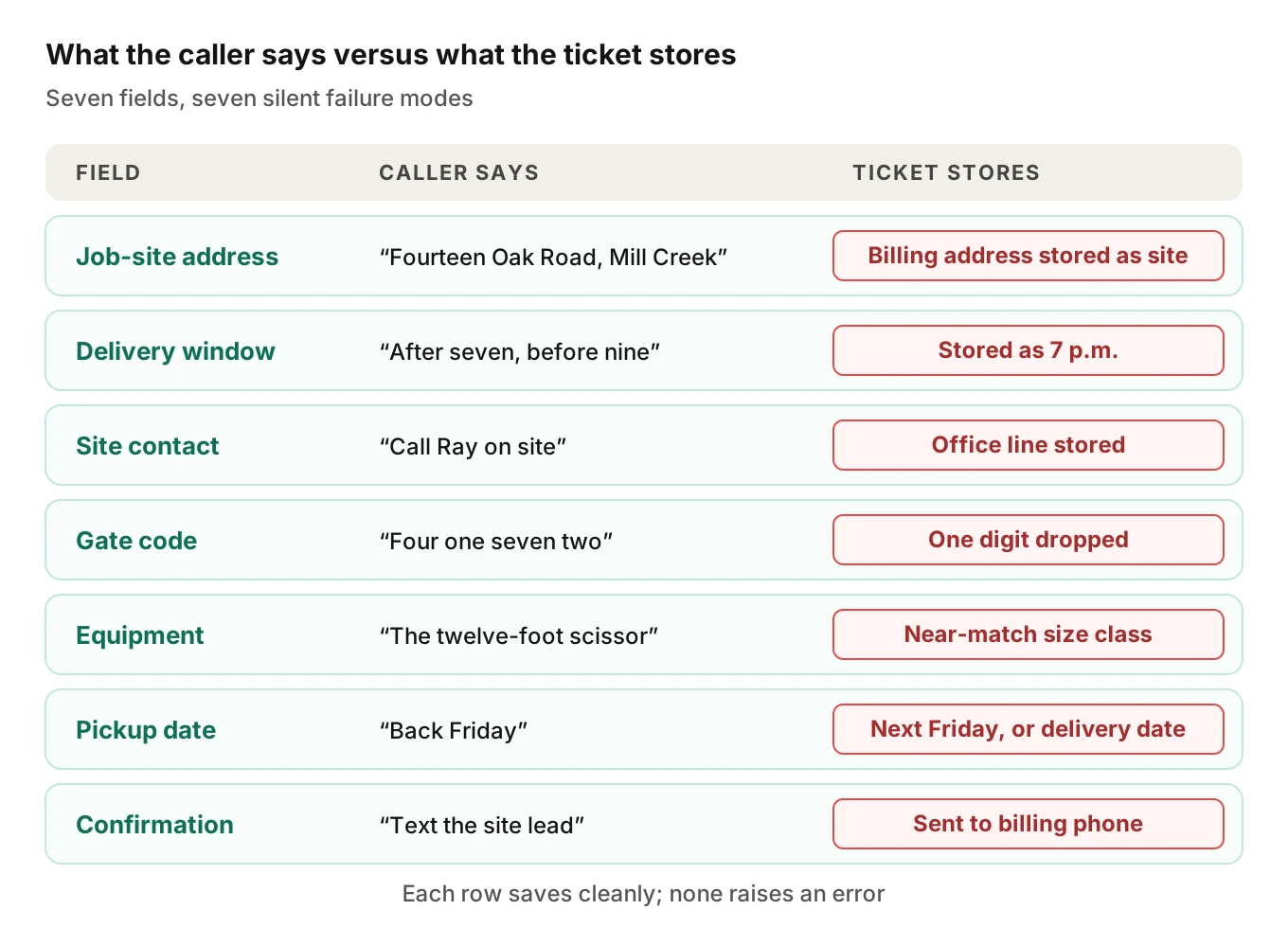
Every job site delivery rests on these fields. Each has its own way to go wrong, and each hurts a different person.
| Field | Who it hurts | Typical silent error |
|---|---|---|
| Job-site address | Driver, dispatcher | Billing or yard address stored as the site |
| Delivery window | Site crew, driver | "Before nine" stored as 9 p.m., or a window the yard cannot serve |
| Site contact | Driver at the gate | Office number stored as the contact |
| Gate code or access note | Driver | One digit dropped, or note not saved at all |
| Equipment line | Yard, driver | Near-match model, wrong size class |
| Pickup date | Billing, next customer | Delivery date reused, or "Friday" taken as next Friday |
| Confirmation target | Customer | Text sent to the billing phone, not the site lead |
None of these produce an error message. The ticket saves, the dispatcher sees a clean row, and the mistake rides along until a truck reaches a gate.
Job-site address versus billing address
Rental accounts carry a billing address. Deliveries go somewhere else. The caller says "the Oak Road job" and the account says "Mill Creek Construction, 220 Industrial Way". A good agent keeps them apart.
Billing and site differ often enough that delivery fees depend on the site. One rental marketplace explains that its delivery rates are "affected by your job site location and distance from the supplier". It tells customers to enter the full job-site address for an accurate estimate. If the agent stores the billing address as the site, the fee quote is wrong too, and the driver heads to the wrong place.
Speech makes this harder than it looks. A 2026 study tested 15 speech models from OpenAI, Deepgram, Google and Microsoft on U.S. street names. The average transcription error rate was 44%. Routing errors were twice as large for speakers whose primary language was not English. That is one dataset and one task, not your yard's calls. It does show that a model with a low overall word error rate can still miss the short, high-stakes phrase.
Common address traps on rental calls:
- Same street name in two towns, with the town said fast or not at all.
- Route and highway numbers ("County Road 12", "Highway 9") said as words.
- Landmark directions ("past the quarry, left at the silo") with no street number.
- A lot, phase or unit inside a larger site, such as "Building C, east gate".
- A caller giving the billing address out of habit when asked "where is it going?"
The fix is mechanical. Ask for the site separately from the account address. Read it back with the street spelled out. Geocode it and compare the result to the ZIP or town the caller said. If the two disagree, ask again or hand off. Never trust a single recognition pass on a street name.
Delivery windows and the person who meets the truck
A delivery window has two halves: the time and the person. The time half fails on small words. "After seven, before nine" can become 7 p.m. "Fifteen hundred" and "five hundred" get confused. A caller says "first thing" and the agent has to choose between the yard's opening time and the site's own rule.
Sites also set their own limits. Many allow deliveries only when a crane is free or before a pour. The agent can only offer windows the dispatcher can actually serve, so the offered slots must come from the yard's calendar. Free-form promises like "we will be there by eight" are an invention.
The person half matters just as much. The same rental marketplace advises that someone be onsite during the delivery window to direct the driver and take the keys, and says keys and access codes are typically released to the person accepting the machine. A site contact field is therefore a control, not a courtesy. If it holds the office line instead of the foreman's cell, the driver calls someone who cannot see the gate.
A Finning guide to rental delivery recommends a walk-around inspection with the customer at delivery and pickup. That only works if the right customer is there.
Test these cases:
1. The caller gives a window and a contact in one breath ("eight to ten, call Ray at 555-0142").
2. The contact is not the person calling.
3. The caller changes the window mid-call ("actually make it after lunch").
4. The only available slot is outside what the site said it allows.
5. Two sites on one account, same day, different contacts.
Gate codes and access notes
Gate codes are the smallest field and cause some of the largest delays. They are short digit strings, often spoken with pauses, and they are the one field a driver cannot guess. A dropped digit means a locked gate.
The agent should read the code back as separate digits and get an explicit yes. It should also save the access note as written, rather than summarizing it. "Use the north gate, second entrance, code 4172" must not become "north gate".
Treat the code as sensitive. It opens a physical site. Keep it out of logs, texts and transcripts that more people can read than should have it. Decide who can read the stored field and test that it stays there.
One practical check is the length test. If your yards use four-digit codes, any stored code of three or five digits is a defect you can find automatically across thousands of calls.
Equipment, truck and operator questions
Here the post stays narrow, because most rules belong to your business, not to regulation. Which machine fits which truck is a yard rule. The agent should know that rule from a table your team owns, not from the model's general knowledge.
A few federal rules do shape what the agent must not promise. Treat them as context for your dispatchers, and as a reason to route doubtful calls to a person. This is not legal advice.
- Securement. For wheeled or tracked equipment of 10,000 lb or more, 49 CFR 393.130 requires restraint against movement in four directions using "a minimum of four tiedowns", and accessory equipment must be lowered and secured. The agent should never agree to a delivery method. It should capture the machine and let dispatch pick the trailer.
- Driver class. 49 CFR 383.91 places a straight truck with a GVWR of 26,001 lb or more in a commercial driver's license group. A heavy machine may need a heavier truck and a licensed driver. Dispatch decides; the agent should not.
- Operators. For forklifts, OSHA says only trained and competent operators may run a powered industrial truck, and each operator must be evaluated at least every three years. For aerial lifts, 29 CFR 1926.453 says "Only authorized persons shall operate an aerial lift." If a caller asks "do I need a certified operator?", the agent should not say "no".
- Digging tools. If the rental is a trencher or auger, 811 says anyone who plans to dig should contact 811 a few business days beforehand. The agent can mention the reminder only if your business wants it said.
The safe design is a short allowlist. For each equipment class, the agent either books, books with a dispatcher flag, or hands off. It never decides compatibility on its own.
Rescheduling and pickup
A reschedule is a new ticket pretending to be an edit. The old window must be released, the driver's route must change, and the site contact must be told. The weak spots are all state:
- The agent creates a second ticket and leaves the first live. Two trucks leave.
- The agent updates the window but not the contact tied to it.
- "Move it to Thursday" is applied to the pickup, not the delivery.
- The caller means "the machine from last week" and the agent edits the wrong order.
Pickup is its own trap. A delivery date and a pickup date look alike on a call. If the agent reuses a date, billing runs wrong and the next customer's machine is not free. Our posts on rain-day rescheduling and missed delivery and return calls show the same state problems in other trades. The HVAC wrong-tech case is the same pattern with a technician instead of a truck.
Test every reschedule as a before-and-after diff of the whole ticket, not only the field the caller named.
Where errors compound
Each field can be mostly right and the ticket still wrong. Per-field accuracy multiplies.
Ticket accuracy: the chance every field is right equals per-field accuracy raised to the number of fields.
With eight fields at 97% each, 0.97 to the eighth power is 78.4%. At 99% each it is 92.3%. These are illustrative numbers, not measurements.
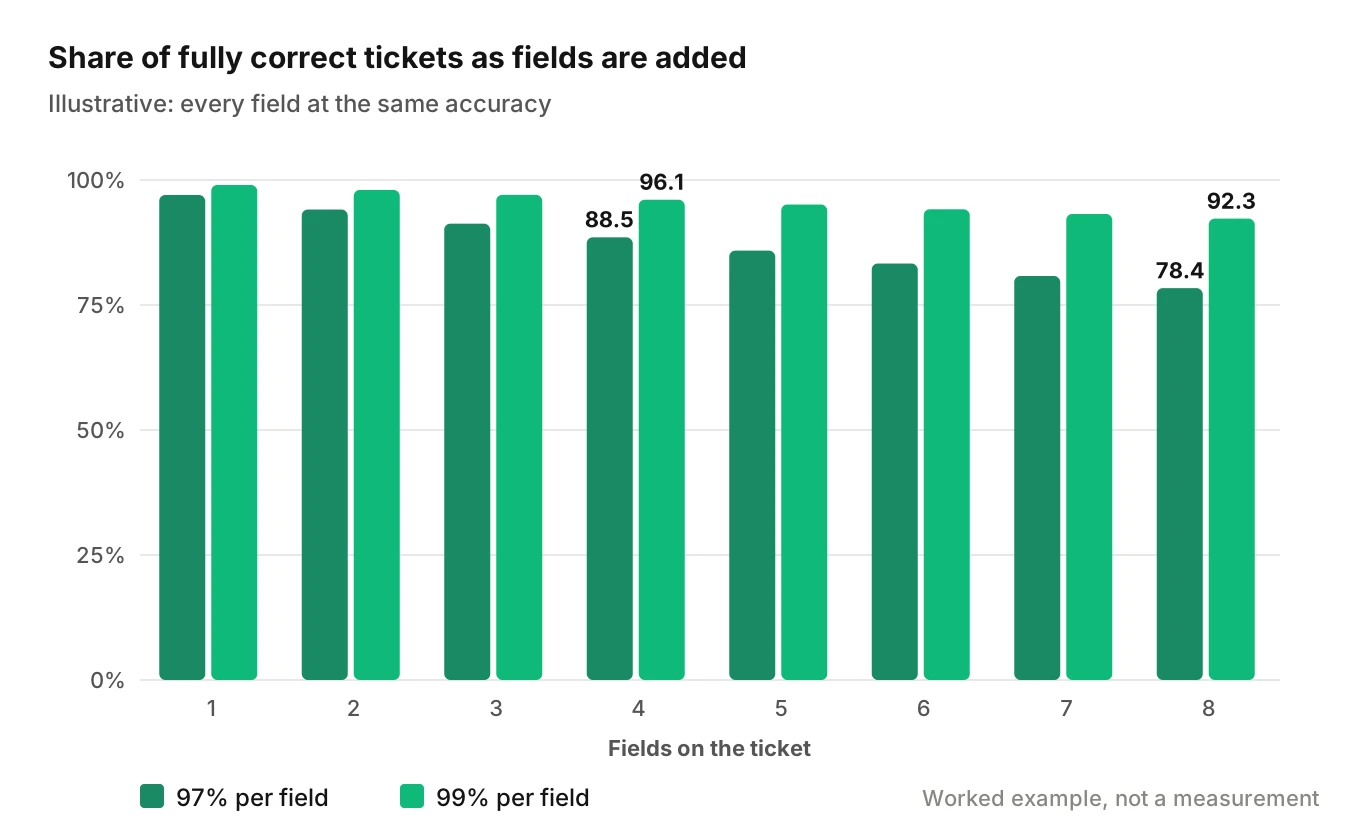
Now a worked cost. Assume 200 delivery calls a week. At 97% per field, about 43 tickets carry at least one wrong field. Assume one in ten becomes a failed trip. That is about four trips. At an assumed $300 per failed trip for truck and driver time, the loss is about $1,300 a week, before the idle crew and the angry customer. Swap in your own numbers. The shape holds: small per-field errors become a weekly bill.
This is why you score the ticket, not the call, for any rental delivery scheduling AI. A friendly call with one wrong digit is a failed call.
What the agent may confirm, and what it hands off
Not every field deserves the same trust. Some can be confirmed by read-back. Others must leave the agent's hands.
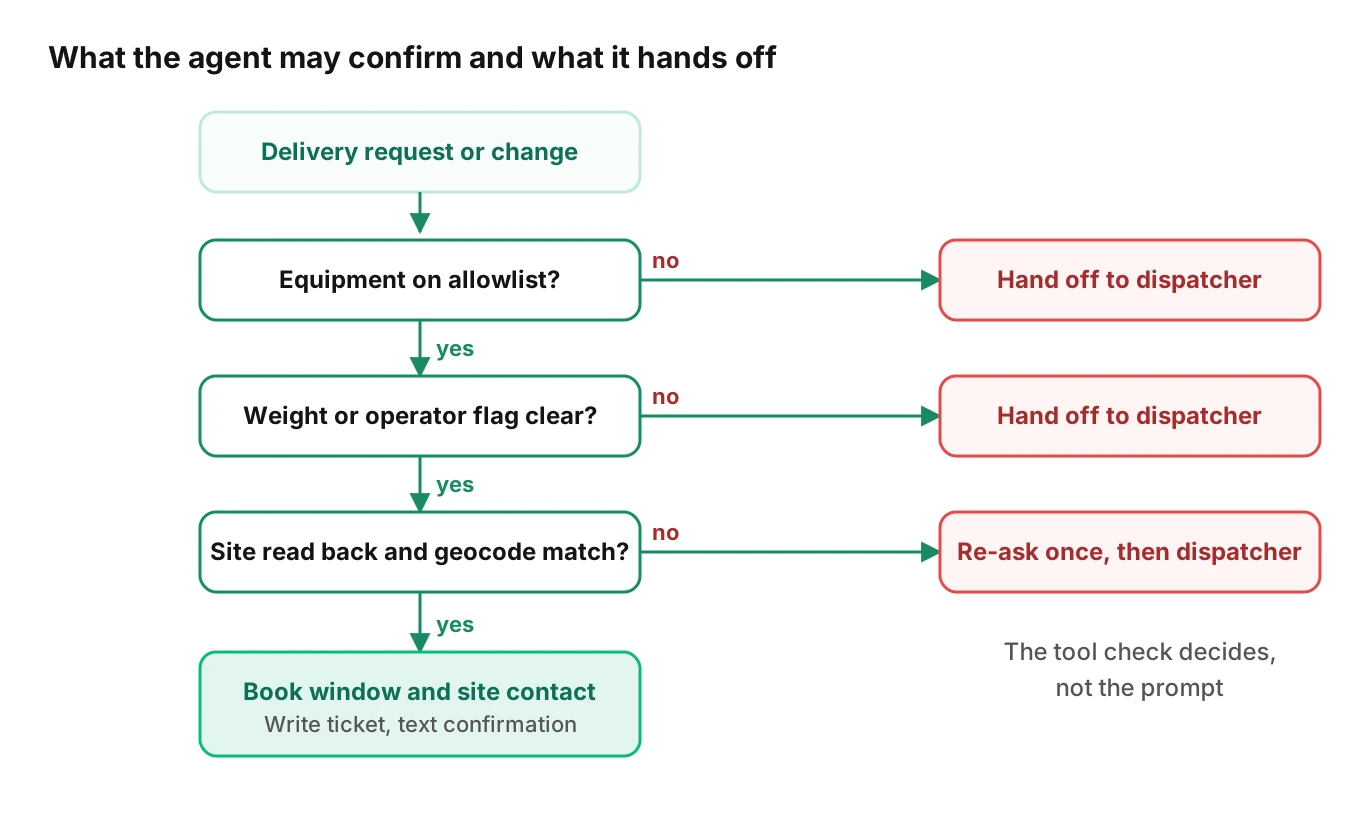
The tree is short on purpose. Equipment off the allowlist goes to dispatch. A weight or operator flag goes to dispatch. An address that fails read-back or geocode gets one retry, then dispatch. Only a clean path books a window, writes the ticket and texts the confirmation.
Write the tree as code the agent calls, not as prompt text it might skip. A prompt says what the agent should do. A tool check decides what it can do.
How to test rental delivery scheduling AI before a change ships
Run this before every prompt, model or speech-to-text change. A small team can build it in days.
1. List the fields. Use the seven above, plus any your yard adds. Each gets an expected value per scenario.
2. Build scenarios from the prompt and the dispatch rules. Cover each branch: new delivery, reschedule, pickup change, wrong-site fix, off-allowlist equipment, window the yard cannot serve, absent contact.
3. Add the caller conditions. Build caller profiles that vary accent, pace, interruptions, response delay and background noise. Job-site calls come from trucks, loaders and wind. Our guide to testing speech recognition under background noise and the post on accent robustness show how.
4. Call the real path. Reach the agent over phone, SIP or WebRTC, the same way customers do, so audio compression and latency are in the loop.
5. Score the stored ticket. After each call, read the saved record and compare each field to the expected value. Use the check below.
6. Check the audio, not just the text. A transcript can look right while the code was spoken as 4-1-7-2 and heard as 4-1-7-3. Judge the audio against the written record.
7. Pool results and set a gate. For a field you want under 1% wrong, the rule of three says zero failures in 300 independent runs puts the upper bound near 1% at 95% confidence. Block the release on any failed hard field.
8. Monitor live calls. Sample production recordings, map them to scenarios and flag ticket-write failures.
Here is a simplified version of step 5. It is a sketch to adapt, not a drop-in library.
import re

FIELDS = ["site_address", "window_start", "window_end",
          "site_contact_phone", "gate_code", "equipment_id",
          "pickup_date"]

def norm(field, value):
    value = (value or "").strip().lower()
    if field in ("site_contact_phone", "gate_code"):
        return re.sub(r"\D", "", value)
    return re.sub(r"\s+", " ", value)

def score_ticket(expected: dict, stored: dict) -> dict:
    """Return per-field pass/fail for one call."""
    result = {}
    for f in FIELDS:
        result[f] = norm(f, expected.get(f)) == norm(f, stored.get(f))
    # Hard rule: site must never equal the billing address
    result["site_not_billing"] = (
        norm("site_address", stored.get("site_address"))
        != norm("site_address", stored.get("billing_address"))
    )
    result["ticket_ok"] = all(result.values())
    return result
Evalgent supports steps 3 to 6. It generates test scenarios from the agent's prompt and flows, simulates callers with set accents, pace, interruption level and background noise, and reaches the agent over phone, SIP or WebRTC. It judges from the audio rather than the transcript alone, and custom metrics, such as "stored gate code equals the code spoken", can run on every call. Evalgent works with teams to set up evals for their first agent.
For step 8, Evalgent's production monitoring takes call recordings, transcribes them, maps them to scenarios and judges them. It flags tool-call failures, latency spikes and policy failures with fix recommendations. A ticket write that returns an error is exactly that kind of failure. Our guide to monitoring voice agents in production covers the setup in more detail.
Metrics to track
Track a small set every week, split by yard and by caller condition.
| Metric | Definition | Starting gate |
|---|---|---|
| Ticket exact-match rate | Calls where all fields match expected | Set from your baseline |
| Site-address error rate | Wrong or billing address stored | Zero on hard cases |
| Gate-code exact match | Stored digits equal spoken digits | 100% in test |
| Duplicate-ticket rate | Reschedules that leave a live second ticket | Zero |
| Hand-off rate | Calls routed to dispatch | Track trend, not a target |
| Call end reason | Why each call ended | Review any new reason |
Any gate is yours to set from your own baseline. We offer starting points, not industry standards.
For related patterns on other record-heavy calls, see last-mile driver support and after-hours dispatch triage.
Frequently asked questions
How do I schedule equipment rental delivery to a job site?
Give the yard the full job-site address, a delivery window, a site contact who will be there, and any gate code. Name the machine and the pickup date. Ask the yard to read the ticket back. A phone agent should follow the same steps and write each field to the ticket.
Can an AI phone agent schedule rental equipment delivery?
Yes, if it books only windows from the dispatcher's calendar and writes a complete ticket. It should hand off equipment, weight or operator questions to a person. The risk is not the conversation. It is a wrong field saved silently, so test the stored ticket on every change.
What is the difference between a job site address and a billing address on a rental?
The billing address is where the invoice goes. The job-site address is where the truck unloads. Delivery fees can depend on the site, as one rental marketplace explains. An agent that stores the billing address as the site sends the driver to the wrong place.
What happens if no one is at the job site for rental delivery?
It depends on the company's policy, so check yours. Rental marketplaces advise having someone onsite during the window to direct the driver and take the keys. The agent should confirm a named contact and number, and should not promise that the driver will leave the machine unattended.
How do you test an AI agent that books equipment deliveries?
Build scenarios for each branch, replay them with varied accents, pace and noise, and call the real phone path. Then read the saved ticket and compare each field to the expected value. Block the release if any hard field, such as the site address or gate code, fails.
What truck does heavy equipment delivery need?
That is a dispatcher decision. Federal rules set minimums, such as four tiedowns for wheeled or tracked equipment of 10,000 lb or more under 49 CFR 393.130, and a CDL group at 26,001 lb GVWR. The agent should capture the machine and hand off, not pick the trailer. This is not legal advice.
How should an AI handle gate codes and site access notes for deliveries?
Read the code back digit by digit and get a clear yes. Save the access note as the caller said it, not as a summary. Limit who can read the stored code, and test the field for length and exact match against the spoken digits.
How do you reschedule a rental equipment delivery by phone?
Identify the exact order, ask for the new window and contact, and confirm both. A good agent updates the existing ticket, releases the old window and informs the driver's route. Test that it never leaves a second live ticket or edits the pickup instead of the delivery.
The bottom line
Rental delivery scheduling AI succeeds when the saved ticket matches the caller, field by field, and fails when one quiet error reaches a locked gate. Test the stored record against audio from real call conditions before every change, and send any equipment, truck or operator question to a person.
Related Articles

How to automate voice agent testing: synthetic callers vs manual QA
Learn how ai test automation replaces manual QA for voice agents. Compare synthetic callers vs human testers, with a 5-step framework to scale without hiring.
Read more
AI Agent Testing vs Voice Agent Testing: What General Tools Miss for Voice
AI agent testing measures text outputs. Voice agent testing measures behaviour through an acoustic pipeline. Five failure categories general tools miss.
Read more