On-Prem vs Cloud TTS for Voice Agents
On this page
Text-to-speech is the mouth of a voice agent. It turns the model's words into audio the caller hears. Every caller judges your agent on how it sounds. If the voice is flat, slow, or wrong, trust drops fast.
One choice shapes the rest. Do you run that mouth yourself, or rent it? On-prem keeps the text and the voice in your building. Cloud sends them to a provider. This post is about that single decision, and how to prove you made it well.
This is the text-to-speech counterpart to our on-prem vs cloud STT post. The STT side is about the audio coming in. This side is about the audio going out.
This is general information, not legal advice. Confirm your obligations with counsel before you deploy.
What on-prem TTS means for a voice agent
The terms get used loosely. Let us pin them down.
> On-prem TTS: text-to-speech that runs on hardware you own and control. The input text and the synthesized audio stay inside your network the whole time.
Self-hosted is the broader idea. It covers speech models you operate yourself, on your servers or your own cloud account. On-prem is the strictest form, on your own metal. The general pattern behind speech synthesis is the same whoever runs it. Only the location changes.
A VPC deployment sits in the middle. The TTS engine runs in your virtual private cloud. It uses cloud GPUs, but it stays isolated from the public internet and other tenants. Many teams treat a VPC as the practical version of self-hosting a large voice model.
Cloud TTS is the other end. You send text to a provider's API. They run the voice model and stream back audio. You can read the general pattern in on-premises software. The line between these options is where your text lives, where the voice model lives, and who touches both.
Where your scripts and voices actually go
Follow the data. That is the whole control question, and it runs in two directions for TTS.
First, the text going in. A voice agent often speaks dynamic content. It reads back names, account details, balances, and appointment times. That prompt text can carry PII. With on-prem TTS, that text never leaves your network. With cloud TTS, every sentence the agent speaks is sent to a provider to be synthesized.
Second, the voice coming out. Your brand voice is an asset. A custom or cloned voice is a model artifact that has to live somewhere. On-prem keeps that voice model on your hardware. Cloud means the provider hosts it, and you trust their controls around it.
> Data residency: the requirement that data stay within a defined location or boundary. That can mean a country, a region, or your own hardware.
Some contracts and laws set a hard boundary. See data residency for the concept. If your boundary is your own network, streaming every spoken sentence to a shared API is a poor fit. On-prem or VPC keeps both the text and the voice inside the line.
On-prem vs cloud TTS: the trade-offs at a glance
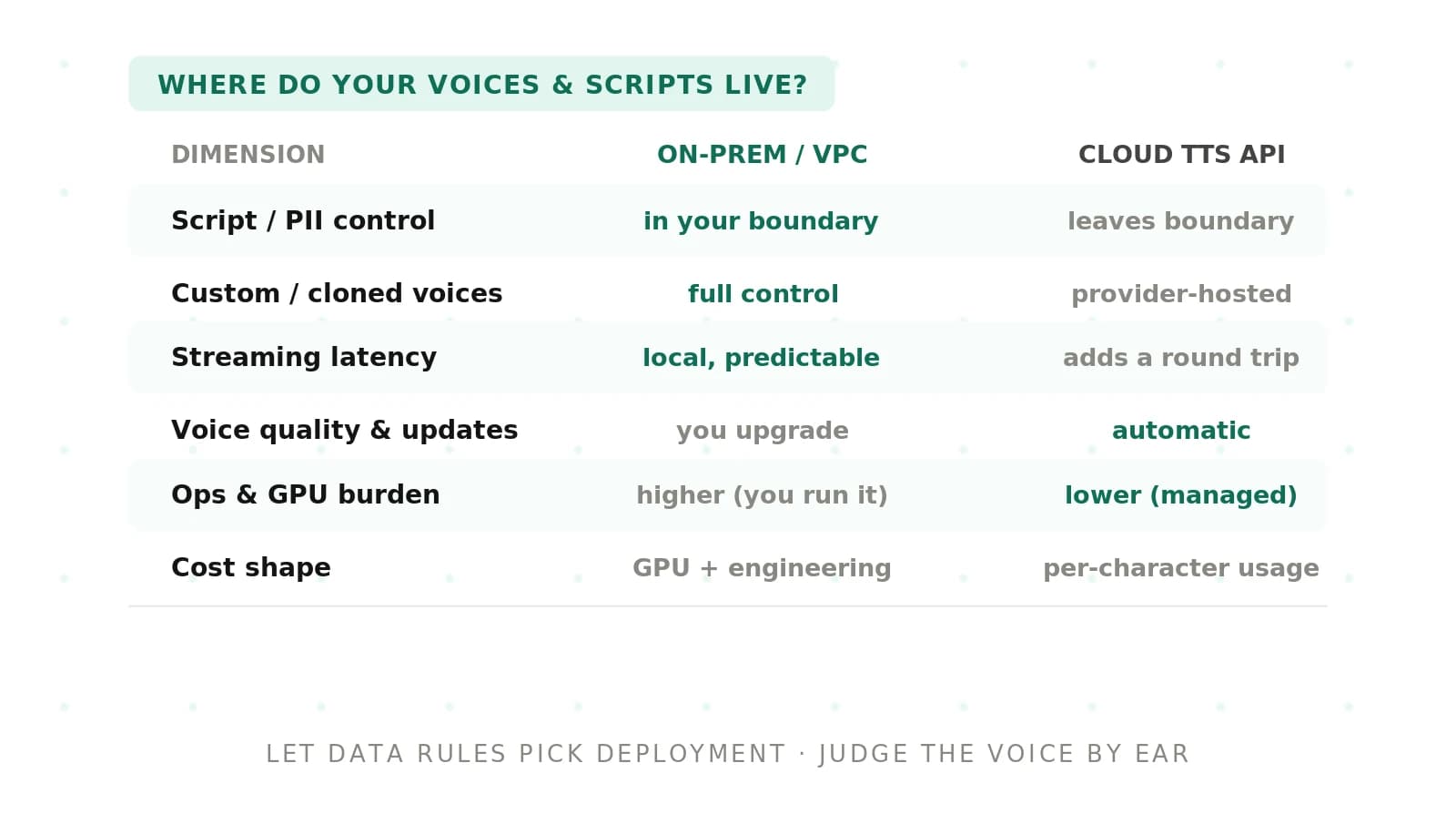
Here is the decision in one view. Read it as a set of trade-offs, not a winner.
| Factor | On-prem / self-hosted / VPC TTS | Cloud TTS API |
|---|---|---|
| Data control | Scripts, PII, and voice models stay in your network. Simpler residency story. | Text and voices leave your network. Needs strong contracts and handling. |
| Latency | No public internet hop. Lower, steadier time to first byte. | Adds a network hop. Fast, but more variable under load. |
| Voice quality and updates | Fixed to the model you deploy. You choose when to upgrade. | Often strong out of the box. New voices ship continuously. |
| Cost | High fixed GPU cost up front. Cheaper per character at large scale. | Low upfront cost. Pay per character or second, which grows with volume. |
| Ops burden | You patch, scale, secure, and monitor the GPUs. | The provider runs the infrastructure for you. |
| Custom voices | You host the voice model and own the licensing. | Provider hosts it. Check portability and license terms. |
No cell in that table is free. A win in one column is usually a cost in another. The rest of this post walks each row.
Data control and prompt privacy
This is the row many teams start with. It is also the one they underestimate.
People think of TTS as harmless output. But the input is a prompt full of things the agent must say aloud. A collections agent reads a balance. A healthcare agent reads an appointment. A support agent reads an order and an address. That text is PII, and it flows to the TTS engine on every turn.
On-prem TTS shrinks your exposure. The spoken text never crosses your boundary. Fewer parties touch it, so there is less to prove in an audit. Cloud TTS can still be handled well. The provider signs a data protection agreement and applies safeguards. But the text does leave your network, and that fact belongs in your risk model.
Either way, your own controls still matter. Encryption in transit, access limits, retention, and logging sit with you. A contract does not remove your side of the work. For a fuller checklist, run a vendor security review before any real script text flows to a provider.
Custom voices and cloning consent
This is where TTS diverges most from STT. A voice is a person. That raises questions STT never does.
Many teams want a branded voice. Some clone a real person, such as a spokesperson or an employee. Voice cloning makes that easy, and that is exactly the risk. You need clear, documented consent from the person whose voice you use. You need to know the terms of that consent and its scope. And you need to control where the resulting voice model can be used.
> Voice cloning: synthesizing speech that imitates a specific person's voice from samples of their recorded audio.
Hosting shapes your consent story. On-prem keeps the cloned voice model on your hardware, under your access controls. You decide exactly which systems can call it. With cloud hosting, the voice model lives with the provider. You must confirm they cannot reuse it, that it is deleted on request, and that only your account can invoke it.
Licensing is the other half. A stock provider voice usually comes with usage terms. A custom voice you paid to build may or may not be portable if you leave. Read those terms before you standardize on a voice. Our evaluate voice cloning for voice agents post covers how to test consent, likeness, and misuse controls.
Streaming latency and the network path
Callers feel delay. A slow mouth makes an agent feel slow, even when the model thinks fast.
The metric that matters for TTS is time to first byte. It is the gap between the model finishing a word and the first audio reaching the caller. A voice agent has to start speaking quickly, or the pause reads as a dropped call.
> Time to first byte: for TTS, the delay between sending text and the first chunk of synthesized audio streaming back.
On-prem TTS skips the public internet. The text travels a short, local path to the GPU, and audio streams straight back. Round trips are shorter. They are also steadier, because they avoid public congestion. For a real-time agent, steady matters as much as fast.
Cloud TTS adds a hop. The text has to reach the provider and the audio has to return. That can still be quick. But distance and shared load add jitter, and the tail spikes on a bad day. The general idea sits under latency). What matters is your own path, not a brochure number. Measure the round trip on the network your callers actually use. Our latency for voice agents guide shows where the budget gets spent.
Voice quality and update cadence
Deployment does not decide quality. The model does. But deployment decides how quality changes over time.
On-prem quality is fixed to what you install. A strong, well-chosen voice sounds great and stays exactly the same. That stability is good for validation. It is also work. You have to schedule, test, and ship each upgrade yourself, and a stale model can start to sound dated.
Cloud TTS often ships strong voices on day one. New and improved voices roll out continuously, sometimes without notice. That can raise quality overnight. It can also shift a voice you had already validated. A quiet update can change pacing, emphasis, or how a name is pronounced.
Pronunciation is where this bites hardest. Brand names, drug names, and street names have to sound right every time. A model update can regress one word while improving the average. Our pronunciation for voice agents guide breaks down how to test the words that carry risk. The lesson holds on both paths. A change you did not measure is a risk you did not manage.
GPU cost and operational burden
Cost splits into two shapes. Fixed and variable.
On-prem TTS is heavy up front. Modern neural voices need GPUs, and you size them for peak concurrency, not average. At small volume, that fixed cost per call looks steep. At very large scale, it spreads out, and per-character economics can beat a metered API. Watch utilization. Idle GPUs are pure loss.
Cloud TTS flips the shape. There is almost no upfront cost. You pay per character or per second of audio. That is friendly at first. But the bill climbs with every spoken sentence, and a high-volume agent can make the meter expensive.
Ops burden follows the same split. On-prem means you run the GPUs. You patch drivers. You scale for traffic. You answer the pager at 2am. Cloud hands most of that to the provider. The reference model for these cloud service shapes is NIST SP 800-145. Be honest about your capacity before you commit to running voice models yourself.
Scaling for concurrency
Scaling has the same shape as cost. Cloud absorbs a traffic spike for you. On-prem holds a ceiling you provisioned.
A voice agent's load is concurrent streams, not total minutes. Fifty callers at once is a very different bill and a very different GPU footprint than fifty callers across a day. On-prem, you have to provision GPUs for peak concurrency. Go past that ceiling and audio stutters or calls queue. Plan headroom before a busy season, not during it.
Cloud scales elastically, but under a shared meter and shared load. Your latency can drift when the provider is busy. The point is to test at real concurrency, not one call at a time. Load matters as much as accuracy. See benchmark voice agents on your own data for how to run those tests.
How to choose TTS deployment for your requirements
Work from your obligations and your load, not from a preference. Here is a repeatable path.
1. Map your spoken data. List every dynamic field the agent reads aloud. Flag PII, PHI, and cardholder data.
2. Name the rules that apply. Privacy laws, contract terms, and any residency clause that binds spoken text.
3. Decide your voice strategy. Stock voice, custom voice, or cloned voice, and document consent for any cloned voice.
4. Set a latency budget. Measure time to first byte your callers will actually tolerate.
5. Model your cost at real volume. Compare fixed GPU cost against per-character cloud pricing.
6. Estimate peak concurrency. Size on-prem GPUs for the busiest hour, not the average.
7. Weigh your ops capacity. Be honest about who patches, scales, and monitors the voice models.
8. Verify before you commit. Test quality, pronunciation, and latency on your own scripts, on the deployment you chose.
Most teams land on a mix. Sensitive or high-volume flows stay in-house. Everyday flows use a cloud API. The point is to match each flow to the right boundary.
Where an independent evaluator fits
Deployment is only half the job. Proof is the other half.
Evalgent is an independent, third-party evaluator for voice agents. We measure voice quality and latency on your own scripts. We do that whether your TTS runs on-prem, in a VPC, or through a cloud API. The scoring does not change with the deployment.
That neutrality matters. A provider grading its own voices has an incentive. An outside evaluator does not. We run the same scripts through each option and report the gaps. For the wider case, see independent voice AI evaluation.
We focus on the numbers that decide trust. Time to first byte under real concurrency. Pronunciation of the names and terms that carry risk. Whether a silent voice update changed behavior you had already signed off. Those are the results that survive a review. For the metrics themselves, see TTS evaluation for voice agents.
Frequently asked questions
What is the difference between on-prem and cloud TTS?
On-prem TTS runs the voice model on hardware you control, so script text and audio never leave your network. Cloud TTS sends text to a provider's API and streams audio back over the internet. On-prem favors data control and steady latency. Cloud favors fast setup, easy scaling, and frequent new voices. Many teams run a mix.
Is on-prem TTS better for data privacy?
On-prem TTS can simplify privacy because the spoken text, which often carries PII, never leaves your network. That shrinks your exposure and audit scope. Cloud TTS can still be handled safely under a data protection agreement and strong controls. Privacy depends on your encryption, access, and retention practices, not on location alone.
Does on-prem TTS reduce latency for voice agents?
Often, yes. On-prem TTS removes the public internet hop, so time to first byte is shorter and steadier. That helps a voice agent start speaking quickly. Cloud TTS can still be fast, but it adds network distance and can vary under load. Measure time to first byte on your own network before you decide.
What is a VPC deployment for text-to-speech?
A VPC deployment runs the TTS engine inside your virtual private cloud. It uses cloud GPUs but stays isolated from the public internet and other tenants. This blends cloud scaling with tighter data control. Many teams use a VPC as a middle ground between full on-prem hosting and a shared cloud TTS API.
How do you host a custom voice for a voice agent?
Host a custom voice by deploying the trained voice model where you control access, either on your own GPUs or in a VPC. Restrict which systems can call it, log every use, and confirm licensing and portability. With cloud hosting, verify the provider isolates your voice, honors deletion requests, and cannot reuse it elsewhere.
Do you need consent to clone a voice for TTS?
Yes. Cloning a real person's voice requires clear, documented consent from that person, with a defined scope of use. Keep the consent record, confirm the terms cover your use case, and control where the cloned voice model can run. Hosting the model on-prem makes it easier to prove only your systems can invoke it.
Is on-prem TTS cheaper than cloud TTS?
Not automatically. On-prem TTS carries a high fixed GPU cost up front and only pays off at large, steady volume with good utilization. Cloud TTS has almost no upfront cost but charges per character or second, so the bill grows with every spoken sentence. Model both at your real volume and concurrency before deciding.
How do you evaluate on-prem vs cloud TTS for a voice agent?
Run the same scripts through both deployments. Measure time to first byte at real concurrency, and check pronunciation of names, drug names, and dollar amounts. Test after any voice update, not just at launch. An independent evaluator like Evalgent scores quality and latency on your data, whichever way the voice model is deployed.
The bottom line
On-prem and cloud TTS are a trade between control and convenience, not a ranking. Pick by your data, voices, and load, then prove quality and latency on your own scripts.
Ready to see how your TTS holds up, on-prem or in the cloud? Book a demo and we will benchmark it on your scripts.
Related Articles

Why AI voice agents fail in production: 9 failure layers, how to detect each, and how to prevent them
Voice agents fail in production across 9 layers, from 8 kHz audio to silent tool errors. Symptoms, root causes, alerts, and fixes in one master table.
Read more
Voice agent regression testing: how to detect regressions from model updates you don't control
Voice agent regression testing for changes you don't control: pin each layer, run a nightly pinned-vs-latest canary, and use paired stats to detect drops.
Read more