How to test pronunciation in AI voice agents
On this page
A voice agent can say the right words and still sound wrong. Mispronouncing a caller's name, or reading a card number as a quantity, breaks trust instantly. Pronunciation is a testable, fixable problem. Evalgent checks it on real output. Here is how it fails and how to test it.
Pronunciation error: a case where the agent's text-to-speech renders a name, number, acronym, or term in a way a caller would recognize as wrong.
What a pronunciation error sounds like
These are the symptoms on a real call:
- The agent mangles a caller's name or a place name.
- It reads "1023" as "one thousand twenty-three" when it should say "ten twenty-three."
- It spells out or mispronounces an acronym.
- It puts the stress on the wrong syllable of a product name.
- It stumbles on homographs, reading "lead" or "read" the wrong way.
The failure is a word the caller does not recognize, or a number read in the wrong format.
Why voice agents mispronounce words
Pronunciation errors come from ambiguous text and default text-to-speech behavior. The model guesses, and for unusual inputs it guesses wrong. The table maps each cause to what you hear and how to fix it.
| Cause | How it shows on a call | Fix |
|---|---|---|
| Unusual names | Mangles a caller or place name | Add phonetic overrides in a pronunciation lexicon |
| Ambiguous numbers | Reads a code as a quantity | Normalize numbers; mark digits vs values in SSML |
| Acronyms | Says a letter string as a word | Tag acronyms so each letter is spoken |
| Homographs | Reads "lead" the wrong way | Provide context or phonemes in SSML |
| Dates and currency | Wrong format for the locale | Normalize to the expected spoken format |
| Domain terms | Botches product or drug names | Build a lexicon of critical terms and test it |
How to test pronunciation in AI voice agents
1. List critical terms — Collect the names, numbers, acronyms, and product terms callers actually hear.
2. Generate the audio — Have the agent speak each term the way it would on a call.
3. Check each rendering — Assert the spoken form matches the expected pronunciation, by ear or a transcription round-trip.
4. Cover the formats — Test numbers as codes and as values, plus dates, currency, and acronyms.
5. Include homographs — Test words that change with context, and assert the right reading.
6. Re-test on changes — Re-run after voice, model, or lexicon updates, since any can shift pronunciation.
A worked example
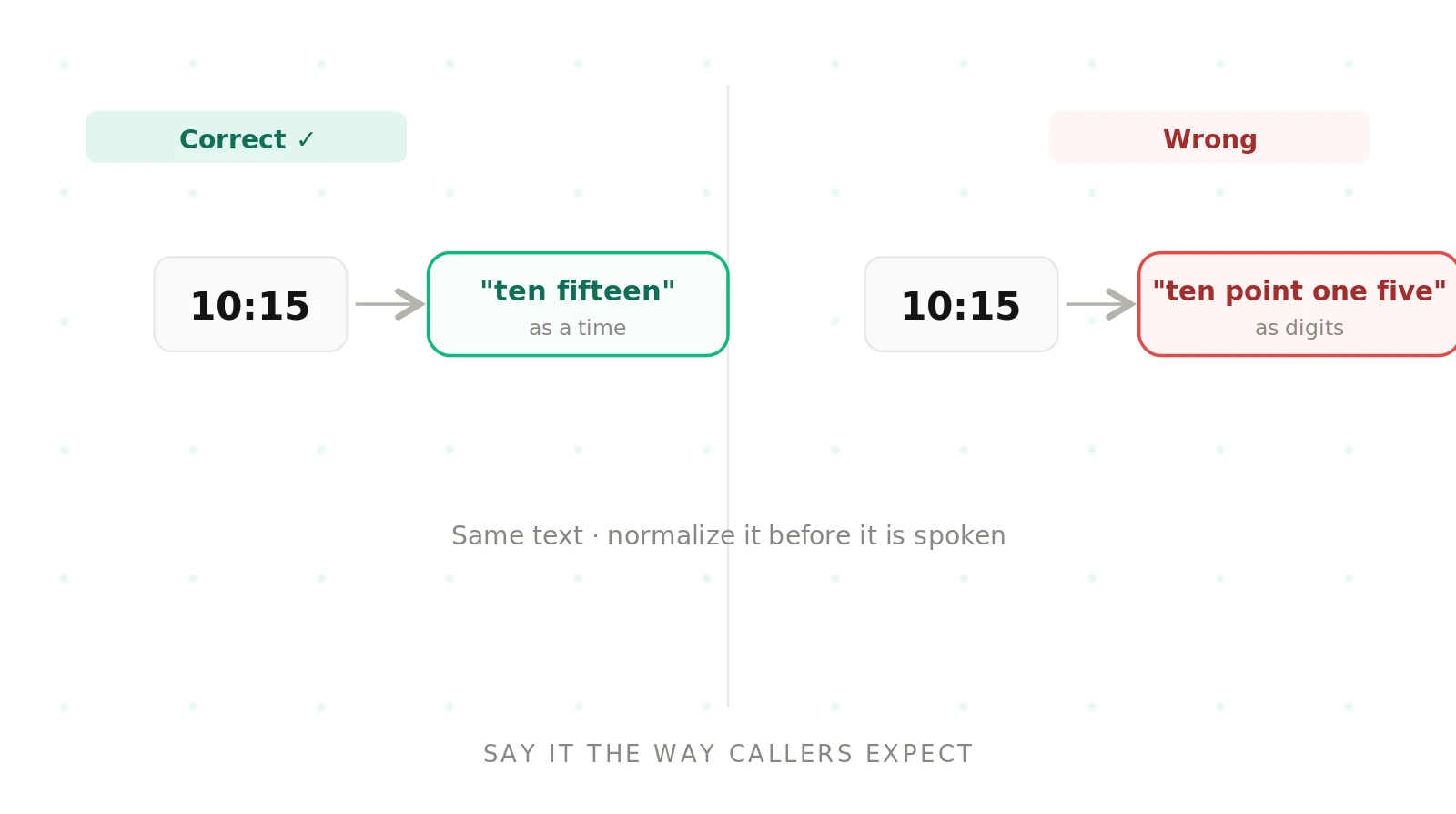
An agent confirmed appointments by reading the time back. For "10:15" it said "ten point one five" instead of "ten fifteen," because the text was not normalized before speech. Callers found it confusing and some misheard the time. The fix was normalizing times, dates, and numbers into their spoken form, plus a test that asserts "10:15" is spoken as "ten fifteen." Pronunciation was a text problem, caught by checking the spoken output.
Testing pronunciation with Evalgent
Evalgent checks pronunciation on the agent's real spoken output, not just its text. Scenarios drive the agent to say your critical terms — names, numbers, acronyms, product names — in context. Profiles vary the callers so pronunciation is checked across the phrases they trigger. Metrics assert each term is spoken correctly and flag the misses, with thresholds you set. Evaluations run the term suite as batches before release. Reviews let you replay a call and hear exactly how a term came out. Pronunciation is part of voice quality — see the TTS evaluation guide — and fits the wider voice agent stack.
The bottom line
Pronunciation errors are a text and text-to-speech problem: unusual names and ambiguous numbers get guessed wrong. Test the exact terms your callers hear, assert each is spoken correctly, and fix the misses with SSML and a custom lexicon.
Frequently asked questions
Why does my voice agent mispronounce names?
Because text-to-speech falls back to default pronunciation rules, and unusual or non-English names fall outside them, so the model guesses and often guesses wrong. The fix is a pronunciation lexicon with phonetic overrides for the names your callers use, plus a test that asserts each one is spoken the way a caller would recognize.
How do you test a voice agent's pronunciation?
Build a list of the exact names, numbers, acronyms, and terms callers hear, have the agent speak each in context, and assert the spoken form is correct — by ear or a transcription round-trip. Cover number formats, dates, currency, acronyms, and homographs, and re-run the suite whenever the voice or model changes.
What is SSML and how does it fix pronunciation?
SSML, Speech Synthesis Markup Language, lets you control how text-to-speech speaks. You can specify phonemes for a name, mark a number as digits rather than a value, force stress, or spell an acronym. It gives you precise control over pronunciation for the specific terms that default rules get wrong, without changing the underlying voice.
Why does my voice agent read numbers wrong?
Because the same digits can be a value or a code, and without guidance the model picks one. "1023" might be "one thousand twenty-three" or "ten twenty-three." Normalize numbers before speech and mark digit sequences explicitly, so codes, phone numbers, and account numbers are read digit by digit instead of as quantities.
How do you fix pronunciation of product or brand names?
Add each product or brand name to a pronunciation lexicon with a phonetic spelling, so the agent says it consistently. Then add those names to your pronunciation test set and assert they are spoken correctly. Brand names are high-value terms callers notice immediately, so they are worth pinning explicitly rather than trusting defaults.
What is a pronunciation lexicon?
A pronunciation lexicon is a mapping from words to their correct spoken form, usually as phonemes. The text-to-speech engine consults it before applying default rules, so listed terms are always spoken the way you specify. It is the standard way to fix recurring pronunciation errors for names, acronyms, and domain terms across an entire voice agent.
How do you test number and date pronunciation?
Include numbers as both codes and values, plus times, dates, and currency, in your test set, and assert each is spoken in the expected format. For example, confirm "10:15" is read "ten fifteen," and an account number is read digit by digit. Normalizing these formats before speech is what makes the tests pass reliably.
Does changing the voice affect pronunciation?
Yes. Different voices and text-to-speech models apply different default pronunciation rules, so a term that sounded right on one voice can break on another. Treat pronunciation as something to re-test after any voice, model, or lexicon change, using the same critical-term suite, so a swap does not silently reintroduce old errors.
Related guides
How to test tool calling in AI voice agents
Tool calling fails when a voice agent picks the wrong function, fills bad arguments, or acts silently. Learn how to test tool calling and catch it.
How to reduce latency in AI voice agents
Voice agent latency is the pause before the agent replies. Learn what drives it, what a good target is, and how to reduce latency without losing quality.