Latency vs response time in voice agents: what's the difference?
On this page
Latency and response time get used as if they measured the same thing, and for a voice agent that mix-up sends teams optimizing the wrong number. One is the pause before the agent speaks; the other is how long the whole reply lasts. Because voice streams, the two come apart — an agent can start almost instantly and still talk for a while — and only one of them is what makes a caller feel talked-with rather than talked-at. Evalgent measures both, and this guide draws the line.
Latency: in a voice agent, the time from the caller finishing to the agent starting to respond — the pause the caller feels, the time to first audio.
Response time: the time for the agent's full response to complete — from the caller finishing to the agent finishing its reply.
Latency vs response time: the core difference
The clearest split is start versus whole. Latency measures when the agent begins speaking. Response time measures how long the entire reply takes.
| Dimension | Latency | Response time |
|---|---|---|
| Measures | Time to start responding | Time for the full reply |
| What the caller feels | The pause before the agent speaks | How long the agent talks |
| Also called | Time to first audio | Total turn duration |
| Driven by | Endpointing, first token, first audio | The whole generation and playback |
| Best target | Under ~800ms | Long enough to be useful, not to ramble |
Latency is the gap: the caller stops, and there is a silence before the agent's voice begins. Response time is the span from the caller finishing to the agent finishing. A short latency with a long response time is common and usually fine; a long latency is what feels broken, no matter how the response time looks.
Why streaming decouples them
The reason these two come apart is streaming. A voice agent does not wait to compose its whole answer before speaking — it begins talking as soon as the first words are ready and keeps generating as it goes. So the agent can start in a few hundred milliseconds (low latency) and still take several seconds to finish the full reply (longer response time).
In a non-streaming system, latency and response time would be nearly the same, because nothing comes out until everything is done. Streaming breaks that link, which is exactly why you have to measure them separately. Time to first audio is your latency; total turn duration is your response time, and they answer different questions about the same reply. Our reduce latency guide covers the start side in depth, including time to first token from the LLM, a concept our best LLM for voice agents guide unpacks.
Which one matters for conversational feel
The distinction matters because latency, not response time, is what makes a conversation feel natural. Callers judge responsiveness by the pause: a prompt start feels human, and a long silence after they finish feels like the agent froze — even if the eventual answer is short. A longer answer that begins promptly feels fine; a short answer that begins after two seconds feels broken.
That is why optimizing for response time alone can mislead you. Shaving a reply from twelve seconds to eight does little for the feel if the agent still takes two seconds to start. Cutting the initial pause from two seconds to three hundred milliseconds transforms it. Response time matters for whether the agent is concise and does not leave dead air mid-answer — the subject of our dead air guide — but the pause is the number that governs how responsive the agent feels.
How to measure latency and response time
Measure them as two separate numbers, at percentiles.
1. Measure time to first audio — Capture the gap from the caller finishing to the agent's first sound; that is latency.
2. Measure total turn duration — Capture the span until the agent finishes its reply; that is response time.
3. Report percentiles — Track p50, p90, and p99 for both, since the tail is what callers notice.
4. Watch latency first — Treat the initial pause as the primary responsiveness metric, with a hard ceiling.
5. Keep response time honest — Ensure replies are useful without rambling, and never go silent mid-answer.
6. Test under load — Re-measure both at expected concurrency, since both grow at scale.
A worked example
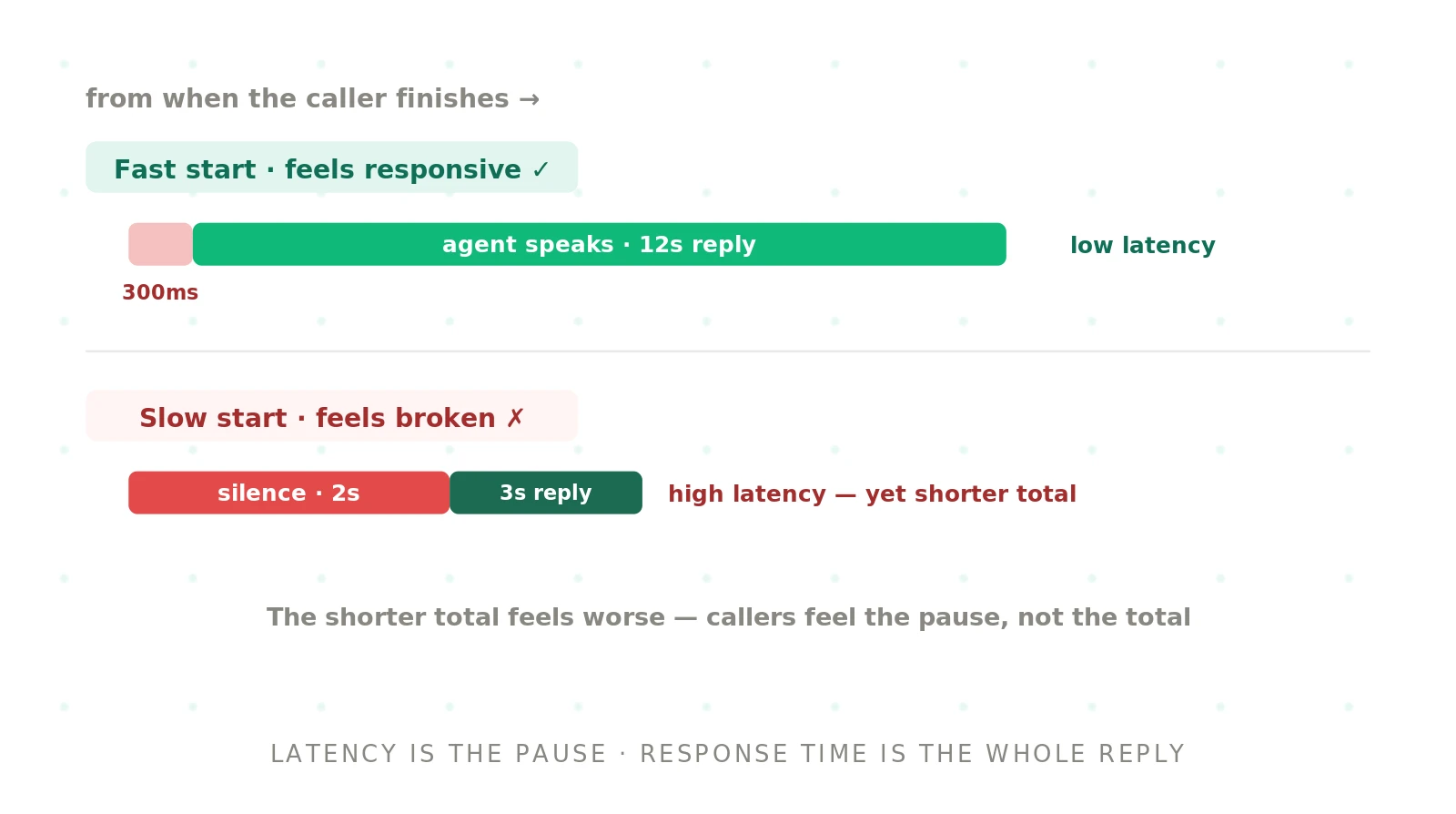
Two agents answer the same question. The first starts speaking 300 milliseconds after the caller finishes and takes 12 seconds to give a thorough answer. The second sits silent for 2 seconds, then delivers a 3-second reply. By response time, the second is faster — 5 seconds total versus over 12. But the first feels responsive and human, while the second feels frozen, because the caller experiences the pause, not the total. Same task, and the agent with the longer response time is the one that feels quick. Latency won.
Latency and response time with Evalgent
Evalgent measures both, and keeps them straight. Scenarios drive realistic calls and capture the timing of each turn — the pause before the agent speaks and the full duration of its reply. Profiles vary caller pace and line quality, and Evaluations run at concurrency, since both numbers grow under load. Metrics report time to first audio as latency and total turn duration as response time, each at percentiles, so you optimize the pause without being misled by the total. Reviews let you replay a call and hear the gap that a latency number is really measuring.
The result is timing you can act on: a hard focus on the initial pause that governs how responsive the agent feels, plus a response-time view that keeps replies useful and free of dead air. For the wider discipline, see the AI voice agent testing pillar.
The bottom line
Latency is how quickly the agent starts responding; response time is how long the full reply takes. Streaming decouples them, so an agent can start fast and still finish a longer answer — and the pause, not the total, is what a caller feels.
Optimize latency for conversational feel and keep response time honest so the agent stays useful and never goes silent mid-answer. The agent with the longer response time can be the one that feels quick, as long as it starts promptly.
Frequently asked questions
What is the difference between latency and response time in a voice agent?
Latency is how quickly the agent starts responding — the pause after the caller finishes, the time to first audio. Response time is how long the full reply takes to complete, from the caller finishing to the agent finishing. Because voice streams, an agent can start fast yet take longer to finish, so the two are separate numbers measuring different parts of the same reply.
Which matters more, latency or response time?
For conversational feel, latency matters more. Callers judge responsiveness by the pause before the agent speaks, so a prompt start feels human even if the answer is long, while a long initial silence feels broken even if the answer is short. Response time matters for keeping replies concise and avoiding dead air, but the pause is what governs how responsive the agent feels.
Why can an agent have low latency but a long response time?
Because voice streams. The agent begins speaking as soon as the first words are ready, rather than waiting to compose the whole answer, then keeps generating as it talks. So it can start in a few hundred milliseconds — low latency — while the full reply still takes several seconds — a longer response time. Streaming is what decouples the start from the whole.
What is time to first audio?
Time to first audio is the delay from the caller finishing speaking to the agent producing its first sound. It is the practical measure of a voice agent's latency — the pause the caller experiences. Because streaming lets the agent start before the full answer is ready, time to first audio, not the total reply length, is the number that determines how responsive the agent feels.
Is a shorter response time always better?
No. A shorter total response time can still feel worse if the agent starts slowly, because callers experience the initial pause more than the total length. An agent that starts in 300 milliseconds and talks for 12 seconds feels more responsive than one that waits 2 seconds and finishes in 3. Optimize the pause first; keep response time useful, not just short.
How do you measure voice agent latency?
Measure time to first audio — the gap from the caller finishing to the agent's first sound — and report it at percentiles like p50, p90, and p99, since the tail is what callers notice. Measure it on realistic audio and under expected concurrency, because latency grows at scale. Treat it as the primary responsiveness metric with a hard ceiling.
Does response time matter at all then?
Yes, just for a different reason. Response time governs whether the agent is concise and whether it goes silent mid-answer while generating. An overly long reply wastes the caller's time, and a gap in the middle reads as dead air. So keep response time honest — useful, not rambling, with no silent stretches — while treating latency as the metric for responsiveness.
What is a good latency for a voice agent?
Aim for the initial pause to stay under about 800 milliseconds, with under 500 feeling natural and beyond a second starting to feel broken. That target is for latency — time to first audio — not total response time, which can be longer as long as the agent starts promptly and does not go silent mid-answer. Judge it by the p90 and p95, not the average.
Related guides
Testing vs evaluation for voice agents: what's the difference?
Testing and evaluation for voice agents are related but distinct: testing verifies behavior pass/fail, evaluation measures quality. Here's how they differ.
VAD vs endpointing: what's the difference in a voice agent?
VAD detects whether someone is speaking; endpointing decides when they've finished. Learn the difference and why confusing them cuts callers off.