Phone Repair Status AI: Ticket Lookups That Go Wrong
On this page
A customer calls and asks, "Is my phone ready?" The agent must find the right ticket, read its status and say something true. Most teams test the voice. Few test the repair ticket lookup.
This post covers phone repair status AI calls on a repair shop's phone line. For the intake side (model capture, price rows, passcodes at drop-off), see our device repair AI intake guide. For the auto version of the same call, see testing AI status calls for auto shops. Phones differ in three ways. One number often owns several tickets. Ticket numbers are short and sequential. The customer's data is the real asset.
What phone repair status AI calls really do
The caller hears one short answer. Behind it, the agent runs a chain of five steps.
1. Identify. Match the caller's number, or ask for a ticket number or name.
2. Resolve. Pick one ticket out of zero, one or many.
3. Read. Pull the status, the last update time and any notes.
4. Translate. Turn an internal label into a safe sentence.
5. Act. Approve a quote, change a pickup plan or hand off to staff.
Each step can fail with no sign in the transcript. The agent sounds equally confident reading the right ticket or a neighbour's. So test the chain step by step.
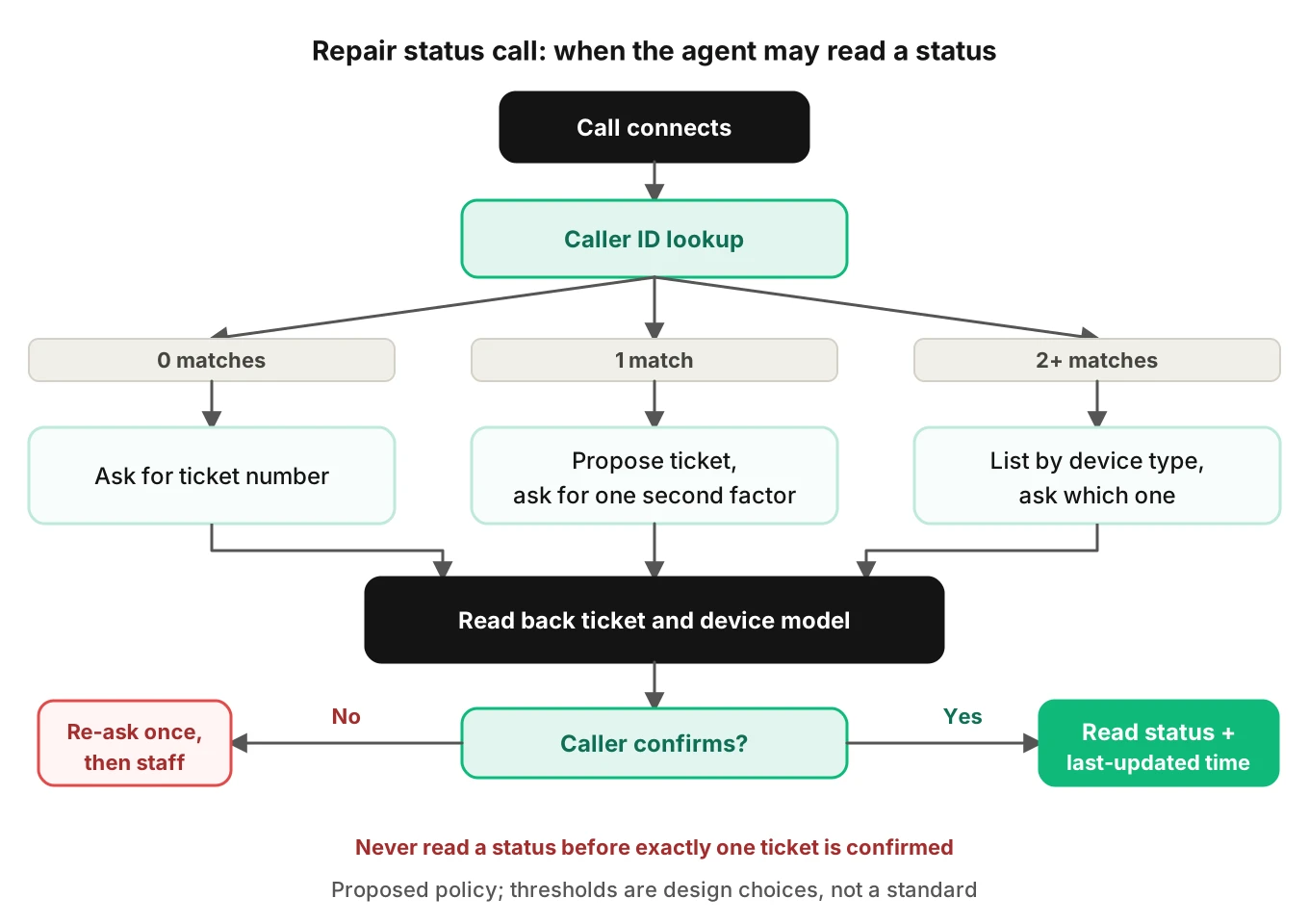
The tree is a design proposal, not a standard. Its rule is simple. The agent reads a status only after it resolves exactly one ticket. It must confirm that ticket with something the caller knows.
Lookup key one: caller ID is a hint, not an identity
Matching the incoming number to a ticket feels natural. It breaks in four ways.
One number, many tickets. On a family plan, a parent's number is on a cracked screen, a kid's battery swap and a spouse's water-damaged phone. The system returns multiple open tickets, three here. A naive agent picks the newest, or the first. It reads the wrong child's phone status.
Different number, same customer. People drop a phone off with a work number and call from a car's hands-free line. Zero matches. The agent says "I can't find a repair" to a customer who is standing in your queue's database.
Shared and recycled numbers. A shop's contact record may hold an old number that now belongs to someone else. The agent reads a stranger's repair status to the current owner of that number.
Spoofed or masked numbers. The FCC describes spoofing this way: "a caller deliberately falsifies the information transmitted to your caller ID display" (FCC consumer guide, opened October 22, 2026). A repair status is low risk. But the same lookup often exposes a name, a device model and a pickup plan.
So treat caller ID as a way to narrow the list, not to unlock it. A workable rule: caller ID proposes a ticket. The caller confirms one detail the agent has not said aloud. Good second factors are the device model, the first name, or the last four ticket digits.
Family accounts need a disambiguation script
With more than one open ticket, the agent lists them by a safe label. "I see two repairs under this number: an iPhone screen and a Galaxy battery. Which one?" Then it locks to the answer and repeats the last four digits of the ticket. Test the caller who names the wrong device, says "the other one," or says "both."
Lookup key two: ticket numbers heard one digit wrong
The cleanest key is the number on the claim check tag. It is also the one speech recognition handles worst. Ticket numbers are short strings with no language context. A recognizer cannot guess a digit from nearby words.
The Sheffield Numbers Spoken Language Corpus paper (Barker et al., LREC 2022) shows why this matters. Their LibriSpeech-trained baseline reached 96.6% word accuracy on partner-company data but only 77% sentence-level accuracy. Adapting on number speech lifted that to 91.7%. The setup was workforce recordings, not phone-shop calls, so do not read these as your error rate. The lesson transfers: a score that looks fine per word hides the per-identifier failure.
Speechmatics, a speech-to-text vendor, lists the usual mechanisms in its alphanumeric write-up. They include near-pairs like P and B, "O" versus zero, "seven" heard as "seventy," and dropped separators. Telephone audio makes the near-pairs worse. Our phone audio quality guide covers the codec side.
Why sequential numbers make errors dangerous
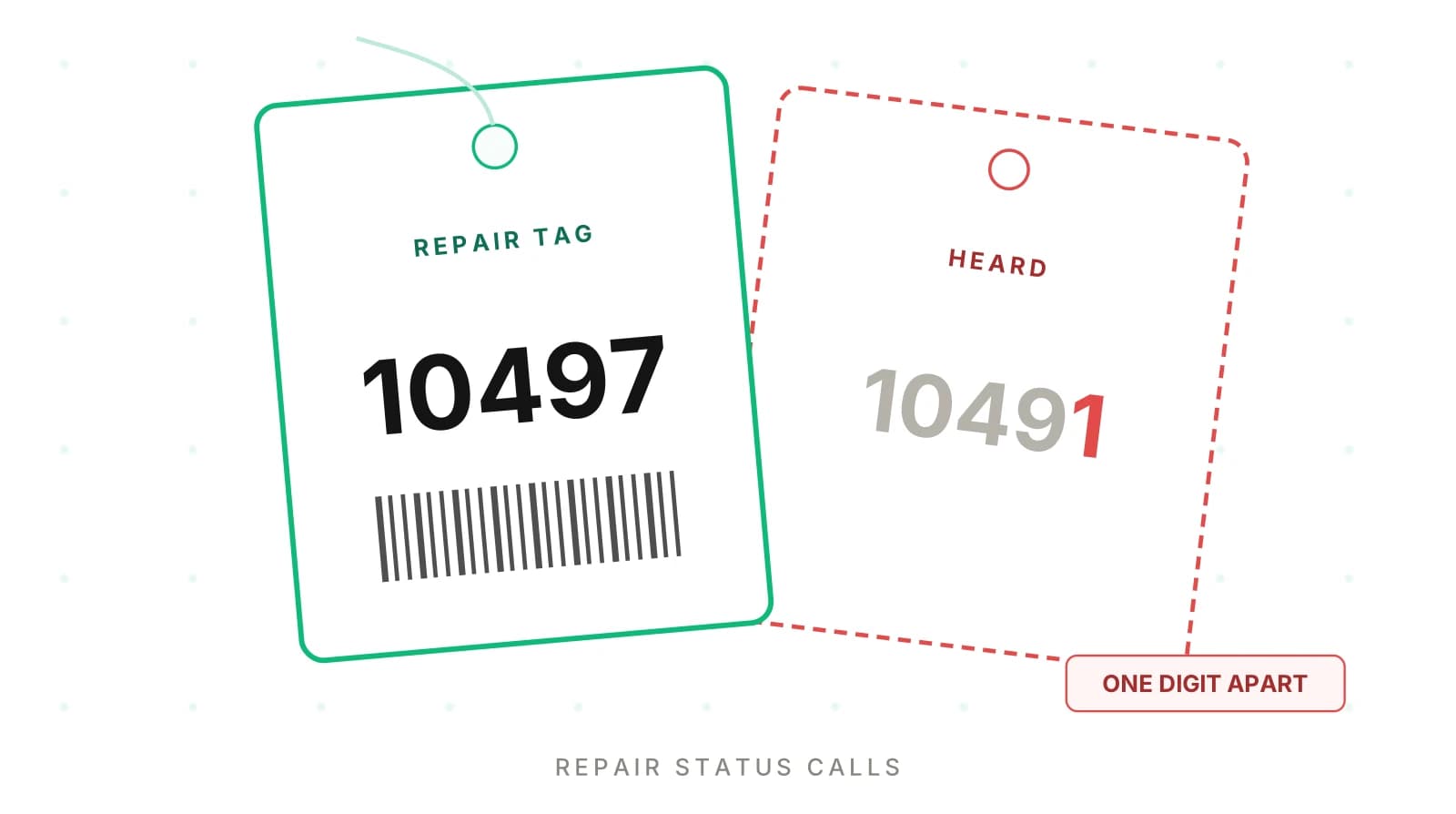
Here is a worked example with illustrative numbers. A shop issues tickets in sequence. Forty are open, numbered 10482 through 10521. The caller says 10497, and the agent hears 10491.
Both are real, open tickets. In that dense range, every one-digit change to the last digit lands on another live ticket. A misheard digit does not return "not found." It returns a plausible status for someone else's phone.
| Spoken | Heard | Lookup result | What the caller gets |
|---|---|---|---|
| 10497 | 10497 | Correct ticket | Correct status |
| 10497 | 10491 | Another live ticket | Wrong status, delivered confidently |
| 10497 | 1049 | No match | Safe "not found" path |
| 10497 | 10947 | Often no match | Safe if the shop has no ticket that high |
The dangerous row is the second. No error is raised. The fix is a read-back plus a second factor. The agent says, "I have ticket one-zero-four-nine-seven, an iPhone 13. Is that right?" The model name is the second factor. If the heard ticket is a Galaxy, the caller says "no, mine is an iPhone," and the mismatch is caught.
A copyable guard (simplified, against your own ticket store):
def resolve_ticket(heard_ticket, caller_claim, db):
    """Return (ticket, action). action is 'read', 'ask', or 'handoff'."""
    t = db.get_ticket(heard_ticket)
    if t is None:
        return None, "ask"            # not found: re-ask, never guess
    # second factor the agent has NOT said aloud yet
    if caller_claim.get("device") and \
       caller_claim["device"].lower() not in t.device_model.lower():
        return None, "ask"            # mismatch: likely wrong digit
    if t.is_closed or t.status == "PICKED_UP":
        return t, "handoff"           # closed tickets go to staff
    return t, "read"
Log the heard string, the matched ticket and which factor passed. Without that log you cannot measure the rate later.
Status labels: what the system says versus what the agent may say
Shop systems use their own labels. One Dublin repair shop's public tracker shows nine. They run from Ticket created through Waiting for approval, Waiting for parts, In repair and Testing to Ready for collection and Completed (ExpressTech tracking page). Samsung's Philippines Care+ page lists no labels. It says staff will report when the repair is complete and when the device is ready (Samsung Care+ FAQ). Your own list will differ.
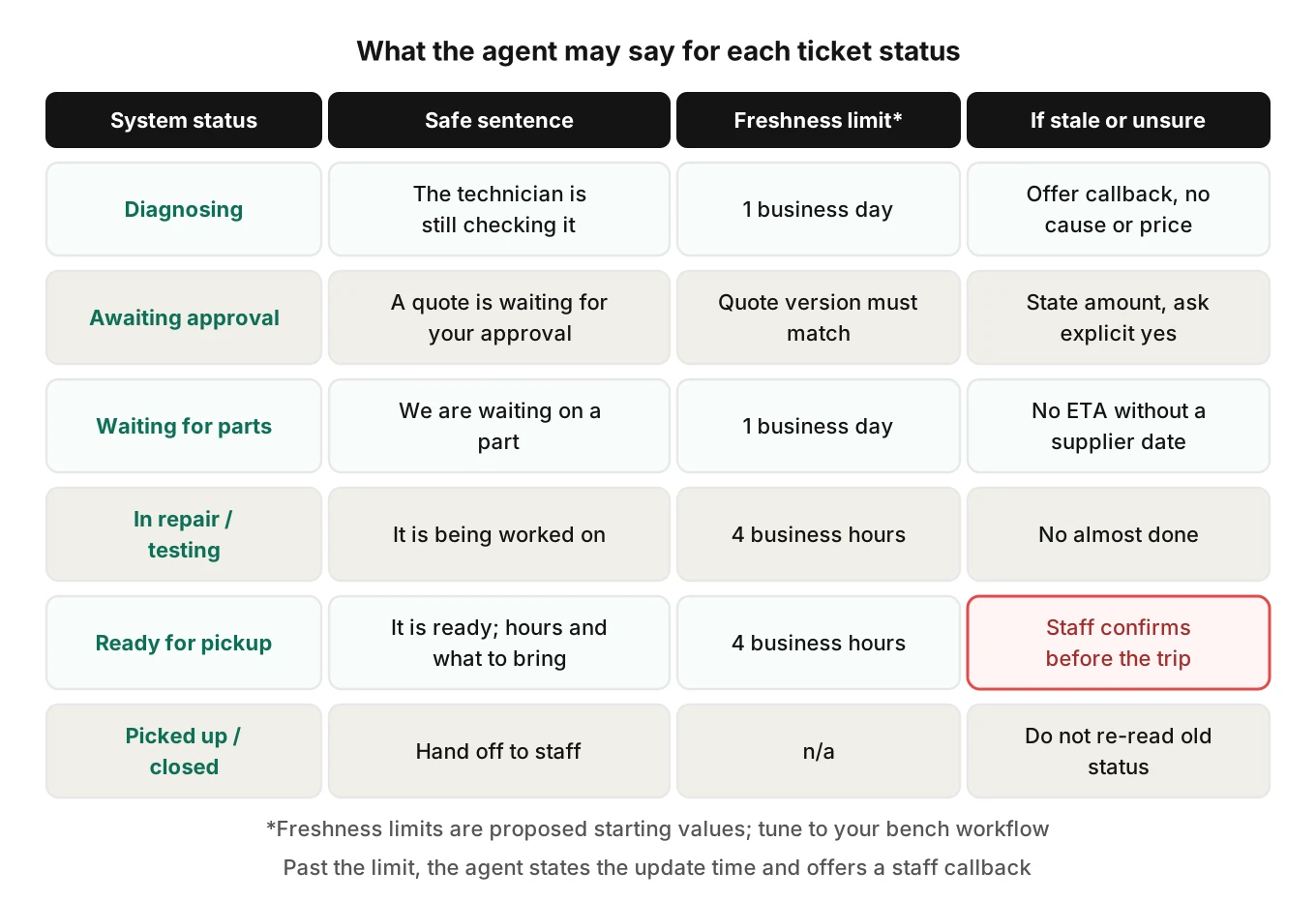
The agent's job is to turn a label into a sentence that is true, with a time stamp. Each label carries a trap.
| Internal status | Safe sentence | Trap to test |
|---|---|---|
| Diagnosing | "The technician is still checking it." | Agent promises a cause or price |
| Quote sent, awaiting approval | "A quote is waiting for your approval." | Agent treats silence as yes |
| Waiting for parts | "We're waiting on a part." | Agent invents an arrival date |
| In repair / testing | "It's being worked on." | Agent says "almost done" |
| Ready for pickup | "It's ready. Here are hours and what to bring." | Status is stale; phone is still on the bench |
| Picked up / closed | Hand off to staff | Agent re-reads old status |
Stale status is the silent killer
The status is only as fresh as the last time a technician tapped the screen. A phone can be finished at noon and still read "In repair" at 3 p.m. It can also read "Ready" because someone batch-updated tickets at closing and the bench disagrees.
Carry the last-updated time with every read. Then add a rule. Past a freshness limit, the agent states when the record was last updated and offers a callback. We propose four business hours for "Ready" and one business day for "Waiting for parts." Tune these to your bench workflow.
"The shop's record was last updated this morning and shows it as ready. I'd like a team member to confirm before you drive over."
That one sentence prevents a wasted trip.
Related patterns show up in other lookup calls. See claim status calls for home warranty and what loan status AI can and cannot say. The "ready" trap also appears in pizza ordering, covered in our where's my order post.
Quote-approval calls: where a status call becomes a transaction
Waiting for approval turns a read-only call into a write. The caller says, "Yeah, go ahead." Now the agent must record repair quote approval against the right ticket and the right quote.
What can go wrong:
- Wrong ticket. The approval lands on the ticket that matched caller ID, not the one the caller meant.
- Wrong version. The shop revised the quote after the first one was sent. The caller approves the old amount.
- Ambiguous yes. "I guess so" or "Let me think about it, but fine" is logged as a signed approval.
- Missing amount. The agent says "approved" without ever stating the price.
- No write-back. The caller approves, the agent says thanks, and the technician never sees it. The phone sits another day.
Use a confirmation gate. The agent states the device, work, total and quote version. It asks for an explicit yes. It saves the approval with the quote ID and a timestamp. It checks the write succeeded before saying "you're all set."
Worked example (illustrative): a quote shows $129 for a screen. A second quote shows $229 after the tech finds a bent frame. The caller says "go ahead" after hearing only "the screen repair." The record now holds a $229 approval for a $129 promise. Test for it by revising the quote between the first call and the callback.
Do not let the agent negotiate price, offer discounts or explain why a part costs what it does. Route those to staff. Pricing lookups belong to intake; see the intake post for price-row failures.
Statements the agent must never make about data, passcodes and warranty
A status call invites reassurance. Callers often ask, "Is my data okay?" Test it on purpose. The agent cannot know the answer for one device.
Apple's own guidance is a good anchor. Its service preparation page tells customers to back up first and says that after service "your device might have been erased." It also says to "Never give your Apple Account password, device passcode, or account security details to anyone else." And it tells customers to turn off Find My, or on newer software turn on Ready for Repair, before service. Pages like this are the ground truth your agent should echo, not contradict.
So the agent must not say:
- "Your data is safe" or "We won't touch your files."
- "Don't worry about a backup."
- "Give me your passcode and I'll note it."
- "That's covered under warranty" unless the ticket carries a verified warranty flag.
- "It's definitely the battery" before diagnosis is complete.
If a caller asks, the safe answer is a short, honest one: "I can't promise that about your data. Please make sure you have a backup, and the technician can explain what's needed." Then offer staff handoff. Write these as test cases with a pass/fail on the exact banned claims, not a vague tone score.
Pickup, hours and ID
Once a phone is ready for pickup, callers ask when they can come and what to bring. The agent should state only what the shop has configured: hours today, the pickup location, and the ID or ticket requirement.
Tests worth running:
- Late Saturday call: does it use Saturday hours or the weekday default?
- Two locations: is the ticket at the one the agent names?
- A spouse will collect: does it invent a policy or route to staff?
- Ready but unpaid: does it mention payment only if the record says so?
A made-up pickup ID rule sends a customer away angry or releases a phone to the wrong person.
A failure taxonomy for repair status calls
| Class | Example | Visible in transcript? | Where it lands |
|---|---|---|---|
| Wrong ticket from caller ID | Reads sibling's status | Looks fine | Customer confusion, privacy |
| Digit error on ticket number | 10491 for 10497 | Looks fine | Wrong status told |
| Stale read | "Ready" but on bench | Looks fine | Wasted trip |
| Invented ETA | "Part arrives Thursday" | Visible if you check | Broken promise |
| Unconfirmed approval | Silence logged as yes | Hard to see | Disputed charge |
| Data promise | "Your data is safe" | Visible | Liability |
| Write-back failure | Approval never saved | No | Repair stalls |
Four of seven look fine on a transcript. Evalgent's view is that a judge reading only the transcript is a deaf referee. The digits the caller said live in the audio. The saved approval lives in the system. Evalgent evaluates from the audio, and your own checks should compare the spoken ticket number with the ticket the agent read.
How to test phone repair status AI calls before each release
Run this suite before any prompt, model or lookup change reaches live callers. It assumes your agent can be called by phone, SIP or WebRTC.
1. Seed a fixture shop. Build a test database with about 40 consecutive open tickets. Add three families with multiple open tickets, two closed tickets, and every status, including stale ones.
2. Build scenarios from the prompt and flows. Cover zero, one and many caller-ID matches, a misheard ticket, status reads, quote approval, data questions, pickup and handoff. Evalgent generates scenarios from an agent's prompt and flows, including states, branches, policies and coverage gaps.
3. Vary the callers. Cross each scenario with caller profiles: accent, pace, interruptions, response delay, background noise and language (English, Spanish, French, German, Hindi or Hinglish). Fast or grouped digits, like "ten forty-nine seven," are the stress case.
4. Define per-call checks in code. Compare spoken ticket, matched ticket and read ticket. Verify every quote approval has a quote ID. Check stale reads include the update time. Flag banned phrases about data, passcodes and warranty.
5. Score from audio and system state. Judge the recording, not only the transcript, and confirm the saved record. Have a person review failing verdicts.
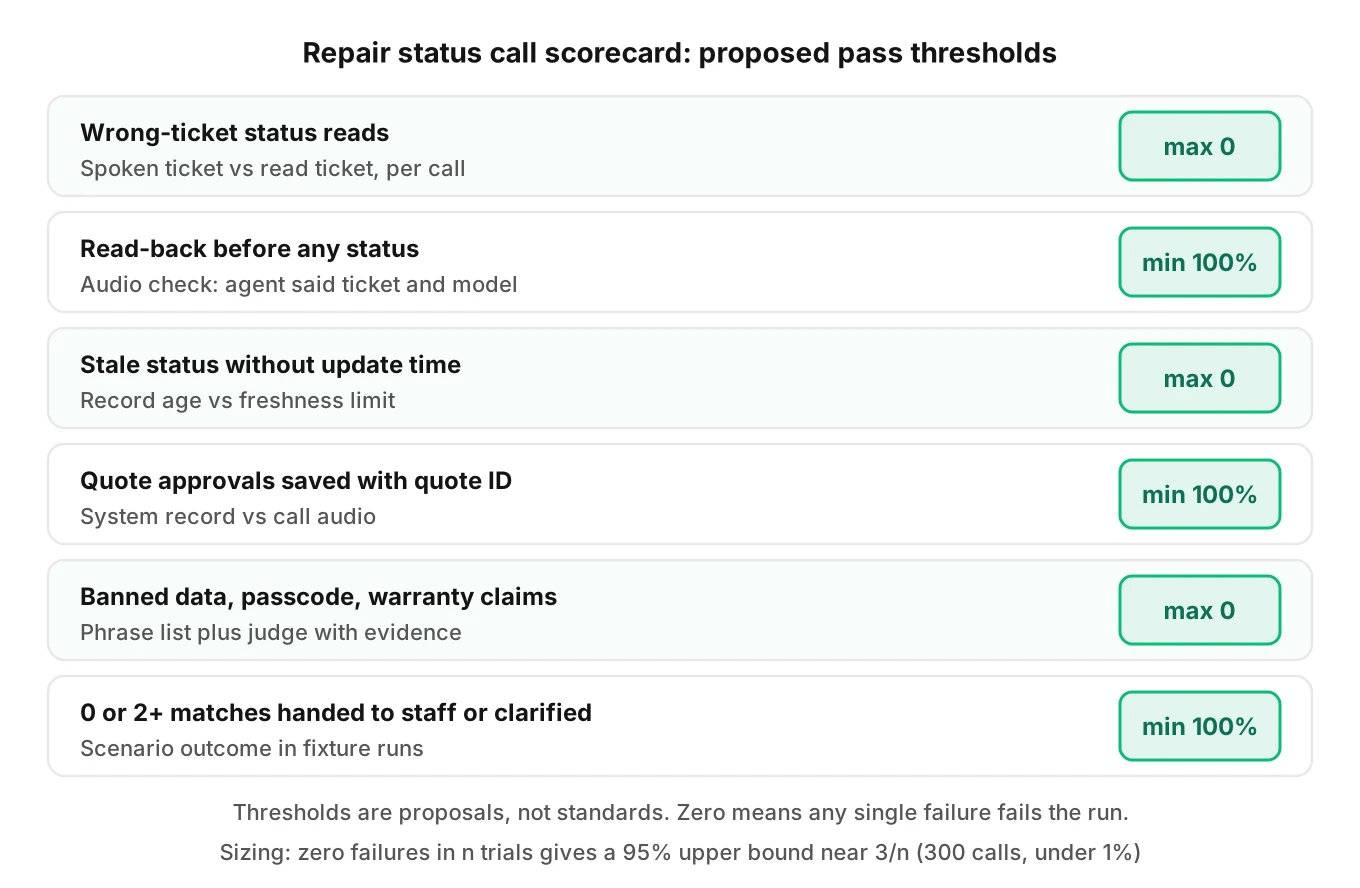
6. Set pass rules. Wrong-ticket disclosure: zero allowed. Read-back on every ticket read: 100%. Stale status without a time stamp: zero. Approval write-back success: 100% on the fixture.
7. Size the run. Zero failures in n independent trials puts the 95% upper bound on the true failure rate near 3/n (the "rule of three"). For a bound under 1%, plan 300 calls per risky scenario class. It is a rule of thumb and assumes independent trials.
8. Re-run on every change. A new prompt or a new speech model shifts digit handling. Keep the suite as a regression gate.
Our go-live checklist and order status vendor guide share the same gate logic.
Monitoring real calls after launch
Fixtures catch what you imagined. Real callers bring odd cases: a ticket for a tablet, a number from a lost-and-found tag, a customer who reads the number from a receipt in Spanish.
Evalgent's production monitoring takes call recordings you push. It transcribes them, maps each to a scenario and judges it. It flags tool-call failures, latency spikes, PII leakage and policy failures, with fix recommendations. For a status agent, watch for three things. A lookup returned a ticket the caller never confirmed. A status was read past the freshness limit. An approval has no matching write.
Review a weekly sample by hand. Compare the ticket the caller said with the ticket the agent read. That one comparison finds most of the silent failures in this post.
Note for compliance: this post discusses privacy and consent concepts in general terms and is not legal advice. Check with counsel for the rules that apply to your shop and states.
Frequently asked questions
How does an AI agent look up a phone repair ticket?
It should treat caller ID as a hint and a spoken ticket number as a claim. It proposes a match, reads back the ticket's device model, and asks the caller to confirm. Only after exactly one ticket is confirmed may it read the status. Zero or many matches should lead to a clarifying question or a staff handoff.
Why does the AI give the wrong repair status?
Common causes are a family number with several open tickets, a misheard digit that lands on another live ticket, and a stale record. The transcript usually looks fine in all three. Compare the ticket the caller meant with the ticket the agent read, and log the record's last-updated time.
What if a caller has more than one repair ticket?
The agent should list the tickets by a safe label, such as device type, and ask which one the caller wants. It then locks to that ticket and repeats its last four digits. Test "the other one," "both" and a wrong device name, since each can push the agent to the wrong ticket.
Can an AI tell a customer their phone repair quote?
It can read an approved, current quote if the system holds one, including the quote version and total. It should not negotiate, discount or explain pricing logic. For approvals, it must state the amount, get an explicit yes, save the approval with the quote ID and read back what it saved.
What should an AI say when a phone is waiting for parts?
It should say the repair is waiting on a part and give the record's last-updated time. It must not invent an arrival date unless the system holds a supplier date it is allowed to share. Offer a callback or staff handoff when the customer needs a firm timeline.
Should an AI say your data is safe on a phone repair call?
No. The agent cannot know the state of one device's data, and Apple's service guidance says a device "might have been erased" after service. A safe reply is that it cannot promise that, the customer should keep a backup, and the technician can explain the process.
How do you test an AI repair status agent?
Seed a fixture shop with dense sequential tickets, family numbers, stale records and every status. Run scenarios across accents and noise. Compare spoken, matched and read ticket. Check quote approvals for IDs and write-backs. Scan for banned data and warranty claims.
Can an AI verify who is picking up a repaired phone?
Only within the policy you configure. It can state the pickup hours and the ID or ticket the shop requires. It should not invent a rule or approve a third-party pickup on its own. Anything beyond the configured policy, like a spouse collecting, goes to a staff member.
The bottom line
Phone repair status AI calls fail where the agent matches a number to a ticket and reads a label from the shop system. Test caller-ID matches, spoken ticket digits, status freshness, quote write-backs and banned data promises before every release, and score the audio, not only the transcript.
Related Articles

How to automate voice agent testing: synthetic callers vs manual QA
Learn how ai test automation replaces manual QA for voice agents. Compare synthetic callers vs human testers, with a 5-step framework to scale without hiring.
Read more
AI Agent Testing vs Voice Agent Testing: What General Tools Miss for Voice
AI agent testing measures text outputs. Voice agent testing measures behaviour through an acoustic pipeline. Five failure categories general tools miss.
Read more