Multilingual STT for Voice Agents: How to Choose
On this page
Most vendor demos run in clean English. Your callers do not. A US line takes English, Spanish, and often a mix of both in one sentence. The right multilingual STT voice agents setup handles that gracefully. The wrong one drops words, misroutes calls, and answers Spanish callers in English.
This guide is about choosing and configuring the speech-to-text layer. It covers which languages are truly supported, how language detection and mid-call switching work, and when to use one model versus many. For how to measure per-language accuracy after you pick, see our companion post on evaluating multilingual accuracy.
Why the US market makes this a default requirement
You do not opt into multilingual support. Your callers bring it. The Census Bureau reports that nearly 68 million people spoke a language other than English at home in 2019. Spanish leads by a wide margin. So a US voice line is a multilingual service by default.
Multilingualism is normal for a large share of callers. Many switch languages without thinking. That means the STT layer is not a nice-to-have. It is core infrastructure. Choosing it well is a design decision, not a checkbox.
Supported languages are not always usable languages
Every STT provider lists dozens of languages. A list is a claim, not a guarantee. The gap between "supported" and "usable on your calls" is where projects fail.
> Language support tiers: most STT engines split languages into tiers. Top-tier languages get large training data and low error rates. Long-tail languages get thin data and much higher error. The same product name can hide very different quality.
Support also varies by variety. Latin American Spanish and European Spanish are not identical. Neither are US and UK English. A dialect on the list may still transcribe poorly. Read the fine print for each variety you need.
Telephony makes this worse. Most demos use clean, wideband audio. Phone calls are 8kHz and noisy. A model that scores well in a lab can degrade sharply on real calls. Always test on your own channel, not the vendor's samples. Our guide on benchmarking on your own data explains why this gap matters.
Encoding is a quieter risk. Names, accents, and special characters rely on Unicode support end to end. If diacritics get stripped, "Jose" loses its accent downstream. That breaks lookups and matching. Confirm the whole pipeline preserves them.
The three ways to run multilingual STT
There are three main architectures. Each has a clear strength, a clear weakness, and a best fit. The right choice depends on your caller mix and your latency budget.
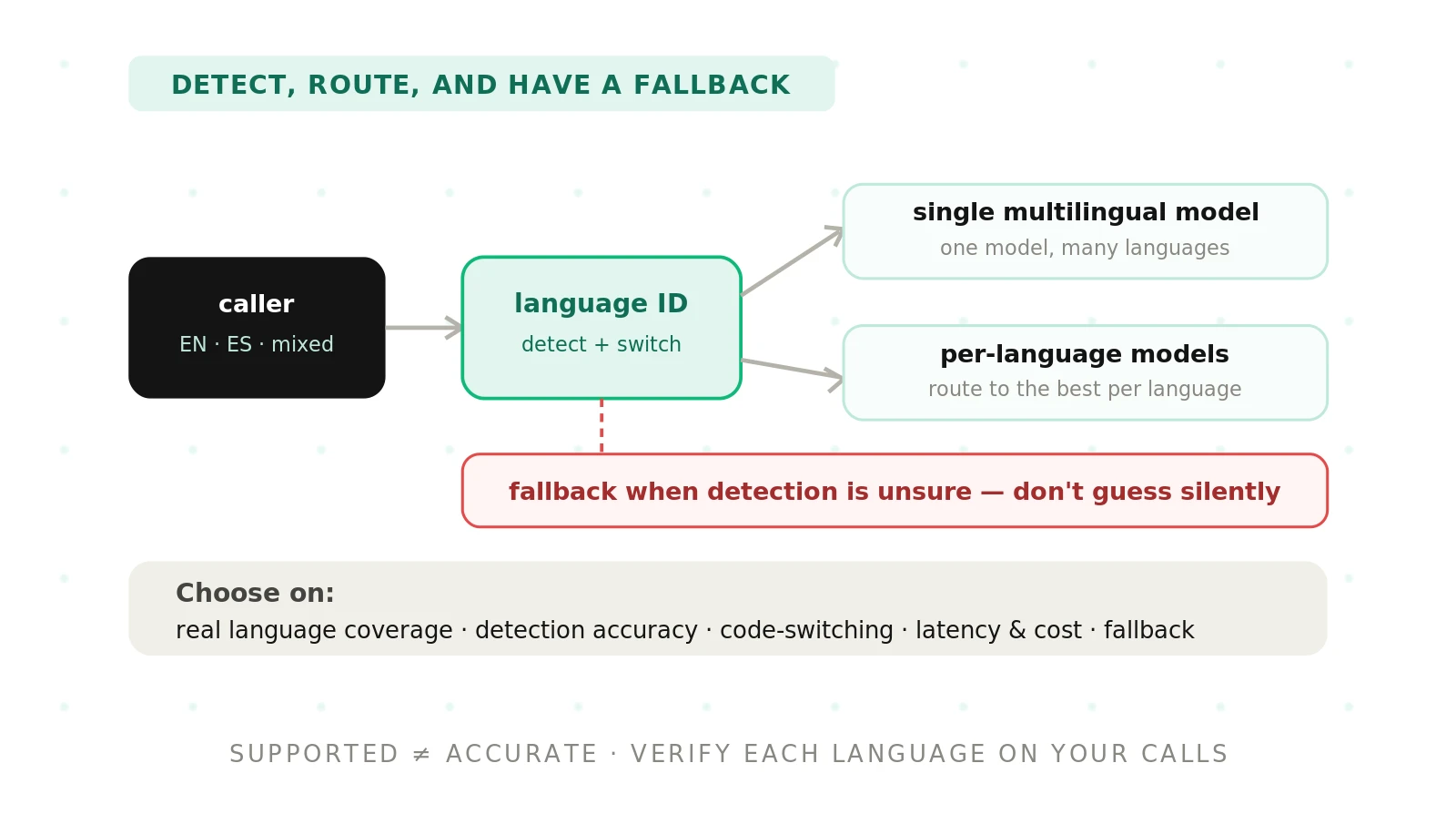
The first is a single multilingual model. One model handles all languages at once. The second is per-language routing. You know the caller's language up front and send audio to a dedicated model. The third is detect-then-route. A language identification step picks the language, then routes to the best model.
| Approach | Strength | Weakness | Best fit |
|---|---|---|---|
| Single multilingual model | Handles mixed and switching speech; no routing step | Weaker on long-tail languages; harder to tune per language | Bilingual lines with heavy code-switching |
| Per-language routing | Best accuracy per language; simple to tune | Needs the language known up front; no mid-call switching | IVR menus or known-language segments |
| Detect-then-route | Adapts to unknown callers; picks the strongest model | Adds detection latency; fails if detection is wrong | High-volume lines with unknown language mix |
No approach wins on every axis. Many teams combine them. A common pattern is detect-then-route for the first turn, then a single multilingual model for the rest of the call. That balances accuracy and flexibility.
Automatic language identification and mid-call switching
Automatic language detection is the hinge of any multilingual setup. The system listens to a short window of audio. It then predicts the language before or during transcription. This is spoken language identification, and it drives everything downstream.
Two design choices matter most. The first is how much audio the detector needs. A longer window is more accurate but adds delay. The second is whether detection runs once or continuously. One-shot detection is cheaper. Continuous detection catches a caller who switches languages later.
Mid-call switching is the hard case. A caller may start in English and switch to Spanish when a family member takes the phone. A one-shot detector locks in English and never recovers. A continuous detector can re-evaluate and switch. Ask each provider directly which mode it supports.
Configuration is where support becomes real. You set languages using standard codes. These follow ISO 639 and often IETF BCP 47 language tags, like "en-US" or "es-MX". Constrain detection to the languages you actually serve. An open-ended detector guesses wildly. A constrained one is faster and far more reliable.
Handling code-switching and accents
Code-switching is when a speaker mixes languages in one utterance. It is common in US Spanish-English communities. A caller might say, "I need to cancel mi cita for Thursday." The sentence is neither fully English nor fully Spanish.
Per-language models struggle here by design. A Spanish-only model transcribes the English words as noise. An English-only model garbles the Spanish. A single multilingual model usually handles the mix better. This is a strong reason to favor one multilingual model on heavily bilingual lines.
Accents are a separate axis inside a single language. US Spanish is not one accent. Neither is US English. A model can score well on one accent group and poorly on another. That gap hides inside any language-level average. Our accent handling guide covers how to test across accent cohorts.
Names and entities are the highest-stakes case. Callers spell names, read account numbers, and give addresses. These are where errors cost the most. A low overall word error rate can still miss most names. See our post on STT entity accuracy for how to measure this directly.
Latency and cost trade-offs
Every design choice has a latency and cost bill. Detection adds a step before transcription starts. Routing adds a network hop. Running many per-language models can raise cost and complexity. You are budgeting milliseconds and dollars at the same time.
Latency shapes the caller experience. A slow detection step delays the first response. That reads as an awkward pause on a phone call. Streaming speech recognition helps, because it transcribes as the caller speaks. Confirm your setup streams rather than waiting for the full utterance.
Cost scales with architecture. A single multilingual model is often the simplest to bill and operate. Per-language routing can mean more model instances and more moving parts. Detect-then-route sits in between. Match the architecture to your call volume, not to a spec sheet.
Fallback when language detection fails
Detection will sometimes be wrong. Plan for it. A missing fallback is where a good setup turns into a bad call. The question is not whether detection fails, but what happens next.
Confidence scores are the first line of defense. Good engines return a confidence value with each language guess. When confidence is low, do not commit silently. Ask the caller a short clarifying question. A simple "Press 1 for English, 2 for Spanish" recovers the call cleanly.
Set a sane default too. If detection cannot decide, route to your most common language. For most US lines that is English or Spanish. Log every low-confidence event. Those logs become the test set that improves detection over time.
Never let a failed detection dead-end the caller. Silent failure is the worst outcome. A human handoff path should always exist. Treat detection failures as a first-class scenario in testing, not an edge case.
How to choose and configure multilingual STT for your voice agent
Use this sequence to move from a vendor list to a verified setup. Each step reduces the risk that a demo hides a real gap.
1. Map your caller languages. Pull real call logs and list the languages and mixes you actually receive. Rank them by volume. This is your true requirement, not the vendor's language list.
2. Confirm real support per variety. For each language, verify the specific dialect and telephony audio are supported, not just the language name. Ask for phone-quality samples.
3. Pick an architecture. Choose single multilingual, per-language routing, or detect-then-route using the comparison table above. Match it to your caller mix and latency budget.
4. Set language codes explicitly. Constrain detection to only the languages you serve, using ISO 639 or BCP 47 tags. A narrower list is faster and more accurate.
5. Enable the right switching mode. Choose one-shot or continuous detection based on whether callers switch languages mid-call. Bilingual lines usually need continuous.
6. Design fallback paths. Set confidence thresholds, a clarifying prompt, a default language, and a human handoff. Log every low-confidence event.
7. Test on your own calls. Build a per-language and code-switching test set from real audio. Measure error rates and routing accuracy separately for each language.
8. Set a per-language bar. Require each language to hit its own threshold before launch. Do not accept a blended average.
For the measurement method behind steps 7 and 8, follow our multilingual accuracy guide and the broader STT evaluation playbook.
How Evalgent verifies per-language performance before you commit
Vendor numbers describe the vendor's test set. They do not describe your calls. That gap is the whole problem. Evalgent is an independent, third-party evaluator that closes it. We test the STT layer on your own audio, not curated demos.
We build a per-language and code-switching test set from your real traffic. We measure recognition, detection, and routing separately for each language. We test what happens when detection fails. Then we report each language against its own bar, side by side. You see where the setup holds and where it breaks before you sign.
This is the point of independent evaluation. One neutral party, one set of your calls, one honest scorecard. For the full discipline, see our overview of voice agent evaluation. If the term "STT" itself is fuzzy, our STT vs ASR guide clears it up.
Frequently asked questions
How do you choose multilingual STT for a voice agent?
Start with your real call logs. List the languages and mixes you receive, ranked by volume. Confirm each variety is supported on telephony audio, not just listed. Then pick an architecture that fits your caller mix and latency budget. Finally, test each language on your own calls before committing.
What is the best multilingual STT setup for voice agents?
There is no single best setup. A single multilingual model fits bilingual lines with heavy code-switching. Per-language routing fits known-language segments and IVR menus. Detect-then-route fits high-volume lines with unknown callers. Match the architecture to your caller mix, latency budget, and the languages you actually serve.
Single multilingual model vs per-language models: which is better?
A single multilingual model handles mixed and switching speech without a routing step. Per-language models give the best accuracy per language but need the language known up front. Choose one multilingual model for code-switching lines. Choose per-language routing when the language is known and switching never happens mid-call.
How does automatic language detection work in STT?
The system listens to a short window of audio and predicts the language. This is spoken language identification. It can run once at the start or continuously during the call. Longer windows are more accurate but add delay. Constrain detection to only the languages you serve for faster, more reliable results.
Can a voice agent switch languages mid-call?
Yes, but only with continuous language detection enabled. One-shot detection locks in the first language and cannot recover. Continuous detection re-evaluates as the call proceeds and switches when the caller does. Bilingual lines usually need this mode. Confirm the provider supports it before you rely on mid-call switching.
How do you handle code-switching in speech-to-text?
Code-switching mixes languages within one utterance, like English and Spanish together. Per-language models garble the mix by design. A single multilingual model usually transcribes it far better. Build a code-switching test set from real bilingual calls. Then measure error rates on those mixed utterances specifically, not just single-language audio.
Which languages are actually supported by STT engines?
Every engine publishes a language list, but support quality varies widely. Top-tier languages have large training data and low error rates. Long-tail languages and specific dialects often perform poorly. Telephony audio degrades results further. Verify each variety on your own phone-quality calls rather than trusting the marketing list.
What happens when language detection fails?
Detection sometimes picks the wrong language or returns low confidence. Handle it with a plan. Use confidence scores to trigger a clarifying prompt, like "Press 1 for English, 2 for Spanish." Set a default language for undecided cases. Always keep a human handoff path. Log every failure to improve detection over time.
The bottom line
Choosing multilingual STT is an architecture decision, not a feature checkbox. Verify every language on your own calls before you commit, because a vendor's list and a blended score both hide the failures your callers will hit.
Ready to see where your multilingual setup breaks? Book a demo and we will test it on your own calls, per language.
Related Articles

Why AI voice agents fail in production: 9 failure layers, how to detect each, and how to prevent them
Voice agents fail in production across 9 layers, from 8 kHz audio to silent tool errors. Symptoms, root causes, alerts, and fixes in one master table.
Read more
Voice agent regression testing: how to detect regressions from model updates you don't control
Voice agent regression testing for changes you don't control: pin each layer, run a nightly pinned-vs-latest canary, and use paired stats to detect drops.
Read more