Best LLM for voice agents (October 2026): latency, tool calling, cost per minute
On this page
Prices and model names in this guide were checked against official pricing pages on October 5, 2026. Models change monthly, so recheck before you commit.
Most "best LLM for voice" lists rank models by intelligence scores. That is the wrong axis. A voice agent spends its life in short, many-turn, tool-heavy conversations where a 900 ms pause sounds like a broken line. The model that tops a reasoning leaderboard can be the worst choice for a scheduling bot.
This guide is for teams that build their own pipeline, usually on LiveKit, Pipecat or Dograh, with STT and TTS wired in by hand. It covers what to measure, how to read published benchmarks without being misled, what each model family costs per minute once caching is on, and how to run a bake-off on your own calls. If you are still deciding on the rest of the stack, start with the voice agent stack guide.
The October 2026 shortlist at a glance
These are the text models worth testing for a cascaded STT, LLM, TTS pipeline, with list prices per million tokens from each vendor's pricing page.
| Model | Input / output per 1M | Cached input | Voice-relevant note |
|---|---|---|---|
| GPT-6 Luna (`gpt-6-luna`) | $0.10 / $0.50 | $0.01 | Supports `reasoning.effort: "none"` |
| GPT-6.1 Sol (`gpt-6.1-sol`) | $2.00 / $10.00 | $0.10 | Lowest effort is `low`; `none` not supported |
| GPT-6 Astra (`gpt-6-astra`) | $10.00 / $50.00 | $1.00 | Ultrafast tier costs 6x the standard price |
| GPT-5.6 Sol | $4.00 / $20.00 (promo) | $0.40 | Still offered; promo pricing through at least Nov 21, 2026 |
| Claude Haiku 4.5 | $1 / $5 | 0.1x input | Anthropic's fastest model |
| Claude Sonnet 5.5 | $2 / $10 | 0.1x input | "Best combination of speed and intelligence" |
| Claude Opus 5.5 | $4 / $20 | 0.05x input | Flagship; overkill for most live turns |
| Gemini 3.8 Flash | $0.75 / $3.75 | $0.075 | Intro price; doubles on Jan 1, 2027 |
| Gemini 3.5 Flash-Lite | $0.30 / $2.50 | $0.03 | Cheapest Google option |
| Grok 4.7 | $2.00 / $6.00 | $0.50 | Configurable reasoning |
| GPT-OSS-120B on Groq | $0.15 / $0.60 | n/a | Groq lists about 500 tokens/sec |
| GPT-OSS-20B on Groq | $0.075 / $0.30 | n/a | Groq lists about 1,000 tokens/sec |
Sources: OpenAI pricing, Anthropic pricing, Gemini API pricing, xAI models, GroqCloud models.
Two details in that table matter more than the prices. First, OpenAI's GPT-6 guide says GPT-6 Astra and GPT-6.1 Sol do not support the `none` reasoning effort, while GPT-6 Luna and the older GPT-6 Sol do. So the cheapest GPT-6 model is also the only current one you can run with no thinking at all. Second, Gemini's pricing page bills output "including thinking tokens," so a Flash model left on its default thinking setting costs more and starts talking later than the list price suggests.
Why time to first token beats throughput for voice
A voice turn does not wait for the full LLM reply. Your framework streams tokens into the TTS engine, and the TTS can start speaking once it has a speakable chunk, usually the first clause or sentence. So the latency the caller hears from the LLM is:
LLM share of turn latency = TTFT + (tokens in first speakable chunk ÷ output speed)
TTFT is made of network round trip, queueing, prefill (processing your input tokens), and any reasoning tokens generated before the answer. Output speed only matters for the 10 to 20 tokens of the first chunk. After that, the TTS plays audio far slower than any modern model generates text, so the rest of the reply streams in while the caller is still listening.
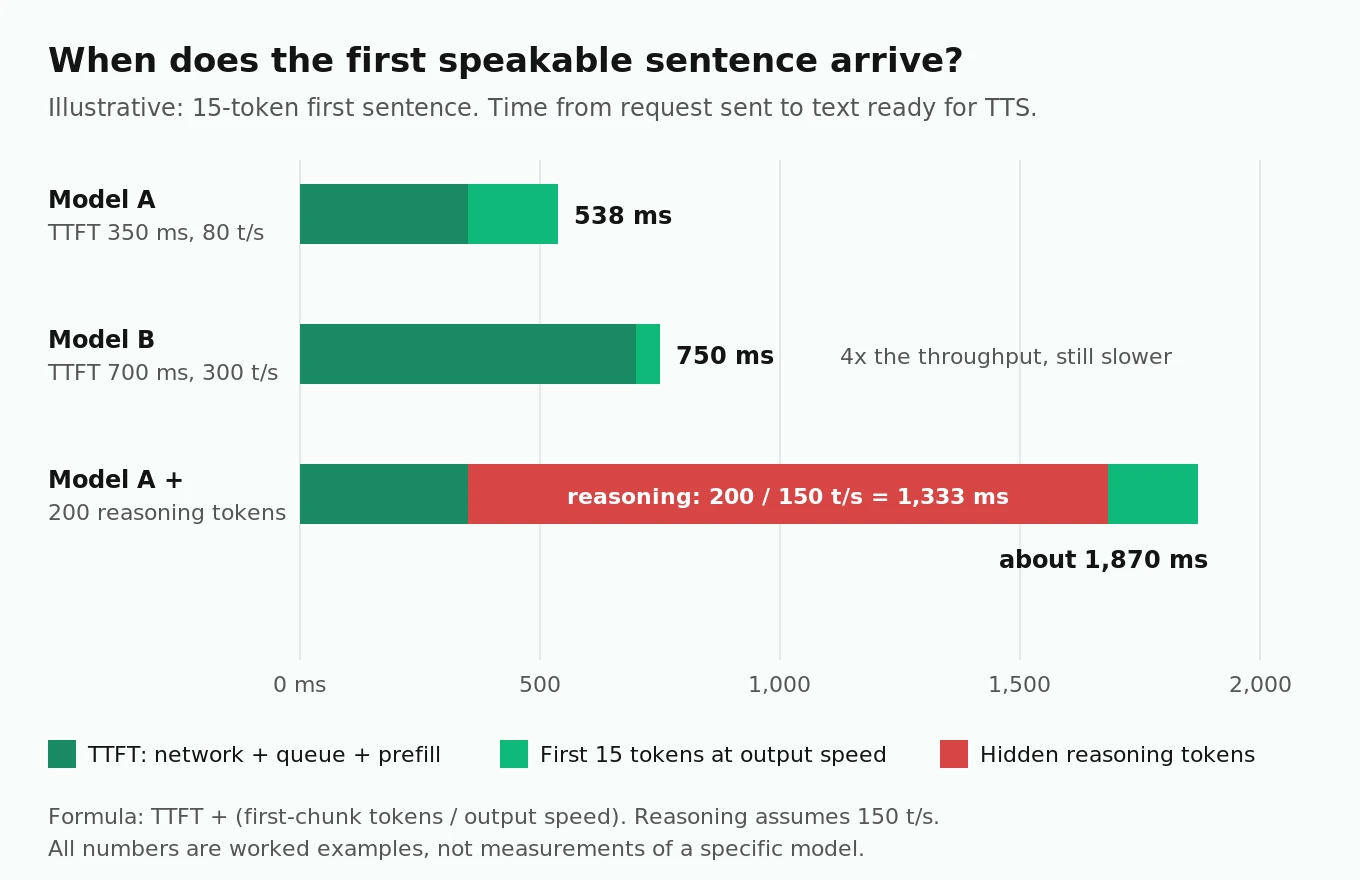
Worked example, illustrative numbers. Take a first sentence of 15 tokens:
- Model A: TTFT 350 ms, 80 tokens/sec. First chunk ready at 350 + (15 ÷ 80 × 1000) = 350 + 188 = 538 ms.
- Model B: TTFT 700 ms, 300 tokens/sec. First chunk ready at 700 + 50 = 750 ms.
Model B is almost four times faster on throughput and still loses by 212 ms. Past roughly 100 tokens/sec, extra throughput barely moves voice latency. TTFT does.
Now add reasoning. If a model emits 200 hidden reasoning tokens at 150 tokens/sec before the answer, that is 200 ÷ 150 = 1.33 seconds of added silence on every turn. That is why "reasoning off on the live turn" is the most important setting in this whole guide. Humans leave gaps of roughly 200 ms between turns across languages, per Stivers et al. in PNAS. Your whole pipeline, not just the LLM, has to land close enough to that for the call to feel normal. The cost of latency post shows what slow turns do to abandonment.
Tool turns pay TTFT twice
When the model calls a tool, the turn needs two LLM requests. The first emits the function call; your code runs the tool; the second turns the result into speech. Turn latency becomes:
Tool turn = TTFT₁ + tool-call tokens ÷ speed + tool execution + TTFT₂ + first chunk ÷ speed
With a 400 ms TTFT and a 300 ms CRM lookup, you are past 1.1 seconds before the caller hears anything. That is why a slow-TTFT model can test fine on FAQ calls and feel broken on booking calls. Test both kinds of turn separately, and measure tool turns as their own latency bucket. Our time to first audio guide explains how to instrument this end to end.
Reading published latency numbers without being misled
Artificial Analysis is the most widely used independent source for LLM API latency. Its methodology has four details that change how a voice team should read it.
1. The default workload is a 10,000-token prompt. Since March 2026 the site's default speed numbers come from 10k-input prompts (previously 1k). A voice turn with a cached 3,000-token system prompt has a much smaller uncached prefill. Switch the prompt option to 1k to get closer to voice conditions.
2. Numbers are medians, not tails. Results are the P50 over the past 72 hours. Callers remember the slow turns. You need your own p95, measured from your region.
3. TTFT on reasoning models counts the first reasoning token. The site separates "Time to First Token" from "Time to First Answer Token." For voice, only first answer token matters, since reasoning tokens are not speakable.
4. It tests from one place. The primary test server is in Google Cloud `us-central1-a`, and network latency is part of TTFT. If your agent servers run in `us-east-1`, your numbers will differ.
The reasoning trap is easy to see on a real page. On October 5, 2026, Artificial Analysis listed GPT-6 Luna (max), the maximum-reasoning variant, with a TTFT of 95.97 seconds against a 2.17 second median for similarly priced reasoning models. Nobody would put that setting on a phone line. The same model with `reasoning.effort: "none"` is a different product for latency purposes. Always check which variant and effort level a leaderboard row describes before you compare it.
Tool calling: what the benchmarks show and what they hide
Two public benchmarks matter most for voice agents that take actions.
τ-bench (Yao et al., 2024) simulates a user talking to an agent that has tools and a policy document, in retail and airline domains. Its biggest contribution is the pass^k metric: the chance an agent succeeds on the same task in all k independent tries. In the original paper, the best GPT-4o function-calling agent had over 60% average success, yet pass^8 in retail fell below 25%. A model that solves a task "most of the time" will still fail many of your callers.
τ²-bench (Barres et al., 2025) adds a telecom domain where the user also has tools and must be guided through actions, like a support call where the caller has to toggle a phone setting. The authors found significant performance drops when agents moved from solving tasks alone to guiding a user. That is the voice support situation exactly.
BFCL, the Berkeley Function Calling Leaderboard (Patil et al., ICML 2025), checks call structure with AST matching and includes multi-turn and irrelevance categories. Its central finding is that top models do well on single-turn calls, while memory, dynamic decisions and long-horizon reasoning are still open problems.
What these hide, for voice:
- Saturation. Third-party aggregators now list several 2025 to 2026 flagships in the high 90s on τ²-bench telecom. At that point the leaderboard no longer separates the models you are choosing between.
- Settings. Vendor-reported scores are usually run with reasoning on at high effort. You will run with reasoning off or low. Your tool accuracy at your settings may be much lower than the headline.
- Clean text input. Benchmarks feed perfect text. Your model gets STT output: "my zip is nine oh two one oh" or a mangled last name. Argument accuracy on noisy transcripts is a separate skill. The tool argument accuracy post covers how to score it.
Instruction following over a 20-turn call
Voice calls are long, underspecified conversations. Callers add details one at a time and change their minds. Laban et al. (2025) ran over 200,000 simulated conversations and found that every top open and closed model they tested did worse when the same task was spread across turns, with an average drop of 39% across six tasks. Most of the drop came from unreliability, not lost skill. Models made early assumptions, committed to them, and did not recover.
For a voice agent, that shows up as:
- confirming an appointment time before the caller has given a date,
- carrying a wrong account number forward after the caller corrected it,
- dropping a policy rule (such as "never quote a price before verifying identity") by turn 15.
The fix is partly prompting and partly model choice, but you only see it with multi-turn tests. A single-turn eval set will rate every candidate as fine. Per-turn reliability also compounds: a model that follows a rule 99% of the time per turn keeps it for all 10 relevant turns only 0.99¹⁰ ≈ 90.4% of the time.
Prompt caching: the biggest lever on cost and a real one on latency
Every turn of a voice call resends the system prompt, tool schemas and the growing history. Without caching, you pay full price for the same 3,000 tokens a dozen times per call, and the model re-prefills them each turn. Caching reduces both.
OpenAI's prompt caching guide lists the current rules for GPT-5.6 and later:
- Cache writes cost 1.25x the input rate. Reads cost 0.1x (0.05x on GPT-6.1 Sol).
- The minimum cacheable prefix is 1,024 visible tokens.
- Cached prefixes last at least 30 minutes after the last write or reuse (`prompt_cache_options.ttl: "30m"`).
- `prompt_cache_options.prewarm: true` writes the cache without generating output, specifically to cut TTFT on the next request.
The voice-specific gotchas follow from "the whole rendered prefix must match":
1. Never put the caller's name, the current time or the account ID at the top of the system prompt. It changes per call and breaks the shared prefix for every caller. Put stable instructions first and dynamic context in a later message.
2. Do not add or remove tools mid-call. Changing tool names, schemas or order changes the prefix. OpenAI recommends keeping the `tools` list fixed and using `allowed_tools` or `tool_choice: "none"` to restrict calls.
3. Do not change `reasoning.effort` at the request level mid-call. On GPT-6 models, append a `configuration_update` input item instead, which keeps the cached prefix.
4. Prewarm before you answer. Fire a prewarm request when the inbound call event arrives, so the cache is warm by the time the caller finishes saying hello.
5. Watch compaction and history trimming. Summarizing old turns rewrites the prefix and resets reuse for the next request.
Anthropic and Google offer similar discounts: Anthropic charges 1.25x for 5-minute cache writes and about 0.1x for reads (0.05x on Opus 5.5), and Gemini 3.8 Flash charges $0.075 per million cached tokens plus an hourly storage fee. Each vendor has its own breakpoint and minimum-length rules, so verify cache hits in the usage fields rather than assuming them.
Cost per minute, worked out
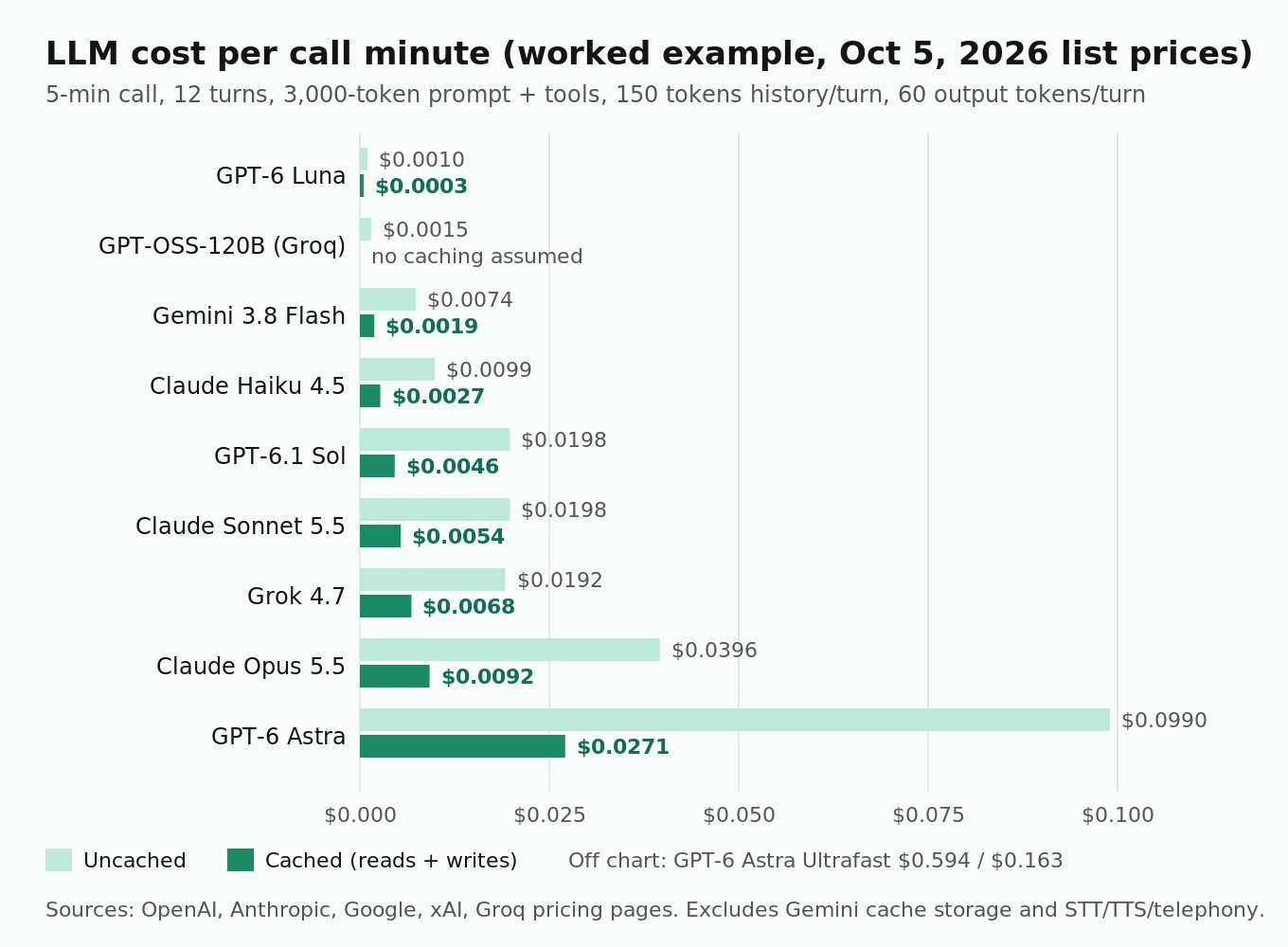
Assumptions for this worked example (replace with your own): a 5-minute call, 12 LLM turns, a 3,000-token system prompt plus tool schemas, history growing 150 tokens per turn, 60 output tokens per turn. That is 45,900 input tokens and 720 output tokens per call. With caching, about 41,250 input tokens are cache reads and 4,650 are cache writes.
| Model | Uncached, per minute | Cached, per minute |
|---|---|---|
| GPT-6 Luna | $0.0010 | $0.0003 |
| GPT-OSS-120B on Groq | $0.0015 | n/a |
| Gemini 3.8 Flash | $0.0074 | $0.0019 |
| Claude Haiku 4.5 | $0.0099 | $0.0027 |
| GPT-6.1 Sol | $0.0198 | $0.0046 |
| Claude Sonnet 5.5 | $0.0198 | $0.0054 |
| Grok 4.7 | $0.0192 | $0.0068 |
| Claude Opus 5.5 | $0.0396 | $0.0092 |
| GPT-6 Astra | $0.0990 | $0.0271 |
| GPT-6 Astra, Ultrafast | $0.5940 | $0.1625 |
Formula per call: (uncached input × input price + cache reads × read price + cache writes × write price + output × output price) ÷ 1,000,000. Gemini storage fees and long-context surcharges are excluded.
Three things fall out of this table:
- Caching cuts LLM cost by roughly 65 to 77% on every model that supports it, because voice prompts are dominated by repeated input.
- For most models the LLM is now a small slice of the per-minute bill. Below a cent a minute, STT, TTS and telephony usually cost more. Use the voice agent pricing comparison for the other lines.
- The exception is the top tier. Astra on Ultrafast at about $0.16 per cached minute is more than three times what GPT-Live charges for a whole speech-to-speech session. Reserve the flagship for the few turns that need it.
Speech-to-speech options in October 2026
If you skip the cascade, the "LLM" choice becomes a realtime model choice. Current options with official pricing:
| Option | Price | Note |
|---|---|---|
| OpenAI GPT-Live (`gpt-live-1`) | $0.05/min, billed per second | Full-duplex; delegates reasoning and tools to a backend Responses model billed separately |
| OpenAI `gpt-realtime-2.1` | $32 / $64 per 1M audio tokens | Token-billed realtime model |
| OpenAI `gpt-realtime-2.1-mini` | $10 / $20 per 1M audio tokens | Cheaper realtime tier |
| Gemini 3.8 Live | about $0.005/min audio in, $0.018/min audio out | Optional Extended Thinking variant |
| xAI Grok Voice | $0.08/min | +$0.01/min telephony on an xAI number |
Two gotchas. GPT-Live's $0.05 is not the full price: per the model page, backend model and tool usage is billed separately, so a Luna backend adds little but a Sol or Astra backend adds the cached rates above. And GPT-Live rate limits are counted in concurrent sessions, starting at 25 on Tier 1, which caps an outbound campaign before cost does. The OpenAI Realtime and Gemini Live phone calls guide covers the telephony side, and evaluating a realtime voice API covers testing.
Selection matrix by use case
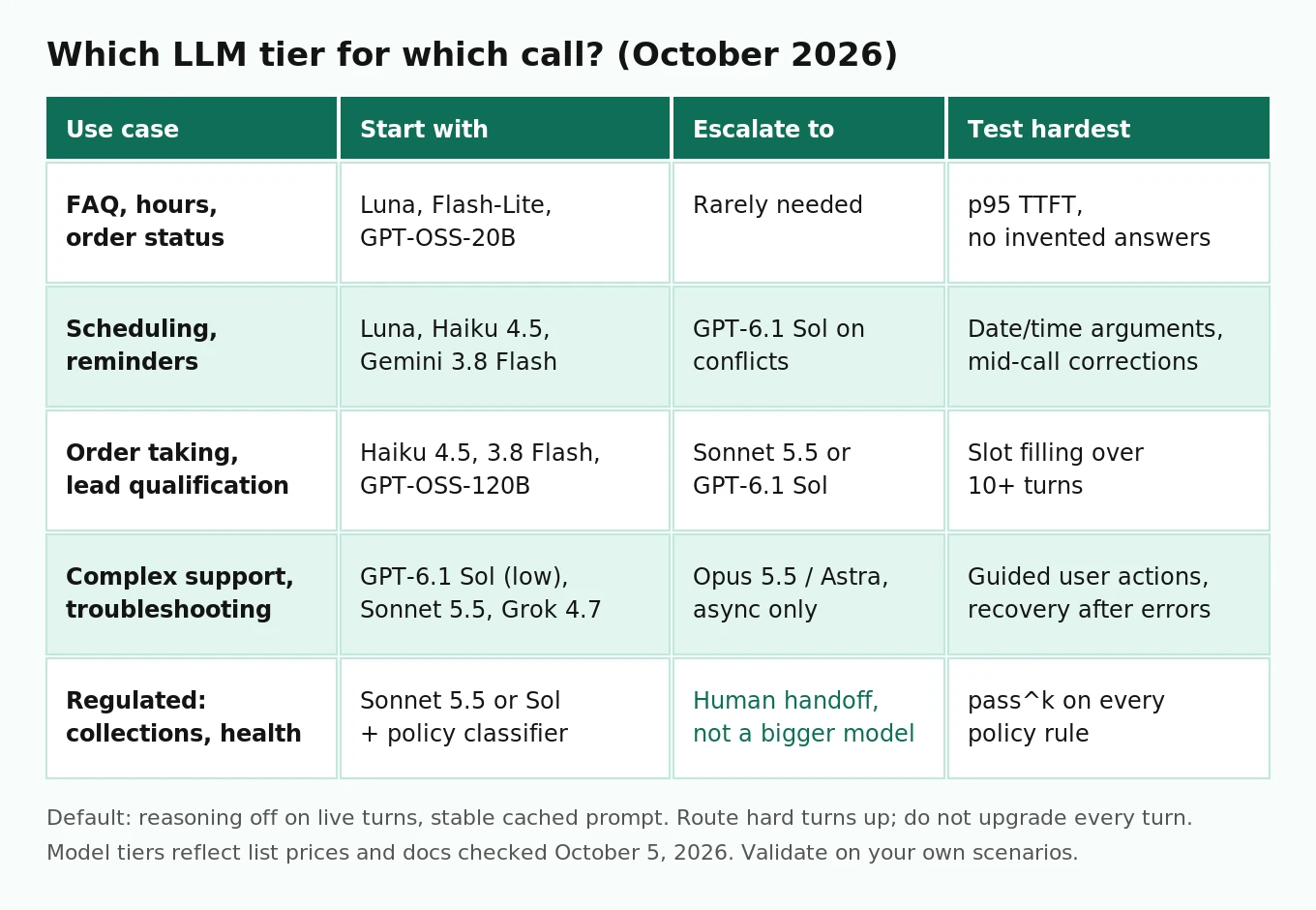
| Use case | Start with | Escalate to | What to test hardest |
|---|---|---|---|
| FAQ, hours, order status | GPT-6 Luna, Gemini 3.5 Flash-Lite, GPT-OSS-20B | Rarely needed | p95 TTFT, refusal to invent answers |
| Scheduling, reminders, shift confirmation | GPT-6 Luna, Claude Haiku 4.5, Gemini 3.8 Flash | GPT-6.1 Sol on reschedule conflicts | Date and time argument accuracy, multi-turn corrections |
| Order taking, lead qualification | Claude Haiku 4.5, Gemini 3.8 Flash, GPT-OSS-120B | Sonnet 5.5 or GPT-6.1 Sol | Slot filling across 10+ turns, upsell policy |
| Complex support, troubleshooting | GPT-6.1 Sol (low), Claude Sonnet 5.5, Grok 4.7 | Opus 5.5 or Astra, offline or async | τ²-style guided actions, recovery after wrong turn |
| Regulated: collections, healthcare intake, insurance | Sonnet 5.5 or GPT-6.1 Sol, with a small classifier for policy checks | Human handoff, not a bigger model | Disclosure wording, identity verification order, pass^k on every rule |
For regulated flows, the model is not your compliance control. Script-level rules need deterministic checks around the model and test cases for every rule, as in regulated voice agent policy test cases.
Routing: a small model by default, a big model by exception
You do not have to pick one model. The pattern most teams settle on is:
1. A fast, no-reasoning model handles every turn by default.
2. A router classifies each turn (or each intent) and sends hard turns, such as billing disputes, multi-constraint rescheduling, or anything after two failed attempts, to a stronger model.
3. The voice keeps flowing while the big model works: speak a short filler from the small model or a fixed phrase, then hand the bigger model's answer to TTS.
On GPT-6 you can also raise reasoning effort for a single hard turn with a `configuration_update` item and lower it again, without losing the cache. The router itself has to be fast and highly consistent, or it adds the latency you were trying to save. The model routing for voice agents post goes deeper on router design, including using a classifier such as Jev, a highly consistent model at $0.042 per million input tokens with 70 to 500 ms responses.
Measuring TTFT and first sentence yourself
Simplified Python against the OpenAI Responses API. It streams a reply with no reasoning and records time to first answer token and time to first sentence. Run it from the same region as your agent servers, at least 200 times per model, and keep p50 and p95.
# Simplified: measure TTFT and time-to-first-sentence for one turn.
import time, statistics
from openai import OpenAI

client = OpenAI()
SYSTEM = open("system_prompt.txt").read()   # stable prefix, 1,024+ tokens

def one_turn(user_text: str, model: str = "gpt-6-luna"):
    t0 = time.perf_counter()
    ttft = first_sentence = None
    buf = ""
    stream = client.responses.create(
        model=model,
        reasoning={"effort": "none"},          # Luna supports "none"
        input=[
            {"role": "developer", "content": SYSTEM},
            {"role": "user", "content": user_text},
        ],
        stream=True,
    )
    for event in stream:
        if event.type == "response.output_text.delta":
            now = time.perf_counter()
            if ttft is None:
                ttft = now - t0
            buf += event.delta
            if first_sentence is None and any(p in buf for p in ".?!"):
                first_sentence = now - t0
        elif event.type == "response.completed":
            u = event.response.usage
            cached = u.input_tokens_details.cached_tokens
    return ttft, first_sentence, cached

runs = [one_turn("Can I move my Tuesday appointment to Thursday?") for _ in range(200)]
ttfts = sorted(r[0] for r in runs)
print("p50", statistics.median(ttfts), "p95", ttfts[int(0.95 * len(ttfts)) - 1])
print("cache hit rate", sum(r[2] > 0 for r in runs) / len(runs))
Check the cached-token count on every run. If the hit rate is low, your prefix is changing between requests, and your TTFT numbers are measuring the uncached case.
How to evaluate an LLM for your own voice agent
1. Build a test set from real calls. Pull 100 to 300 transcripts and turn them into scenarios: about 40% routine paths, 30% tool-heavy paths, 20% corrections and mind changes, 10% adversarial or out-of-scope. A golden dataset should include the STT errors you actually see.
2. Freeze everything except the model. Same prompt, same tools, same STT and TTS, same region. Only the LLM and its reasoning setting change.
3. Define the metrics before you run. Task success (did the booking exist in the system at the end), tool-call accuracy (right function, right arguments), policy adherence per rule, p50 and p95 time to first audio, and cost per resolved call.
4. Run each scenario k times. Use k = 4 to 8 and report pass^k, not just average success. A model at 92% average and 70% pass^4 is less dependable than one at 89% and 82%.
5. Size the comparison honestly. To tell 90% from 95% task success at 80% power and α = 0.05, you need about 435 scenario runs per model: n ≈ [1.96√(2 × 0.925 × 0.075) + 0.84√(0.9 × 0.1 + 0.95 × 0.05)]² ÷ 0.05². Smaller differences need more.
6. Listen to the disagreements. Where models differ on the same scenario, play both calls. Text graders miss pacing, interruptions and tone, which is why an LLM judge alone has limits.
7. Re-run on every model update. Vendors ship new snapshots monthly. Pin versions where you can, and treat each upgrade as a release, as in LLM update regressions.
This is the part most teams skip, because hand-dialing 400 calls per model is not realistic. It is also where independent evaluation helps most. Evalgent runs the same simulated callers against each candidate, with accent and noise profiles, and scores latency, tool accuracy and policy adherence with thresholds you set. You can keep using the same suite as a regression gate after you choose. The broader method is in the AI voice agent testing guide.
Frequently asked questions
What is the best LLM for voice agents in October 2026?
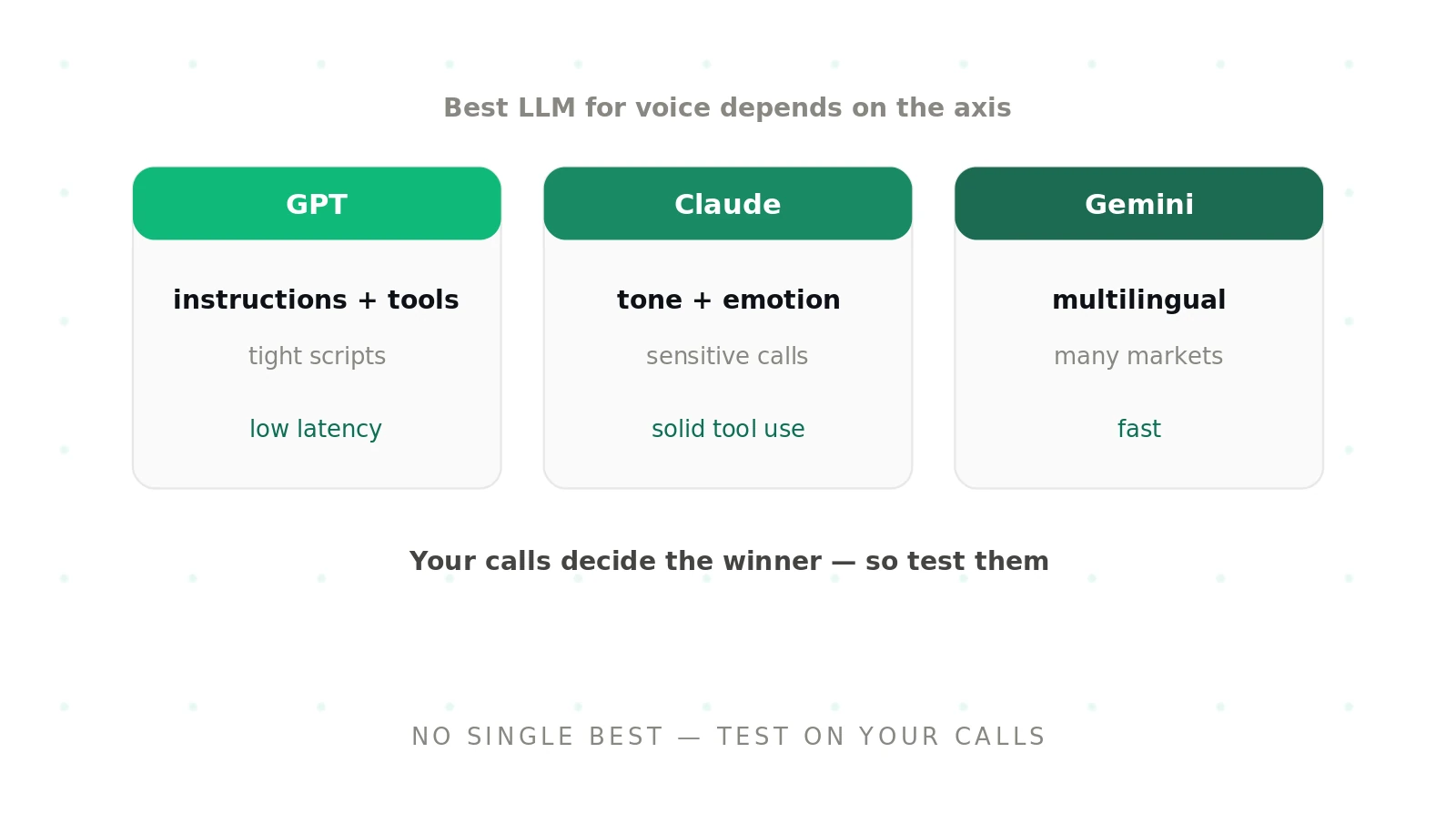
There is no single winner. For most cascaded voice agents, start with a fast model with reasoning off: GPT-6 Luna, Claude Haiku 4.5, Gemini 3.8 Flash or GPT-OSS-120B on Groq. Escalate hard turns to GPT-6.1 Sol, Claude Sonnet 5.5 or Grok 4.7. Pick the final model by testing on your own scenarios.
Why does TTFT matter more than tokens per second?
TTS starts speaking once the first clause arrives, so the caller only waits for TTFT plus 10 to 20 tokens. At 100 tokens per second or more, those tokens take 100 to 200 ms. A slow first token adds its full delay to every turn, while extra throughput after that is mostly hidden behind playback.
Should reasoning be turned on for voice agents?
Not on the live turn by default. Reasoning tokens arrive before any speakable text, so 200 reasoning tokens at 150 tokens per second add over a second of silence. Use reasoning for offline work or for single hard turns, raised temporarily with a configuration update on GPT-6 so the cache survives.
How much does the LLM cost per minute of a voice call?
In our worked example of 12 turns over 5 minutes with a 3,000-token prompt, cached LLM cost ranges from about $0.0003 per minute on GPT-6 Luna to $0.027 on GPT-6 Astra. Most mid-tier models land between $0.002 and $0.007. Caching cuts these numbers by two thirds to three quarters.
How does prompt caching help voice agent latency?
Cached tokens skip prefill, so the model starts generating sooner, and they cost 0.05x to 0.1x the input price. To get hits, keep the system prompt and tool list identical across calls, move caller-specific data later in the prompt, and prewarm the cache while the phone is ringing.
Is GPT-Live cheaper than a cascaded pipeline?
GPT-Live costs $0.05 per minute, billed per second, plus separate charges for its backend model and tools. A cascaded pipeline with a small LLM can cost less on the LLM line, but you also pay for STT and TTS. Compare full per-minute cost and test both on the same scenarios.
Which benchmark best predicts tool calling on calls?
τ²-bench is the closest public proxy because it simulates users who must be guided through actions, and τ-bench's pass^k metric captures consistency. Both use clean text and usually high reasoning effort, so they overstate accuracy at voice settings. Your own transcripts with real STT errors predict better.
How many test runs do I need to compare two LLMs?
To detect a 5-point difference in task success, such as 90% versus 95%, at 80% power, plan for about 435 runs per model. Run each scenario 4 to 8 times so you can report pass^k. Smaller differences need far more runs, so focus on the metrics that actually differ.
The bottom line
The best LLM for a voice agent in October 2026 is usually a small, fast model with reasoning off, a stable cached prompt, and a stronger model routed in only for the turns that need it. Measure time to first audio, multi-turn tool accuracy and pass^k on your own calls before you commit, and measure again every time a vendor ships a new snapshot.
Related Articles
Why AI voice agents fail in production: 9 failure layers, how to detect each, and how to prevent them
Voice agents fail in production across 9 layers, from 8 kHz audio to silent tool errors. Symptoms, root causes, alerts, and fixes in one master table.
Read more
Voice agent regression testing: how to detect regressions from model updates you don't control
Voice agent regression testing for changes you don't control: pin each layer, run a nightly pinned-vs-latest canary, and use paired stats to detect drops.
Read more