What is a voice agent? The complete guide
On this page
The term gets used loosely, so it is worth being precise. What is a voice agent, exactly? It is not a voice assistant like Siri or Alexa — those respond to commands. It is not an IVR system — those respond to button presses and keywords. It is not a chatbot with a text-to-speech layer bolted on. What makes a voice ai agent different is that it understands what you mean, not just what you said — and it can act on that understanding by calling your CRM, booking a calendar slot, processing a payment, or escalating to a human with full context. That is what is a voice agent and how does it work in one sentence: a real-time system that listens, understands, acts, and speaks.
The market reflects this shift. The ai voice agent market was valued at $14.8 billion in 2024 and is projected to reach $61 billion by 2033 according to AssemblyAI's 2026 industry analysis. That growth is not driven by curiosity. It is driven by a measurable business case: self-service interactions cost $1.84 per contact versus $7.20 for a live agent, and call abandonment reached 8.9% in 2024 — the highest rate in thirteen years of tracking.
This guide covers what a voice agent actually is, how it works technically, how it differs from legacy systems, where it is being deployed, and what production-ready deployment actually requires.
Voice agent definition: what it is and what it is not
A voice agent is software that conducts a live spoken conversation with a human, processes what they say in real time, determines what they want, and acts on that determination — all within a single interaction.
What a voice agent is:
A conversational ai agent that operates over a voice channel. It handles multi-turn dialogues — meaning it tracks context across the full conversation, not just the last utterance. It calls external systems mid-conversation: booking databases, CRMs, payment processors, knowledge bases. It responds in natural-sounding synthesised speech. It can transfer to a human agent with the full conversation transcript if the request exceeds its scope.
What a voice agent is not:
| System | What it does | What it cannot do |
|---|---|---|
| IVR | Routes calls via button presses or keywords | Understand natural language or multi-turn context |
| Chatbot | Handles text conversations | Process real-time audio or operate over voice channels |
| Voice assistant (Siri/Alexa) | Responds to individual commands | Hold multi-turn business conversations or take backend actions |
| Recorded announcement | Plays audio | Listen, understand, or respond |
| Voice bot (simple) | Reads a script | Deviate from the script or handle unexpected input |
The key distinction: a voice agent understands intent expressed in any phrasing the user chooses. An IVR understands only the options it was programmed to recognise. That difference is what makes voice agents capable of replacing phone-based workflows that legacy systems could not automate.
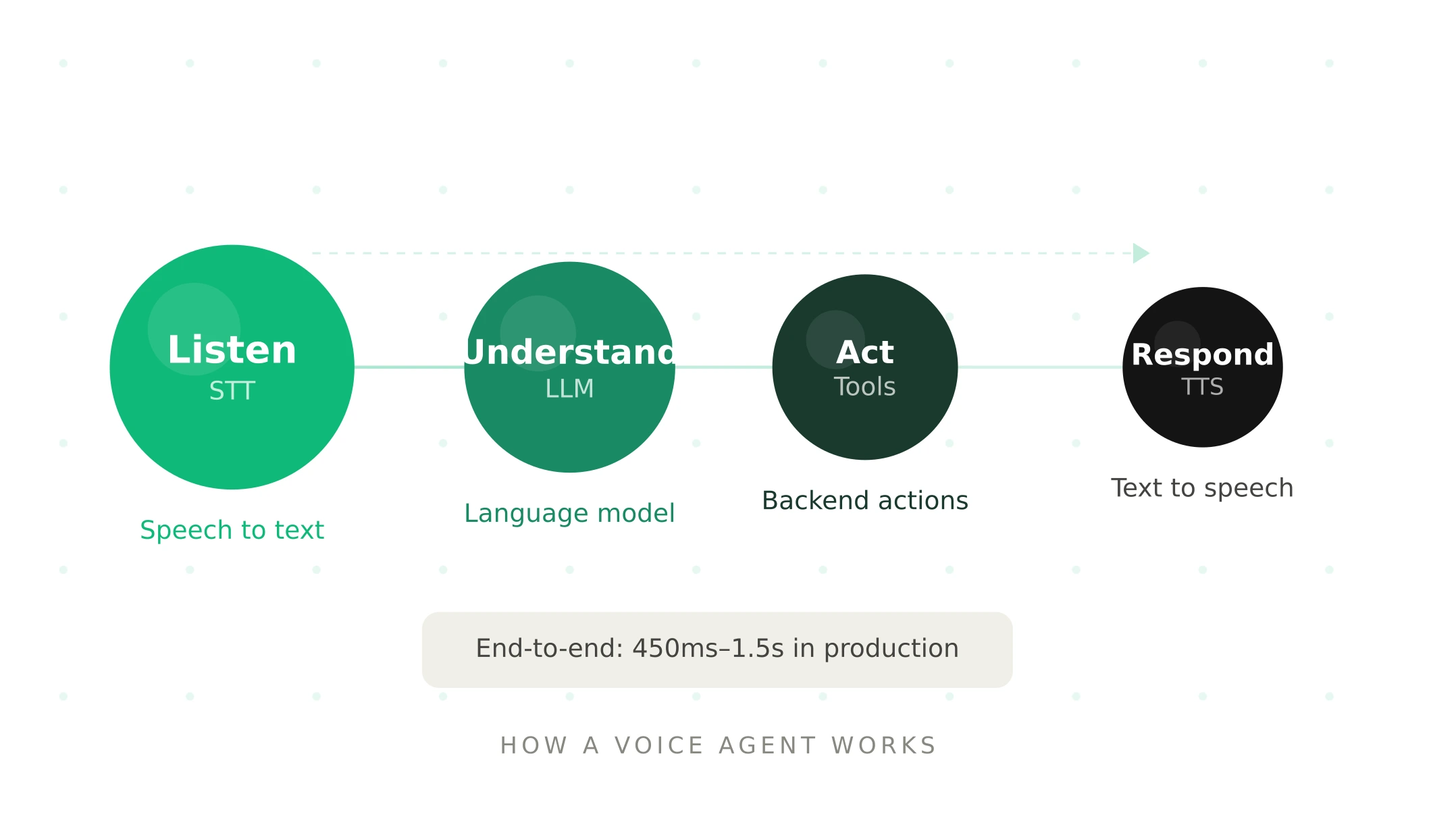
How a voice agent works — the four stages
Every voice agent processes a conversation through four stages in near real-time. Understanding these stages is what distinguishes a voice agent from every system that came before it.
Stage 1 — Listen (speech-to-text)
The user speaks. The voice agent's speech-to-text (STT) layer converts audio into text in real time. This happens while the user is still speaking — streaming architectures send partial transcripts to the next stage as they arrive, rather than waiting for the utterance to complete.
This stage is where acoustic conditions introduce risk. According to Deepgram's production analysis, word error rate — the percentage of words incorrectly transcribed — is typically 5–12% on clean audio and rises to 20–35% in noisy environments. A WER above 20% makes a voice agent functionally unusable in production. The STT layer is the first point of contact with real-world conditions that demos never replicate.
Stage 2 — Understand (large language model)
The transcript reaches the large language model (LLM). The LLM determines user intent, extracts key details (dates, account numbers, names, amounts), maintains conversation context across the full interaction, and decides how to respond — either generating a direct answer or determining that a tool call is required.
LLM inference is typically the largest latency contributor in the pipeline, averaging around 670ms per generation. Streaming LLMs send partial responses as they generate, allowing the next stage to begin immediately rather than waiting for the complete output.
Stage 3 — Act (tool calls and backend integration)
When the LLM determines an action is needed, it generates a structured tool call. The orchestration layer executes it: querying a database, updating a CRM record, checking calendar availability, processing a payment, retrieving account status, or triggering a workflow. The result flows back into the conversation context.
This is the stage that makes voice agents genuinely useful rather than merely conversational. A voice agent that can only talk is a sophisticated chatbot. One that can query your booking system, update your CRM in real time, and confirm a transaction mid-call is a business automation system.
Stage 4 — Respond (text-to-speech)
The LLM's response is converted to audio by the text-to-speech (TTS) layer. Modern TTS produces natural-sounding speech with appropriate pacing, tone, and inflection. Streaming TTS begins generating audio from the first sentence fragment while the LLM is still producing the rest of the response — this parallel processing is what makes sub-500ms response times achievable.
The total time from user finishing their sentence to the first audio byte of the response — called Time to First Byte (TTFB) — is the defining metric for voice agent quality. Below 300ms feels human. Above 600ms, users revert to touch-tone mental models. Production deployments typically achieve 450ms–1.5s end-to-end. For a complete technical breakdown of each layer, see the voice agent stack guide.
Voice agent architectures — cascading vs speech-to-speech
There are two ways to wire the four stages above. The architecture choice affects latency, accuracy, control, and telephony compatibility.
Cascading pipeline (STT → LLM → TTS): The most widely deployed architecture in production. Each stage is a separate component with its own provider, configuration, and failure mode. Modular, debuggable, provider-swappable, and telephony-compatible. A team using Deepgram for STT, Claude for the LLM, and ElevenLabs for TTS is running a cascading pipeline. This is the architecture Vapi, LiveKit Agents, and Pipecat all orchestrate.
Speech-to-speech (S2S): A single model processes audio input to audio output — bypassing the STT→LLM→TTS chain. OpenAI's Realtime API and Google Gemini Live are the leading S2S options. S2S can achieve lower latency and capture acoustic nuance like tone and hesitation that a transcript-based pipeline loses. The trade-off: harder to debug, less telephony-compatible (PSTN audio codec mismatch), less granular tool calling control, and higher cost.
The practical choice: for phone-based deployments — the majority of production voice agents — cascading pipelines are more reliable. For browser-based or app-based conversational interfaces where audio quality is consistent, S2S is increasingly viable. Most mature production systems use a hybrid approach: cascading for structured workflows, S2S for open-ended conversational segments.
Voice agent vs IVR vs chatbot — what is the difference
The voice agent vs ivr what is the difference question comes up constantly in procurement and deployment decisions. The comparison is important because teams often underestimate how different the two systems are:
| Dimension | Voice agent | IVR | Chatbot |
|---|---|---|---|
| Input method | Natural spoken language | Key presses or keywords | Typed text |
| Language understanding | Intent from any phrasing | Preset keywords only | Intent from typed text |
| Context retention | Full conversation history | None (stateless menus) | Varies |
| Backend actions | Real-time tool calls | Limited | Varies |
| Multi-turn dialogue | Yes | No | Yes |
| Handles unexpected input | Yes | No — falls back to menu | Yes |
| Channel | Voice | Voice | Text |
| Escalation | With full context | Blind transfer | Varies |
The voice agent vs chatbot comparison is subtler. Both understand natural language and maintain context. The difference is channel: chatbots operate in text, voice agents operate in real-time audio. The technical complexity of the voice channel — acoustic noise, latency constraints, VAD, STT accuracy, TTS naturalness — is what makes voice agents significantly harder to build and evaluate than text-based agents.
Voice agent use cases by industry
The voice agent examples below represent the most commercially mature deployments in 2026. Each use case is characterised by high call volume, structured workflows, and a measurable ROI from automation.
Customer service and contact centre
The largest deployment category by volume. Voice agents handle tier-one inquiries — account status, order tracking, returns, billing, technical troubleshooting — freeing human agents for complex escalations. A CloudTalk field experiment found that a deployed voice ai agent answered 100% of inbound calls and completed 96% of conversations without human intervention. Gartner projects conversational AI will reduce global customer service costs by $80 billion by 2026.
Healthcare
Appointment scheduling, rescheduling, pre-visit information collection, medication reminders, and symptom triage. Healthcare is the second-largest deployment category — driven by acute staffing shortages and the regulatory clarity of narrow, well-defined workflows. A Texas clinic used AI voice agents to clear 61% of 1,200 pending requests in nine days, recovering $58,000 in operational capacity.
Sales and outbound
Lead qualification, demo scheduling, follow-up calls, and outbound prospecting. AI calling agent deployments in sales are the fastest-growing use case — driven by the measurability of conversion metrics and the high cost of SDR time on low-quality leads. McKinsey found that AI automation enables companies to handle 20–30% more calls while reducing agent headcount by 40–50%.
Financial services
Balance inquiries, payment processing, fraud alerts, loan status, and appointment booking for advisors. Compliance requirements make financial services deployments more complex but the ROI from automation is among the highest — a single payment processing call handled autonomously instead of by a live agent saves $5–7 per interaction at scale.
Retail and e-commerce
Order status, returns, delivery updates, and product availability. High seasonality makes AI voice agents particularly valuable — they scale instantly during peak periods without hiring, training, or overtime costs.
HR and recruitment
Candidate screening, interview scheduling, reference collection, and onboarding information. Reduces screening time by 50–70% in documented deployments, with AI voice agents conducting initial qualification calls before routing qualified candidates to human recruiters.
Voice agent benefits — the business case
The voice agent benefits that drive adoption are consistent across industries:
24/7 availability. Voice agents operate around the clock without shifts, holidays, or sick days. For businesses with after-hours call volume — healthcare, emergency services, hospitality — this eliminates missed interactions and the associated revenue loss. Gartner projects conversational AI will reduce global customer service costs by $80 billion by 2026, with voice automation a key driver.
Cost per interaction. Self-service interactions via AI cost $1.84 per contact. Live agent interactions cost $7.20. At 10,000 calls per month, that difference compounds to $64,000 in monthly savings before accounting for headcount reduction.
Unlimited concurrency. A human agent handles one call at a time. A voice agent handles thousands simultaneously. For businesses with unpredictable volume spikes — retail during peak season, healthcare during flu season — concurrency is the critical advantage.
Consistency. A voice agent delivers identical service quality on the 10,000th call that it delivered on the first. Human performance varies with fatigue, mood, training gaps, and turnover. Consistent quality is measurable and improvable in ways that human consistency is not.
Data capture. Every conversation is transcribed, structured, and available for analysis. Voice agents surface patterns in user requests, identify knowledge gaps, and generate structured data that manual call handling never produces.
What production-ready actually means
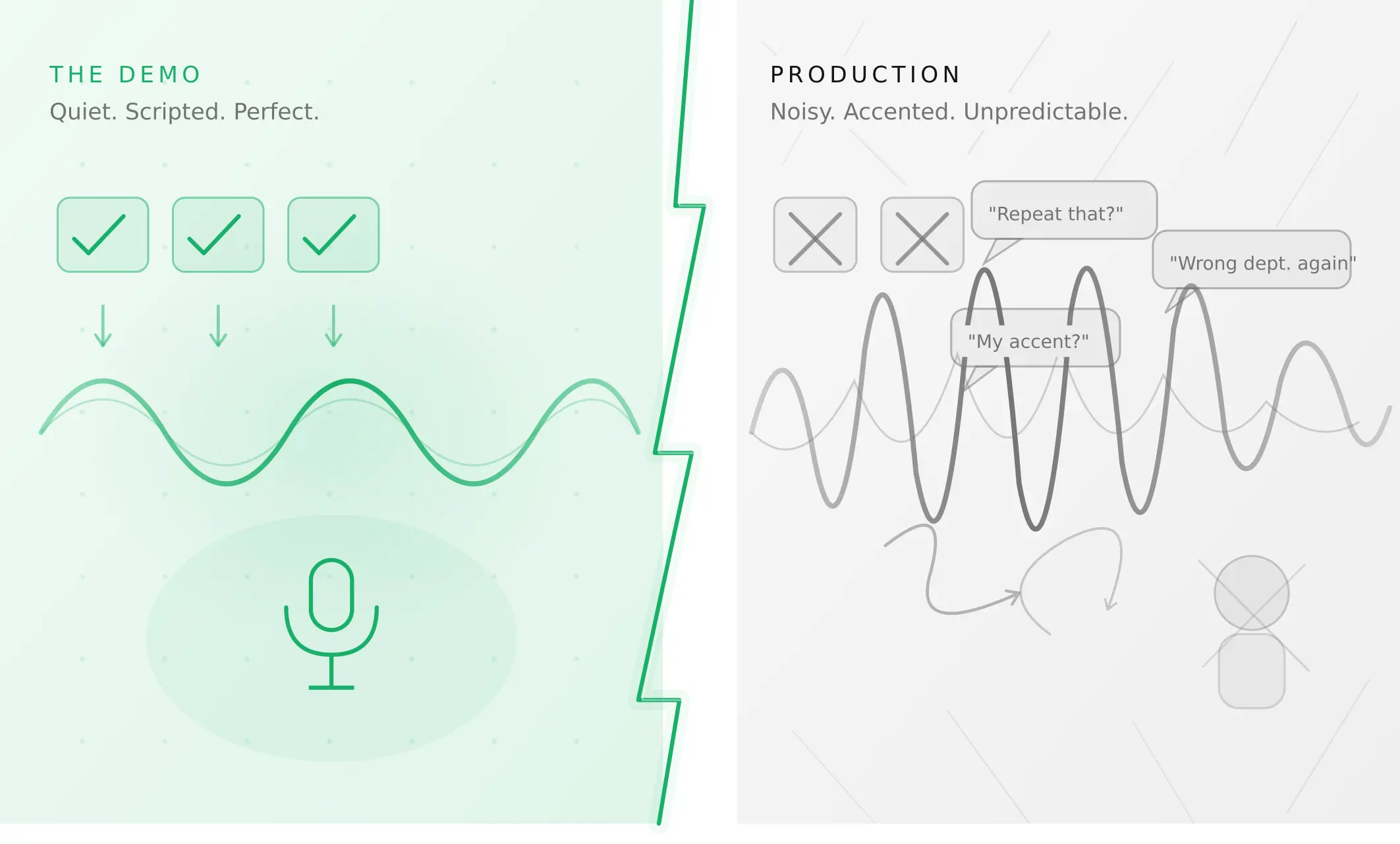
This is the section most articles skip — and the section that matters most for anyone deploying a voice agent rather than demoing one. How do voice agents work in production is a different question from how do they work in a demo. The answer to how to deploy a voice agent in production comes down to one principle: test for the conditions real users will create, not the conditions that made the demo look good.
Voice agents fail in production not because they are technically inadequate, but because they were never tested outside the conditions that made the demo look good. The demo used clean audio. The demo used cooperative, script-following users. The demo ran at low concurrency. Production is none of these things.
According to IDC, 88% of AI pilots fail to reach production with measurable P&L impact. The most common reason is not a technical failure — it is a confidence failure. Teams cannot demonstrate that the agent will behave reliably under the conditions real users will create.
What you own vs what the platform owns. Every voice agent platform — Vapi, Retell, LiveKit, Pipecat — handles infrastructure reliability. None of them handle conversation reliability on your behalf. Turn detection, tool call correctness, scenario coverage, regression after prompt changes, and performance under acoustic stress are entirely your responsibility regardless of platform.
The evaluation gap. Most teams test whether their voice agent works. What they do not test is how reliably it works under varying conditions — noise levels, accents, speech pace, interruptions, concurrent load, edge case inputs. Synthetic caller testing — running the agent against parameterised caller profiles across acoustic conditions and behavioural patterns before launch — is what closes this gap.
How to evaluate a voice agent before going live. The checklist is straightforward even if executing it is not: run your full scenario suite to ≥90% task completion rate, test across acoustic profiles, verify tool call outcomes against downstream system state (not transcript quality), measure P95 TTFB under concurrent load, test telephony separately from WebRTC, and run regression after every change. The failure modes that matter most — silent tool call failures, STT error compounding through the LLM — are the ones that look like successes in transcript evaluation.
Summary
A voice agent is a real-time AI system with five layers for spoken conversations. Production-ready means tested under real conditions — not just demo conditions.
Frequently asked questions
What is an AI voice agent?
An ai voice agent is software that uses speech recognition, a large language model, and text-to-speech to conduct live spoken conversations autonomously. It understands natural language (not just keywords), maintains context across a multi-turn conversation, calls backend systems mid-call, and responds in synthesised speech — handling interactions that previously required a human agent.
How does a voice agent work step by step?
How does an ai voice agent work step by step: user speaks → STT converts audio to text in real time → LLM determines intent and decides whether to answer or call a tool → orchestration executes the tool call → TTS converts the response to audio → user hears the reply. Total TTFB: 450ms–1.5s in production, sub-300ms with optimised streaming architecture.
What is the difference between a voice agent and an IVR?
Voice agent vs ivr what is the difference: an IVR routes callers through predefined menus using button presses or keyword matching. A voice agent understands intent expressed in any natural language phrasing, maintains context across multiple turns, and calls backend systems to take real actions. An IVR forces users to speak the system's language; a voice agent speaks the user's language.
What is the difference between a voice agent and a chatbot?
Voice agent vs chatbot comparison: both understand natural language and maintain conversation context. The key difference is channel. Chatbots operate in text — no audio, no real-time processing. Voice agents operate in real-time audio — handling speech recognition, acoustic noise, latency, and voice synthesis. Voice agents are technically more complex to build and significantly harder to evaluate under production conditions.
What are the main use cases for voice agents?
Voice agent use cases for customer service are the most mature: tier-one inquiry handling, account status, and escalation routing. Beyond customer service: healthcare appointment scheduling, sales lead qualification (ai calling agent deployments), financial services payment and balance inquiries, retail order management, and HR candidate screening. Any workflow involving high call volume, structured interactions, and predictable outcomes is a candidate.
What does production-ready mean for a voice agent?
What makes a voice agent production ready: it performs reliably under real conditions — noise, accents, fast speech, interruptions, concurrent load — not just clean-audio demos. Production-ready means ≥90% task completion across all scenarios, tool calls verified against downstream system state, P95 TTFB measured under concurrent load, and a regression suite passing before every deployment.
How do I build a voice agent?
How to build a voice agent: choose an orchestration approach (managed platform like Vapi or Retell for fast deployment; open-source framework like LiveKit or Pipecat for full control), select STT, LLM, and TTS providers, connect backend systems via tool calls, configure telephony, and test systematically before launch. See the voice agent stack guide for a full technical breakdown.
How do I evaluate a voice agent before going live?
How to evaluate a voice agent before going live: run your full scenario suite to ≥90% task completion, test across acoustic profiles, verify tool call outcomes against downstream system state, measure P95 TTFB under concurrent load, test PSTN telephony separately, and run regression after every change. Silent tool call failures and STT error compounding are the hardest to catch before production.
Related Articles
Why AI voice agents fail in production: 9 failure layers, how to detect each, and how to prevent them
Voice agents fail in production across 9 layers, from 8 kHz audio to silent tool errors. Symptoms, root causes, alerts, and fixes in one master table.
Read more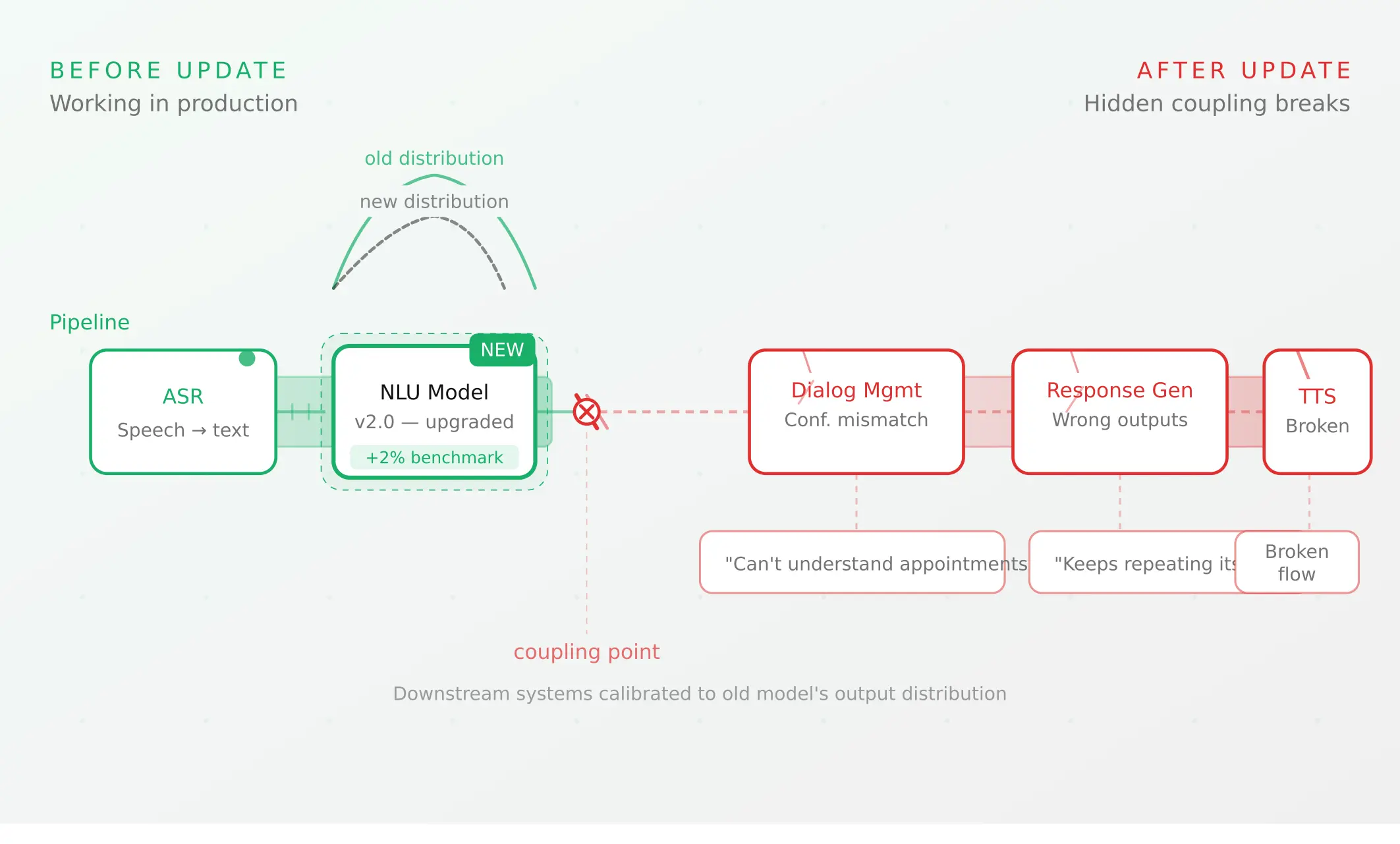
Voice agent regression testing: how to detect regressions from model updates you don't control
Voice agent regression testing for changes you don't control: pin each layer, run a nightly pinned-vs-latest canary, and use paired stats to detect drops.
Read more